


Best Maintenance Management Software of 2026
Updated February 18, 2026 at 4:29 AM

Written by Laura Burgess
Content Analyst

Edited by Caroline Rousseau
Senior Editor

Reviewed by Cameron Pugh
Senior Advisor

Talk with us for a free 15-min consultation
Expert advisors like Jacqueline, who have helped 1,000+ companies, can find the right software for your needs.
- All Software
- Buyer's Guide
- Software Advice FrontRunners
- Frequently Asked Questions
- Popular Comparisons
Maintenance management software standardizes maintenance scheduling, asset tracking, and work order management. With hundreds of maintenance management products listed on Software Advice, choosing the right tool can be daunting. To help you navigate through 500 maintenance software available on our website, I worked with our advisors to curate a list of recommended productsi and a list of the maintenance management software FrontRunners based on user reviews. For further information, read my maintenance management software buyer's guide.
Maintenance Management Software
Sort by
Reviews: Sorts listings by the number of user reviews we have published, greatest to least.
Average Rating: Sorts listings by overall star rating based on user reviews, highest to lowest.
Alphabetically (A-Z): Sorts listings by product name from A to Z.

MaintainX is a maintenance and asset management platform built for industrial and frontline teams. It helps organizations stream...Read more about MaintainX


MaintainX's Best Rated Features
See All
MaintainX's Worst Rated Features
See All

Coast is a leading maintenance management software, designed to help the deskless workforce succeed. Our all-in-one, adaptable s...Read more about Coast
Coast's Best Rated Features
See All
Coast's Worst Rated Features
See All

Fiix is a cloud-based computerized maintenance management system (CMMS) that helps businesses organize their maintenance departm...Read more about Fiix


Fiix's Best Rated Features
See All
Fiix's Worst Rated Features
See All

Click Maint is a maintenance management solution designed for businesses across a wide range of industries such as manufacturing...Read more about Click Maint CMMS
Click Maint CMMS's Best Rated Features
See All
Click Maint CMMS's Worst Rated Features
See All

Maint CMMS is a cloud-based solution that enables maintenance professionals to monitor, capture, store and share historical asse...Read more about eMaint CMMS
eMaint CMMS's Best Rated Features
See All
eMaint CMMS's Worst Rated Features
See All
Software Advice FrontRunners 2026

(1420)

(985)

(737)

(1290)

(253)

(419)

(1772)

(150)

(95)

(1320)
Best for Mobile app

Jobber

Of the products listed on our FrontRunners report, Jobber is the most requested by users for mobile app out of the most popular tools.
Jobber is best for businesses that prioritize mobile app functionality, especially field service teams needing to manage scheduling, quotes, and invoicing on the go. Our reviewers say the mobile app streamlines daily operations, allowing users to create jobs, send invoices, and update schedules efficiently from any location.
- Reviewers Perspective
"For starters, I am able to have all our clients information in 1 location. If a customer calls I can look up their information and re-read notes, which is especially helpful if you have multiple staff that handles the phone."
EPErica Peka
Admin and Sales
Used for 6-12 months
We analyzed 670 verified user reviews for Jobber to find out what actual users really think.
Ease of Use
Jobber’s intuitive interface lets teams quickly learn and operate the software. New staff are onboarded efficiently, and daily tasks—jobs, quotes, client communications—are managed with minimal complexity.Invoice Management
Service businesses create, send, and track invoices from anywhere. Professional templates, automated reminders, and client portals support organized records and faster payment processing.Scheduling
Teams organize jobs, assign tasks, and keep schedules updated using Jobber’s drag-and-drop calendar and automated reminders. Route planning and quick adjustments help maintain productivity across service teams. - Key FeaturesJobber's scoreCategory average
Preventive Maintenance
5.04.62 category average
Work Order Management
4.384.61 category average
- Screenshots


Best for Usability
MaintainX

According to our user reviews, MaintainX is the highest rated for its usability out of the most popular tools.
MaintainX is best for organizations seeking top-tier usability in maintenance management. Our reviewers point out its intuitive, mobile-first interface and easy onboarding, enabling teams to quickly create, track, and complete work orders with minimal training.
- Reviewers Perspective
"MaintainX offers an impressive level of flexibility, allowing teams across various industries to tailor the platform to meet their specific operational requirements, workflows, and maintenance protocols—regardless of size, complexity, or sector."
MPMike Pugsley
Engineering Supervisor
Used for 6-12 months
We analyzed 515 verified user reviews for MaintainX to find out what actual users really think.
Maintenance Management
Teams organize maintenance operations in MaintainX, centralizing asset documentation and scheduling preventive tasks. Customizable checklists and real-time updates help staff stay proactive and accountable.Work Orders
Technicians create, update, and track work orders from desktop and mobile devices. Real-time collaboration, photo attachments, and clear communication tools streamline workflows and keep teams informed.Ease of Use
MaintainX’s intuitive interface lets organizations quickly onboard staff and deploy the system across devices. Teams manage tasks efficiently without extensive training, simplifying daily operations. - Key FeaturesMaintainX's scoreCategory average
Preventive Maintenance
4.784.62 category average
Work Order Management
4.764.61 category average
- Screenshots


Best for Customer Satisfaction

Limble

In our analysis of Maintenance Management products with the most market demand, Limble is the highest rated for customer satisfaction out of the most popular tools.
Limble is best for companies focused on customer satisfaction in maintenance and asset management. Our reviewers say Limble’s responsive support, customizable workflows, and clear reporting make it easy to track assets, schedule preventive maintenance, and resolve issues efficiently.
- Reviewers Perspective
"I gave us the capacity to go from reactive maintenance to more preventative maintenance, and building our ability to go further with the invaluable data it is providing my team and take steps to be proactive in our maintenance approach."
ECEric Capone
Delivery Manager
Used for 1-2 years
We analyzed 495 verified user reviews for Limble to find out what actual users really think.
Maintenance Management
Maintenance teams use Limble to centralize work order tracking, schedule preventive maintenance, and document assets. Real-time visibility into equipment health, downtime, and costs supports proactive strategies and compliance.Ease of Use
Organizations implement Limble with a straightforward interface that reduces the learning curve. Both new and experienced users manage daily tasks efficiently, streamlining transitions from paper-based systems.Asset Management
Companies create, organize, and track assets across locations. Custom asset fields, documentation, and linking work orders, PMs, and parts provide comprehensive oversight and support decision-making. - Key FeaturesLimble's scoreCategory average
Preventive Maintenance
4.784.62 category average
Work Order Management
4.784.61 category average
- Screenshots


Best for Customization

Odoo

Of the products listed on our FrontRunners report, Odoo is the most requested by users for customization out of the most popular tools.
Odoo is best for businesses needing extensive customization across integrated business functions. Our reviewers say the platform’s high degree of flexibility allows them to tailor modules and workflows to specific needs, supporting efficient operations and growth.
- Reviewers Perspective
"I use Odoo to manage multiple ventures, and it’s allowed me to help entrepreneurs, startups, and even 100 million dollar companies run with full transparency and confidence."
NSNovellynn Stancil
Founder
Used for 1-2 years
We analyzed 567 verified user reviews for Odoo to find out what actual users really think.
Customization
Businesses customize Odoo’s modules and workflows to fit unique needs. The platform’s built-in tools and open-source code allow for interface modifications and personalized solutions, supporting diverse industry requirements.Modules
Organizations activate, add, or remove Odoo modules as business needs change. The modular approach covers CRM, accounting, inventory, HR, and project management, supporting evolving operations with intuitive navigation.Inventory Management
Companies track products, manage warehouses, and streamline supply chain operations in Odoo. Inventory integrates with sales, accounting, and purchasing, improving visibility and efficiency across business processes. - Key FeaturesOdoo 's scoreCategory average
Preventive Maintenance
4.504.62 category average
Work Order Management
3.04.61 category average
- Screenshots


Best for Security and Access Control


In our analysis of Maintenance Management products with the most market demand, SafetyCulture is the most requested by users for Security and Access Control out of the most popular tools.
SafetyCulture is best for organizations prioritizing security and access control in audit and inspection processes. Our reviewers say customizable templates, automated data capture, and centralized record-keeping help standardize protocols and reduce administrative workload.
- Reviewers Perspective
"SafetyCulture helps us standardize review protocols—and by automating data capture and record-keeping, it’s cut most of our admin work, making audits smoother —no more scattered reports or endless paperwork."
JHJoshua Hendricks
Network Engineer
Used for 1-2 years
We analyzed 185 verified user reviews for SafetyCulture to find out what actual users really think.
Reporting
Teams generate professional reports with automatic calculations, real-time analytics, and media attachments. Customizable templates and dashboards centralize information and improve communication across teams.Ease of Use
Organizations implement SafetyCulture with minimal effort. The straightforward interface and customizable features allow for fast training and adaptation to various business needs.Inspections
Businesses schedule, assign, and track inspection tasks across sites. Automated reminders, mobile-first design, and asset linking support efficient inspections and compliance management. - Screenshots


Most Used By Facilities Services

FMX

Of the products listed on our FrontRunners report, FMX is the most requested by users in facilities services out of the most popular tools.
FMX is most used by facilities services teams looking for streamlined maintenance and communication. Our reviewers point out that FMX is easy to onboard, supports quick ticket entry, and improves coordination across maintenance, IT, and scheduling workflows.
- Reviewers Perspective
"Helps me have my work organized on all maintenance schedules up to date and the office teem all on the same page with schedules and reservations on all of the areas."
JMJesus Maldonado
Facilities Manager
Used for 1-2 years
We analyzed 306 verified user reviews for FMX to find out what actual users really think.
Ease of Use
FMX’s intuitive interface allows staff with varying technical backgrounds to perform tasks easily. The platform simplifies daily operations, streamlines work order entry, and reduces intimidation for less tech-savvy users.Maintenance Requests
Organizations manage maintenance requests, preventive maintenance, and work orders across departments and locations. Automated updates and centralized tracking keep everyone informed and organized.Staff Communication
FMX improves communication and collaboration among staff and departments. Real-time updates, accountability, and easy access to information streamline workflows and foster a connected workplace. - Key FeaturesFMX's scoreCategory average
Preventive Maintenance
4.634.62 category average
Work Order Management
4.804.61 category average
- Screenshots


Best for Quick Adoption/Easy Adoption

Fracttal One

According to our user reviews, Fracttal One is the highest rated for easy adoption out of the most popular tools.
Fracttal One is best for organizations seeking quick adoption and easy onboarding for maintenance and asset management. Our reviewers say its intuitive interface and cloud access enable teams to centralize asset data and manage work orders efficiently from any device.
- Reviewers Perspective
"Excellent tool for optimizing maintenance tasks for medical equipment in the hospital center, allowing us to determine and take actions depending on the statistics it provides."
IEIng. Emanuel Gonzalez
Ingeniero Biomedico
Used for 1-2 years
We analyzed 697 verified user reviews for Fracttal One to find out what actual users really think.
Maintenance Management
Maintenance departments use Fracttal One to centralize information, access real-time reports, and optimize preventive, predictive, and corrective maintenance. Scheduling, tracking, and resource optimization support operational control and proactive strategies.Asset Management
Organizations track asset history, maintenance activities, and costs across locations. Fracttal One’s tools support efficient asset planning, scheduling, and reporting for improved visibility and control.Ease of Use
Staff with limited technical backgrounds efficiently manage information and generate reports in Fracttal One. The visually appealing, organized interface simplifies navigation and reduces training requirements. - Key FeaturesFracttal One's scoreCategory average
Preventive Maintenance
4.644.62 category average
Resource Allocation
4.484.48 category average
Work Order Management
4.534.61 category average
- Screenshots


Most Rated for SMBs

BuildOps

BuildOps is the most requested by small businesses out of the most popular tools, based on our analysis of Maintenance Management products with the most market demand.
BuildOps is most rated for SMBs in construction and field services needing strong support and ease of use. Our reviewers say the platform’s responsive customer service and straightforward interface help teams onboard quickly and manage jobs, reporting, and customer communications efficiently.
- Reviewers Perspective
"I always get a real person on the phone when I call. When I email, I get a response back usually within a couple of hours. If there is an issue that requires a little research, they regularly email me with updates."
DTDarrin Torrey
Operations Manager
Used for 6-12 months
We analyzed 113 verified user reviews for BuildOps to find out what actual users really think.
Reporting
Dispatchers and managers track jobs in real time and generate custom reports in BuildOps. Standardized documentation and flexible reporting support business decisions and operational improvements.Ease of Use
Staff quickly locate information and manage jobs in BuildOps. The clean interface and smart search functionality support efficient onboarding and daily operations for both experienced and novice users.Team
BuildOps teams guide users through implementation and ongoing use. Honest communication and collaborative problem-solving help organizations stay organized and adapt the software to evolving needs. - Key FeaturesBuildOps's scoreCategory average
Preventive Maintenance
3.914.62 category average
Work Order Management
4.574.61 category average
- Screenshots


Most Rated for Enterprise

Equips

According to our user reviews, Equips is the most requested by enterprises out of the most popular tools.
Equips is most rated for enterprise users who value ease of use in equipment and service management. Our reviewers say the intuitive, web-based interface simplifies ticketing, tracking, and access to equipment history, making it easy for large teams to stay organized.
- Reviewers Perspective
We analyzed 77 verified user reviews for Equips to find out what actual users really think.
Ease of Use
Users navigate Equips with clear lists and accessible equipment information. The web-based platform enables fast loading and easy tracking of requests and service tickets, supporting daily management across locations.Customer Support
Equips provides quick email replies and helpful team members. Regular check-ins and timely follow-ups ensure issues are addressed promptly, with user feedback often incorporated into the software.Equipment Management
Organizations log issues and monitor repair status in one location. The notification system and transparent interface help oversee maintenance history and keep information organized for large inventories. - Key FeaturesEquips's scoreCategory average
Preventive Maintenance
4.364.62 category average
Work Order Management
4.494.61 category average
- Screenshots


Most Used By Computer & Network Security

UpKeep

UpKeep is the most requested by users in computer & network security out of the most popular tools.
UpKeep is most used by computer and network security teams and other industries needing centralized maintenance management. Our reviewers point out that its mobile app and request portal improve workflow efficiency, enabling real-time tracking and communication across multiple sites.
- Reviewers Perspective
"Solid software for daily maintenance of production assets, easy to get around and constant updates to the product."
TZTamzed Zaman
Engineer
Used for 6-12 months
We analyzed 646 verified user reviews for UpKeep to find out what actual users really think.
Order Management
Teams create, assign, and monitor work orders in real time with UpKeep. This streamlines daily operations for maintenance teams, allowing them to prioritize requests, categorize tasks, and share documents for improved coordination.Ease of Use
Organizations deploy UpKeep across varying technical skill levels with minimal training. The intuitive interface lets staff input information, manage tasks, and stay organized, reducing complexity and accelerating adoption.Maintenance Management
Maintenance teams use UpKeep to centralize work orders, schedule preventive maintenance, and manage inventory. Customizable reporting and streamlined workflows support better communication and process optimization. - Key FeaturesUpKeep's scoreCategory average
Preventive Maintenance
4.134.62 category average
Work Order Management
4.214.61 category average
- Screenshots


Asset Panda

- Reviewers Perspective
"It is a great way to manage all of our IT Assets in one place making sure ownership, condition, and versions stay documented and up to date."
ADAaron Decker
Tech Specialist
Used for 2+ years
We analyzed 706 verified user reviews for Asset Panda to find out what actual users really think.
Asset Management
Users value Asset Panda for its ability to centralize asset tracking, making it easier to monitor ownership, condition, and location across multiple sites. They appreciate the flexibility to customize fields, workflows, and asset categories, which helps them adapt the platform to their unique business processes. Additionally, users find the mobile app and barcode scanning features convenient for managing assets on the go and conducting audits efficiently.Customer Support
Users consistently describe Asset Panda's customer support as responsive, knowledgeable, and helpful throughout onboarding and ongoing use. They note that support staff are quick to address questions, provide solutions, and assist with system customization or troubleshooting. Many reviewers also highlight the availability of tutorials, a helpful knowledge base, and the willingness of support agents to guide them through complex tasks.Customization
Users appreciate Asset Panda's extensive customization options, which allow them to tailor the software to fit their specific organizational needs. They mention the ability to adjust workflows, fields, interface layouts, and reporting templates, making the platform adaptable to a wide range of industries and use cases. While some users find the breadth of customization initially overwhelming, they value the flexibility and support provided during setup. - Key FeaturesAsset Panda's scoreCategory average
Preventive Maintenance
4.314.62 category average
Work Order Management
4.334.61 category average
- Screenshots


FlowPath

- Reviewers Perspective
"FlowPath did a great job implementing new work order system with our school district."
JIJeff Infinger
Coordinator of Facilities
Used for 6-12 months
We analyzed 77 verified user reviews for FlowPath to find out what actual users really think.
Work Orders
Users find FlowPath highly effective for managing work orders, appreciating its centralized tracking and ease of submission. They value features such as mobile access, email notifications, and the ability to attach images and invoices, which streamline their workflow and improve communication. Many reviewers note that FlowPath has replaced paper processes, increased productivity, and made it simple to monitor, review, and customize work orders for their organizations.Customer Support
Users consistently praise FlowPath for its responsive and professional customer support, highlighting the team's willingness to listen and address concerns quickly. They mention that FlowPath’s support staff are approachable, knowledgeable, and provide timely assistance, which helps organizations resolve issues and adapt the software to their needs. Reviewers also appreciate the positive communication and follow-up, noting that customer service stands out compared to other facility management solutions.Ease of Use
Users describe FlowPath as intuitive and user-friendly, with a straightforward design that makes navigation and task management simple for people with varying technical skills. They appreciate how easy it is to learn, teach, and transition to FlowPath, noting that the platform reduces unnecessary steps and screens compared to other systems. Reviewers also highlight the clear explanations, visual layout, and convenience of using FlowPath both on desktop and mobile devices. - Key FeaturesFlowPath's scoreCategory average
Preventive Maintenance
4.494.62 category average
Work Order Management
4.754.61 category average
- Screenshots


Coast

- Reviewers Perspective
"For a company like Turner Construction that handles large-scale projects, Coast has brought simplicity and accountability to how we manage tasks and communicate across different industries we collaborate with."
TDTom Dutchyshyn
Vice President and Operations Manager
Used for 6-12 months
We analyzed 83 verified user reviews for Coast to find out what actual users really think.
Team Communication
Users find Coast to be an effective solution for keeping teams connected and organized across various job sites and departments. They appreciate features such as dedicated team channels, real-time updates, and file sharing, which help reduce unnecessary meetings and streamline daily communication. With Coast, reviewers note that task assignment, shift management, and instant messaging are all accessible in one place, supporting accountability and making it easier to coordinate work without relying on multiple apps or constant follow-ups.Ease of Use
Users highlight Coast's intuitive design and straightforward navigation, making it accessible even for those less comfortable with technology. They find that setup, training, and daily use require minimal effort, allowing teams to quickly adopt the platform and manage tasks efficiently. Reviewers also mention that Coast’s mobile-first approach and clear interface simplify communication, scheduling, and task management, which helps employees stay productive whether in the office or out in the field.Customer Support
Users consistently praise Coast for its responsive and knowledgeable customer support, noting that the team addresses questions and issues quickly. They value the hands-on assistance during setup and ongoing use, as well as the willingness of Coast’s staff to listen to feedback and provide tailored solutions. Reviewers also mention that support is available through various channels, making it easy to resolve concerns and customize the platform to fit their industry needs. - Key FeaturesCoast's scoreCategory average
Preventive Maintenance
4.854.62 category average
Work Order Management
4.764.61 category average
- Screenshots


BlueFolder

- Reviewers Perspective
"Bluefolder is easy to setup and use, and the overall time to learn the product is very short."
RGRandy Gargotta
AVP - Systems Administrator
Used for 2+ years
We analyzed 73 verified user reviews for BlueFolder to find out what actual users really think.
Customer Support
Users consistently highlight BlueFolder's customer support as responsive, attentive, and helpful, making it easier to resolve issues and receive guidance when needed. They appreciate how the support team listens to feedback, addresses requests promptly, and offers practical solutions or workarounds for any challenges encountered. Many reviewers mention that BlueFolder's support staff are approachable, knowledgeable, and treat users with care, which contributes to a positive experience for both businesses and their customers.Ease of Use
Users find BlueFolder easy to set up and navigate, with an intuitive interface that streamlines daily operations and organization. They value how quickly new team members can learn the system, noting that features like the search bar and smart lists help them manage work orders efficiently. Reviewers frequently mention that BlueFolder's user-friendly design allows them to stay organized and productive without unnecessary complexity or a steep learning curve.Mobile Access
Users appreciate that BlueFolder can be accessed from multiple devices and find it helpful for managing field service tasks and customer information remotely. They like the cloud-based nature of the platform, which allows them to retrieve essential data from anywhere and keep their teams connected in the field. However, reviewers often note that the mobile app lacks polish, can be difficult to use during travel, and would benefit from improvements in speed, interface design, and additional mobile-specific features. - Key FeaturesBlueFolder's scoreCategory average
Preventive Maintenance
4.194.62 category average
Work Order Management
4.574.61 category average
- Screenshots


Reftab

- Reviewers Perspective
"The ability to check assets in and out, assign them to staff, and keep a clean history of each item has been especially helpful in keeping our inventory organized."
SSShub Sharma
Manager, System Admin
Used for 2+ years
We analyzed 93 verified user reviews for Reftab to find out what actual users really think.
Customer Support
Users consistently highlight Reftab's customer support as responsive, knowledgeable, and genuinely invested in resolving issues quickly. They value the ease of contacting the support team, who are open to feedback and often implement suggested improvements, making onboarding and troubleshooting straightforward. Reviewers note that the support team’s willingness to assist, regular communication, and helpful resources contribute to a positive experience, with many users emphasizing the seamless transition from setup to daily use.Asset Tracking
Users find Reftab effective for tracking assets, appreciating features like check-in/check-out, QR code labeling, and detailed asset histories that help keep inventories organized. They mention that the software simplifies monitoring asset status, location, and availability, making it easier to manage both physical and digital items across various locations. Reviewers also value the reporting tools, mobile app, and ability to track accessories and consumables, noting that these capabilities have replaced manual spreadsheets and improved overall asset visibility.Asset Management
Users rely on Reftab for comprehensive asset management, citing its straightforward setup, custom fields, and workflow automations that streamline processes. They appreciate the ability to bulk import assets, manage asset categories, and generate reports for various needs, including tax documentation and repair tracking. Reviewers note that Reftab offers a cost-effective and flexible solution for organizations of different sizes, though some mention a desire for more customization in templates and automated asset status changes. - Key FeaturesReftab's scoreCategory average
Preventive Maintenance
4.754.62 category average
Work Order Management
5.04.61 category average
- Screenshots


- Reviewers Perspective
"It is nice to be able to put work orders in and see the status of that work order when more than one person is needing to view the information"
PGPeggy Graumenz
Administrative Assistant
Used for 2+ years
We analyzed 175 verified user reviews for Asset Essentials to find out what actual users really think.
Order Management
Users value how Asset Essentials enables them to submit, track, and update work orders in a centralized and organized system, which streamlines communication across departments and teams. They appreciate features such as status updates, document attachments, and automatic notifications, which help keep everyone informed and reduce unnecessary travel or duplicate efforts. Reviewers highlight that Asset Essentials allows for easy customization, batch processing, and visibility into work order history, making it suitable for multi-location organizations and improving overall workflow efficiency.Ease of Use
Users consistently find Asset Essentials easy to learn and navigate, noting that its intuitive layout and user-friendly design reduce the learning curve for new users. They appreciate that tutorials and helpful resources are available, allowing them to quickly become comfortable with the software’s features and daily operations. Reviewers mention that Asset Essentials is straightforward to use for a variety of tasks, making it accessible for both experienced and less tech-savvy team members.Features
Users recognize that Asset Essentials offers a comprehensive set of features that support a wide range of maintenance and asset management needs, with flexibility to adapt to different organizational requirements. They appreciate the ability to customize pages, access historical data, and manage tasks across departments, but some find that certain features require too many steps or are not as streamlined as they would like. Reviewers note that while the system is robust and functional, there are limitations with search, mobile access, and the simplicity of some features compared to newer alternatives. - Key FeaturesAsset Essentials's scoreCategory average
Preventive Maintenance
4.474.62 category average
Work Order Management
4.604.61 category average
- Screenshots


EZO

- Reviewers Perspective
"The multi-type asset tracking feature is my favorite as it doesn't restrict us to 1 or a few methods to track assets."
ABAlok Bhardwaj
Lead Analyst
Used for 1-2 years
We analyzed 761 verified user reviews for EZO to find out what actual users really think.
Inventory Management
Users find EZO highly effective for managing and tracking inventory across multiple locations, appreciating its user-friendly interface and real-time updates. They value features such as barcode scanning, customizable fields, and robust reporting, which streamline processes like asset allocation, stock monitoring, and audit preparation. Reviewers highlight that EZO’s cloud-based platform allows teams to collaborate efficiently, maintain accurate records, and quickly locate or update inventory, making it suitable for organizations of various sizes and industries.Equipment Tracking
Users rely on EZO to monitor and manage equipment across diverse environments, noting that it simplifies check-in/check-out processes and enhances accountability. They appreciate being able to track equipment status, location, and maintenance schedules, as well as the ability to assign items to specific employees or projects. Reviewers mention that EZO’s mobile compatibility and customizable notifications help reduce loss, improve efficiency, and ensure timely equipment servicing.Ease of Use
Users consistently describe EZO as straightforward and intuitive, making it easy for individuals of varying technical backgrounds to adopt and navigate. They highlight the clear layout, quick setup, and minimal learning curve, which allow teams to manage assets and inventory with little training required. Reviewers also appreciate that EZO’s platform is accessible across devices, enabling efficient management and collaboration whether in the office or in the field. - Key FeaturesEZO's scoreCategory average
Preventive Maintenance
4.474.62 category average
Resource Allocation
4.04.48 category average
Work Order Management
4.254.61 category average
- Screenshots


AkitaBox

- Reviewers Perspective
"Learning what the application can do was exciting, I enjoyed the pictures of assets, and the maps of our buildings is very helpful when giving out information to our techs to give direct locations."
SBSylvester Bunch
Maintenance Technician
Used for 1-2 years
We analyzed 68 verified user reviews for AkitaBox to find out what actual users really think.
Asset Management
Users value AkitaBox for its comprehensive asset management capabilities, including the ability to visualize assets on maps, attach documentation, and track maintenance history. They find it easy to add new assets, reference detailed information, and utilize features like interactive floor plans and asset photos for efficient facility oversight. Reviewers highlight the intuitive interface and the usefulness of asset tracking for planning, budgeting, and maintaining accurate records across multiple sites.Work Orders
Users appreciate that AkitaBox centralizes work orders, making it easy to submit, track, and update requests while keeping records accessible for teams. They find features like asset photo attachments and editing submitted orders helpful, and value the system’s ability to streamline proactive and reactive maintenance. However, reviewers express frustration with limitations such as cumbersome navigation, lack of advanced search and categorization options, and the need to open each work order individually to gather information.Customer Support
Users consistently describe AkitaBox customer support as responsive, knowledgeable, and attentive, with staff readily available to address questions and resolve issues. They highlight the helpfulness of ongoing training, personalized assistance, and the willingness of support representatives to guide them through challenges. Reviewers also mention that AkitaBox staff provide clear communication and quick response times, which contributes to a positive experience and smooth implementation. - Key FeaturesAkitaBox's scoreCategory average
Preventive Maintenance
4.524.62 category average
Work Order Management
4.554.61 category average
- Screenshots

eMaint CMMS

- Reviewers Perspective
"Once the end users get familiar and comfortable with the software the information that is collected regarding parts being used, equipment failures, workorder field requests and scheduling of work it is a valuable tool for the department especially with documentation and again control inventory."
KNKevin Nowakowski
Maintenance Planner
Used for 2+ years
We analyzed 235 verified user reviews for eMaint CMMS to find out what actual users really think.
Maintenance Management
Users rely on eMaint CMMS to streamline maintenance management by centralizing work orders, equipment history, and scheduling preventive tasks in one platform. They find that the software’s flexibility allows for tracking both in-house and outsourced labor, managing inventory, and improving the efficiency of maintenance teams. Reviewers appreciate the ability to plan, document, and analyze maintenance activities, which supports proactive decision-making and reduces equipment downtime.Customer Support
Users describe eMaint CMMS customer support as responsive, knowledgeable, and consistently available to resolve issues or provide guidance. They value the ability to customize the system with support staff assistance, as well as the prompt help received via phone, chat, or email for troubleshooting and training. Many reviewers note that the support team offers practical solutions, ongoing communication, and a willingness to incorporate user feedback into updates, which helps them maximize the software’s capabilities.Reporting
Users appreciate the customizable reporting features in eMaint CMMS, which allow them to tailor dashboards and reports to their organization’s needs and share insights with management. While they find the reporting module powerful and flexible, some reviewers mention that creating or modifying reports can be complex, requiring additional training or support. Users also note occasional formatting challenges and wish for more intuitive tools to simplify report setup and customization. - Key FeatureseMaint CMMS's scoreCategory average
Preventive Maintenance
4.354.62 category average
Work Order Management
4.564.61 category average
- Screenshots


Fluix

- Reviewers Perspective
"The ability of editing fillable files by adding photos, screenshots, notes and even drawings sparks my creativity to simplify technically complex explanations."
IBIstvan Bosnyak
Offshore Windturbine Lead Technician
Used for 2+ years
We analyzed 69 verified user reviews for Fluix to find out what actual users really think.
- Key FeaturesFluix's scoreCategory average
Preventive Maintenance
4.504.62 category average
Work Order Management
4.04.61 category average
- Screenshots


IndySoft

- Reviewers Perspective
"If you’re in an industry that requires rigorous calibration management and detailed reporting, IndySoft is a solid option,IndySoft is an excellent choice for organizations that need to ensure compliance, track calibration schedules, and manage assets in a regulated environment."
DRDiane Russet
Brand Influencer
Used for 6-12 months
We analyzed 112 verified user reviews for IndySoft to find out what actual users really think.
Calibration Management
Users rely on IndySoft to streamline calibration management, asset tracking, and documentation in regulated environments. They appreciate the software’s ability to centralize calibration activities, automate workflows, and maintain compliance with industry standards. Many reviewers highlight the flexibility to customize calibration processes, track certificates, and manage assets efficiently, noting that IndySoft supports both internal and external calibration events with robust reporting and audit capabilities.Customer Support
Users consistently praise IndySoft’s customer support for being responsive, knowledgeable, and willing to assist with troubleshooting and training needs. They find the support team professional and proactive, often going above and beyond to resolve issues and provide guidance. Reviewers also note that IndySoft listens to customer feedback, regularly updates the software, and maintains a high standard of service that builds confidence in their business operations.Training and Learning Curve
Users recognize that IndySoft offers extensive functionality, which results in a learning curve and the need for thorough training during onboarding. They find that once configured, the software becomes intuitive and easy to navigate, with resources like tutorials and support materials helping new users gain proficiency. Reviewers mention that IndySoft is suitable for both beginners and advanced users, as training and ongoing support make it accessible for teams of varying skill levels. - Key FeaturesIndySoft's scoreCategory average
Preventive Maintenance
4.424.62 category average
Work Order Management
4.504.61 category average
- Screenshots


QT9 QMS

- Reviewers Perspective
"The system has everything you would want and need in an EQMs and a great customer support team behind it."
JSJohn Schaftenaar
President
Used for 6-12 months
We analyzed 89 verified user reviews for QT9 QMS to find out what actual users really think.
Customer Support
Users find QT9 QMS to be backed by a responsive and knowledgeable customer support team that is readily available to address questions and concerns. They appreciate the thoroughness of the support, noting that training and assistance are included at no extra cost, which helps make implementation and ongoing use straightforward. Reviewers highlight that QT9 QMS staff are attentive to feedback, often incorporating user suggestions into software updates and maintaining consistent communication throughout the customer relationship.Ease of Use
Users describe QT9 QMS as intuitive and user-friendly, with a well-organized layout that makes navigation seamless for both new and experienced users. They note that the interface is straightforward, allowing them to quickly adapt to the system and efficiently manage their quality processes. Reviewers also mention that the consistent design across modules and helpful onboarding support contribute to a smooth learning experience with QT9 QMS.Document Management
Users value how QT9 QMS centralizes document control, making it easy to organize, manage, and access all records in one electronic system. They report that features such as revision tracking, electronic signatures, and customizable fields help streamline the transition from paper-based processes and improve overall efficiency. Reviewers also appreciate the ability to collaborate on documents, automate workflows, and maintain compliance through robust document management tools in QT9 QMS. - Key FeaturesQT9 QMS's scoreCategory average
Preventive Maintenance
3.674.62 category average
Work Order Management
5.04.61 category average
- Screenshots


Zuper

- Reviewers Perspective
"Since our team has begun utilizing Zuper it has helped organize our delivery and installation jobs and allowed our processes to be for efficient."
LCLynne Cillo
Customer Service Manager
Used for 1-2 years
We analyzed 37 verified user reviews for Zuper to find out what actual users really think.
- Key FeaturesZuper's scoreCategory average
Preventive Maintenance
4.504.62 category average
Resource Allocation
4.254.48 category average
Work Order Management
4.164.61 category average
- Screenshots


ServiceBox

- Reviewers Perspective
"I also like how you can do a search function on different properties to pull up the work orders for just those properties and you don't have to scroll through all the work orders that have been done until you find that particular work order."
GVGary Vestal
HVAC senior service technician
Used for 6-12 months
We analyzed 95 verified user reviews for ServiceBox to find out what actual users really think.
Work Orders
Users appreciate how ServiceBox streamlines the creation, management, and tracking of work orders, making it easier to access job details, attach documents, and maintain a digital history. They find the ability to assign work orders to multiple technicians, include customer signatures, and transition from paper to electronic records particularly beneficial. However, users mention that search functions for work orders can be unreliable, and they would like improved sorting, filtering, and reporting options to enhance efficiency.Invoicing and Quotes
Users value ServiceBox for its seamless workflow that connects quoting, work order creation, and invoicing within a single platform. They highlight the convenience of converting quotes to work orders and invoices without manual entry, which saves time and reduces errors. Users also appreciate the system's ability to organize customer information, automate follow-ups, and integrate with payment solutions, making billing and quoting more efficient.Features
Users benefit from ServiceBox's wide range of features that centralize business operations, including dispatch, inventory, and reporting tools. They note that the platform's flexibility allows them to adapt ServiceBox to their specific business needs, and they appreciate ongoing improvements driven by user feedback. While the software offers robust functionality, users acknowledge that learning to use all features can take time, but support from the development team helps them maximize the platform's potential. - Key FeaturesServiceBox's scoreCategory average
Preventive Maintenance
4.254.62 category average
Work Order Management
4.484.61 category average
- Screenshots


DimoMaint FM

- Reviewers Perspective
"One of the standout features is the ability to create custom forms that our resources can complete in real time, which enhances our team's productivity and data accuracy. Although we’ve encountered some limitations, the support from [sensitive content hidden] has been invaluable in resolving any issues."
ABAtlanta Bush
Contract Support
Used for 2+ years
We analyzed 47 verified user reviews for Trackplan to find out what actual users really think.
- Key FeaturesDimoMaint FM's scoreCategory average
Preventive Maintenance
4.644.62 category average
Resource Allocation
4.504.48 category average
Work Order Management
4.754.61 category average
- Screenshots


Methodology
The research for the best maintenance management software list was conducted in October 2025. We evaluated data (user reviews and demand signals) from the past 24 months as of the research date. Read the complete methodology.
Popular Maintenance Management Comparisons


Buyer's Guide
This detailed guide will help you find and buy the right 2026 cmms buyer’s guide: how to choose maintenance management software for you and your business.
Last Updated on December 04, 2025Here's what we'll cover:
What is maintenance management software?
What are the features of maintenance management software?
Who uses maintenance management software?
What is maintenance management software?
Maintenance management software, also known as CMMS software (computerized maintenance management system), helps businesses plan, track, and optimize maintenance activities for equipment, facilities, and assets. It centralizes work orders, schedules preventive maintenance, and stores asset histories to reduce downtime and extend asset life.
With one in five organizations planning to invest in field service and maintenance management systems in the next year [1], interest in this software continues to grow as businesses seek more efficient ways to manage their operations.
“A lot of the buyers we’re talking with are just tracking their maintenance on Excel. A CMMS program allows them to be more ahead and more preventative rather than reactive when it comes to their maintenance,” says Jakub Vaughn, Senior CMMS Advisor at Software Advice.
What are the features of maintenance management software?
Core CMMS software features
Each year, we speak to hundreds of maintenance management and CMMS software users. We have analyzed those conversations [2] to better understand which features are most critical to managers and maintenance professionals.
Feature | Description |
Preventive maintenance | Minimize equipment failures and optimize asset reliability through scheduled inspections, repairs, and replacements. 95% of CMMS users we spoke to rate this feature as critical or highly important. |
Work order management | Create, assign, and track jobs and/or tasks for work orders. 92% of CMMS users we spoke to rate this feature as critical or highly important. |
Asset tracking | Monitor asset usage by tracking equipment maintenance, tools, software, and other resources throughout their lifecycle. 84% of CMMS users we spoke to rate this feature as critical or highly important. |
Common CMMS software features
Feature | Description |
Reporting & statistics | Collect, analyze, and represent numerical data and generate reports to understand various patterns. 86% of CMMS users we spoke to rate this feature as critical or highly important. |
Workflow management | Create, design, and manage workflows for repetitive tasks. 86% of CMMS users we spoke to rate this feature as critical or highly important. |
Resource allocation | Assign available resources to various projects and tasks. 85% of CMMS users spoke to rate this feature as critical or highly important. |
Service history | Track work performed and resources used for past customers, sites, or assets. 85% of CMMS users we spoke to rate this feature as critical or highly important. |
Alerts & notifications | Alerts or notifications of various types, such as pop-up messages, sounds, banners, or badges. 84% of CMMS users we spoke to rate this feature as critical or highly important. |
Maintenance scheduling | Plan availability and assign specific time slots for tasks and resources. 83% of CMMS users we spoke to rate this feature as critical or highly important. |
Mobile access | Access software remotely via mobile devices. 80% of CMMS users we spoke to rate this feature as critical or highly important. |
Activity dashboard | Dashboard to view the status of ongoing processes, identify current incidents, and track past activities. 80% of CMMS users we spoke to rate this feature as critical or highly important. |
Inventory management | It enables parts inventory tracking and triggers reorder alerts when stock levels drop. 73% of CMMS users we spoke to rate this feature as critical or highly important. |
Billing & invoicing | Create, manage, and send invoices or bills to customers. 47% of CMMS users we spoke to rate this feature as critical or highly important. |
What advanced CMMS capabilities should you consider?
Basic CMMS features may be sufficient for small teams and your initial goals, but growing businesses often require more advanced capabilities. Look for tools that offer the following:
IoT sensor integration for real-time asset monitoring
Inventory alerts to prevent stockouts or overordering
Reporting dashboards to track performance and costs
Mobile access so technicians can work from anywhere
Beyond these capabilities, many CMMS vendors are introducing new functionality designed to improve efficiency and decision-making, such as:
Predictive maintenance powered by AI to anticipate failures before they occur
Digital twin support for modeling asset performance
Voice-enabled commands for hands-free work order updates
Enhanced analytics for sustainability tracking and cost optimization
These advanced features enable SMBs to transition from reactive fixes to proactive planning and management. As you evaluate vendors, consider which capabilities align with your growth plans. This will make building a focused shortlist easier in the next step and highlight the importance of involving the right internal stakeholders early in the process.
Expert tip for SMBs:
“Once SMBs move past basic scheduling, they start asking for predictive insights, inventory alerts, and mobile dashboards. These features help teams stay ahead of breakdowns, not just react to them.” - Laura Burgess
Who uses maintenance management software?
Maintenance management software is used by businesses that rely on physical assets to deliver services or products. It is typically used by maintenance supervisors, operations managers, and technicians.
Whether managing a single site or multiple locations, these roles utilize maintenance management tools to minimize downtime, monitor asset performance, and stay ahead of scheduled maintenance tasks. Our conversations with thousands of software buyers [3] show that CMMS is mostly used by industries related to:
Manufacturing
Maintenance and facilities management
Construction and engineering
Food and beverage
Government
Education
Healthcare
Field services
What are the common use cases of maintenance software by industry?
Here is how maintenance management software is used across industries:
Manufacturing
Preventive maintenance: Automate service schedules for machinery to reduce unplanned downtime.
Asset tracking: Monitor equipment health, usage, and lifecycle to optimize performance.
Inventory control: Manage spare parts and supplies to avoid delays during repairs.
Facilities management
Work order management: Centralize service requests and assign tasks across multiple buildings or campuses.
Vendor coordination: Track contractor performance and manage service-level agreements (SLAs).
Compliance reporting: Maintain inspection logs and safety documentation for maintenance audits.
Construction
Field team coordination: Assign technicians based on location and skill set, and track job progress in real time.
Equipment maintenance: Schedule upkeep for heavy machinery and tools to prevent costly breakdowns.
Site-specific tracking: Monitor asset usage and maintenance history across multiple job sites.
Healthcare
Regulatory compliance: Document maintenance activities to meet health and safety standards.
Critical asset monitoring: Ensure uptime for essential equipment like HVAC systems, sterilizers, and imaging machines.
Emergency response: Prioritize urgent repairs to minimize risk to patient care.
Fleet and transportation
Vehicle maintenance tracking: Schedule oil changes, inspections, and repairs based on mileage or usage.
Downtime reduction: Use real-time data to prevent breakdowns and keep vehicles on the road.
Regulatory readiness: Maintain logs for DOT (Department of Transportation) compliance.
Understanding how maintenance software is utilized across various industries can help you identify which features are most crucial to your business.
Cameron Pugh, Senior Advisor at Software Advice, shares: “We run into a lot of smaller companies where someone’s been doing maintenance for 30 years and everything’s just recorded ‘in their head’ rather than having an exact schedule where it reminds them.”
This highlights why automated scheduling and centralized tracking are essential, especially in industries where downtime or compliance issues can have severe consequences.
5 steps to buying CMMS
Today’s software buyers are more intentional than ever: 82% of businesses expect revenue growth in the next 18 months, and 77% plan to increase their software budgets. But with 45% of buyers regretting at least one software purchase in the past year, the pressure to choose wisely has never been higher. [1]
Before comparing vendors, it’s important to define your maintenance priorities. Whether you’re aiming for faster response times, fewer manual tasks, or better asset visibility, setting clear goals early on will guide your selection process and help you avoid disappointment later.
Our research into global software buyers shows a clear pattern: success depends on planning.
34% found the right software without regret or disruption.
40% experienced regret or disruption after purchase.
This five-step buyer’s guide outlines the proven methods used by successful adopters. It’s designed to help SMBs avoid common mistakes and choose CMMS software that supports long-term growth.
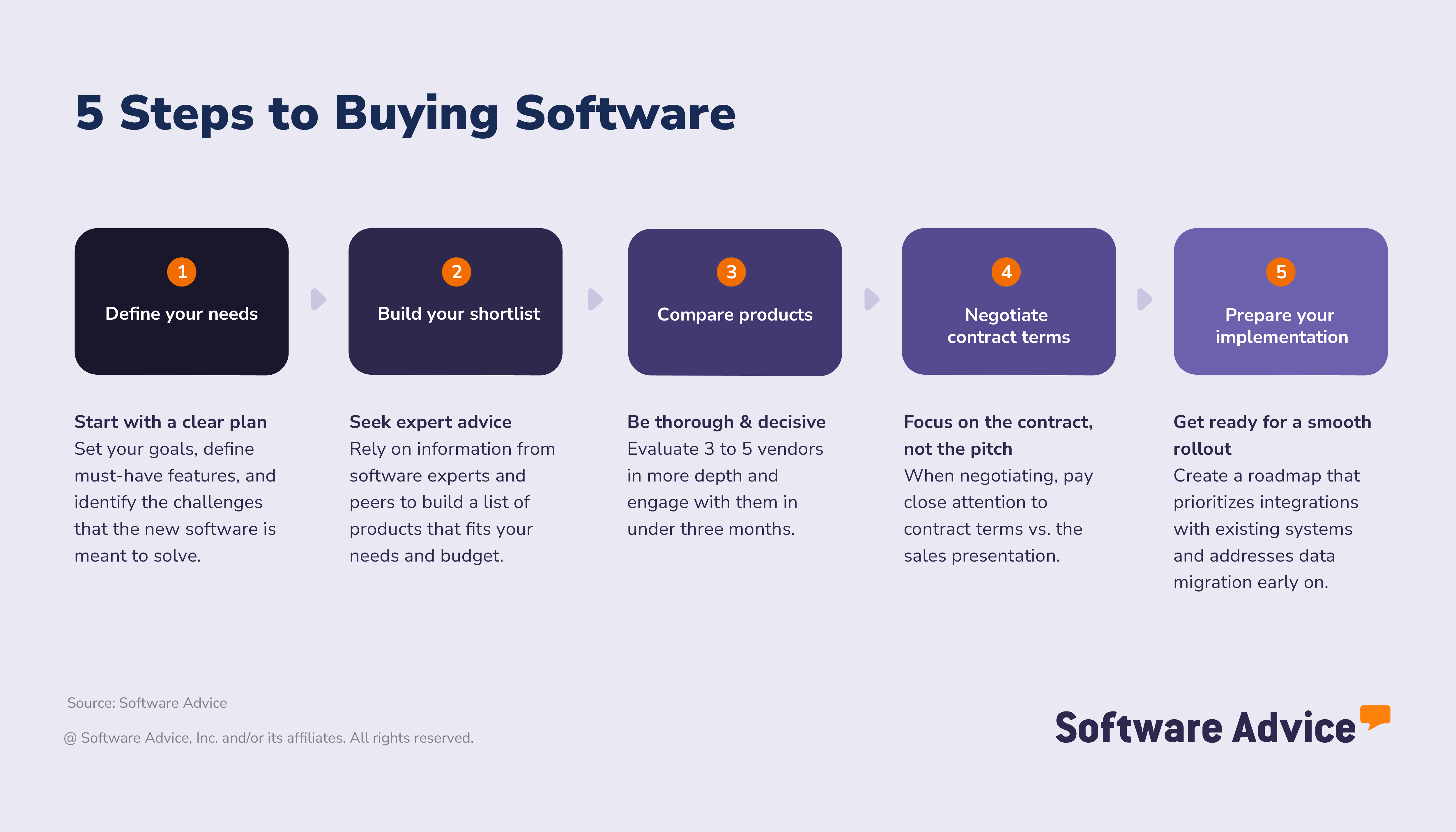
Step 1. Define your maintenance management needs and goals
Teams that take time to plan ahead and clearly define their desired outcomes are far more likely to succeed with their software implementation. In fact, over half of successful adopters follow this approach compared to those who don't.
Starting with a clear vision helps you choose a system that fits your goals and avoids costly mistakes during implementation. From there, you can focus on setting specific objectives, understanding the benefits of a CMMS, and identifying the features and stakeholders that matter most to your organization.
Set your goals: What challenges do you want to solve with your CMMS?
Start by thinking about the results you want to achieve, not just the features you require. Before you compare different products, define what success actually looks like for your team. Using real-world scenarios can make it easier to connect everyday challenges with clear, measurable goals and metrics.
This approach ensures your software choice addresses specific operational needs rather than generic requirements.
Examples of common business goals and CMMS software benefits:
Reducing downtime: Track and analyze metrics such as mean time to repair (MTTR) and mean time between failures (MTBF), identifying issues early and preventing unexpected outages.
Improving compliance: Automate preventive maintenance scheduling and documentation to ensure audit readiness and maintain consistent records for regulatory standards.
Increasing productivity: Enhance first-time fix rates and encourage technicians with mobile access to work orders, enabling faster and more efficient maintenance completion.
Enhancing maintenance operations: Use predictive maintenance and condition-based triggers to adjust schedules based on real equipment performance. Integrating IoT sensors and digital checklists minimizes unnecessary manual tasks and supports compliance with OSHA and EPA.
Supporting better workflows and accessibility: Mobile-first design and technician dashboards improve navigation. QR code scanning, real-time updates, offline access, and role-based permissions help manage work orders, while team messaging and alerts keep everyone informed.
Aiding staff management: Administrators can manage in-house and field teams, assign jobs based on skill and location, and maintain all updates and documentation across a single centralized platform.
Set measurable success metrics
Use performance data to track progress, demonstrate ROI, and prove the value of your CMMS investment.
Examples of key CMMS success metrics for SMBs:
Enhanced equipment reliability (measure before and after implementation)
Lower overall maintenance costs (monthly or annual)
Faster work order completion times
Higher ratio of preventive to reactive maintenance tasks
Improved asset utilization and performance rates
Set your requirements: Map business goals to features
Start with the essentials
Mapping your business goals to CMMS features ensures you choose tools that deliver real outcomes. Here’s how common goals align with helpful features:
Goal area | Business goal (outcome) | Helpful features |
Preventive maintenance | Reduce unplanned downtime and extend asset life | Automated preventive maintenance scheduling Calendar-based and usage-based triggers Maintenance history logs |
Work order management | Improve task visibility and response times | Centralized work order dashboard Mobile access for technicians Real-time status updates |
Asset tracking | Maintain accurate records of equipment and locations | Barcode or RFID scanning Asset lifecycle tracking Location mapping |
Inventory control | Avoid stockouts and reduce excess inventory costs | Parts inventory management Low-stock alerts Supplier integration |
Reporting and compliance | Meet regulatory standards and optimize performance | Customizable reports Audit trails KPI dashboards |
CMMS software advisor Jakub Vaughn shares his experience with buyers: “A lot of maintenance managers appreciate a system that has a good dashboard, which is something that they can view all their assets on.”
For additional guidance, our advisors can support your team in defining maintenance priorities and mapping them to the right CMMS capabilities. If you’d like personalized assistance, you can chat online now or schedule a call with an advisor at your convenience.
Once you’ve mapped your goals to core features, the next step is to consider how your needs may evolve. Many SMBs start with basic functionality but quickly discover the value in more advanced capabilities, especially as their operations expand or compliance requirements increase.
Identify stakeholders: Who needs to be involved for a successful maintenance software purchase?
Selecting maintenance management software is a team effort. Involving the right stakeholders early is key to successful purchase and implementation. In fact, 41% of global software buyers say that forming a cross-functional selection team is one of the most crucial steps in the software selection process.
Dashboards are a priority for maintenance teams, but other stakeholders, such as IT, finance, and compliance, will have different requirements. Aligning these priorities early ensures the software meets everyone’s needs and avoids gaps later.
Which teams should evaluate the fine print and terms?
Typically, bringing together facilities management, IT, finance, and operations ensures all requirements are considered and the contract terms are thoroughly reviewed.
Which teams need to approve the purchase before it can be made?
Final approval often comes from leadership, procurement, and legal.
Among buyers who regretted a software purchase in the past 18 months, 33% said they would have engaged a more diverse group of stakeholders to avoid regret, and 37% would have improved communication with stakeholders throughout the process.
Expert tip for SMBs:
“Collaborate early with IT, end users, and leadership to uncover hidden requirements, reduce risk, and drive adoption. This alignment ensures your CMMS investment delivers value across the organization.” - Laura Burgess
Step 2. Build your shortlist and seek expert advice
A key difference between successful and disappointed software buyers came down to how they conducted their research. Successful adopters took time to compare vendors, explore tools, and plan their selection using structured, expert-backed sources. Disappointed buyers were more likely to rely on AI tools that lacked sufficient depth or reliability.
In our analysis of successful vs disappointed buyers:
52% of successful adopters used industry experts (vs. 38%)
43% used comparison sites (vs. 35%)
33% used user reviews (vs. 32%)
Disappointed buyers leaned on generative AI tools (42% vs. 32%)
While AI-generated tools can provide quick summaries, they often lack structured analysis and verified data, making them less reliable for high-stakes decisions, such as software selection.
Get real advice from real people
Expert input from software advisers can help SMBs avoid common purchasing mistakes, as representatives offer structured guidance based on real-world implementation scenarios, not just product specifications. They help SMBs:
Understand which CMMS features align with their workflows, business size, and industry
Compare vendors based on support, usability, and integration risks
Plan for implementation with fewer disruptions
Speaking with an advisor can help clarify your shortlist and reduce the risk of costly mistakes. Need help choosing the right CMMS? Connect with an advisor for tailored, one-on-one guidance.
How to leverage user reviews
How can you use real user reviews to guide your CMMS selection?
User feedback is a powerful resource: 32% of global software buyers say user reviews are the most influential factor when researching a new tool.
Here’s how to make reviews work for you:
Focus on feedback from organizations like yours: Seek out reviews from companies with similar team sizes, facility types, or compliance needs.
Look for detailed user experiences: Pay attention to comments about onboarding, daily workflows, and mobile app usability.
Prioritize recent reviews: Sort for feedback from the last 6–12 months to ensure you’re seeing the latest product updates and support experiences.
Compare star ratings and written feedback: A lower rating accompanied by a detailed explanation (e.g., “Inventory tracking is slow for large teams”) can be more useful than a generic 5-star review.
Spot recurring themes: If multiple users mention issues with integrations or customer support, that’s a signal to probe further during your evaluation.
Expert tip for SMBs:
“Once you’ve screened for these criteria, engage your top three candidates for demos or free trials. This targeted approach helps you compare strengths side by side and keeps your evaluation process efficient.” - Laura Burgess
How much does CMMS software typically cost?
CMMS software is typically priced per month, starting at $21 for basic systems. [4] More advanced platforms can cost upwards of $649 and often include premium support services and in-house or outsourced IT consultants.
Many businesses overestimate the number of user licenses they actually need, which can inflate projected costs, especially when pricing scales with user count.
As Cameron Pugh, Senior CMMS Software Adviser, notes: “People think every team member has to be a user. When they see that cost per user, it looks through the roof. But there are affordable options, especially if you clarify who actually needs a license.”
Budgeting tip: When building your CMMS budget, include the full cost of ownership, not just the monthly fee. Factor in implementation, training, data migration and ongoing support. These hidden costs can add up quickly if they are not discussed early in the process.
How do CMMS pricing models compare?
Understanding how maintenance management software is priced helps you avoid hidden fees and choose the best value for your business.
Subscription vs. per-user: Monthly or annual fees may be charged per user, per site, or as a flat rate.
Flexible models: Some platforms offer free trials, tiered pricing, or pay-as-you-go options.
Hidden fees: Be aware of additional costs associated with onboarding, integrations, storage, add-ons, or premium support.
Because of these differences, it’s worth looking for transparent pricing and platforms that don’t require costly add-ons for essential features.
“It was well costed compared to other similar products on the market, highly customisable to suit our needs clearing away some sections we did not require. The product is complete and you don't need to buy expensive bolt-on's to open functionality.”- Mervyn H., Estates and facilities business partner, Non-Profit Organization Management, Used the software for: 1-2 years
This type of user feedback underscores the importance of value and clarity in driving your CMMS selection process.
Expert tip for SMBs:
“Before committing, ask vendors for a detailed pricing breakdown that includes all potential costs, such as implementation, training, integration, and future upgrades. Use this information to create a cost comparison chart of your top choices, so you can see which platform offers the best long-term value for your business.” - Laura Burgess
Step 3. Compare products and take action decisively
Now that you’ve explored the market, it’s time to narrow your options and take practical steps, such as signing up for trials, comparing specific products, and booking demos, to find the right maintenance management solution for your business.
Successful buyers typically keep their shortlist and timelines succinct:
92% of successful adopters list five or fewer products on their shortlist
68% of successful software adopters decide on the software within three months or less
With numerous maintenance management solutions available, it’s essential to efficiently screen vendors and focus on those that truly meet your needs. Keep an eye on:
Business fit: Look for software that match your operation’s size, whether you run a single facility or manage multiple sites.
Industry alignment: Choose systems with a proven track record in your sector, such as manufacturing, property management, or healthcare.
Regulatory compatibility: If you operate in a regulated industry, confirm that the platforms support the necessary standards and documentation.
Integration potential: Favor solutions that connect easily with your existing tech stack and digital workflows.
Implementation support: Prioritize vendors offering clear onboarding, training resources, and responsive customer support.
Pricing transparency: Opt for platforms with clear pricing tiers, free trials, and flexible subscription options.
User experience: Review verified feedback from similar businesses, focusing on pain points solved and real-world implementation stories.
Once you have a shortlist, the next step is to evaluate vendors against critical criteria to ensure the solution aligns with your workflows and minimizes implementation risks.
Evaluation checklist
Use this checklist to assess whether a software product aligns with your business needs and operational realities. It’s designed to help SMBs identify practical considerations that are often overlooked during demos or trials, particularly those that impact usability, scalability, and long-term value.
How to schedule demos with CMMS vendors
Scheduling demonstrations with vendors is a great way to see how a CMMS system can fit into your workflows. Whether you want to buy a maintenance management system for manufacturing or subscribe to a mobile CMMS tool, a targeted demo will provide clarity.
Request tailored demos: Ask for a walkthrough that matches your actual workflows, such as submitting work orders or preventive scheduling.
Test mobile access: Ensure the platform functions effectively for teams in the field.
Expert tip for SMBs:
“Request two demos: one focused on your team’s daily workflows, and one for your technical team to evaluate security and integration. This ensures you cover both usability and technical requirements.” - Laura Burgess
What should you ask vendors when evaluating software?
When evaluating software, SMBs should go beyond feature lists and pricing. Asking the right questions helps uncover how well a product fits your workflows, team capabilities, and long-term goals.
Consider starting with these questions:
How does the platform handle mobile access and notifications?
What’s the onboarding and training process?
How are data backups and security managed?
What integrations are available out of the box?
Step 4. Negotiate contract terms and pricing
Before making a final decision, it’s important to understand the costs, contract details, and who needs to be involved in the purchase process. Transparent pricing and clear terms protect your business and help you avoid surprises later on.
Glossary of CMMS contract terms
When evaluating CMMS contracts, it’s vital to understand the key terms that define responsibilities, service expectations, and compliance obligations. These elements form the foundation of a strong maintenance management agreement and help minimize risk.
Master Services Agreement (MSA): The main contract that defines the relationship between the service provider and client, which includes responsibilities, scope, payment terms, and dispute resolution procedures.
Service Level Agreement (SLA): Specifies measurable service expectations, including uptime, response time, and performance standards. In practice, this determines how quickly maintenance issues must be resolved and what compensation applies if targets are not met.
Preventive maintenance clause: Outlines how often maintenance activities must occur, who is responsible for scheduling and performing them, and how they are documented.
Asset management terms: Define ownership, maintenance responsibility, and liability for equipment and assets listed in the contract.
Inventory and parts provisioning: Clarifies whether spare parts are included in the contract, how they are supplied, and any limits or cost-sharing agreements.
Compliance and reporting requirements: Detail how both parties ensure adherence to regulatory standards (e.g., OSHA, EPA) and who provides documentation or audits.
Vendor management obligations: Describe how subcontractors or third-party providers are handled within the main contract and who is accountable for their performance. This may include ensuring that vendors provide compatible tools, such as a mobile maintenance app, to enable real-time updates and field visibility.
Downtime and performance penalties: Explain how downtime reduction is measured and what financial or service penalties apply if thresholds are exceeded.
Expert tip for SMBs:
“When reviewing CMMS agreements, ensure these features are clearly defined and included. Clarify any vague language and confirm that your operational, compliance, and workflow needs are addressed before signing.” - Laura Burgess
What tips can help negotiate with maintenance software vendors?
Even if a vendor displays their pricing plans online, remember that those packages are often just starting points for negotiation. There’s usually room to negotiate. You can often get a better deal by focusing on the features you need, rather than accepting a standard bundle with unnecessary extras.
Here’s how to approach vendor discussions:
Clarify support and service levels: Ask for clear commitments on response times, escalation procedures, and ongoing support availability.
Discuss price locks and renewal caps: Request limits on future price increases to maintain predictable and stable costs.
Negotiate data ownership and compliance terms: Ensure your organization retains control over its data and that the vendor meets all relevant regulatory and security requirements.
Customize your package: Don’t hesitate to ask for a tailored package. Negotiate to remove features you won’t use and focus on the capabilities that matter most to your team. Vendors may be willing to adjust pricing or offer add-ons at no extra cost.
Review contract flexibility: Look for options to scale, downgrade, or exit the agreement without excessive penalties.
Negotiate price: Don’t accept the first quote; ask about discounts for multi-year contracts, bundled modules, or longer payment terms. Vendors often have the flexibility to match competitor pricing or adjust rates to secure your business.
To keep costs manageable, clarify who actually needs a license. Not every team member requires full access. For example:
Maintenance managers often require full-feature access for scheduling and reporting purposes.
Technicians may only need mobile work order updates or limited permissions.
Supervisors or PMs can often rely on dashboards or shared reports without individual logins.
Right-sizing licenses based on roles can significantly reduce costs without limiting visibility or efficiency.
Expert tip for SMBs:
“Request a sample contract early in the process. Reviewing terms in advance helps you spot restrictive clauses and gives your legal or procurement team time to prepare for negotiations.” - Laura Burgess
Step 5. Prepare your implementation and long-term success
Choosing your maintenance management software is just the beginning. A smooth rollout and clear long-term plan are key to realizing the value of your investment. Here’s how to set your team up for success:
How to create an implementation roadmap—from onboarding to data migration
A structured implementation plan minimizes disruption and accelerates adoption. Start with these essentials:
Onboarding
Point of contact: Assign a primary contact on both your team and the vendor’s side to manage communication.
Timeframe: Set clear milestones for onboarding, from initial setup to full rollout.
Team involvement: Identify which departments (maintenance, IT, operations) need to participate in testing and launch.
Integration and data migration
Data to migrate: Determine which asset records, maintenance, histories, and inventory lists need to be imported.
Integrations: List any APIs or connections required with existing systems (e.g., ERP, accounting, HR).
Vendor support: Confirm what migration and integration support the vendor provides.
Testing
Configuration checks: Assign team members to test workflows, permissions, and notifications to ensure the system is ready for daily use.
Efficiency review: Ensure that the setup aligns with your business processes and supports a successful rollout.
Documentation and rollout
Process documentation: Designate who will document best practices, user permissions, and workflow steps.
Training: Decide who will lead training sessions for end users and provide ongoing support.
Expert tip for SMBs:
“Schedule a post-launch review 30–60 days after go-live to gather feedback, address issues, and optimize workflows. Continuous improvement ensures your CMMS delivers value over the long term.” - Laura Burgess
About our contributors
Author
Laura Burgess is a content analyst at Software Advice with more than a decade of journalism experience and particular knowledge of human resources-related topics.
Laura’s research and analysis is informed by more than 350,000 authentic user reviews on Software Advice and over 60,000 interactions between Software Advice software advisors and software buyers. Laura also regularly analyzes market sentiment by conducting surveys of business leaders in the HR, sales, and construction tech spaces so she can provide the most up-to-date and helpful information to small and midsize businesses purchasing software or services.
She has written for various industries on technology trends. Laura's research has been featured in Australian publications such as ABC News, HR Leader, Inside Retail, Dynamic Business, Retail Biz, and Technology Decisions. She has also appeared in various news segments on Ticker News, Channel 9 News, and SBS Mandarin, quoting her research.
When Laura isn't helping small to midsize businesses with insight on tech trends, she enjoys traveling and seeing her favorite music artists live.
Editor
Caroline Rousseau is a content editor at Software Advice. A former content analyst, Caroline has, for the past five years, built, written and edited research reports about technological trends, opportunities, and challenges with a SMB audience in mind. Her content has been featured in French Tier 1 media including Le Monde, L’Express and Le Figaro, among other publications.
Her previous experience as a graphic designer, translator and LQA specialist in various industries converged into a skill set that allows her to create compelling content about today’s business matters. Caroline’s personal interests include literature and art and she has a passion for Albert Camus, graphic novels and drawing.
Advisors
Cameron Pugh is a senior advisor. He joined Software Advice in 2022, and he is based in Austin, TX.
Cameron works directly with small-business leaders to connect them with best fit software providers. He assesses the technology needs of small businesses seeking tools such as CMMS, inventory management, call center, and facilities software through one-to-one conversations and provides a short list of potential matches.
His favorite part of being a software advisor is experiencing the buyer’s gratitude and relief when he finds the best software solution for their needs.
Jakub Vaughn is a senior advisor. He joined Software Advice in 2022 as a software advisor. He is based in Fort Myers, FL.
As part of the software advisor team, Jakub helps professionals from a wide range of industries who are seeking tools including CMMS, manufacturing, inventory management, and help desk software. He provides a short list of personalized technology recommendations based on budget, business goals, and other specific needs.
Jakub’s favorite part of being a software advisor is educating buyers with different needs on software systems available to them and their business.
Sources
The 2025 Tech Trends Survey was conducted online in August 2024 among 3,500 respondents from the U.S. (n=700), U.K. (n=350), Canada (n=350), Australia (n=350), France (n=350), India (n=350), Germany (n=350), Brazil (n=350), and Japan (n=350), at businesses across multiple industries and company sizes (5 or more employees). The survey was designed to understand the timeline, organizational challenges, adoption & budget, vendor research behaviors, ROI expectations, and satisfaction levels for software buyers. Respondents were screened to ensure their involvement in business software purchasing decisions.
Software Advice reviews data: Reviews are collected from verified users for individual software products.
Software Advice advisor call notes: Findings are based on data from telephonic conversations that Software Advice’s advisor team had with small to mid-sized businesses seeking CMMS tools.
Software Advice software pricing data: Only products with publicly available pricing information and qualified software products within the category are included in the pricing analysis.
Maintenance Management FAQs
- What are two types of CMMS?
The two main types are work order software and preventive maintenance software. Work order tools manage requests and repairs, while preventive systems schedule recurring tasks to reduce downtime.
- What does a computerized maintenance management system do?
A CMMS (Computerized Maintenance Management System) organizes asset data, schedules maintenance, and tracks work orders to improve efficiency and reduce equipment failures.
- What is the main function of a CMMS?
The main function of a CMMS is to centralize and automate maintenance tasks, including asset tracking, scheduling, inventory, and compliance. This helps teams with reliability and productivity.
- What is the best maintenance software?
According to Software Advice, MaintainX holds one of the highest customer ratings among CMMS platforms. Choosing maintenance software depends on your business needs, but it typically includes features such as preventive maintenance, work order tracking, and mobile access.
- Is there free CMMS software?
Yes, several free CMMS systems offer core features, such as work order tracking, asset logs, and maintenance scheduling. These tools are ideal for small teams or businesses starting with digital maintenance management.
- What is the difference between CMMS and EAM software?
The main difference is scope. CMMS software manages maintenance operations, such as work orders and preventive tasks. EAM (Enterprise Asset Management) software covers the full asset lifecycle, including procurement, depreciation, and capital planning.
- What are the benefits of CMMS software?
The benefits of a CMMS include reduced downtime, improved asset reliability, better inventory control, and actionable maintenance analytics for smarter decision-making.
- What is asset management in maintenance software?
Asset maintenance management refers to tracking, scheduling, and optimizing the upkeep of equipment and facilities. Maintenance software ensures assets run efficiently, preventive tasks are completed on time, and costly breakdowns are minimized.
- How much does CMMS software cost?
CMMS software is typically billed monthly, with entry-level plans starting around $21 per month for basic features. Advanced platforms can cost over $649 per month, often including premium support or IT consulting services. Pricing typically scales based on the number of users or seats.
- Which CMMS software integrates with ERP systems?
Many CMMS platforms integrate with ERP systems, facilitating data sharing for work orders, inventory, procurement, and financial reporting. When comparing options, look for software with open APIs or built-in connectors for popular ERP solutions.