
Best Team Communication Software of 2026
Updated March 26, 2026 at 12:55 PM
- FrontRunners
- Popular Comparisons
- Buyers Guide
Compare Products
Showing 1 - 25 of 319 products
Compare Products
Sort by
Reviews: Sorts listings by the number of user reviews we have published, greatest to least.
Average Rating: Sorts listings by overall star rating based on user reviews, highest to lowest.
Alphabetically (A-Z): Sorts listings by product name from A to Z.

Connecteam was designed and built as a true all-in-one solution. Easily engage and manage non-desk employees with a true all-in-...Read more about Connecteam


Connecteam's Best Rated Features
See All
Connecteam's Worst Rated Features
See All

Slack is a cloud-based project collaboration and team interaction tool designed to facilitate communication across organizations...Read more about Slack


Slack's Best Rated Features
See All
Slack's Worst Rated Features
See All

Axero is the leading intranet software that unifies teams, accelerates growth, increases productivity and unites employees. With...Read more about Axero

Axero's Best Rated Features
See All
Axero's Worst Rated Features
See All

Zoho Workplace is a digital workspace platform to centralize workspaces, simplify file sharing, and streamline team communicatio...Read more about Zoho Workplace


Zoho Workplace's Best Rated Features
See All
Zoho Workplace's Worst Rated Features
See All

Zenzap is a professional work chat app that helps you separate work from personal life by providing a secure, organized space fo...Read more about Zenzap

Zenzap's Best Rated Features
See All
Zenzap's Worst Rated Features
See All

Homebase is a comprehensive platform designed to simplify the management of hourly work for businesses of all sizes. Through its...Read more about Homebase


Homebase's Best Rated Features
See All
Homebase's Worst Rated Features
See All

Haiilo’s AI-Powered intranet is the digital home your employees actually want to use – built to inform, connect, and engage your...Read more about Haiilo

Zoom Workplace brings communication, employee engagement, spaces, and productivity solutions together on a single platform with ...Read more about Zoom Workplace

Zoom Workplace's Best Rated Features
See All
Zoom Workplace's Worst Rated Features
See All

HUB is the go-to intranet for SMEs looking to find a smarter way to work and communicate as a team, at an affordable rate. With...Read more about Hub
Hub's Best Rated Features
See All
Hub's Worst Rated Features
See All

Staffbase is the first AI-native employee experience platform. Staffbase enables HR, IT and internal communication teams to rea...Read more about Staffbase


Staffbase's Best Rated Features
See All
Staffbase's Worst Rated Features
See All

Blink is the mobile-first employee experience platform that connects your people, systems, and culture in one super-app. It brid...Read more about Blink

Blink's Best Rated Features
See All
Blink's Worst Rated Features
See All

Lucidspark is a cloud-based software designed to help businesses of all sizes record and share ideas, discuss projects and organ...Read more about Lucidspark
Lucidspark's Best Rated Features
See All
Lucidspark's Worst Rated Features
See All

Haystack is a modern cloud-based intranet that empowers employees with access to the people, resources, and knowledge they need ...Read more about Haystack

TextExpander boosts your business productivity by allowing your team to communicate smarter, faster, and more consistently acros...Read more about TextExpander
TextExpander's Best Rated Features
See All
TextExpander's Worst Rated Features
See All

Grammarly Business is a web-based communication management and written content curation system that helps businesses across all ...Read more about Grammarly Business
Grammarly Business's Best Rated Features
See All
Grammarly Business's Worst Rated Features
See All

Google Workspace (formerly G Suite) is a cloud-based suite of collaboration and document management tools designed to help busin...Read more about Google Workspace
Google Workspace's Best Rated Features
See All
Google Workspace's Worst Rated Features
See All

WhatsApp enables businesses to connect with customers using real-time chat. The app can be used to answer customer questions in ...Read more about WhatsApp


WhatsApp's Best Rated Features
See All
WhatsApp's Worst Rated Features
See All

MeisterTask is a web-based task, project, and work management software perfect for teams of any size. Its easy-to-use interfac...Read more about MeisterTask
MeisterTask's Best Rated Features
See All
MeisterTask's Worst Rated Features
See All

Dostoevsky said that beauty will save the world. Padlet offers beautiful boards and canvases for visual thinkers and learners....Read more about Padlet

Padlet's Best Rated Features
See All
Padlet's Worst Rated Features
See All

Miro is a visual workspace for innovation that enables distributed teams of any size to dream, design, and build the future toge...Read more about Miro
Miro's Best Rated Features
See All
Miro's Worst Rated Features
See All

Telegram is an open-source desktop and mobile messaging app that provides businesses with reliable messaging by utilizing end-to...Read more about Telegram


Telegram's Best Rated Features
See All
Telegram's Worst Rated Features
See All

Figma is a cloud-based design tool, which helps businesses create, test, and deliver product designs in a collaborative manner. ...Read more about Figma
Figma's Best Rated Features
See All
Figma's Worst Rated Features
See All

ScreenConnect is a cloud-based operations management solution that allows technicians to perform remote support, gain remote acc...Read more about ScreenConnect


ScreenConnect's Best Rated Features
See All
ScreenConnect's Worst Rated Features
See All

7shifts is a comprehensive employee scheduling tool designed specifically for the restaurant industry. It aims to streamline wor...Read more about 7shifts

7shifts's Best Rated Features
See All
7shifts's Worst Rated Features
See All

Zulip is the only modern team chat app that is designed for both live and asynchronous conversations. Zulip topics create a sepa...Read more about Zulip

Zulip's Best Rated Features
See All
Zulip's Worst Rated Features
See All
Popular Comparisons



Your Guide to Top Team Communication Software, June 2025
Software Advice uses reviews from real software users to highlight the top-rated Team Communication products in North America.
Learn how products are chosenExplore FrontRunners


“Usability” includes user ratings for Functionality and Ease of Use.
“Customer Satisfaction” includes user ratings for Customer Support, Likelihood to Recommend and Value for Money.
Reviews analysis period: The reviews analysis period spans two years and ends the 15th of the month prior to publication.
Buyers Guide
This detailed guide will help you find and buy the right team communication software for you and your business.
Last Updated on January 27, 2025In a collaborative business setup, employees have to communicate with, not only their own teammates, but also members of other teams. Any miscommunication or delay in communication can result in poor collaboration and missed project deadlines.
Team communication software equips businesses with the tools required to ensure effective communication among employees. It allows team members to exchange messages, share files, and connect via audio and video calls.
Since there are several team communication software tools available on the market, it can be difficult for buyers to find the right solution. To help with product selection, we’ve created a buyers guide that includes important information required for making a purchase decision.
Here's what we'll cover:
What is team communication software?
Team communication software is a type of software that lets users collaborate with their team members via direct messages, group chats, and audio and video conferences. It allows users to perform the following functions:
Share work-related files and documents
Communicate with peers remotely
Share screens and conduct online presentations
Create and manage discussion forums and chat groups
Conduct one-on-one or group meetings
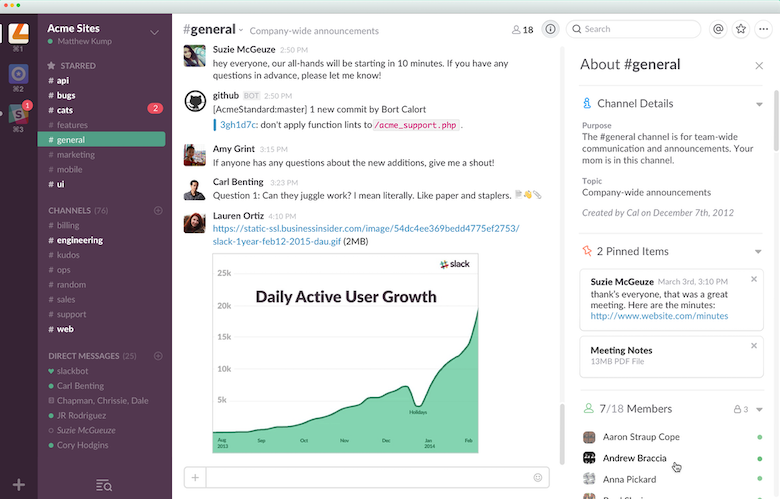
Group messaging in Slack (Source)
Common features of team communication software
In this section, we’ve listed some of the common features of team communication software. Identify features required for your business, and select a solution accordingly.
Use a drag-and-drop interface to share files, or send files as attachments. | |
Internal chat | Communicate with teammates using a business-wide internal chat tool. |
Connect with team members via video calls. Send invites and add multiple colleagues to these calls. | |
Screen sharing | Share your desktop screen with teammates for online presentations, collaboration, or other business purposes. |
Group messaging | Create message groups to discuss projects and tasks, and share related updates. |
What type of buyer are you?
Based on number of employees, most buyers can be divided into the following two types:
Small and midsize businesses (up to 1,000 employees): These businesses have fewer employees and therefore small teams and simple collaboration needs. Team communication software with instant messaging, audio and video conferencing, and file sharing capabilities should meet the needs of such buyers.
Large businesses (over 1,000 employees): Such businesses have large teams and therefore more complex collaboration needs. They also have different departments that need to collaborate frequently. These businesses should invest in a comprehensive team communication tool with file sharing, one-on-one and group chats, audio and video conferencing, and screen sharing capabilities. They should also seek a tool that can be integrated with other software applications, such as project management tools.
Benefits of team communication software
Understanding the key benefits of team communication software will help you build a strong case for investing in one.
Removal of communication gaps: Team communication software provides all the tools required for easy and effective collaboration. Users can connect with their peers in real time via instant messages, chats, audio calls, and video conferences instead of having to schedule meetings or send emails. This ease of communication also helps save time, thereby enhancing team productivity.
Improved project management: Effective communication is key to smooth project execution. Miscommunication or delay in communication can lead to potential crisis situations. Team communication software offers the tools required to coordinate efforts, connect in real time, and communicate about project challenges. It helps project members stay on the same page and have access to the latest information.
Better work efficiency: Team communication software enables employees to work collaboratively. With real-time access to resources (such as files and documents) and the ability to discuss work via audio and video calls, employees can complete their tasks more quickly and efficiently.
Market trends to understand
Here are some key trends impacting the team collaboration software space:
Shift toward smartphone-based collaboration: With businesses increasingly implementing bring-your-own-device (BYOD) policies, smartphones are becoming employees’ preferred method of communication. In line with this trend, team collaboration software vendors are working on improving the mobile experience for users by providing mobile apps with features such as integrated messaging, video calling and conferencing, and real-time notifications.
Corporate social networking on the rise: Corporate social networking allows businesses to replicate the social networking experience for their employees to improve participation and engagement. With increasing emphasis on employee collaboration and engagement, corporate social networking is expected to become a key team communication software functionality in the near future.
Augmented reality (AR) and virtual reality (VR) to replicate the physical meeting experience: Team communication software equipped with AR and VR capabilities combines the ease of online meetings with the physical experience of in-person meetings. It provides interactive virtual spaces where teams can connect and collaborate just like they would do in physical meetings.
Note: The application selected in this article is an example to show a feature in context and isn’t intended as an endorsement or recommendation. It has been obtained from sources believed to be reliable at the time of publication.