


Best Softphone Software of 2026
Updated March 19, 2026 at 11:27 AM
- Popular Comparisons
- FrontRunners
- Buyers Guide
Compare Products
Showing 1 - 25 of 82 products
Compare Products
Sort by
Reviews: Sorts listings by the number of user reviews we have published, greatest to least.
Average Rating: Sorts listings by overall star rating based on user reviews, highest to lowest.
Alphabetically (A-Z): Sorts listings by product name from A to Z.

RingEX is a cloud-based business communications solution that offers tools for Messaging, Video and Phone. Core features of the ...Read more about RingEX


RingEX's Best Rated Features
See All
RingEX's Worst Rated Features
See All

ULTATEL enables people to work together and get the information they need to do their best work, anywhere they are. Our cloud p...Read more about Ultatel Cloud Business Phone System


Ultatel Cloud Business Phone System's Best Rated Features
See All
Ultatel Cloud Business Phone System's Worst Rated Features
See All

Cloud Hosted Phone, VoIP & UCaaS- metricVOICE by Fastmetrics. Smarter communications from $15 per month. Connect how you work, ...Read more about metricVOICE


Ringover is the no.1 business phone system that gives you unlimited calls to 110 countries, video conferencing, SMS and group me...Read more about Ringover


Ringover's Best Rated Features
See All
Ringover's Worst Rated Features
See All

Global Call Forwarding is a provider of toll-free, international, and local phone numbers. Buy virtual phone numbers from more ...Read more about Global Call Forwarding
Global Call Forwarding's Best Rated Features
See All
Global Call Forwarding's Worst Rated Features
See All

OnSIP Hosted OnSIP Hosted VoIP by Junction Networks is a cloud-based phone solution that offers businesses across various indust...Read more about OnSIP


OnSIP's Best Rated Features
See All
OnSIP's Worst Rated Features
See All

CTM is a conversation analytics software designed to provide tracking and insights for sales and marketing teams. It helps organ...Read more about CTM
CTM's Best Rated Features
See All
CTM's Worst Rated Features
See All

AVOXI is a global communications provider specializing in cloud-based contact center and virtual number solutions. Their platfor...Read more about AVOXI
AVOXI's Best Rated Features
See All
AVOXI's Worst Rated Features
See All

VirtualPBX is a cloud-based phone solution that caters to all-sized businesses. VirtualPBX enables companies to streamline and i...Read more about VirtualPBX

VirtualPBX's Best Rated Features
See All
VirtualPBX's Worst Rated Features
See All

Unitel Voice is the business builder's phone system. It lets you run your business from anywhere using any device. Easy to set u...Read more about Unitel Voice
Unitel Voice's Best Rated Features
See All
Unitel Voice's Worst Rated Features
See All

TalkChief isn't just a business phone system; it's your partner in enhancing communication for call centers, startups, enterpris...Read more about TalkChief
TalkChief's Best Rated Features
See All
TalkChief's Worst Rated Features
See All

Cloud Voice for Microsoft Teams from UniVoIP Why Use Microsoft Teams as a Phone System? ● You already have M365, so maximize ...Read more about UniVoIP

Vodia PBX is a hybrid VoIP PBX solution that caters to businesses in industries like healthcare, education, call centers and hos...Read more about Vodia PBX


Acrobits is a cloud-based softphone solution, which helps small to large businesses configure, develop and deploy communications...Read more about Cloud Softphone

Cloud Softphone's Best Rated Features
See All
Cloud Softphone's Worst Rated Features
See All

Zoom Phone is a VoIP solution designed to help businesses in education, finance, healthcare and government sectors connect and c...Read more about Zoom Phone
Zoom Phone's Best Rated Features
See All
Zoom Phone's Worst Rated Features
See All

Tragofone stands at the forefront of modern communication solutions, offering a highly adaptable VoIP softphone application desi...Read more about Tragofone

RingRx is a phone system designed for modern healthcare providers. It supports healthcare professionals with HIPAA-compliant voi...Read more about RingRx

Telzio is a cloud communications provider that offers small business phone system. It includes trunking that allows professional...Read more about Telzio
Telzio's Best Rated Features
See All
Telzio's Worst Rated Features
See All

PiPcall is a VoIP phone system for the everywhere office that delivers consistency and quality calls in any location on any devi...Read more about PiPcall

GoTo Connect is the all-in-one phone, meeting and messaging software built for SMBs. It boasts an enterprise-class phone system ...Read more about GoTo Connect
GoTo Connect's Best Rated Features
See All
GoTo Connect's Worst Rated Features
See All

CloudTalk is an AI-powered, cloud-based call center solution designed for modern sales and customer support teams. It simplifies...Read more about CloudTalk
CloudTalk's Best Rated Features
See All
CloudTalk's Worst Rated Features
See All

Evolve IP is a cloud-based IP phone and collaboration solution suitable for businesses with over 50 employees. It caters to mult...Read more about Unified Communications as a Service (UCaaS)
Unified Communications as a Service (UCaaS)'s Best Rated Features
See All
Unified Communications as a Service (UCaaS)'s Worst Rated Features
See All

Zoiper is an on-premise and cloud-based softphone solution that caters to service providers, call centers, VoIP integrators, mob...Read more about Zoiper


Zoiper's Best Rated Features
See All
Zoiper's Worst Rated Features
See All

Revenue.io is a VoIP solution that helps sales teams by providing voice communication and an automated dialer. It is a cloud-bas...Read more about Revenue.io


Linphone is an on-premise and web-based voice over internet protocol (VoIP) system, which helps businesses in industries such as...Read more about Linphone
Popular Comparisons



Your Guide to Top Softphone Software, November 2023
Software Advice uses reviews from real software users to highlight the top-rated Softphone products in North America.
Learn how products are chosenExplore FrontRunners


“Usability” includes user ratings for Functionality and Ease of Use.
“Customer Satisfaction” includes user ratings for Customer Support, Likelihood to Recommend and Value for Money.
Reviews analysis period: The reviews analysis period spans two years and ends the 15th of the month prior to publication.
Buyers Guide
This detailed guide will help you find and buy the right voip softphones software for you and your business.
Last Updated on January 27, 2025With the vast number of VoIP softphone products on the market, choosing the right solution for your phone system can be daunting. (Technically, all softphones are for VoIP service, since they’re essentially software for placing calls over the Internet.) To help make your decision easier, we’ve compiled this guide.
We’ll outline the common features of softphones and give a rundown of popular products to help you make the right decision for your business. We’ll look at:
Common Functions of VoIP Softphones
Crucial Considerations for Buyers
What Is a VoIP Softphone?
The name says it all: software phone. Softphones are software applications that run on devices (laptops, smartphones, tablets etc.) with Internet connections and allow you to make and receive calls. Softphones are thus designed for Internet phone service, commonly known as Voice over Internet Protocol (VoIP), rather than traditional phone service.
A VoIP softphone is perhaps easiest to understand when compared to an IP phone i.e., a hardware office phone designed to make calls over the Internet using a business VoIP service rather than traditional land lines.
Both IP phones and softphones serve as endpoints to which VoIP phone systems connect calls, but one is software and the other is hardware.
Some businesses choose to deploy softphones rather than hardware phones as phone system extensions. For instance, if your employees work remotely, it makes more sense to connect the phone system to applications on their laptops than to desk phones in an office they rarely see. Additionally, you can deploy softphones alongside desk phones and connect the same extension to both endpoints. This gives your employees more flexibility in their communications options.
Softphone-only deployments are gaining in popularity and can also help keep the costs of switching to VoIP down, since IP phones can be expensive.
Common Functions of VoIP Softphone Software
VoIP softphones often include the following core capabilities:
Voice calling | The key functionality of softphones. Make and receive calls through your Internet connection. |
Video calling | Place and receive video calls on devices with cameras. (Note that video calling is not the same as video conferencing, which frequently requires a more advanced application.) |
Call history | Track incoming and outgoing calls. |
Voicemail | Let callers leave voice messages when you’re not available. Listen to voice messages and return calls. |
On-demand call recording | Users can frequently initiate on-demand call recording from the softphone user interface (UI). |
Directory of contacts/presence | Just like your smartphone, a softphone has a directory of contacts. The difference is that softphones also generally display which contacts are currently online (a feature known as presence). |
Call transferring | Softphones allow you to transfer calls to contacts in your organization. |
Click-to-dial | Because softphones are installed on your device, they allow you to click on links on web pages and in emails in order to place calls automatically, without touching a keypad or picking up a receiver. |
More advanced softphones offer a smorgasbord of features beyond these basic capabilities, and are known as unified communications (UC) clients. Generally, these clients are offered directly via the vendor of your phone system or UC system, whereas softphones are commonly offered by third-party vendors. If you’re just looking for basic inbound and outbound calling capabilities, a softphone will generally be enough, while UC clients are for supporting advanced communications like multi-party video conferencing on smartphones and tablets.
Benefits of VoIP Softphones
There are many benefits of choosing a softphone over, or in addition to hardphones:
Reduce costs by reducing hardware. Softphone software gives you the option to forego traditional office phones. You’ll save money by not having to buy extra hardware in the first place.
Integrate with computer systems. Because softphones use your local computer network, they also integrate with your existing computer-based systems. Many softphone applications, including the ones mentioned above, can integrate with contact databases such as Outlook, Thunderbird and Mac address books. Softphones with click-to-dial allow you to place calls from your customer relationship management (CRM) software, Web browser or accounting system. This is a highly useful feature for call center agents and other employees that have to place lots of outbound calls (e.g those in accounts receivable).
Place calls through Wi-Fi. Normally, when you make a call with your cellphone, it goes over a cellular network and you have to pay per-minute rates as well as prohibitively expensive roaming fees if you’re out of range of your providers’ network. Softphones allow you to place calls over a Wi-FI internet connection, so you bypass the cellular network and avoid per-minute rates and roaming charges. You still need to pay for the data connection or the Wi-Fi connection unless it’s public. This feature results in significant savings for employees who travel abroad frequently.
The Vendor Landscape
There are both free and paid softphones on the market. To help you determine which softphone solution is right for you, let’s take a look at a few popular products.
3CX. 3CX offers both cloud and on-premise business phone systems. Manage calls from your desktop and use your computer to make and receive calls.
3CX has softphones for both Windows and Mac, and it includes native Session Initiation Protocol (SIP) apps for Android and iOS.
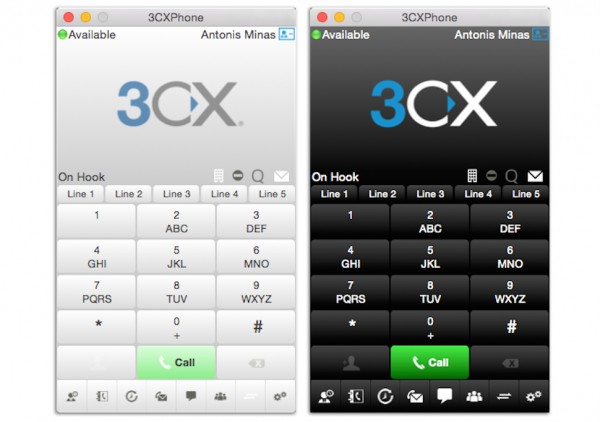
3CX softphone for Mac
Bria X-Lite. One of Bria X-Lite’s most attractive qualities is that it’s free. Several softphone vendors offer “freemium” versions that may have only limited functionalities and/or be supported by ads.
Bria X-Lite includes functionalities for voice and video calls, instant messaging and voicemail support. This free solution is meant to act as a stepping stone to the paid option, Bria 4. It is compatible with Windows and Mac systems.
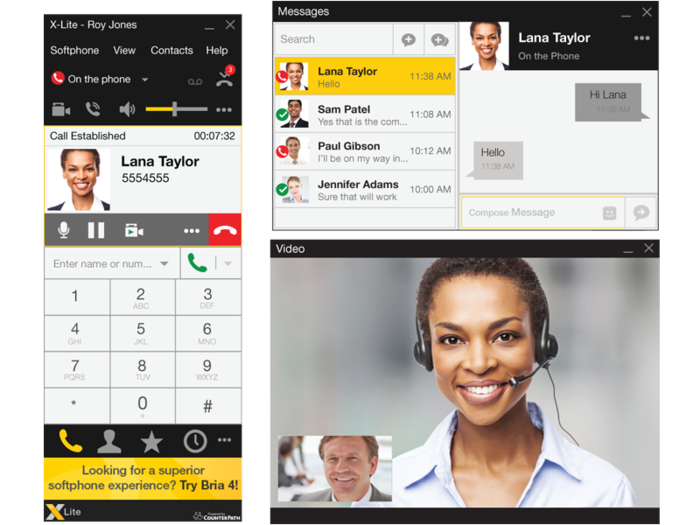
Bria X-Lite softphone, video calling and chat
Zoiper. Another notable option on the market is Zoiper. Along with voice and video calling, it offers call recording, call transfer and auto-answering. It also has native conferencing, so you can conduct conference calls without relying on a third-party service. It works on Windows, Mac and Linux systems.
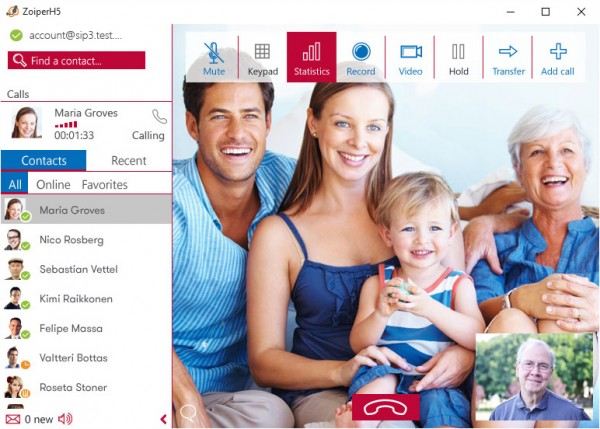
Zoiper video calling
Crucial Considerations for Buyers
Free vs. paid softphones. Many softphone vendors offer what are called “freemium” clients (e.g., Bria X-Lite) to encourage customers to eventually pay to upgrade. Some freemium products rely heavily on advertisements within the application to stay free.
These clients can work well for smaller companies or companies with limited needs. However, larger enterprises or those seeking more complex functionalities will need a more advanced client.
Phone system/headset compatibility. The #1 factor that should guide your choice of a softphone is compatibility. The softphone needs to be supported by your phone system, so check with your vendor or your vendor’s channel partner about this issue. Most major vendors list compatible softphones on their websites or in product literature. Additionally, if you’re planning to use the softphone in conjunction with a headset in a call center environment, you need to ensure that the softphone is also compatible with the specific brand of headset you’re using.
Softphone platforms. Softphones are trending toward OS agnosticism. Users want apps that run on Windows, Mac and Linux, as well as on smartphone operating systems such as Android and iOS. Thus, many providers are now offering their products on many different platforms, and they’re developing mobile clients.