


Best Consulting CRM software of 2026

- Popular Comparisons
- Buyers Guide
Compare Products
Showing 1 - 25 of 286 products
Compare Products
Sort by
Reviews: Sorts listings by the number of user reviews we have published, greatest to least.
Average Rating: Sorts listings by overall star rating based on user reviews, highest to lowest.
Alphabetically (A-Z): Sorts listings by product name from A to Z.

Claritysoft is a cloud-based customer relationship management (CRM) solution designed for midsize and large enterprise businesse...Read more about Claritysoft CRM


Claritysoft CRM's Best Rated Features
See All
Claritysoft CRM's Worst Rated Features
See All

Supercharge your sales process with Sales Hub, a powerful and easy-to-use sales CRM that includes sales engagement tools, config...Read more about HubSpot Sales Hub

HubSpot Sales Hub's Best Rated Features
See All
HubSpot Sales Hub's Worst Rated Features
See All

LeadMaster is a SaaS-based all-in-one lead management solution that offers capabilities to capture, track and follow up with lea...Read more about LeadMaster


Pipeliner has revolutionized CRM with our unique visual interface, no-code workflow automation engine, and instant, dynamic insi...Read more about Pipeliner CRM


Pipeliner CRM's Best Rated Features
See All
Pipeliner CRM's Worst Rated Features
See All

SalesNOW by Interchange Solutions Inc. is a cloud-based customer relationship management (CRM) and sales force automation soluti...Read more about SalesNOW

SalesNOW's Best Rated Features
See All
SalesNOW's Worst Rated Features
See All

monday CRM is a sales platform that helps businesses streamline sales cycle. The platform caters to a range of industries, such ...Read more about monday CRM

monday CRM's Best Rated Features
See All
monday CRM's Worst Rated Features
See All

Document360 is an AI-powered knowledge base platform built for enterprises that need secure, scalable documentation. It centrali...Read more about Document360

Document360's Best Rated Features
See All
Document360's Worst Rated Features
See All

LeadSquared is a cloud-based marketing automation and customer relationship management (CRM) solution for businesses of all size...Read more about LeadSquared


LeadSquared's Best Rated Features
See All
LeadSquared's Worst Rated Features
See All

Zoho CRM is a cloud-based business management platform that caters to businesses of all sizes. It offers sales and marketing aut...Read more about Zoho CRM
Zoho CRM's Best Rated Features
See All
Zoho CRM's Worst Rated Features
See All

Sales Cloud is equipped with customer relationship management (CRM) functionality that encompasses lead management, marketing au...Read more about Salesforce Sales Cloud
Salesforce Sales Cloud's Best Rated Features
See All
Salesforce Sales Cloud's Worst Rated Features
See All

SalesOutlook CRM is a comprehensive customer relationship management (CRM) and email marketing system that embeds into Microsoft...Read more about SalesOutlook CRM

SalesOutlook CRM's Best Rated Features
See All
SalesOutlook CRM's Worst Rated Features
See All

HelpCrunch is a customer communication platform combining live chat, email marketing automation and a help desk in one solution....Read more about HelpCrunch
HelpCrunch's Best Rated Features
See All
HelpCrunch's Worst Rated Features
See All

Workbooks is the 'No-BS' CRM. Workbooks designs, develops and implements its own software, which is targeted specifically at m...Read more about Workbooks
Workbooks's Best Rated Features
See All
Workbooks's Worst Rated Features
See All

Universal Knowledge is a knowledge management solution designed by Knowledge Powered Solutions to increase the efficiency of age...Read more about Universal Knowledge

Agiloft is a cloud-based contract management software that helps businesses streamline the entire contract lifecycle with custom...Read more about Agiloft

NetSuite is an AI-powered cloud-based business management suite that incorporates ERP, financial management, CRM and eCommerce f...Read more about NetSuite

NetSuite's Best Rated Features
See All
NetSuite's Worst Rated Features
See All

Quickbase is a work management and application platform designed to help organizations centralize and manage complex projects an...Read more about Quickbase
Quickbase's Best Rated Features
See All
Quickbase's Worst Rated Features
See All

We built Less Annoying CRM 17 years ago for the thousands of independent consultants, agents, and small business owners who are ...Read more about Less Annoying CRM

Less Annoying CRM's Best Rated Features
See All
Less Annoying CRM's Worst Rated Features
See All

Bigin by Zoho CRM is a pipeline-centric CRM that is built and priced for small businesses. Minimal by design and focused on grea...Read more about Bigin by Zoho CRM
Bigin by Zoho CRM's Best Rated Features
See All
Bigin by Zoho CRM's Worst Rated Features
See All

Flowlu is a cloud-based, all-in-one business management solution designed for teams of all sizes and industries. Whether you're ...Read more about Flowlu
Flowlu's Best Rated Features
See All
Flowlu's Worst Rated Features
See All

Brevo is a cloud-based email marketing tool suited for organizations of all sizes. It offers marketing automation, email campaig...Read more about Brevo
Brevo's Best Rated Features
See All
Brevo's Worst Rated Features
See All

The Mortgage Office is a loan servicing solution designed for companies of all sizes. It offers loan tracking, payment processin...Read more about The Mortgage Office


The Mortgage Office's Best Rated Features
See All
The Mortgage Office's Worst Rated Features
See All

Google Contacts is a cloud-based solution that allows enterprises to store and manage contacts in a built-in directory. Professi...Read more about Google Contacts
Google Contacts's Best Rated Features
See All
Google Contacts's Worst Rated Features
See All

CyberSentriq is the unified brand created through the merger of TitanHQ and Redstor, bringing together more than 25 years of awa...Read more about LiveAgent
LiveAgent's Best Rated Features
See All
LiveAgent's Worst Rated Features
See All

HoneyBook is a client relationship platform designed to help small businesses manage proposals, contracts, invoices, payments, a...Read more about HoneyBook
HoneyBook's Best Rated Features
See All
HoneyBook's Worst Rated Features
See All
Popular Comparisons


Buyers Guide
This detailed guide will help you find and buy the right consulting crm software for you and your business.
Last Updated on January 27, 2025As a consultant working with high-value clients, you don't want to get their names and numbers wrong, miss meetings, delay responses to their emails, nor forget action items discussed in meetings. But these tasks aren't easy to manage on one's own. You need consulting CRM software to do all these and more, so that your clients stay happy.
However, finding the right solution for your consulting needs isn't really easy. Most vendors don't market themselves as consulting CRM solutions providers but as business-to-business (B2B) CRM solutions providers.
Therefore, you could explore these B2B solutions and find one that allows you to do the following consulting CRM tasks:
Organize all incoming and outgoing interactions with each client in one place.
Schedule and manage meetings, calls, and other tasks on a calendar.
Create “deals" or notes that detail the key points discussed with each client.
A solution that offers features to accomplish these tasks could serve the functions of consulting CRM software. We created this guide to help you find such a solution.
Here's what we've covered:
What is consulting CRM software?
Consulting CRM software is a tool for managing interactions with existing and potential clients as well as identifying leads. It's used by employees who directly interact with clients and customers, and work in teams such as client servicing, sales, or marketing. The software streamlines communication and speeds-up the teams' responses to clients.
Pipeline view in PipeDrive (Source)
CRM solutions for consulting businesses broadly fall into three categories—basic, mid-range, and advanced.
Basic solutions focus on streamlining incoming and outgoing interactions.
Mid-range solutions offer features to manage project-related information.
Advanced solutions automate sales and marketing processes, and provide a detailed overview of your consulting business.
Common features of consulting CRM software
Contact management | Record, update, and manage the information of each contact such as names, addresses, and social media accounts. |
Interaction tracking | Autotrack and document all the written interactions (emails and messages) for each contact; record calls and add your notes to these call records. |
Account management | Link multiple contacts to one account (or organization). Get a 360-degree view of each account, including their recent activity, background, pipeline, as well as ongoing and upcoming activities. |
Lead management | Capture and manage leads from multiple sources, including the website, mobile app, application forms, or integrated third-party platforms. The feature also lets you manually enter a lead's information. |
Tasks and calendar | Create tasks for appointments, meetings, phone calls, submission deadlines, deals, proposals, etc. The inbuilt calendar helps you manage scheduling for these tasks. |
Pipeline management | Track and manage opportunities through different stages of the sales pipeline. Also, get a visual overview of the pipeline. |
Reporting | Generate detailed reports regarding the team's activity, productivity, and sales performance. Also, track clients on predetermined metrics. |
Integration | Add third-party applications directly or via an API. |
Prioritization | Prioritize tasks and clients based on predetermined parameters such as project value or past relationships. |
What type of buyer are you?
Your specific business requirements should dictate the type of consulting CRM software you choose. Solutions that large consulting firms use, or even the popular solutions, may not be the right fit for your organization.
After researching about the software types and talking to hundreds of software buyers, we've determined that buyers fall into different categories based on their needs. Specifically, consulting CRM software buyers fall into the following three categories:
Independent consultants. These buyers may have to work from different locations such as client sites, co-working spaces, or home offices. Their information could be stored in multiple locations, such as the client's servers. In addition, they need to execute extraneous tasks such as preparing and sending invoices and proposals.
Therefore, cloud-based CRM software suits independent consultants. It doesn't require an extensive set-up and has a monthly subscription fee. Buyers can also explore CRM solutions that allow them to do things, such as invoicing and making proposals, so that they can quickly and efficiently execute these additional tasks.
Small businesses with few in-house consultants. Our research found that 11% of all prospective CRM buyers are small consulting businesses. In small firms, employees directly deal with clients while working on projects. Usually, they have a small IT budget and no dedicated, in-house IT support to manage technical requirements.
Such buyers should explore cloud-based CRM solutions for small businesses that offer mobile accessibility and functionalities such as invoicing, deals, and proposals. The software will be maintained and managed by the vendor for a fee. This takes away the headache of having to hire IT staff to maintain the tool.
Large consulting firm with a dedicated IT team. These buyers will need detailed customer databases, task management, and integration with third-party applications. The solution should streamline the client's journey from one team to another, and provide the flexibility of customizing the functionalities.
These buyers should check out vendors who offer both cloud-based and on-premise deployment. With a dedicated IT team maintaining the CRM, there will be greater flexibility to scale-up and customize the tool. As most cloud-based solutions charge per user, an on-premise solution may be more profitable in the long run.
Benefits of consulting CRM software
Consulting CRM software helps businesses organize information about existing and prospective clients, track follow-up activities, and streamline client communication. Here are the details of some of these key benefits:
Manage client communication: The tool maps each client's communication to their profile. It highlights action items and tasks so that you can address every client's query on time. If you communicate with multiple people in an organization, you can map them all to the same client account. This centralizes visibility into ongoing communication.
Get a full view of your pipeline: The software organizes client information in a timeline or pipeline format to provide a bird's eye view of all ongoing interactions. This makes it easier to see each client's status, the soon-to-be-closed deals, and projects that are next in line to be picked.
Fine-tune marketing and sales campaigns: Consulting CRM software helps you initiate and develop a relationship with prospective clients. Use it to run marketing and sales campaigns, assess campaign effectiveness, and tweak each campaign as required.
Automate recurring activities: You can automate recurring tasks such as updating the status of each client account, sending reminder emails, or adding leads to the system. This saves time on routine activities and gets things done faster.
Gain detailed insights into your business: Get detailed reports on your team's and the client's activities to find out the high-value clients, average time taken to close a new lead, or bottlenecks in your sales pipeline. Some solutions also score the leads and apply predictive analytics in ongoing discussions to identify the top trends and sentiments.
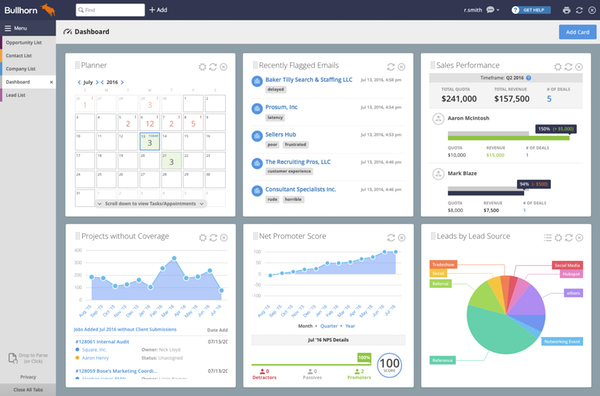
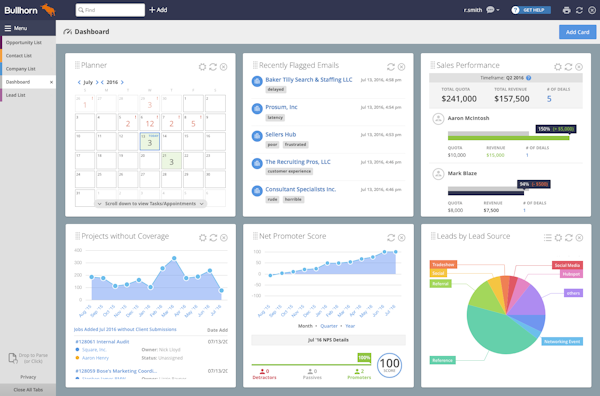
Dashboard view in Bullhorn CRM
Key considerations when buying consulting CRM software
With so many vendors and pricing plans in the market, choosing a solution for your consulting business could be overwhelming. Keep the following considerations in mind when purchasing software:
Focus on user experience and interface: A top pain point of small businesses is that the CRM software is often “clunky" or “hard to use", with users taking a long time to figure it out. This results in an unpleasant user experience, as they're unable to fully utilize the software. To avoid this, focus on the solution's user experience and interface. Opt for trials and demos to get a feel of using the tool.
Examine the “free" software thoroughly: A free CRM solution can be tempting but there could be a catch. Free tools offer limited features, which means you will eventually have to pay—such as for customer support and issue resolution. Thoroughly explore each solution and figure out the costs of paid features you require now, or in the future.
Check for mobile capability: Mobile capability is integral in consulting CRM software as it provides employees flexibility of working from the client locations as well. Though most CRM solutions offer mobile capabilities, check for it in the solutions you shortlist.
Focus on core features: Some CRM solutions have extensive functionalities, such as channel management, help desk automation, call center automation, field service management, and marketing automation, which you may not need. Make a list of the features you need and then choose a suitable solution or pricing plan. Get the essential features such as document storage, custom reports, and proposal management.
Evaluate cloud and on-premise options: Gartner predicts that cloud will represent 75% of the total spend on CRM in 2019. However, don't choose a cloud-based solution just because it's popular. The deployment option determines where your data is stored, the data security measures, and maintenance required. Therefore, thoroughly evaluate both cloud-based and on-premise deployment before making a choice.