


Best Inventory Management Software of 2026
Updated February 18, 2026 at 6:09 AM

Written by Molly Burke
Senior Specialist Analyst

Edited by Caroline Rousseau
Senior Editor

Reviewed by Bryan Dengler
Senior Advisor

Talk with us for a free 15-min consultation
Expert advisors like Jacqueline, who have helped 1,000+ companies, can find the right software for your needs.
- All Software
- Buyer's Guide
- Software Advice FrontRunners
- Frequently Asked Questions
- Popular Comparisons
Inventory management software helps businesses maintain balanced stock levels. Some products are designed for use by many kinds of businesses, while others are tailored to specific industries such as manufacturing, eCommerce, and food and beverage. I worked with inventory management software advisors to create a list of the top tools so you can narrow your search from nearly 800 products in our catalog. To help you narrow it down, I worked with our inventory management software advisors to curate a list of recommended productsi and a list of the inventory management software FrontRunners based on user reviews. For further information, read my inventory management software buyer's guide.
Inventory Management Software
Sort by
Reviews: Sorts listings by the number of user reviews we have published, greatest to least.
Average Rating: Sorts listings by overall star rating based on user reviews, highest to lowest.
Alphabetically (A-Z): Sorts listings by product name from A to Z.

Sortly is an inventory management software designed to help businesses track and organize physical inventory, supplies, material...Read more about Sortly


Sortly's Best Rated Features
See All
Sortly's Worst Rated Features
See All

Striven is a cloud-based enterprise resource planning (ERP) solution suitable for many industries and organizations of all sizes...Read more about Striven


Striven's Best Rated Features
See All
Striven's Worst Rated Features
See All

The CoreIMS Inventory Management System (CoreIMS™) is a cost-effective inventory management system that provides flexibili...Read more about CoreIMS


Cin7 Omni is a highly configurable inventory management and order management solution with built-in EDI and integrations to all ...Read more about Cin7 Omni


Cin7 Omni's Best Rated Features
See All
Cin7 Omni's Worst Rated Features
See All

You know how some companies struggle to get work done as efficiently as they should or could because of internal bottlenecks, ba...Read more about TrackVia

TrackVia's Best Rated Features
See All
TrackVia's Worst Rated Features
See All
Software Advice FrontRunners 2026

(951)

(1828)

(1289)

(1078)

(504)

(414)

(88)

(710)

(239)

(357)
Best for Mobile app
Sortly

According to our user reviews, Sortly is the most requested by users for mobile app out of the most popular tools.
Sortly is best for SMBs seeking robust mobile inventory management, especially those needing on-the-go tracking and barcode scanning. Our reviewers say the mobile app streamlines inventory updates, enables quick barcode scans, and is easy for teams to adopt, making daily inventory tasks more efficient.
- Reviewers Perspective
"I like i can add a photos, prices, minimum i want in stock, and update quantity easily. And when i finish inventory i can email myself a list and see what i need to order."
DVDasha Vincent
OPERATIONS MANAGER
Used for 6-12 months
We analyzed 499 verified user reviews for Sortly to find out what actual users really think.
Inventory Management
Users organize inventory with visual cataloging, tagging, and customizable fields, streamlining tracking across locations. Businesses monitor stock levels, set reorder alerts, and generate reports, reducing errors and paperwork for both small and larger organizations.Ease of Use
Teams set up and operate Sortly with an intuitive interface, allowing staff of all skill levels to manage inventory efficiently. Customizable setup options support diverse workflows and simplify complex inventory tasks.Equipment Tracking
Organizations track equipment and assets across sites, using custom fields and photo uploads to monitor locations, maintenance records, and usage history. This reduces manual tracking and improves organization for tools, hardware, and high-value gear. - Key FeaturesSortly's scoreCategory average
Inventory Control
4.554.50 category average
Inventory Tracking
4.574.58 category average
- Screenshots


Best for Customization

NetSuite

Of the products listed on our FrontRunners report, NetSuite is the most requested by users for customization out of the most popular tools.
NetSuite is best for organizations prioritizing customization in their ERP and financial management workflows. Our reviewers say its extensive customization options allow businesses to tailor forms, reports, and workflows to their unique needs, supporting complex processes and improving operational efficiency.
- Reviewers Perspective
"Time to automate various accounting processes which reduces manual data entry, minimizes errors and saves time allowing us to focus on more strategic financial activities."
FSFlorence Schlensog
Trade Advisor
Used for 2+ years
We analyzed 761 verified user reviews for NetSuite to find out what actual users really think.
Features
Organizations manage ERP, CRM, project management, and HR in one platform. NetSuite adapts to evolving needs, automates repetitive tasks, and centralizes operations for diverse industries.Accounting and Financial Management
Finance teams automate processes, consolidate data, and gain real-time visibility. NetSuite supports general ledger, tax management, and multi-subsidiary operations for strategic decision-making.Reporting
Managers generate custom reports and dashboards to support decisions. NetSuite offers flexibility and consolidated data, though advanced customization may require technical expertise. - Key FeaturesNetSuite's scoreCategory average
Inventory Control
4.224.50 category average
Inventory Tracking
4.324.58 category average
Sales Reports
4.04.55 category average
- Screenshots


Highly Rated for Quick Adoption/Easy Adoption

Odoo

Of the products listed on our FrontRunners report, Odoo is the highest rated for quick adoption/easy adoption out of the most popular tools.
Odoo is highly rated for SMBs looking for quick and easy adoption of a unified business management platform. Our reviewers point out that its modular design and integrated apps enable fast onboarding and streamlined workflows, allowing businesses to scale and digitize operations efficiently.
- Reviewers Perspective
"The fact that everything is integrated into one system – sales, accounting, inventory, and marketing – really helps make workflows smoother and improves overall visibility into operations."
GMGustavo Medina
Manager
Used for 1-2 years
We analyzed 567 verified user reviews for Odoo to find out what actual users really think.
Inventory Management
Odoo centralizes warehouse operations, tracks stock levels, and streamlines order processing. Businesses use its integration with sales, purchasing, and accounting modules to improve visibility and efficiency across functions.Customization
Teams adapt Odoo’s modules and reports to their business needs. The open-source platform and Odoo Studio enable changes without deep programming, supporting unique processes and evolving requirements.Modules
Organizations activate and configure a range of modules—CRM, accounting, inventory, HR, project management—as needs evolve. This modularity supports streamlined operations and business growth. - Key FeaturesOdoo 's scoreCategory average
Inventory Control
4.184.50 category average
Inventory Tracking
4.204.58 category average
Sales Reports
4.224.55 category average
- Screenshots


Highly Rated for User Interface

Fishbowl

According to our user reviews, Fishbowl is the highest rated for user interface out of the most popular tools.
Fishbowl is highly rated for users who value an intuitive user interface in inventory and manufacturing management. Our reviewers say the interface is logical and easy to navigate, making onboarding straightforward and daily operations—such as tracking inventory and generating reports—more efficient.
- Reviewers Perspective
"What I liked most about Fishbowl is its powerful inventory and order management features, which make tracking stock, processing orders, and maintaining accuracy across multiple locations incredibly efficient and reliable."
MMManuele Mazzanti
CFO
Used for 1-2 years
We analyzed 572 verified user reviews for Fishbowl to find out what actual users really think.
Inventory Management
Fishbowl enables tracking of stock levels, automates reorder points, and maintains accuracy across multiple warehouses. Businesses use its intuitive interface for managing complex inventories, generating reports, and streamlining order processing.Training and Learning Curve
Companies leverage onsite sessions, video tutorials, and knowledgeable trainers to onboard staff. While the learning curve can be steep for advanced features, accessible documentation and ongoing support help teams become proficient.Reporting
Managers access a wide range of built-in reports for business data. Customizing or modifying reports often requires technical expertise or extra fees, which can be limiting for specialized analytics. - Key FeaturesFishbowl's scoreCategory average
Inventory Control
4.324.50 category average
Inventory Tracking
4.354.58 category average
Sales Reports
4.054.55 category average
- Screenshots


Best for Quick Implementation


inFlow Inventory is the most requested by users for quick implementation out of the most popular tools.
inFlow Inventory is best for SMBs needing quick implementation of inventory and order management. Our reviewers say setup is fast, the interface is user-friendly, and onboarding new staff is simple, enabling businesses to efficiently track inventory and process orders with minimal downtime.
- Reviewers Perspective
"We've been able to set up BOMs, track inventory, handle parts sales, etc., all with real time updates."
KFKarla Folstad
Corporate Office Liaison and Compliance Analyst
Used for 2+ years
We analyzed 352 verified user reviews for inFlow Inventory to find out what actual users really think.
Inventory Management
Teams organize, track, and manage stock across multiple locations and categories, maintaining accurate inventory levels and reducing manual errors. Real-time updates, customizable features, and reporting tools streamline purchasing, sales, and job costing for businesses ranging from basic inventory tracking to complex manufacturing.Ease of Use
Staff quickly learn and configure inFlow Inventory, making onboarding straightforward. The interface allows fast access to information, supporting a variety of business types and technical skill levels, which reduces training time and daily operational friction.Customer Support
Users access support through email and community forums, receiving timely solutions and clear guidance. The support team addresses questions efficiently and incorporates customer feedback into regular updates, helping businesses maintain smooth operations. - Key FeaturesinFlow Inventory's scoreCategory average
Inventory Control
4.674.50 category average
Inventory Tracking
4.624.58 category average
Sales Reports
4.04.55 category average
- Screenshots


Most Used By Wholesale


In our analysis of Inventory Management products with the most market demand, Zoho Inventory is the most requested by users in wholesale out of the most popular tools.
Zoho Inventory is most used by wholesale businesses that require efficient multi-channel inventory tracking and order management. Our reviewers say it simplifies managing stock across warehouses, automates reordering, and integrates well with sales platforms, streamlining wholesale operations.
- Reviewers Perspective
"It has simplified my work at Leader Sat Africa by automating the update of inventory, consequently saving me hours of trying to reconcile manually on a monthly basis."
CTClara Tate
Accountant
Used for 2+ years
We analyzed 287 verified user reviews for Zoho Inventory to find out what actual users really think.
Inventory Management
Zoho Inventory manages stock flow, tracks inventory across warehouses, and automates updates, saving time compared to manual processes. Real-time tracking, automated reordering, and detailed reporting provide insights into sales trends and inventory performance, centralizing data and streamlining fulfillment.Integrations
Businesses integrate Zoho Inventory with e-commerce sites, accounting software, and other Zoho apps, streamlining workflows. API connectors and marketplace options support workflow management, though integration with some third-party solutions and shipping providers could be improved.Ease of Use
Users manage products and categories with a clean, intuitive interface. The software is easy to learn and adaptable for different business types, enabling efficient operations without extensive training or technical expertise. - Key FeaturesZoho Inventory's scoreCategory average
Inventory Control
4.684.50 category average
Inventory Tracking
4.884.58 category average
Sales Reports
4.504.55 category average
- Screenshots


Most Used By Business Supplies and Equipment

ShipHero

Of the products listed on our FrontRunners report, ShipHero is the most requested by users in business supplies and equipment out of the most popular tools.
ShipHero is most used by business supplies and equipment companies needing streamlined shipping and fulfillment. Our reviewers say it offers seamless integration with major carriers, intuitive pick/pack workflows, and easy onboarding for staff, which improves shipping accuracy and operational efficiency.
- Reviewers Perspective
"ShipHero is one of the very few feature-rich and intuitive WMS platforms."
AJArsen Janikyan
CEO
Used for 2+ years
We analyzed 68 verified user reviews for ShipHero to find out what actual users really think.
Ease of Use
Teams manage products, track movements, and access reports with an intuitive interface. Mobile apps and clear menus support quick onboarding for users with varying technical backgrounds.Features
Businesses automate fulfillment tasks and reduce manual errors. ShipHero’s feature set supports scaling operations and streamlining workflows in diverse fulfillment environments.Shipping
Organizations manage shipments with multiple carriers, print labels, and track orders efficiently. The platform helps organize shipping data and train staff, though some users note challenges with integrations. - Key FeaturesShipHero's scoreCategory average
Inventory Control
4.454.50 category average
Inventory Tracking
4.714.58 category average
Sales Reports
3.834.55 category average
- Screenshots


Highly Rated for Automation

Epos Now

Epos Now is the highest rated for automation out of the most popular tools, based on our analysis of Inventory Management products with the most market demand.
Epos Now is highly rated for businesses seeking automation in their point-of-sale and inventory processes. Our reviewers say automation features reduce manual tasks, improve reporting accuracy, and make staff training straightforward, leading to more efficient daily operations.
- Reviewers Perspective
"Also glad to see that up grading the system to help business to have an easier time and be able to help more customers as well as being able to send more time with our families and less time doing reports or uploading items into the system."
WCWendy Chessor
co owner
Used for 2+ years
We analyzed 392 verified user reviews for Epos Now to find out what actual users really think.
Ease of Use
Staff and management quickly learn Epos Now’s interface, making tasks like adding products and navigating menus straightforward. The system reduces training time and simplifies onboarding for new users.Training and Learning Curve
Businesses use Epos Now’s tutorials, support calls, and one-on-one guidance to onboard staff. The manageable learning curve and ongoing support enable efficient employee training and issue resolution.Staff Management
Managers track staff hours, train new employees, and manage daily operations efficiently. The user-friendly system supports smooth transitions for new hires and keeps team management organized. - Key FeaturesEpos Now's scoreCategory average
Inventory Control
4.424.50 category average
Inventory Tracking
3.504.58 category average
Sales Reports
3.754.55 category average
- Screenshots
Most Rated for SMBs

Craftybase

According to our user reviews, Craftybase is the most requested by small businesses out of the most popular tools.
Craftybase is most rated by SMBs, particularly small craft and maker businesses needing detailed inventory and recipe tracking. Our reviewers say it helps manage raw materials, finished goods, and production workflows, making inventory management and cost tracking easier for growing makers.
- Reviewers Perspective
"Craftybase helps me keep track of my inventory - both raw materials and finished products - while also providing me with the forms and reports I need to monitor my business."
DMDeanna McKinney
Business owner
Used for 1-2 years
We analyzed 169 verified user reviews for Craftybase to find out what actual users really think.
Inventory Tracking
Small manufacturers and crafters manage raw materials and finished products in one place. Craftybase streamlines organization, provides detailed reports, and offers real-time insights to avoid shortages.Customer Support
Users access quick, helpful support and onboarding guides. The support team is available for troubleshooting and complex tasks, helping businesses resolve issues efficiently.Small Business
Craftybase offers intuitive tools for managing inventory, production, and growth. Its pricing and features suit solo entrepreneurs and small teams looking to streamline operations. - Key FeaturesCraftybase's scoreCategory average
Inventory Control
4.624.50 category average
Inventory Tracking
4.694.58 category average
Sales Reports
4.04.55 category average
- Screenshots


Most Used By Logistics and Supply Chain


In our analysis of Inventory Management products with the most market demand, Wasp InventoryCloud is the most requested by users in logistics and supply chain out of the most popular tools.
Wasp InventoryCloud is most used by logistics and supply chain organizations that need real-time inventory visibility across multiple locations. Our reviewers say it enables efficient tracking, easy reporting, and quick onboarding, improving accuracy and decision-making in warehouse operations.
- Reviewers Perspective
"I like the easy functionality of adding/ removing inventory and making it as detailed as I want with establishing par levels and notifications of low inventory."
LGLino Galaviz
Night Facilities Operations Supervisor
Used for 2+ years
We analyzed 252 verified user reviews for Wasp InventoryCloud to find out what actual users really think.
Inventory Management
Teams track and manage inventory across multiple locations with real-time visibility and detailed reporting. Users set par levels, receive low stock notifications, and perform audits to streamline operations.Ease of Use
Organizations benefit from straightforward setup and an intuitive interface, enabling staff to manage inventory with minimal training. The clean design supports efficient operation and onboarding.Training and Learning Curve
Supervisors train staff quickly using tutorials and clear instructions. The system’s intuitive design allows for self-teaching and efficient adoption, even with limited formal training resources. - Key FeaturesWasp Inventory's scoreCategory average
Inventory Control
4.594.50 category average
Inventory Tracking
4.664.58 category average
- Screenshots


EZO

- Key FeaturesEZO's scoreCategory average
Inventory Control
4.494.50 category average
Inventory Tracking
4.704.58 category average
Sales Reports
5.04.55 category average
- Screenshots


RetailEdge

- Key FeaturesRetailEdge's scoreCategory average
Inventory Control
5.04.50 category average
Inventory Tracking
4.334.58 category average
Sales Reports
4.804.55 category average
- Screenshots


MRPeasy

- Key FeaturesMRPeasy's scoreCategory average
Inventory Control
4.634.50 category average
Inventory Tracking
4.474.58 category average
- Screenshots


SKU IQ

- Key FeaturesSKU IQ's scoreCategory average
Inventory Control
4.804.50 category average
Inventory Tracking
4.784.58 category average
Sales Reports
4.534.55 category average
- Screenshots


- Key FeaturesInventory Planner's scoreCategory average
Inventory Control
4.424.50 category average
Inventory Tracking
4.554.58 category average
Sales Reports
4.674.55 category average
- Screenshots


ERPAG

- Key FeaturesERPAG's scoreCategory average
Inventory Control
4.624.50 category average
Inventory Tracking
4.764.58 category average
Sales Reports
4.04.55 category average
- Screenshots


- Key FeaturesThrive by Shopventory's scoreCategory average
Inventory Control
4.704.50 category average
Inventory Tracking
4.684.58 category average
Sales Reports
4.774.55 category average
- Screenshots


- Key FeaturesAcumatica Cloud ERP's scoreCategory average
Inventory Control
3.604.50 category average
Inventory Tracking
4.144.58 category average
- Screenshots


- Key FeaturesSAP Business One's scoreCategory average
Inventory Control
4.304.50 category average
Inventory Tracking
3.904.58 category average
- Screenshots


Sage 100

- Key FeaturesSage 100's scoreCategory average
Inventory Tracking
3.04.58 category average
Sales Reports
5.04.55 category average
- Screenshots


WarehouseOS

- Key FeaturesWarehouseOS's scoreCategory average
Inventory Control
4.434.50 category average
Inventory Tracking
4.754.58 category average
Sales Reports
4.604.55 category average
- Screenshots


RF-SMART WMS

- Key FeaturesRF-SMART WMS's scoreCategory average
Inventory Control
4.674.50 category average
Inventory Tracking
4.574.58 category average
Sales Reports
2.04.55 category average
- Screenshots


Cin7 Core

- Key FeaturesCin7 Core's scoreCategory average
Inventory Control
4.364.50 category average
Inventory Tracking
4.394.58 category average
Sales Reports
4.334.55 category average
- Screenshots


Methodology
The research for the best inventory management software list was conducted in October 2025. We evaluated data (user reviews and demand signals) from the past 24 months as of the research date. Read the complete methodology.
Popular Inventory Management Comparisons


Buyer's Guide
This detailed guide will help you find and buy the right inventory management software for you and your business.
Last Updated on October 16, 2025Here's what we'll cover:
What you need to know about inventory management software
What is inventory management software?
Essential features of inventory management software
Benefits and competitive advantages of using inventory management software
How to choose the best inventory management software for your business
Software related to inventory management
More resources for your inventory management journey
What you need to know about inventory management software
Inventory management software automates inventory management tasks—it tracks stock levels, manages customer orders, and forecasts product demand on behalf of businesses, so they can save time and money and maintain balanced stock levels. In the past year, Software Advice advisors spoke with 1,446 inventory management buyers to help match them with the right tool. [1]
Here’s a quick overview of the inventory management software market: we list 886 vendors on our site, and we’ve published over 6,700 verified user reviews for those products in the past year alone. [2] This kind of software is essential for any business that produces, sells, rents, stores, or otherwise uses physical products and materials, but there are many different subtypes of inventory management software that are specialized to specific use cases. The tool you select will depend in large part on the type of business you run and the kinds of stock you manage.
Cost will also help determine which product you should choose. When priced at a flat monthly rate, inventory management software ranges in price from $92 per month for entry-level tools to up to $2,250 per month for higher-end tools. Some inventory management software is priced on a per-user per-month basis, which can range from $18 per user per month on the low end to up to $150 per user per month for high-end products. Many vendors offer free products or free trials of paid subscription plans. [3]
First-time buyers should start their search for inventory management software with a budget in mind, as well as an idea of the number of user seats they’ll need, specific use cases, and integration requirements. Align stakeholders on the following list of critical pre-purchase questions to ensure you find the right tool:
How many physical storage locations do we need this software to support?
What kinds of stock does this tool need to manage? Are they perishable goods, non-perishables, finished materials, raw materials, or rental stock?
Do end users find this software easy to use?
Does this tool integrate well with our existing software for accounting, point-of-sale, eCommerce, CRM, or ERP?
Is this software cloud-based, or will we need to store data on our own servers?
Because there are so many options to choose from, it can be hard to know where to get started when browsing for inventory management software. This guide is designed to support you during the process by telling you what you need to know about this software and how to choose the right product for your business, including what features to look for, costs to keep in mind, and tips for the implementation phase. It also provides some expert tips from Software Advice advisors Saul Sanchez and Bryan Dengler, who have nearly 10 years of combined experience helping software buyers find the right tools. Scheduling a consultation is easy—reach out to our advisors here.
What is inventory management software?
Inventory management software is designed to track and manage items through various stages along the supply chain. Features include stock level management, inventory item categorization, sales order and purchase order tracking, barcode scanning, and automatic reorder point purchasing.
Retail businesses can typically use scaled-down systems focused on maintaining perpetual inventory data and inventory levels, whereas businesses with complex supply chains often use the inventory management functionality built into ERP systems or with strong warehouse management integrations.
Depending on the complexity of your asset tracking and physical inventory needs, you may require features to support multiple sales channels, multiple warehouse management, and a mobile app. We'll get into more detail below.
Essential features of inventory management software
All products categorized as inventory management software include three core features: inventory optimization, inventory tracking, and product identification. Common features of this category that also come with most tools include inventory control, barcode scanning, order management, and analytics. Most tools also come with mobile access, and some include eCommerce management or warehouse management functionality. We analyzed thousands of reviews and spoke to nearly 1,500 software buyers in the past year to give you insight into which features real inventory management software users deem the most critical.
Core inventory management software features
Inventory tracking | Monitor the movement and quantities of inventory items. 94% of reviewers rate this feature as critical or highly important. |
Inventory optimization | Balance and streamline inventory stock to meet customer service and revenue goals. 82% rate this feature as critical or highly important. |
Product identification | Ability to link barcodes or serial numbers with specific items for identification. 81% rate this feature as critical or highly important. |
Common inventory management software features
Inventory control | Monitor product stock levels. 94% of reviewers rate this feature as critical or highly important. |
Reporting/analytics | View and track pertinent metrics. 81% rate this feature as critical or highly important. |
Order management | Organize, track, monitor, and execute customer orders for goods, investments, or any other purchases. 78% rate this feature as critical or highly important. |
Mobile access | Access the software remotely via mobile devices. 71% rate this feature as critical or highly important. |
eCommerce management | Has a built-in eCommerce system or integrates with third-party systems to manage online sale of products. 67% rate this feature as critical or highly important. |
Barcode/ticket scanning | The ability to scan barcodes to ensure accurate pricing and label tracking. 64% rate this feature as critical or highly important. |
Warehouse management | Software specialized for managing warehouses and tracking where inventory is located within the warehouses. |
Benefits and competitive advantages of using inventory management software
Saul Sanchez is a Software Advice advisor who has helped hundreds of software buyers find tools for inventory management, ERP, and MRP. Based on his conversations with buyers, one of the biggest challenges that businesses face when they use outdated or manual methods of tracking inventory is a lack of real-time visibility into stock levels, which makes it hard to know how much stock they’re using and when to reorder it. Inventory management software automatically tracks inventory as it moves in and out of storage, and alerts users when stock is low, so businesses can avoid stockouts and production bottlenecks.
“With Excel spreadsheets, you don't really have a live count of what’s going into production,” says Sanchez. “[These businesses] don't know how much inventory is going into their products or they just want to get a better overall account of the amount of inventory going into the product. They want to be alerted when their inventory levels are low. that way, they can plan efficiently for their next project.”
In addition to providing real-time stock levels, inventory management software benefits businesses in other ways:
Support during a growth phase: Dedicated inventory management software saves you time and money by handling the manual work of tracking the flow of inventory for you. It can more easily take on increases in inventory volume or transactions than a person or team of people can, often for no or little added cost. This flexibility means this software can grow with you as your business grows.
Time-saving automation: Manually tracking inventory can be tedious. Automated stock level tracking takes human error and guesswork out of the equation.
Forecasting future demand: Inventory management software helps you determine how much stock to order based on product data. This helps businesses avoid the costly issue of being under- or over-stocked and gives insight into the frequency at which products are being used or purchased.
The benefits of inventory management software compound when you integrate it with other tools, such as those for accounting, manufacturing, eCommerce management, or retail point of sale.
How to choose the best inventory management software for your business
1. Define your requirements
Before buying an inventory management tool, you need to identify what your business needs. Here’s what to keep in mind as you narrow your search down to your best options.
Know your inventory and desired use cases
Bryan Dengler is another Software Advice advisor who has been helping buyers find the right tools in the inventory management, warehouse management, and manufacturing industries. He encourages buyers to consider how the type of inventory they work with will determine the use cases they want their new software purchases to satisfy. “One thing that I always try to drill down on with people is the kind of inventory they’re looking to track,” says Dengler. “Are we talking raw materials that you're using for production, or maybe inventory that you're using internally for maintenance? Do you need the software to track inventory through production? Or is it internal inventory for things like spare parts?” With that information, buyers can narrow in on tools that support specific types of inventory, or look for fuller solutions that support multiple use cases.
Know your needs around automation, integrations, and security
The level of automation and security varies among inventory management tools and can impact pricing. Your business may want to consider products with cutting-edge AI-powered features, or you may find better options at a lower price point that offer less automation. Similarly, how your new software stores data determines how much you’ll pay, how easily you can integrate it with other tools, and how that data is protected.
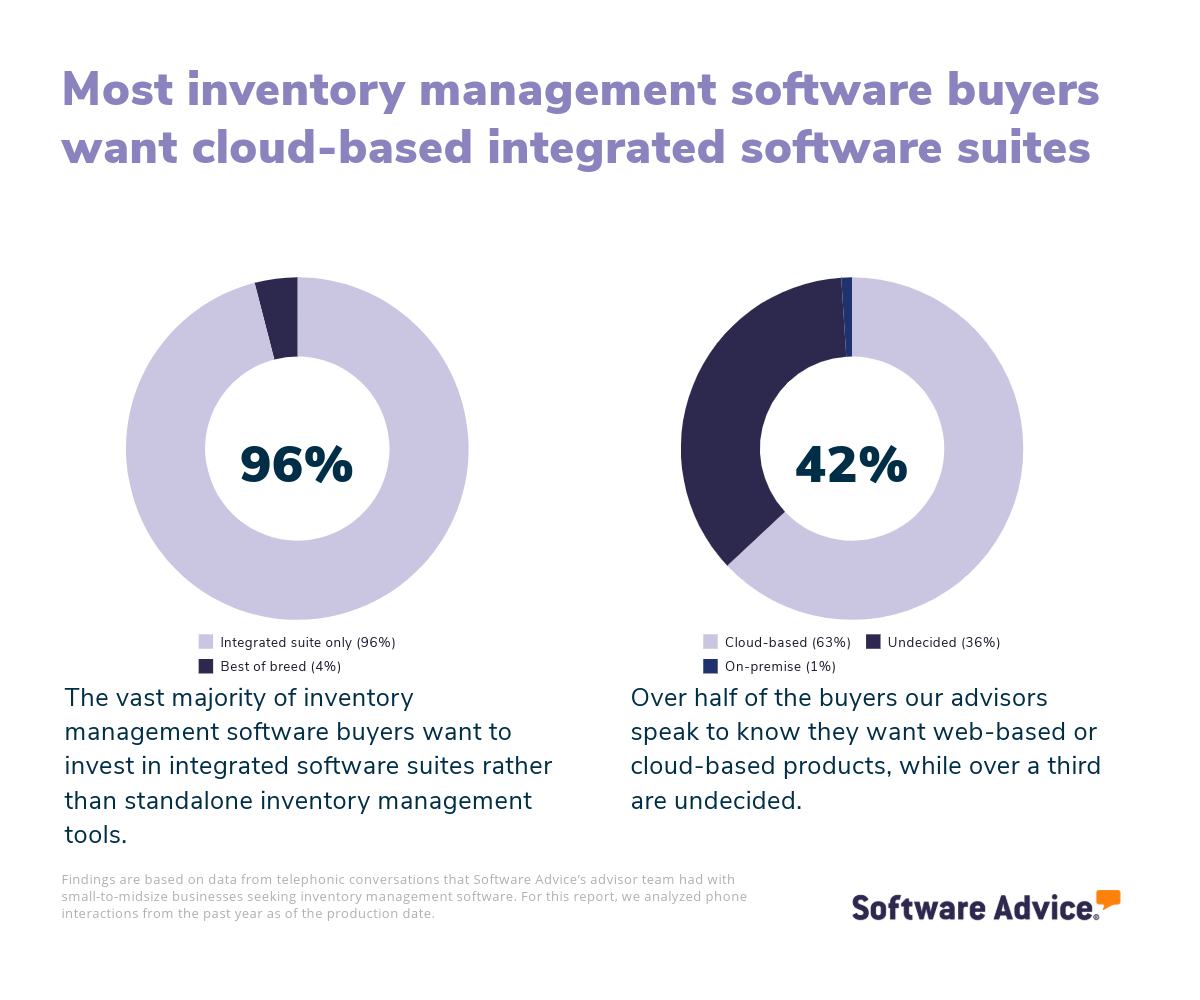
Cloud-based inventory management software can be accessed online and offers remote access, subscription pricing, provider-managed updates, easy scalability, and integration with other cloud apps. On-premise software is installed locally and requires significant upfront investment, user-managed maintenance, greater customization, and more control over security. Each suits different needs based on budget, IT resources, and scalability.
Consider the full cost of adoption
When purchasing software, it’s important to find a tool that fits within your budget, provides support for future growth phases, and has all the features and functionality you need. Your budget should include the initial cost of adopting the software, plus common long-term costs, like upgrade fees, maintenance fees, or data storage fees.
Ease of use is an overlooked factor that often adds cost in the long term. You need to select a tool that’s easy enough to learn that it doesn’t impact end users’ work to the extent that it costs your business too much time and money in the onboarding phase and beyond. Choose a user-friendly tool that you’re likely to stick with, from a vendor that provides responsive customer support, and you can save yourself some money and headaches over time.
2. Make a shortlist
As you browse our catalog of 886 inventory management products, put together a shortlist of 2-3 products and vendors that would be a good fit for your business, based on the requirements you identified in step 1. Here are a few strategies for creating your shortlist.
Get qualified help from an advisor
Software Advice advisors like Saul Sanchez and Bryan Dengler have experience helping hundreds of businesses find inventory management solutions that support their unique needs and budgets. For advice from experts like them, you can chat online with us right now or schedule a phone call. During your conversation, these advisors can help you identify a shortlist of options that align with your requirements.
Check out the leading inventory management tools
Want to do some of your own research before speaking with an advisor? Explore our inventory management FrontRunners report. This is a list of products that have earned top user ratings.
To be eligible for consideration, products must:
Have at least 20 unique user reviews from the last 24 months
Be a stand-alone WMS product
Offer these core features: inventory management, order management, and receiving
Check out our full methodology for a more detailed understanding of how we compiled the FrontRunners list.
3. Select your best option
Once you’ve put together a shortlist, it’s time to get in touch with vendors to learn more about your top options through demos and free trials.
Schedule vendor demos
Demo sessions allow you to see how software works and get personalized information about pricing, features, technical support, and training resources. You should ask the following questions during these demo sessions:
What kind of customer support do you offer?
How frequently do you update your software?
What customizations do you offer in your subscription plans?
How do you protect customer data?
Be sure to include end users at your business in the demo sessions, so they can give their opinion on how user-friendly the software seems before you buy it and learn the hard way.
Be sure to engage all the vendors on your shortlist so you can get the full picture of your options.
Take advantage of free trials
Free trials are the best way to try out each product on your shortlist and can protect you from making a disastrous purchase of a tool that turns out to be buggy or not user-friendly. Involve end users and your IT team in free trials so you can get the most helpful feedback.
Don’t hesitate to make a final decision
Our research shows that software buyers are most satisfied with their purchases when they spend no more than three months evaluating their options. [4] Don’t drag out your deliberations—once you’ve identified a solid option through demos and free trials, go ahead and make your purchase decision so you can start reaping the tool’s benefits.
4. Make the most of your new inventory management software
Once you’ve purchased your software, it’s time to implement it. Here are some tips for getting your new software up and running smoothly:
Train your team
To maximize the potential of your inventory management software, provide thorough training for your team. Conduct hands-on sessions and offer resources like videos and guides. Remember that even user-friendly products require an adjustment period.
Migrate data the right way
Clean and organize your existing inventory data before you migrate it to the new tool. Transferring inaccurate data makes implementation unnecessarily confusing and time-consuming.
Integrate with existing processes
Integration involves more than just connecting systems; it requires aligning the new tool with your team's workflows. Assign responsibilities for tasks related to the software, establish communication guidelines, and customize features to enhance efficiency without complicating current processes.
Measure success
Begin tracking metrics like customer satisfaction, fill rate, and inventory accuracy right after implementation. Regularly review these KPIs to assess whether the new tool is boosting efficiency. You know your new tool is working if it’s helping you prevent stockouts and overstock, notifying you consistently when stock is low, and helping you forecast demand.
You should also source feedback from end users and promptly address any bottlenecks concerning ease of use or further training needs.
For more help with the implementation stage, check out our five-step guide to a successful software implementation.
Software related to inventory management
Depending on the size and complexity of their business, some buyers may need to look beyond inventory management tools to broad, integrated suites of software designed to manage multiple other areas of operation, including employees, production, supply chain, safety, suppliers, and accounting. Other buyers, such as those with direct-to-consumer retail businesses, may want more point-of-sale or eCommerce management functionality in addition to inventory management.
If this sounds like you, consider checking out these other software categories:
Material requirements planning (MRP) software: This software helps businesses calculate the materials or components required for manufacturing processes. It is used to track inventory levels of materials, components, and products that should be kept in stock in order to fulfill production and meet demand.
Enterprise resource planning (ERP) software: This software integrates all of an organization's departments and functions into a single system. These systems handle processes including manufacturing, logistics, distribution, inventory, shipping, invoicing, and accounting. ERP applications can also control business-side functions, including sales, billing, and human resources management.
eCommerce management software: eCommerce software enables businesses to conduct transactions for goods and services wholly or partially over the Internet. Typical features for eCommerce applications include online shopping carts, product cataloging, customer accounts, order tracking, and website management. eCommerce solutions often provide integration tools for inventory control, customer relationship management, and payment processing. eCommerce software is related to order management software and point of sale software.
Supply chain management software: This software automates the entire supply chain lifecycle, from raw material management to delivery of finished goods to the consumer. These applications allow for organization-wide order processing, transportation, and warehouse management along with planning and forecasting functionalities. Supply chain management software provides for efficient operation through the distribution and synchronization of this key data across multiple locations.
Warehouse management software: This software helps streamline the movement, tracking, and storage of materials throughout the warehouse. This type of software often includes inventory management, shipment tracking, and barcode scanning. These solutions are typically used by manufacturing, retail, and distribution companies to optimize supply chain operations. Warehouse Management software is related to Distribution software, Logistics software, and Inventory software.
More resources for your inventory management journey
4 Key Asset Tracking Software Features and Top Products That Offer Them
Economic Concerns, Talent Shortages, and Cybersecurity Are Top Challenges for SMB Supply Chains
About our contributors
Author
Molly Burke is a senior analyst and writer for Software Advice. She covers customer experience and marketing in the retail and restaurant industries, with a focus on how emerging technology is transforming the way everyday people shop. Her research helps business owners make software investment decisions that will help them navigate the ever-shifting retail landscape.
Molly’s research and analysis is informed by more than 120,000 authentic user reviews on Software Advice and nearly 8,000 interactions between Software Advice software advisors and retail software buyers. Molly also regularly analyzes market sentiment by conducting surveys of retail and restaurant leaders, as well as consumers, so she can provide the most up-to-date and helpful information to small and midsize businesses purchasing software or services.
Her insights on generative AI, social media, and other tech trends have been featured in The New York Times, Vogue, BBC, CNBC, Forbes, and the Financial Times, among other publications.
Editor
Caroline Rousseau is a content editor at Software Advice. A former content analyst, Caroline has, for the past five years, built, written and edited research reports about technological trends, opportunities, and challenges with a SMB audience in mind. Her content has been featured in French Tier 1 media including Le Monde, L’Express and Le Figaro, among other publications.
Her previous experience as a graphic designer, translator and LQA specialist in various industries converged into a skill set that allows her to create compelling content about today’s business matters. Caroline’s personal interests include literature and art and she has a passion for Albert Camus, graphic novels and drawing.
Advisors
Bryan Dengler is a senior advisor. He joined Software Advice in 2022, and is based in Austin, TX.
As part of the software advisor team, Bryan helps professionals from a wide range of industries who are seeking accounting, project management, manufacturing, learning management, and supply chain software. He provides a shortlist of personalized technology recommendations based on budget, business goals, and other specific needs.
Bryan’s favorite part of being a software advisor is knowing he’s made a valuable difference in a buyer’s life with each advising session he holds.
Saul Sanchez is a senior advisor. He joined Software Advice in 2019 and is based in Austin, TX.
Saul works directly with small-business leaders to connect them with best fit software providers. He assesses the technology needs of small businesses seeking a wide variety of software, including business intelligence, inventory management, manufacturing, and supply chain tools. Through one-to-one conversations, Saul provides a shortlist of potential matches.
His favorite part of being a software advisor is experiencing a buyer’s relief when they discover how much time and energy he’s saved them by helping narrow down the list of many possible options on the mar
Sources
Software Advice advisor call notes: Findings are based on data from telephonic conversations that Software Advice’s advisor team had with small-to-midsize businesses seeking inventory management software. For this report, we analyzed phone interactions from the past year as of the production date. Read the complete methodology.
Software Advice reviews data: Software Advice reviews are collected from verified users for individual software products. For this report, we analyzed reviews from the past year as of the production date. Read the complete methodology.
Software Advice software pricing data: Only products with publicly available pricing information and qualified software products within the category, as of the production date, are included in the pricing analysis. Read the complete methodology.
Software Advice’s 2025 Tech Trends Survey was conducted online in August 2024 among 3,500 respondents in the U.S. (n=700), U.K. (n=350), Canada (n=350), Australia (n=350), France (n=350), India (n=350), Germany (n=350), Brazil (n=350), and Japan (n=350), at businesses across multiple industries and company sizes (five or more employees). The survey was designed to understand the timeline, organizational challenges, adoption & budget, vendor research behaviors, ROI expectations, and satisfaction levels for software buyers. Respondents were screened to ensure their involvement in business software purchasing decisions.
Inventory Management FAQs
- What is the most common inventory management software?
- Can I use Excel for inventory management?
From our advisors’ conversations with software buyers looking to upgrade from using spreadsheets to track inventory, we know that Excel does not offer the efficiency, functionality, or reliability users need for inventory management. Unlike using dedicated inventory management software, using spreadsheets is a largely manual process that puts you at risk of data entry errors and does not provide real-time insights on stock levels.
- Is there a free inventory management software?
Many inventory management software vendors offer free versions of their product, as well as free trials of paid subscription plans. Check out our list of the 7 top-rated free inventory management software to get started, or speak with an advisor about free options in this category.
- Which inventory system is best for small businesses?
Fishbowl is the highest-rated inventory management tool for small businesses, which we define as businesses with 1 to 499 employees.
- What is the best simple inventory app?
Among the most popular inventory management products in our catalog, Salesforce Commerce Cloud is highly rated for ease of use.
- How much does inventory software cost?
Most inventory management software is priced at a flat monthly rate or on a per-user per-month basis. Monthly, inventory management software ranges from $92 for entry-level tools to up to $2,250 for higher-end tools. Priced using a per user per month basis, costs range from $18 per user per month on the low end to up to $150 per user per month for high-end products. Many vendors offer free products or free trials of paid subscription plans.
- Which software is recommended for doing inventory management?
We recommend using one of the highly rated products we listed above in our Best Rated Inventory Management Software list. The right tool will depend on your business’s specific needs, so we included tools that are highly rated for affordability, value for money, ease of use, customer service, functionality, small businesses, and feature-specific rankings.