


Best Distribution CRM Software of 2026
Updated March 19, 2026 at 3:46 PM
- Popular Comparisons
- Buyers Guide
Compare Products
Showing 1 - 25 of 255 products
Compare Products
Sort by
Reviews: Sorts listings by the number of user reviews we have published, greatest to least.
Average Rating: Sorts listings by overall star rating based on user reviews, highest to lowest.
Alphabetically (A-Z): Sorts listings by product name from A to Z.

Claritysoft is a cloud-based customer relationship management (CRM) solution designed for midsize and large enterprise businesse...Read more about Claritysoft CRM


Claritysoft CRM's Best Rated Features
See All
Claritysoft CRM's Worst Rated Features
See All

LeadMaster is a SaaS-based all-in-one lead management solution that offers capabilities to capture, track and follow up with lea...Read more about LeadMaster


Supercharge your sales process with Sales Hub, a powerful and easy-to-use sales CRM that includes sales engagement tools, config...Read more about HubSpot Sales Hub

HubSpot Sales Hub's Best Rated Features
See All
HubSpot Sales Hub's Worst Rated Features
See All

Pipeliner has revolutionized CRM with our unique visual interface, no-code workflow automation engine, and instant, dynamic insi...Read more about Pipeliner CRM


Pipeliner CRM's Best Rated Features
See All
Pipeliner CRM's Worst Rated Features
See All

monday CRM is a sales platform that helps businesses streamline sales cycle. The platform caters to a range of industries, such ...Read more about monday CRM

monday CRM's Best Rated Features
See All
monday CRM's Worst Rated Features
See All

Sales Cloud is equipped with customer relationship management (CRM) functionality that encompasses lead management, marketing au...Read more about Salesforce Sales Cloud
Salesforce Sales Cloud's Best Rated Features
See All
Salesforce Sales Cloud's Worst Rated Features
See All

SalesNOW by Interchange Solutions Inc. is a cloud-based customer relationship management (CRM) and sales force automation soluti...Read more about SalesNOW

SalesNOW's Best Rated Features
See All
SalesNOW's Worst Rated Features
See All

CallProof is built for leaders who manage outside and field sales teams and want a simple way to know what’s really happening in...Read more about CallProof


Document360 is an AI-powered knowledge base platform built for enterprises that need secure, scalable documentation. It centrali...Read more about Document360

Document360's Best Rated Features
See All
Document360's Worst Rated Features
See All

Zoho CRM is a cloud-based business management platform that caters to businesses of all sizes. It offers sales and marketing aut...Read more about Zoho CRM
Zoho CRM's Best Rated Features
See All
Zoho CRM's Worst Rated Features
See All

SAP Customer Experience is a cloud-based customer relationship management solution that helps small and mid-size businesses mana...Read more about SAP Customer Experience
SAP Customer Experience's Best Rated Features
See All
SAP Customer Experience's Worst Rated Features
See All

SalesOutlook CRM is a comprehensive customer relationship management (CRM) and email marketing system that embeds into Microsoft...Read more about SalesOutlook CRM

SalesOutlook CRM's Best Rated Features
See All
SalesOutlook CRM's Worst Rated Features
See All

Workbooks is the 'No-BS' CRM. Workbooks designs, develops and implements its own software, which is targeted specifically at m...Read more about Workbooks
Workbooks's Best Rated Features
See All
Workbooks's Worst Rated Features
See All

HelpCrunch is a customer communication platform combining live chat, email marketing automation and a help desk in one solution....Read more about HelpCrunch

HelpCrunch's Best Rated Features
See All
HelpCrunch's Worst Rated Features
See All

Universal Knowledge is a knowledge management solution designed by Knowledge Powered Solutions to increase the efficiency of age...Read more about Universal Knowledge

NetSuite is an AI-powered cloud-based business management suite that incorporates ERP, financial management, CRM and eCommerce f...Read more about NetSuite


NetSuite's Best Rated Features
See All
NetSuite's Worst Rated Features
See All

Salesforce Service Cloud is a customer service platform designed to support organizations in managing interactions across multip...Read more about Salesforce Service Cloud

Salesforce Service Cloud's Best Rated Features
See All
Salesforce Service Cloud's Worst Rated Features
See All

Agiloft is a cloud-based contract management software that helps businesses streamline the entire contract lifecycle with custom...Read more about Agiloft

Salesken is a sales enablement platform that helps businesses leverage artificial intelligence (AI) technology to generate leads...Read more about Salesken
Salesken's Best Rated Features
See All
Salesken's Worst Rated Features
See All

Quickbase is a work management and application platform designed to help organizations centralize and manage complex projects an...Read more about Quickbase
Quickbase's Best Rated Features
See All
Quickbase's Worst Rated Features
See All

Bigin by Zoho CRM is a pipeline-centric CRM that is built and priced for small businesses. Minimal by design and focused on grea...Read more about Bigin by Zoho CRM
Bigin by Zoho CRM's Best Rated Features
See All
Bigin by Zoho CRM's Worst Rated Features
See All

Brevo is a cloud-based email marketing tool suited for organizations of all sizes. It offers marketing automation, email campaig...Read more about Brevo
Brevo's Best Rated Features
See All
Brevo's Worst Rated Features
See All

Flowlu is a cloud-based, all-in-one business management solution designed for teams of all sizes and industries. Whether you're ...Read more about Flowlu
Flowlu's Best Rated Features
See All
Flowlu's Worst Rated Features
See All

CyberSentriq is the unified brand created through the merger of TitanHQ and Redstor, bringing together more than 25 years of awa...Read more about LiveAgent
LiveAgent's Best Rated Features
See All
LiveAgent's Worst Rated Features
See All

Google Contacts is a cloud-based solution that allows enterprises to store and manage contacts in a built-in directory. Professi...Read more about Google Contacts
Google Contacts's Best Rated Features
See All
Google Contacts's Worst Rated Features
See All
Popular Comparisons


Buyers Guide
This detailed guide will help you find and buy the right distribution crm software for you and your business.
Last Updated on January 27, 2025Those in the distribution industry, like any other business, stand to benefit by using customer relationship management (CRM) software—through increased customer satisfaction and sales, for instance. Also, as in other industries, our research finds that distributors want a CRM tool that offers features relevant to their field.
For distributors, customer relationships are tied very closely to the products they distribute; they fall in between the customer and the manufacturer whose products they're distributing. That's why the CRM tool they use should not just let them manage customers but also the products flowing to them.
There are plenty of software vendors that are aware if this need, and thus build or modify CRM tools to suit distributors' unique requirements.
In this buyer's guide, we'll look at the core features of distribution CRM software and what you should know before making a purchase.
Here's what we'll cover:
Common features of distribution CRM
What is a distribution CRM?
A distribution CRM is a software tool for managing customers as well as products in a centralized location. This type of software comes with monitoring and reporting functionalities that help distributors manage customer information, track product orders, generate invoices/quotes, and automate marketing efforts.
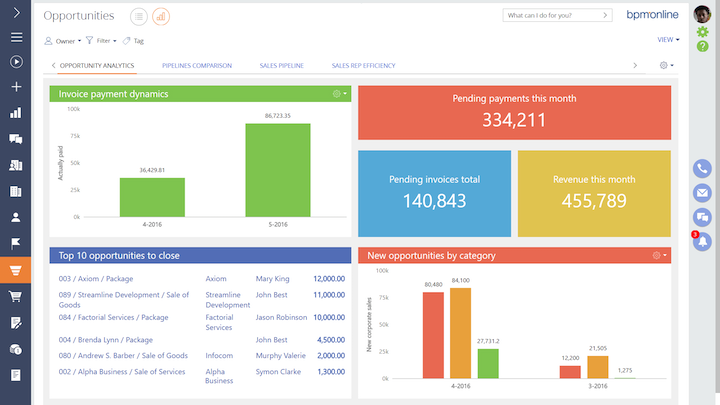
Tracking prospects, invoices, and payments in bpm'online
Common features of distribution CRM
Distribution CRMs offer certain common functionalities that cater to a wide range of distribution businesses: food distribution, consumer packaged goods, fuel delivery, and so on.
Let's look at these functionalities more closely.
Create a centralized database of customer data such as shipping address and phone number. | |
Interaction tracking | Track communications with contacts via multiple channels, such as emails, chat conversations, and phone calls. |
Capture and store details of potential clients, in a central location, and track their conversions. | |
Quote management | Allow sales representatives to automatically generate price quotes of products for customers. |
Order and invoice management | Process orders and create invoices using shipping and billing details. |
Keep inventory records based on item size, color, and other attributes. Monitor stock levels. | |
Track how items are arranged and stored in the warehouse and optimize their storage for quick order processing. | |
Workflow automation | Create and monitor tasks that sales agents need to complete as customers move along the sales pipeline. |
Store and track documents, such as bills of material, product quotes, and invoices in a centralized location. | |
Reporting and analytics | Monitor and analyze the performance of your sales team with detailed reports and analytical dashboards. |
What type of buyer are you?
The right distribution CRM depends on the size and specific requirements of your business.
Here are three common types of distribution CRM buyers and their chief concerns:
Small and midsize businesses (fewer than 1,000 employees): These buyers typically have limited budgets for software. As a result, they're primarily concerned with a solution's pricing. This makes cloud-based CRM tools preferable over on-premise tools, as cloud-based deployment requires significantly lower upfront investment.
Large enterprises (more than 1,000 employees): These buyers need a tool with advanced functionalities. Enterprise resource planning software that offers CRM as a built-in module is a viable option for these buyers. ERP tools typically also offer accounting and project management functionalities; this can serve cross-functional needs by allowing teams to use a single solution to manage different business processes.
Best-of-breed buyers: These buyers could belong to either of the above categories. They are typically looking to solve a specific business need with software. For instance, a wholesale distributor that wants software primarily to process customer orders more quickly might need distribution inventory management software, instead of a CRM tool. Likewise, if you're looking to improve after-sales customer service, you might go for help desk software, which is a part of the larger family of CRM solutions.
Key considerations
To choose the right manufacturing CRM for your business, you must take into account factors such as total cost and integration requirements.
Let's look at these more closely:
Total cost of software: Understanding the total cost of software means looking beyond its procurement cost (usually a one-time license fee for on-premise and a recurring subscription for cloud-based solutions). Businesses also need to account for costs incurred during installation, customization, maintenance and support, data migration, training, and so on.
Integration requirements: As you evaluate options, you need to consider a CRM's ability to integrate with the tools you already use, or intend to use. This will ensure seamless data flow between otherwise disparate tools, reducing effort and errors due to manually copying and pasting data, and should also speed up processes. Email marketing, project management, and help desk software solutions are some popular integration options.
Note: The applications selected in this article are examples to show a feature in context and are not intended as endorsements or recommendations. They have been obtained from sources believed to be reliable at the time of publication.