


Best Employee Recognition Software of 2026
Updated February 18, 2026 at 9:25 AM

Written by Emilie Audubert
Content Analyst

Edited by Mehar Luthra
Team Lead, Content

Reviewed by Dan Schawbel
Contributor

Talk with us for a free 15-min consultation
Expert advisors like Jacqueline, who have helped 1,000+ companies, can find the right software for your needs.
- All Software
- Software Advice FrontRunners
- Popular Comparisons
- Buyer's Guide
- Frequently Asked Questions
Employee recognition software helps HR teams and people managers celebrate achievements, boost morale, and reinforce company values. Navigating 200 products, each built for different team sizes, reward models, or engagement goals, can be overwhelming. To help you narrow it down, I worked with our employee recognition software advisors to curate a list of recommended productsi and a list of the employee recognition software Frontrunners based on user reviews. For further information, read my employee recognition software buyer's guide.
Employee Recognition Software
Sort by
Reviews: Sorts listings by the number of user reviews we have published, greatest to least.
Average Rating: Sorts listings by overall star rating based on user reviews, highest to lowest.
Alphabetically (A-Z): Sorts listings by product name from A to Z.

HiBob is a human resources management platform that combines HR, talent management, payroll, and financial planning tools in one...Read more about HiBob


HiBob's Best Rated Features
See All
HiBob's Worst Rated Features
See All

Employment Hero is a cloud-based human resource management (HRM) system for small and medium businesses on the up. The solution ...Read more about Employment Hero

Employment Hero's Best Rated Features
See All
Employment Hero's Worst Rated Features
See All

Engagedly is an AI-driven talent management software designed to support organizations in managing, developing, and engaging the...Read more about Engagedly


Flex Surveys is an employee engagement platform that helps businesses conduct surveys and analyze employee satisfaction through ...Read more about Flex Surveys


Flex Surveys's Best Rated Features
See All
Flex Surveys's Worst Rated Features
See All

Darwinbox is a new-age and disruptive mobile-first, cloud-based HRMS platform built for large enterprises to attract, engage and...Read more about Darwinbox
Darwinbox's Best Rated Features
See All
Darwinbox's Worst Rated Features
See All
Software Advice FrontRunners 2026

(5025)

(743)

(2906)

(2157)

(4839)

(378)

(692)

(576)

(201)

(1180)
Best for Mobile app

Connecteam

According to our user reviews, Connecteam is the most requested by users for mobile app out of the most popular tools.
Connecteam is best for organizations managing mobile or deskless teams who need robust scheduling and communication tools on the go. Our reviewers say its intuitive mobile app streamlines time tracking, shift management, and team communication, making it easy for employees and managers to stay connected and efficient from anywhere.
- Reviewers Perspective
"That I can schedule teams, record time to develop pay, chat with members and send positive updates while creating reports all in real time in the field or at the office."
JRJonathan Roach
Operations Manager
Used for 1-2 years
We analyzed 890 verified user reviews for Connecteam to find out what actual users really think.
Scheduling
Managers streamline shift planning with Connecteam’s centralized scheduling, time tracking, and communication tools. Flexible templates and mobile access support diverse shift types, reducing administrative workload for SMBs.Ease of Use
Teams quickly onboard and navigate Connecteam’s clean interface. Tutorials and accessible app design minimize technical barriers, letting managers focus on core business tasks without confusion.Team Management
Leaders use Connecteam to coordinate remote or field-based staff, leveraging real-time communication and resource sharing. Custom workflows and department grouping help maintain productivity and reduce miscommunication. - Screenshots


Best for Usability

Nectar

In our analysis of Employee Recognition products with the most market demand, Nectar is the highest rated for its usability out of the most popular tools.
Nectar is best for SMBs seeking a highly usable employee recognition and rewards platform that encourages peer-to-peer engagement. Our reviewers say the platform is user-friendly, offers quick onboarding, and makes it easy to recognize colleagues and redeem rewards, boosting morale and team connection.
- Reviewers Perspective
"A simple, user-friendly platform that boosts employee morale through peer recognition, customizable rewards, automated celebrations, and strong integrations—all with solid security and support."
HHHeather Hancock
MA
Used for 2+ years
We analyzed 444 verified user reviews for Nectar to find out what actual users really think.
Employee Rewards
HR teams use Nectar to recognize colleagues with points redeemable for diverse rewards. Customization, goal setting, and challenges drive engagement and motivation.Employee Recognition
Managers publicly celebrate achievements and tie recognition to core values. The intuitive design enables seamless acknowledgment across departments, supporting a culture of appreciation.Gift Cards
Employees redeem Nectar points for a wide selection of gift cards. The process is quick and easy, with options for various needs and locations, enhancing tangible motivation. - Key FeaturesNectar's scoreCategory average
Employee Reward Programs
4.774.78 category average
Peer-to-Peer Recognition
4.894.72 category average
Rewards Catalog
4.644.60 category average
- Screenshots


Best for User Interface

Achievers

Achievers is the highest rated for its user interface out of the most popular tools.
Achievers is best for businesses prioritizing a standout user interface for recognition and rewards. Our reviewers say its intuitive design makes it simple to recognize peers, redeem a wide variety of rewards, and track engagement, which helps foster a culture of appreciation.
- Reviewers Perspective
"I really like that the app allows us to share the recognitions we receive with Workday, which helps us strengthen our resumes and support periodic performance evaluations."
EEEdgar Encastin
Design Engineer
Used for 2+ years
We analyzed 837 verified user reviews for Achievers to find out what actual users really think.
Recognition
Managers tailor recognition to company culture and individual preferences. The social feed and real-time notifications make acknowledgments visible and meaningful across teams.Gift Cards
Employees redeem points for virtual or physical gift cards from popular brands. The process is quick, with a wide range of choices for different preferences and needs.Rewards
Users earn, track, and redeem rewards easily. Customizable recognition and a variety of reward options motivate consistent participation and foster a positive work environment. - Key FeaturesAchievers's scoreCategory average
Employee Reward Programs
4.674.78 category average
Peer-to-Peer Recognition
4.764.72 category average
Rewards Catalog
4.404.60 category average
- Screenshots


Highly Rated for Collaboration

Workhuman

According to our user reviews, Workhuman is the highest rated for collaboration out of the most popular tools.
Workhuman is highly rated for teams focused on collaboration and organization-wide recognition. Our reviewers point out that its platform supports real-time, visible recognition and offers a broad selection of rewards, making it easy for colleagues to celebrate achievements together.
- Reviewers Perspective
"It's an awesome and complete tool to recognize employees, the best perk is that the tool is very efficient, so whenever there is a recognition to anyone is fast and that credit is available to be used for a lot of variety of gift cards, those gift cards also come really fast to your email and they always work."
RARicardo Aguiluz
Quality
Used for 2+ years
We analyzed 693 verified user reviews for Workhuman to find out what actual users really think.
Ease of Use
Managers and employees navigate Workhuman easily, using clear menus and straightforward steps. Accessibility across devices streamlines recognition and reward redemption for daily tasks.Recognition
Leaders facilitate meaningful recognition with customizable messages and instant notifications. Real-time visibility and reporting features support a supportive work environment.Rewards
Employees choose from a variety of items, gift cards, and experiences. Immediate access and the option to pay the difference if points are insufficient provide flexibility for diverse needs. - Key FeaturesWorkhuman's scoreCategory average
Employee Reward Programs
4.714.78 category average
Peer-to-Peer Recognition
4.714.72 category average
Rewards Catalog
4.374.60 category average
- Screenshots


Best for Customer Satisfaction

Awardco

In our analysis of Employee Recognition products with the most market demand, Awardco is the highest rated for customer satisfaction out of the most popular tools.
Awardco is best for organizations seeking high customer satisfaction in employee recognition and rewards. Our reviewers say it provides flexible reward options—including Amazon integration and gift cards—and makes it easy for employees to redeem points, contributing to a positive recognition experience.
- Reviewers Perspective
"From customizing our programs, to easy notifications for employees and even managers, this system has allowed our employees to recognize each other, for leaders to recognize employees, and allow employees to choose how they redeem "points.""
JKJohanna Krogh
Senior Manager of Communications
Used for 2+ years
We analyzed 788 verified user reviews for Awardco to find out what actual users really think.
Employee Recognition
Managers and peers use Awardco to acknowledge achievements and milestones. Flexible point awarding and diverse reward options support personalized, impactful recognition.Gift Cards
Employees redeem points for digital or physical gift cards from popular retailers and restaurants. The process is convenient, motivating, and adaptable for different preferences.Options
Users select from a wide range of products, services, and experiences. The ability to save for larger rewards or combine points with cash makes Awardco adaptable for varied needs. - Key FeaturesAwardco's scoreCategory average
Employee Reward Programs
4.874.78 category average
Peer-to-Peer Recognition
4.734.72 category average
Rewards Catalog
4.724.60 category average
- Screenshots


Highly Rated for Customization

Matter

According to our user reviews, Matter is the highest rated for customization out of the most popular tools.
Matter is highly rated for teams needing customizable recognition and feedback workflows. Our reviewers say it offers flexible integration with Slack and Teams, easy customization of kudos and feedback, and supports ongoing team engagement and soft skill development.
- Reviewers Perspective
"Easy integration & customization within Slack, so easy to add to multiple channels to provide shoutouts across different teams, fosters a fantastic sense of community and gives a quick and easy way to appreciate team members going the extra mile."
AHAmy Hutchinson
Ops Director
Used for 6-12 months
We analyzed 251 verified user reviews for Matter to find out what actual users really think.
Feedback
Managers encourage regular peer-to-peer feedback with Matter, using prompts and reporting tools to generate actionable insights. This supports engagement and recognition in distributed teams.Ease of Use
Administrators quickly implement Matter with its intuitive interface and clear instructions. Customization and device accessibility enable fast adoption across all staff levels.Team Collaboration
Leaders foster team unity by using Matter to celebrate achievements and reinforce skill development. Transparent communication and positive reinforcement help build a motivated workforce, especially in remote environments. - Key FeaturesMatter's scoreCategory average
Employee Reward Programs
4.684.78 category average
Peer-to-Peer Recognition
4.734.72 category average
Rewards Catalog
4.474.60 category average
- Screenshots


Most Rated for Enterprise

Bucketlist

In our analysis of Employee Recognition products with the most market demand, Bucketlist is the most requested by enterprises out of the most popular tools.
Bucketlist is most rated for enterprise organizations looking for a scalable recognition and rewards solution. Our reviewers highlight its broad reward catalog, ability to personalize recognition, and options for both experiences and gift cards, which help drive engagement across large teams.
- Reviewers Perspective
"The ability to choose between unique experiences, convert points to gift cards, or even make charitable donations really sets the platform apart."
AMAlex Mejia
Manager
Used for 1-2 years
We analyzed 396 verified user reviews for Bucketlist to find out what actual users really think.
Rewards
Managers reward colleagues with points redeemable for a variety of prizes. The broad catalog supports diverse interests and motivates participation across the workplace.Gift Cards
Employees redeem points for gift cards from many vendors, including Amazon and Walmart. Fast email delivery and flexible selection support everyday purchases and special occasions.Recognition
Leaders recognize team members for small wins and achievements. Notifications and visibility help foster a positive work culture and encourage regular acknowledgment. - Key FeaturesBucketlist's scoreCategory average
Employee Reward Programs
4.844.78 category average
Peer-to-Peer Recognition
4.814.72 category average
Rewards Catalog
4.754.60 category average
- Screenshots


Most Rated for SMBs

Recognize

According to our user reviews, Recognize is the most requested by small businesses out of the most popular tools.
Recognize is most rated for SMBs that want an integrated recognition and rewards tool within platforms like Slack or Yammer. Our reviewers say it’s easy to use, supports both public and private recognition, and streamlines reward redemption, making it practical for everyday appreciation.
- Reviewers Perspective
"Great way to recognize those those that are out in the field, working day in and day out that are the building blocks of the company for its nurse case management work."
DTDiane Thompson
Nurse Case Manager
Used for 1-2 years
We analyzed 325 verified user reviews for Recognize to find out what actual users really think.
Ease of Use
Managers and employees navigate Recognize’s intuitive platform with ease. The streamlined process encourages regular participation and reduces the learning curve across organizations.Employee Recognition
Leaders foster a culture of appreciation by making recognition easy for all staff. The platform boosts morale and supports retention through consistent, accessible celebration of achievements.Coworker Recognition
Employees highlight achievements and efforts of coworkers, choosing public or private recognition. This flexibility helps build strong team connections and a supportive environment. - Key FeaturesRecognize's scoreCategory average
Employee Reward Programs
4.674.78 category average
Peer-to-Peer Recognition
4.784.72 category average
Rewards Catalog
4.564.60 category average
- Screenshots


Best for Quick Implementation

Lattice

According to our user reviews, Lattice is the most requested by users for quick implementation out of the most popular tools.
Lattice is best for organizations needing quick implementation of performance management and feedback processes. Our reviewers say onboarding is straightforward, and the platform centralizes reviews, feedback, and goal tracking, which helps teams adopt and benefit from the system rapidly.
- Reviewers Perspective
"I appreciate that our "Praise" channel is integrated within Lattice (or vice versa) - that allows one to document feedback for colleagues and share it with the HR Team while also praising the colleague publicly within the organization."
BCBEN COLYER
CUSTOMER SUCCESS MANAGER
Used for 1-2 years
We analyzed 136 verified user reviews for Lattice to find out what actual users really think.
Performance Review
Managers simplify performance reviews with Lattice’s intuitive interface and customizable cycles. The platform helps track trends and set goals, maintaining clear records over time.Ease of Use
HR teams transition smoothly to Lattice, benefiting from a clean design that supports efficient workflow. Goal and review management becomes intuitive after initial onboarding.Employee Management
Administrators oversee teams, provide troubleshooting guidance, and facilitate praise with Lattice’s intuitive design. The platform supports engagement and streamlines HR tasks across the organization. - Screenshots


Highly Rated for Integrations

Motivosity

Motivosity is the highest rated for integrations out of the most popular tools, based on our analysis of Employee Recognition products with the most market demand.
Motivosity is highly rated for organizations that value seamless integrations in their recognition and rewards programs. Our reviewers point out that it connects easily with other tools, supports both public and private recognition, and offers flexible monetary rewards, enhancing engagement across distributed teams.
- Reviewers Perspective
"It creates a social media space for team engagement that resonates with Gen Z and Millennials which is the rising population in your team."
AHAmber Herman
Organizational Sales Leader
Used for 2+ years
We analyzed 561 verified user reviews for Motivosity to find out what actual users really think.
Team Recognition
Managers use Motivosity to celebrate achievements across departments, supporting remote teams and enabling public appreciation. The platform strengthens team bonds and encourages collaboration.Employee Recognition
Motivosity lets managers and peers give public or private recognition, helping employees feel connected and valued. Regular celebration of accomplishments supports positive behaviors and retention.Ease of Use
Administrators streamline recognition processes with Motivosity’s intuitive interface. Employees—from new hires to veterans—participate easily, reducing barriers and confusion. - Key FeaturesMotivosity's scoreCategory average
Employee Reward Programs
4.864.78 category average
Peer-to-Peer Recognition
4.864.72 category average
Rewards Catalog
4.564.60 category average
- Screenshots


Kudos

- Reviewers Perspective
"I really enjoy the ease of use and the point earning system that allows employees to then trade those points in for prizes or gifts"
MPMegan Pearson
Specialist
Used for 1-2 years
We analyzed 607 verified user reviews for Kudos to find out what actual users really think.
Rewards and Recognition
Kudos’ point system lets managers reward colleagues and enables employees to redeem points for gifts and vouchers. This supports both public and private recognition, streamlining rewards for day-to-day achievements in SMB environments.Employee Recognition
Kudos enables organizations to recognize coworkers’ contributions with a user-friendly interface, allowing for public and immediate recognition. This helps teams acknowledge achievements across departments and boosts engagement.Ease of Use
Kudos’ intuitive design requires little onboarding, making it easy for all technical skill levels to give recognition. This encourages regular participation and helps maintain a positive workplace culture. - Key FeaturesKudos's scoreCategory average
Employee Reward Programs
4.784.78 category average
Peer-to-Peer Recognition
4.794.72 category average
Rewards Catalog
4.544.60 category average
- Screenshots


Assembly

- Reviewers Perspective
"Employee performance is able to be recognized by a wider audience, and recognition allows for them to cash out for rewards such as company perks, gift cards, or donations."
CDCara DeBlois
Recruiter
Used for 2+ years
We analyzed 109 verified user reviews for Assembly to find out what actual users really think.
Ease of Use
Assembly’s interface makes it easy to organize tasks, share recognition, and access features, helping managers streamline feedback and recognition processes.Rewards
Managers can customize recognition programs and select from a wide variety of rewards, including points and carrots, which can be redeemed for items or experiences.Gift Cards
Assembly offers a wide selection of gift cards for redeeming recognition points, making it straightforward for employees to receive tangible rewards for achievements. - Key FeaturesAssembly's scoreCategory average
Employee Reward Programs
4.754.78 category average
Peer-to-Peer Recognition
4.814.72 category average
Rewards Catalog
4.694.60 category average
- Screenshots


Bonusly

- Reviewers Perspective
"I like that my work is valued, I strive to do everything well and when they give rewards for performance and reaching objectives it is even more satisfying to receive this recognition, Bonusly makes the rewards and recognition process really for those who deserve it and motivates us to continue improving every day to be more committed to work."
TCThomas Coleman
civil engineer
Used for 1-2 years
We analyzed 662 verified user reviews for Bonusly to find out what actual users really think.
Ease of Use
Bonusly’s interface resembles popular social platforms, making it easy for teams to give and receive recognition with minimal setup or training.Team Recognition
Bonusly enables public recognition of team contributions, supporting teamwork and increasing the visibility of individual and group achievements.GIFs and Hashtags
Bonusly’s GIF and hashtag features allow users to personalize recognition, reinforcing company values and encouraging participation with creative, engaging posts. - Key FeaturesBonusly's scoreCategory average
Employee Reward Programs
4.854.78 category average
Peer-to-Peer Recognition
4.834.72 category average
Rewards Catalog
4.544.60 category average
- Screenshots


WorkTango

- Reviewers Perspective
"It allows us to streamline a rewards and recognition platform across the business - and across all four countries of which we have operations in."
SJShauna Jamison
Senior Employee Engagement Specialist
Used for 2+ years
We analyzed 166 verified user reviews for WorkTango to find out what actual users really think.
Rewards
WorkTango’s rewards system enables organizations to recognize and reward employees across multiple locations, with a straightforward process for earning and redeeming points.Ease of Use
WorkTango’s interface is easy to navigate, allowing new users to quickly learn how to recognize peers, redeem rewards, and access analytics without extensive training.Customer Support
WorkTango’s support team provides thorough onboarding and ongoing help, addressing issues and introducing new features to ensure users get the most value from the platform. - Key FeaturesWorkTango's scoreCategory average
Employee Reward Programs
4.784.78 category average
Peer-to-Peer Recognition
4.944.72 category average
Rewards Catalog
4.644.60 category average
- Screenshots


Kudoboard

- Reviewers Perspective
"A easy way to collaborate on and share heartfelt messages for retirements, key life events, etc. instead of a physical card (with lots more room and functionalities too)."
DMDanielle Morrison
Director, Regulatory Affairs
Used for 2+ years
We analyzed 486 verified user reviews for Kudoboard to find out what actual users really think.
Ease of Use
Kudoboard’s interface allows managers to launch projects and invite contributors with minimal effort. This flexibility supports creativity and collaboration, especially for distributed teams.Cards
Kudoboard lets teams create and share virtual cards for milestones, making it easy to add messages and media. This helps maintain workplace culture and inclusivity when teams are not co-located.GIFs and Images
Kudoboard supports adding GIFs, images, and videos to messages, increasing engagement for celebrations and acknowledgments. Teams can reflect their culture and personalities through visual customization. - Key FeaturesKudoboard's scoreCategory average
Employee Reward Programs
4.754.78 category average
Peer-to-Peer Recognition
4.734.72 category average
Rewards Catalog
4.474.60 category average
- Screenshots


Culture Amp

- Reviewers Perspective
"I like the ability to be able to create multiple surveys for a variety of different purposes within Culture Amp from Onboarding and Engagement to 360 Reviews and Exit Interviews, it is helpful and can be as simple or complex as needed with the aid of the presets and templates offered."
JLJulie Lewis
Director
Used for 2+ years
We analyzed 102 verified user reviews for Culture Amp to find out what actual users really think.
Surveys
Culture Amp enables organizations to create, customize, and automate surveys for various purposes, with benchmarking features to track progress over time.Employee Performance
Managers use Culture Amp to manage performance, track development, and facilitate ongoing feedback, supporting transparent communication and continuous improvement.Feedback
Culture Amp’s tools make it easy to collect, organize, and act on employee feedback, supporting open communication and participation across teams. - Screenshots


Mo

- Reviewers Perspective
"Recognition in workplace isn't just a lip service in Mo, it comes with redeemable point for digital reward that has various option and store type."
DMDieter Medien
Account Executive
Used for 1-2 years
We analyzed 110 verified user reviews for Mo to find out what actual users really think.
Employee Recognition
Mo links employee recognition directly to redeemable points and digital rewards, allowing managers to track performance and celebrate milestones within a transparent process.Gift Cards
Mo’s catalog includes a range of popular and local store gift cards, with instant digital delivery and straightforward redemption for recognized achievements.Peer Recognition
Mo encourages peer-to-peer recognition, helping teams celebrate successes and milestones together, which supports collaboration and a positive work environment. - Key FeaturesMo's scoreCategory average
Employee Reward Programs
4.864.78 category average
Peer-to-Peer Recognition
4.944.72 category average
Rewards Catalog
4.474.60 category average
- Screenshots


- Reviewers Perspective
"Adding employee info is very simple, the Recognition feature has boosted morale, and the 1-on-1/Employee Review feature helps us keep track of employee productivity throughout the year."
ADAaron Decker
Tech Specialist
Used for 2+ years
We analyzed 125 verified user reviews for Quantum Workplace to find out what actual users really think.
Features
Quantum Workplace provides customizable tools for recognition, 1-on-1 meetings, and action planning, supporting both engagement and management tasks in SMBs.Data Management
Quantum Workplace allows organizations to gather, analyze, and benchmark employee feedback, supporting data-driven decision making with robust analytics and visualization.User Interface
The platform’s interface is easy to navigate for both administrators and employees, with customizable templates and continuous improvements to meet evolving organizational needs. - Key FeaturesQuantum Workplace's scoreCategory average
Employee Reward Programs
4.504.78 category average
Peer-to-Peer Recognition
4.554.72 category average
- Screenshots


Teamflect

- Reviewers Perspective
"Teamflect provides tools for goal setting, feedback, and recognition, which helps create a more structured and consistent approach to employee development, according to multiple software review platforms."
THTerrance Hagan
Patient Access
Used for 1-2 years
We analyzed 117 verified user reviews for Teamflect to find out what actual users really think.
Team Meetings
Managers can organize and document team meetings, capture notes, and share agendas directly within Microsoft Teams or Outlook. This streamlines communication and accountability for remote and hybrid teams.Goal and Task Management
Teamflect enables assignment and tracking of goals and tasks for individuals and teams. This supports performance monitoring and alignment with organizational objectives in daily operations.Ease of Use
Teamflect’s clean interface and straightforward navigation require minimal training, allowing quick adoption and efficient workflows for teams of varying technical backgrounds. - Screenshots


- Reviewers Perspective
"Its ability to provide rewards, recognition, perks, and wellness programs can foster a positive work environment and boost employee morale."
JNJoel Neil Wellington Jr.
Specialist Recruiter
Used for 2+ years
We analyzed 788 verified user reviews for Vantage Circle to find out what actual users really think.
Redemption Options
Vantage Circle offers a broad selection of redemption options, including popular e-commerce sites and gift card vendors, allowing employees to redeem points quickly and flexibly.Gift Cards
The platform provides a variety of gift cards from major brands, enabling quick and seamless point redemption with multiple denominations to suit employee preferences.Employee Rewards
Vantage Circle supports customizable reward programs and peer recognition features, making it easy for managers to distribute points for achievements and milestones. - Key FeaturesVantage Circle's scoreCategory average
Employee Reward Programs
4.694.78 category average
Peer-to-Peer Recognition
4.554.72 category average
Rewards Catalog
4.614.60 category average
- Screenshots


StaffCircle

- Reviewers Perspective
"It allows your direct reports to express areas of support required prior to the meeting which allows for the meeting to be better planned."
COCliona O'Hanlon
Fundraising Manager
Used for 2+ years
We analyzed 114 verified user reviews for StaffCircle to find out what actual users really think.
Employee Management
StaffCircle helps managers stay connected with employees across branches, supporting communication, recognition, and engagement through news feeds and check-ins.Holiday Booking
StaffCircle provides a clear platform for managing holiday bookings and absences, improving team coordination and reducing administrative back-and-forth.Customer Support
StaffCircle’s support team is noted for being responsive and helpful during onboarding and ongoing use, making it easier to implement new features and resolve issues. - Key FeaturesStaffCircle's scoreCategory average
Employee Reward Programs
4.614.78 category average
Peer-to-Peer Recognition
4.704.72 category average
Rewards Catalog
4.444.60 category average
- Screenshots


- Reviewers Perspective
"We have pulse surveys, which provide valuable feedback on how our organization is doing. And it's become a social media platform where we can gather virtually to recognize each other for our accomplishments."
DKDan Kilday
Director of Employee Engagement
Used for 1-2 years
We analyzed 77 verified user reviews for Applauz Recognition to find out what actual users really think.
Ease of Use
Applauz Recognition’s intuitive interface allows organizations to quickly adopt and maintain engagement programs, with straightforward processes for allocating points and browsing features.Employee Engagement
Applauz Recognition helps teams stay connected and involved, offering tools like pulse surveys and automated announcements to foster community and improve engagement data.Employee Motivation
The platform motivates employees by celebrating achievements and rewarding efforts with points, encouraging ongoing participation and reinforcing company culture. - Key FeaturesApplauz Recognition's scoreCategory average
Employee Reward Programs
4.714.78 category average
Peer-to-Peer Recognition
4.924.72 category average
Rewards Catalog
4.384.60 category average
- Screenshots


Methodology
The research for the best Employee Recognition software list was conducted in October 2025. We evaluated data (user reviews and demand signals) from the past 24 months as of the research date. Read the complete methodology.
Popular Employee Recognition Comparisons


Buyer's Guide
This detailed guide will help you find and buy the right employee recognition software for you and your business.
Last Updated on June 17, 2025Here's what we'll cover:
What you need to know about employee recognition software
Employee recognition software centralizes and digitizes recognition programs, helping HR departments and managers sustain employee morale, engagement, and performance.
These tools support peer recognition through corporate and team discussion spaces, award and loyalty program administration, and in-depth reporting and analytical tools, enabling efficient program management and providing actionable data to measure and enhance program effectiveness. We've spoken to more than 6,800 software buyers to assist them in selecting the right tool for supporting their businesses on creating successful employee recognition programs. [1]
Market overview: To provide an overview of the market, we have more than 200 different employee recognition vendors on our site, and we've published more than 8,400 verified reviews for employee recognition products in the past year alone. [2]
What’s it going to cost? Entry-level plans average $16 per month for basic functionality, premium plans can cost $49 per month for more advanced features, and advanced plans begin at over $122 per month. [3] However, it should be noted that pricing for employee recognition software varies depending on the vendor, features offered, and scalability. Some solutions offer tiered pricing models based on specific organizational requirements.
Selection prep: New buyers should begin by defining their budget, user base, required features, and necessary integrations. To make sure you choose the right system, talk to everyone involved and create a list of essential questions that reflect your specific requirements, including:
Does the program offer peer-to-peer recognition, manager-led recognition, or both?
Does it include a variety of reward options, such as gift cards, experiences, or time off?
Can we tailor the program to reflect our company's branding and values?
Can the system identify trends in recognition activity, such as which teams or individuals are most active?
How does the employee recognition software integrate with our current HR tech stack?
Navigating the diverse landscape of employee recognition solutions requires careful consideration. To make the process simpler, this resource offers guidance on the features and benefits, empowering you to make an informed choice. It also comes with expert insights from Dan Schwabel, New York Times bestselling author and career expert. [4]
What is employee recognition software?
Employee recognition software allows HR reps and supervisors to formally commend staff contributions by granting rewards, including digital gifts, time-off, and recognition awards, for both high performance and demonstration of core company values.These platforms, operating within the human resources (HR) software landscape, are dedicated to fostering engagement and appreciation, whether as standalone solutions or integrated components. Such tools offer features such as:
The ability to gather peer insights via surveys
Analytical tools to identify top talent and reward recipients based on various criteria
Gamification components like leaderboards and badges to drive user engagement
Customizable templates for designing recognition programs and scheduling reward distribution
Essential features of employee recognition software
Some features that come as standard with every product, called core features, include building reward programs and tracking recognition. Other features, which may or may not be included in each product, are social recognition, peer-to-peer recognition, nominations and rewards management.
Based on user reviews and direct conversations with software providers, we’ve identified several features that consistently enhance these core functions and improve overall program effectiveness. [1] [3]
Core employee recognition software features
Employee rewards program | Build a system of recognition and rewards to encourage employee performance and link outcomes to business needs. 92% of reviewers rate this feature as critical or highly important. |
Recognition tracking | Track accrued recognition and rewards at an individual employee level. 77% rate this feature as critical or highly important. |
Common employee recognition software features
Peer-to-peer recognition | Allow employees to praise one another in a social network-like feed visible to the whole organization. 89% of reviewers rate this feature as critical or highly important. |
Nominations | Formally propose yourself or choose someone as a candidate for a job, responsibility, or award. 85% rate this feature as critical or highly important. |
Rewards catalog | Build a catalog that lists a selection of rewards for incentive programs, loyalty programs, referral programs, and more. 84% rate this feature as critical or highly important. |
Social recognition | Set up forums and/or tools where employees and managers recognize and showcase peers' achievements to boost workplace culture & community engagement. 78% rate this feature as critical or highly important. |
E-cards | Send digital greetings electronically, usually via email. 76% rate this feature as critical or highly important. |
Commenting/notes | Leave comments and notes on documents for others to view. 72% rate this feature as critical or highly important. |
Benefits and competitive advantages of using employee recognition software
Our analysis of over 8,483 user reviews from the past year shows that colleague recognition, employee rewards, appreciation recognition, and team recognition are the top-rated benefits of employee recognition software. Here’s an in-depth overview:
Facilitates colleague recognition: Employee recognition software provides a central hub for peer appreciation. This helps colleagues easily acknowledge each other's contributions using features like social feeds, comments, and customizable badges. This increases the visibility of recognition, and enables specific praise for achievements, fostering a culture of mutual respect.
Streamlines employee rewards: Such tools often include integrated reward systems, distributing points or badges for tangible rewards. Automation ensures consistent distribution, and tracking allows for program refinement. Moreover, centralization of the reward process within the platform streamlines administrative tasks by eliminating the need for manual record-keeping.
Cultivates a culture of appreciation: These platforms provide a structured way to express appreciation through customizable e-cards or badges, increasing the impact of recognition. Visible appreciation reinforces positive behaviors and fosters a supportive environment, aligning with the importance of strong relationships in building loyalty. As Dan Schawbel points out: “I think that good relationships are always important for creating a healthy or better work environment that breeds loyalty.”
Supports team acknowledgement: Employee recognition software simplifies team recognition, enabling managers to acknowledge group achievements with features like team boards and tagging. “I think it comes down to the basic human need of dignity”, says Dan Schawbel, “And this is really important because if people feel like what they're doing matters, they're more likely to continue to do it.”
How to choose the best employee recognition software
Step 1: Define your requirements
To choose the right employee recognition software, first, clearly identify what your company requires. This includes knowing how many employees will use it and ensuring it works with your current HR tools.
What is the cost of employee recognition software?
Based on our findings, basic plans typically start at $16 monthly, while more comprehensive plans average about $49. For organizations with more specialized needs, advanced plans usually cost more than $122 per month.
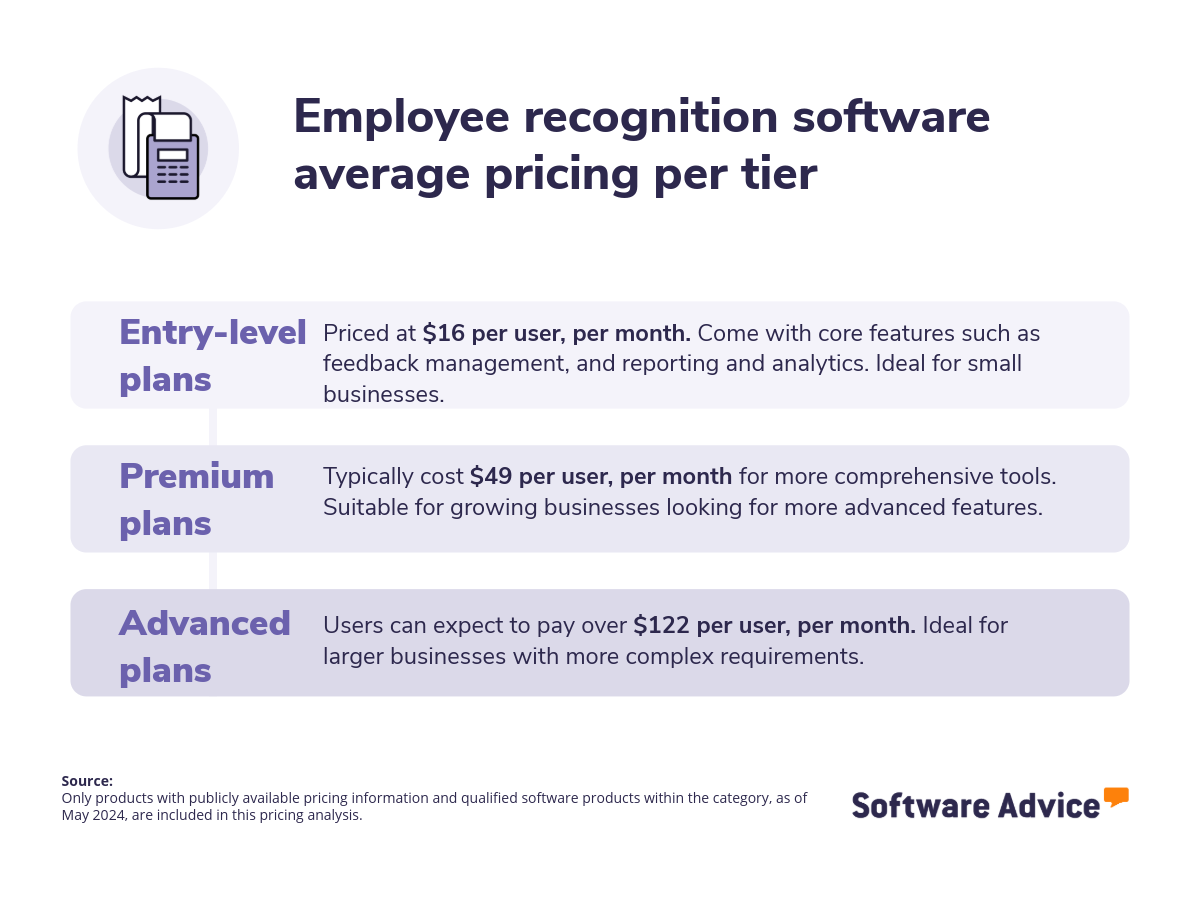
Pricing pros based on reviews: A key positive aspect is the perception of fair and competitive pricing, with users often mentioning the affordability of products and the overall value for money. They appreciate the wide range of product options available at reasonable prices, enabling them to redeem rewards without financial strain. Furthermore, the ease of use and seamless integration of these platforms contribute to their perceived value. Pricing cons based on reviews: Some users highlight issues like inconsistent pricing, hidden fees, and a lack of transparency, with some pointing to inflated product prices within reward catalogs. This leads to users feeling they must expend excessive points for underwhelming rewards. This is why before committing to a platform, it's essential to meticulously compare reward catalog prices with market values, scrutinize the point redemption system for fairness, and consider the total cost of ownership. By addressing these concerns, buyers can avoid common pitfalls and select a solution that provides genuine value to their employees.
Integration considerations for employee recognition software
Integrate employee recognition platforms with core HR, collaboration, and payroll systems to improve operational efficiency and data consistency. This can automate data transfers, potentially reducing manual errors and administrative workload. For employees, it can streamline the recognition process and provide a more unified experience. Common must-have integrations for employee recognition software include:
Human resources software: By connecting HR and employee recognition systems, employee information is automatically updated across platforms, ensuring accuracy and saving administrative time. This integration also allows for a more holistic view of employee performance, linking recognition data with HR records to provide insights into engagement and impact.
Collaboration software: Integrating collaboration and employee recognition software creates a more dynamic and visible recognition culture. Essentially, it embeds recognition into the daily work experience, making it more immediate and impactful. Furthermore, it allows for easy collection of peer-to-peer recognition, as the collaboration software is already in use by employees.
Payroll software: Integrating payroll and employee recognition software streamlines the process of rewarding employees with monetary or tangible benefits. Through this integration, recognition awards that involve financial incentives, such as bonuses or gift cards, can be automatically processed and included in payroll. This eliminates manual data entry and reduces the risk of errors, ensuring accurate and timely payouts. Additionally, it provides a clear record of recognition-related compensation, simplifying reporting and compliance.
Be aware of potential drawbacks
Although employee recognition software provides many advantages, it also comes with potential challenges for businesses. Our analysis of 8,483 verified user reviews over the past year has helped us to identify the following:
Limited voucher options and lengthy redemption timelines: Reviewers have noted challenges such as lengthy voucher delivery times, a restricted selection of voucher options, and limitations based on location. To mitigate these issues, organizations should meticulously define their voucher requirements, specifying the desired voucher types and redemption procedures. Additionally, it's crucial to evaluate the vendor's support infrastructure to ensure prompt resolution of technical issues and a seamless redemption experience.
Overwhelming email notifications: The sheer volume of notifications, perceived as excessive and disruptive, is highlighted. Some mention that receiving numerous emails and alerts for minor actions can create clutter and make it difficult to discern important messages. Organizations should seek platforms with granular notification controls, allowing users to filter and prioritize alerts, and vendors should offer clear demonstrations of how users can manage notification frequency and types during the software evaluation.
System bugs: Feedback reveals that platforms can sometimes suffer from user-friendliness issues, such as software errors or incomplete toolsets, which can impede user efficiency. Businesses can prevent these problems by carefully assessing software before deploying it, conducting comprehensive trials, gathering user opinions, and choosing providers known for reliable support, consistent improvements, and robust service level agreements.
Understanding these limitations enables organizations to refine their approach, ensuring employee recognition efforts deliver the greatest possible value.
Step 2: Make a shortlist of software
Choosing the best employee recognition software from a wide range of choices can be daunting, but the right guidance can make the process much easier.
Explore our list of employee recognition FrontRunners
If you'd like to start your research independently, explore our 2025 FrontRunners report. This report features only those products that have received top user ratings, ensuring you have access to the best solutions available. For a deeper understanding of the criteria and methodology used to compile this report, be sure to check out our detailed explanation.
Step 3: Pick your best option
After compiling a shortlist, start reaching out to vendors to schedule vendor demos. These sessions allow for a comprehensive examination of each product's functionality and the clarification of any specific questions. Proper planning is key to maximizing the value of these demonstrations.
How to prepare for vendor demos
To get the most out of these demonstrations, plan ahead. Coordinate demos with each vendor, involve key team members, and prepare a list of questions and use cases relevant to your organization. In addition, evaluate the software's ability to perform essential functions, such as monitoring recognition activity and facilitating peer acknowledgments.
Here are some examples of what to ask:
Can you demonstrate how the platform facilitates employee recognition feedback (peer-to-peer recognition and manager recognition)?
Asking for a demonstration of how the platform facilitates employee recognition feedback is crucial because it reveals the software's core functionality and user experience. It allows you to observe firsthand how easily employees can give and receive recognition, both from peers and managers, and gauge the platform’s user-friendliness. Ultimately, it helps you determine if the software will effectively encourage and streamline meaningful feedback within your company.
As Dan Schawbel notes: “You also need to ensure that people are getting the right feedback at the right time, that they're getting praised and supported because if they're not, then they sort of lose focus. If they don't feel appreciated, then they are less likely to stay at your company long term.”
How does the system support tracking of the recognition initiatives?
Understanding how the software monitors recognition efforts is key because it shows whether you can measure your program's success with data. This feature lets you see if your initiatives are working, find areas for improvement, and prove their value. A good tracking system should give you detailed reports on how often people are recognized, what kind of recognition they get, and who gets it.
What kind of customer support do you offer during implementation?
Enquiring about customer support during implementation is crucial because it reveals the vendor's commitment to ensuring a smooth and successful rollout. Implementing new software can be complex, and the appropriate support helps mitigate potential disruptions and ensures your team can quickly adapt. It demonstrates whether the vendor provides adequate training, troubleshooting, and assistance to address any issues that may arise during the setup process, ultimately influencing the platform's long-term effectiveness within your organization. Selecting appropriate employee recognition software demands a tailored approach, as each company has distinct requirements. By adhering to the outlined process and focusing on essential functionalities, businesses can choose a platform that effectively supports their recognition efforts and improves efficiency.
For more detailed advice and demo questions, refer to our resource: How To Cut Through the Sales Pitch During Software Demos.
Step 4: Make the most of your employee recognition software
Once a new employee recognition system is chosen and agreed upon, the transition process begins. This stage, which involves moving from existing practices to the new platform, requires careful planning and execution to guarantee a successful integration. Key considerations include:
Ensure proper data migration: Carefully transfer all employee recognition records, achievements, and historical data from your old system or spreadsheets to the new software. Collaborate with both your previous data management vendor and the new software provider to ensure all data is accurately migrated and nothing is lost, maintaining data integrity and continuity of recognition history.
Conduct hands-on training: After launching the new employee recognition system, comprehensive user training is essential. To maximize adoption, utilize the vendor's expertise for thorough training sessions, offering diverse learning materials suitable for various roles and skill levels. Expect to conduct multiple training sessions, provide continuous support, and schedule regular refreshers to reinforce knowledge and address any developing needs.
Keep your team updated: When moving to a new employee recognition platform, it's vital to keep your team informed. Clearly communicate the change, acknowledge potential short-term inconveniences, and highlight the eventual improvements in accuracy and efficiency. This open approach will build confidence and alleviate concerns during the shift.
Regularly assess your usage: After launching the system, ongoing evaluation and refinement are necessary. Define specific measures to assess the software's effect on employee engagement, productivity, and retention. Consistently collect user feedback to pinpoint issues, improvement areas, or unmet expectations. Use this data to adjust the platform's settings, guaranteeing it remains valuable and meets changing organizational needs.
For additional information on ensuring a seamless transition, refer to our guide: 5 Critical Steps to a Successful Software Implementation Plan.
Software related to employee recognition
While researching software, you might encounter similar tools that share features with employee recognition platforms. These include:
Community software: Enables employees to interact with each other by providing spaces for idea exchange, feedback collection, knowledge sharing, and direct communication. These tools facilitate cross-departmental collaboration, breaking down internal barriers between teams.
Talent management software: Provides organizations with the means to oversee, assess, and reward employees based on their contributions. By monitoring performance and establishing benchmarks, these systems enable companies to cultivate and sustain a highly productive workforce. Core functionalities typically include employee development, compensation reviews, adherence to policies, and planning for future leadership, all contributing to effective personnel growth.
Human resources software: Centralizes employee data, including contact details, departmental assignments, attendance, salary information, training programs, and benefits. These systems streamline the organization and management of personnel records.
Performance management software: Helps organizations track, evaluate, and improve employee performance. It typically includes features for setting goals, providing feedback, conducting performance reviews, and identifying areas for development. These platforms are designed to align individual employee contributions with overall organizational objectives.
More resources for your employee recognition journey
About our contributors
Author
Emilie Audubert is a content analyst at Software Advice. Always on the lookout for the latest technological and strategic trends for small and midsize businesses, she specializes in human resources topics.
Emilie’s research and analysis is informed by more than 250,000 authentic user reviews on Software Advice and over 20,000 interactions between Software Advice software advisors and HR software buyers. Emilie also regularly analyzes market sentiment by conducting surveys of HR leaders and practitioners so she can provide the most up-to-date and helpful information to small and midsize businesses purchasing software or services.
Her research has been featured in Forbes, CB News, Sud-Ouest, BPI France, and Siècle Digital, as well as on BSMART TV channel, covering topics such the challenges of employee retention or the state of women in the workplace.
Passionate about writing and storytelling in all its forms, she produces audio podcasts. She is fond of pugs and '70s rock.
Editor
Mehar Luthra is a team lead at Software Advice and specializes in editing reports that cover the latest trends affecting small businesses. With nearly a decade of experience, she has edited a multitude of research articles, top-rated software reports, and thought leadership articles for diverse markets such as Brazil, Japan, Canada, France, Australia, and India. She finds it particularly rewarding to produce content that provides small-business owners with practical tips and helpful advice on topics such as the digitalisation of small businesses, eCommerce trends, and HR developments.
Armed with a double bachelor’s in law (LL.B.) and business economics from Delhi University, she won a full scholarship to study for a master’s in creative writing at the National University of Ireland, Galway. In addition, she has written blog articles spanning a variety of topics such as fiction and non-fiction books, mental health and anxiety, the latest restaurants, and more. Her articles have been featured in Ireland’s national magazine The Village, among other publications. A die-hard journaling fan, she enjoys watching psychological thrillers, reading fiction books, and drinking iced coffee (even in the winter).
Sources
Software Advice advisor call notes: Findings are based on data from telephonic conversations that Software Advice’s advisor team had with businesses seeking HR software. For this report, we analyzed phone interactions from February 28, 2024, to February 28, 2025. Read the complete methodology.
Software Advice reviews data: Software Advice reviews are collected from verified users for individual software products. For this report, we analyzed reviews from the past year as of the production date. Read the complete methodology.
Software Advice software pricing data: Only products with publicly available pricing information and qualified software products within the category, as of May 2024, are included in the pricing analysis. Read the complete methodology.
Dan Schawbel, LinkedIn
Employee Recognition FAQs
- What is the best employee recognition software?
According to our analysis of products with high market demand and reviews, Guusto has the highest overall rating from verified reviewers on Software Advice. Check out our full methodology description for more details on this selection process.
- What is an employee recognition platform?
Employee recognition software enables organizations to foster engagement and appreciation in the workplace. These systems often include features for peer-to-peer acknowledgment via discussion forums, the administration of reward and loyalty programs, and comprehensive reporting and analytics capabilities.
- How much does employee recognition software cost?
Generally, basic plans with limited features tend to average around $16 per month, while more feature-rich premium plans cost about $49 per month. Advanced plans, offering the most comprehensive capabilities, typically start at over $122 per month. The cost of employee recognition software differs based on the provider, the features included, and the company's size. Some vendors also use tiered pricing, adjusting costs to meet specific organizational needs.
- What are the benefits of employee recognition software?
Our analysis of over 8,483 user reviews from the past year highlights that employee recognition software helps foster colleague recognition, streamlines rewards, cultivates appreciation, and supports team acknowledgment. These platforms create centralized spaces for peer-to-peer appreciation, automate reward distribution, provide customizable tools for expressing gratitude, and simplify team-based recognition. By making appreciation visible and trackable, these systems contribute to a culture of mutual respect and provide valuable data for performance analysis and program refinement.