


Best Medical Practice Management Software of 2026
Updated February 18, 2026 at 5:53 AM

Written by Lisa Morris
Associate Principal Analyst

Edited by Mehar Luthra
Team Lead, Content

Reviewed by Lexi Smith
Software Advisor

Talk with us for a free 15-min consultation
Expert advisors like Jacqueline, who have helped 1,000+ practices, can find the right software for your needs.
- All Software
- Software Advice FrontRunners
- Popular Comparisons
- Buyer's Guide
- Frequently Asked Questions
Medical practice management software helps front‑office staff, billing teams, and administrators coordinate scheduling, patient records, and revenue cycle tasks. With more than 300 tools built for varied operational models, integration needs, or regulatory contexts, choosing the right tool can be tough. To help you narrow it down, I worked with our medical practice management software advisors to curate a list of recommended productsi and a list of the medical practice management software FrontRunners based on user reviews. For further information, read my medical practice management software buyer's guide.
Medical Practice Management Software
Sort by
Reviews: Sorts listings by the number of user reviews we have published, greatest to least.
Average Rating: Sorts listings by overall star rating based on user reviews, highest to lowest.
Alphabetically (A-Z): Sorts listings by product name from A to Z.

CharmHealth is a comprehensive suite of healthcare solutions designed to streamline practice management, revenue cycle managemen...Read more about CharmHealth


CharmHealth's Best Rated Features
See All
CharmHealth's Worst Rated Features
See All

RXNT’s cloud-based, ONC-certified medical software—Billing, Practice Management, EHR, and more—improves clinical outcomes & reve...Read more about RXNT


RXNT's Best Rated Features
See All
RXNT's Worst Rated Features
See All

athenaOne is an integrated solution designed for healthcare practices, offering electronic health records, revenue cycle managem...Read more about athenaOne


athenaOne's Best Rated Features
See All
athenaOne's Worst Rated Features
See All

Tebra helps independent medical practices plug the revenue leaks caused by no-shows, manual processes, and slow reimbursements. ...Read more about Tebra


Tebra's Best Rated Features
See All
Tebra's Worst Rated Features
See All

PatientNow is an EMR practice management software designed for aesthetic and wellness providers. It supports various specialties...Read more about PatientNow


PatientNow's Best Rated Features
See All
PatientNow's Worst Rated Features
See All
Software Advice FrontRunners 2026

(488)

(363)

(644)

(446)

(757)

(96)

(74)

(117)

(495)

(904)
Best for Mobile app

Jane

Of the products listed on our FrontRunners report, Jane is the most requested by users for mobile app out of the most popular tools.
Jane is best for practices seeking a robust mobile app experience, particularly those needing easy access to scheduling, documentation, and billing on the go. Our reviewers say Jane’s mobile interface is intuitive and allows both practitioners and patients to manage appointments and records efficiently from any device.
- Reviewers Perspective
"The team at Jane is always working above and beyond to make changes and work with those who use their software to improve, fix and grow the software in ways that actually work."
MYMorgan Young
Administrator
Used for 2+ years
We analyzed 327 verified user reviews for Jane to find out what actual users really think.
Clinic Management
Practices coordinate care, customize workflows, and track performance using Jane. The platform adapts to solo and multi-provider clinics, streamlining scheduling, documentation, and communication.Patient Management
Practitioners manage scheduling, documentation, and communication with secure telemedicine and customizable patient records. Jane’s design and support help staff focus on patient care.Billing and Payment
Practices handle billing, payments, and insurance claims in one platform. Jane offers useful payment features, though some users report challenges with insurance billing and report customization. - Key FeaturesJane's scoreCategory average
Document Management
4.434.37 category average
Patient Records Management
4.684.52 category average
Practice Management
4.684.53 category average
- Screenshots


Best for Automation Capabilities

ModMed

According to our user reviews, ModMed is the most requested by users for automation capabilities out of the most popular tools.
ModMed is best suited for practices prioritizing automation capabilities, especially in specialties like dermatology. Our reviewers point out that automation features such as automatic superbill creation and prepopulated templates streamline charting and billing, improving workflow efficiency.
- Reviewers Perspective
"It has made charging patients so much easier. Because of the ease, you can spend more time focusing on patients and less time in an iPad."
TKTracy K
Office Manager
Used for 2+ years
We analyzed 239 verified user reviews for ModMed to find out what actual users really think.
Ease of Use
Staff navigate ModMed quickly, reducing administrative workload. Practices benefit from intuitive layouts and accessible features, enabling more focus on patient care and efficient workflows.Training and Learning Curve
New hires can get up to speed with ModMed’s comprehensive training tools. Even staff without prior medical experience become proficient through hands-on practice and tutorials, supporting efficient adoption.User Interface
Practices use both iPad and desktop versions to match workflow preferences. The interface is visually clear, making patient information and documentation easy to access for staff with varying tech comfort. - Key FeaturesModMed's scoreCategory average
Document Management
4.644.37 category average
Patient Records Management
4.674.52 category average
Practice Management
4.634.53 category average
- Screenshots


Best for Customer Satisfaction

ClinicSense

In our analysis of Medical Practice Management products with the most market demand, ClinicSense is the highest rated for customer satisfaction out of the most popular tools.
ClinicSense is ideal for SMBs seeking high customer satisfaction, especially those valuing streamlined scheduling and client management. Our reviewers say the platform’s user-friendly interface and integrated appointment reminders save time and make client interactions more efficient.
- Reviewers Perspective
"It is a very good software that allows me to schedule clients or the clients to schedule themselves online, to send out intake forms and appointment reminders."
SMSharon Martin
Massage Therapist
Used for 1-2 years
We analyzed 464 verified user reviews for ClinicSense to find out what actual users really think.
Appointment Scheduling
Practices use ClinicSense to manage schedules with online booking and automated reminders. Both practitioners and clients book appointments conveniently, reducing missed appointments and administrative workload.SOAP Notes
Practitioners organize client records and streamline documentation with customizable SOAP note templates. The platform integrates scheduling and invoicing, making note-taking faster and more professional.Online Booking
Practices simplify appointment management with intuitive online booking. Clients schedule, reschedule, and cancel appointments easily, increasing appointment volume and reducing administrative tasks. - Key FeaturesClinicSense's scoreCategory average
Document Management
5.04.37 category average
Patient Records Management
4.834.52 category average
Practice Management
4.834.53 category average
- Screenshots


Best for Customization

Epic

According to our user reviews, Epic is the most requested by users for customization out of the most popular tools.
Epic is best for organizations needing extensive customization to fit complex workflows. Our reviewers say Epic’s customizable charting templates and layouts enable practices to tailor documentation and reporting to their specific needs, enhancing operational flexibility.
- Reviewers Perspective
"It allows me to address patient concerns, chart and chat with co workers, there is built in support systems, different levels of affordability."
TTTory Twito
physician
Used for 2+ years
We analyzed 303 verified user reviews for Epic to find out what actual users really think.
Patient Charting
Clinicians access, document, and review patient information quickly. Epic supports interdisciplinary collaboration and provides shortcuts for routine charting, improving efficiency.Hospital Use
Hospitals use Epic to facilitate communication between departments and standardize processes. The platform adapts to inpatient and outpatient workflows, easing transitions for staff.Patient Information
Providers access medical histories, appointments, and documentation in one platform. Epic’s patient portals enhance communication and support coordinated care across multiple locations. - Key FeaturesEpic's scoreCategory average
Patient Records Management
4.474.52 category average
Practice Management
2.504.53 category average
- Screenshots
Best for User Interface

Carepatron

Carepatron is the highest rated for its user interface out of the most popular tools, based on our analysis of Medical Practice Management products with the most market demand.
Carepatron is best for users who value a strong user interface, particularly solo practitioners and small teams. Our reviewers say the platform’s intuitive design and easy navigation help streamline daily tasks and improve overall practice organization.
- Reviewers Perspective
"I believe that this app has been very useful for healthcare professionals, the best feature so far has been the introduction of AI that helps with note taking. Once there are new options for note taking or the ability to record calls that may not be through video, it would also be helpful."
JSJoanna Stewart
Mental Health Therapist
Used for 6-12 months
We analyzed 303 verified user reviews for Carepatron to find out what actual users really think.
Patient Practice Management
Practices manage appointments, patient communication, and documentation securely. Carepatron streamlines administrative tasks and supports clinics of all sizes with accessible clinical tools and HIPAA compliance.Templates
Practitioners save time with Carepatron’s template library for documentation, assessments, and client management. Templates are easily modified and shared, supporting both new and experienced practitioners.Client Management
Practices automate administrative tasks and maintain confidentiality. Carepatron supports tracking client progress, sending documents, and remote services, though some users seek improved communication options. - Key FeaturesCarepatron's scoreCategory average
Document Management
4.464.37 category average
Patient Records Management
4.614.52 category average
Practice Management
3.334.53 category average
- Screenshots


Highly Rated for Quick Implementation


Practice Better is the highest rated for quick implementation out of the most popular tools, based on our analysis of Medical Practice Management products with the most market demand.
Practice Better is highly rated for SMBs needing quick implementation, especially those starting or scaling a health and wellness practice. Our reviewers point out that onboarding is straightforward, with clear instructions and resources that help new users get up and running efficiently.
- Reviewers Perspective
"Makes administrative work less daunting and having everything in one place for back-end but also client facing is so helpful."
BLBree Lowry
Holistic Health Practitioner
Used for 2+ years
We analyzed 73 verified user reviews for Practice Better to find out what actual users really think.
Ease of Use
Practices organize workflow efficiently with Practice Better’s intuitive platform. Family members and clients of varying ages use the system easily, supporting smooth transitions and daily operations.Client Scheduling
Practitioners manage scheduling, records, billing, and communication in one place. Practice Better streamlines group programs and automates scheduling, though some users seek more flexibility.Client Support
Practices onboard clients easily with Practice Better’s intuitive design and HIPAA-compliant messaging. Comprehensive client management features enhance organization and engagement. - Key FeaturesPractice Better's scoreCategory average
Document Management
4.684.37 category average
Patient Records Management
4.854.52 category average
- Screenshots


Best for Usability

DocVilla

Of the products listed on our FrontRunners report, DocVilla is the highest rated for its usability out of the most popular tools.
DocVilla is best for practices seeking top usability, including those with diverse staff experience levels. Our reviewers say the system is user-friendly and easy to navigate, with helpful support that makes onboarding and daily use straightforward.
- Reviewers Perspective
"Simple to use, has everything is one place, lot of psych templates and also has the ability to create custom templates, customer service is super helpful."
LJLa’Risha Jeter
NP - Owner
Used for 6-12 months
We analyzed 68 verified user reviews for DocVilla to find out what actual users really think.
Medical Practice Management
Practices manage scheduling, resource allocation, and documentation with DocVilla’s customizable templates and secure environment. The platform supports multi-specialty, mental health, and aesthetics practices.Customer Support
Practices receive prompt, knowledgeable support during onboarding and ongoing use. DocVilla’s team is available even on weekends, ensuring smooth transitions and continuous help.Features
Practices leverage bundled coding, security tools, and customizable templates to manage operations. Tutorials and training resources help users maximize DocVilla’s extensive capabilities. - Key FeaturesDocVilla's scoreCategory average
Document Management
5.04.37 category average
Patient Records Management
5.04.52 category average
Practice Management
5.04.53 category average
- Screenshots


Most Used By Health, Wellness and Fitness

Healthie

According to our user reviews, Healthie is the most requested by users in health, wellness and fitness out of the most popular tools.
Healthie is most used by health, wellness, and fitness professionals who need an all-in-one platform for client management. Our reviewers say it streamlines charting, scheduling, and communication, with intuitive tools that support both solo and growing practices.
- Reviewers Perspective
"Enjoying the interaction with clients as I look to scale more programs in the platform coming out of my beta testing with a small cohort of clients I'd like the way healthy is constantly adding more features. As a PT using Healthie, I'd also like to see more remote measuring outcome tools like 2D pose estimation for monitoring mobility and joint range of motion improvements."
DDDavid Dansereau
Owner
Used for 1-2 years
We analyzed 93 verified user reviews for Healthie to find out what actual users really think.
Practice Management
Practices manage scheduling, billing, and client records in Healthie. The platform adapts to different practice sizes and specialties, supporting HIPAA compliance and enabling professional operations both in-person and virtually.Customization Options
Practices tailor Healthie to their needs by editing patient information and embedding features into websites. The clean design supports workflow, though some users seek more flexibility in modules and reporting.Charting
Practitioners securely document sessions, share notes, and manage client information in one place. Voice charting, automatic note transfers, and integration with scheduling and billing streamline daily workflow. - Screenshots


Most Used By Mental Health Care
RXNT

Of the products listed on our FrontRunners report, RXNT is the most requested by users in mental health care out of the most popular tools.
RXNT is most used by mental health care providers who require efficient, easy-to-use e-prescribing and charting. Our reviewers say the system offers a variety of templates and is accessible across devices, making it simple for clinicians to manage patient records and prescriptions.
- Reviewers Perspective
"RXNT strikes a great balance between simplicity and functionality."
LALisa Abern
PMHNP
Used for 1-2 years
We analyzed 330 verified user reviews for RXNT to find out what actual users really think.
E-Prescribing
Practices use RXNT to prescribe electronically from various devices, streamlining medication management and ensuring compliance with regulatory requirements for controlled substances.User Interface
Staff access patient information and perform daily tasks efficiently with RXNT’s user-friendly interface. The platform supports fast learning for both new and experienced users.Training and Learning Curve
Teams adapt to RXNT quickly with available training resources. Once familiar, users integrate the system into their practices and teach others with minimal friction. - Key FeaturesRXNT's scoreCategory average
Document Management
4.174.37 category average
Patient Records Management
4.134.52 category average
Practice Management
4.334.53 category average
- Screenshots


Best for Quick Adoption/Easy Adoption
athenaOne

Of the products listed on our FrontRunners report, athenaOne is the highest rated for its easy adoption out of the most popular tools.
athenaOne is best for organizations seeking quick and easy adoption, particularly those needing streamlined onboarding for staff. Our reviewers say the platform’s intuitive interface and clear navigation allow new users to become productive with minimal training.
- Reviewers Perspective
"We also have a robust ALL TEXT to our patients when we have specific messages to all our patients, this is a wonderful feature that contributes to our success as a company serving our community."
NGNora Garza
CEO and owner
Used for 2+ years
We analyzed 13 verified user reviews for athenaOne to find out what actual users really think.
- Key FeaturesathenaOne's scoreCategory average
Patient Records Management
4.274.52 category average
Practice Management
3.714.53 category average
- Screenshots


Pabau

- Reviewers Perspective
"Pabau provides fantastic support to streamline my business with automation, strategic marketing, productivity insights, and enhanced patient management."
JPJoanne Porter
Nurse Prescriber
Used for 1-2 years
We analyzed 377 verified user reviews for Pabau to find out what actual users really think.
Customer Support
Pabau’s support team is available around the clock, offering clear onboarding guidance and ongoing assistance. Clinics benefit from tailored advice and regular meetings, which help resolve issues and keep operations running.Patient Management
Clinics use Pabau to manage appointments, documentation, and patient communication in one platform. Customizable workflows and integrated marketing tools support both small and large practices, streamlining daily operations.Features
Pabau offers automation, marketing, and customizable workflows for practice management. The user-friendly interface and regular updates help teams organize daily tasks, though some features require additional training to fully utilize. - Key FeaturesPabau's scoreCategory average
Document Management
4.364.37 category average
Patient Records Management
4.654.52 category average
Practice Management
4.504.53 category average
- Screenshots


PracticeQ

- Reviewers Perspective
"The service when I first opened my account, he literally helped me build my forms and gave me lots of advice and answered all my calls without getting upset"
MSMelinda Smith
RN
Used for 1-2 years
We analyzed 59 verified user reviews for PracticeQ to find out what actual users really think.
Customer Support
PracticeQ’s support team provides prompt, knowledgeable help during onboarding and ongoing use. Staff are available for guidance and technical issue resolution, offering one-on-one help and follow-up to ensure smooth operations for medical practices.Customization
PracticeQ lets clinics personalize forms, notes, and user roles to match workflow needs. Tutorials and guides support setup, but extensive settings can make navigation complex for teams managing multiple configurations.Form Creation
Teams use PracticeQ’s form tools to build, duplicate, and edit intake forms and surveys. Pre-built templates and workflow automation streamline data collection for staff and patients, improving operational efficiency. - Key FeaturesPracticeQ's scoreCategory average
Patient Records Management
4.744.52 category average
Practice Management
4.504.53 category average
- Screenshots


Tebra

- Reviewers Perspective
"The user interface is intuitive and well-designed, making it a breeze for our staff to navigate and utilize its full potential."
CBColey Bennett
Administrator
Used for 2+ years
We analyzed 540 verified user reviews for Tebra to find out what actual users really think.
Ease of Use
Staff use Tebra’s modern interface to quickly locate features and organize information. Minimal training is needed, helping teams streamline workflows and reduce time spent on administrative tasks.Training and Learning Curve
Tebra provides onboarding coaches, tutorials, and self-guided modules. Training videos and webinars help staff learn features and adapt to updates, supporting efficient onboarding and ongoing education.Customer Support
Tebra’s support team is knowledgeable and polite, offering prompt responses and official resources. Dedicated specialists guide clinics through onboarding, though some users report delays and inconsistent follow-through. - Key FeaturesTebra's scoreCategory average
Document Management
3.204.37 category average
Patient Records Management
3.744.52 category average
Practice Management
4.824.53 category average
- Screenshots


- Reviewers Perspective
"We can keep patient credit card payments up to date and storing the credit card information for future sessions with reports is valuable."
JSJames Schaefer
Chief Operating Officer
Used for 2+ years
We analyzed 148 verified user reviews for Practice Mate to find out what actual users really think.
Billing
Practice Mate streamlines billing by managing patient information, insurance claims, and payments in one platform. Clinics track payments and generate reports, reducing overhead and improving efficiency.Claims
Teams submit and manage insurance claims with Practice Mate’s straightforward tools. The platform provides feedback on errors and helps prioritize claims, supporting reliable claims processing for clinics.Insurance
Practice Mate offers automatic secondary insurance billing, payment tracking, and a library of payers and codes. Clinics manage client records and insurance information efficiently, though some report navigation challenges and extra fees. - Key FeaturesPractice Mate's scoreCategory average
Document Management
4.834.37 category average
Patient Records Management
4.334.52 category average
Practice Management
4.474.53 category average
- Screenshots


- Reviewers Perspective
"It has simplified practice management by reducing the need for multiple systems, and it has supported better client engagement through its telehealth tools. While there’s a small learning curve, once you get comfortable, it’s a powerful and efficient solution for therapists looking to streamline their workflow."
MRMohamed Rauf
Designer
Used for 6-12 months
We analyzed 62 verified user reviews for TheraPlatform to find out what actual users really think.
Therapist and Client Management
TheraPlatform streamlines therapist and client management, supporting onboarding, account setup, and customization for various therapy disciplines. Solo practitioners and small clinics use it to simplify daily workflow.Ease of Use
TheraPlatform’s user-friendly interface helps staff quickly learn and adapt to essential tools. Practices teach others with ease, making business and session management straightforward even for those new to technology.Billing and Notes
Clinics use TheraPlatform to manage telehealth, scheduling, documentation, and billing in one place. Customizable forms and notes, invoice creation, and claim submission simplify collaboration with billers and insurers. - Key FeaturesTheraPlatform's scoreCategory average
Document Management
4.754.37 category average
Patient Records Management
4.774.52 category average
Practice Management
3.04.53 category average
- Screenshots


Zanda

- Reviewers Perspective
"It saves me a lot of time, I can see at a glance if my clients will be attending, I can look back over their attendance easily when asked."
JBJames Bowden
Therapist, Counsellor
Used for 2+ years
We analyzed 160 verified user reviews for Zanda to find out what actual users really think.
Customer Support
Support teams respond quickly to queries, making onboarding and troubleshooting less stressful for medical practices. Staff can access help through multiple channels and time zones, with issues resolved promptly and feedback considered for platform improvements.Appointment Management
Teams use Zanda to schedule, track, and update appointments, streamlining daily operations. Clients can self-book, receive automated reminders, and access telehealth options, reducing administrative workload and improving attendance management.Ease of Use
Staff quickly train others and tailor workflows using Zanda’s clear layout and customizable options. Frequent updates enhance functionality, allowing practices to manage operations efficiently with minimal technical barriers. - Key FeaturesZanda's scoreCategory average
Document Management
3.714.37 category average
Patient Records Management
4.574.52 category average
Practice Management
4.604.53 category average
- Screenshots


Medesk

- Reviewers Perspective
"It is very easy to use and is intuitive, making it user-friendly."
JDJosé David Tavera Vega
Psicólogo
Used for 6-12 months
We analyzed 92 verified user reviews for Medesk to find out what actual users really think.
Ease of Use
Medesk’s intuitive interface allows medical professionals to quickly learn and perform multiple functions. The user-friendly design supports efficient management of patient information and office operations.Appointment Scheduling
Clinics use Medesk to schedule telehealth visits and manage appointments for multiple professionals. The platform organizes patient data and coordinates clinical schedules, though some users report slow loading and calendar limitations.Medical Records
Medesk centralizes patient information, images, and documents securely. Clinics digitize forms and streamline processes, maintaining high standards in medical documentation and easy access for clinical care. - Key FeaturesMedesk's scoreCategory average
Document Management
4.294.37 category average
Patient Records Management
4.294.52 category average
Practice Management
5.04.53 category average
- Screenshots


CureMD

- Reviewers Perspective
"It has brought me more structure in the organization of patient information and communication, which in my case is important when I coordinate cases of medical assistance in a time crisis."
HLHikmet Labter
Medical Assistance Specialist
Used for 2+ years
We analyzed 11 verified user reviews for CureMD to find out what actual users really think.
- Key FeaturesCureMD's scoreCategory average
Document Management
4.04.37 category average
Patient Records Management
4.234.52 category average
Practice Management
4.04.53 category average
- Screenshots


CharmHealth

- Reviewers Perspective
"Easy setup and customization, intuitive charting."
SOSarah Ouano
Naturopathic Physician
Used for 1-2 years
We analyzed 107 verified user reviews for CharmHealth to find out what actual users really think.
Charting
Clinics use CharmHealth’s charting tools to create personalized templates and securely upload documents. The HIPAA-compliant system supports collaborative work and helps transition from paper to digital records.Charm
CharmHealth supports labs, billing, scheduling, and patient records. Practices access the platform from any device and benefit from flexible pricing and responsive support, making it suitable for varied practice needs.Customization
Teams adjust CharmHealth to match specific workflows, creating custom forms and automating processes. Regular updates incorporate user feedback, making the system adaptable for different practice types. - Key FeaturesCharmHealth's scoreCategory average
Document Management
3.304.37 category average
Patient Records Management
4.454.52 category average
Practice Management
3.674.53 category average
- Screenshots


- Reviewers Perspective
"The program easily integrates with practice fusion and its bi-directional."
SASandy Amador
doctor
Used for 1-2 years
We analyzed 92 verified user reviews for CollaborateMD to find out what actual users really think.
Training and Learning Curve
CollaborateMD offers accessible help desk, guides, and responsive trainers. Teams master the platform after initial training and can teach others, with ongoing resources for continued improvement.Implementation Support
Clinics benefit from knowledgeable specialists during setup and unlimited support post-implementation. The knowledge center helps resolve complex issues, though peak hour support could be more accessible.Practice Management
CollaborateMD’s practice management tools simplify operations for small and midsize clinics. Smooth screen transitions and responsive staff help teams manage workflows, with management receptive to feedback and improvements. - Key FeaturesCollaborateMD's scoreCategory average
Document Management
5.04.37 category average
Patient Records Management
4.224.52 category average
Practice Management
4.154.53 category average
- Screenshots


Nexus EHR

- Reviewers Perspective
"Perhaps the single greatest feature that we love about Nexus EHR is our ability to personalize the software program to meet our individual provider and specialty practice needs!"
CGCynthia Garrett
Practice Administrator
Used for 2+ years
We analyzed 32 verified user reviews for Nexus EHR to find out what actual users really think.
- Screenshots


MDnet EHR

- Reviewers Perspective
We analyzed 13 verified user reviews for MDnet EHR to find out what actual users really think.
- Key FeaturesMDnet EHR's scoreCategory average
Document Management
4.424.37 category average
Patient Records Management
4.744.52 category average
Practice Management
5.04.53 category average
- Screenshots


- Reviewers Perspective
"Nextgen is a very god system that offers the flexibility to do self-developments of their KBM Templates, it allows the client to do APIs to meet the client needs when connecting to 3rd party vendors."
YGYurisleydi Gonzalez
Product Manager
Used for 2+ years
We analyzed 30 verified user reviews for NextGen Enterprise to find out what actual users really think.
- Key FeaturesNextGen Enterprise's scoreCategory average
Document Management
3.254.37 category average
Patient Records Management
4.104.52 category average
Practice Management
5.04.53 category average
- Screenshots


Methodology
The research for the best medical practice management software list was conducted in October 2025. We evaluated data (user reviews and demand signals) from the past 24 months as of the research date. Read the complete methodology.
Popular Medical Practice Management Comparisons


Buyer's Guide
This detailed guide will help you find and buy the right medical practice management software for you and your business.
Last Updated on February 17, 2025Here's what we'll cover:
What you need to know about practice management software
What is medical practice management software?
Essential features of practice management software
Benefits and competitive advantages of using medical practice management software
How to choose the best practice management software for your practice
Software related to medical practice management
More resources for your practice management journey
What you need to know about practice management software
Medical practice management software allows users to comprehensively manage every aspect of their practice from one single platform. These systems include modules for business management processes like billing, patient scheduling and communication, and patient record keeping.
Among the 8,000+ calls our advisors have had with medical practitioners in the past year, the most requested features include electronic medical records, patient scheduling, e-prescribing, medical billing, and telemedicine. [1] Most practice management software platforms include all of these features.
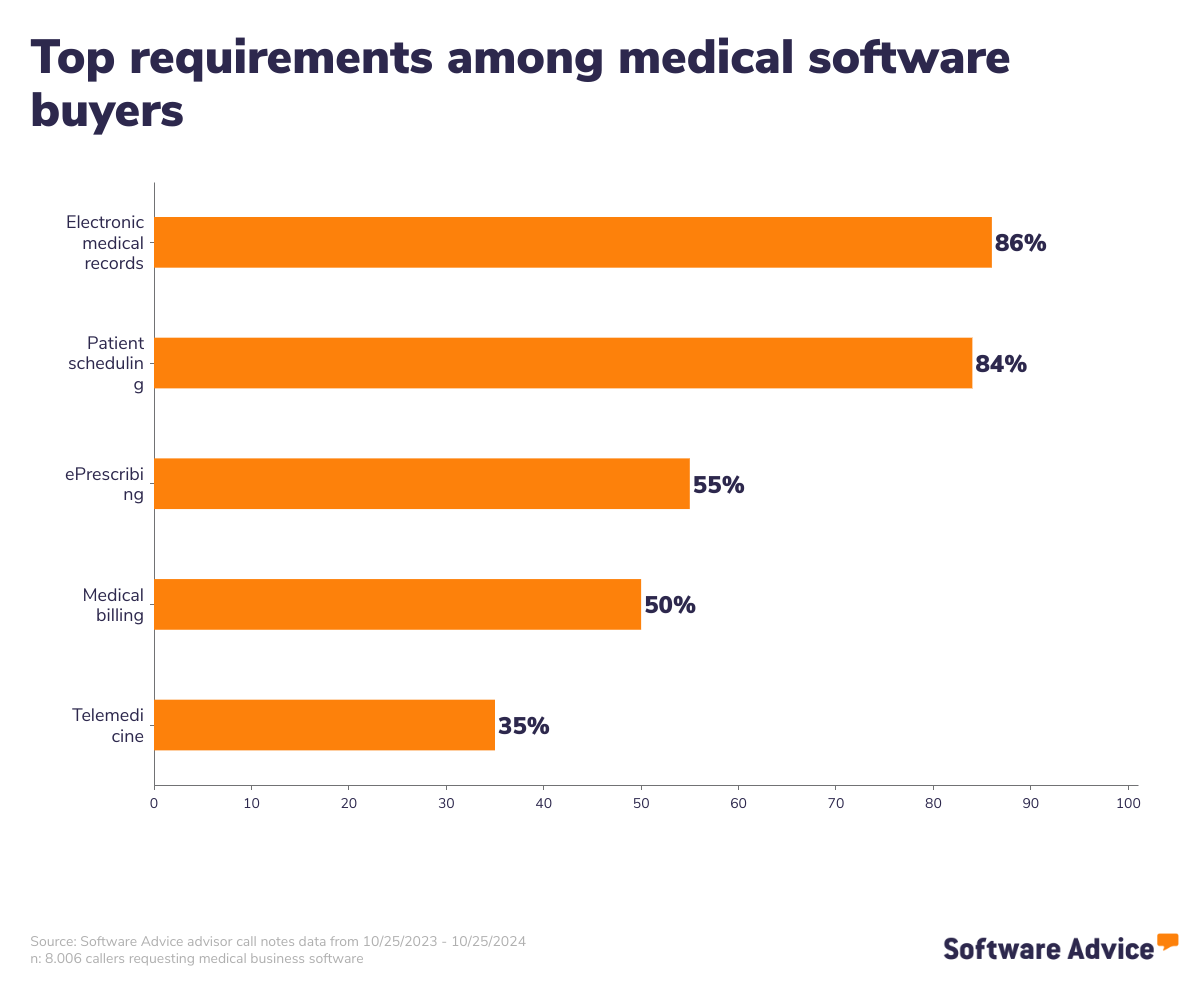
To give you an idea of the market, we have over 350 different medical practice management products on our site and have published more than 3,000 verified practice management reviews in the past year alone. We’ve mined these data-intensive resources to craft insights that can aid you in making the right software purchasing decisions for your practice.
In terms of costs, practice management software tends to be priced on a subscription basis, with costs ranging from $8 for basic plans all the way up to $14,975 for the most advanced plans. [3] Costs may also vary depending on the number of users, the size of your practice, or the number of patients you serve. If you’re a new practice looking for your first practice management system, or if you’re interested in upgrading, here are a few questions you should be prepared to ask vendors when vetting their products:
What core features does the software offer, and can the platform be customized to fit our practice's specific needs?
How does the software ensure data security and compliance with healthcare regulations such as HIPAA?
What integration capabilities does the software have with existing systems, such as electronic health records (EHRs) or billing platforms?
What kind of training, support, and ongoing updates do you provide?
What is medical practice management software?
Medical practice management systems allow physicians and their staff to do everything they need to run their practices, including recording patient demographics, performing billing procedures, generating reports, and scheduling appointments through patient scheduling applications. Sometimes referred to as physician's office management and medical information systems (POMIS), practice management solutions can dramatically improve a doctor's clinical workflow efficiency and often streamline reimbursements from health care insurance companies and other providers.
Common features of medical practice management software include patient scheduling tools, EHR integrations, and automatic claims submissions.
Essential features of practice management software
When searching for the right practice management software, it’s important to know which features you should expect to see in every single product (often referred to as “core” features) and which features aren’t necessarily guaranteed to be included (we’ll call these “common” features). We analyzed thousands of verified user reviews in order to determine which features fall into each of these categories:
Core practice management features
Practice management | Designed to be used specifically for the management of day-to-day operations of a medical practice. |
Patient records management | Manage different types of patient records, including paper documents, digital files, billing information, and scheduling details. 44% of reviewers on our site rate this feature as critical or highly important. |
Common practice management features
Patient/physician scheduling | Book and manage patient appointments and follow-ups, and handle physician availability and schedules. 51% of reviewers on our site rate patient scheduling as critical or highly important. |
EMR/EHR | Create, modify, share, and securely store digital patient records. 40% of reviewers on our site rate charting as critical or highly important. |
HIPAA compliant | Ensure compliance with HIPAA regulations, which set standards for the protection of sensitive patient data. 32% of reviewers on our site rate this feature as critical or highly important. |
Patient portal | An online portal where patients can access information such as health records and treatment plants, as well as communicate with medical providers via direct messages. |
E-prescribing | Send prescriptions to pharmacies electronically. |
Telemedicine | Consult with patients remotely using secure video conferencing tools. |
Medical billing | Manage billing and payment collections for healthcare services. |
Claims management | Automate processes related to creating, submitting, and following up on claims with insurance companies. |
Inventory management | Track and manage inventory levels to maintain adequate medical and office supplies. |
Benefits and competitive advantages of using medical practice management software
Our medical software advisor Lexi Smith, who has been helping businesses choose software for six years, talks about the value of practice management systems for healthcare providers: “These programs are extremely helpful in automating provider and office staff workflows; they allow offices to see more patients rather than spending so much time keeping paper trails, managing schedules, or billing patients.”
We’ve leveraged thousands of reviews to determine the top benefits of medical practice management software, as rated by verified users:
Efficient practice management: Reviewers highlight how much better their practices run after adopting a practice management software system. The biggest benefit is having every tool housed in one platform, so users can accomplish all business tasks quicker and easier.
Highly customizable features, forms, and templates: Users from a variety of specialties and general practices talk about the benefits of being able to customize so many of their processes. For example, users can customize intake forms to collect data they specifically require and then correlate that patient information with their charts.
Automated patient appointments: Providers are delighted to find that their practice management systems are capable of fully automating calendar management tasks like syncing patient scheduling and physician availability. Patients can request appointments online, and the system then auto-generates a patient profile and eliminates that manual task from scheduling workflows.
How to choose the best practice management software for your practice
Because practice management systems control so many different aspects of the business of running your practice, choosing the right one can make or break you. Our medical software advisor Rocco Mangione, who has been helping medical software buyers find the right products since 2020, points out the importance of establishing your specific requirements before you begin exploring products. He explains: “Some medical systems are specific to specialties, so it's important to figure out what applications the system will serve, and what specific functionality will be needed.”
Buyers who start with the product list and reverse engineer their requirements will often find that the practice management system they purchase is not actually a good fit. Instead, follow these steps to choose the ideal practice management software for your business.
1. Define your requirements
This step includes collecting both hard data—like how many users you will have, what your monthly budget will be, which features you have to have, and what integrations you require—as well as softer information, like what level of customer support you expect, how involved you want the vendor to be in migrating your existing data, or what type of user experience you want from your practice management system. You’ll likely spend more time on this step than you expect, but it’s absolutely critical that you don’t rush through this process. You want to end up with a system that meets your needs, and this is the best way to do that.
2. Make a shortlist of software vendors
Once you know what you want, start collecting names of products that you intend to engage with. Many providers come up with this list based on word-of-mouth or recommendations from peers, past experience, or even Google. An even easier option is to reach out to our advisors like Lexi or Rocco to discuss that list of requirements you came up with back in step one. Based on your conversation, our advisor will produce a list of around five vetted products that fit your specific needs. However you come up with this list, the next step is to reach out to these vendors.
3. Pick your best option
The reason you want to keep this list relatively short is because you should expect to spend a good amount of time engaging with each vendor. This will include some back-and-forth with their sales team, at least one product demo session in which a sales associate walks you through all of the features of their product, and contract negotiations with whichever vendor you ultimately decide to go with. During all of this communication is when you want to ask about how their product meets your requirements, and then you’ll compare the answers from each of the vendors on your shortlist to help you settle on the right one. Besides your requirements, a few other things you want to make sure you ask about include:
Security and HIPAA compliance
Integrations with any existing software you may have, like EHRs or payment collection providers
Availability of training materials and support to get your team up to speed with using the new product
Software related to medical practice management
While practice management software generally includes features to cover a variety of clinical and administrative tasks for medical practices, providers do have the option of purchasing specific tools or features as individual, standalone systems. Some software types related to practice management include:
Electronic health records (EHR) software: Allows users to create, edit, share, and store patient information securely. EHRs often integrate with practice management systems to create a fully comprehensive medical tech stack.
Patient scheduling software: Automates appointment booking, manages staff schedules, and sends reminders to reduce no-shows. It also optimizes resource allocation, improves patient flow, and enhances operational efficiency.
E-prescribing software: Allows practices to send prescriptions and refill requests directly online to pharmacies for faster prescription filling with fewer errors.
Medical billing software: Automates manual billing tasks like insurance verification, claims submission and processing, payment processing, and following up on denied claims. The software helps providers increase their collections by avoiding human error and automating repetitive and cumbersome administrative tasks.
Hospital management software: For providers working in large healthcare organizations or hospitals, you may want something more robust than general practice management software. Hospital management systems are essentially practice management for significantly larger medical systems with more extensive operational needs.
More resources for your practice management journey
About our contributors
Author
Lisa Morris is an associate principal analyst at Software Advice, covering the healthcare and medical industry, with a focus on technologies impacting independent practices and mental healthcare, such as electronic medical records and practice management tools.
Lisa’s research and analysis is informed by more than 15,000 authentic user reviews on Software Advice and over 20,000 interactions between Software Advicesoftware advisors and medical software buyers. Lisa also regularly analyzes market sentiment by conducting surveys of medical practitioners and administrators so she can provide the most up-to-date and helpful information to small and midsize businesses purchasing software or services.
She presented her research on medical wearable devices at the 2022 Sensors Summit in La Jolla, California, and also appeared on the Health Innovation Matters podcast with Logan Plaster. Her work has been featured in multiple publications, including Becker’s Hospital Review, Healthcare IT News, and AP News.
Editor
Mehar Luthra is a team lead at Software Advice and specializes in editing reports that cover the latest trends affecting small businesses. With nearly a decade of experience, she has edited a multitude of research articles, top-rated software reports, and thought leadership articles for diverse markets such as Brazil, Japan, Canada, France, Australia, and India. She finds it particularly rewarding to produce content that provides small-business owners with practical tips and helpful advice on topics such as the digitalization of small businesses, eCommerce trends, and HR developments.
Armed with a double bachelor’s in law (LL.B.) and business economics from Delhi University, she won a full scholarship to study for a master’s in creative writing at the National University of Ireland, Galway. In addition, she has written blog articles spanning a variety of topics such as fiction and non-fiction books, mental health and anxiety, the latest restaurants, and more. Her articles have been featured in Ireland’s national magazine The Village, among other publications. A die-hard journaling fan, she enjoys watching psychological thrillers, reading fiction books, and drinking iced coffee (even in the winter).
Advisors
Lexi Smith is a software advisor at Software Advice. She joined the Software Advice advisor team in 2018, and she is based in Austin, Texas.
As a software advisor, Lexi works directly with small business leaders to connect them with best fit software providers. She assesses the technology needs of small businesses seeking medical, mental health, telehealth, and home health software through one-to-one conversations and provides a short list of potential matches. Her favorite part of being on the Software Advice advisor team is being an unbiased resource software buyers can rely on.
Lexi holds a bachelor’s degree in business marketing, and she has spent nearly three years helping members of the medical field identify the right technology for their practices.
Rocco Mangione is a senior software advisor. He joined Software Advice in 2020 as a software advisor. He is based in Austin, Texas.
As part of the software advisor team, Rocco helps medical professionals who are seeking electronic medical records, mental health, telehealth, or home health software. He provides a short list of personalized technology recommendations based on their budget, business goals, and other specific needs. Rocco’s favorite part of being a software advisor is helping people save time as they look for the right software tool for their medical practices.
Rocco holds a bachelor’s degree in business and sports management. He has spent nearly five years advising small businesses and medical practices through their software selection process.
Sources
Software Advice advisor call notes: Findings are based on data from telephonic conversations that Software Advice’s advisor team had with small-to-midsize businesses seeking medical tools. For this report, we analyzed phone interactions from the 12 months prior to publication. Read the complete methodology.
Software Advice reviews data: Software Advice reviews are collected from verified users for individual software products. For this report, we analyzed reviews from the past year as of the production date. Read the complete methodology.
Software Advice software pricing data: Only products with publicly available pricing information and qualified software products within the category, as of May 8, 2023, are included in the pricing analysis. Read the complete methodology.
Medical Practice Management FAQs
- What is the difference between EHR and practice management software?
The main difference is their functionality: where EHR systems manage patient medical records and clinical data, practice management software handles various administrative tasks like scheduling and billing. Often, practice management software will include integrations with EHRs, so you can consider EHRs a feature of larger practice management software suites.
- What is the best practice management software?
Practice Mate is the best overall practice management software based on our analysis of user reviews and ratings. AthenaOne has been rated the highest for ‘Ease of Use’ by users, CharmHealth for ‘Customer Service’, and RXNT for ‘Functionality’.
- What does practice management software do?
Practice management software handles the administration and coordination of a medical practice, including scheduling, billing, patient management, and regulatory compliance. It helps practices better manage all of these tasks in order to make things run smoother and improve the quality of patient care. In fact, this kind of software encompasses both clinical and administrative tasks to ensure fully integrated operations.
- What is an example of practice management?
An example of practice management is using software to schedule patient appointments, create and submit insurance claims, and maintain patient records. The software automates administrative tasks, reduces errors, and improves workflow efficiency, allowing healthcare providers to focus more on patient care and less on paperwork.
- What software is most frequently used by medical practices?
Electronic health records (EHR) software and practice management software are the two most frequently used by medical practices. Often, users opt for a fully integrated practice management system that includes EHR functionality so that every tool they need can be found in one place.