


Best Time and Expense software of 2026

- Popular Comparisons
- FrontRunners
- Buyers Guide
Compare Products
Showing 1 - 25 of 333 products
Compare Products
Sort by
Reviews: Sorts listings by the number of user reviews we have published, greatest to least.
Average Rating: Sorts listings by overall star rating based on user reviews, highest to lowest.
Alphabetically (A-Z): Sorts listings by product name from A to Z.

TimeSolv is a cloud-based time tracking and billing solution that caters to accountants, consultants, architects and freelancers...Read more about TimeSolv
TimeSolv's Best Rated Features
See All
TimeSolv's Worst Rated Features
See All

BigTime is the AI-powered platform purpose-built for finance and operations leaders at growing professional services firms—inclu...Read more about BigTime
BigTime's Best Rated Features
See All
BigTime's Worst Rated Features
See All

Mango Practice Management is a cloud-based, all-in-one practice management solution that is a game-changer for professional serv...Read more about Mango Practice Management
Mango Practice Management's Best Rated Features
See All
Mango Practice Management's Worst Rated Features
See All

Grow your firm - and your impact Projectworks is professional services automation software (PSA) designed for consulting firms ...Read more about Projectworks
Projectworks's Best Rated Features
See All
Projectworks's Worst Rated Features
See All

Project Insight (PI) is award-winning work & project management software that helps companies manage and visualize projects, all...Read more about Project Insight
Project Insight's Best Rated Features
See All
Project Insight's Worst Rated Features
See All

BQE CORE is a cloud-based accounting and invoicing software designed for architecture, engineering, and consulting firms. The pl...Read more about BQE CORE Suite
BQE CORE Suite's Best Rated Features
See All
BQE CORE Suite's Worst Rated Features
See All

Sage Intacct operates within the Sage Business Cloud portfolio as a comprehensive cloud-based financial management software, exp...Read more about Sage Intacct
Sage Intacct's Best Rated Features
See All
Sage Intacct's Worst Rated Features
See All

Beyond Software is a project accounting and management software system available for small to mid-size companies. The system all...Read more about Beyond Software

Combining powerful project management and easily streamlined operations - we’re the only platform built for managing client proj...Read more about Teamwork.com
Teamwork.com's Best Rated Features
See All
Teamwork.com's Worst Rated Features
See All

Polaris Self-driving PSA by Replicon harvests 100% accurate business data in real-time, does the heavy-lifting analysis, and pro...Read more about Polaris PSA
Polaris PSA's Best Rated Features
See All
Polaris PSA's Worst Rated Features
See All

Wrike is a cloud-based project management platform for teams of 20+ that is suitable for both large enterprises and SMBs. It sup...Read more about Wrike
Wrike's Best Rated Features
See All
Wrike's Worst Rated Features
See All

Kantata helps professional services organizations of 50 to 5,000+ employees ensure consistent excellence and profitability acros...Read more about Kantata
Kantata's Best Rated Features
See All
Kantata's Worst Rated Features
See All

Smartsheet is a work execution platform and collaboration tool with a familiar spreadsheet-like interface that helps teams plan,...Read more about Smartsheet
Smartsheet's Best Rated Features
See All
Smartsheet's Worst Rated Features
See All

"Sage Timeslips is built with a singular purpose—to help you manage time and billing exceptionally well. Trusted by professiona...Read more about Sage Timeslips
Sage Timeslips's Best Rated Features
See All
Sage Timeslips's Worst Rated Features
See All

Timesheets you will love. eTimesheets makes it easy to capture project time and generate powerful reports for management & billi...Read more about eTimesheets.com
eTimesheets.com's Best Rated Features
See All
eTimesheets.com's Worst Rated Features
See All

Rocketlane is a next-gen PSA platform that unifies your projects, resources, and time into a single, powerful system. Run your e...Read more about Rocketlane
Rocketlane's Best Rated Features
See All
Rocketlane's Worst Rated Features
See All

Rippling is an integrated workforce management platform that unifies HR, IT, and finance tools to streamline operations. It cent...Read more about Rippling
Rippling's Best Rated Features
See All
Rippling's Worst Rated Features
See All

ClockShark is a time tracking and job management platform designed for field service and construction businesses. It helps strea...Read more about ClockShark
ClockShark's Best Rated Features
See All
ClockShark's Worst Rated Features
See All

Zoho Invoice is a 100% free cloud-based invoicing solution designed to help small businesses with invoicing, tracking expenses a...Read more about Zoho Invoice
Zoho Invoice's Best Rated Features
See All
Zoho Invoice's Worst Rated Features
See All

QuickBooks Time is a cloud-based time tracking solution that helps owners and managers keep track of employees in real-time from...Read more about QuickBooks Time
QuickBooks Time's Best Rated Features
See All
QuickBooks Time's Worst Rated Features
See All

Bill4Time is a cloud-based system designed to assist professional service organizations with time and expense tracking, billing ...Read more about Bill4Time
Bill4Time's Best Rated Features
See All
Bill4Time's Worst Rated Features
See All

Timesheets.com provides cloud-based time tracking for small and midsize businesses. The service allows employers to track both h...Read more about Timesheets.com
Timesheets.com's Best Rated Features
See All
Timesheets.com's Worst Rated Features
See All

Everhour is a cloud-based time tracking and project management solution for teams and small to midsize businesses across various...Read more about Everhour
Everhour's Best Rated Features
See All
Everhour's Worst Rated Features
See All

HoneyBook is a client relationship platform designed to help small businesses manage proposals, contracts, invoices, payments, a...Read more about HoneyBook
HoneyBook's Best Rated Features
See All
HoneyBook's Worst Rated Features
See All

Streamtime is a cloud-based project management solution that offers task management and team management functionalities to help ...Read more about Streamtime
Streamtime's Best Rated Features
See All
Streamtime's Worst Rated Features
See All
Popular Comparisons



Your Guide to Top Time and Expense Software, April 2025
Software Advice uses reviews from real software users to highlight the top-rated Time and Expense products in North America.
Learn how products are chosenExplore FrontRunners


“Usability” includes user ratings for Functionality and Ease of Use.
“Customer Satisfaction” includes user ratings for Customer Support, Likelihood to Recommend and Value for Money.
Reviews analysis period: The reviews analysis period spans two years and ends the 15th of the month prior to publication.
Buyers Guide
This detailed guide will help you find and buy the right time and expense software for you and your business.
Last Updated on January 27, 2025An important aspect of managing the costs of a project is tracking employee time and external expenses separate from other projects or operational costs. Although young companies are usually able to get away with using Excel spreadsheets and standard bookkeeping software to track all this information, as professional service businesses grow and start changing how projects get assigned, they often find these tools to be insufficient for their needs.
The solution is software that’s specifically designed to track the time and expenses associated with each project. But with so many time management systems on the market, picking the right one can be a challenge. With that in mind, we’ve written this buyer’s guide to help you as you start to narrow down your choices from the hundreds available.
Here's what we'll cover:
What Is Time and Expense Tracking Software?
Common Features of Time and Expense Software
Time and Expense Software Benefits
What Is Time and Expense Software?
Time and expense report software gives professional services organizations the ability to monitor and control the labor and costs associated with every project. This, in turn, helps streamline their invoicing, improve bid accuracy and reduce unnecessary costs.
Time tracking software is often used as part of a comprehensive professional services automation (PSA) suite, which would also include features that support project management, help desk, resource management and customer relationship management, among others.
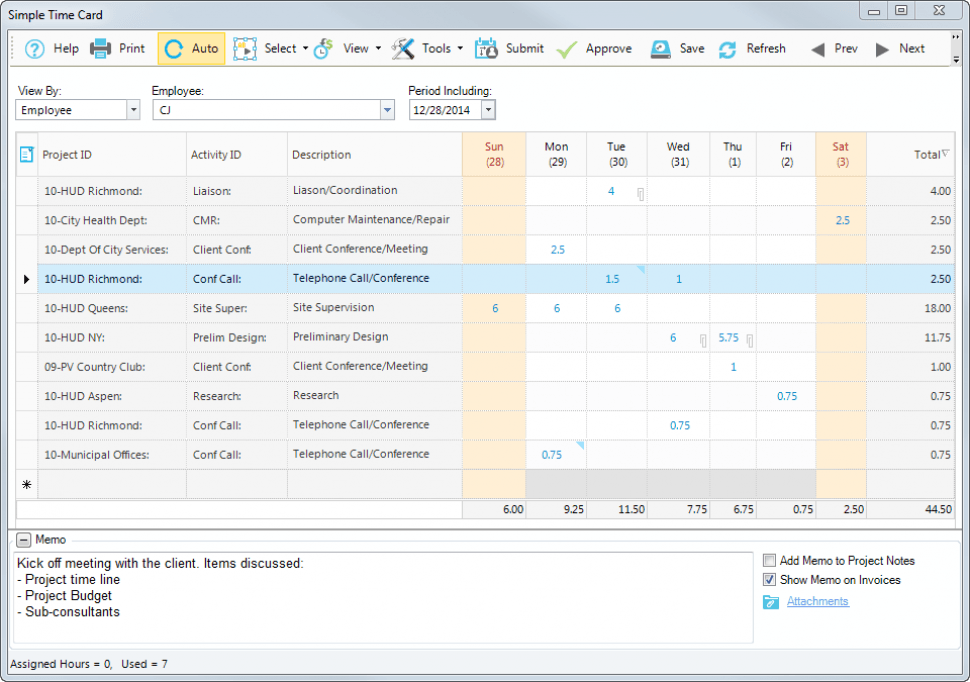
Screenshot of time card in BillQuick
This type of software can be deployed in the cloud, or on premise. In the case of the former, the software is hosted online and accessed via Web browser. On-premise deployment, on the other hand, means the software is installed manually on a user's local servers and run directly on the user's machine. An online time tracking system may be preferable if you need remote access or prefer a lower up-front cost (since pricing for web-based systems is usually by annual or monthly subscription, rather than purchasing a license in full up front).
Common Features of Time and Expense Software
Features and functionality of time and expense reporting software include:
Punch-clock and manual time entry | The most basic functionality, which free and high-end products alike will provide: the ability to electronically clock in and out and to manually enter or change clocking times as necessary. The more advanced the product is, the more likely it is to offer PINs, magnetic card reader hardware, automated start/stop capability (e.g., clocking out when your computer goes to sleep) or other features. |
Expense tracking | Monitor costs of materials, tools etc., with the ability to tie them to individual projects or to general expenses. |
Project-based accounting | If you’ve got 15 employees each working on five different projects, accurate time reporting requires knowing which projects they were working on when. So this feature is there to help you track revenues and expenses by client and project and then export in a way that your accounting software can understand. |
Workload management | Some time and expense tracking software can help you monitor the bandwidth of each employee, providing clear reports that show you which ones are working on which projects, how much time they’re dedicating to each one, where they’re heading and when and when they complete a certain project. This helps streamline employee assignments, and becomes especially useful as company sizes grow into the hundreds of employees. |
Resource planning | An advanced feature, this uses historical data and analytics to improve your ability to estimate any given project. This impacts the accuracy of your bids and optimizes your budgets, so you never end up taking a loss on a project again. |
Mobile integration | Since many consulting companies travel extensively, the ability to integrate this software with your mobile device is often essential. |
Time and Expense Software Benefits
If you’re still on the fence about whether you should implement a dedicated time and expense software system, consider the following benefits it can bring to your business:
It makes the tracking process more accurate. Thanks to all the features we described in the previous section, the tracking process is less error-prone compared to manual methods.
It simplifies workflows. This is especially true if employees in one company are currently using separate spreadsheets or systems to report work time. When you have to combine disparate documentation, you’ll often have to check records against each other to ensure accuracy. A unified solution makes it faster to evaluate the entire company’s progress when it comes to time and expense reporting.
It will help you better manage resources. Once you’re able to see time and expense information at a glance, you’ll be able to better plan or avoid employee overtime.
What Type of Buyer Are You?
Specialty buyers. Although time and expense reporting is generally considered a feature of PSA software, it could also be considered a function human resources or accounting, and similar features can be found in any number of other specialty suites, including construction software, manufacturing software or others. If you fit into one of these categories, take a look at those buyers guide to see if other solutions might be more appropriate for your needs.
Large professional services firms. Large consulting operations likely won’t be happy with a basic time and expense tracking program. With the right resources, a more comprehensive PSA solution like Clarizen or AtTask would be a much better fit.
Medium or rapidly growing professional services firms. We usually find that this is the sweet spot for the best-of-breed time and expense tracking programs. These will be focused on optimizing the features described above, and are designed to take medium-sized businesses to the next phase of their growth cycle. Example products include Deltek Maconomy, Replicon Web TimeSheet and Sage Timeslips.
Small businesses and solopreneurs. There are a number of free solutions, both for computers and for smartphones, which perform the basic functions listed above. Even with cross-user compatibility, these subscription-based solutions are very affordable for companies on even the tightest budget. Products to consider include 1DayLater and Harvest.