


Best Workflow Management Software of 2026
Updated February 18, 2026 at 4:43 AM

Written by Olivia Montgomery, PMP
Associate Principal Analyst

Edited by Kathryn Todd
Senior Editor

Reviewed by Matt Ramsey
Software Advisor

Talk with us for a free 15-min consultation
Expert advisors like Jacqueline, who have helped 1,000+ companies, can find the right software for your needs.
- All Software
- Software Advice FrontRunners
- Popular Comparisons
- Buyer's Guide
- Frequently Asked Questions
Workflow management software helps businesses design, automate, and optimize repetitive processes by routing tasks and information through a defined sequence of steps. This software improves operational efficiency and reduces manual errors by providing real-time visibility into task progress, dependencies, and bottlenecks across teams. With over 750 tools covering varied operational models, integration needs, or regulatory contexts, choosing the right system can be daunting. To help you narrow it down, I worked with our workflow management software advisors to curate a list of recommended productsi and a list of the workflow management software FrontRunners based on user reviews. For further information, read my workflow management software buyer's guide.
Workflow Management Software
Sort by
Reviews: Sorts listings by the number of user reviews we have published, greatest to least.
Average Rating: Sorts listings by overall star rating based on user reviews, highest to lowest.
Alphabetically (A-Z): Sorts listings by product name from A to Z.

Smartsheet is a work execution platform and collaboration tool with a familiar spreadsheet-like interface that helps teams plan,...Read more about Smartsheet


Smartsheet's Best Rated Features
See All
Smartsheet's Worst Rated Features
See All

monday.com is a work and project management platform that helps teams of all sizes plan, prioritize, manage, and execute work ef...Read more about monday.com
monday.com's Best Rated Features
See All
monday.com's Worst Rated Features
See All

Wrike is a cloud-based project management platform for teams of 20+ that is suitable for both large enterprises and SMBs. It sup...Read more about Wrike

Wrike's Best Rated Features
See All
Wrike's Worst Rated Features
See All

Kintone is a cloud-based, customizable workflow management platform suitable for businesses of all sizes. The key features of th...Read more about kintone
kintone's Best Rated Features
See All
kintone's Worst Rated Features
See All

Quickbase is a work management and application platform designed to help organizations centralize and manage complex projects an...Read more about Quickbase
Quickbase's Best Rated Features
See All
Quickbase's Worst Rated Features
See All
Software Advice FrontRunners 2026

(5718)

(2221)

(3043)

(406)

(215)

(233)

(127)

(273)

(636)

(85)
Best for User Interface
monday.com

Of the products listed on our FrontRunners report, monday.com is the highest rated for its user interface out of the most popular tools.
monday.com is best suited for teams and SMBs prioritizing an intuitive user interface for project and task management. Our reviewers say its visually appealing design and clear navigation make it easy to track tasks, collaborate, and customize workflows, reducing onboarding time and improving team productivity.
- Reviewers Perspective
"Monday makes team collaboration easy with features like task comments, mentions, file sharing, and real-time notifications, allowing each member to stay up to date."
LLLaura LEPINAY
Communication et Evenementiel
Used for 6-12 months
We analyzed 850 verified user reviews for monday.com to find out what actual users really think.
Team Collaboration
Departments use monday.com to assign and track tasks, share files, and stay aligned. Real-time updates and customizable boards help teams avoid miscommunication and maintain transparency across projects.Task Management
Managers organize, prioritize, and automate tasks using custom boards, deadlines, and notifications. monday.com’s tools streamline workflows and ensure tasks are completed efficiently.Project Management
Teams plan, track, and collaborate on projects using flexible boards, Gantt charts, and real-time updates. monday.com supports both simple and complex project management needs across industries. - Key Featuresmonday.com's scoreCategory average
Customizable Fields
4.464.56 category average
Progress Tracking
4.564.55 category average
Task Management
4.624.64 category average
- Screenshots


Highly Rated for Integrations

Airtable

Airtable is the highest rated for integrations out of the most popular tools, based on our analysis of Workflow Management products with the most market demand.
Airtable is highly rated for users who need robust integrations to connect data and workflows across multiple platforms. Our reviewers say its flexible API, seamless app connections, and real-time collaboration features streamline processes and enable efficient data management without technical barriers.
- Reviewers Perspective
"Airtable facilitates all the features that allows me to track, plan and organize optometric projects automatically across my two current organizations."
COCharles Omondi
National Treasurer
Used for 2+ years
We analyzed 768 verified user reviews for Airtable to find out what actual users really think.
Project Management
Teams centralize tasks, timelines, and resources in visual formats. Airtable’s multiple project views, task tracking, and collaboration tools help organizations stay organized and adapt workflows to their needs.Spreadsheets
Users switch between grid, kanban, calendar, and gallery views. Airtable links records and automates processes, simplifying complex data management tasks and enabling collaboration compared to traditional spreadsheets.Team Collaboration
Departments assign tasks, leave comments, and track progress together. Airtable’s collaborative features keep teams aligned and informed, supporting transparent communication across locations and projects. - Key FeaturesAirtable's scoreCategory average
Customizable Fields
4.774.56 category average
Progress Tracking
4.504.55 category average
Task Management
4.574.64 category average
- Screenshots


Highly Rated for Mobile app

Zapier

Of the products listed on our FrontRunners report, Zapier is the highest rated for mobile app out of the most popular tools.
Zapier is highly rated for SMBs seeking a strong mobile app to automate workflows on the go. Our reviewers point out that its mobile capabilities allow users to monitor, trigger, and manage automations from anywhere, saving time and increasing operational efficiency.
- Reviewers Perspective
"This tool saves time within my company on jobs that would take a long time to complete, with the simple fact of already programming a task that connects different actions from different platforms with just a few clicks a series of actions are already triggered, saving me a lot of time in the process."
JNJosh Neuman
Realtor
Used for 2+ years
We analyzed 817 verified user reviews for Zapier to find out what actual users really think.
Time Savings
Teams automate manual processes and reduce repetitive work, freeing up time for more important tasks. Zapier’s quick setup and no-coding approach make workflows efficient and less error-prone.Integrations
Organizations bridge gaps between software tools using Zapier’s extensive library of supported apps. Most connections are straightforward, enabling automation without developer involvement.Connections
Staff connect marketing, reporting, and communication tools, reducing manual work and improving efficiency. Zapier’s integration capabilities cover most business needs, though some advanced setups may require technical knowledge. - Screenshots


Best for Automation Capabilities

Make

Of the products listed on our FrontRunners report, Make is the most requested by users for automation capabilities out of the most popular tools.
Make is best for organizations seeking advanced automation capabilities to streamline complex workflows. Our reviewers say its flexibility in building multi-step automations and wide app integration options enable users to automate both simple and intricate business processes efficiently.
- Reviewers Perspective
"Thanks to new features on a regular basis, a big community and a lot of help every project and workflow can be achieved, Of course you need to have time to understand the product, create and administrate your workflows, but that should be clear from the start."
MAMarvin Arnst
Consultant
Used for 6-12 months
We analyzed 327 verified user reviews for Make to find out what actual users really think.
Automation
Teams automate tasks ranging from simple data transfers to complex business processes. Make’s flexibility allows users to create workflows without coding, saving time and reducing manual effort.Integrations
Organizations link a broad range of apps, automating processes that would otherwise require manual work. Make’s library of supported apps and custom connections expand automation possibilities.Ease of Use
Staff build and manage workflows using Make’s intuitive interface. The visual design and drag-and-drop functionality help users quickly set up automations, improving productivity after an initial adjustment period. - Screenshots


Highly Rated for Customization

Businessmap

Businessmap is the highest rated for customization out of the most popular tools, based on our analysis of Workflow Management products with the most market demand.
Businessmap is highly rated for users who need extensive customization in their workflow and project management tools. Our reviewers say its flexible Kanban boards, configurable value streams, and adaptable views support tailored processes and effective team collaboration.
- Reviewers Perspective
"Perfect solution for Flight Levels approach and ORK and Kanban management, with complete functions for project alignment, objective handling and measuring, and the brand new AI features."
ECEnrico Corinti
CEO
Used for 2+ years
We analyzed 144 verified user reviews for Businessmap to find out what actual users really think.
Kanban
Teams implement Kanban for simple and complex workflows, gaining full visibility into work processes. Businessmap supports value stream mapping and extensive board customization, aligning with Kanban theory for improved delivery flow.Team Collaboration
Departments organize, assign, and track work on a single platform. Managers use Businessmap’s interface and support resources to keep teams aligned with strategic goals and adapt to evolving needs.Project Portfolio Management
Executives oversee strategic initiatives and daily workflows in one place. Businessmap enables customized views, connects operational layers, and tracks progress across multiple projects, supporting decision-making and alignment with business objectives. - Key FeaturesBusinessmap's scoreCategory average
Customizable Fields
4.534.56 category average
Progress Tracking
4.504.55 category average
Task Management
4.814.64 category average
- Screenshots


Highly Rated for Quick Implementation


Of the products listed on our FrontRunners report, Microsoft Power Automate is the highest rated for quick implementation out of the most popular tools.
Microsoft Power Automate is highly rated for organizations needing quick implementation of automation within the Microsoft 365 ecosystem. Our reviewers say its pre-built templates, low-code interface, and seamless integration with Microsoft apps enable rapid onboarding and efficient workflow automation.
- Reviewers Perspective
"Being a non-code, dragon drop platform, it's quite simple to use and, along with co-pilot and templates, it works very well for automating simple yet time-consuming tasks. And the best part is integration with Microsoft 365, linking with Microsoft PBI, Excel, and SharePoint to automate tasks beyond just data entry, and you can manage the process flows very easily, set their time and execution date."
YJYugank Jain
Business Analyst
Used for 1-2 years
We analyzed 181 verified user reviews for Microsoft Power Automate to find out what actual users really think.
Automation
Teams automate repetitive and manual tasks, reducing errors and saving time. The no-code and low-code interface lets both technical and non-technical staff set up automations quickly, using templates and AI features to optimize business processes.Integrations
Organizations link applications and services using Power Automate’s wide range of connectors. Pre-built templates simplify integration with Microsoft products and select third-party tools, though connecting to external platforms may require extra expertise or licensing.Training and Learning Curve
Staff benefit from tutorials, training materials, and community resources to overcome the learning curve. After initial investment in learning, users apply Power Automate effectively for varied business needs without needing to master new programming languages. - Key FeaturesMicrosoft Power Automate's scoreCategory average
Customizable Fields
4.144.56 category average
Task Management
4.454.64 category average
- Screenshots


Most Rated for Enterprise

Rocketlane

According to our user reviews, Rocketlane is the most requested by enterprises out of the most popular tools.
Rocketlane is most rated for enterprise teams managing customer onboarding and project tracking at scale. Our reviewers say its structured workflows, customizable templates, and intuitive interface streamline onboarding processes and improve project visibility for both internal teams and clients.
- Reviewers Perspective
"The intuitive UI is a game-changer, allowing teams to track projects, milestones, and tasks efficiently."
SSSatyam Sundram
Senior Business Analyst
Used for 2+ years
We analyzed 98 verified user reviews for Rocketlane to find out what actual users really think.
Project Tracking
Teams track efforts, resources, and timelines efficiently. Rocketlane’s real-time updates, automated task management, and customizable templates help organizations stay organized and make prompt decisions throughout the project lifecycle.Task Management
Managers streamline monitoring progress, set deadlines, and assign roles. Rocketlane’s drag-and-drop functionality and clear organization contribute to improved efficiency and transparency in tracking tasks.Customer Onboarding
Teams manage customer onboarding with structured workflows and real-time project visibility for clients. Rocketlane’s collaboration tools and customizable templates keep stakeholders informed and support multiple onboarding projects. - Key FeaturesRocketlane's scoreCategory average
Customizable Fields
4.544.56 category average
Progress Tracking
4.794.55 category average
Task Management
4.714.64 category average
- Screenshots


Best for Seamless Upgrades

M-Files

M-Files is the most requested by users for seamless upgrades out of the most popular tools.
M-Files is best for organizations seeking seamless upgrades in document management and workflow automation. Our reviewers point out that its metadata-driven search, customizable workflows, and integration with existing tools deliver long-term productivity gains with minimal disruption during upgrades.
- Reviewers Perspective
"M-Files lets me use metadata tags so that the specific document I want appears immediately. Since the AI-based classification learns my preferences, it becomes consistently accurate and intelligent after a few uses, to find files across systems."
MHMartin Herrera
Purchasing Analyst
Used for 1-2 years
We analyzed 212 verified user reviews for M-Files to find out what actual users really think.
Document Management
Teams organize, store, and retrieve documents using M-Files’ metadata-driven system. The centralized repository supports secure sharing, version control, and real-time collaboration, improving consistency and productivity across departments.Workflow Automation
Managers digitize and optimize business processes with graphical workflow tools. M-Files streamlines approvals, document routing, and compliance tracking, reducing manual follow-ups and repetitive tasks.Document Search
Staff locate documents quickly using metadata tags, AI-based classification, and full-text search. This functionality reduces duplication and ensures relevant documents are accessible when needed. - Screenshots


Best for AI powered

viaSocket

According to our user reviews, viaSocket is the most requested by users for AI powered out of the most popular tools.
viaSocket is best for SMBs looking for AI-powered automation with no-code setup and rapid integration. Our reviewers say its intuitive interface, AI-driven workflow suggestions, and extensive template library enable quick onboarding and efficient automation of repetitive tasks.
- Reviewers Perspective
"It allowed me to integrate different platforms into one cohesive system, boosting productivity and reducing repetitive manual tasks. Once the workflows were set up, everything ran smoothly and reliably."
BSBassem Shehata
Art director
Used for 6-12 months
We analyzed 520 verified user reviews for viaSocket to find out what actual users really think.
- Screenshots


Most Rated for SMBs

Workato

Of the products listed on our FrontRunners report, Workato is the most requested by small businesses out of the most popular tools.
Workato is most rated for SMBs needing scalable integrations and automation across diverse business applications. Our reviewers say its extensive library of pre-built connectors and recipes allows both technical and non-technical users to quickly implement complex workflows and reduce manual effort.
- Reviewers Perspective
"I specifically liked the idea of the pre-built connectors as it allowed avoiding many lines of script and private channels, while conditional logic in the workflows helped me to prepare every outlet just to be precise according to the business process."
JLJean Louis Natta
External Consultant
Used for 6-12 months
We analyzed 65 verified user reviews for Workato to find out what actual users really think.
Connectors
Teams connect platforms and applications using Workato’s extensive library of pre-built connectors. Pre-built recipes reduce custom development, while technical users can create custom connectors as needed.Integrations
Organizations streamline processes by connecting a wide variety of business applications. Workato’s customization options support basic integrations, though complex setups may require additional effort.Customer Support
Managers access helpful, responsive support for troubleshooting, training, and onboarding. Immediate follow-ups and accessible resources contribute to smooth transitions and issue resolution. - Key FeaturesWorkato's scoreCategory average
Customizable Fields
5.04.56 category average
Task Management
4.644.64 category average
- Screenshots


- Reviewers Perspective
"I like how at both places I have used Salesforce, it is so customisable and adaptable to the organisational needs, it has customer data, sales, marketing but also a strong dashboard and pipeline tracker."
CGChelsea Gray
Engagement Officer
Used for 2+ years
We analyzed 221 verified user reviews for Salesforce Platform to find out what actual users really think.
Data Management
Organizations use Salesforce Platform to centralize, organize, and securely store customer and business data. Custom dashboards and workflow management support efficient tracking and analysis across departments.Training and Learning Curve
New users face a significant learning curve, but resources like Trailhead and community support help teams master the platform. Proficiency enables easier navigation and more effective use.Lead Tracking
Sales teams monitor pipelines, track leads, and automate assignments. Visual charts and detailed tracking support decision-making and collaboration, ensuring no leads are overlooked. - Key FeaturesSalesforce Platform's scoreCategory average
Customizable Fields
4.394.56 category average
Task Management
4.324.64 category average
- Screenshots

Bitrix24

- Reviewers Perspective
"Bitrix24 is a customizable and easily integrated multi-tool that allows you to build literally any pre-sales, sales and post-sales process on it."
JSJohann Sebastian Kreusch
Líder Técnico
Used for 2+ years
We analyzed 526 verified user reviews for Bitrix24 to find out what actual users really think.
Project Management
Organizations manage projects, tasks, and timelines with Bitrix24’s flexible tools. Kanban boards and cross-department features support efficient coordination and project tracking.Task Management
Teams assign, monitor, and automate tasks with real-time updates and customizable workflows. Scheduling and collaboration tools help keep daily operations organized.Team Communication
Bitrix24 centralizes chat, video, and file sharing, supporting remote work and real-time collaboration. These tools help teams coordinate and maintain clear communication. - Key FeaturesBitrix24's scoreCategory average
Customizable Fields
4.424.56 category average
Progress Tracking
4.504.55 category average
Task Management
4.364.64 category average
- Screenshots


Front

- Reviewers Perspective
"It allows one to create inboxes and easily separate subjects into different categories and consequently offering automation, which by itself always save the company a lot of money when the issue is handling hours."
RGRafael Grigoleti
Analyst
Used for 2+ years
We analyzed 212 verified user reviews for Front to find out what actual users really think.
Team Collaboration
Front’s collaboration tools let teams assign tasks, share drafts, and leave notes. These features keep everyone aligned and responsive to both internal and external needs.Features
Users access customizable workflows, reporting, and a user-friendly interface. While the feature set is extensive, some tools are only in higher-priced plans and updates can impact established workflows.Customer Support
Front’s support team addresses questions and resolves issues promptly. Documentation and proactive service help teams onboard and troubleshoot new features efficiently. - Screenshots


Caspio

- Reviewers Perspective
"We were able to organize and store detailed information on individual units, linking technical specifications, service history, and images within a clean relational database model."
MTMelissa Taylor
Environmental, Health, and Safety Coordinator II
Used for 1-2 years
We analyzed 204 verified user reviews for Caspio to find out what actual users really think.
Features
Organizations develop custom applications for diverse business needs using Caspio’s suite of features. The platform is versatile, with frequent updates and options for both simple and complex solutions.Database Management
Teams create, organize, and maintain relational databases without advanced coding. Features like search, filtering, and reporting streamline workflows and support migration from legacy systems.Ease of Use
Nontechnical staff build, update, and deploy applications with minimal training. Caspio’s interface and documentation support quick adoption and ongoing skill development. - Key FeaturesCaspio's scoreCategory average
Customizable Fields
4.554.56 category average
Progress Tracking
5.04.55 category average
Task Management
4.554.64 category average
- Screenshots


Latenode

- Reviewers Perspective
"Latenode and their support team have been great and responsive in providing my team with support in creating a workflow where our data from Google Sheet Form Submissions will take the users that submitted the form and then use our OpenAI API to create newsletters to send to them."
HTHoang Tran
Program Manager
Used for 6-12 months
We analyzed 52 verified user reviews for Latenode to find out what actual users really think.
Integrations
Latenode links various apps through custom API connections. While the native integration library is smaller than competitors, it covers essential needs and expands regularly.Customer Support
Teams use Latenode’s support and community resources to structure workflows and resolve issues. Documentation and response times could improve, but assistance is generally accessible.Workflow
Users build and manage complex workflows with a drag-and-drop interface. The flexible design and workflow merging features enable efficient automation tailored to business needs. - Screenshots


Laserfiche

- Reviewers Perspective
"I like most about laserfiche security and compliance features ensure that sensitive documents are well protected"
RGRavi Gurjar
Fashion consultant
Used for 6-12 months
We analyzed 50 verified user reviews for Laserfiche to find out what actual users really think.
Document Management
Teams organize, access, and secure documents using Laserfiche’s automation, labels, and filters. This supports compliance and document safety, streamlining workflows and enabling fast retrieval in regulated environments.Ease of Use
Most users quickly learn Laserfiche’s interface, managing permissions and tracking activities without extensive training. The straightforward design supports basic document management and organization.Customer Support
Laserfiche’s support team is accessible and engaged, helping resolve questions and issues efficiently. The collaborative environment and ongoing improvements assist teams in overcoming challenges. - Screenshots


Kissflow

- Reviewers Perspective
"It makes process automation accessible to non-technical users, allowing them to build and manage workflows with a simple drag and"
SMShivam Maurya
Owner
Used for 1-2 years
We analyzed 63 verified user reviews for Kissflow to find out what actual users really think.
Ease of Use
Kissflow’s intuitive interface and mobile app help users manage daily tasks and urgent processes. Some users face a learning curve, but most find operations straightforward after initial setup.Workflow Automation
Departments automate and digitize workflows without technical expertise. The no-code/low-code approach allows quick setup and customization, though complex workflows may require extra support.Form Customization
Organizations tailor forms and fields to specific needs using Kissflow’s form builder. Most users find customization powerful and easy, with some limitations in advanced design elements. - Key FeaturesKissflow's scoreCategory average
Customizable Fields
4.414.56 category average
Progress Tracking
4.434.55 category average
Task Management
4.194.64 category average
- Screenshots


Podio

- Reviewers Perspective
"From stand alone apps to fully integrated and automated workspaces and workflows, Podio lets me build and edit custom solutions as and when I need them."
RDRobert Dombkowski
Pesident
Used for 2+ years
We analyzed 187 verified user reviews for Podio to find out what actual users really think.
Customization
Organizations tailor Podio to fit unique workflows, modifying fields and creating custom apps without advanced technical skills. This adaptability supports various industries and evolving needs.Team Collaboration
Teams use Podio to coordinate tasks, share documents, and manage projects across locations. The platform’s structure supports seamless collaboration and assignment management for internal and external teams.Workflow Automation
Users build automated tasks, forms, and logic to reduce manual work. Podio’s workflow automation helps manage projects, sales pipelines, and communications efficiently across departments. - Key FeaturesPodio's scoreCategory average
Progress Tracking
4.504.55 category average
Task Management
4.444.64 category average
- Screenshots


DocuWare

- Reviewers Perspective
"DocuWare makes all document management easier to manage, for example searching for documents, classifying and filing, it saves time by having this organized and when I need a document it is much easier to find and not waste a lot of time searching, and each document is secure"
JRJulian Ramirez
Finance and foreign trade
Used for 1-2 years
We analyzed 68 verified user reviews for DocuWare to find out what actual users really think.
Document Search
Teams locate documents quickly using OCR and indexing. Intelligent search and full-text capabilities reduce manual search time, though exact criteria may be needed for best results.Document Access
Staff access, manage, and share documents securely from any location or device. Centralized repositories and user-friendly tools support collaboration and ensure document availability.Workflow Automation
Departments digitize and automate workflows, centralizing information and improving efficiency. Features like graphic workflow design and mobile access reduce paper use and speed up handling. - Screenshots


Revver

- Reviewers Perspective
"Revver is used across all departments in my organization to digitize, organize, search and securely store documents in one central repository."
DSDilak Shakya
Senior Experience Designer
Used for 1-2 years
We analyzed 572 verified user reviews for Revver to find out what actual users really think.
Document Management
Departments digitize, organize, and securely store documents in a central repository. Features like real-time collaboration and version control support efficient workflows and compliance.Ease of Use
Staff with limited technical experience quickly learn Revver’s interface. The system streamlines record-keeping, scanning, and retrieval, making daily information management efficient.User Interface
Users tailor templates and organization options to their needs. Some find certain menus confusing, but overall the interface supports collaboration and document management. - Screenshots


LaunchBay

- Reviewers Perspective
"Motion.io offers an incredibly useful platform that allows the creation of automated workflows that help perfectly streamline the collection of forms, files and feedback."
DGDominick Guglielmo
Sr. Post Producer
Used for 6-12 months
We analyzed 49 verified user reviews for LaunchBay to find out what actual users really think.
- Key FeaturesLaunchBay's scoreCategory average
Customizable Fields
4.404.56 category average
Task Management
4.674.64 category average
- Screenshots


- Reviewers Perspective
"It is great for documenting tribal knowledge fairly easily and for making it quickly iterative. When our clients go "off the flow chart" I am able to adjust the process while I am working on an instance of that process and have it update all open processes immidiatly."
RSRyan Slack
Internet Engineer
Used for 1-2 years
We analyzed 423 verified user reviews for Process Street to find out what actual users really think.
Ease of Use
Teams adopt Process Street quickly due to its simple layout and navigation. The platform supports fast onboarding, process updates, and efficient daily use.Checklists
Users build, assign, and track checklists to ensure tasks are completed accurately and on time. Features like recurring schedules and real-time tracking support collaboration and accountability.Customer Support
Process Street’s support staff provide prompt assistance, extensive resources, and regular updates. This helps teams resolve issues and maximize platform value. - Key FeaturesProcess Street's scoreCategory average
Customizable Fields
5.04.56 category average
Progress Tracking
4.724.55 category average
Task Management
4.694.64 category average
- Screenshots


Kantata

- Reviewers Perspective
"I like the timer feature to track our developers and their billable hours."
PBPeter Bright
Managing Director
Used for 1-2 years
We analyzed 355 verified user reviews for Kantata to find out what actual users really think.
Project Tracking
Managers track project phases, time, and deliverables using real-time dashboards and timeline views. This supports on-schedule delivery and resource allocation.Task Management
Teams assign tasks, track progress, and manage to-do lists. Some users note limitations in customization and bulk editing, affecting workflow speed for large task volumes.Time Tracking
Organizations log hours, monitor budgets, and track resource use. The system supports billing, project reporting, and productivity analysis for accurate project accounting. - Key FeaturesKantata's scoreCategory average
Customizable Fields
5.04.56 category average
Progress Tracking
3.934.55 category average
Task Management
4.214.64 category average
- Screenshots


- Reviewers Perspective
"A solid form builder with surprisingly robust calculator features."
KMKevin McKenzie
IT
Used for 2+ years
We analyzed 132 verified user reviews for 123FormBuilder to find out what actual users really think.
Ease of Use
Staff of all technical levels build and manage forms quickly with an intuitive interface. The platform is accessible for both technical and non-technical users, supporting efficient workflows.Customer Support
Teams receive responsive help with queries and technical issues, including weekend support. Most users are satisfied, though some free accounts experience slower response times.Integrations
123FormBuilder integrates with platforms like PayPal, Mailchimp, and Wix. This enables lead capture, payment processing, and data sync with marketing or website management solutions. - Screenshots


Fluix

- Reviewers Perspective
"The ability of editing fillable files by adding photos, screenshots, notes and even drawings sparks my creativity to simplify technically complex explanations."
IBIstvan Bosnyak
Offshore Windturbine Lead Technician
Used for 2+ years
We analyzed 69 verified user reviews for Fluix to find out what actual users really think.
- Screenshots


Methodology
The research for the best workflow management software list was conducted in October 2025. We evaluated data (user reviews and demand signals) from the past 24 months as of the research date. Read the complete methodology.
Popular Workflow Management Comparisons


Buyer's Guide
This detailed guide will help you find and buy the right workflow management software for you and your business.
Last Updated on October 24, 2025Here's what we'll cover:
What you need to know about workflow management software
What is workflow management software?
Essential features of workflow management software
Benefits and competitive advantages of using workflow management software
How to choose the best workflow management software for your business
Software related to workflow management
More resources for your workflow management journey
What you need to know about workflow management software
Workflow management software helps businesses automate and organize multi-step processes across teams and departments. It’s especially useful for formal project management offices (PMOs), internal IT teams, and consulting firms that handle complex, approval-heavy projects. Our analysis of 6,115 user reviews from the last two years shows that workflow tools help users manage projects and tasks, speed up approval processes, and automate repetitive tasks. [1]
Our experienced software advisor, Bryan Dengler, shares that “workflow management isn’t just about task tracking; it’s about structuring how work moves through an organization. Buyers often don’t realize how much automation and hierarchy these systems can support.”
For example, a PMO team might use workflow software to manage project proposals. The system can route submissions through approval stages, assign resources, and trigger task creation, all without manual intervention. This structured flow helps teams launch projects faster and with fewer errors.
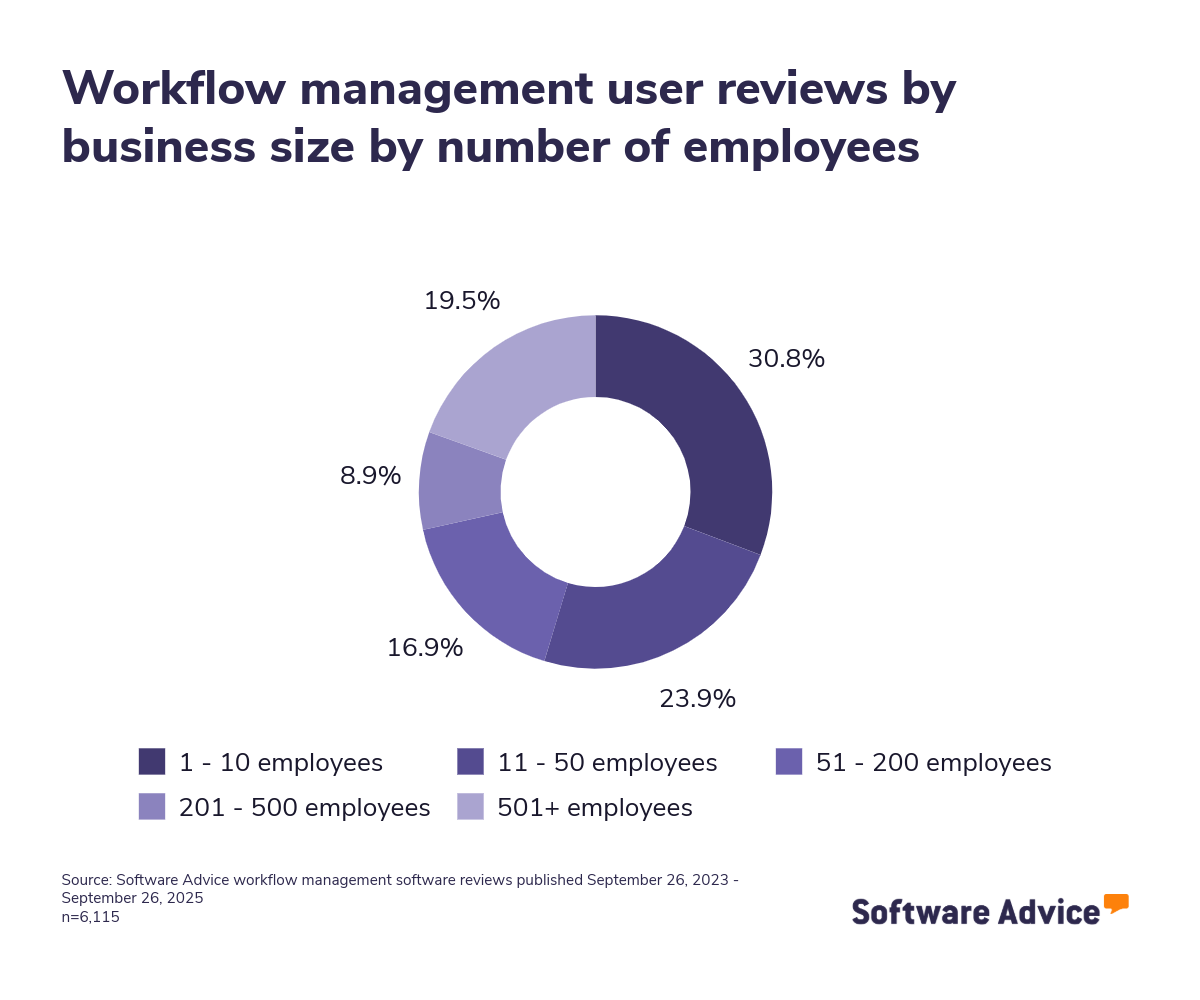
To give you an idea of the market, we have 1,178 workflow management products listed on our site, and we’ve published 6,115 reviews for 344 products since September 2023. Most reviewers (55%) come from small businesses with 50 or fewer employees, and another 26% represent midsize firms with 51–500 employees.
Pricing varies widely. Entry-level plans average $8 per user, per month, and typically support basic workflow creation and task routing. Mid-tier plans range from $15 per user, per month to $69 per user, per month and may include conditional logic, approval chains, and integrations. High-end plans, averaging $105 per user, per month, often support advanced reporting, role-based access, and portfolio-level management. [2]
If you’re a first-time buyer, consider your internal processes and how structured they are. Ask stakeholders what steps they want to automate and what visibility they need across teams. Create a list of questions that help you better assess your needs. These questions can be:
Can the tool support multi-step workflows with conditional logic?
Does it allow role-based access and external user permissions?
Can workflows be customized for different departments or project types?
Does it integrate with your existing project management or CRM systems?
With more than 1,178 workflow management products available, finding the right fit can feel overwhelming. Our experienced software advisor, Bryan Dengler, who has three years of expertise helping businesses select workflow tools, can guide you through the decision-making process. If you’re ready to get personalized recommendations, schedule a call to discuss your needs.
What is workflow management software?
Workflow management software helps teams coordinate complex, multi-step processes by defining how tasks move from one stage to the next. Instead of relying on spreadsheets or email chains, businesses use these tools to map out repeatable workflows, assign responsibilities, and track progress in real time.
These systems are especially useful in environments where approvals, dependencies, or compliance steps are involved. Bryan Dengler, one of our experienced software advisors, explains that “workflow tools are most valuable when there’s a formal process that needs to be followed—like in a PMO, IT department, or consulting firm. They help ensure nothing falls through the cracks.”
Our analysis of 6,115 workflow management software reviews over the past two years shows simplified project management as a key benefit of this type of software. Reviewers frequently mention that these tools made it easier to assign tasks, track progress, and manage dependencies across teams. Many also highlight improved visibility into project timelines and bottlenecks, which helped them prioritize work and reduce delays.
Based on 2,459 advisor conversations with workflow management software buyers in the last two years, the industries that most commonly use these tools are manufacturing, management consulting, and engineering. [3]
Essential features of workflow management software
When evaluating workflow management software, it’s important to understand which features are standard and which ones vary across tools. Most systems include core capabilities such as task management, workflow configuration, and business process automation. Other features—like collaboration tools, activity tracking, and document management—are commonly offered but not guaranteed. After analyzing reviews and engaging with ERP software providers, we've identified the following core and common features that enhance workflow management functionalities. [4]
Core workflow management features
Task management | Create, manage, and track all task activities and progression. 93% of our reviewers rate this feature as critical or highly important. |
Workflow configuration | Alter the default workflow to meet your organization's needs. 89% of our reviewers rate this feature as critical or highly important. |
Business process automation | Helps automate and manage information, tasks, and procedures by establishing routines and patterns associated with processes. 86% of our reviewers rate this feature as critical or highly important. |
Common workflow management features
Collaboration tools | Provides a channel for team members to share media files, communicate, and work together. 89% of our reviewers rate this feature as critical or highly important. |
Activity tracking | Provides visibility into task progress, status changes, and user actions. 92% of our reviewers rate this feature as critical or highly important. |
Document management | Supports storing, attaching, and managing documents within workflows. 86% of our reviewers rate this feature as critical or highly important. |
Search/filter | Search and filter data across systems to locate required information by entering keywords or certain criteria. 90% of our reviewers rate this feature as critical or highly important. |
Benefits and competitive advantages of using workflow management software
Our analysis of 6,115 user reviews in the last two years shows that workflow management software is valued for its ability to improve team coordination, streamline task execution, and enhance visibility across projects. These tools help businesses reduce manual work, improve accountability, and keep teams aligned, especially when managing multiple projects or departments.
Here’s an overview of the top benefits, listed in order of highest user sentiment:
Team collaboration: Unify communication and task updates across teams by centralizing comments, file sharing, and status changes in one platform. This reduces the need for scattered emails or meetings and ensures everyone is aligned on priorities and progress.
User interface: Accelerate adoption and ease of use with an intuitive, user-friendly interface that minimizes training time. A clean layout helps users, from project managers to occasional contributors, navigate workflows confidently and complete tasks without confusion.
Task management: Organize and assign work by breaking down projects into actionable tasks with clear owners and deadlines. This improves accountability, helps teams stay on track, and ensures that no step in the process is overlooked.
Project tracking: Gain real-time visibility into project timelines, dependencies, and milestones. This allows teams to identify delays early, adjust workloads, and make informed decisions to keep projects moving forward.
Automation: Eliminate repetitive manual steps by automating approvals, notifications, and task handoffs. This not only saves time but also ensures consistency in how work is executed, reducing the risk of errors and delays.
How to choose the best workflow management software for your business
Step 1: Define your requirements
Before choosing a workflow management system, start by outlining your specific needs. Identify the processes you want to automate, the level of visibility teams require, and the approval steps involved. Consider factors such as conditional logic, role-based access, integrations with existing tools, budget constraints, training needs, and data migration support. Clear requirements will help you select software that fits your current workflows and scales with your organization’s long-term goals.
What is the cost of workflow management software?
Most workflow management platforms use a subscription model, with pricing tied to the features you need and the size of your team. Starter plans often begin around $8 per user each month and work well for teams that need simple workflow setup and task routing.
For organizations looking for greater automation and customization, pricing typically moves into the $15–$69 per user, per month range. Tools at this level may include conditional steps, approval paths, and integrations with other systems.
At the enterprise level, plans can reach an average of $105 per user, per month, offering capabilities like advanced analytics, role-based permissions, and portfolio-wide workflow management — features built for complex, multi-department environments.
Integration considerations for workflow management software
Integration plays a critical role when selecting workflow management software. Many businesses need their platform to connect with tools such as project management systems, customer relationship management (CRM) platforms, enterprise resource planning (ERP) software, or IT service management tools. For example, integrating with a CRM can help sales or support teams automatically trigger tasks and approvals when new deals or tickets are created. These integrations improve collaboration, minimize manual updates, and ensure teams always have the latest information to keep work moving efficiently.
Different industries have unique integration needs. IT services teams may require connections with help desk or ticketing systems to automate incident resolution workflows. Marketing and advertising agencies often benefit from integrations with campaign management tools to streamline creative approvals. In finance and accounting, linking workflows to ERP systems helps automate expense approvals and budget tracking.
Be aware of potential drawbacks
While workflow management software offers significant benefits, it’s important to understand some common challenges before investing:
Complexity and learning curve: Advanced platforms can feel overwhelming for first-time users, especially in smaller teams without IT support. A steep learning curve may delay adoption and lead to underused features.
Integration challenges: Connecting workflow tools with existing systems (CRM, ERP, project management, or HR platforms) can create data gaps or sync issues if not configured correctly, sometimes requiring manual workarounds.
Hidden costs as you scale: Many tools price by user or feature tier. Costs can increase quickly as your team grows or you need premium capabilities like analytics, role-based permissions, or advanced automations.
Over-automation risks: Excessive automation can make processes rigid, slowing teams down when exceptions or creative problem-solving are needed. Too many automated rules can also be hard to maintain over time.
Change management hurdles: Introducing workflow software often means changing how people work. Without strong training and internal buy-in, teams may resist adoption, revert to manual processes, or create shadow workflows outside the system.
Step 2: Make a shortlist of workflow management software
With more than 1,100 workflow management tools on the market, narrowing down your options can feel daunting. Here are some ways to simplify the process:
Get qualified help from an advisor
At Software Advice, our advisors specialize in helping businesses match workflow tools to their needs and budgets. You can chat online with an advisor or schedule a call to discuss your requirements. In just a few minutes, you’ll get a shortlist of platforms tailored to your workflows, approval structures, and team size.
For additional tips after your consultation, read After Your Advisor Call: 4 Tips to Keep Your Software Purchase on Track.
Explore our list of workflow management FrontRunners
If you’d rather start on your own, check out our Workflow Management Software FrontRunners report, which highlights workflow tools with the highest user ratings. Review our methodology to understand how products make the list and why it’s a reliable starting point.
For deeper help comparing options, download The Ultimate Software Vendor Evaluation Guide. It includes a free comparison chart to evaluate each vendor’s features, pricing, support, training options, and deployment models — all in one place.
Step 3: Pick your best option
Once you’ve built your shortlist, your next step is requesting vendor demos for all your shortlisted tools. In these demo sessions, you can explore the tool fully and get a firsthand experience of its usability. Demos also give you the chance to ask the vendor some questions about the tool and clear any doubts you may have about its use and functionality.
How to prepare for vendor demos
Demos are your best chance to see the software in action and get clear answers about features, pricing, integrations, technical support, and training. To make the most of the session, prepare a list of questions in advance so you don’t overlook critical details. Here are some example questions:
How customizable are your workflows?
Every organization structures work differently. Ask if the software supports multi-step workflows, conditional logic, and approval rules without heavy coding, so it fits your existing processes.
What integrations does your software support?
Find out if the platform connects with CRM, ERP, ITSM, or project management tools out of the box or requires custom work. Confirm who maintains and updates those integrations.
How is ongoing support and training provided?
Smooth adoption depends on onboarding and help resources. Ask about live training, tutorials, knowledge bases, and support channels such as chat or dedicated reps.
Does it provide workflow analytics and bottleneck tracking?
Analytics show where work gets delayed. Ask if the tool offers cycle time reports, task completion metrics, and dashboards to help you improve processes over time.
Can external collaborators join securely?
If you work with vendors or clients, check whether the system allows secure external participation without exposing sensitive internal data.
For more guidance and additional questions to ask during demos, read How To Cut Through the Sales Pitch During Software Demos. This resource helps you prepare for live product walkthroughs tailored to your use case, not just generic marketing overviews.
Step 4: Successful implementation of the new workflow management software
After you’ve chosen and signed the contract for your workflow management platform, the real work begins—rolling it out smoothly across teams and processes. Good planning here determines whether the system drives efficiency or stalls adoption.
Establish clear change management communication: Explain how the new tool will reshape approvals, task routing, and cross-department collaboration. Share a rollout timeline, key milestones, and who will own each stage. Let teams know when legacy processes will be retired and how escalations or exceptions will be handled in the new system.
Provide tailored training and user support: Offer role-based training—administrators learn how to build workflows and set permissions, while end users focus on tracking tasks, approvals, and notifications. Include tips for editing active workflows, managing exceptions, and monitoring progress. Keep a help channel or office hours for early questions.
Audit and migrate processes carefully: Before launch, review existing workflows to remove redundant or outdated steps. If moving from another platform, map old processes to the new tool’s structure (e.g., triggers, conditions, and parallel paths). Test a few critical workflows end-to-end to confirm automations and notifications work as intended.
Plan for integrations early: If the platform will connect with CRM, ERP, ITSM, or project management tools, configure and test these links during implementation—not after. Confirm data flow direction, user permissions, and what happens when integrated systems fail or change.
Set up analytics and performance tracking: Define the KPIs you’ll monitor (e.g., cycle time, task completion rates, bottleneck locations) and build dashboards before go-live. This helps leadership measure ROI and adjust workflows quickly as teams adopt the new system.
For more guidance on a smooth rollout, see 5 Critical Steps to a Successful Software Implementation Plan.
Software related to workflow management
When researching workflow management tools, you may come across other software categories that offer overlapping features or complement workflow platforms. These solutions can extend automation, improve visibility, and help manage complex business processes more effectively.
Business Process Management (BPM) software: Helps organizations analyze, design, and optimize end-to-end business processes. BPM tools are often more advanced than basic workflow platforms, offering features like process modeling, simulation, and performance monitoring.
Professional Services Automation (PSA) software: Supports service-based businesses—such as IT consultancies and agencies—in managing projects, resources, time tracking, and billing. When paired with workflow management, PSA tools can streamline service delivery and improve utilization rates.
Project management software: Provides task planning, scheduling, and resource allocation for projects of any size. While workflow software focuses on process automation, project management tools help track progress, budgets, and milestones for delivery.
Requirements management software: Used primarily by product development and engineering teams to collect, track, and prioritize requirements. Integrating it with workflow tools ensures that requirements flow smoothly into approvals, development tasks, and testing workflows.
Task management software: Offers a lightweight way to create, assign, and track tasks. Ideal for small teams or businesses that need visibility without building complex workflows.
Customer relationship management (CRM) software: Enables sales and support teams to manage customer interactions and pipelines. Connecting CRM to workflow software automates follow-ups, deal approvals, and onboarding steps.
Forms automation software: Transforms paper-based processes into digital forms that trigger workflows for reviews, approvals, or routing across departments.
Low-code/no-code application platforms: Allow non-technical users to build custom workflow applications or extend existing ones with minimal coding, making it easier to adapt workflows to unique business needs.
More resources for your workflow management journey
Make Your Software Search More Seamless With a Software Advisor
How To Write a Business Case for New Software [Template Included]
About our contributors
Author
Preksha Buttan is a writer at Software Advice. She provides insights to help small businesses identify the right software for their needs by analyzing more than 550,000 Software Advice user reviews and nearly 48,000 interactions between Software Advice software advisors and buyers.
Prior to joining Software Advice, she covered topics related to the medical and automotive industries.
Editor
Parul Sharma is a content editor at Software Advice with expertise in curating content for various niches, including SaaS, digital marketing, and search engine optimization. With over half a decade of experience in content writing and editing, Parul has the expertise to simplify complex terms into engaging, valuable content for targeted audiences. She completed her graduation and post-graduation in English literature from Delhi University and was awarded the Dr. Asha Sahni Memorial Award for being the highest scorer in her graduating class.
Parul has contributed to the news, lifestyle, education, and health verticle of DNA India, India’s premier media channel. Outside of work, she can be found curating healthy recipes, coloring in mandala books, and spending quality time with her family.
Advisor
Bryan Dengler is a senior advisor. He joined Software Advice in 2022, and is based in Austin, TX.
As part of the software advisor team, Bryan helps professionals from a wide range of industries who are seeking accounting, project management, manufacturing, learning management, and supply chain software. He provides a shortlist of personalized technology recommendations based on budget, business goals, and other specific needs.
Bryan’s favorite part of being a software advisor is knowing he’s made a valuable difference in a buyer’s life with each advising session he holds.
Sources
Software Advice reviews data: Software Advice reviews are collected from verified users for individual software products. For this report, we analyzed reviews from September 2023 to September 2025. Read the complete methodology.
Pricing: Products evaluated for the pricing calculation were taken from Software Advices’s workflow management FrontRunner report. The pricing ranges exclude freemium versions of the products. The features highlighted were identified based on their relevance and the percentage of products in the Software Advice directory that offer them. Only products with publicly available pricing information, as of September 28, 2025, were considered for pricing calculation.
Software Advice advisor call notes: Findings are based on data from telephonic conversations that Software Advice’s advisor team had with businesses seeking workflow management tools. For this report, we analyzed phone interactions from September 2023 to September 2025. Read the complete methodology.
Core and common features: To identify these features, we asked users to rate, on a scale of “low importance” to “critical,” how important different features are for workflow management software. The features showcased are those that the highest percentage of reviewers rated as “highly important” or “critical” over the past two years (as of Sept. 28, 2025).
Workflow Management FAQs
- What is the best software for workflow management?
The best workflow management software is Podio, based on the highest overall user ratings in the Workflow Management FrontRunners report.
- Is Excel a workflow management tool?
No. Excel is not specifically designed for workflow management but can handle basic tasks like creating lists, schedules, and process trackers. However, it lacks automation, real-time collaboration, and scalability for complex workflows.
- How does workflow management differ from project management?
Workflow management focuses on automating and monitoring recurring processes for efficiency, while project management involves planning and controlling temporary initiatives with specific goals and timelines. Workflow tools streamline routine tasks, whereas project management tools handle broader objectives and resource allocation.
- How much does workflow management software cost?
As of January 2026, entry-level workflow management software plans typically start around $6 per user per month, while comprehensive solutions with advanced functionality can exceed $85 per user per month. Many providers also offer free trials or tiered pricing to accommodate different business sizes.