


Best Accounts Payable Software of 2026
Updated January 14, 2026 at 5:19 AM

Written by Amita Jain
Senior Content Writer

Edited by Parul Sharma
Editor

Reviewed by Niko Bernardone
Advisor Manager

Talk with us for a free 15-min consultation
Expert advisors like Jacqueline, who have helped 1,000+ companies, can find the right software for your needs.
- All Software
- Software Advice FrontRunners
- Popular Comparisons
- Buyer's Guide
- Frequently Asked Questions
Accounts payable software automates invoice processing, approvals, payments, and reconciliation for businesses. With over 300 tools on Software Advice, knowing where to start can be tough. To help you find the right fit, I partnered with our accounts payable software advisors to curate a list of recommended productsi and a list of the Accounts payable software Frontrunners based on user reviews. For further information, read our buyers guide before purchase.
Accounts Payable Software
Sort by
Reviews: Sorts listings by the number of user reviews we have published, greatest to least.
Average Rating: Sorts listings by overall star rating based on user reviews, highest to lowest.
Alphabetically (A-Z): Sorts listings by product name from A to Z.

Sage Intacct operates within the Sage Business Cloud portfolio as a comprehensive cloud-based financial management software, exp...Read more about Sage Intacct


Sage Intacct's Best Rated Features
See All
Sage Intacct's Worst Rated Features
See All

Sage 50 Accounting is an accounting solution designed to cater to the needs of small and medium-sized businesses. It offers a su...Read more about Sage 50 Accounting

Sage 50 Accounting's Best Rated Features
See All
Sage 50 Accounting's Worst Rated Features
See All

Accounts payable is a bottleneck for teams handling high volumes and complex operations. Manual entry, delayed approvals, and co...Read more about MakersHub


MakersHub's Best Rated Features
See All
MakersHub's Worst Rated Features
See All

Xledger is a cloud-based enterprise resource planning (ERP) solution that caters to midsize and large businesses and helps them ...Read more about Xledger


NetSuite is an AI-powered cloud-based business management suite that incorporates ERP, financial management, CRM and eCommerce f...Read more about NetSuite


NetSuite's Best Rated Features
See All
NetSuite's Worst Rated Features
See All
Software Advice FrontRunners 2026

(215)

(462)

(2233)

(1803)

(1283)

(671)

(257)

(186)

(207)

(194)


Best for Customer Satisfaction

Stampli

- Key FeaturesStampli's scoreCategory average
Accounting
4.704.57 category average
Invoice Processing
4.794.53 category average
- Screenshots


Best for Mobile app

SAP Concur

- Key FeaturesSAP Concur's scoreCategory average
Accounting
5.04.57 category average
Invoice Management
4.254.57 category average
Invoice Processing
4.714.53 category average
- Screenshots


Best for Customization
NetSuite

- Key FeaturesNetSuite's scoreCategory average
Accounting
4.414.57 category average
Invoice Management
4.04.57 category average
Invoice Processing
4.224.53 category average
- Screenshots


Highly Rated for Quick Adoption/Easy Adoption

Odoo

- Key FeaturesOdoo 's scoreCategory average
Accounting
3.934.57 category average
Invoice Management
5.04.57 category average
Invoice Processing
4.364.53 category average
- Screenshots


Best for User Interface

Zoho Books

- Key FeaturesZoho Books's scoreCategory average
Accounting
4.464.57 category average
Invoice Management
4.754.57 category average
Invoice Processing
4.574.53 category average
- Screenshots


Best for Automation Capabilities

Teampay

- Key FeaturesTeampay's scoreCategory average
Accounting
4.754.57 category average
Invoice Management
4.334.57 category average
Invoice Processing
4.304.53 category average
- Screenshots


Most Used By Information Technology and Services

Payhawk

- Key FeaturesPayhawk's scoreCategory average
Accounting
4.694.57 category average
Invoice Management
4.784.57 category average
Invoice Processing
4.604.53 category average
- Screenshots


Highly Rated for Quick Implementation

AvidXchange

- Screenshots


Most Used By Non-Profit Organization Management

Procurify

- Key FeaturesProcurify's scoreCategory average
Accounting
4.604.57 category average
Invoice Management
5.04.57 category average
Invoice Processing
4.914.53 category average
- Screenshots


Tipalti

- Key FeaturesTipalti's scoreCategory average
Accounting
5.04.57 category average
Invoice Processing
4.434.53 category average
- Screenshots


DualEntry

- Key FeaturesDualEntry's scoreCategory average
Accounting
4.04.57 category average
Invoice Management
5.04.57 category average
Invoice Processing
4.404.53 category average
- Screenshots


Yooz

- Key FeaturesYooz's scoreCategory average
Invoice Management
4.464.57 category average
Invoice Processing
4.364.53 category average
- Screenshots


Melio

- Key FeaturesMelio's scoreCategory average
Accounting
4.04.57 category average
Invoice Management
4.694.57 category average
Invoice Processing
4.384.53 category average
- Screenshots


Agicap

- Key FeaturesAgicap's scoreCategory average
Accounting
3.974.57 category average
Invoice Processing
3.824.53 category average
- Screenshots


- Key FeaturesSAP Business ByDesign's scoreCategory average
Accounting
4.354.57 category average
Invoice Management
4.04.57 category average
- Screenshots


Sage X3

- Key FeaturesSage X3's scoreCategory average
Accounting
5.04.57 category average
Invoice Management
5.04.57 category average
Invoice Processing
3.754.53 category average
- Screenshots


Lightyear

- Key FeaturesLightyear's scoreCategory average
Accounting
4.894.57 category average
Invoice Management
5.04.57 category average
Invoice Processing
4.934.53 category average
- Screenshots


- Key FeaturesMultiview ERP's scoreCategory average
Accounting
4.534.57 category average
Invoice Processing
4.324.53 category average
- Screenshots


- Key FeaturesBILL Accounts Payable & Receivable's scoreCategory average
Accounting
3.604.57 category average
Invoice Management
5.04.57 category average
Invoice Processing
4.224.53 category average
- Screenshots


Sage 100

- Key FeaturesSage 100's scoreCategory average
Accounting
3.714.57 category average
Invoice Processing
4.074.53 category average
- Screenshots


Methodology
The research for the best accounts payable software list was conducted in October 2025. We evaluated data (user reviews and demand signals) from the past 24 months as of the research date. Read the complete methodology.
Popular Accounts Payable Comparisons


Buyer's Guide
This detailed guide will help you find and buy the right accounts payable software for you and your business.
Last Updated on February 04, 2025What you need to know about accounts payable software
What is accounts payable software?
Essential features of accounts payable software
Benefits of using accounts payable software
How to choose the best accounts payable software for your business
Software related to AP software
More resources for your AP software journey
What you need to know about accounts payable software
Accounts payable (AP) software is a subset of broader accounting software that helps organizations manage their debts and other financial liabilities. While most accounting software includes basic bill payment features, dedicated AP modules offer deeper capabilities for processing invoices and vendor payments.
Companies typically invest in specialized accounts payable solutions when managing hundreds of monthly vendor payments. Of 3,410 accounting software buyers our advisors talked to in the past year, most who asked about AP applications were primarily businesses with 21 to 500 employees. [1]
To give you an idea about the market, we have over 380 different accounts payable products, with more than 7,400 verified user reviews of those products published in the past year alone. [2] With so many options, how do you find the right AP software for your business?
Pricing is one of the biggest factors you should consider. Most accounts payable solutions are priced on a “per month” basis, scaling with the number of invoices processed and the number of users. The cost of AP software typically starts from $25 per month for entry-level plans and can go up to $105 per month for premium or advanced systems. [3]
Buyers also need to consider several other factors when purchasing AP software, including features, integrations, ease of use, and support. Some critical questions to answer as you consult with stakeholders and evaluate different systems are:
How many invoices does our team process monthly?
How many people need to be involved in approval workflows? Do we need mobile access for approvals?
Which systems (like accounting or ERP) must the AP software integrate with?
Are there any special offerings for user access controls and audit trails?
How will the software provider help migrate existing data?
Finding the right AP software can be a long and daunting process. In this guide, you’ll learn about the essential components of AP software and get step-by-step guidance on choosing the right solution for your organization. To help, we’ll tap into the expertise of our accounting advisors, Niko Bernardone and Chris Soltani, who have been leading buyers to the right software for over a combined 15 years. Schedule a free consultation with them or our other advisors today for the best advice.
What is accounts payable software?
Accounts payable (AP) software helps a company manage its outstanding liabilities by automating the vendor payment process. It provides tools to automatically capture and extract data from emailed or scanned invoices, establish approval workflows, set up payment terms, and track payment status—all in one system.
Most accounting systems come with basic AP features alongside core modules like general ledger and accounts receivable. "When evaluating AP solutions, first understand what your accounting system already offers," says our advisor, Niko Bernardone. Dedicated AP solutions, however, offer deeper capabilities for businesses handling higher monthly payment volumes, including multi-level approvals, integrated payment processing, and detailed audit trails.
Companies typically invest in specialized AP tools when they face increasing monthly invoice volumes, need complex approval requirements, handle multi-currency payments, or want better vendor relationship management.
For accounting teams, AP automation makes their life easier by eliminating manual data entry, preventing duplicate payments, and freeing up time for more value-added activities like monitoring cash flow and building vendor relationships.
Essential features of accounts payable software
When choosing an accounts payable software for your business, it's important to understand both essential and common features. Core features like invoice processing, invoice management, and vendor management are central to nearly every AP system. At the same time, other features like duplicate payment alerts and expense tracking are also fairly common.
Based on our analysis of thousands of reviews, here are some essential features of AP software that users often mention. [2]
Core AP software features
Invoice processing | Automatically captures invoice data from paper and digital sources, converts it to digital format, and validates key information like amounts, due dates, purchase order numbers, vendor information, and payment terms. 90% of our reviewers rate this feature as critical or highly important. |
Invoice management | Organizes and tracks invoices throughout their lifecycle, from receipt to payment, including routing for approvals, payment scheduling, and maintaining audit trails. |
Vendor management | Tracks and stores all vendor-related information, such as contact persons, payment history, services offered, terms of payment, and discounts. |
Common AP software features
Expense tracking | Keeps a detailed log of all spending activities, enabling teams to track costs by department, project, or category. 78% of our reviewers rate this feature as critical or highly important. |
Duplicate payment alert | Automatically flags duplicate invoices by matching vendor names, amounts, invoice numbers, and dates—preventing accidental double payments. 77% of our reviewers rate this feature as critical or highly important. |
Bank reconciliation | Compares and matches AP transactions with bank feeds, highlighting discrepancies to ensure payment records align with actual bank activity. 73% of our reviewers rate this feature as critical or highly important. |
Approval process control | Configures multi-level approval workflows based on invoice amounts, departments, or vendors. Lets managers set approval thresholds and routing rules. 73% of our reviewers rate this feature as critical or highly important. |
Optional AP software features worth noting
Accounting: Built-in accounting to handle everyday money tracking and generating financial reports. 92% of reviewers rate this feature as critical or highly important.
General ledger: Centralized record-keeping for all money flowing in and out of the business. 84% of reviewers rate this feature as critical or highly important.
Billing and invoicing: Generates and sends invoices to customers, complementing the accounts payable function with accounts receivable capabilities. 79% of reviewers rate this feature as critical or highly important.
Receipt management: Stores and organizes digital copies of all payment receipts and related documents. 75% of reviewers rate this feature as critical or highly important.
Modern AP solutions continuously evolve to include advanced artificial intelligence (AI) and machine learning (ML) to enhance these features and automate almost every task in the process. According to Gartner, AI already powers invoice capture in 75% of AP solutions and fraud or duplicate invoice detection in 55%. [4]
If you’d like to know more about AP software features and get recommendations for your business, schedule a call with one of our AP software advisors to discuss your options.
Benefits of using accounts payable software
Our advisor, Chris Soltani, has been helping companies find the best software solutions for 11 years and counting. Based on his conversations with buyers, he says two of the biggest benefits of adopting accounts payable (AP) software are control and efficiency.
AP software gives finance teams more control over how and when they make vendor payments. “The technology helps you create a standard process for paying vendor bills, so you’re not paying out your cash too early and have a good picture of what’s coming due,” Soltani notes. “This empowers accounting departments to take more control over payment decisions and maintain stronger oversight."
Manual data entry is the number one process challenge for AP professionals. Switching from manual spreadsheets to dedicated AP software makes payment processes significantly more efficient. For example, instead of entering invoice data and chasing down approvals through email, the software automatically routes bills to the right approvers and processes payments according to the rules. This increases the system's speed and accuracy.
Some other benefits that reviewers say AP software provides include:
Time savings: Users report saving hours each week by eliminating manual data entry and paper-based approvals. As one reviewer notes, 'What used to take me a few hours is now cut down to minutes.'
Cost savings: Beyond saving staff time, users report reducing costs by accurately capturing invoice data, identifying pricing inconsistencies across vendors, identifying early payment discounts, and preventing duplicate payments.
Better financial visibility: Having all payment data in one digital system helps accounting teams spot their spending patterns and monitor cash flow more effectively. Reviewers frequently mention the value of real-time insights into payment statuses and financial health.
The culmination of all these benefits is that companies with the right AP software are able to utilize their available resources better, build stronger vendor relationships, and maintain efficient finance operations focused on promoting business growth.
How to choose the best accounts payable software for your business
Many businesses struggle with determining whether they need dedicated accounts payable (AP) software or if the basic AP features offered in accounting software are sufficient. “The answer depends on your payment processing volume and process complexity,” says our software advisor, Soltani. While standard accounting software can handle basic tracking of paid or unpaid bills and generate AP aging reports (highlighting bills coming due), they often lack capabilities for intelligent invoice capturing, complex approval routing, and integrated payment processing.
To avoid a regretful purchase, the first thing you should do is ask yourself what exactly you need your software to do.
Step 1. Define your requirements
Before shortlisting the best accounts payable software providers, you should:
Assess your current needs
Start by evaluating your AP workload and pain points. Are you processing over 50 vendor payments monthly? Is manual data entry consuming too much staff time? Are you struggling to catch duplicate payments or pricing discrepancies?
If the answer to several of these questions is yes, you likely need a dedicated AP system. Also, map out who needs system access and at what level. For example, marketing managers may need remote approval rights, while accounting staff may need full processing capabilities.
List out all the features you need
Your invoice volume and process complexity should guide your feature needs.
If you’re processing 50 to 100 invoices with one to two approvers, automated invoice capture and easy payment processing may be the features you’re mainly looking for.
If you’re handling over 100 invoices with complex approval processes and basic automation in invoice processing, look for advanced workflow automation and robust integration capabilities.
“Don’t let budget constraints limit your initial search,” shares our advisor Bernardone. “First, experience systems that check all your boxes, and then consider costs. We find that buyers often willingly pay more for the right features and good user experience.” This isn’t surprising, as ease of use is the #1 driver of satisfaction for almost 70% of accounting users. [5]
Plan integration with existing systems
Expecting your new software to work with your existing systems may seem obvious, but it needs to be discussed upfront with vendors. Bernardone says, “Integration capabilities can make or break your software success, so you aren’t wasting time evaluating systems that can't connect with your critical platforms.”
Consider all the systems your AP solution must connect with, such as accounting software, banking platform for payments and reconciliation, enterprise resource planning (ERP), or payroll system.
While vendors may claim their software "can integrate with anything," always ask for specific integrations you need and preferably customer references of those using them. Some key questions to ask vendors about integration:
What level of integration is possible with different systems?
How often does data sync between systems?
What are the specific costs associated with each integration?
Is an open API available?
Consider your total cost of ownership (TCO)
Accounts payable software is typically offered either as a perpetual license or a monthly subscription. With a perpetual license, an organization pays a fee upfront and then typically pays annual fees for support, maintenance, and updates. With a monthly subscription, an organization pays one monthly fee.
Generally, pricing is determined by the user count and feature requirements. More advanced AP systems can cost as much as $105 per user per month; entry-level plans cost an average of $25 per user per month, and many products offer free versions.
In addition to the label price, consider additional costs, including setup and implementation fees, data migration costs from your old to the new system, additional user licenses as your team grows, and customer support or training fees.
Budget for the whole finance tech stack
Considering your entire finance tech stack as you plan and budget for your AP purchase is important. While AP software will help you in efficient payment processing, it's not the only tool you may need. Based on your business complexity, you may also want tools like expense management software for employee reimbursements and financial reporting tools to track business performance.
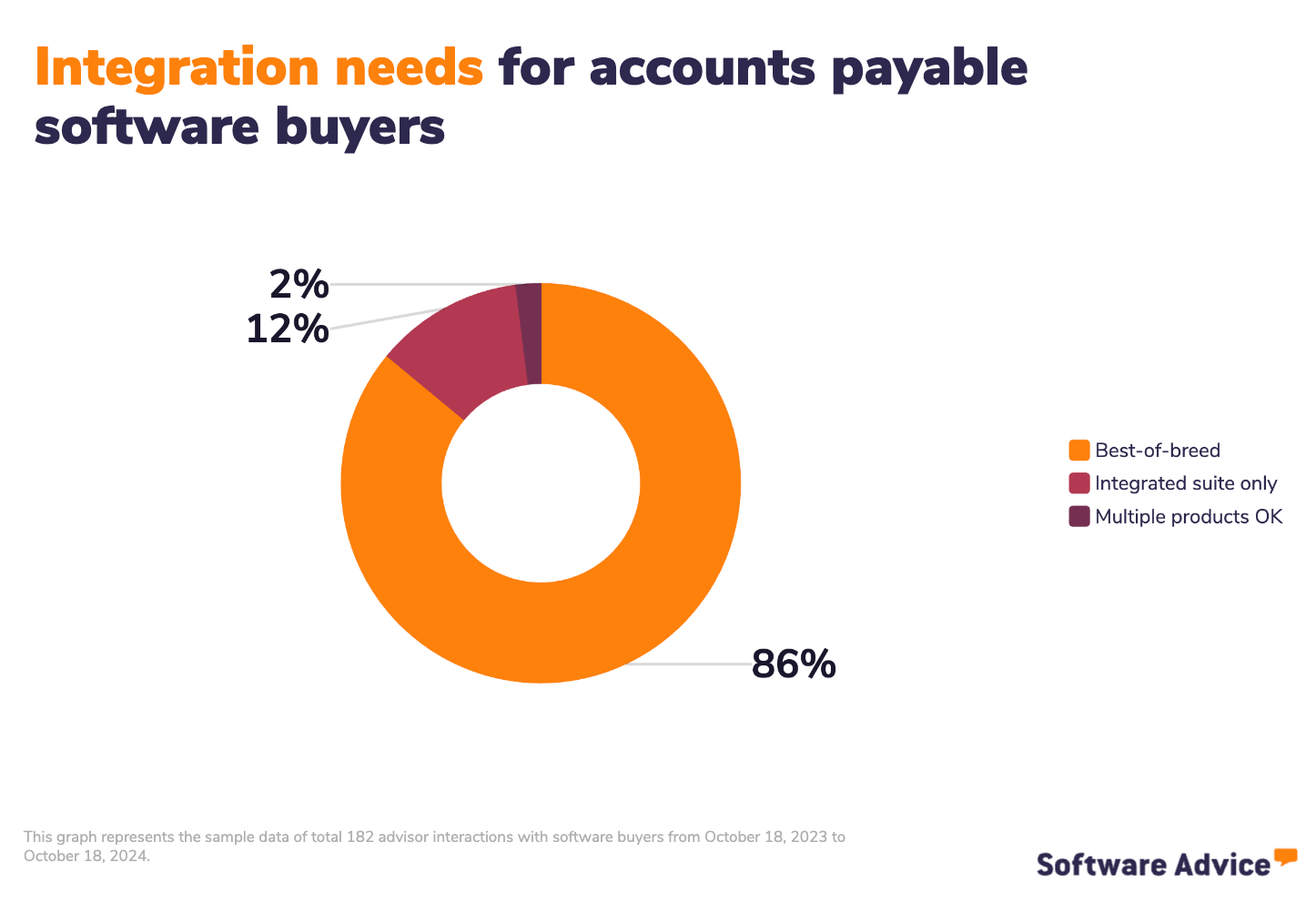
The question is, do you want all of these different feature sets to be rolled into one system—a more comprehensive accounting platform? Or do you want to purchase these tools as separate standalone systems?
From hundreds of conversations we had with accounting software buyers, we found that 86% of buyers seeking AP software prefer specialized solutions. Your choice between an integrated suite or a best-of-breed system should align with your existing systems and growth plans.
Step 2. Make your accounts payable software shortlist
With nearly 400 different accounts payable software to choose from on Software Advice alone, it can be daunting to try and make a shortlist of options that fit your needs and budget. But with the right resources and support, it doesn’t have to be.
Get qualified help from an advisor
At Software Advice, our advisors like Niko Bernardone and Chris Soltani have experience helping organizations identify AP solutions that match their needs and budgets.
If you need help, you can either schedule a phone call with an advisor or chat online with one right now. In just a few minutes, our advisor will help you identify a shortlist of HR software options that best align with your requirements.
Explore our list of AP FrontRunners
If you’re not ready to speak to an advisor or simply want to do the research yourself, we recommend starting with our Accounts Payable FrontRunners report. Only products rated highly by verified users qualify for this list, which you can use to learn what the most sought-after AP products are on the market.
Step 3. Pick the best option for your business
Once you've shortlisted potential vendors, it's time for detailed evaluation through demos and trials. Here’s our advice at this stage.
Ask important questions during demos
Demos can often feel like one-sided affairs, with vendors showcasing their products in the best light possible. To get a realistic understanding of how a given AP software system will work for you, guide the conversation with specific questions about your needs, such as:
Can you show how the system handles different invoice formats (PDF, paper, email)?
What fields are automatically captured vs. requiring manual input?
How does the system handle exceptions (poor-quality scans, unusual formats)?
How are approval rules set up for different scenarios?
Can you demonstrate handling a rush invoice approval?
How does payment scheduling work?
Can you show the process for different payment methods (ACH, check, wire)?
Bernardone says, “While all accounts payable tools you shortlist will have the same core features you need, the key difference lies in user experience. Take multiple demos, and use each demo to build your understanding.”
To help you keep track of how vendors answered these questions and how you rate different products, make use of our ultimate software vendor evaluation guide.
Take your time with the trial period
Most AP software providers offer free trials. Use this time to actually try a software product before buying it. Bernardone advises buyers to get feedback from everyone who’ll use the system, from AP staff to approving managers; each user’s perspective matters for successful software adoption.
Step 4. Make the most of your AP software
Whether you’re switching from one product to another or going from manual methods to your first electronic system, plan across these areas to ensure successful AP software implementation:
Data migration: If you’re migrating vendor and invoice data from one system to another, make sure the vendor helps you ensure a clean data transfer. Once done, verify data accuracy post-migration.
Integration: Whether it’s a payroll system, an expense management tool, a company intranet, or some other type of software, map out all of the important integrations you want and work with your IT department to test if everything runs smoothly.
Training: Take advantage of vendor training resources and give your team time to adapt to new workflows.
For more guidance, read our five critical steps to a successful software implementation.
Software related to AP software
Core financial systems
Accounting software: Complete financial management system for recording transactions, maintaining ledgers, and generating reports.
Enterprise resource planning (ERP): Comprehensive business management software that includes accounting, operations, and other business functions.
Transaction management
Accounts receivable software: Manages incoming payments and customer invoicing processes.
Billing and invoicing software: Creates and sends invoices to customers and tracks payment status.
Expense management software: Handles employee expenses, reimbursements, and corporate card reconciliation.
Payment processing software: Facilitates electronic payments and manages payment methods.
Business process tools
Document management software: Stores and organizes financial documents and supports paperless processes.
Procurement software: Manages purchasing processes, from requisition to purchase order creation.
Industry-specific accounting
Agriculture and farm accounting software: Tracks seasonal expenses, crop/livestock costs, and farm-specific tax requirements.
Construction accounting software: Manages job costing, progress billing, and contractor payments.
Fund accounting software: Designed for nonprofits and government entities to track restricted funds and grants.
Medical accounting software: Handles insurance billing, patient payments, and healthcare-specific compliance.
Legal accounting software: Manages trust accounts, billable hours, and client matter cost tracking.
Hotel accounting software: Manages property-specific expenses, occupancy-based revenue, and vendor relationships.
More resources for your AP software journey
Automate Invoice Processing to Boost Efficiency and Lower Costs
Accounting Process Automation: How to Get Started and What to Consider
About our contributors
Author
Amita Jain is a senior writer for Software Advice, covering finance technology with a focus on expense management and accounting solutions for small-to-midsize businesses. After completing her master’s in policy studies from King’s College London, she began her career as a journalist in New Delhi, India, where she garnered first-hand knowledge of the startup space and the education sector. She spent nearly half a decade covering high-level events hosted by the United Nations and the Government of India. Her work has been featured in Careers360, among other publications.
Amita’s research and writing for Software Advice is informed by more than 130,000 authentic user reviews and over 30,000 interactions between Software Advice software advisors and software buyers. Amita also regularly speaks to leaders in the finance and accounting space so she can provide the most up-to-date and helpful information to small and midsize businesses purchasing software or services.
When she’s not contemplating tech solutions for SMBs, Amita finds her zen in swimming, doodling, and indulging in animated sitcoms and science fiction.
Editor
Parul Sharma is a content editor at Software Advice with expertise in curating content for various niches, including SaaS, digital marketing, and search engine optimization. With over half a decade of experience in content writing and editing, Parul has the expertise to simplify complex terms into engaging, valuable content for targeted audiences. She completed her graduation and post-graduation in English literature from Delhi University and was awarded the Dr. Asha Sahni Memorial Award for being the highest scorer in her graduating class.
Parul has contributed to the news, lifestyle, education, and health verticle of DNA India, India’s premier media channel. Outside of work, she can be found curating healthy recipes, coloring in mandala books, and spending quality time with her family.
Advisors
Niko Bernardone is an advisor manager. He joined Software Advice in 2020 as a software advisor, and now he manages a team of 8 software advisors. He is based in Fort Myers, FL.
Niko and his team help small businesses find the right accounting, project management, manufacturing, and learning management software for their needs each year. They’re able to do this through one-to-one conversations designed to narrow down the list of potential tools to only those that are the best fit.
His favorite part of being a Software Advice advisor team manager is the opportunity to help buyers navigate complex issues and help them find the solutions that drive the results they need.
Chris Soltani is a senior advisor. He joined Software Advice in 2013 as a software advisor, and he is based in Austin, TX.
As part of the software advisor team, Chris helps accounting, project management, and supply chain industry professionals find budgeting, collaboration, inventory management, and billing and invoicing tools. He provides a short list of personalized technology recommendations based on budget, business goals, and other specific needs.
Chris’s favorite part of being a software advisor is truly helping buyers overcome challenges when they’re researching the hundreds of software options online.
Sources
Software Advice advisor call notes: Findings are based on data from telephonic conversations that Software Advice’s advisor team had with small-to-midsize businesses seeking AP software. For this report, we analyzed phone interactions from the past year as of the production date. Read the complete methodology.
Software Advice software pricing data: Only products with publicly available pricing information and qualified software products within the category, as of the production date, are included in the pricing analysis. Read the complete methodology.
Software Advice reviews data: Software Advice reviews are collected from verified users for individual software products. For this report, we analyzed reviews from the past year as of the production date. Read the complete methodology.
Market Guide for Accounts Payable Invoice Automation Solutions, Gartner
Software Advice 2025 Tech Trends Survey: The survey was designed to understand the timeline, organizational challenges, adoption and budget, vendor research behaviors, ROI expectations, and satisfaction levels for software buyers. Read the complete methodology.
Accounts Payable FAQs
- What software is used for accounts payable?
Based on their invoice volume and process complexity, businesses typically choose between standard accounting systems or specialized AP solutions to manage their accounts payable. For many small businesses processing a few monthly bills, accounting software with built-in AP features usually suffices. It can handle basic bills and due date tracking and generate aging reports. However, businesses handling a high invoice volume every month mostly opt for dedicated AP solutions that offer stronger automation, from intelligent data capture to complex approval workflows and integrated payment processing. Our data shows that a majority (87%) of buyers seeking AP functionality typically prefer specialized solutions for it over integrated accounting systems.
- How do you keep track of accounts payable?
The basic process for tracking accounts payable involves capturing supplier invoices when they arrive, recording payment due dates, and tracking them through to payment. While some small businesses still use spreadsheets, most companies now rely on some software (AP module in general accounting system or specialized AP software) to keep track of vendor bills. Most AP tools automate this by capturing data from emailed or scanned invoices, routing them through approval workflows, and scheduling payments. They provide real-time visibility into paid and unpaid bills, flag urgent items, and ensure accurate vendor payments—reducing the risk of missed deadlines or errors.
- What are the most popular accounts payable software?
According to our analysis of products with high market demand and reviews, Ramp had the highest overall rating from verified reviewers on Software Advice.
- How much does AP automation cost?
An AP automation system can cost anywhere from $25 to $103 per month or more depending on how many users want access, how many invoices you want to process, how much functionality it has, and how advanced it is. Vendors also sell free versions of their AP systems.
- Is AP automation worth it?
AP automation is worth the investment for businesses processing over 50 monthly invoices or managing complex approval workflows. Our review data shows that AP automation delivers substantial benefits for users, such as faster invoice processing (cutting monthly work by 2-3 days) and fewer payment errors, both of which are critical in AP management. If you're struggling with delays in invoice processing, missed payments, and complex approvals, automation can provide quick ROI. That said, companies with low invoice volumes, simple approval processes, or limited budgets might want to wait before automating their AP.