


Best Human Resource Apps software of 2026

- Popular Comparisons
- Buyers Guide
Compare Products
Showing 1 - 25 of 605 products
Compare Products
Sort by
Reviews: Sorts listings by the number of user reviews we have published, greatest to least.
Average Rating: Sorts listings by overall star rating based on user reviews, highest to lowest.
Alphabetically (A-Z): Sorts listings by product name from A to Z.

BambooHR centralizes your HR data, automating key tasks like payroll, benefits, and employee management. Streamline processes fr...Read more about BambooHR


BambooHR's Best Rated Features
See All
BambooHR's Worst Rated Features
See All

Paycom is the most automated HCM platform and the only HR and payroll software built on a truly single, unique database that aut...Read more about Paycom


Paycom's Best Rated Features
See All
Paycom's Worst Rated Features
See All

Rippling is an integrated workforce management platform that unifies HR, IT, and finance tools to streamline operations. It cent...Read more about Rippling


Rippling's Best Rated Features
See All
Rippling's Worst Rated Features
See All

TriNet's HR Plus is outsourced HR services plus HR technology to help your business thrive. Our all-in-one HR platform helps you...Read more about TriNet HR Plus

TriNet HR Plus's Best Rated Features
See All
TriNet HR Plus's Worst Rated Features
See All

UKG Pro Human Capital Management (HCM) software is a workforce management solution designed to align people strategy with busine...Read more about UKG Pro
UKG Pro's Best Rated Features
See All
UKG Pro's Worst Rated Features
See All

RUN Powered by ADP is a smart, simple payroll and HR solution designed to help small businesses pay people confidently and stay ...Read more about RUN Powered by ADP

RUN Powered by ADP's Best Rated Features
See All
RUN Powered by ADP's Worst Rated Features
See All

ApplicantPRO by JobMatch is a cloud-based applicant tracking (ATS) system designed for small to midsized companies that are work...Read more about isolved Talent Acquisition

isolved Talent Acquisition's Best Rated Features
See All
isolved Talent Acquisition's Worst Rated Features
See All

ADP Workforce Now is an HR suite that combines all core payroll and HR management processes into a single database-driven platfo...Read more about ADP Workforce Now


ADP Workforce Now's Best Rated Features
See All
ADP Workforce Now's Worst Rated Features
See All

Workable is an HR platform designed to support hiring, employee data management, time tracking, and payroll processes. It is sui...Read more about Workable

Workable's Best Rated Features
See All
Workable's Worst Rated Features
See All

Asure’s end-to-end Payroll, HR, and Time and Attendance solutions were developed specifically for small to mid-sized businesses....Read more about Asure


Asure's Best Rated Features
See All
Asure's Worst Rated Features
See All

Teambridge brings together every staffing tool you need, like scheduling, time tracking, and team chat, on a composable, mobile-...Read more about Teambridge


Dayforce is an AI-powered people platform, delivering simplicity at scale with a full-suite HCM solution. Designed as a single, ...Read more about Dayforce HCM
Dayforce HCM's Best Rated Features
See All
Dayforce HCM's Worst Rated Features
See All

Tired of juggling disconnected systems for HR, Finance, and IT? Wasted time and manual work slow your business down. Paylocity i...Read more about Paylocity

Paylocity's Best Rated Features
See All
Paylocity's Worst Rated Features
See All

TriNet provides a full-service solution that offers HR products tailored to the industry and strategic HR services for small to ...Read more about TriNet

TriNet's Best Rated Features
See All
TriNet's Worst Rated Features
See All

HiBob is a human resources management platform that combines HR, talent management, payroll, and financial planning tools in one...Read more about HiBob
HiBob's Best Rated Features
See All
HiBob's Worst Rated Features
See All

emPerform is a hybrid employee performance management solution that helps organizations to automate performance reviews and alig...Read more about emPerform

emPerform's Best Rated Features
See All
emPerform's Worst Rated Features
See All

ClearCompany is a unified talent management platform designed to help organizations recruit, develop and retain their workforce....Read more about ClearCompany
ClearCompany's Best Rated Features
See All
ClearCompany's Worst Rated Features
See All

ICIMS is a leading provider of talent acquisition technology that enables organizations everywhere to build winning workforces. ...Read more about iCIMS Hire


iCIMS Hire's Best Rated Features
See All
iCIMS Hire's Worst Rated Features
See All

Eddy is the all-in-one HR Suite built for local businesses. With Eddy, businesses can streamline tedious HR processes and improv...Read more about Eddy

Eddy's Best Rated Features
See All
Eddy's Worst Rated Features
See All

Payroll Relief is a cloud-based accounting software designed to help human resource (HR) professionals manage and streamline pay...Read more about Payroll Relief


Payroll Relief's Best Rated Features
See All
Payroll Relief's Worst Rated Features
See All

ClockShark is a time tracking and job management platform designed for field service and construction businesses. It helps strea...Read more about ClockShark
ClockShark's Best Rated Features
See All
ClockShark's Worst Rated Features
See All

Designed for home care agencies and skilled nursing facilities, Viventium Software is a cloud-based solution that helps organiza...Read more about Viventium Software
Viventium Software's Best Rated Features
See All
Viventium Software's Worst Rated Features
See All

Employment Hero is a cloud-based human resource management (HRM) system for small and medium businesses on the up. The solution ...Read more about Employment Hero
Employment Hero's Best Rated Features
See All
Employment Hero's Worst Rated Features
See All

Nowsta is a cloud-based workforce management solution designed to help businesses streamline the entire employee lifecycle, from...Read more about Nowsta


Nowsta's Best Rated Features
See All
Nowsta's Worst Rated Features
See All

Rise is a cloud-based human resources (HR) solution that helps companies engage with their employees and action all HR functions...Read more about Rise
Rise's Best Rated Features
See All
Rise's Worst Rated Features
See All
Popular Comparisons


Buyers Guide
This detailed guide will help you find and buy the right human resources (hr) mobile apps software for you and your business.
Last Updated on January 27, 2025Having a human resources (HR) system that HR personnel, recruiters, managers and employees can access on their smartphones or tablets outside of the office is no longer a “nice-to-have” luxury. It’s now a necessity in today’s constantly moving, increasingly flexible work environment.
That doesn’t make selecting the right HR mobile app for your business any easier though. With hundreds of systems offering dedicated mobile apps to choose from, with varying levels of device compatibility and ported functionality, it can be difficult to separate out the best solutions from the bunch.
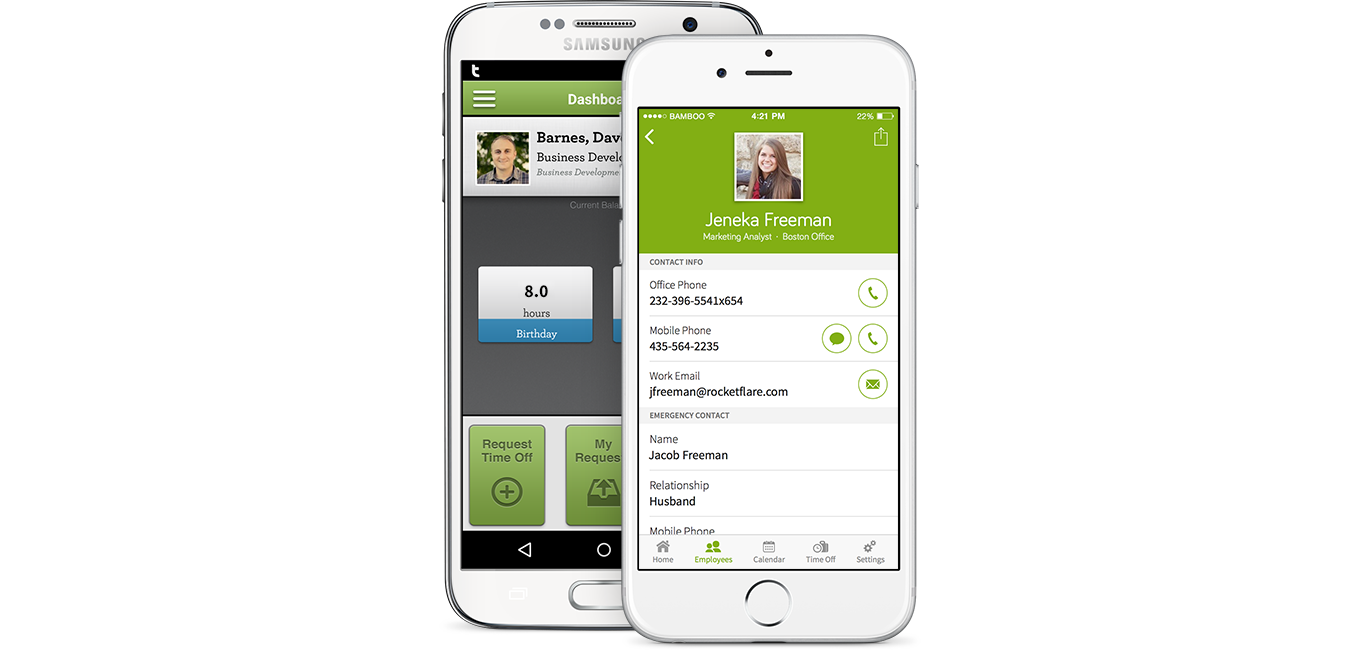
Mobile app for BambooHR
To help, we’ve created this essential Buyer’s Guide for HR mobile apps. Whether you’re an experienced buyer, or researching HR apps for the first time, the goal here is to ensure you have the necessary knowledge to make the best purchase decision for your business.
Here’s what we’ll cover:
What Is a Human Resources (HR) App?
Common Functionality of HR Apps
Benefits of a Dedicated HR App
Key Considerations When Selecting HR Apps
What Is a Human Resources (HR) App?
HR apps are downloadable programs for mobile devices such as smartphones or tablets that allow users to perform a number of core HR tasks on the go. Employees can check their pay stubs, change their mailing address or request paid time off (PTO); managers can adjust shift schedules and recruiters can even conduct video interviews if an app allows for it.
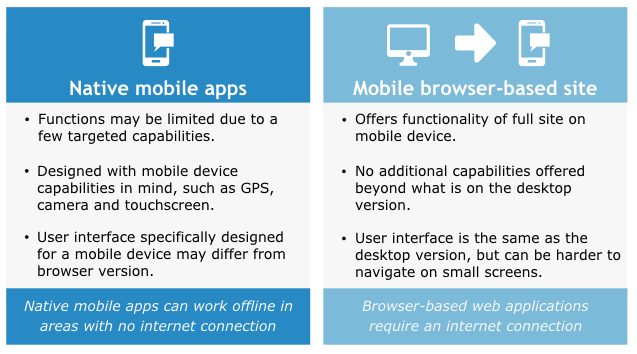
Though all cloud-based HR systems are accessible through a mobile web browser, not all systems have dedicated mobile apps. Here are some details on how native mobile apps and mobile websites can differ:
Key Differences Between Native Mobile Apps and Mobile Websites
Common Functionality of HR Apps
HR app functionality can vary wildly depending on what vendor you’re looking at, the breadth of features offered and the system’s intended end-user. Some apps are only meant to be used by HR personnel, while others include self-service functionality for employees and managers.
That being said, here are some common HR functions to look out for that vendors often include in their mobile apps:
Personnel tracking | Update employee contact and job title information, manage rosters and teams and view the company org chart. |
Time and attendance | Request and approve time off, clock in and out of shifts and monitor employee hours. |
Payroll | Calculate and run payroll; check pay stubs. |
Recruiting | Manage candidate pipelines and share job listings; read resumes and applications. |
Performance reviews | Create, share and manage employee performance appraisals. |
Learning management | Take mobile e-learning courses, complete assessments and review training program performance. |
Benefits of a Dedicated HR App
The main benefit that a dedicated HR mobile app brings to your organization is flexibility. If there’s an HR-related task you need to do immediately, whether it’s a payroll run or updating an employee’s benefits, you no longer need to be at the office or at your desktop computer to do it. In a fast-paced, growing business, this immediate access to important employee information can result in thousands of hours saved over time.
Here are some other benefits:
Employee self-service. With employee self-service (ESS) functionality available on their mobile device, employees now have more freedom to take care of HR-related tasks themselves (updating personal information, logging shift hours)—saving you and your HR department valuable time.
Mobile optimization. If you’ve ever had to pinch-and-zoom your way around a website on your smartphone, you know the pains of a non-optimized mobile experience. A dedicated app is built with the mobile experience in mind, making it easier to navigate on a smaller screen.
Offline access. The main drawback with a cloud-based system is that if your internet goes out, you can’t access it. Some mobile apps avoid this problem by offering an “offline mode” where you can jump in and see important information without a connection. You can also access the system using your phone’s cellular data connection.
How Much Do HR Apps Cost?
If you’re new to the world of HR software, these systems are typically priced one of two ways.
The first way, called a perpetual license, involves paying one large fee upfront to own the software in perpetuity. This type of license is more common in on-premise systems that are housed and maintained by the customer, on their own server.
The second, more common way is a subscription license. In this pricing method, customers pay a monthly or annual fee to use the software. Sometimes this is an unchanging flat fee, but more often the fee fluctuates depending on how many employees you have at your company or how many users will need to access the system. This type of pricing tends to go hand-in-hand with cloud-based systems.
Outside of a few exceptions, access to an HR system’s mobile app comes included with the software purchase. Once you have the system setup, users can download the app from their device’s respective app store or the vendor’s website and log in using the same information they use to access the system on their computer.
Key Considerations When Selecting HR Apps
Even the best desktop-based HR systems can have a lackluster mobile experience. Here are some things to consider as you research mobile HR app offerings:
Device compatibility. If your employees are predominantly Android users, but your vendor only offers an iOS app, that won’t work. Survey your employees to find out what mobile devices they have, so you can find a compatible solution.
Limited functionality. Mobile apps rarely offer a true one-to-one experience with the same functionality as the main software platform, because of data constraints, the smaller screen size and other factors. If a vendor doesn’t offer the functionality your organization needs for mobile, look elsewhere.
User permissions. Consider what an employee can do when they login to the mobile app. Does that differ from what a manager can do? Or a recruiter? If you plan on having multiple users access an HR system through a mobile app, make sure you can set different user permissions so that rank-and-file workers don’t start messing with your payroll numbers.