


Best Mac CRM Software of 2026
Updated January 27, 2025 at 9:56 AM
- Popular Comparisons
- FrontRunners
- Buyers Guide
- Related Software
Compare Products
Showing 1 - 25 of 53 products
Compare Products
Sort by
Reviews: Sorts listings by the number of user reviews we have published, greatest to least.
Average Rating: Sorts listings by overall star rating based on user reviews, highest to lowest.
Alphabetically (A-Z): Sorts listings by product name from A to Z.

Sales Cloud is equipped with customer relationship management (CRM) functionality that encompasses lead management, marketing au...Read more about Salesforce Sales Cloud


Salesforce Sales Cloud's Best Rated Features
See All
Salesforce Sales Cloud's Worst Rated Features
See All

monday CRM is a sales platform that helps businesses streamline sales cycle. The platform caters to a range of industries, such ...Read more about monday CRM
monday CRM's Best Rated Features
See All
monday CRM's Worst Rated Features
See All

Shape's cloud-based solution offers tools designed to manage online marketing and promotions, capture leads from online sources,...Read more about Shape


Shape's Best Rated Features
See All
Shape's Worst Rated Features
See All

Zoho CRM is a cloud-based business management platform that caters to businesses of all sizes. It offers sales and marketing aut...Read more about Zoho CRM

Zoho CRM's Best Rated Features
See All
Zoho CRM's Worst Rated Features
See All

We built Less Annoying CRM 17 years ago for the thousands of independent consultants, agents, and small business owners who are ...Read more about Less Annoying CRM

Less Annoying CRM's Best Rated Features
See All
Less Annoying CRM's Worst Rated Features
See All

HoneyBook is a client relationship platform designed to help small businesses manage proposals, contracts, invoices, payments, a...Read more about HoneyBook

HoneyBook's Best Rated Features
See All
HoneyBook's Worst Rated Features
See All

Pipedrive is a web-based sales CRM solution that helps sales teams of all sizes and industries close more deals. Pipedrive lets ...Read more about Pipedrive
Pipedrive's Best Rated Features
See All
Pipedrive's Worst Rated Features
See All

HubSpot is an AI-enabled, cloud-based CRM solution designed to support businesses of all sizes in the growth journey. It caters ...Read more about HubSpot CRM

HubSpot CRM's Best Rated Features
See All
HubSpot CRM's Worst Rated Features
See All

Running a service-based business means balancing clients, projects, and relationships while still finding time to grow. Too ofte...Read more about Daylite for Mac

Daylite for Mac's Best Rated Features
See All
Daylite for Mac's Worst Rated Features
See All

Sage Sales Management CRM, tailored for any-sized business with a field sales force, now integrates cutting-edge AI and Timeline...Read more about Sage Sales Management
Sage Sales Management's Best Rated Features
See All
Sage Sales Management's Worst Rated Features
See All

Close is the CRM built for small and growing teams who need to manage customer relationships and sales without the bloat and com...Read more about Close
Close's Best Rated Features
See All
Close's Worst Rated Features
See All

OnePageCRM is a simple contact management tool. While it has all the usual features of a customer relationship management (CRM) ...Read more about OnePageCRM

OnePageCRM's Best Rated Features
See All
OnePageCRM's Worst Rated Features
See All

Salesflare is an intelligent CRM and email outreach platform used by thousands of small and medium-sized B2B businesses, who wan...Read more about Salesflare
Salesflare's Best Rated Features
See All
Salesflare's Worst Rated Features
See All

AgentLocator provides lead generation and website design services coupled with a powerful in-house CRM system tailored to the ne...Read more about AgentLocator

AgentLocator's Best Rated Features
See All
AgentLocator's Worst Rated Features
See All

Servis.ai, formerly FreeAgent CRM, is a robust Business Operations Management Platform that helps your team get organized, gain ...Read more about servis.ai
servis.ai's Best Rated Features
See All
servis.ai's Worst Rated Features
See All

Simplify your CRM. All contacts, deals, your calendar, your sales pipeline analysis –? all in one place. Perfectly organized d...Read more about RAYNET CRM
RAYNET CRM's Best Rated Features
See All
RAYNET CRM's Worst Rated Features
See All

Spotler CRM is an easy to use cloud CRM system designed for small and mid-sized organizations, yet also perfect for larger teams...Read more about Spotler CRM
Spotler CRM's Best Rated Features
See All
Spotler CRM's Worst Rated Features
See All

vcita is a cloud-based, all-in-one business management solution designed especially for service-based micro and small businesses...Read more about vcita

vcita's Best Rated Features
See All
vcita's Worst Rated Features
See All

EQUP is designed is to bridge the gap between the currently available solutions and the requirements of small business owners. ...Read more about EQUP

EQUP's Best Rated Features
See All
EQUP's Worst Rated Features
See All

Unique CRM tools for organizing data, overseeing leads, managing deals and the entire sales process, tracking activities, report...Read more about Onpipeline


Salesforce Starter is a comprehensive CRM suite designed for growing businesses. It provides essential marketing, sales, service...Read more about Salesforce Starter

Salesforce Starter's Best Rated Features
See All
Salesforce Starter's Worst Rated Features
See All

Reflect CRM is an on-premise customer relationship management solution that enables businesses to manage customer relationships ...Read more about Reflect CRM Software

17hats is a cloud-based business management platform that helps automate the entire business process. It caters to a wide spectr...Read more about 17hats
17hats's Best Rated Features
See All
17hats's Worst Rated Features
See All

Contactually is a cloud-based customer relationship management (CRM) software that enables businesses to drive personalized comm...Read more about Contactually

The #1 QuickBooks CRM—Make QuickBooks Even Better with Method CRM Method CRM makes QuickBooks even stronger by keeping your dat...Read more about Method CRM

Method CRM's Best Rated Features
See All
Method CRM's Worst Rated Features
See All
Popular Comparisons



Your Guide to Top Mac CRM Software, October 2022
Software Advice uses reviews from real software users to highlight the top-rated Mac CRM products in North America.
Learn how products are chosenExplore FrontRunners


“Usability” includes user ratings for Functionality and Ease of Use.
“Customer Satisfaction” includes user ratings for Customer Support, Likelihood to Recommend and Value for Money.
Reviews analysis period: The reviews analysis period spans two years and ends the 15th of the month prior to publication.

Buyers Guide
This detailed guide will help you find and buy the right mac crm software for you and your business.
Last Updated on January 27, 2025Here's what we'll cover:
What is CRM software for Mac?
CRM software for Mac is software designed to run natively on Mac OS that manages customer contact information as well as customer life cycles.
CRM software for Mac systems should have all the functionality of CRM software for windows meaning you'll still be able to manage the customer-focused side of your business in order to maintain contact with customers and respond to any needs they might have.
Apple is often thought of as a consumer-focused brand, controlling both market and mindshare in the consumer electronics industry. However, many businesses are adopting Apple devices as well. While this is particularly the case among the self-employed and small to mid-sized businesses (SMBs), adoption isn’t limited to this area. In 2013, for instance, Apple devices accounted for nearly 90 percent of new mobile device activations in the enterprise.
As a result of this adoption, enterprise software vendors are developing applications specifically for Apple’s operating systems—OS X and iOS. Customer relationship management (CRM) software is one area where development is already underway. There are currently several CRM solutions on the market available to Apple users. These solutions come in two varieties: Mac-based CRMs and Web-based CRMs.
In this guide, we’ll profile the options available to help you better understand the differences between these two models.
Mac-Based CRM Solutions
Several vendors in the market have developed Mac-based CRM solutions, which are built to run natively on the Mac operating system. These systems borrow from the existing infrastructure of a Mac operating system, resulting in a user interface that is similar to the one Apple users are already familiar with.
(https://software-advice.imgix.net/managed/tinymce_files/images/Elements
A screenshot of Elements CRM, a Mac-based CRM system
While Mac CRM solutions are excellent options for managing your customer relationships, there are relatively few Mac-based CRM options on the market today. Because of this, software buyers looking for a variety of options should consider looking into Software-as-a-Service (SaaS) systems that are “Mac-enabled,” or adapted for use via the Safari Web browser as well as other modern browsers.
Web-Based CRM Solutions
SaaS CRM systems are hosted in the Cloud. In this model, the vendor hosts and maintains the software on servers in a secure, off-site location. Users can access the software from any Web-enabled device, such as a computer, iPhone or iPad. These systems are typically built to be browser-agnostic, meaning they can accessed from Safari, Chrome or another Web browser you run on your Mac.
With the growth of mobile and tablet devices, more CRM vendors are developing subscription-based Cloud software. One benefit of opting for a Web-based CRM system is that it offers more flexibility down the road should you choose to switch away from Apple devices. If your company decides to go the PC route, for instance, you can continue to run your CRM on a hosted system.
Additionally, with the multitude of Web-based CRM systems available, the market is much larger, giving organizations more options when searching for a CRM to meet their unique functional needs.
A Web-based CRM system also requires a smaller upfront investment. Since the software isn’t installed or maintained on your organization’s premises, you won’t need to dedicate resources to an internal IT staff. Moreover, most Web-based systems are sold on a subscription basis and can be licensed for a more affordable monthly payment.
Common Features of Mac CRM Software
Lead management (including tools for lead generation, scoring and nurturing), email and event marketing, landing pages, Web and marketing analytics tools and campaign management. | |
Contact and opportunity management, workflow automation, territory management, sales forecasting, pipeline analysis and reporting. | |
Trouble ticketing, knowledge management and knowledge base systems, self-service solutions, case management, live chat and surveys. | |
Dispatching, scheduling, invoicing, inventory management and order management. | |
Call routing, recording and monitoring; load balancing, call list management, autodialing, scripting, computer telephony integration (CTI) and interactive voice response (IVR). | |
Trouble ticketing, knowledge management, self-service, IT asset management, network management, service level agreement (SLA) management and remote control. | |
Lead and contact management, partner portals, partner relationship management and market development funds management. |
Important Considerations
As you evaluate which option is right for managing your customer relationships, there are a few additional things to keep in mind. If the following considerations are important to you, make sure to discuss them with vendors prior to selecting a CRM system.
Social CRM. CRM vendors increasingly offer social functionality (e.g., social media monitoring) within their CRM application. These systems allow you to access and use data from social media networks such as Facebook, LinkedIn and Twitter. For instance, your sales rep could use the software to monitor a potential customer’s Twitter activity to look for purchasing signals and determine the right time to reach out and potentially close a deal.
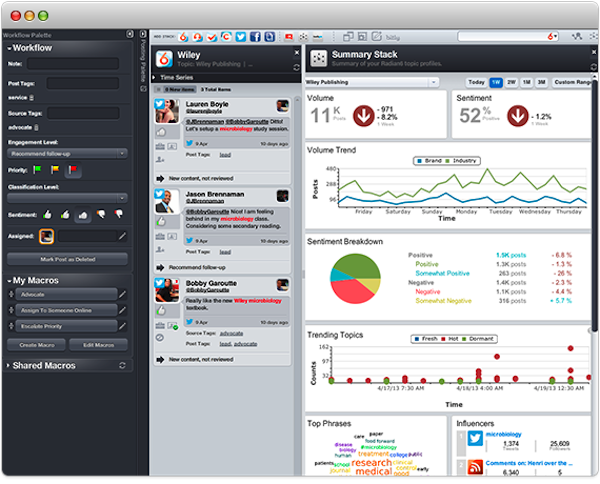
Salesforce's Radian6, an example of a CRM platform incorporating social media streams
Mobile CRM. Even if a CRM solution is Mac-based, there’s no a guarantee that the system will include support for your iPhone or iPad. If the system isn’t compatible with your device’s version of iOS, you may experience issues with appearance and performance. Meanwhile, a Web-based solution may not be built to run natively on iOS, resulting in a poor user experience on your mobile device. To make sure a system will work with your device, ask vendors if their software supports the version of your iPad or iPhone. (To learn more about CRM systems for mobile devices, check out our guides on mobile, iPad and Android CRM options.)
Size of your business. Some CRM systems are only designed to serve the needs of small businesses, which may become an issue down the road as your company grows. If you’re a small business, the functionality offered by vendors that target mid-sized to enterprise-level companies may be more than you can reasonably use. Be sure to select a vendor that meets your level of business needs.