


Best Talent Management Software of 2026
Updated February 18, 2026 at 5:02 AM

Written by Brian Westfall
Associate Principal Analyst

Edited by Caroline Rousseau
Senior Editor

Reviewed by Allen Butt
Senior Advisor

Talk with us for a free 15-min consultation
Expert advisors like Jacqueline, who have helped 1,000+ companies, can find the right software for your needs.
- All Software
- Software Advice FrontRunners
- Popular Comparisons
- Buyer's Guide
- Frequently Asked Questions
Talent management software helps HR teams attract, develop, and retain employees through hiring, onboarding, performance, and succession planning. Choosing from nearly 490 products—each built for different team structures, workforce strategies, or growth goals—can be daunting. To help you narrow it down, I worked with our talent management software advisors to curate a list of recommended productsi and a list of the Talent Management software Frontrunners based on user reviews. For further information, read my Talent management software buyer's guide.
Talent Management Software
Sort by
Reviews: Sorts listings by the number of user reviews we have published, greatest to least.
Average Rating: Sorts listings by overall star rating based on user reviews, highest to lowest.
Alphabetically (A-Z): Sorts listings by product name from A to Z.

BambooHR centralizes your HR data, automating key tasks like payroll, benefits, and employee management. Streamline processes fr...Read more about BambooHR


BambooHR's Best Rated Features
See All
BambooHR's Worst Rated Features
See All

Rippling is an integrated workforce management platform that unifies HR, IT, and finance tools to streamline operations. It cent...Read more about Rippling


Rippling's Best Rated Features
See All
Rippling's Worst Rated Features
See All

Paycom is an HR and payroll software designed to manage the entire employment lifecycle, from recruitment to retirement. It is s...Read more about Paycom


Paycom's Best Rated Features
See All
Paycom's Worst Rated Features
See All

TriNet's HR Plus is outsourced HR services plus HR technology to help your business thrive. Our all-in-one HR platform helps you...Read more about TriNet HR Plus

TriNet HR Plus's Best Rated Features
See All
TriNet HR Plus's Worst Rated Features
See All

ApplicantPRO by JobMatch is a cloud-based applicant tracking (ATS) system designed for small to midsized companies that are work...Read more about isolved Talent Acquisition

isolved Talent Acquisition's Best Rated Features
See All
isolved Talent Acquisition's Worst Rated Features
See All
Software Advice FrontRunners 2026

(4250)

(7138)

(1154)

(1727)

(305)

(3027)

(1721)

(150)

(164)

(641)
Best for Usability

Deel

According to our user reviews, Deel is the highest rated for its usability out of the most popular tools.
Deel is best for organizations prioritizing usability, especially those managing global teams or remote workers. Our reviewers say the intuitive interface and streamlined onboarding make contract, payment, and compliance processes accessible and efficient, even for teams without dedicated HR staff.
- Reviewers Perspective
"The platform also automates the invoicing and compliance paperwork (like generating annual tax forms), which saves significant time and administrative hassle."
DPDhruvkumar Panchal
Design Engineer
Used for 6-12 months
We analyzed 784 verified user reviews for Deel to find out what actual users really think.
Payment Management
Organizations use Deel to centralize payment activities, automate invoicing, and handle compliance paperwork. This streamlines payroll and contractor management for businesses operating across multiple countries.Ease of Use
Teams manage contracts, payments, and HR tasks across borders with Deel’s intuitive layout and navigation. This reduces confusion and makes remote administration manageable for both new and experienced users.Customer Support
HR managers access timely support via multiple channels. Clear communication and knowledgeable staff help resolve both routine and complex issues, supporting confidence in global team management. - Key FeaturesDeel's scoreCategory average
Activity Dashboard
4.754.40 category average
Applicant Tracking
4.724.58 category average
Employee Profiles
4.704.58 category average
- Screenshots


Best for Quick Adoption/Easy Adoption


Of the products listed on our FrontRunners report, ADP Workforce Now is the highest rated for its ease of adoption out of the most popular tools.
ADP Workforce Now is best for businesses seeking quick adoption and a unified HR and payroll platform. Our reviewers say onboarding is straightforward, and the centralized dashboard makes it easy for employees and managers to access payroll, benefits, and time tracking information.
- Reviewers Perspective
"One of hte features that stand out is the self-service portal that allows employees to access paystubs, request time off and update personal information with ease."
CSCassandra Snow
Clinical Services Manager
Used for 2+ years
We analyzed 877 verified user reviews for ADP Workforce Now to find out what actual users really think.
Payroll
HR teams process payroll, track time, and manage deductions in one platform. Centralization supports compliance and keeps operations organized for medium to large businesses.Employee Information
Managers and employees access and update records, schedules, and documents independently. Self-service features reduce HR workload and support efficient workforce management.Pay and Paystubs
Employees track hours, view pay breakdowns, and manage deductions through a secure portal. The mobile app and self-service options keep compensation details accessible. - Key FeaturesADP Workforce Now's scoreCategory average
Activity Dashboard
4.594.40 category average
Applicant Tracking
4.154.58 category average
Employee Profiles
4.394.58 category average
- Screenshots


Best for Quick Implementation
Paycom

In our analysis of Talent Management products with the most market demand, Paycom is the most requested by users for quick implementation out of the most popular tools.
Paycom is best for businesses seeking quick implementation of an all-in-one HR and payroll solution. Our reviewers say setup is efficient, and the integrated platform allows for seamless onboarding, payroll, and employee self-service, reducing manual work and streamlining HR tasks.
- Reviewers Perspective
"I like that we can utilize one system for so many different things including Recruiting, Onboarding, Training, payroll processing, benefits administration, time and attendance, etc. Since joining Paycom a few years ago, they have continued to make improvements to the system and there are monthly trainings on those improvements- large strides in truly providing ROI for their customers"
CSCrystal Swanson
Sr Director of HR
Used for 2+ years
We analyzed 633 verified user reviews for Paycom to find out what actual users really think.
Payroll
HR and payroll teams manage recruiting, onboarding, training, and payroll processing in one system. Automation and reporting tools support compliance and accuracy.Customer Support
Organizations receive help from dedicated representatives and regular training. Support teams assist with system features and updates, helping maximize platform capabilities.Pay Stub
Employees and HR access pay stubs, schedules, and pay data through web and mobile. Automation supports leave management and quick reference to payroll information. - Key FeaturesPaycom's scoreCategory average
Activity Dashboard
4.134.40 category average
Applicant Tracking
3.874.58 category average
Employee Profiles
4.284.58 category average
- Screenshots


Highly Rated for Mobile app

Paylocity

In our analysis of Talent Management products with the most market demand, Paylocity is the highest rated for mobile app out of the most popular tools.
Paylocity is highly rated for its mobile app, making it ideal for organizations with a mobile or distributed workforce. Our reviewers say the app enables easy access to timesheets, pay details, and HR functions, improving convenience and workflow efficiency for both employees and managers.
- Reviewers Perspective
"The timesheet functionality is good, as well; it allows us to track billable hours across various client jobs, and access relevant notes per subsection of times worked."
MEMichelle Egner
Senior Manager, Marketing and Operations
Used for 6-12 months
We analyzed 644 verified user reviews for Paylocity to find out what actual users really think.
Ease of Use
HR teams and employees manage payroll and HR tasks with Paylocity’s user-friendly design. Intuitive features and a mobile app support efficient onboarding and daily operations.User Interface
Administrators configure dashboards and navigate a visually organized interface. This streamlines operations and reduces training time for HR teams and employees.Training and Learning Curve
Organizations access live support, on-demand courses, and a knowledge base to learn Paylocity’s features. Regular updates and support facilitate ongoing skill development. - Key FeaturesPaylocity's scoreCategory average
Activity Dashboard
4.364.40 category average
Applicant Tracking
4.274.58 category average
Employee Profiles
4.314.58 category average
- Screenshots


Best for Customer Satisfaction

Apploi

Of the products listed on our FrontRunners report, Apploi is the highest rated for customer satisfaction out of the most popular tools.
Apploi is best for customer satisfaction, particularly for healthcare and service organizations focused on hiring. Our reviewers point out that responsive support, customizable workflows, and timely communication tools contribute to a positive user experience and efficient candidate management.
- Reviewers Perspective
"I appreciate the high level of customization available within the system, which allows us to tailor workflows effectively to our needs."
NLNaomi Letz
Director of TA
Used for 1-2 years
We analyzed 159 verified user reviews for Apploi to find out what actual users really think.
Applicant Management
Recruiters use Apploi to organize and track high volumes of applicants. Immediate notifications and easy access to candidate information streamline the hiring process from job posting to onboarding.Customer Support
Hiring teams receive timely assistance and clear training resources from Apploi’s support staff. This ensures smooth onboarding and ongoing system usage for recruitment operations.User Interface
HR managers customize workflows and navigate between classic and updated views. Templates and automation tools support efficient recruitment management and quick access to essential features. - Key FeaturesApploi's scoreCategory average
Activity Dashboard
4.894.40 category average
Applicant Tracking
4.844.58 category average
Employee Profiles
4.784.58 category average
- Screenshots

Highly Rated for Automation

Paycor

Paycor is the highest rated for automation out of the most popular tools, based on our analysis of Talent Management products with the most market demand.
Paycor is highly rated for automation, making it well-suited for organizations looking to streamline HR and payroll processes. Our reviewers say automated workflows, intuitive tracking, and robust reporting save time and reduce manual effort for both HR teams and employees.
- Reviewers Perspective
"The mobile-friendly capability that allows both employers and employees to access HR tasks and payroll information remotely, enhancing flexibility and convenience."
JMJenifer Medina
Professional Learning Events and Programs Coordinator
Used for 6-12 months
We analyzed 814 verified user reviews for Paycor to find out what actual users really think.
Payroll
Finance and HR teams automate payroll tasks, track employee hours, and maintain compliance using Paycor. Cloud-based management and mobile access support remote work and timely processing.Employee Pay
Employees access pay stubs, W-2s, and PTO balances on desktop or mobile. Automated tracking and self-service tools reduce administrative burden and keep staff informed.Navigation
Managers and employees use Paycor’s logical layout and clear menus to locate information and complete HR tasks. Tutorials and consistent design support efficient daily use. - Key FeaturesPaycor's scoreCategory average
Activity Dashboard
4.04.40 category average
Applicant Tracking
4.184.58 category average
Employee Profiles
4.194.58 category average
- Screenshots


Best for User Interface

Workday HCM

In our analysis of Talent Management products with the most market demand, Workday HCM is the highest rated for its user interface out of the most popular tools.
Workday HCM is best for users seeking a strong user interface for HR and payroll management. Our reviewers say the intuitive design, centralized dashboard, and clear navigation make it easy for employees and managers to access pay, benefits, and HR resources efficiently.
- Reviewers Perspective
"It's an all-in-one application that centralizes so many business needs such as internal opportunities and positions, employee referrals, and additional company information."
TFTrinidad Flores
Remote Assistance Operator
Used for 1-2 years
We analyzed 783 verified user reviews for Workday HCM to find out what actual users really think.
Features
HR teams leverage Workday HCM’s wide range of features—covering payroll, benefits, and employee development—in one platform. This supports complex organizational needs with flexible configuration and tutorials.Employee Management
HR professionals use Workday HCM to centralize employee records, streamline onboarding, and enable self-service for time off and profile updates. Mobile access and secure document storage support efficient management.Payroll Access
Employees and managers access pay stubs, tax documents, and direct deposit details from one platform. This reduces HR workload and ensures quick access to compensation information on both desktop and mobile. - Key FeaturesWorkday HCM's scoreCategory average
Activity Dashboard
4.564.40 category average
Applicant Tracking
4.434.58 category average
Employee Profiles
4.584.58 category average
- Screenshots


Most Rated for SMBs

Monster+

According to our user reviews, Monster+ is the most requested by small businesses out of the most popular tools.
Monster+ is most rated for SMBs, making it a strong choice for small and midsize businesses seeking effective candidate sourcing. Our reviewers say the platform’s powerful search tools, large candidate pool, and customizable filters help recruiters quickly identify qualified talent.
- Reviewers Perspective
"Monster+ gives an easy way to post jobs and received qualified candidates."
CWChelsey Wright
Project Manager
Used for 6-12 months
We analyzed 110 verified user reviews for Monster+ to find out what actual users really think.
Candidate Search
Recruiters source a wide range of candidates, including niche and entry-level talent, using Monster+'s powerful search features, smart matching, and skill-based organization. This supports hiring for specialized and general roles across industries.Resume Search
Hiring teams access an extensive resume database, upload and filter resumes, and proactively reach out to recently updated profiles. This streamlines candidate identification and outreach for diverse industry needs.Search Functionality
Managers refine job and candidate searches by location, skills, and experience using radius search and keyword filtering. These tools help target talent within specific regions or specialties. - Key FeaturesMonster+'s scoreCategory average
Activity Dashboard
4.104.40 category average
Employee Profiles
4.334.58 category average
- Screenshots


Most Used By Automotive

Netchex

In our analysis of Talent Management products with the most market demand, Netchex is the most requested by users in automotive out of the most popular tools.
Netchex is most used by automotive businesses, making it a good fit for organizations in that sector needing integrated payroll and HR solutions. Our reviewers say customizable reporting, intuitive navigation, and seamless integration help streamline workforce management tasks.
- Reviewers Perspective
"It's an excellent solution that doesn't require you to move from one product to another to accomplish your employee management tasks."
KHKevin Haymon
Director of Quality
Used for 1-2 years
We analyzed 146 verified user reviews for Netchex to find out what actual users really think.
Employee Management
Managers and employees use Netchex to access personal info, request time off, and view tax documents. Self-service modules and onboarding simplify HR tasks and empower staff.Reporting
HR teams build and export tailored reports for payroll, benefits, and compliance. Some users find advanced report creation less intuitive, suggesting improvements in flexibility and sharing.Customer Support
Organizations receive responsive support and benefit from training resources like NetHelp and video tutorials. Dedicated representatives and frequent communication aid smooth transitions. - Key FeaturesNetchex's scoreCategory average
Activity Dashboard
5.04.40 category average
Applicant Tracking
3.604.58 category average
Employee Profiles
4.424.58 category average
- Screenshots


Highly Rated for Customization

isolved

isolved is the highest rated for customization out of the most popular tools, based on our analysis of Talent Management products with the most market demand.
isolved is highly rated for customization, making it suitable for organizations with unique payroll and HR requirements. Our reviewers say the platform’s flexibility allows for tailored workflows and reports, while its user-friendly interface supports efficient onboarding and payroll processing.
- Reviewers Perspective
"It offers a robust, all-in-one HCM platform that has allowed us to streamline payroll, benefits, and employee management into a single system. Once the setup and initial learning curve are behind you, the system becomes a powerful tool for automating processes and reducing manual effort."
MZMelanie Zakrzewski
Payroll Benefits Supervisor
Used for 2+ years
We analyzed 336 verified user reviews for isolved to find out what actual users really think.
Ease of Use
HR administrators and employees navigate isolved’s interface with ease. Straightforward setup and clear explanations help teams quickly learn the basics and manage daily HR and payroll tasks efficiently.Training and Learning Curve
Organizations utilize isolved’s online university, videos, and help articles for onboarding and skill development. These resources support users as they master complex features over time.Navigation
Managers move between HR and payroll functions using isolved’s organized layout and search tools. Familiarity grows with use, making it easier to locate features and complete tasks. - Key Featuresisolved's scoreCategory average
Applicant Tracking
4.184.58 category average
Employee Profiles
4.504.58 category average
- Screenshots


Dayforce HCM

- Reviewers Perspective
"What I appreciate most about Dayforce HCM is how seamlessly it brings together payroll, HR, time tracking, and benefits into one centralized platform."
APAnthoinette Palogan
Project Manager
Used for 6-12 months
We analyzed 601 verified user reviews for Dayforce HCM to find out what actual users really think.
Payroll
Users manage payroll, HR, benefits, and time tracking in one place. Real-time payroll processing and comprehensive reporting reduce errors and save time on administrative tasks. Auditing, customizable payroll policies, and multi-location support are highlighted for organizations with diverse workforces.Employee Management
Teams access all employee data—from onboarding to benefits and performance—on a single platform. Self-service and mobile access reduce HR workload, while real-time updates and transparent records streamline communication and recordkeeping.Pay and Paystubs
Staff can view, print, and manage paystubs, earnings, and tax forms from any device. On-demand pay, automated tax calculations, and direct deposit management simplify payroll-related tasks for employees and administrators. - Key FeaturesDayforce HCM's scoreCategory average
Activity Dashboard
4.04.40 category average
Applicant Tracking
4.034.58 category average
Employee Profiles
4.244.58 category average
- Screenshots


UKG Pro

- Reviewers Perspective
"UKG Pro's features including managing teams, a user-friendly interface, seamless integration of payroll, time tracking, and other HR features made it very efficient tool."
SHSuman Humagain
Software Engineer
Used for 2+ years
We analyzed 434 verified user reviews for UKG Pro to find out what actual users really think.
Employee Information
HR teams store and manage payroll, benefits, and personnel records in one location. Self-service features empower employees to update information and access reports, supporting efficient HR processes.Ease of Use
Users complete HR and payroll tasks with minimal training. The platform’s intuitive navigation and clear options help reduce learning curves and make daily operations more convenient.Reporting
Managers generate standard and custom reports for HR and payroll. Features like scheduled reports, drag-and-drop customization, and BI integration support compliance and decision-making. - Key FeaturesUKG Pro's scoreCategory average
Activity Dashboard
5.04.40 category average
Applicant Tracking
3.864.58 category average
Employee Profiles
4.264.58 category average
- Screenshots


Personio

- Reviewers Perspective
"Personio is the main tool we use in the team, we request time of, track our attendance there, we can super easily access our paycheck and control all contract related informations"
ALAdele Le Houerf
Print Design
Used for 1-2 years
We analyzed 243 verified user reviews for Personio to find out what actual users really think.
Customer Support
HR departments receive assistance throughout implementation and daily use. Resources like help articles and proactive communication from Customer Success Managers help organizations resolve issues and ease transitions.Ease of Use
HR staff and employees manage daily tasks with minimal training. The clear interface and logical workflows allow users to quickly find information and configure settings as needed.HR Management
Organizations streamline personnel data management, absence tracking, and recruitment. Automation and comprehensive features reduce administrative workload and improve efficiency and compliance. - Key FeaturesPersonio's scoreCategory average
Activity Dashboard
2.04.40 category average
Applicant Tracking
4.154.58 category average
Employee Profiles
4.624.58 category average
- Screenshots


UKG Ready

- Reviewers Perspective
"I liked the ease of documenting the start and end of official working hours and the accuracy of documentation, issuing a payslip, scheduling vacations or requesting leave directly from the employee's page."
SASara Amer
Social Media Manager
Used for 1-2 years
We analyzed 512 verified user reviews for UKG Ready to find out what actual users really think.
Employee Payroll
You can process payroll, manage employee data, track PTO, and generate reports from a single platform. Customizable workflows and self-service options help organizations streamline payroll preparation and reduce manual work.Ease of Use
Staff quickly learn to log hours, review paychecks, and manage schedules. The clear layout and self-explanatory functions support fast onboarding for new users, making daily HR tasks more efficient.Workforce Management
HR teams centralize recruitment, onboarding, time tracking, and communications. The platform supports large and distributed teams, offering analytics for decision-making and comprehensive features for talent acquisition and engagement. - Key FeaturesUKG Ready's scoreCategory average
Activity Dashboard
3.504.40 category average
Applicant Tracking
3.954.58 category average
Employee Profiles
4.244.58 category average
- Screenshots


ClayHR

- Reviewers Perspective
"The platform provides a centralized space for managing key HR activities such as leave applications, performance tracking, and accessing personal records, which has improved efficiency and transparency."
GDGideon Dankwa
Credit Control Officer
Used for 1-2 years
We analyzed 76 verified user reviews for ClayHR to find out what actual users really think.
Performance Evaluation
HR teams automate performance reviews and goal setting with customizable templates and notifications. This standardizes evaluations, ensures deadlines are met, and supports employee development.HR Management
Organizations manage recruitment, onboarding, performance, leave, and payroll in one place. Features like employee reward programs and skill matrices help optimize workforce management and reporting.Integrations
Teams connect ClayHR with tools like Slack, Indeed, and Jira to reduce duplicate data entry. Integration streamlines workflows and supports efficient HR operations across platforms. - Key FeaturesClayHR's scoreCategory average
Activity Dashboard
5.04.40 category average
Applicant Tracking
4.604.58 category average
Employee Profiles
4.714.58 category average
- Screenshots


Factorial

- Reviewers Perspective
"The modern UI made adoption painless for non-tech colleagues; even our finance team figured out the timesheet module on day one."
MEMaike Ernst
Manager
Used for 6-12 months
We analyzed 217 verified user reviews for Factorial to find out what actual users really think.
Ease of Use
Teams navigate the platform easily, regardless of technical experience. Both web and mobile applications support efficient daily HR activities, reducing the need for extensive training.Absence Management
Managers and employees request and approve leaves quickly, with centralized tracking of attendance and documentation. This reduces paperwork and provides clear visibility into team schedules.Features
Organizations access payroll, recruitment, and employee data management in one system. Ongoing updates introduce new tools, and the platform adapts to a variety of business needs. - Key FeaturesFactorial's scoreCategory average
Applicant Tracking
3.934.58 category average
Employee Profiles
4.154.58 category average
- Screenshots


- Reviewers Perspective
"Our company is able to benefit from your diverse group of experts specifically from Payroll, Reporting and compliance specialists ensuring regulatory adherences and prompt solution."
DGDenise Ghassem
HR and Payroll Manager
Used for 2+ years
We analyzed 208 verified user reviews for ADP Comprehensive Services to find out what actual users really think.
Payroll
HR teams process payroll efficiently, manage compliance, and access dedicated payroll specialists. The platform reduces manual work and administrative burden, supporting regulatory adherence for growing businesses.Ease of Use
HR professionals and employees navigate the system easily, with most functions accessible with minimal training. The clear layout simplifies administrative tasks for everyday operations.Integrations
Organizations connect ADP Comprehensive Services with other business systems for HR, payroll, and benefits. Integration supports cross-functional operations and enables remote management of HR tasks. - Key FeaturesADP Comprehensive Services's scoreCategory average
Activity Dashboard
4.04.40 category average
Employee Profiles
3.434.58 category average
- Screenshots


Bizneo HR

- Reviewers Perspective
"What I appreciate most is the management of absences (leave, illness, teleworking, etc.), the distribution of pay slips and the reminder of birthdays each month."
NGNicolas GRANIE
Directeur Général
Used for 1-2 years
We analyzed 128 verified user reviews for Bizneo HR to find out what actual users really think.
Ease of Use
Organizations adapt quickly to Bizneo HR’s clear layout and practical features. Both web and mobile access support efficient management of daily HR tasks with minimal training.Vacation and Absence Management
HR teams manage absences, vacations, and documentation in one place. Real-time tracking and easy vacation requests improve transparency and coordination among teams.Performance Evaluation
Managers implement structured feedback and monitor employee progress in a centralized system. The platform simplifies evaluations and supports organized, efficient HR procedures. - Key FeaturesBizneo HR's scoreCategory average
Applicant Tracking
5.04.58 category average
Employee Profiles
4.784.58 category average
- Screenshots


- Reviewers Perspective
"SAP SuccessFactors is very useful for viewing all documents related to payroll, view complete employee information such as manager details , work location ,team mates info and is also very useful for completing all e-learning assigned"
SKSneha Kulkarni
Program Manager
Used for 2+ years
We analyzed 160 verified user reviews for SAP SuccessFactors HCM to find out what actual users really think.
Employee Management
Managers and employees access and update critical data for development and planning. The platform supports large enterprises, secures personnel data, and enables global workforce management.Employee Tracking
HR teams track activities, training progress, and performance across locations. The My Team tile and reporting features support oversight and decision-making for distributed workforces.Performance Management
Organizations manage goals, development plans, and appraisals in one system. Tools support continuous feedback, 360 evaluations, and succession planning, helping teams improve and plan HR strategies. - Key FeaturesSAP SuccessFactors HCM's scoreCategory average
Applicant Tracking
3.774.58 category average
Employee Profiles
4.554.58 category average
- Screenshots


Methodology
The research for the best Talent Management software list was conducted in October 2025. We evaluated data (user reviews and demand signals) from the past 24 months as of the research date. Read the complete methodology.
Popular Talent Management Comparisons


Buyer's Guide
This detailed guide will help you find and buy the right talent management software for you and your business.
Last Updated on October 16, 2025Here’s what we’ll cover:
What you need to know about talent management software
What is talent management software?
Essential features of talent management software
Benefits and competitive advantages of using talent management software
How to choose the best talent management software for your business
Software related to talent management
More resources for your talent management journey
What you need to know about talent management software
Talent management software is a category of human resources (HR) software dedicated to supporting strategic HR needs. As opposed to categories like payroll software and time and attendance software, talent management software is less concerned with compliance and more focused on ensuring companies are providing the right support to retain their best workers. This includes applications for things like managing employee goals and performance, delivering targeted training courses, and optimizing compensation.
Because talent management software isn’t limited to a specific application, and the definition of talent management software can vary, this can be a difficult software market to navigate for newcomers. And with over 550 different talent management software products on our site alone, you have a lot of options to consider. How do you find the right system for your needs?
Understanding how much to budget should be a top priority. While entry-level systems average around $73 per month, high-end talent management suites can average $234 per month or more, depending on how many employees you have and the level of functionality offered. [1]
You should also meet with stakeholders in your organization to figure out answers to critical questions about your talent management software purchase, like:
Which applications do we need, and which ones would be redundant with our current HR systems?
What training resources do we require to get different users (HR, managers, employees, IT) up to speed?
How much implementation support do we need from our chosen vendor?
How can we leverage AI to bolster different talent management processes?
What integrations do we need to keep in mind?
With help from our experienced talent management software advisor Allen Butt, and former HR executive and professional HR strategist Jennifer McClure, this buyer’s guide can help you make the right talent management software purchase decision with confidence.
What is talent management software?
Talent management software helps businesses attract, engage, and retain employees. As Jennifer describes, these are comprehensive HR suites that are designed to give HR departments, managers, and other stakeholders the data and analysis tools to make important talent management decisions. “It’s taking information from your organization that’s been input into the system to help coach and guide you as a leader,” McClure says.
Common features of talent management software include onboarding, recruiting, performance management, compensation management, and learning management.
Essential features of talent management software
You can expect to find core features like onboarding, recruiting management, and performance management in almost all talent management software systems. Beyond this, the features offered can be almost endless, as vendors will differ in which areas of talent management that they want their product to focus on.
To help you hone in on the most essential talent management features, here are the ones that reviewers of talent management software rate as the most important. [2]
Core talent management software features
Recruiting management | Digitize processes related to finding, assessing, and hiring job candidates for open roles. 51% of our reviewers rate this feature as critical or highly important. |
Performance management | Automate performance review processes and track the performance of employees, departments, or your workforce as a whole. 51% of our reviewers rate this feature as critical or highly important. |
Onboarding | Automate the process of turning new hires into legal employees. 45% of our reviewers rate this feature as critical or highly important. |
Common talent management software features
Succession planning | Identify and develop internal talent to fill key leadership positions in the future. 42% of our reviewers rate this feature as critical or highly important. |
Compensation management | Optimize compensation for employees, including wages and bonuses, based on performance, flight risk, and market data. 35% of our reviewers rate this feature as critical or highly important. |
Competency management | Catalog, manage, and develop employee skill sets. 34% of our reviewers rate this feature as critical or highly important. |
Employee engagement | Measure employee engagement through pulse surveys and identify areas for engagement improvement. 27% of our reviewers rate this feature as critical or highly important. |
Learning & development | Create and deliver targeted training materials to help employees grow and progress in their roles. 21% of our reviewers rate this feature as critical or highly important. |
One development to watch with talent management software is the addition of artificial intelligence (AI). Jennifer says AI has been embedded in many talent management systems to help users gain more insights from their data and make the software more helpful in recommending next actions based on that data. This is especially beneficial to small companies that don’t have the resources of their larger competitors.
“I think it's exciting, especially for small and medium-sized organizations, because maybe they don't have access to something that larger organizations do, like whole teams of data analysts. [AI] is a powerful tool,” McClure says.
Benefits and competitive advantages of using talent management software
The companies that are able to hire and retain the best employees have a distinct advantage in their industry. Every business knows this, but only those that can move accurately and efficiently can reap the rewards. Allen, who has been advising buyers to help them find the right software for nearly a decade, says this is one of the distinct benefits of having talent management software.
“With talent management software, you can run periodic anonymous surveys where employees can talk about problems they’re having. Using this data, you can make changes and promote a work culture that is more likely to retain talent,” Butt says.
Some other benefits that reviewers say talent management software brings include:
Streamlined recruiting efforts: Features like applicant tracking, interview management, and onboarding ensure recruiter communications are seamless and promising job candidates are quickly identified and hired.
Improved performance reviews: Reviewers say that with better data from features like 360 feedback, automated reminders, and performance review templates, managers have the tools to make performance reviews more effective and timely.
Future-proofing the business: Talent management software enables businesses to proactively identify major skills gaps and develop future leaders to take over the business as more senior leaders retire.
How to choose the best talent management software for your business
Step 1: Define your requirements
We surveyed 3,500 software buyers and found that the most common thing regretful software buyers would do to avoid regret on their next purchase is to define their goals and desired outcomes more clearly. [3]
Meeting with stakeholders and outlining the specific needs and goals for your talent management software is critical at the outset. This ensures everyone is aligned on what kind of software to look for, and also gives you a measuring stick to declare if your purchase is ultimately successful or not.
Here are some things to keep in mind as you define your requirements.
Evaluate your current HR technology stack
We find that 57% of the buyers who have contacted us about talent management software in the past year have 101 or more employees. [4] This means that buyers tend to have some HR software in place already, be it payroll software or an applicant tracking system.
Because talent management software systems have a lot of different HR applications within them, it’s important to assess where new software is needed and where it isn’t. If you already like your applicant tracking system’s recruiting capabilities, then eliminate recruiting from your feature needs. On the other hand, if you’re looking to sunset your current performance management system and replace it with something else, a talent management suite with performance management capabilities can fill that need.
Budget for how much talent management software really costs
The license cost for talent management software tends to scale based on the number of employees and the amount of functionality offered. Consider not only how many employees you have now but also how many you plan to have in the next year. For context, 55% of the talent management software buyers we talked to budgeted between $5 and $10 per employee per month for their new system.
But this isn’t the only cost you need to budget for. There can be charges for implementation, data migration, customization, user training, or premium customer support buried in the fine print, so be sure to bring up these potential costs with vendors before committing to a purchase.
That being said, have some budget flexibility. “Don't limit yourself too much on budget initially until you know all the features that you need, because you may pigeonhole yourself early on,” Butt says.
Get ahead of potential talent management software challenges
Some of the most common criticisms of talent management software products on our site by reviewers are slow performance, high costs, and issues with data management. Keep these in mind when researching different systems, reading reviews, and talking to vendors.
Step 2: Make your talent management software shortlist
Once you’ve figured out your requirements, it’s time to research your options and come up with a shortlist of 2-3 systems to evaluate further.
Here are some ways you can pare down your talent management software options and create a reliable shortlist with ease.
Get qualified help from our advisors
At Software Advice, our advisors like Allen Butt have experience helping organizations identify talent management systems that match their needs and budgets.
If you need help, you can either schedule a phone call with an advisor or chat online with one right now. In just a few minutes, your advisor will help you identify a shortlist of talent management software options that best align with your requirements.
Explore our list of talent management FrontRunners
If you’d rather do the research yourself, a good place to start is our talent management FrontRunners report. Using reviews data, we map the top products in the category based on customer satisfaction and usability.
Step 3: Pick the best option
Once you have your shortlist, it’s time to investigate your final options further. This means talking to vendors, doing demos, and getting some hands-on time through free trial periods.
Here are our tips at this stage.
Be ready with the right questions during demos
To get the most out of your demo experience, come prepared with questions like:
If I wanted to generate a specific report, how would I do it?
How does this feature work on mobile devices?
How often do you update your software, and what kinds of features are on your roadmap for future updates?
What kind of user training resources and support do you offer?
Do you charge for implementation and data migration?
Take advantage of our ultimate software vendor comparison chart to keep track of the answers and how your team is scoring different products.
Take advantage of free trials
A free trial is your chance to get your hands on a product before purchasing it. This is critical, as it’s an opportunity to assess whether this is the tool for you.
Make sure all types of users (managers, employees, HR, IT) try out the system, and then gather their feedback. Most vendors offer free trials ranging from a week to a whole month.
Don’t settle for your first option
It can be tempting to settle for the first option you demo if it meets most of your requirements and saves you time. But we find that buyers achieve success more often when they engage all of the vendors on their shortlist. This way, you can get a comprehensive understanding of every product on your shortlist before making a decision.
Make a purchase decision in a timely manner
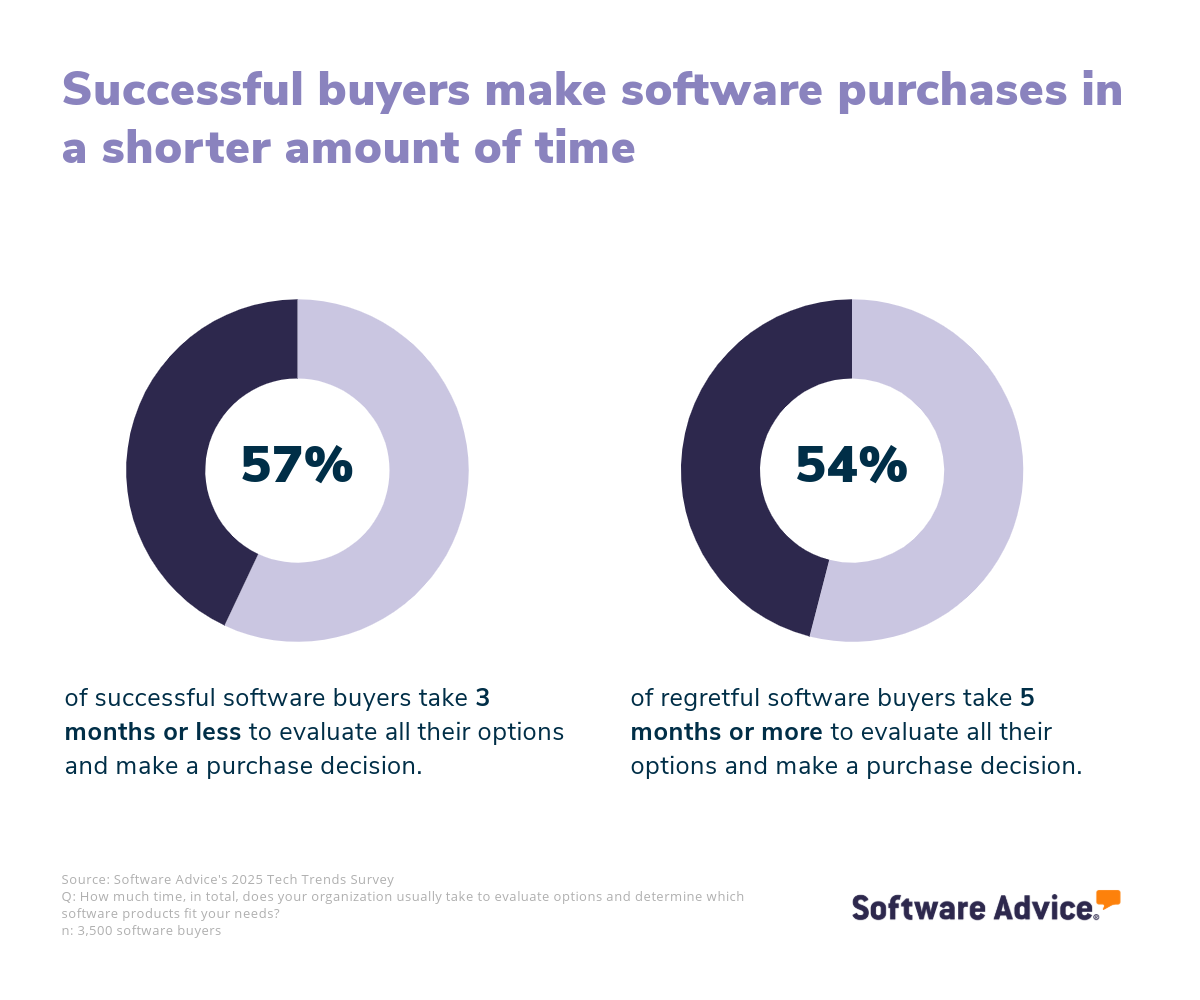
We find that most successful buyers (57%) take three months or less to evaluate software options, while most regretful buyers (54%) take five months or more. While it’s worthwhile to research your options carefully, once you’ve finished your research, don’t hesitate or dawdle on your purchase decision. This can lead to second-guessing and scope creep.
Step 4: Make the most of your talent management software
Here are some important considerations to keep in mind as you implement your new talent management software:
Data migration: Talent management systems succeed or fail based on the quality of your employee data. Look through the current data you have, making sure it’s consistently formatted and cleaned of any obvious errors.
Training: Take advantage of all the training resources your vendor offers, and don’t assume managers can figure it out themselves without hands-on guidance.
Feature rollout: Because talent management systems are so large and packed with features, it’s best to do a staggered rollout. Start with the most important use case, do tests, gather user feedback, squash bugs, then move on to the next most important use case, and so on.
Our five critical steps to a successful software implementation can help guide you through this process.
Software related to talent management
Maybe you decide you only want part of a talent management system, or something related to talent management but a little different. To help, here are some types of software that are closely related to talent management systems:
Succession planning software: This type of software focus on identifying high-potential employees within the company and preparing them for future leadership positions.
Employee engagement software: These tools measure employee engagement (usually through pulse surveys), and identify solutions to improve engagement over time.
Employee recognition software: Allow employees to recognize one another for work accomplishments in a highly visible way and redeem earned recognition for tangible rewards (like gift cards).
Performance management software: Automate performance review processes while collecting and analyzing employee performance data.
Learning management software: This category of software allows companies to create and administer employee training courses at scale, while collecting data on course completion percentages and assessment scores.
Compensation management software: HR departments can analyze compensation data and optimize it based on market trends and performance.
More resources for your talent management journey
The 6 Stages of the Talent Management Lifecycle and HR's Role in Them
After Your Advisor Call: 4 Tips To Keep Your Software Purchase on Track
About our contributors
Author
Brian Westfall is an associate principal analyst at Software Advice, covering human resources, with a focus on recruiting, talent management, and employee engagement. Over the past decade, Brian’s research on the intersection of talent and technology has been featured in Bloomberg, Fortune, SHRM, TIME, and The Wall Street Journal.
Brian’s research and analysis is informed by more than 250,000 authentic user reviews on Software Advice and over 20,000 interactions between Software Advice software advisors and HR software buyers. Brian also regularly analyzes market sentiment by conducting surveys of HR leaders and practitioners so he can provide the most up-to-date and helpful information to small and midsize businesses purchasing software or services.
Editor
Caroline Rousseau is a senior content editor at Software Advice. A former content analyst, Caroline has, for the past five years, built, written, and edited research reports about technological trends, opportunities, and challenges with an SMB audience in mind. Her content has been featured in French Tier 1 media including Le Monde, L’Express, and Le Figaro, among other publications. Her previous experience as a graphic designer, translator, and LQA specialist in various industries converged into a skill set that allows her to create compelling content about today’s business matters.
Caroline’s personal interests include literature and art and she has a passion for Albert Camus, graphic novels, and drawing.
Advisor
Allen Butt is a senior advisor. He joined Software Advice in 2016, and he is based in Austin, TX.
Allen works directly with small business leaders to connect them with the best software providers for their needs. Through one-on-one consultations, Allen assesses the technology requirements of businesses seeking HR and learning management solutions, providing tailored recommendations from a short list of potential matches.
What Allen enjoys most about his role is helping buyers streamline their software search, cutting through the noise to identify the ideal product that aligns with their goals.
Contributor
Jennifer McClure
Experience
With decades of leadership and executive experience, I have worked in and with startups, privately held companies, and Fortune 500 organizations across various industries. As an entrepreneur, keynote speaker, and high-performance coach, I help leaders leverage their influence, increase their impact, and accelerate results.
My journey led me to found Unbridled Talent, LLC, where I provide education, coaching, and strategy consulting services. As the Chief Excitement Officer of DisruptHR, I lead a global community designed to innovate talent strategies in the workplace. My role as a Board Member for the Defense Business Board and CareerPoint.com further extends my influence in strategic leadership.
Expertise
I am recognized globally as an expert on the future of work, strategic leadership, and innovative people strategies. My specialties include keynote speaking, executive coaching, and strategic consulting. I have shared insights with thousands of leaders at conferences and corporate events worldwide, working with clients like Procter & Gamble, General Electric, and LinkedIn.
My workshops blend research, best practices, and storytelling, inspiring audiences to take actionable steps. As a sought-after speaker and consultant, I focus on recruiting, employment branding, and effective use of social media. My podcast, Impact Makers, shares conversations with changemakers building impactful careers.
Education
I hold a Bachelor of Business Administration in Management from Middle Tennessee State University. My educational journey continued at the University of Cincinnati, where I earned an Executive Coaching Certification.
Sources
Software Advice software pricing data: Only products with publicly available pricing information and qualified software products within the category, as of the production date, are included in the pricing analysis. Read the complete methodology.
Software Advice reviews data: Software Advice reviews are collected from verified users for individual software products. For this report, we analyzed reviews from the past year as of the production date. Read the complete methodology.
Software Advice’s 2025 Tech Trends Survey was conducted online in August 2024 among 3,500 respondents in the U.S. (n=700), U.K. (n=350), Canada (n=350), Australia (n=350), France (n=350), India (n=350), Germany (n=350), Brazil (n=350), and Japan (n=350), at businesses across multiple industries and company sizes (five or more employees). The survey was designed to understand the timeline, organizational challenges, adoption & budget, vendor research behaviors, ROI expectations and satisfaction levels for software buyers. Respondents were screened to ensure their involvement in business software purchasing decisions.
Software Advice advisor call notes: Findings are based on data from telephonic conversations that Software Advice’s advisor team had with small-to-midsize businesses seeking HR software. For this report, we analyzed phone interactions from the past year as of the production date. Read the complete methodology.
Talent Management FAQs
- What is a talent management system?
A talent management system is a type of HR software that helps companies attract, retain, develop, and engage their employees. Typically, a talent management system has applications for recruiting, performance management, learning management, and employee engagement, though it may have additional applications for needs like compensation management and succession planning as well.
- What is ATS in talent management?
ATS stands for applicant tracking system in talent management. It is a component often found in talent management software that helps companies manage job applicants as they move through the recruiting pipeline.
- How much does talent management software cost?
According to our pricing research, entry-level talent management software systems average around $73 per month. Premium talent management software suites can average $234 per month or more, depending on how many employees you have and the level of functionality offered. Be sure to talk to vendors to understand all the costs involved with their talent management system.
- How do you create a talent management system?
If you want to create a talent management system, a good place to start is an open source talent management product. Open source products provide the source code for free, so users can customize the system to their liking without involving the vendor. Find an open source talent management system you like, then customize the source code to create a proprietary solution from there.
- What is the future of talent management?
There are a lot of exciting developments in the future of talent management. One such development is the use of artificial intelligence (AI) to better map employee skills and identify skills gaps within the organization. Managers have more data at hand through the use of AI to make better talent management decisions. There’s also the growth of internal talent marketplaces—internal platforms where employees can not only apply for roles on different teams, but also one-off projects, learning programs, and mentorships. When implemented right, internal talent marketplaces make it easier for talent and skills to move around the organization more fluently.