


Best Live Chat Software of 2026
Updated March 28, 2026 at 8:15 PM
- FrontRunners
- Popular Comparisons
- Buyers Guide
Compare Products
Showing 1 - 25 of 398 products
Compare Products
Sort by
Reviews: Sorts listings by the number of user reviews we have published, greatest to least.
Average Rating: Sorts listings by overall star rating based on user reviews, highest to lowest.
Alphabetically (A-Z): Sorts listings by product name from A to Z.

LiveHelpNow provides omnichannel support solutions that give teams of any size the tools they need to drive an amazing customer ...Read more about LiveHelpNow


Connect with customers instantly across live chat, AI chatbots, SMS, messaging apps, and voice, all from a single workspace. Vel...Read more about Velaro


Zendesk is a cloud-based help desk management solution offering customizable tools to build customer service portal, knowledge b...Read more about Zendesk Suite

Zendesk Suite's Best Rated Features
See All
Zendesk Suite's Worst Rated Features
See All

Yellow.ai is a leading provider of generative AI-powered customer service automation, dedicated to transforming how enterprises ...Read more about yellow.ai

yellow.ai's Best Rated Features
See All
yellow.ai's Worst Rated Features
See All

Salesforce Service Cloud is a customer service platform designed to support organizations in managing interactions across multip...Read more about Salesforce Service Cloud

Salesforce Service Cloud's Best Rated Features
See All
Salesforce Service Cloud's Worst Rated Features
See All

Glassix's mission is to empower businesses with the potential of Conversational AI and Omnichannel Customer Communication, drivi...Read more about Glassix
Glassix's Best Rated Features
See All
Glassix's Worst Rated Features
See All

Missive is an inbox collaboration platform that allows teams to work together on email without disrupting their existing workflo...Read more about Missive
Missive's Best Rated Features
See All
Missive's Worst Rated Features
See All

Broadly is a reputation management solution that helps businesses in automotive, construction, medicine and other industries str...Read more about Broadly

Broadly's Best Rated Features
See All
Broadly's Worst Rated Features
See All

Chatway is a live chat app for websites that helps businesses connect with visitors, support customers, answer questions, and co...Read more about Chatway


Chatway's Best Rated Features
See All
Chatway's Worst Rated Features
See All

HelpCrunch is a customer communication platform combining live chat, email marketing automation and a help desk in one solution....Read more about HelpCrunch
HelpCrunch's Best Rated Features
See All
HelpCrunch's Worst Rated Features
See All

Tidio is a complete customer support software suite combining a help desk, live chat, chatbot automation, and a conversational A...Read more about Tidio

Tidio's Best Rated Features
See All
Tidio's Worst Rated Features
See All

WhatsApp enables businesses to connect with customers using real-time chat. The app can be used to answer customer questions in ...Read more about WhatsApp

WhatsApp's Best Rated Features
See All
WhatsApp's Worst Rated Features
See All

Chatra is a cloud-based live chat platform for small businesses and e-commerce retailers. It helps users increase their online s...Read more about Chatra
Chatra's Best Rated Features
See All
Chatra's Worst Rated Features
See All

For business leaders who want to get AI right, Gladly is the only customer experience AI that delivers the cost savings you need...Read more about Gladly

Gladly's Best Rated Features
See All
Gladly's Worst Rated Features
See All

Chekkit is a cloud-based reputation management solution that caters to service-oriented businesses such as dentists, chiropracto...Read more about Chekkit
Chekkit's Best Rated Features
See All
Chekkit's Worst Rated Features
See All

Chaport is a cloud-based live chat and chatbot solution for websites that also enables businesses to communicate with clients ac...Read more about Chaport
Chaport's Best Rated Features
See All
Chaport's Worst Rated Features
See All

Consolto is a complete remote customer communication suite with live chat, web conferencing and appointment scheduling. It is de...Read more about Consolto


Consolto 's Best Rated Features
See All
Consolto 's Worst Rated Features
See All

Chaty helps businesses interact with customers, on their preferred channels including WhatsApp, Facebook Messenger, Telegram, Vi...Read more about Chaty
Chaty's Best Rated Features
See All
Chaty's Worst Rated Features
See All

Slack is a cloud-based project collaboration and team interaction tool designed to facilitate communication across organizations...Read more about Slack

Slack's Best Rated Features
See All
Slack's Worst Rated Features
See All

Wing has the world's best talent ready for you! Use your dedicated assistant to help you focus on your core activities by havin...Read more about Wing

Wing's Best Rated Features
See All
Wing's Worst Rated Features
See All

Lucky Orange is a suite of conversion optimization tools designed to help businesses track and engage with visitors using heatma...Read more about Lucky Orange
Lucky Orange's Best Rated Features
See All
Lucky Orange's Worst Rated Features
See All

Reamaze is a cloud-based help desk and customer messaging solution that helps businesses support, engage and convert customers u...Read more about Re:amaze

Hiver is a modern, AI help desk software designed for sleek, fast-moving teams. It rejects the false trade-off that power must m...Read more about Hiver
Hiver's Best Rated Features
See All
Hiver's Worst Rated Features
See All

LiveAgent is a multichannel help desk solution with advanced AI features, live chat, ticketing, and call center capabilities. St...Read more about LiveAgent
LiveAgent's Best Rated Features
See All
LiveAgent's Worst Rated Features
See All

Denser AI is an artificial intelligence-powered tool designed to enhance semantic search and chat capabilities on websites. This...Read more about Denser AI
Denser AI's Best Rated Features
See All
Denser AI's Worst Rated Features
See All
Popular Comparisons



Your Guide to Top Live Chat Software, April 2025
Software Advice uses reviews from real software users to highlight the top-rated Live Chat products in North America.
Learn how products are chosenExplore FrontRunners


“Usability” includes user ratings for Functionality and Ease of Use.
“Customer Satisfaction” includes user ratings for Customer Support, Likelihood to Recommend and Value for Money.
Reviews analysis period: The reviews analysis period spans two years and ends the 15th of the month prior to publication.
Buyers Guide
This detailed guide will help you find and buy the right live chat software for you and your business.
Last Updated on January 27, 2025Live chat software solutions allow companies to have real-time conversations with website visitors. It is, by many measures, one of the most effective tools for improving customer service and can help increase online sales and repeat business by fostering customer engagement. It can be used for both pre- and post-sales service and, to top it all off, can help businesses save on the costs of providing support through channels such as phone and email.
We’ve prepared a buyers guide to answer the most common and important questions that come up when businesses consider implementing a new (or replacement) live chat solution.
Here’s what we’ll cover:
Common features of live chat software
Strategy tips for live chat implementation
What is live chat software?
Live chat is a communication channel that lets customers and businesses converse in real time on a company’s website via a chat widget. The widget usually appears as a small box or window on the webpage. A live chat conversation can be initiated by the customer, the company, or both, depending on how it’s configured.
A live chat app can be deployed either on-premise (hosted on the company’s own servers) or on the cloud (hosted on the vendor’s or service provider’s servers), typically under a Software-as-a-Service (SaaS) model. On-premise installations are becoming less common and are generally used when a company needs a high degree of customization or integration with other on-premise software platforms. The SaaS deployment option is growing in popularity and is the more common choice for companies that want to add live chat to their websites quickly and easily.
In both deployment models and in most cases, the live chat function is added to a webpage by simply inserting a line or two of code, provided by the live chat vendor, into the page’s HTML. This code tells a website visitor’s web browser to display the live chat box or window whenever a certain page is visited or certain conditions are met.
Live chat is a highly flexible service channel, which is part of what has made it so successful. One-size-fits-all solutions are rarely ideal in the world of customer service, as there are simply too many changing variables that need to be considered to deliver the best outcomes.
For example, a company may find that its website visitors have lots of questions and really appreciate the live chat support option, so the company wants the live chat window to feature prominently for all visitors. Another company might find that live chat is best used selectively, not wanting it to become a distraction to visitors, and might only have the live chat option displayed after certain conditions are met.
For instance, live chat can be set to display only for:
People who’ve spent more than a specific amount of time on a particular page, as this could suggest they’re having difficulty understanding it.
Customers who’ve been searching for topics on the company’s frequently asked questions (FAQs) or help page, but seemingly not finding the answers they need.
Visitors who go back and forth between two different product pages, as this suggests they might need help deciding which of the two to purchase.
Once a company decides exactly how and for which visitors it wants to offer live chat, the live chat tool can be set to automatically follow these or similar rules.
Common features of live chat software
Live chat is one of the most feature-rich communication channels available, and platforms are offered by a great variety of vendors. Some platforms are intended for general use, while others are tailored to specific business models and/or industries. All vary somewhat in the breadth and depth of the features and functionality provided.
One functionality common to nearly all live chat platforms is the “dashboard” or “control panel.” This is used by the business owner or supervisor to monitor current and past live chat interactions. In the following example dashboard, we see a variety of key indicators showing how well a particular agent is performing. Some of these indicators include the number of chats queued up for this agent, the number of currently active chats, and the longest amount of time any customer has had to wait for a chat session to begin.
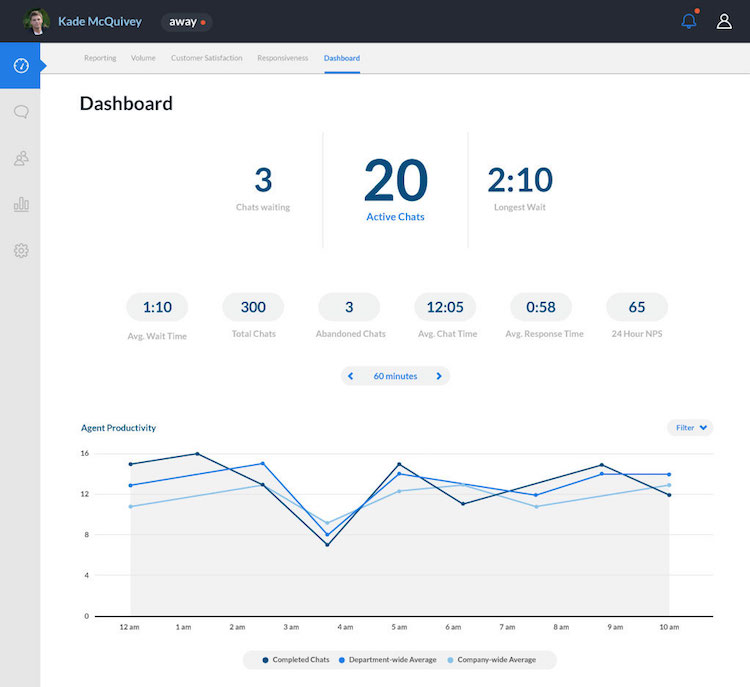
Dashboard showing an agent’s live statistics in Help.com (Source)
The following table lists and explains a variety of other live chat support software features. Not all of these are offered by all vendors, so buyers are advised to consider their live chat purchase carefully.
Functionality | Description |
Ticketing | Lets agents create new tickets for customer support issues directly from the live chat with the customer. |
File-sharing | Allows your live chat agent and customer to send files (documents, images, etc.) to each other from within the chat window, often aiding in troubleshooting. |
Co-browsing | Lets a chat agent take control (with permission) of the visitor’s web browser to lead them to specific pages on the website. |
Surveys and feedback | Allows for automatic surveys, such as those to determine customer satisfaction, to be given at the end of the chat. |
Email transcripts | Gives customers the option of having a transcript of their live chat session emailed to them when it concludes. |
Mobile support | Makes it easier to offer live chat to site visitors using mobile devices: something many consumers have a preference for. |
SMS (text message) | Allows customers to use their phones to send a text message to a company and the company to respond from its live chat platform. |
Application programming interface (API) | Some live chat platforms come with an API that allows for more granular customization. |
Social media integration | Some platforms offer a chat plugin that can be integrated directly onto a third-party social media site (e.g., a company’s Facebook page). |
Strategy tips for live chat implementation
Since live chat is a web-based technology, a company’s decision to implement it should begin with an examination of its existing website. Buyers can start by asking themselves two broad questions:
What are the goals of our website? Companies should determine whether the site is mainly selling products, providing information, giving customers technical support, or some combination of these (or other) goals. This will lead to a clearer understanding of how the chat feature will fit into the company’s larger online strategy.
How are customers actually using the website? Customers’ real-life usage should compare to the company’s stated goals. Website-visitor metrics can reveal which pages are most viewed, which pages customers spend the most time on, and a variety of other browsing behaviors. The discrepancy between what a company wants customers to do on the website and what customers are actually doing is where live chat implementation should focus.
These questions are important because simply having a live chat widget integrated into the website is not an automatic ticket to online success. It should be implemented with specific goals in mind. Most of these boil down to encouraging customers to do what the company hopes they’ll do when they visit the website.
What type of buyer are you?
Different companies have different goals for implementing live chat—and most have more than one. To help buyers understand the variety of goals live chat can help meet, here is a shortlist of the most common. Most live chat software buyers’ goals include:
Reducing support costs: Providing customer support over the phone is expensive, as each support agent can only handle one phone call at a time. But live chat agents can handle multiple conversations simultaneously. Because of this, live chat allows companies to serve more customers with fewer agents.
Increasing online sales: Most online retailers know how customers interact with their websites. Records of sales along with basic engagement analytics reveal which pages (or products) are viewed most often, which products customers have questions about, and which products are often bought together. Retailers can start a proactive chat session to direct visitors to low-traffic product pages, proactively answer questions they are likely to have, and make suggestions (using co-browsing) about products visitors might like to purchase.
Improving customer service: Surveys repeatedly show customers prefer finding the answers to their own questions. Catering to this preference, many companies have invested in detailed online self-service resources, such as a searchable knowledge base and FAQ pages—yet customers may not use these effectively. Offering live chat service alongside self-service resources can help customers make better use of them and increase satisfaction while reducing the company’s costs on phone service.
Converting more traffic: In some industries, websites are used mainly to get the company’s foot in a prospective customer’s door, advertising services or products and hoping visitors will get in touch. However, customers may be hesitant to contact some types of businesses (such as car dealerships, insurance agencies, or law firms) until they know what they’re looking for. Live chat is a low-barrier, commitment-free way to help with the easy questions that might be keeping customers from officially getting in touch.
Note: The application selected in this article is an example to show a feature in context and is not intended as an endorsement or recommendation. It has been obtained from sources believed to be reliable at the time of publication.