


Best Small Business Invoicing Software of 2026
Updated March 19, 2026 at 7:46 AM
- Popular Comparisons
- FrontRunners
- Buyers Guide
Compare Products
Showing 1 - 25 of 244 products
Compare Products
Sort by
Reviews: Sorts listings by the number of user reviews we have published, greatest to least.
Average Rating: Sorts listings by overall star rating based on user reviews, highest to lowest.
Alphabetically (A-Z): Sorts listings by product name from A to Z.

Sage Intacct operates within the Sage Business Cloud portfolio as a comprehensive cloud-based financial management software, exp...Read more about Sage Intacct


Sage Intacct's Best Rated Features
See All
Sage Intacct's Worst Rated Features
See All

Sage 50 Accounting is an accounting solution designed to cater to the needs of small and medium-sized businesses. It offers a su...Read more about Sage 50 Accounting

Sage 50 Accounting's Best Rated Features
See All
Sage 50 Accounting's Worst Rated Features
See All

Xledger is a cloud-based enterprise resource planning (ERP) solution that caters to midsize and large businesses and helps them ...Read more about Xledger


NetSuite is an AI-powered cloud-based business management suite that incorporates ERP, financial management, CRM and eCommerce f...Read more about NetSuite


NetSuite's Best Rated Features
See All
NetSuite's Worst Rated Features
See All

FreshBooks is a web-based accounting platform designed for small businesses across industries such as marketing, legal services,...Read more about FreshBooks

FreshBooks's Best Rated Features
See All
FreshBooks's Worst Rated Features
See All

Yooz is a cloud-based accounts payable automation platform designed to optimize financial operations using real-time processing ...Read more about Yooz

Yooz's Best Rated Features
See All
Yooz's Worst Rated Features
See All

AccountMate is a hybrid accounting solution that caters to small and midsize businesses and offers them tools and functionalitie...Read more about AccountMate


Aplos is a dedicated accounting solution engineered specifically for the unique financial demands of nonprofit organizations. We...Read more about Aplos


Aplos's Best Rated Features
See All
Aplos's Worst Rated Features
See All

Connected is a hybrid integrated accounting and enterprise resource planning (ERP) that caters to small and midsize businesses a...Read more about Connected


Striven is a cloud-based enterprise resource planning (ERP) solution suitable for many industries and organizations of all sizes...Read more about Striven

Striven's Best Rated Features
See All
Striven's Worst Rated Features
See All

AvidXchange is an accounts payable automation software designed to help businesses manage bill payment processes with visibility...Read more about AvidXchange

AvidXchange's Best Rated Features
See All
AvidXchange's Worst Rated Features
See All

Tradogram is a cloud-based procurement management solution. Users can choose from a list of integrated modules such as supplier ...Read more about Tradogram

Tradogram's Best Rated Features
See All
Tradogram's Worst Rated Features
See All

Versa is Modern all-in-one Cloud ERP software created for fast growing inventory heavy manufacturing, distribution, and e-commer...Read more about Versa Cloud ERP

Sage Accounting is a cloud-based accounting and invoice management solution for small to midsize businesses. It offers accountin...Read more about Sage Accounting


Sage Accounting's Best Rated Features
See All
Sage Accounting's Worst Rated Features
See All

Deltek Costpoint is an enterprise resource planning (ERP) and management solution designed to meet the requirements of midsize a...Read more about Deltek Costpoint

Deltek Costpoint's Best Rated Features
See All
Deltek Costpoint's Worst Rated Features
See All

aACE is a powerful, comprehensive business management solution designed for companies that have outgrown small-business packages...Read more about aACE


Canopy is a cloud-based practice management and tax resolution platform for accounting firms, tax professionals, tax attorneys a...Read more about Canopy
Canopy's Best Rated Features
See All
Canopy's Worst Rated Features
See All

Housecall Pro is a business solution for home service professionals. Available on web and mobile, Housecall Pro helps home servi...Read more about Housecall Pro
Housecall Pro's Best Rated Features
See All
Housecall Pro's Worst Rated Features
See All

MIP is fund accounting for your mission-based organization’s future. Designed to track unlimited funds and manage your financial...Read more about MIP Accounting


Beyond Software is a project accounting and management software system available for small to mid-size companies. The system all...Read more about Beyond Software

M3 Accounting Core Software is a cloud-based accounting solution that helps streamline financial operations for small to large b...Read more about M3 Accounting Core


Plooto is an all-in-one platform that enables businesses to automate their domestic and international accounts payable and accou...Read more about Plooto

Plooto's Best Rated Features
See All
Plooto's Worst Rated Features
See All

Quadient Accounts Receivable By YayPay is a cloud-based accounts receivable (AR) automation solution aimed to serve credit, coll...Read more about Quadient Accounts Receivable by YayPay

Quadient Accounts Receivable by YayPay's Best Rated Features
See All
Quadient Accounts Receivable by YayPay's Worst Rated Features
See All

Deltek Ajera is an integrated accounting and project management solution built for architecture and engineering (A/E) firms. It ...Read more about Deltek Ajera
Deltek Ajera's Best Rated Features
See All
Deltek Ajera's Worst Rated Features
See All

TimeSolv is a cloud-based legal time tracking and billing solution that caters to law firms, accountants, consultants, architect...Read more about TimeSolv Legal Billing

TimeSolv Legal Billing's Best Rated Features
See All
TimeSolv Legal Billing's Worst Rated Features
See All
Popular Comparisons



Your Guide to Top Small Business Invoicing Software, October 2022
Software Advice uses reviews from real software users to highlight the top-rated Small Business Invoicing products in North America.
Learn how products are chosenExplore FrontRunners


“Usability” includes user ratings for Functionality and Ease of Use.
“Customer Satisfaction” includes user ratings for Customer Support, Likelihood to Recommend and Value for Money.
Reviews analysis period: The reviews analysis period spans two years and ends the 15th of the month prior to publication.

Buyers Guide
This detailed guide will help you find and buy the right small business invoicing software for you and your business.
Last Updated on January 27, 2025Invoicing can be time-consuming, and it may not be the most interesting task you do every day. But, as a small business owner, it's an essential part of growing and sustaining your cash inflow. You can save yourself some time and effort; however, by investing in small business invoicing software to automate your invoicing process.
There are several invoicing platforms on the market that offer functionalities for small businesses from a variety of industries. Some solutions are designed for specific fields, such as nonprofit, legal or distribution, while others are for specific business sizes and offer varying degrees of complexity in their features.
Searching through all the options can make choosing the right solution feel overwhelming. So, we've created this Buyer's Guide to provide the guidance you need to make the right software purchase choice.
You can use this guide whether you're researching small business invoicing software for the first time or want to replace your current solution with one that's a better fit.
What is small business invoicing software?
Small business invoicing software organizes and automates the invoicing process. It helps small businesses reduce manual data-entry errors and ensure the timely and consistent collection of payments.
Small businesses across several industries, including manufacturing, hotel, construction and logistics use invoicing software to bill customers and clients. Due to the wide range of industries served, most software vendors offer customizable solutions that support distinct business models, payment types and pricing structures.
For this reason, features can vary remarkably from one small business to another.
Invoicing software is useful for both time-bound as well as delivery-bound small businesses. For instance, freelance legal consultants or small law firms can charge a client based on the time spent working on a case, while a small manufacturer could charge the supplier upon final delivery of goods.
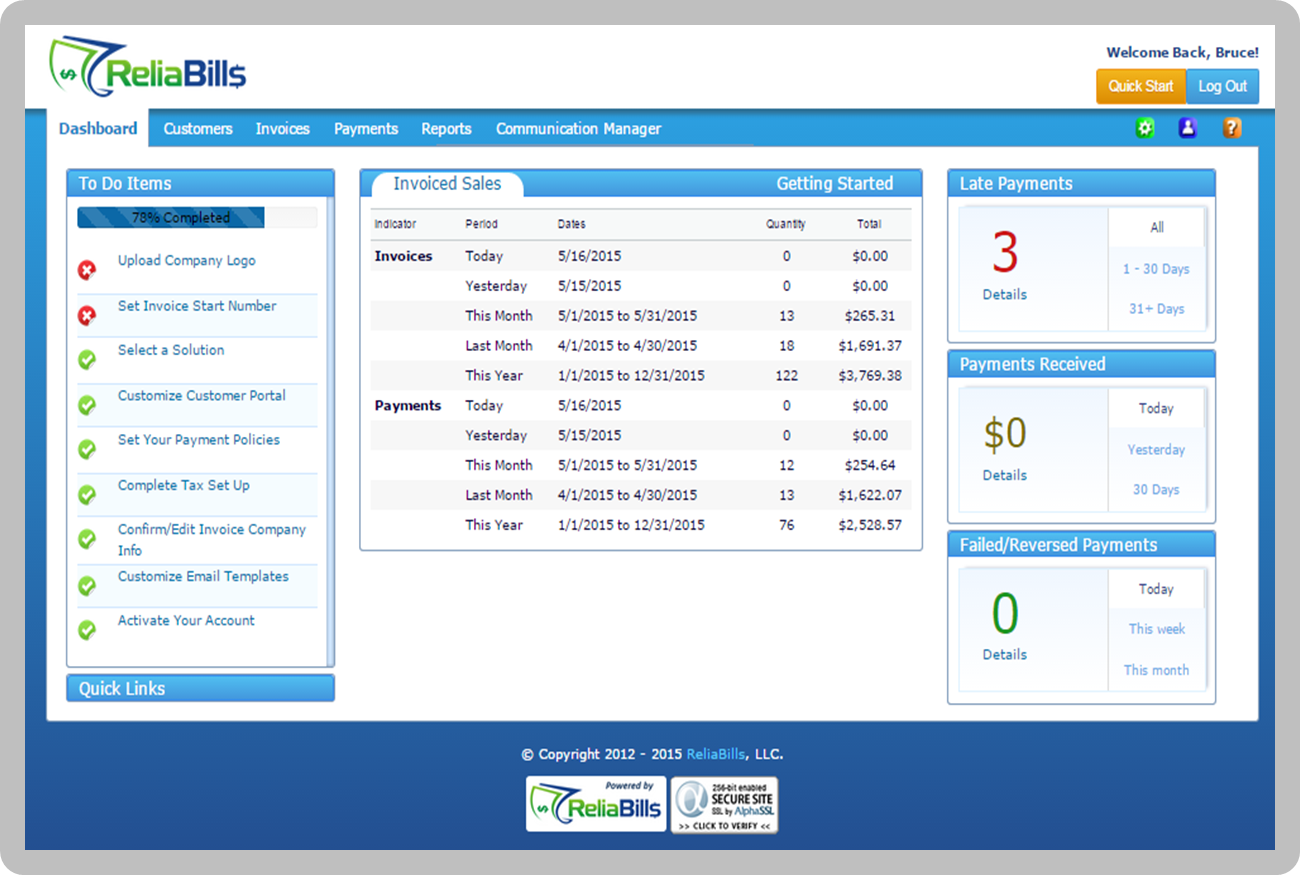
List of invoiced sales and incoming payments in ReliaBills
What are common features of small business invoicing software?
Vendors offer a variety of functional breadth and depth in their small business invoicing software. We've listed some of the common capabilities below:
Invoice creation | Customize and create invoices that include the company logo, client details and all the terms of payment. |
Invoice sending | Set up one-time or recurring invoices to be sent to clients. Some systems also send alerts when an invoice has been viewed by the recipient. |
Reporting | Generate various financial statements such as a profit and loss statement, expense report and payments collected statement. |
Online payments | Accept online payments through automatic bank transfer, credit card or payment gateways such as PayPal. Add late fees for overdue invoices and send payment reminders. |
Time tracking | Assign fees or rates based on project, employee, flat-fee or per hour billing. Users can track billable time and import this data into the invoices. |
API | Integrate the invoicing software with other systems such as a CRM application or project management tool. |
What type of buyer are you?
Before you start evaluating small business invoicing software, you should understand what buyer category you fall into to better gauge your needs. You'll also know which specific features other small businesses like yours consider to be most important.
We believe almost all buyers can be categorized as one of the below types:
Small businesses that invoice based on project/unit. These buyers (e.g., small consulting or manufacturing firms) focus more on their specific invoicing needs than any other business process. They require a stand-alone invoicing system that offers a high level of customization and flexibility to suit their specific needs.
Buyers looking for a complete software package. These buyers generally need an invoicing module that's part of a complete software suite. In other words, they're looking for an integrated software and prefer a holistic software experience. This type of buyers usually value a specific invoicing functionality in a system rather than integrating with other systems. For example, an auto shop repair software offers invoicing along with various other modules such as work order management and customer relationship management (CRM).
Industry-specific, unique buyers. These buyers (e.g., small utility companies or legal consultants) have such unique invoicing processes that they need systems designed exclusively for their industry. For that reason, they either purchase an industry-specific solution, or build their own system, or outsource the software development process to a third-party organization.
What are benefits of small business invoicing software?
We've already talked about some of the benefits of small business invoicing software in the article, but here are the most key benefits:
Automated invoicing. One of the biggest advantages of invoicing software for small businesses is automation. The software allows users to set up recurring payment options for their long-term clients. The system automatically sends payment reminders and follow-ups to clients for invoices that are past due and upcoming.
This helps minimize late and missed payments, and hence, reduce business losses.
Improved professional reputation. A good invoicing system could boost your small business's reputation. Many invoicing software vendors offer features that allow users to create customized logos and make other design enhancements, which they can add to their invoices and payment documents.
This helps users showcase professionalism to their clients and suppliers, which can lead to more business opportunities.
What are the market trends of small business invoicing software?
You should be aware of the following market trends as you begin your search for small business invoicing software:
Preference for cloud-based software. Many small business buyers prefer cloud-based software, as easy and quick accessibility is critical for them. Cloud software enables users to send and manage invoices from any location, using any device at any time. This convenience of doing business is vital for small businesses that have a limited number of staff members handling a lot of responsibilities.
Availability of mobile apps. Small business invoicing software is also offered in the form of mobile apps, and several vendors offer this feature. The portability and convenience of mobile devices allows users to continue working while on the move. For instance, EBizCharge offers an Android mobile app to monitor invoicing transactions on the go.
What should you consider when purchasing small business invoicing software?
Here are some important factors you should think about before you buy or implement a small business invoicing software:
System integration. Consider a small business invoicing solution that integrates with whatever existing software you currently use, such as a CRM, vendor management software or project management tools. Seamless integration makes it easy to share existing data with the new system.
Mobile support. If you are among those users who prefer to access the software remotely, check whether the vendor offers a mobile app, so you can access invoices and receive updates on your mobile device.
Cloud or on-premise deployment. Check with vendors about the deployment options they offer. Many small businesses prefer cloud-based deployment due to the low upfront costs and easy access to invoicing data.
However, some businesses may consider the on-premise option based on budget and other unique requirements.
Free or paid software. You'll find there are vendors that offer a free version of their software with limited features. If you only require basic features, such as creating and sending invoices in a limited volume, a free version may be right for you.
However, if you need advanced features such as an API and online payments then you'll most likely need to pay extra for them.