


Best Business Management Software of 2026
Updated February 18, 2026 at 10:13 AM

Written by Alejandra Aranda
Content Analyst

Edited by Mehar Luthra
Team Lead, Content

Reviewed by Matt Ramsey
Software Advisor

Talk with us for a free 15-min consultation
Expert advisors like Jacqueline, who have helped 1,000+ companies, can find the right software for your needs.
- All Software
- Software Advice FrontRunners
- Popular Comparisons
- Buyer's Guide
- Frequently Asked Questions
Business management software helps SMB owners and team leads coordinate operations across finance, HR, inventory, and customer service. Navigating 400 products—each built for different use cases, team structures, or industry‑specific demands—can be overwhelming. To help you narrow it down, I worked with our business management software advisors to curate a list of recommended productsi and a list of the business management software Frontrunners based on user reviews. For further information, read my business management software buyer's guide.
Business Management Software
Sort by
Reviews: Sorts listings by the number of user reviews we have published, greatest to least.
Average Rating: Sorts listings by overall star rating based on user reviews, highest to lowest.
Alphabetically (A-Z): Sorts listings by product name from A to Z.

Contentverse is document management for every department in every industry. It's a blank slate for your team to recreate your st...Read more about Contentverse


SuiteDash is the ultimate All-in-One Business Software multi-tool tailored for small to medium-sized businesses, designed to str...Read more about SuiteDash


SuiteDash's Best Rated Features
See All
SuiteDash's Worst Rated Features
See All

Project.co is a cloud-based solution that helps small to large enterprises manage multiple elements of projects including paymen...Read more about Project.co


Project.co's Best Rated Features
See All
Project.co's Worst Rated Features
See All

MassageBook is professional massage therapy practice management software that takes care of virtually all the tasks a practice o...Read more about MassageBook


MassageBook's Best Rated Features
See All
MassageBook's Worst Rated Features
See All

HoneyBook is a client relationship platform designed to help small businesses manage proposals, contracts, invoices, payments, a...Read more about HoneyBook

HoneyBook's Best Rated Features
See All
HoneyBook's Worst Rated Features
See All
Software Advice FrontRunners 2026

(13530)

(23463)

(8340)

(4549)

(5698)

(3473)

(2875)

(1821)

(1284)

(674)
Best for Collaboration

Asana

According to our user reviews, Asana is the most requested by users for collaboration out of the most popular tools.
Asana is best for teams seeking strong collaboration capabilities, especially those managing complex projects across departments. Our reviewers say Asana’s real-time updates, intuitive interface, and integrated communication tools make it easy to coordinate work and keep everyone aligned.
- Reviewers Perspective
"Some of the features I like are that you can customise the fields, easily duplicate projects, track tasks (with integrated time management tools if needed) and stay very organised across a team."
SKSara Keli
Comms Specialist
Used for 2+ years
We analyzed 842 verified user reviews for Asana to find out what actual users really think.
Task and Project Management
Managing tasks and projects in Asana involves customizable fields, project duplication, and integrated time management tools. Teams can organize work, assign responsibilities, and track progress efficiently.Project Tracking
Tracking projects is supported by intuitive dashboards, multiple visual views, and customizable workflows. Real-time updates and reporting tools help monitor status and address bottlenecks.Ease of Use
Navigating Asana is straightforward, with a clean interface and helpful tutorials. Teams can quickly learn and manage workflows, making daily operations efficient even for non-technical users. - Key FeaturesAsana's scoreCategory average
Client Management
4.314.55 category average
Collaboration Tools
4.574.62 category average
Reporting & Statistics
4.484.48 category average
- Screenshots


Best for Usability

Trello

Of the products listed on our FrontRunners report, Trello is the highest rated for its usability out of the most popular tools.
Trello is best for users who value ease of use, offering a highly visual and flexible platform for organizing tasks and projects. Our reviewers say its intuitive drag-and-drop boards, customizable cards, and mobile accessibility make onboarding and daily workflow management simple for teams of any size.
- Reviewers Perspective
"Absolutely amazing at helping team members manage tasks and have visibility over workloads, help clients keep up to date with the progress of current campaigns, and also have the opportunity to respond to questions in real time."
TKTimea Koppandi
Account Planner
Used for 1-2 years
We analyzed 824 verified user reviews for Trello to find out what actual users really think.
Task Management
Managing daily tasks and workloads is facilitated by drag-and-drop boards, automation, and collaborative tools. Teams can organize tasks, set deadlines, and communicate updates efficiently.Ease of Use
Setting up Trello is straightforward, with a simple interface that adapts to both beginners and experienced users. Boards and workflows can be customized for diverse needs.Team Collaboration
Collaborating in Trello involves sharing boards, assigning tasks, and tracking updates in real time. Visual tagging and communication features help teams stay organized and aligned. - Key FeaturesTrello's scoreCategory average
Client Management
4.314.55 category average
Collaboration Tools
4.544.62 category average
Reporting & Statistics
4.024.48 category average
- Screenshots


Best for Quick Implementation


According to our user reviews, QuickBooks Online is the most requested by users for quick implementation out of the most popular tools.
QuickBooks Online is best for organizations needing quick implementation of accounting and invoicing processes. Our reviewers say its automation features, real-time collaboration with accountants, and easy setup help small businesses streamline financial operations efficiently.
- Reviewers Perspective
"In my experience, using QuickBooks has been a great experience, as estimator I am able to create the estimates which later help personal from the accounting office, manage awarded projects, using those same estimates previously created."
MEMarvin Enamorado
Estimator
Used for 6-12 months
We analyzed 787 verified user reviews for QuickBooks Online to find out what actual users really think.
Accounting
Managing financials is streamlined with real-time updates, automation for accounts payable/receivable, and collaborative access. Teams can handle day-to-day accounting and audit readiness efficiently.Ease of Use
Setting up QuickBooks Online is easy, with a user-friendly interface and helpful tutorials. Both beginners and experienced users can quickly manage essential accounting functions.Invoicing
Creating, customizing, and sending invoices is efficient. Automation options for recurring invoices and payment reminders help SMBs streamline cash flow management and track payments. - Key FeaturesQuickBooks Online's scoreCategory average
Client Management
4.164.55 category average
Reporting & Statistics
4.464.48 category average
- Screenshots


Best for Customization

ClickUp

Of the products listed on our FrontRunners report, ClickUp is the most requested by users for customization out of the most popular tools.
ClickUp is best for businesses prioritizing customization, allowing teams to tailor workflows and task structures to their needs. Our reviewers point out the platform’s flexible views, custom fields, and automation options enable efficient project tracking and improved team productivity.
- Reviewers Perspective
"ClickUp has amazing project visualization tools like project boards and lists that allows us to easily monitor our progress towards completing projects."
JKJames Kent
Brand Ambassador
Used for 2+ years
We analyzed 786 verified user reviews for ClickUp to find out what actual users really think.
Project Management
Managing projects in ClickUp means teams can organize tasks, communication, and documentation in one workspace. Visualization tools like boards and Gantt charts streamline workflow and keep everything organized.Task Management
Creating, organizing, and prioritizing tasks is adaptable with custom tags, statuses, and dependencies. Automation and subtasks help teams break down projects and monitor progress efficiently.Team Management
Coordinating teams across projects is simplified with customizable workflows, built-in chat, and shared workspaces. Managers can assign roles, track progress, and manage both remote and in-office teams. - Key FeaturesClickUp's scoreCategory average
Client Management
4.264.55 category average
Collaboration Tools
4.464.62 category average
Reporting & Statistics
4.524.48 category average
- Screenshots


Highly Rated for Automation

monday.com

According to our user reviews, monday.com is the highest rated for automation out of the most popular tools.
monday.com is highly rated for automation, making it ideal for teams seeking to streamline repetitive tasks and improve workflow efficiency. Our reviewers say its automation features, customizable boards, and integration options save time and enhance project visibility.
- Reviewers Perspective
"All along, it has enables me to save time by enhancing collaboration, instant messaging, project management, time tracking etc all-in-one place."
ZMZakaria Mairami
Assistant Manager
Used for 2+ years
We analyzed 850 verified user reviews for monday.com to find out what actual users really think.
Team Collaboration
Project information and communication are centralized. Teams use real-time updates, task assignments, and file sharing to stay aligned and avoid miscommunication across departments and locations.Task Management
Planning, prioritizing, and tracking tasks is managed with customizable boards and automation features. Teams can assign responsibilities, set deadlines, and monitor progress efficiently.Ease of Use
Learning monday.com is straightforward, with tutorials and onboarding resources. Teams of varying technical backgrounds can set up and use the platform with minimal difficulty. - Key Featuresmonday.com's scoreCategory average
Client Management
4.444.55 category average
Collaboration Tools
4.434.62 category average
Reporting & Statistics
4.384.48 category average
- Screenshots


Highly Rated for User Interface

Smartsheet

Of the products listed on our FrontRunners report, Smartsheet is the highest rated for user interface out of the most popular tools.
Smartsheet is highly rated for its user interface, making it well-suited for teams that need a familiar spreadsheet-like experience with advanced collaboration features. Our reviewers highlight its intuitive design, customizable templates, and real-time updates as key benefits for managing projects and data.
- Reviewers Perspective
"The platform facilitated the generation of real-time reports, offering valuable insights into the advancement of projects, allocation of resources, and identification of potential bottlenecks."
ENEdmond Nguzo
Research Project Support Coordinator
Used for 6-12 months
We analyzed 815 verified user reviews for Smartsheet to find out what actual users really think.
Project Planning and Management
Scheduling, resource allocation, and progress tracking are managed with customizable templates and automation. Teams can streamline workflows and improve communication across projects.Training and Learning Curve
Learning Smartsheet is easier for users familiar with spreadsheets. Online tutorials and community support help onboarding, but mastering advanced features requires dedicated training.Team Collaboration
Collaborating in Smartsheet means sharing documents, assigning tasks, and setting permissions in real time. Automated notifications and collaborative dashboards keep all members aligned. - Key FeaturesSmartsheet's scoreCategory average
Client Management
4.344.55 category average
Collaboration Tools
4.374.62 category average
Reporting & Statistics
4.654.48 category average
- Screenshots


Highly Rated for Quick Adoption/Easy Adoption

Wrike

Of the products listed on our FrontRunners report, Wrike is the highest rated for quick adoption/easy adoption out of the most popular tools.
Wrike is highly rated for quick adoption, making it a strong fit for teams that need to get up and running with project management tools rapidly. Our reviewers say its flexible setup, user-friendly interface, and adaptable templates support fast onboarding and efficient team collaboration.
- Reviewers Perspective
"I find Wrike to be one of the more adaptive and useful softwares available for managing projects and groups. As someone who manages multiple projects with different audiences, timetables, and needs - having the ability to stay in the same software and tailor my use of it to the skill level of the group I'm working with has been tremendously helpful in allowing me to keep things organized."
MJMelissa Jarus
Manager
Used for 1-2 years
We analyzed 754 verified user reviews for Wrike to find out what actual users really think.
Task and Project Management
Organizing, assigning, and tracking tasks across projects is streamlined with Wrike’s automation, templates, and project views. Teams can reduce manual effort and improve visibility.Team Collaboration
Collaborating in Wrike means teams share files, edit documents, and discuss projects in one location. Real-time tools foster transparency and reduce reliance on scattered emails or meetings.Team Management
Tailoring workspaces, statuses, and access levels lets managers coordinate work across departments, track performance, and streamline onboarding for diverse teams. - Key FeaturesWrike's scoreCategory average
Client Management
4.964.55 category average
Collaboration Tools
4.404.62 category average
Reporting & Statistics
4.04.48 category average
- Screenshots


Highly Rated for Integrations

NetSuite

Of the products listed on our FrontRunners report, NetSuite is the highest rated for integrations out of the most popular tools.
NetSuite is highly rated for integrations, making it suitable for organizations needing a unified platform that connects financial, operational, and CRM data. Our reviewers say its robust integration capabilities and real-time visibility support streamlined processes and informed decision-making.
- Reviewers Perspective
"NetSuite allowed our business to reevaluate process and streamline existing ones, while serving as a single location to house our financial, banking, and CRM data."
SCSydney Clouatre
Controller
Used for 2+ years
We analyzed 761 verified user reviews for NetSuite to find out what actual users really think.
Features
Managing diverse business functions is possible with NetSuite’s wide array of features, supporting ERP, CRM, project management, and HR. Modular options and automation help SMBs scale operations.Accounting and Financial Management
Automating accounting processes, consolidating financials, and generating real-time reports is central to NetSuite. Features like general ledger, tax management, and multi-subsidiary consolidation improve accuracy.Data Management
Consolidating information across departments enables a single source of truth. Real-time dashboards, reporting tools, and automation enhance data accuracy, visibility, and decision-making. - Key FeaturesNetSuite's scoreCategory average
Client Management
3.404.55 category average
Collaboration Tools
3.694.62 category average
Reporting & Statistics
4.304.48 category average
- Screenshots


Most Rated for SMBs

Odoo

Of the products listed on our FrontRunners report, Odoo is the most requested by small businesses out of the most popular tools.
Odoo is most rated for SMBs, making it ideal for small and midsize businesses seeking an all-in-one, modular business management solution. Our reviewers say its broad range of integrated modules and scalability help streamline operations and support business growth without high costs.
- Reviewers Perspective
"I use Odoo to manage multiple ventures, and it’s allowed me to help entrepreneurs, startups, and even 100 million dollar companies run with full transparency and confidence."
NSNovellynn Stancil
Founder
Used for 1-2 years
We analyzed 567 verified user reviews for Odoo to find out what actual users really think.
Customer Support
Accessing Odoo’s customer support can be helpful for resolving issues, but SMBs often face slow responses and inconsistent service, especially on lower-tier plans or outside core regions.Customization
You can tailor Odoo’s workflows, modules, and reports to fit specific business needs. Open-source architecture enables both simple adjustments and deep personalization, but advanced customization may require technical expertise.Modules
Adding, removing, or customizing modules lets SMBs manage CRM, accounting, HR, and inventory within one platform. Most modules are intuitive, supporting operational efficiency and scalability. - Key FeaturesOdoo 's scoreCategory average
Client Management
4.584.55 category average
Collaboration Tools
3.774.62 category average
Reporting & Statistics
3.954.48 category average
- Screenshots


Most Used By Events Services
HoneyBook

According to our user reviews, HoneyBook is the most requested by users in events services out of the most popular tools.
HoneyBook is most used by event services professionals who need to manage contracts, invoicing, and client communication in one place. Our reviewers say its streamlined workflows, easy onboarding, and integrated payment features help event businesses stay organized and responsive.
- Reviewers Perspective
"I liked its ability to track the invoice from sending to payment, as it documents all of that in the records with date and time efficiently."
MGMoran Geckt
Mobile Marketing Lead
Used for 2+ years
We analyzed 477 verified user reviews for HoneyBook to find out what actual users really think.
Invoicing and Contracts
Creating, sending, and tracking invoices and contracts is streamlined. SMBs can customize documents, automate reminders, and keep financial records accessible for efficient payment management.Ease of Use
Navigating HoneyBook is user-friendly, with a clean interface and helpful tutorials. Teams can quickly implement features without advanced technical skills, focusing more on core work.Customer Support
Resolving questions and learning new features is supported by live chat, tutorials, and a user community. HoneyBook actively seeks feedback and provides a sense of partnership. - Key FeaturesHoneyBook's scoreCategory average
Client Management
4.384.55 category average
Collaboration Tools
4.564.62 category average
Reporting & Statistics
4.04.48 category average
- Screenshots


SuiteDash

- Reviewers Perspective
"I love the customisable dashboards, robust project management tools and comprehensive client relationship management functionalities; SuiteDash has streamlined our workflows and improved our team's efficiency."
SMSarah Meaney
Communications Officer
Used for 6-12 months
We analyzed 416 verified user reviews for SuiteDash to find out what actual users really think.
Client Management
Consolidating project management, CRM, and client portals in SuiteDash lets teams manage tasks, files, proposals, and client interactions without switching apps. This improves efficiency and client satisfaction.Training and Learning Curve
Learning SuiteDash requires time due to its robust features. Tutorials, guides, webinars, and community forums help users master the platform, supporting onboarding and ongoing skill development.Invoicing and Billing
Automating proposals, managing recurring payments, and centralizing client transactions in SuiteDash reduces reliance on multiple software subscriptions. Billing tools are efficient and customizable for SMBs. - Key FeaturesSuiteDash's scoreCategory average
Client Management
4.834.55 category average
Collaboration Tools
4.884.62 category average
Reporting & Statistics
5.04.48 category average
- Screenshots


Houzz Pro

- Reviewers Perspective
"The ability to interact with my colleagues, shareholders and clients on Houzz has been an invaluable experience which has helped us deliver to our clients a more transparent view of the design and build process."
DJDanica Juric
Project Manager
Used for 2+ years
We analyzed 607 verified user reviews for Houzz Pro to find out what actual users really think.
Client Management
Houzz Pro streamlines client management by keeping information, communications, and project files organized. Teams collaborate with clients, share proposals, and maintain clear communication throughout projects.Ease of Use
Navigating Houzz Pro is straightforward. Tutorials and clear design enable quick onboarding, allowing users to manage projects, proposals, and communications without extensive training.Project Management
Organizing project details, schedules, and documents in one place supports tracking progress, budgeting, and communication. Tools for proposals and estimates help manage multiple projects efficiently. - Key FeaturesHouzz Pro's scoreCategory average
Client Management
4.294.55 category average
Collaboration Tools
3.824.62 category average
Reporting & Statistics
4.04.48 category average
- Screenshots


Bonsai

- Reviewers Perspective
"I like the ability to attach a pdf to the invoice (like bank wire information if the client prefers to pay with that over a credit card payment)."
VMVesna Mirosavljev
Copywriter and Messaging Strategist
Used for 2+ years
We analyzed 72 verified user reviews for Bonsai to find out what actual users really think.
Ease of Use
Navigating Bonsai’s tools is straightforward. Administrative users can manage business tasks efficiently, with everything needed for operations available in one place and requiring little training.Freelancers and Small Businesses
Bonsai provides essential tools for freelancers and small businesses, including contract management, invoicing, and financial organization. It streamlines workflows and supports professional operations.Invoicing and Contracts
Managing proposals, contracts, and invoicing in Bonsai allows users to create and customize documents easily. Features like electronic signatures, recurring invoices, and payment reminders support efficient billing. - Key FeaturesBonsai's scoreCategory average
Client Management
3.834.55 category average
Collaboration Tools
5.04.62 category average
Reporting & Statistics
3.04.48 category average
- Screenshots


Bitrix24

- Reviewers Perspective
"Bitrix24 is a customizable and easily integrated multi-tool that allows you to build literally any pre-sales, sales and post-sales process on it."
JSJohann Sebastian Kreusch
Líder Técnico
Used for 2+ years
We analyzed 526 verified user reviews for Bitrix24 to find out what actual users really think.
Project Management
Organizing, tracking, and collaborating on projects is centralized in Bitrix24. Kanban boards, Gantt charts, and customizable workspaces help teams monitor progress and manage tasks efficiently.Task Management
Assigning tasks, setting deadlines, and monitoring progress in real time supports accountability. Automation, templates, reminders, and visual tools like Gantt and Kanban boards aid productivity.Team Communication
Using chat, video conferencing, and file sharing tools keeps teams connected. Centralized communication channels simplify collaboration, decision-making, and sharing updates or documents. - Key FeaturesBitrix24's scoreCategory average
Client Management
4.504.55 category average
Collaboration Tools
4.434.62 category average
Reporting & Statistics
3.954.48 category average
- Screenshots


- Reviewers Perspective
"The trainings available are also incredibly helpful, especially with updates and when training new hires. While some of the customization impedes the efficiency of the platform, we've found ways to mitigate this while still having the system meet our needs."
AVAlexandra Van Ness
People Business Partner
Used for 2+ years
We analyzed 105 verified user reviews for Dynamics 365 Business Central to find out what actual users really think.
Integrations
Connecting with Office 365, Power BI, and Outlook creates unified workflows. Integrating business processes and automating tasks enhances daily operations and reporting capabilities.Data Management
Accessing business data securely from any location supports collaboration and transparency. Efficient reporting and easy export/import with Excel help teams manage and customize data.Productivity
Providing real-time metrics and optimized workflows improves efficiency and decision-making. Compatibility with Microsoft Office reduces paperwork and saves time across departments. - Key FeaturesDynamics 365 Business Central's scoreCategory average
Collaboration Tools
4.434.62 category average
Reporting & Statistics
4.674.48 category average
- Screenshots


Productive

- Reviewers Perspective
"Productive is a tool that brings together an efficient task management system, resource allocation, time tracking, leave request management, budgeting, and CRM under one roof."
CVCinzia Vilardi
Resource Manager
Used for 1-2 years
We analyzed 83 verified user reviews for Productive to find out what actual users really think.
Project Management
Managing project tasks, resource allocation, and time tracking in Productive streamlines daily operations. Custom fields and workflow management support coordination from start to finish.Project Budgeting
Setting up budgets, tracking expenses, and viewing real-time profitability data helps maintain control over projects. Consolidating budgeting and expense tracking supports informed decisions.Customer Support
Productive’s support team addresses questions and resolves issues quickly. Ongoing improvements and dedication to user needs contribute to smooth onboarding and positive relationships. - Key FeaturesProductive's scoreCategory average
Client Management
3.04.55 category average
Collaboration Tools
3.254.62 category average
Reporting & Statistics
4.04.48 category average
- Screenshots


Avaza

- Reviewers Perspective
"With clean layouts, drag-and-drop functionality, and clearly labeled features, Avaza reduces complexity and helps teams stay focused on what really matters: getting work done efficiently. Whether you're assigning tasks, setting deadlines, or reviewing progress, Avaza keeps everything straightforward and accessible."
KKKarolina Krzeska
CEO, owner
Used for 6-12 months
We analyzed 342 verified user reviews for Avaza to find out what actual users really think.
Invoice Management
Generating invoices and tracking hours is streamlined in Avaza. Administrative teams can customize invoices, generate financial reports, and handle recurring billing, helping manage client accounts and project budgets efficiently.Ease of Use
Setting up and managing projects is straightforward. Managers can navigate the platform, retrieve information, and configure features with minimal training, supporting productivity and organization.Project Management
Breaking down projects into components, tracking progress, and customizing views enables oversight. Teams in SMBs rely on Avaza to organize tasks and collaborate, supporting productivity for small and medium-sized groups. - Key FeaturesAvaza's scoreCategory average
Client Management
5.04.55 category average
Collaboration Tools
4.524.62 category average
Reporting & Statistics
4.604.48 category average
- Screenshots


Zoho One

- Reviewers Perspective
"Instead of switching between multiple tools, I can manage CRM, finance, HR, and collaboration from a single platform, which saves time, reduces costs, and keeps data consistent across the organization."
MSManish Saharawat
Business Software Specialist
Used for 6-12 months
We analyzed 95 verified user reviews for Zoho One to find out what actual users really think.
Integrations
Managing CRM, finance, HR, and collaboration from one platform streamlines workflows. Zoho One connects a wide range of internal and external applications, automating processes and keeping data consistent.Features
Zoho One covers various business functions, supporting organizational growth. Frequent updates add new functionalities and advanced features, though some require technical expertise or additional setup.Marketing and Sales
Accessing marketing and sales tools—including CRM, email campaigns, social media management, and analytics—lets sales teams manage communications and automate processes. Customizable dashboards support reporting. - Key FeaturesZoho One's scoreCategory average
Client Management
4.384.55 category average
Reporting & Statistics
3.334.48 category average
- Screenshots


Scoro

- Reviewers Perspective
"Task and time management, to be able to manage our studio in a very decent way! And of course theat we create our tasks directly from our quotes."
MVManuel van Dam
Traffic and Studio Manager
Used for 2+ years
We analyzed 154 verified user reviews for Scoro to find out what actual users really think.
Customer Support
Scoro’s support team assists during onboarding and issue resolution. Quick replies, helpful screenshots, and willingness to adapt the platform to specific needs make support accessible for SMBs.Project Tracking
Tracking project progress, managing time, and overseeing budgets is centralized in Scoro. Real-time tracking and customizable reporting support informed decisions and transparency within teams.Ease of Use
Scoro’s logical layout and clear design simplify project and task management. Teams quickly adapt and integrate the software, making information management and navigation convenient. - Screenshots


vcita

- Reviewers Perspective
"I love how I had sort of a “control panel” with functions to choose from without leaving the client portal."
ZCZarinah Clark
Owner
Used for 2+ years
We analyzed 217 verified user reviews for vcita to find out what actual users really think.
Ease of Use
Managing business tasks in vcita is accessible even for users with limited technical experience. The clean dashboard and straightforward navigation support efficient daily operations.Client Management
Organizing client information, scheduling appointments, and maintaining records is streamlined. Clients benefit from secure access to documents and services, supporting engagement and satisfaction.Integrations
Embedding scheduling and client portals into websites enhances accessibility. Integrations with platforms like Wordpress, Wix, and Zoom support efficient appointment and payment management. - Screenshots


- Reviewers Perspective
"BQE Core Suite makes invoicing and reconciling expenses fast and efficient, giving us the opportunity to update any items that may need adjusted prior to finalizing any entries each month."
MKMary Kinsley
Finance Analyst
Used for 6-12 months
We analyzed 477 verified user reviews for BQE CORE Suite to find out what actual users really think.
Project Management
BQE CORE Suite enables tracking of time, expenses, budgets, and project progress in one platform. Teams automate recurring tasks and gain real-time insights through dashboards and reports.Invoicing
Generating, customizing, and sending professional invoices is efficient. Tracking billable hours and expenses, processing batch invoices, and adjusting entries reduces administrative workload.Reporting
Monitoring project performance, financials, and staff productivity is supported by built-in reports and dashboards. Exporting reports and scheduling automated reporting aids business analysis. - Key FeaturesBQE CORE Suite's scoreCategory average
Client Management
5.04.55 category average
Collaboration Tools
4.04.62 category average
Reporting & Statistics
4.504.48 category average
- Screenshots


Sage X3

- Reviewers Perspective
"Sage X3 is a robust and flexible ERP system that excels in managing complex business operations across multiple departments, locations, and even countries."
PTPreci Thomas
Representative
Used for 6-12 months
We analyzed 57 verified user reviews for Sage X3 to find out what actual users really think.
Management
Managing operations across departments, locations, and countries is streamlined in Sage X3. Accounting, procurement, warehousing, production, sales, and financial management are handled efficiently.Inventory and Manufacturing
Tracking inventory, managing production costs, and consolidating operations across sites supports productivity. Features for replenishment planning and mobile inventory management maintain accuracy.Ease of Use
Sage X3 offers user-friendly functions for accounting and business management. Simple search, self-explanatory menus, and a straightforward interface help teams work efficiently. - Screenshots


- Reviewers Perspective
"The ability to customize Acumatica to fit our industry's workflow is a driving factor for why we chose them."
RWRyan Woodhead
System Admin
Used for 2+ years
We analyzed 110 verified user reviews for Acumatica Cloud ERP to find out what actual users really think.
Customization
Teams adapt Acumatica Cloud ERP by customizing workflows and dashboards to fit business needs. Many tasks can be completed without coding, supporting industry-specific requirements.Cloud Accessibility
Accessing Acumatica from any location enables collaboration across teams. Automatic updates and device flexibility streamline daily operations, eliminating the need for on-premise servers.Reporting
Creating custom reports and dashboards helps manage financial and operational data. However, building or modifying reports may require technical support, and essential reports can be missing. - Screenshots


Methodology
The research for the best Business Management software list was conducted in October 2025. We evaluated data (user reviews and demand signals) from the past 24 months as of the research date. Read the complete methodology.
Popular Business Management Comparisons


Buyer's Guide
This detailed guide will help you find and buy the right business management software for you and your business.
Last Updated on October 14, 2025Here's what we'll cover:
What you need to know about business management software
What is business management software?
Essential features of business management software
Benefits and competitive advantages of using business management software
How to choose the best business management software for your needs
Software related to business management
More resources for your business management journey
What you need to know about business management software
Business management software helps businesses control and manage a wide range of business activities from a centralized hub. This, in turn, leads to less time spent onboarding team members to different individual software and reducing data silos, driving overall organizational effectiveness. Generally, you’ll see business management software categorized as project management software or enterprise resource planning (ERP) software. However, business management platforms are more niche and specifically tailored to meet the needs of organizations that handle various business activities. [1]
Such tools allow professionals to streamline operations across accounting, contact management, customer relationship management (CRM), ERP, and human resources.
Business management software is essential for small businesses that need to perform essential tasks efficiently with limit resources. Besides that, business management software can also help enterprise-level businesses that require extra management.
To give you an idea of the business management market, our site has over 400 business management software products, and we’ve published more than 22,700 reviews for business management software products in the last two years alone. [2] If you run a business that needs a unified platform to manage several daily activities related to your finances, customers, or projects, it’s not a question of whether or not you should have a business management tool; the question is which system is best for you.
Factors like pricing will play a big part in deciding what type of business management software you need. Most business management software solutions on the market are priced on a ‘per user, per month’ basis, and entry-level pricing plans range from $5 to $70+. [3] An enterprise-level business management system that’s priced higher may include additional features such as business process management, inventory control, order management, resource management, sales management, team management, team collaboration, and workflow automation.
First-time buyers should start their business management software journey by evaluating integration capabilities, cost, customer support services, and other relevant factors. Choosing the appropriate business management software is crucial for addressing operational challenges and optimizing processes. Consider posing the following questions to ensure the vendor's software meets your operational requirements:
How does the software use artificial intelligence (AI) to enhance CRM tasks like customer segmentation and automate resource planning?
What features assist with managing contacts and improving customer service interactions?
Does the software offer analytics for tracking employee performance metrics and managing team workloads?
Can the software support tasks like inventory management and scale to accommodate new business needs?
Because there are so many different vendors, choosing the right option can be a daunting process. In this guide, you will learn more about business management software and how to choose the right system. You’ll also discover tips and advice from an analyst, as well as valuable insights from experienced software advisors Richard Ramsey and Nathan Pozen, together bringing over 13 years of expertise to the table.
What is business management software?
Business management software helps businesses manage and oversee their operations, and includes project management, sales, marketing, finance, and inventory management features. It automates routine tasks and provides a unified platform for daily activities such as tracking finances, organizing customer information, and managing supply chains. Business management tools also support data analysis and reporting, helping businesses make informed decisions.
That said, business management software comes with specific functionality that you won’t find in more general project management or ERP software, such as:
Calendar management: Track and manage schedules and meetings via an integrated calendar.
Client management: Manage contact details and communication with clients.
Inventory management: Track and manage inventory levels to maintain proper supply.
Scheduling: Plan availability and assign specific time slots for tasks and resources.
Workflow management: Create, design, and manage workflows for repetitive tasks
As a buyer advocate and team lead, Nate Pozen frequently speaks with business owners who express difficulty in forecasting their inventory needs or production plans, particularly when they lack a clear understanding of their existing inventory levels. “Business owners will tell me that they’re selling things that they don’t have because they aren’t tracking their inventory well enough.” That’s why inventory management and workflow management are so important for businesses looking for business management software.
When it comes to replacing one project management software with another, advisor Richard Ramsey has found that strong project workflows are one big reason to choose a tool before others. “In my conversations with users, I've found that the biggest challenge they face is finding a tool with collaborative features and a strong project workflow. This is often their top priority when considering a switch.”
Industries that commonly use business management software include information technology (IT), health, wellness, and fitness, construction, marketing, design, and computer software.
We’ll dive into more detail about these features later.
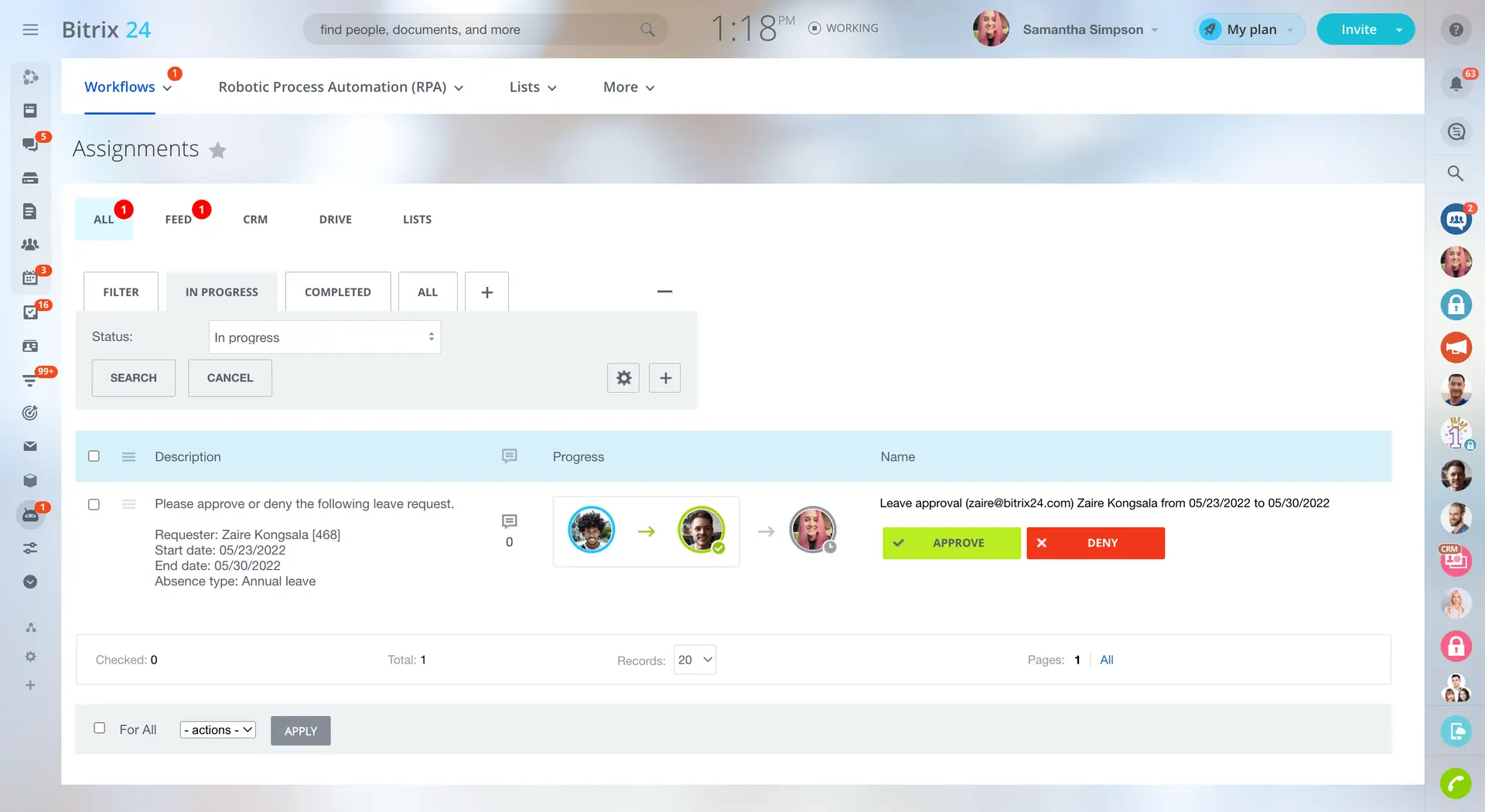
An example of workflow management in business management software | Source
Essential features of business management software
All business management software includes CRM, employee management, project management, and financial management as essential features. Most systems also share several common functionalities, such as access controls/permissions, accounting, activity dashboard, billing and invoicing, and more. We analyzed thousands of reviews and spoke to thousands of business managers to determine what we believe are core features of business management software. [1]
Core business management features
Financial management | Plan, manage, and track an individual or organization's financial activities. 87% of users rate this feature as critical or highly important. |
Project management | Plan and coordinate all the resources, costs and time needed to execute assignments. 85% rate this feature as critical or highly important. |
CRM | Built-in customer relationship management (CRM) capabilities or integration with a third-party CRM system. 79% rate this feature as critical or highly important. |
Employee management | Track employees’ schedules, availability, and performance across projects and tasks. |
Common business management features
Accounting | Built-in accounting features to manage ledgers, accounts payable/receivable, financial reports, etc. 93% of users rate this feature as critical or highly important. |
Reporting & statistics | Collection, analysis, and representation of numerical data and generation of reports to understand various patterns. 93% rate this feature as critical or highly important. |
Workflow management | Create, design, and manage workflows for repetitive tasks. 91% rate this feature as critical or highly important. |
Access controls/permissions | Define authorization levels for access to specific files or systems. 88% rate this feature as critical or highly important. |
Activity dashboard | Dashboard to view the status of ongoing processes, identify incidents, and track past activities. 88% rate this feature as critical or highly important. |
Task management | Create, manage, and track all task activities and progression. 87% rate this feature as critical or highly important. |
Inventory management | Track and manage inventory levels to maintain proper supply. 86% rate this feature as critical or highly important. |
Billing & invoicing | Create and share invoices or bills with customers. 83% rate this feature as critical or highly important. |
HR management | Automates core HR functions such as talent management, employee evaluation, and learning management. |
Marketing automation | Automate workflows and trigger campaigns based on customer actions. |
Performance metrics | A set of indicators that track the performance of networks, applications, systems, teams, etc. |
Sales automation | Automate processes to manage leads, contacts, opportunities, and sales activities. |
Time & expense tracking | Log and record hours worked and costs spent to assist in billing and invoicing. |
Vendor management | Ability to track and store all vendor-related information such as contacts, services offered, terms, etc. |
Industry individual needs are an essential factor to consider during the process of choosing a business management software. As Ramsey notes, “Even industry veterans and individuals can benefit from an industry-specific system. It's important to consider the unique needs of your industry and understand why these requirements might lead you to choose such a system.”
Benefits and competitive advantages of using business management software
You’ll find several benefits that come with utilizing business management software that can directly impact your bottom line:
Improved workflow management. Facilitates the creation and management of workflows for repetitive tasks, ensuring efficiency and consistency.
Better team collaboration: Enhances coordination and communication through integrated tools, enabling seamless teamwork across business activities.
Enhanced productivity: Boosts efficiency by providing comprehensive reporting and analytics tools, in addition to automated tasks to optimize performance and resource allocation.
More efficient project management: Offers robust planning and coordination tools to manage resources, costs, and timelines effectively.
In addition, when talking to professionals, Pozen says they’re often facing challenges in routing purchase requests, causing confusion and limited visibility in procurement.
“In conversations with software users about vendor management, they expressed difficulty in getting purchase requests to the right approvers. They mentioned there was often a breakdown in the hierarchy, leading to confusion about where requests should go and a lack of visibility into the procurement process.”
In general, business management software can streamline vendor management by automating approval workflows, taking some of the manual tasks you’re doing, and streamlining them.
Another important factor to consider that is gaining a lot of popularity is automation through AI. Richard Ramsey points out that in the field of project management, AI is a powerful time-saver:
“Many project management systems are adopting AI to streamline task management, prioritize workflows, and even handle content management. It's cool to see the system can analyze and prioritize tasks or content on its own, saving time and improving project flow.”
How to choose the best business management software for your needs
Step 1: Define your requirements
Before you start your business management software selection process, it’s critical that you define your business’s specific needs, such as task automation, data analysis, and finance tracking. Not only will this guide you to the software tool that meets your current needs—you’ll end up with software that supports your long-term goals as well.
What is the cost of business management software?
The price of business management software is difficult to generalize, because it depends on factors that vary by buyer, such as:
Number of users
Required features
Business size
Most business management software solutions on the market are priced on a ‘per user per month’ basis, and their entry-level pricing plans range from $5 to $70+. That said, entry-level business management software typically provides essential tools like basic accounting, customer data management, simple reporting, and project tracking. Premium plans, however, can offer advanced features such as AI-driven predictive analytics, enhanced workflow automation, sophisticated project management, comprehensive CRM systems, and in-depth analytics.
Based on our analysis of extensive business management user reviews, positive sentiments highlight time and cost savings, with many appreciating features that streamline operations, enhance efficiency, and provide good value for money. Users often commend the ease of use, flexibility, and functionality that these tools offer, making them integral to their business processes.
Conversely, negative sentiments frequently revolve around the high costs associated with premium features, unexpected price increases, and limitations in free versions. Users also express frustration over complex pricing structures, and the need to pay for additional features, which can detract from the overall user experience.
Integration considerations for business management software
Our analysis of over 170 software buyer reviews reveals that business management software users value the its seamless integration capabilities and ability to easily connect with multiple platforms and tools. They praise integration features as intuitive and beneficial for streamlining business processes. On the negative side, users express challenges with limited third-party integrations and the complexity of setting them up. Some also note the lack of integration with specific tools they rely on, which can hinder overall efficiency.
Some popular categories that most often integrate with business management software are project management, accounting, and CRM software.
A business management system can integrate with various tools to optimize business management operations. We looked at thousands of reviews from users of business management software to identify products that users frequently mention integrating with their business management tools:
Google Calendar is a time-management and scheduling tool. Integrating it with business management software enhances scheduling efficiency, ensures timely reminders for meetings and deadlines, and facilitates easy sharing and coordination of schedules among team members.
Microsoft Excel is a spreadsheet tool used for data analysis, calculation, and visualization. Integrating it with business management software allows for advanced data analysis, custom reporting, and data entry automation, enhancing decision-making and operational efficiency.
Zapier is a web-based service that connects multiple apps to automate workflows. Integrating it with business management software enables the automation of tasks between different platforms, increasing efficiency, reducing manual work, and simplifying processes without needing custom coding.
QuickBooks Online is an accounting software. Integrating it with business management software simplifies financial management, enhances invoice and payment tracking, and provides real-time financial insights, improving accuracy and decision-making in financial operations.
Stripe is an online payment processing platform for businesses. Integrating it with business management software simplifies payment collection, automates billing processes, enhances financial reporting, and provides secure transaction capabilities, facilitating smoother, more efficient financial operations and customer transactions.
Be aware of potential drawbacks
Recent feedback from business management software reviewers highlights the prevalence of issues related to performance speed, pricing complexities, issue management, and email notifications. These challenges can affect the effectiveness when implementing business management software.
To navigate these drawbacks effectively, it’s essential to choose software that is reliable, fast, and able to scale with your business. Select software vendors that offer strong customer support and diligent issue resolution; you can utilize free trials and ensure that the training resources are available to users.
Other potential issues with business management software are:
Limited scalability: Business management tools may not accommodate increasing amounts of data, users, or expansion into new markets. This can cause operational bottlenecks and require you to migrate to different software solutions that meet your needs, increasing your overall investment cost.
Data synchronization errors: Discrepancies when updating or integrating data from different platforms and databases can lead to inaccurate information, which lead to error-prone decision-making and reporting. This can disrupt the flow of accurate, real-time data essential for operations, analytics, and customer service.
Steep learning curve: Complex business management tools can require employees to undergo extensive training to learn effective usage. This leads to delays in implementation and reduces operational efficiency. Such challenges can demotivate staff, increase resistance to new systems, and necessitate additional support and resources.
Step 2: Make a shortlist of business management software
With so many business management software options to choose from, selecting the best one for your business can be challenging, but with the right resources and support, it doesn’t have to be.
Explore our list of business management FrontRunners
You can start compiling your shortlist of business management software with our 2025 FrontRunners report for business management software. Only products that earn top user ratings make this list. You can also check out our full methodology description for more details on how the report is compiled.
For more help creating a shortlist and a free comparison chart, check out our Ultimate Software Vendor Evaluation Guide. This will help you compare software evaluation criteria for each prospective vendor by tracking aspects such as functionalities, support offerings, costs, and deployment options.
Step 3: Pick your best option
Once you have narrowed down your options, the next step is scheduling vendor demos. These sessions are essential for exploring features, understanding pricing, and ensuring a sound investment decision. However, thorough preparation is essential to maximizing the benefits of these demos.
How to prepare for vendor demos
Here are some questions you should consider asking business management software vendors during demos:
What kind of customer support do you offer during implementation?
Inadequate customer support and assistance are significant contributors to implementation failures. It's crucial to inquire about the vendor's strategy for supporting you and your team with any doubts you might have throughout the implementation process.
What customization options are currently available?
The ability to customize existing features in business management software can ensure it meets your specific requirements. A system may offer industry-specific features that aren't relevant to your business, so the ability to tailor the software to your unique needs can enhance efficiency and cost-effectiveness. Ask if the system can be tailored to suit the specific way your team manages different business tasks, from accounting to project management, without requiring complex coding or technical expertise.
What integrations does your software support?
Getting insight into available integrations is essential for ensuring that the business management software can seamlessly connect with your existing tools. This inquiry allows you to evaluate whether the software will boost productivity by reducing manual data entry and consolidating information across systems.
Step 4: Make the most of your business management software
Once you’ve made your final choice and finalized your business management software purchase, the implementation process will start. Whether you’re switching from one business management system to another or going from an assortment of spreadsheets to your first electronic system, there are some important considerations you’ll need to pay attention to during this process:
Data migration: Transferring all of your business and employee data from an existing business management tool to a new system can be time consuming, but it’s crucial to get this part of the process right. Communicate with both your old and new business management providers to make sure nothing gets missed and you transfer all the data successfully in this part of the process.
Training: Once the new business management software is implemented, it’s important to ensure that your team is fully proficient in its use. Ensure that your software provider conducts training sessions and offers training materials. Understand that this process requires time, so schedule multiple training sessions and refresher courses to ensure all staff members are confident about using the new system.
Communication: Clear and transparent communication is essential to minimize resistance and facilitate a seamless transition for the team. That said, develop a communication strategy that details the implementation process of the business management software, highlights its advantages for the different teams and employees, and explains the adjustments to existing workflows. Ensure that all team members are informed of critical dates, training sessions, and key milestones.
Compliance: Investing in a business management system that adheres to industry-specific regulations ensures data security and maintains customer trust. It also helps avoid costly modifications or additional solutions to meet regulatory requirements later.
Data visualizing: Data visualizations convert complex data into charts, graphs, and reports that are easier to comprehend. It aids in identifying trends, patterns, and outliers, facilitating quicker, more informed decision-making. Assessing data visualizing capabilities empowers you to fully leverage your data insights.
Software related to business management
Depending on which business management software you choose, you may need to supplement some features with related software systems in order to cover all your business operations. Some types of software that are closely related to business management, but may or may not be included in your business management system, include:
Accounting software: These systems assist businesses in managing financial transactions, tracking income and expenses, and generating financial reports.
Budgeting software: Tools that assist in planning, tracking, and managing budgets, helping businesses allocate resources effectively and monitor financial performance.
CRM software: CRM systems help manage interactions with current and potential customers, streamline processes, and improve customer service.
Enterprise resource planning software: ERP systems integrate various business processes, including finance, HR, manufacturing, and supply chain, into a single platform.
Human resources software: Solutions that focus on managing the overall employee lifecycle, including recruitment, onboarding, training, and performance management.
Project management software: Tools designed to help plan, execute, and monitor projects, ensuring they are completed on time and within budget.
More resources for your business management journey
About our contributors
Author
Alejandra Aranda is a content analyst at Software Advice, specializing in technology trends while always on the lookout for strategic insights for small and midsize businesses. Her areas of focus are brand management, performance marketing, and anything related to digital marketing.
Alejandra’s research and analysis is informed by more than 150,000 authentic user reviews on Software Advice and over 15,000 interactions between Software Advice software advisors and marketing software buyers. Alejandra also regularly analyzes market sentiment by conducting surveys of marketing leaders so she can provide the most up-to-date and helpful information to small and midsize businesses purchasing software or services.
Alejandra led the session “Q-Commerce & M-Commerce in Spain 2023: How is consumption evolving thanks to technology” at Universidad Complutense de Madrid and has had research published in Spanish publications such as El Economista, Corresponsables, and El Español.
When she is not on the lookout for new marketing trends, she is probably exploring a bookshop or researching a new travel destination.
Editor
Mehar Luthra is a team lead at Software Advice and specializes in editing reports that cover the latest trends affecting small businesses. With nearly a decade of experience, she has edited a multitude of research articles, top-rated software reports, and thought leadership articles for diverse markets such as Brazil, Japan, Canada, France, Australia, and India. She finds it particularly rewarding to produce content that provides small-business owners with practical tips and helpful advice on topics such as the digitalisation of small businesses, eCommerce trends, and HR developments. Armed with a double bachelor’s in law (LL.B.) and business economics from Delhi University, she won a full scholarship to study for a master’s in creative writing at the National University of Ireland, Galway. In addition, she has written blog articles spanning a variety of topics such as fiction and non-fiction books, mental health and anxiety, the latest restaurants, and more.
Her articles have been featured in Ireland’s national magazine The Village, among other publications. A die-hard journaling fan, she enjoys watching psychological thrillers, reading fiction books, and drinking iced coffee (even in the winter).
Advisors
Richard Ramsey is a software advisor who joined the Software Advice advisor team in 2016 and is based in Austin, Texas.
As a software advisor, Richard works directly with small business leaders seeking to find the right HR, CRM, accounting, project management, and manufacturing software. They connect businesses with best fit software providers by assessing technology needs through one-to-one conversations and providing a short list of potential matches.
Their favorite part of being a software advisor is connecting small businesses with software that helps grow their businesses. They hold a bachelor's degree in criminal justice, and are experienced in retail management and social work.
Nate Pozen is a buyer advocate team leader. He joined Software Advice in 2021 as a software advisor, and now he manages a team of four software advisors. He is based in Austin, TX.
Nate and his team helps small businesses find the right HR, CRM, accounting, project management, and manufacturing software for their needs each year. They’re able to do this through one-to-one conversations designed to narrow down the list of potential tools to only those that are the best fit.
His favorite part of being a Software Advice advisor team manager is partnering with buyers to help them through their entire software journey.
Sources
Software Advice advisor call notes: Findings are based on data from telephonic conversations that Software Advice’s advisor team had with businesses seeking project management and enterprise resource planning (ERP) software. For this report, we analyzed phone interactions from January 1, 2023, to January 1, 2025. Read the complete methodology.
Software Advice reviews data: Software Advice reviews are collected from verified users for individual software products. For this report, we analyzed reviews from January 1, 2023 to January 1, 2025. Read the complete methodology.
Software Advice software pricing data: Only products with publicly available pricing information and qualified software products within the category, as of March 2024, are included in the pricing analysis. Read the complete methodology.
Business Management FAQs
- What is a business management software?
Business management software tools are systems designed to help businesses manage operations like project management, sales, marketing, finance, and inventory. They automate routine tasks and provide a single platform for activities such as tracking finances, organizing customer information, and managing supply chains.
- Which is the best business management software?
According to our analysis of business management products with high market demand, Striven has the highest overall rating from verified reviewers on Software Advice.
- How much is business management software?
Most business management software solutions are priced ‘per user per month’, with entry-level plans ranging from $5 to $70+.
- Which software is commonly used for business applications?
Business management software is commonly used for several business applications, such as project management, sales, marketing, finance, and inventory. Other related business management software that covers other business applications is accounting software, budgeting software, CRM software, and ERP software.