


Best Retail POS System software of 2026: which is right for you?

- Popular Comparisons
- FrontRunners
- Buyers Guide
Compare Products
Showing 1 - 25 of 320 products
Compare Products
Sort by
Reviews: Sorts listings by the number of user reviews we have published, greatest to least.
Average Rating: Sorts listings by overall star rating based on user reviews, highest to lowest.
Alphabetically (A-Z): Sorts listings by product name from A to Z.

Clover is a POS system designed to help small businesses streamline their operations. The system offers a range of features, inc...Read more about Clover


Clover's Best Rated Features
See All
Clover's Worst Rated Features
See All

Toast POS is a comprehensive point-of-sale system designed specifically for the restaurant industry. It is more than just a tool...Read more about Toast POS


Toast POS's Best Rated Features
See All
Toast POS's Worst Rated Features
See All

Epicor retail POS and business management solutions are designed to help independent retailers work smarter, not harder. With mo...Read more about Epicor Propello

Rain is an all-in-one point-of-sale, website, and marketing system for small to midsized retailers. Music, dive, sporting goods...Read more about Rain POS


Rain POS's Best Rated Features
See All
Rain POS's Worst Rated Features
See All

Meevo is a management tool designed for salons, spas and med spas to streamline operations. It supports scheduling, point-of-sal...Read more about Meevo


Meevo's Best Rated Features
See All
Meevo's Worst Rated Features
See All

Rapid POS is a certified NCR Counterpoint point-of-sale reseller and systems integrator providing software, hardware, installati...Read more about Rapid POS


Epos Now POS systems are an effective business management, sales, and payment solution for single-site, multi-site, and online b...Read more about Epos Now


Epos Now's Best Rated Features
See All
Epos Now's Worst Rated Features
See All

Bravo Store Systems empowers small businesses innovative point of sale solutions. Bravo is the leading provider of an all in o...Read more about Bravo Store Systems


Pacific Amber’s AmberPOS offers a point of sale software solutions to a variety of retail specialties, ranging from small to mid...Read more about AmberPOS

GoldTech Retail Manager is a retail management and point of sale system designed for small and midsize retail businesses. It off...Read more about GoldTech Retail Manager
No reviews yet
recommendations

KORONA POS provides point of sale software, inventory management, and CRM services for all types of retailers, such as convenien...Read more about KORONA POS


KORONA POS's Best Rated Features
See All
KORONA POS's Worst Rated Features
See All

NetSuite is an AI-powered cloud-based business management suite that incorporates ERP, financial management, CRM and eCommerce f...Read more about NetSuite
NetSuite's Best Rated Features
See All
NetSuite's Worst Rated Features
See All

Ordorite offers a fully end-to-end management software solution for furniture, bedding and related retailers. The system can man...Read more about Ordorite


Phorest is a salon management software solution designed for small and midsize businesses that features appointment bookings, po...Read more about Phorest

Phorest's Best Rated Features
See All
Phorest's Worst Rated Features
See All

Designed for independent and enterprise retailers, MyPOS Connect is a SOC2 compliant, cloud-hybrid POS solution that allows busi...Read more about MyPOS Connect

MyPOS Connect's Best Rated Features
See All
MyPOS Connect's Worst Rated Features
See All

POS Nation is built to support retailers, including specialty businesses such as convenience stores, liquor, wine and beer store...Read more about POS Nation for Retail
POS Nation for Retail's Best Rated Features
See All
POS Nation for Retail's Worst Rated Features
See All

Retail Pro is a specialty retail management software platform featuring POS, replenishment, inventory management, promotions, cu...Read more about Retail Pro


Revel Systems is the leading flexible cloud-based point-of-sale (POS) platform built for multi-location growth. The platform ena...Read more about Revel Systems
Revel Systems's Best Rated Features
See All
Revel Systems's Worst Rated Features
See All

Liberty React is a cloud-based eCommerce and consignment management solution designed for businesses in the resale industry. The...Read more about Liberty REACT
Liberty REACT's Best Rated Features
See All
Liberty REACT's Worst Rated Features
See All

RockSolid MAX is a cutting-edge software platform designed to revolutionize the way hardware store and home center businesses op...Read more about RockSolid MAX
RockSolid MAX's Best Rated Features
See All
RockSolid MAX's Worst Rated Features
See All

Dylish is a white-labelled platform designed to assist restaurants with online food ordering and delivery using a customizable a...Read more about Dylish

COMCASH ERP is a cloud-based retail management solution that caters to multi-channel and multi-location retailers. The poin...Read more about COMCASH Retail ERP

Visual Retail Plus is an integrated system that gives retailers a single centralized location to manage Point of Sale, Inventory...Read more about Visual Retail Plus

CresLane offers point-of-sale solutions for independent grocers with features, such as self-checkout systems, back-office manage...Read more about CresLane
No reviews yet
recommendations


AXIS Retail Management System is a cloud-based point of sale and inventory management solution for the shooting sports industry....Read more about AXIS POS


Popular Comparisons



Your Guide to Top Retail POS System Software, March 2025
Software Advice uses reviews from real software users to highlight the top-rated Retail POS System products in North America.
Learn how products are chosenExplore FrontRunners


“Usability” includes user ratings for Functionality and Ease of Use.
“Customer Satisfaction” includes user ratings for Customer Support, Likelihood to Recommend and Value for Money.
Reviews analysis period: The reviews analysis period spans two years and ends the 15th of the month prior to publication.

Buyers Guide
This detailed guide will help you find and buy the right retail software for you and your business.
Last Updated on March 03, 2025Here's what we'll cover:
What is a retail point of sale (POS) system?
Benefits of retail POS software
Competitive advantages of using retail POS software
Business sizes using retail POS software
Software related to retail POS
What is a retail point of sale (POS) system?
A retail POS system is any technology that includes software where a retail transaction is completed. It provides capabilities such as scanning a barcode, making a purchase order or printing a receipt. Features include inventory management, sales reporting, and analytics. The software also helps retailers nurture relationships with customers by providing customer relationship management (CRM) tools.
Benefits of retail POS software
Retail POS systems bring many benefits to retailers aside from simply completing transactions. These include:
Sales reporting and analytics: Provides retailers with insight into their sales, helping them make informed decisions that strengthen the business.
Inventory management: Automates stock control and helps retailers determine optimal product counts and when and how to reorder top selling products.
Customer management capabilities: Help retailers automatically record and track valuable customer information, enabling stronger relationships and encouraging repeat business.
Competitive advantages of using retail POS software
Surprisingly, many retailers we work with at Software Advice have survived without software. In fact, 64 percent of single-store retailers we work with are operating without retail POS systems in place.
But Excel spreadsheets can only go so far in supporting the operational processes retailers need to accomplish every day. As retailers grow, software can:
Scale the business: Key insights provided by a POS solution can help retailers identify the strong points of their business. This information can be used to pinpoint top-selling products and the most valuable customers to focus on in order to scale.
Operate more efficiently: The operational efficiencies and automations provided by retail POS systems enable shop owners, operators and managers to spend more time training employees and interacting with customers.
Business sizes using retail POS software
The POS market easily accommodates retailer demographics ranging from small retail store operations to large enterprise retailers.
Small: If you operate a single store, or even just do pop-up events, you're likely best suited for a basic POS system with limited hardware and advanced features.
Medium: If you operate a growing, high-volume single store or up to five stores, you're best suited for a POS system that enables multiple location management and features advanced reporting and analytics.
Large, enterprise: If you operate a chain of five or more stores, you're best suited for an enterprise POS system with enterprise resource planning support, including warehousing, shipping logistics and advanced analytics.
Software related to retail POS
Many retail POS systems on the market today offer retailers with all the critical capabilities packaged into one solution. However, if a core capability that retailers need is missing from their POS system, they'll want to look to specialized software to fill the void. Popular specialized software includes:
Inventory management for maintaining desired product counts.
Sales reporting and analytics for pinpointing key performance indicators.
Customer relationship management (CRM) for generating customer loyalty.
Accounting for managing payroll, taxes and other accounting.
Ecommerce for setting up an online store.
Aside from software for specialized functionalities, retailers might want to consider software designed specifically for the unique needs of their business. For example:
Restaurant and foodservice business owners often require restaurant software to process orders, print tickets, analyze ingredient availability and determine how much to charge for meals.
Jewelers might need jewelry POS software to manage repairs and quotes, in addition to processing sales and inventory tracking.
Consignment, pawn shop and resale store owners need specialized software since they don't own their inventories. These retailers need software with functionality tailored to their store types.
Features guide
Feature details and examples
Here are some examples showing the top common features of POS solutions:
Reporting and analytics: Highlights key data. Enables insight into sales data. Supports data filtering options for pinpoint analysis.
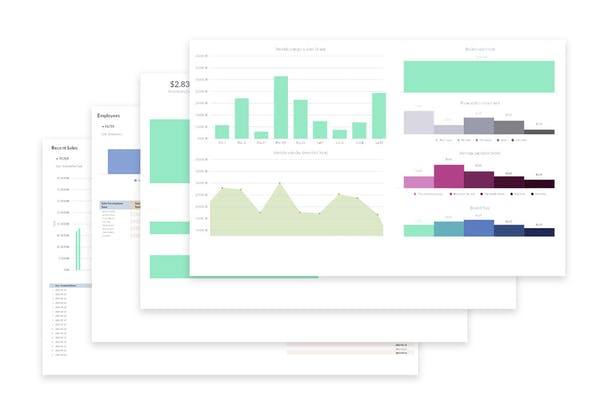
Reporting and analysis by Lightspeed Retail (Source)
Customer management: Helps retain valuable customers. Create and manage customer profiles. Track valuable contact information and purchase histories. Send personalized marketing and deals.
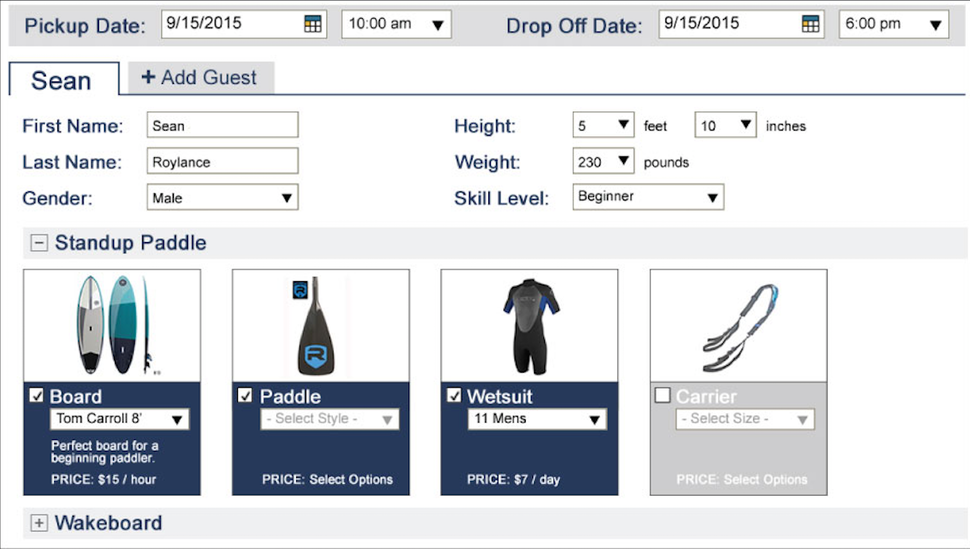
Customer profile in Rain POS (Source)
Inventory management: Automates the management of supply levels. Deducts inventory as sales are completed and provides alerts when inventory levels reach pre-defined thresholds. Also provides reports on inventory movement trends.
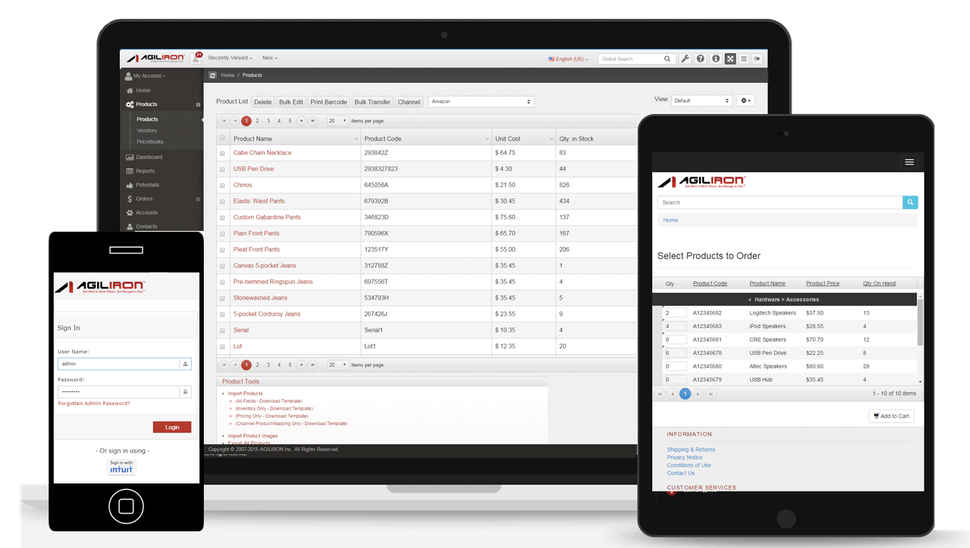
Inventory management in Agiliron (Source)
Employee management: Optimizes scheduling and tracks commissions (when applicable). Provides employee logins to enable clocking in/out for shifts.
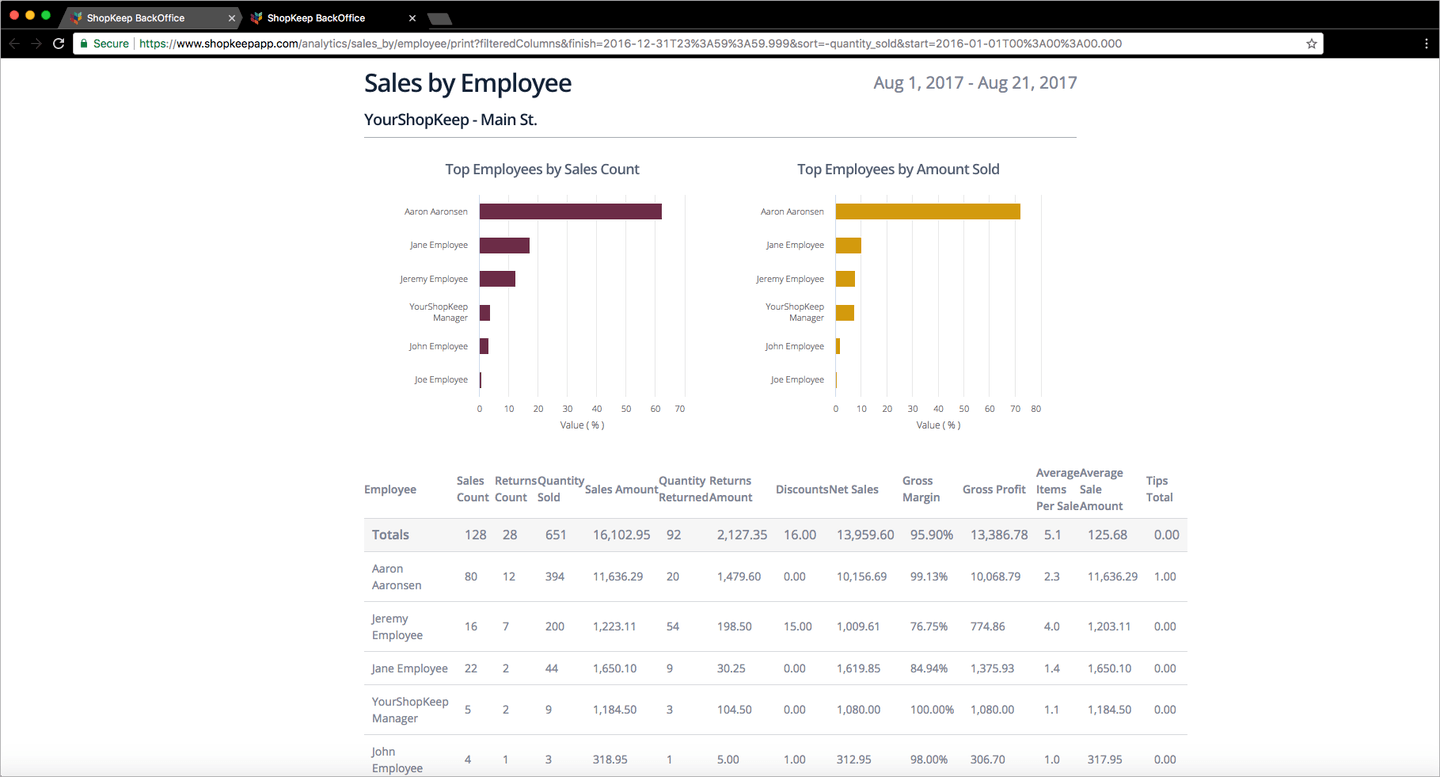
Employee management by ShopKeep (Source)
Payment processing: Accepts payments from multiple modes such as credit card, debit card, e-wallet, and cash.
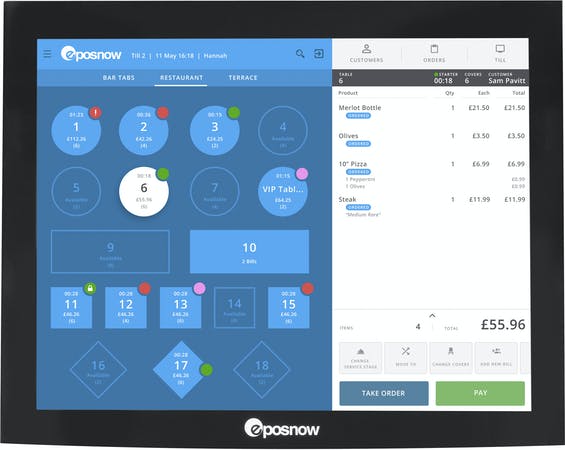
Processing payments in Epos Now (Source)
Some retail POS solutions also offer the following advanced features:
Ecommerce: Many of the top POS players on the market today offer some form of e-commerce integration, either within their system or through a specialized e-commerce platform.
Accounting: Manages the process of generating customer invoices and receiving payments as well as tracking all payments made to partners and vendors.
Purchase orders: Tracks items and amounts ordered, including date of order, shipping information and progress.
Loyalty program: Manages and tracks customer loyalty by providing rewards or points for purchase frequency or other incentive goals.
Targeted marketing: Allows retailers to segment customers and create mailing lists based on custom criteria such as items purchased, total amount spent etc.
Loss prevention: Monitors inventory levels and purchase orders and reports discrepancies or missing quantities.
Variable pricing: Allows managers to automate the process by which varied prices are assigned to products, typically based on walk-in/phone orders, time of day or season.
Retail POS buyers' top requested features
Our advisors at Software Advice have helped thousands of SMB retailers find the best POS system for their unique business needs. We're able to analyze these consultations to determine trends in POS needs.
According to this analysis, these are the top requested POS solution features by your SMB retail peers:
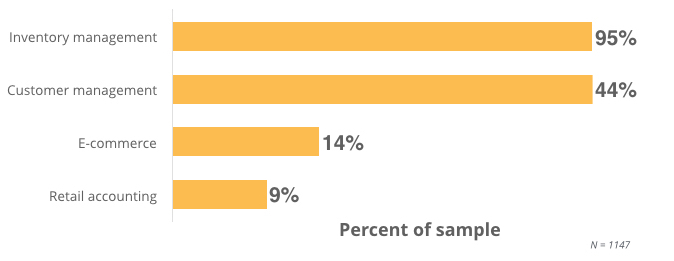
The retail POS software features you really need
Depending on the number of stores your business is operating, certain software capabilities take priority over others. Here are some must-have retail POS features for retailers at different stages of business:
Independent retailers not operating an actual store | Payment processing: Just need the bare-bone ability for retailers to manage transactions and checkout customers. |
Single-store retailers | Sales reporting: Identify key performance indicators within the sale system and pinpoint top selling items to help drive more business. |
Multi-store retailers | Multi-store merchandise management: Enables creation of the optimal balance of SKUs. Provides analytical tools to plan merchandise based on sales histories, trends and forecasts. |
Enterprise retailers | Shipping and transportation management: Helps organizations efficiently transport inventory from distribution centers to store locations and customers. Enables enterprises to plan shipments via air, land or sea with their own or via third-party fleets. |
Pricing guide
For an accurate snapshot of what retail POS systems cost, download our Pricing Guide.
FAQs
What questions should I ask vendors when evaluating retail POS products?
Here are some key questions you need each vendor to answer when evaluating their POS offerings:
Does the functionality of the system suit your specific business needs?
Create a list of must-have functionality that you need your new POS system to do. Walk through each of these with each vendor and record how many each system offers.
How much does the software really cost?
You don't want to be sold on a system based on inaccurate pricing. Figure out how much each system will cost over the next three months, six months and year.
Is your only option to sign a contract?
You don't want to be stuck paying for an inadequate system, so see if there's a monthly subscription you can agree to rather than committing to paying for a system for a year or more.
Are there any hidden fees?
Many POS system costs include payment processing fees. Some even include fees for upgrading or for tech support. Figure out all the potential costs before committing to a system.
Is any POS hardware proprietary?
POS hardware is often just as important for a retailer as the software it supports. Determine if you're required to purchase hardware through POS vendors (which is often marked up).
Do I have options for my merchant service provider?
Merchant service providers (MSP) are a critical partner for SMB retailers. Some POS systems allow you to work with whichever MSP you prefer, while others require you to work with their partner MSPs.
What hardware do I need for my retail POS system?
These are the critical hardware tools you need to get the most out of your POS system:
Register screen: Displays transaction information and product database. Visual hub of a POS system. iPads and other tablets are replacing bulky, traditional monitors.
Barcode scanner: Automatically pulls product details, and adds price to transaction total. Adjusts inventory level once transaction is complete.
Credit card reader: Processes credit, debit and gift cards. Most new readers accept EMV readers as well as enable mobile payments (Apple Pay, Android Pay).
Receipt printer: Paper receipts provide customers with data on their purchase. Phasing out in exchange for email and text receipts.
Cash drawer: A secure place to house cash from payments.
Tips & tools
Build a business case for retail POS software
If you're having trouble justifying the purchase of a new POS system for your business, take a look at this narrative to see how beneficial such a system can be.
Relevant articles
Here are some recent articles about retail POS systems you should check out:
"What Is a Merchant Service Provider—And Why Do They Matter?"
"Why Your Business Should Start Offering Gift Cards Now"
"Improve Customer Experience in Retail Stores With New Technologies"
Popular Retail POS System Comparisons
There are many POS systems on the market that might work for your business, so we've included the following pages for you to see detailed comparisons of a few top systems:
"Shopkeep POS vs. Revel POS"