


Best Nonprofit Project Management Software of 2026
Updated January 27, 2025 at 9:59 AM
- Popular Comparisons
- Buyers Guide
- Related Software
Compare Products
Showing 1 - 25 of 200 products
Compare Products
Sort by
Reviews: Sorts listings by the number of user reviews we have published, greatest to least.
Average Rating: Sorts listings by overall star rating based on user reviews, highest to lowest.
Alphabetically (A-Z): Sorts listings by product name from A to Z.

Project Insight (PI) is award-winning work & project management software that helps companies manage and visualize projects, all...Read more about Project Insight


Project Insight's Best Rated Features
See All
Project Insight's Worst Rated Features
See All

NetSuite OpenAir offers buyers a collection of applications designed to support every stage of the professional services deliver...Read more about NetSuite SuiteProjects Pro


Wrike is a cloud-based project management platform for teams of 20+ that is suitable for both large enterprises and SMBs. It sup...Read more about Wrike
Wrike's Best Rated Features
See All
Wrike's Worst Rated Features
See All

Combining powerful project management and easily streamlined operations - we’re the only platform built for managing client proj...Read more about Teamwork.com

Teamwork.com's Best Rated Features
See All
Teamwork.com's Worst Rated Features
See All

monday.com is a work and project management platform that helps teams of all sizes plan, prioritize, manage, and execute work ef...Read more about monday.com

monday.com's Best Rated Features
See All
monday.com's Worst Rated Features
See All

Quickbase is a no-code collaborative work management platform that empowers citizen developers to improve operations through rea...Read more about Quickbase
Quickbase's Best Rated Features
See All
Quickbase's Worst Rated Features
See All

Planview® ProjectAdvantage is a cloud-based project and portfolio management solution for enterprises that allows to strategical...Read more about Planview ProjectAdvantage

Planview ProjectAdvantage's Best Rated Features
See All
Planview ProjectAdvantage's Worst Rated Features
See All

Smartsheet is a work execution platform and collaboration tool with a familiar spreadsheet-like interface that helps teams plan,...Read more about Smartsheet
Smartsheet's Best Rated Features
See All
Smartsheet's Worst Rated Features
See All

Clockify is a cloud-based time tracking solution designed to help businesses monitor employee productivity, attendance and billa...Read more about Clockify
Clockify's Best Rated Features
See All
Clockify's Worst Rated Features
See All

GitHub is a project management and code sharing platform that allows users to share their codes with others and create/iterate u...Read more about GitHub

GitHub's Best Rated Features
See All
GitHub's Worst Rated Features
See All

My Hours is a cloud-based time tracking app built for growing teams that need fast adoption and reliable data. It’s often descri...Read more about My Hours


My Hours's Best Rated Features
See All
My Hours's Worst Rated Features
See All

SuiteDash is the ultimate All-in-One Business Software multi-tool tailored for small to medium-sized businesses, designed to str...Read more about SuiteDash

SuiteDash's Best Rated Features
See All
SuiteDash's Worst Rated Features
See All

GanttPRO is a cloud-based project management solution for small to midsize companies, as well as individual users. The software ...Read more about GanttPRO
GanttPRO's Best Rated Features
See All
GanttPRO's Worst Rated Features
See All

Your all‑in‑one control center for managing your team's tasks, project, calendar, and chat. All-in one intuitive app that costs ...Read more about Any.do
Any.do's Best Rated Features
See All
Any.do's Worst Rated Features
See All

Exciting news: WorkOtter is now Prism PPM! Prism PPM (formerly WorkOtter) is a project portfolio management (PPM) solution purpo...Read more about Prism PPM

Prism PPM's Best Rated Features
See All
Prism PPM's Worst Rated Features
See All

Flowlu is a cloud-based, all-in-one business management solution designed for teams of all sizes and industries. Whether you're ...Read more about Flowlu
Flowlu's Best Rated Features
See All
Flowlu's Worst Rated Features
See All

Airtable is a platform designed for building AI applications that support business operations and deploy embedded AI agents at a...Read more about Airtable
Airtable's Best Rated Features
See All
Airtable's Worst Rated Features
See All

ClickUp is a productivity platform designed to unify work tools within a single workspace. It supports various teams and industr...Read more about ClickUp
ClickUp's Best Rated Features
See All
ClickUp's Worst Rated Features
See All

Everhour is a cloud-based time tracking and project management solution for teams and small to midsize businesses across various...Read more about Everhour
Everhour's Best Rated Features
See All
Everhour's Worst Rated Features
See All

Quire is a project management software designed for small to medium-sized teams. It provides a suite of features to help teams p...Read more about Quire
Quire's Best Rated Features
See All
Quire's Worst Rated Features
See All

Glasscubes offers cloud-based collaboration solution for businesses. It provides for file sharing, collaboration and document ma...Read more about Glasscubes


Glasscubes's Best Rated Features
See All
Glasscubes's Worst Rated Features
See All

Paymo is a work and project management software for small teams of up to 20 people. This solution supports remote work and offer...Read more about Paymo
Paymo's Best Rated Features
See All
Paymo's Worst Rated Features
See All

Agiled is an all in one business management platform. It comes with built-in CRM, HRM, Financial Management, Project Management ...Read more about Agiled
Agiled's Best Rated Features
See All
Agiled's Worst Rated Features
See All

TimeCamp is a 100% free time tracker for teams. Unlimited users for $0. TimeCamp is a cloud-based time tracking solution that e...Read more about TimeCamp
TimeCamp's Best Rated Features
See All
TimeCamp's Worst Rated Features
See All

Businessmap (formerly Kanbanize) is the most flexible Lean project & portfolio management platform for complete strategy executi...Read more about Businessmap
Businessmap's Best Rated Features
See All
Businessmap's Worst Rated Features
See All
Popular Comparisons


Buyers Guide
This detailed guide will help you find and buy the right project management software for nonprofits for you and your business.
Last Updated on January 27, 2025For any nonprofit organization, time and money are extremely valuable resources, and they are often scarce. As a project manager, you must ensure that the funds allocated to a project are used efficiently and that each member of your team stays updated on the progress. However, working with a mixed pool of full- and part-time employees and volunteers can make this a challenge.
These challenges can be addressed by project management software. This type of software allows you to organize information for each project, track its underlying tasks, and monitor the time and funds spent on it. It also helps streamline workflows and makes it easier for your team members to share information and documents.
We've prepared this guide to help you find the right project management software for your nonprofit organization. Here's what we'll cover:
What is project management software for nonprofits?
Common features of project management software for nonprofits
Benefits of project management software for nonprofits
Key considerations when buying project management software for nonprofits
What is project management software for nonprofits?
Project management software for nonprofits is a tool that teams can use to track project progress, collaborate on tasks, and manage resources and costs.
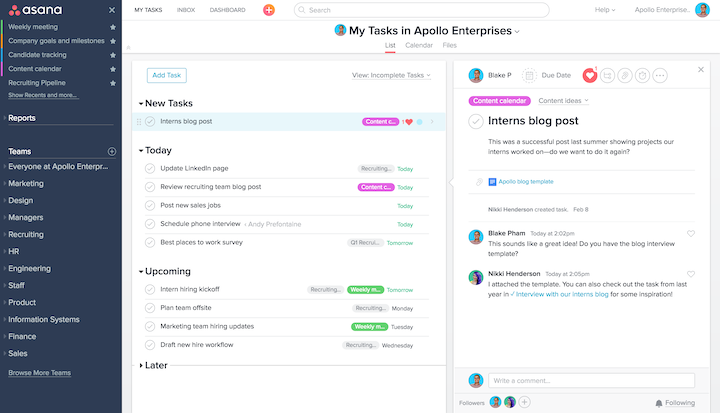
User dashboard in Asana (Source)
Common features of project management software for nonprofits
Project management solutions can offer basic (e.g., time tracking and task management), mid-level (e.g., reporting, project planning, document management), or advanced (e.g., resource management, portfolio management, risk management) capabilities.
The typical features of a project management solution are:
Project planning | Define scope, timeline, and budget for projects, and assign projects to team members. Also, break a project down into smaller tasks and set short-term goals. |
Task management | Create tasks; add descriptions; set timelines, priority, and level of effort; and assign them to users. Team members can update task status and/or details and leave comments. Some solutions also include features for converting emails to tasks, setting dependencies, and creating task checklists. |
Time tracking | Track time spent by each team member on each task, and collect the data in a single sheet or repository. |
Project collaboration | Work together over shared tasks, projects, calendars, and dashboards. Stay updated on user activities, and tag peers on items. Also, allow sharing of files, chatting, and inviting guests to participate. |
Project tracking | Track progress made on a project, and view active and completed tasks. Also, track milestones and stay on top of what's in the pipeline. |
Reporting | Understand the status of projects with a quick Gantt chart view or dive deeper with detailed reports. Also, track team performance, and compare estimated time to actual time spent and/or estimated spend to actual cost. |
Resource planning | Allocate staff and funding to projects and monitor their usage. Also, prioritize and redistribute resources based on the requirement. |
Self-service portal | Create self-service portals for team members to access project information and perform related tasks. |
Scheduling and calendar | Schedule tasks and activities for team members and allow them to update timelines. Visualize this information on a shared calendar so team members can view each other's schedules and timelines. |
Permissions | Control access to project details so team members can view projects (and information) pertinent to them. Some solutions also allow making hidden projects for sensitive work. |
Document management | Add files to projects and tasks as attachments, or store them in a central location and share them with relevant team members. |
What Type of Buyer Are You?
Nonprofit organizations of different sizes have different requirements from a project management tool. For instance, not all will need advanced features to handle multiple projects simultaneously. It's important to understand the needs of your nonprofit before choosing a solution.
In general, nonprofits that need project management software fall into one of the following categories:
Grassroots organizations:
Annual budgets of up to $1 million
Small team of employees and volunteers
One location
May not have a dedicated IT budget or personnel
For such buyers, we recommend exploring free project management solutions as well as free task management solutions. If these tools don't meet your needs, then explore cloud-based project management solutions that are priced on a per user/per month basis
Small and midsize nonprofits:
Annual budget of $2 to $10 million.
A few fixed employees as well as some part-time employees and volunteers, working on one or more projects at a time.
One or more locations.
May have a dedicated IT person and budget earmarked for IT needs.
For such buyers, we recommend basic to mid-ranged project management solutions. Choose one that is cloud-based and ask if the vendor lets you add volunteers for free.
Large nonprofits:
Annual budget of $10 million or more.
Large team of full- and part-time employees and volunteers.
Multiple projects running in multiple locations at the same time
Dedicated IT personnel and earmarked budget for IT needs.
For such buyers, we recommend advanced project management solutions. Both cloud-based and on-premise solutions can work for you.
Benefits of project management software for nonprofits
Project management software helps nonprofits create plans for projects, streamline tasks, and track progress, improving efficiency and effectiveness. Its key benefits are as follows:
Efficiency in planning resources: Have clear visibility into the funds and staff allocated to each project. Use available resources efficiently, and plan ahead for any shortage of staff or funds.
Improved communication: Break virtual departmental borders and bring everyone onto the same page. The person-in-charge of fundraising, for example, can see what the marketing team has planned for the next month, and plan their fundraising activities accordingly.
Systematized workflow: Streamline workflow and create step-wise processes for completing tasks. For example, once your content team has created the content for a newsletter, designers can be automatically notified, and the next steps can begin.
Reduced effort on repetitive tasks: Create process or task templates for repetitive tasks such as sending newsletters and reminders for fundraisers or updating social media posts.
Key considerations when buying project management software for nonprofits
With so many solutions on the market, it can be confusing to figure out what your nonprofit needs in a project management solution. To help you find the right solution, we've listed some key considerations you should keep in mind:
Assess your project management requirements: Before you select a vendor, ask yourself if you're looking for a project management tool or simply a tool to track your to-do's. Check out our article on the difference between to-do list, task management, and project management software to understand all three solutions better.
Use a features checklist: To avoid over- or under-purchasing, create a checklist of features and evaluate solutions basis that. Our project management feature checklist can help you with this process.
Evaluate pricing plans: Choose a pricing plan that fits your needs; don't buy an advanced tool simply because you can afford it.
Check for nonprofit discounts or donation: Some software vendors offer standing discounts or donations to nonprofits.
To further understand the features and benefits of project management software for nonprofits, call our advisors at (844) 852-3639 for free, no-obligation help. They'll help you narrow down your options by listening to your requirements and recommending the best-suited solutions for your business.
Note: The applications selected in this article are examples to show a feature in context and are not intended as endorsements or recommendations. They have been obtained from sources believed to be reliable at the time of publication.