


Best Customer Service Software of 2026
Updated February 18, 2026 at 9:54 AM

Written by Giorgia Pisano
Content Associate

Edited by Parul Sharma
Editor

Reviewed by Marty Moore
Senior Advisor

Talk with us for a free 15-min consultation
Expert advisors like Jacqueline, who have helped 1,000+ companies, can find the right software for your needs.
- All Software
- Software Advice FrontRunners
- Popular Comparisons
- Buyer's Guide
- Frequently Asked Questions
Customer service software helps support teams manage queries, enhance customer experiences, and save time through automation. With over 400 tools listed in our directory—spanning help desk, call center, live chat, and ticketing—it can be hard to choose. To help you narrow it down, I worked with our customer service software advisors to curate a list of recommended productsi and a list of the customer service software FrontRunners based on user reviews. For further information, read my customer service software buyer's guide.
Customer Service Software
Sort by
Reviews: Sorts listings by the number of user reviews we have published, greatest to least.
Average Rating: Sorts listings by overall star rating based on user reviews, highest to lowest.
Alphabetically (A-Z): Sorts listings by product name from A to Z.

Claritysoft is a cloud-based customer relationship management (CRM) solution designed for midsize and large enterprise businesse...Read more about Claritysoft CRM


Claritysoft CRM's Best Rated Features
See All
Claritysoft CRM's Worst Rated Features
See All

Sales Cloud is equipped with customer relationship management (CRM) functionality that encompasses lead management, marketing au...Read more about Salesforce Sales Cloud


Salesforce Sales Cloud's Best Rated Features
See All
Salesforce Sales Cloud's Worst Rated Features
See All

Shape's cloud-based solution offers tools designed to manage online marketing and promotions, capture leads from online sources,...Read more about Shape


Shape's Best Rated Features
See All
Shape's Worst Rated Features
See All

Zendesk is a cloud-based help desk management solution offering customizable tools to build customer service portal, knowledge b...Read more about Zendesk Suite

Zendesk Suite's Best Rated Features
See All
Zendesk Suite's Worst Rated Features
See All

SAP Customer Experience is a cloud-based customer relationship management solution that helps small and mid-size businesses mana...Read more about SAP Customer Experience
SAP Customer Experience's Best Rated Features
See All
SAP Customer Experience's Worst Rated Features
See All
Software Advice FrontRunners 2026

(851)

(1710)

(3405)

(590)

(1131)

(178)

(1750)

(2209)

(761)

(4067)
Best for Customization

Act!

Of the products listed on our FrontRunners report, Act! is the most requested by users for customization out of the most popular tools.
Act! is best suited for SMBs seeking extensive customization in their CRM solution. Our reviewers say the platform offers ample options for customizing fields, processes, and layouts, enabling businesses to tailor contact and client management workflows to their unique requirements.
- Reviewers Perspective
"The excellent support their technology team provides give me piece of mind that I don't have to concern myself with issues that come up from time to time."
KWKevin Waide
Manager
Used for 2+ years
We analyzed 487 verified user reviews for Act! to find out what actual users really think.
Ease of Use
Administrative buyers use Act! for its easy-to-use CRM interface. Quick setup and straightforward navigation help teams manage contacts and tasks efficiently, with minimal training required.Customization
Managers tailor Act! by customizing fields, screens, and templates. This flexibility supports unique business workflows, though advanced changes may require expert help or additional time.Contact Management
Teams rely on Act! to efficiently organize large contact databases. Custom fields, reminders, and reporting functions help maintain business relationships and streamline communication. - Screenshots


Best for Mobile app

LiveChat

LiveChat is the most requested by users for mobile app out of the most popular tools.
LiveChat is ideal for organizations prioritizing mobile accessibility in customer engagement. Our reviewers say the mobile app enables instant notifications and real-time chat management, allowing teams to respond quickly and efficiently to customer inquiries from anywhere.
- Reviewers Perspective
"Essentially, this means that the system supports me in solving my customer's problems and thanks to a central database and a 360 degree view, I quickly have all the relevant information at my fingertips."
EGEdgaras Galaunia
Digital Marketing Specialist
Used for 2+ years
We analyzed 642 verified user reviews for LiveChat to find out what actual users really think.
Customer Support
Teams use LiveChat to provide real-time assistance across chat, email, and phone. Features like chat history, canned responses, and detailed insights help resolve issues quickly and improve satisfaction.Ease of Use
Staff onboard rapidly with LiveChat’s user-friendly interface. Setup and daily operation are straightforward, allowing both new and experienced users to manage chats and support tasks efficiently.Integrations
Businesses integrate LiveChat with websites, CMS, and third-party apps to manage conversations and automate workflows. Flexible integration options support multiple sites and processes from one account. - Key FeaturesLiveChat's scoreCategory average
Dashboard
4.674.56 category average
Real-Time Monitoring
4.554.66 category average
Support Ticket Management
4.454.56 category average
- Screenshots


Best for Automation Capabilities

Freshdesk

Freshdesk is the most requested by users for automation capabilities out of the most popular tools.
Freshdesk is best for businesses seeking strong automation capabilities in customer support. Our reviewers point out that its automated ticket routing, canned responses, and workflow customization save time and streamline support processes, improving efficiency and response times.
- Reviewers Perspective
"The tool's multi-channel support and automation capabilities help reduce response times and ensure that customers get timely help. While there are some limitations regarding pricing and advanced reporting, it’s a solid choice for businesses that need a reliable, easy-to-use, online customer support platform."
AZArpad Zsok
Senior software consultant
Used for 2+ years
We analyzed 794 verified user reviews for Freshdesk to find out what actual users really think.
Customer Support
Support teams use Freshdesk to organize and manage high volumes of inquiries. Multichannel support, automation, and self-service options help resolve queries efficiently and keep customers informed.Ticket Management
Managers depend on Freshdesk’s ticketing system to track, categorize, and prioritize inquiries. Automation, ticket assignment, and real-time dashboards streamline workflows and ensure timely resolution.Ease of Use
Teams onboard quickly with Freshdesk’s clean interface and logical menu structure. Customizable views and efficient search functions simplify daily support tasks and reduce complexity for new and experienced users. - Key FeaturesFreshdesk's scoreCategory average
Dashboard
4.344.56 category average
Real-Time Monitoring
4.424.66 category average
Support Ticket Management
4.564.56 category average
- Screenshots


Best for Quick Implementation

Tidio

Of the products listed on our FrontRunners report, Tidio is the most requested by users for quick implementation out of the most popular tools.
Tidio is a top choice for teams needing quick implementation of live chat and chatbot solutions. Our reviewers say setup is fast and intuitive, with easy website integration and a user-friendly dashboard that enables organizations to start engaging customers in real time within minutes.
- Reviewers Perspective
"It centralizes student/parent support, automates repetitive questions, enhances communication through emails and messages, and even helps teachers with internal support."
MDMonika Damarla
Software Engineer
Used for 6-12 months
We analyzed 414 verified user reviews for Tidio to find out what actual users really think.
Chat
Teams deploy Tidio’s live chat to engage website visitors instantly. The customizable widget and intuitive dashboard streamline real-time support, letting staff resolve queries efficiently across devices.Customer Support
Organizations use Tidio to centralize customer communication and automate responses. This reduces workload for support teams and enables real-time, personalized assistance, improving satisfaction and sales.Integrations
Businesses connect Tidio with platforms like WordPress and Shopify to manage messages and chats from one dashboard. Setup is straightforward, saving time and simplifying workflows, though advanced integration options are limited. - Key FeaturesTidio's scoreCategory average
Dashboard
5.04.56 category average
Real-Time Monitoring
4.834.66 category average
Support Ticket Management
4.304.56 category average
- Screenshots


Best for AI powered

Intercom

Of the products listed on our FrontRunners report, Intercom is the most requested by users for AI powered out of the most popular tools.
Intercom is best for businesses looking to leverage AI-powered customer communication. Our reviewers say its AI features automate responses and streamline support, while integrations and real-time chat improve onboarding and customer engagement.
- Reviewers Perspective
"What I like most about Intercom is its ability to combine multiple customer service, marketing and sales tools into one platform, making direct and efficient communication with users easier."
GMGustavo Medina
Manager
Used for 1-2 years
We analyzed 525 verified user reviews for Intercom to find out what actual users really think.
Customer Chat
Support teams use Intercom to manage real-time conversations, automate workflows, and track analytics. The platform centralizes communication, streamlines engagement, and provides detailed reporting for improved service.Ease of Use
Managers and staff quickly adopt Intercom due to its clean interface and tutorials. Setup can be time-consuming, but once configured, workflows are efficient and accessible for all users.Email
Teams use Intercom’s email features to manage support tickets and campaigns. Segmentation, automation, and tracking help run newsletters and follow-ups, though customization and deliverability need improvement. - Key FeaturesIntercom's scoreCategory average
Dashboard
4.04.56 category average
Real-Time Monitoring
3.674.66 category average
Support Ticket Management
4.214.56 category average
- Screenshots


Most Rated for SMBs

HelpDesk

HelpDesk is the most requested by small businesses out of the most popular tools, based on our analysis of Customer Service products with the most market demand.
HelpDesk is most rated for SMBs needing a straightforward ticket management system. Our reviewers say it offers an intuitive interface and efficient onboarding, making it easy for teams to organize, track, and resolve customer requests without a steep learning curve.
- Reviewers Perspective
"I interact with the tool the most when connecting to our tech team on internal issues that affect employees and customers and it is a great way for multiple people to report the same issue at once to bring attention to it."
JSJazzmine Sorrell
Returns and Service
Used for 2+ years
We analyzed 138 verified user reviews for HelpDesk to find out what actual users really think.
Customer Support
Organizations use HelpDesk to connect internal teams and address issues efficiently. The platform’s prompt support and cross-department communication improve response times and collaboration.Ticket Management
Managers organize, track, and resolve support tickets with HelpDesk. Internal notes, automated responses, and sorting features streamline communication, though customization and reporting are limited.Ease of Use
Teams adapt quickly to HelpDesk’s user-friendly layout. The straightforward interface and accessible functions allow efficient management of support tasks across varying technical skill levels. - Key FeaturesHelpDesk's scoreCategory average
Dashboard
4.234.56 category average
Real-Time Monitoring
4.644.66 category average
Support Ticket Management
4.614.56 category average
- Screenshots


Most Rated for Enterprise

LiveAgent

Of the products listed on our FrontRunners report, LiveAgent is the most requested by enterprises out of the most popular tools.
LiveAgent is most rated for enterprises requiring robust multi-channel support and workflow automation. Our reviewers point out its advanced ticketing, automation, and real-time chat features help large teams efficiently manage high volumes of inquiries across channels.
- Reviewers Perspective
"The kind of business that we have definitely needs a customer satisfaction and resolution software and connecting with them manually one by one really takes a lot of time that's why after installing liveagent we are able to automate lots of customer support challenges and build a better relationship with them with minimum resources investment"
SKSourabh Kashyap
Operations Analyst
Used for 1-2 years
We analyzed 708 verified user reviews for LiveAgent to find out what actual users really think.
Customer Support
Organizations use LiveAgent to centralize communication channels and automate support workflows. This streamlines query management and enables timely, personalized service across languages and touchpoints.Live Chat
Support teams implement LiveAgent’s live chat for immediate customer engagement. Customizable widgets, chat routing, and analytics help manage conversations efficiently alongside other channels.Ticket Management
Managers rely on LiveAgent’s ticket system to organize and resolve inquiries from multiple sources. Automation features streamline assignment and tagging, while reporting and customization aid in tracking and improving operations. - Key FeaturesLiveAgent's scoreCategory average
Dashboard
4.634.56 category average
Real-Time Monitoring
5.04.66 category average
Support Ticket Management
4.704.56 category average
- Screenshots


Most Used By Information Technology and Services

Zoho Desk

According to our user reviews, Zoho Desk is the most requested by users in information technology and services out of the most popular tools.
Zoho Desk is most used by information technology and services organizations seeking integrated support and workflow automation. Our reviewers say its seamless integration with other Zoho apps and customizable automation tools streamline ticket management and improve team collaboration.
- Reviewers Perspective
"Zoho Desk has enabled us to automate various processes from customer community management, Mobil customer care and contact centre integration."
CPClaudia Pionati
Lawyer
Used for 2+ years
We analyzed 768 verified user reviews for Zoho Desk to find out what actual users really think.
Customer Support
Support teams use Zoho Desk to streamline customer interactions with multichannel support, automation, and analytics. This helps manage tickets, provide self-service, and maintain strong customer relationships.Ticket Management
Managers rely on Zoho Desk’s ticket system to track and resolve inquiries across channels. The intuitive interface, automation, and customization options enable efficient assignment and monitoring of agent performance.Integrations
Businesses integrate Zoho Desk with Zoho and third-party apps to centralize customer data and streamline processes. Seamless syncing with CRM and inventory reduces administrative work and ensures quick access to information. - Key FeaturesZoho Desk's scoreCategory average
Dashboard
4.364.56 category average
Support Ticket Management
4.624.56 category average
- Screenshots


Most Used By Health, Wellness and Fitness


According to our user reviews, JIRA Service Management is the most requested by users in health, wellness and fitness out of the most popular tools.
JIRA Service Management is most used by health, wellness, and fitness organizations needing structured ticket and project tracking. Our reviewers say its customizable workflows, SLA tracking, and integration with development tools enhance collaboration and process visibility.
- Reviewers Perspective
"The SLA tracking and reporting features are particularly valuable for tracking performance metrics, and the interface is intuitive, helping teams stay organized and collaborative."
OSOlga Stanchevska
Automation QA Engineer
Used for 2+ years
We analyzed 427 verified user reviews for JIRA Service Management to find out what actual users really think.
Ticket Management
Support teams use JIRA Service Management to organize, track, and resolve tickets across departments. Custom workflows, SLA management, and a customer portal streamline assignment and communication.Team Collaboration
Organizations leverage JIRA Service Management for real-time communication and task delegation. Internal comments and integration with knowledge bases enable efficient collaboration across business units.Customer Support
IT and service teams manage requests, incidents, and problems with JIRA Service Management. Omnichannel support and integrated knowledge base reduce workload and streamline communication. - Key FeaturesJIRA Service Management's scoreCategory average
Dashboard
4.174.56 category average
Real-Time Monitoring
4.514.66 category average
Support Ticket Management
4.584.56 category average
- Screenshots


Most Used By Consumer Services

In our analysis of Customer Service products with the most market demand, Zendesk Suite is the most requested by users in consumer services out of the most popular tools.
Zendesk Suite is most used by consumer services companies looking for centralized, multi-channel customer support. Our reviewers say its intuitive interface, ticket management, and real-time chat features help streamline workflows and improve response times across teams.
- Reviewers Perspective
"Overall, Zendesk suite serves as a robust and scalable support platform centralizing mulit-stakeholder support, improving response times through automation and self-service capabilities supported with analytics to report on support metrics."
ATAnita Thirumalai
Senior Solution Architect
Used for 2+ years
We analyzed 815 verified user reviews for Zendesk Suite to find out what actual users really think.
Customer Support
Teams use Zendesk Suite to centralize customer interactions and automate repetitive tasks. In industries like healthcare, this enables faster response times and organized support across multiple channels, with analytics helping monitor performance and improve satisfaction.Ticket Management
Managers leverage Zendesk Suite’s ticketing system to track, prioritize, and resolve requests efficiently. Customizable ticket fields, workflow automation, and collaborative handling ensure that inquiries are not missed and workflows adapt to business needs.Ease of Use
New hires and non-technical staff can quickly learn Zendesk Suite thanks to its clean, straightforward interface. Daily navigation and task completion are simplified, with shortcuts and macros enhancing productivity and reducing complexity. - Key FeaturesZendesk Suite's scoreCategory average
Dashboard
4.474.56 category average
Real-Time Monitoring
4.674.66 category average
Support Ticket Management
4.504.56 category average
- Screenshots


Front

- Reviewers Perspective
"Front's collaboration, shared inbox system and ability to coordinate with people on my team, make it a necessity in our core tech stack."
EHEmily Harju
Marketing and Techology
Used for 2+ years
We analyzed 212 verified user reviews for Front to find out what actual users really think.
Team Collaboration
Teams use Front’s real-time communication tools, internal notes, and file sharing to maintain transparency and coordinate tasks. Features like @mentions and internal chat support cohesive, responsive collaboration.Features
Organizations leverage customizable workflows, reporting, and plugin support to manage resources and communications. Frequent updates add new functionalities, though some features are tied to higher pricing tiers.Customer Support
Support teams resolve issues quickly and provide useful documentation. Front enables efficient customer service and cross-department communication, improving response times and satisfaction. - Key FeaturesFront's scoreCategory average
Real-Time Monitoring
5.04.66 category average
Support Ticket Management
3.294.56 category average
- Screenshots


Sobot

- Reviewers Perspective
"Sobot Omnichannel Suite is allowing us to proactively address customer queries before they escalate, and they give room for reporting on every customers queries"
SKShaun Kasperbauer
Founder
Used for 6-12 months
We analyzed 81 verified user reviews for Sobot to find out what actual users really think.
- Screenshots


Groove

- Reviewers Perspective
"GrooveHQ simplifies our customer experience and consolidates our capabilities so we can be efficient""
BBBrady B. McLaughlin, MS, NREMT
CEO
Used for 2+ years
We analyzed 65 verified user reviews for Groove to find out what actual users really think.
Team Collaboration
Multiple team members assist each other, assign issues, and keep communication clear. Groove supports onboarding and ongoing improvements for efficient team operations.Customer Support
Teams manage customer inquiries from a single dashboard. Automation and quick setup help provide efficient service without requiring customer logins.Ticketing System
Support staff use ticket assignment, tagging, and snooze functions to organize operations. Groove integrates with knowledge bases and suits small teams needing straightforward ticket management. - Key FeaturesGroove's scoreCategory average
Dashboard
4.504.56 category average
Support Ticket Management
5.04.56 category average
- Screenshots


Gorgias

- Reviewers Perspective
"Automations help route tickets, trigger responses, and handle repetitive tasks instantly, freeing up our team to focus on more complex issues."
CFCadence Farmer
Online Customer Experience and E-Commerce Sales Manager
Used for 2+ years
We analyzed 101 verified user reviews for Gorgias to find out what actual users really think.
Team Collaboration
Gorgias centralizes communication, supports easy case assignment, and enables performance monitoring. The platform adapts to both small and larger teams, streamlining collaboration and coverage.Integrations
Staff manage helpdesk information with seamless Shopify and social channel integrations. Most integrations are easy to implement, though some require extra setup or incur additional costs.User Interface
Teams use Gorgias’s simple interface and macro features for daily tasks. While some users find the design less modern, the platform remains effective for support operations. - Screenshots


UJET

- Reviewers Perspective
"Ujet resolves almost every problem in my everyday workout."
DRDanicelis Rosado
Customer service representative
Used for 2+ years
We analyzed 124 verified user reviews for UJET to find out what actual users really think.
Ease of Use
UJET’s interface is straightforward, making daily operations accessible for all experience levels. Staff navigate tasks easily, supporting a smoother workflow.Customer Support
Support teams resolve customer issues quickly using real-time dashboards and secure information exchange. Access to customer data during interactions enhances service quality.Status Management
Agents manage work status and track time spent in various states. Monitoring team availability helps coordinate workflow and productivity. - Screenshots


Help Scout

- Reviewers Perspective
"It's a no frills help desk tool that gets out of your way and just lets you help your customers"
JSJosef Szotten
Technical Support Specialist
Used for 2+ years
We analyzed 189 verified user reviews for Help Scout to find out what actual users really think.
Customer Support
Teams use Help Scout to centralize all customer communications, streamlining inquiry management and cross-team collaboration. The platform’s ticket assignment, internal notes, and reporting features support efficient service operations and provide actionable insights.Email Management
Teams handle multiple mailboxes, assign emails, and keep communication organized in one place. Tagging, internal notes, and automation help maintain workflow, though some users note occasional notification and attachment issues.Ease of Use
Staff get started quickly with Help Scout’s clear, straightforward interface. Both new and experienced users navigate the platform easily, supporting organized and productive team operations. - Screenshots


JustCall

- Reviewers Perspective
"At HIE, we're all about efficiency and customer satisfaction, and Justcall has proven to be the perfect tool to help us achieve both."
SPSergio Perez
IT Manager
Used for 6-12 months
We analyzed 160 verified user reviews for JustCall to find out what actual users really think.
Customer Support
Teams receive responsive support and helpful documentation, making onboarding smoother. Support staff are proactive and open to suggestions, contributing to ongoing satisfaction.Call Recording
Supervisors monitor calls for training and compliance. Easy retrieval and CRM integration help maintain control over client communications and support call center management.SMS
Organizations use SMS automation, bulk messaging, and scheduled sends to reach clients efficiently. These tools support campaign management and routine communication. - Key FeaturesJustCall's scoreCategory average
Real-Time Monitoring
4.754.66 category average
Support Ticket Management
3.364.56 category average
- Screenshots


Mava

- Reviewers Perspective
"One of the most standout feature about this platform is the AI bots that allows quick customer assistance with engaging live chats that replies and processes any errors that customers might have encountered."
ETElizabeth Tamuno
Head of sales
Used for 6-12 months
We analyzed 29 verified user reviews for Mava to find out what actual users really think.
- Screenshots

Talkdesk

- Reviewers Perspective
"The two tools worked together flawlessly to allow customers to call us, which is what we needed from a call tool."
RLRebecca Luttig
Strategy Coordinator
Used for 1-2 years
We analyzed 471 verified user reviews for Talkdesk to find out what actual users really think.
Call Quality
Organizations rely on Talkdesk for inbound and outbound calling, leveraging consistent voice clarity across devices. Call monitoring, tagging, and reporting support productivity and customer service improvement.Ease of Use
New team members adapt quickly due to Talkdesk’s clean layout and intuitive controls. Customization and remote access features help teams stay productive with minimal training.Customer Support
Support teams resolve issues quickly, enabling users to maintain high standards of service. Talkdesk’s reliability and support resources help organizations focus on their own customers. - Key FeaturesTalkdesk's scoreCategory average
Dashboard
5.04.56 category average
Support Ticket Management
4.454.56 category average
- Screenshots


BOSSDesk

- Reviewers Perspective
"I appreciate their responsiveness to customer feedback and offer personalized sessions to help both new and existing customers tailor the application to their needs."
RJRandy Jackson
DBA
Used for 2+ years
We analyzed 113 verified user reviews for BOSSDesk to find out what actual users really think.
Ticket Management
Teams use BOSSDesk to organize and track work orders, tasks, and helpdesk tickets across departments. Customizable workflows, automated routing, and robust search features support efficient ticket lifecycle management.Customer Support
Support staff address questions and issues promptly, tailoring the application to organizational needs. This approach builds user confidence and encourages engagement with new features.Ease of Use
Administrators and end users benefit from a user-friendly interface and intuitive dashboards. BOSSDesk adapts to varying complexity, simplifying IT task and request management. - Screenshots


Hiver

- Reviewers Perspective
"Hiver is awesome for organization within Gmail, building out automations to keep things clean, and allowing teammates to work seamlessly out of a shared inbox"
FSFletcher Sherrod
Customer Experience Supervisor
Used for 2+ years
We analyzed 119 verified user reviews for Hiver to find out what actual users really think.
Customer Support
Teams use Hiver to manage customer queries, improve workflow efficiency, and enhance collaboration. Responsive support staff provide quick resolutions and thorough assistance.Shared Inbox
Multiple team members access, assign, and track emails in one location. Shared labels, automated routing, and assignment tools keep communication organized and efficient.Team Collaboration
Staff assign tasks, share information, and monitor workloads. Shared templates and internal communication tools support effective teamwork and project management. - Key FeaturesHiver's scoreCategory average
Dashboard
5.04.56 category average
Real-Time Monitoring
4.04.66 category average
Support Ticket Management
4.414.56 category average
- Screenshots


- Reviewers Perspective
"Overall, our experience has been entirely useful, providing us with a central place to manage projects across our team efficiently and easily."
JIJack Isaacs
IT Development Lead
Used for 6-12 months
We analyzed 61 verified user reviews for monday service to find out what actual users really think.
Team Management
Teams organize information and assign tasks in one place. The platform supports role creation and progress monitoring, keeping teams focused and coordinated.Collaboration
Staff share updates, communicate, and edit projects from any location. The interface and secure access support seamless teamwork across departments.Dashboard
Managers track tasks and deadlines using customizable dashboards. Features like progress bars and notifications help teams stay organized and manage high-volume workloads. - Key Featuresmonday service's scoreCategory average
Dashboard
4.404.56 category average
Support Ticket Management
4.184.56 category average
- Screenshots


- Reviewers Perspective
"Hubspot has great off the shelf, free integrations with host of services I.e. WordPress, WooCommerce, Magenta, Shopify and many more."
TCTorlock Cooper
Head of marketing and development
Used for 1-2 years
We analyzed 134 verified user reviews for HubSpot Service Hub to find out what actual users really think.
Features
Organizations use HubSpot Service Hub’s knowledge base, reporting, and drag-and-drop tools to manage information and workflows. The platform adapts to various business needs, though some users seek more advanced and multi-language options.Ticketing System
Teams track, assign, and resolve customer issues efficiently. Pipeline visualization and ticket merging support collaboration and transparency throughout the support process.Ease of Use
Staff navigate daily tasks with straightforward menus and reporting tools. The platform is user-friendly and quick to implement, supporting teams with limited technical experience. - Screenshots


Supportbench

- Reviewers Perspective
"Good support - and useful for a small startup needing to track service tickets at a respectable price point."
TWTim Washington, PfMP
President
Used for 1-2 years
We analyzed 100 verified user reviews for Supportbench to find out what actual users really think.
Ticket Management
Agents triage and resolve customer issues using customizable views and workflows. All ticketing, escalation, and knowledge base functions are unified, supporting high service standards.Integrations
Supportbench integrates with tools like Salesforce and Slack, reducing the need to switch between platforms. The unified approach streamlines workflows and boosts efficiency.Workflow
Teams configure simple or complex workflows to match brand and team needs. The platform’s design and features help streamline processes and improve turnaround times. - Key FeaturesSupportbench's scoreCategory average
Dashboard
5.04.56 category average
Support Ticket Management
4.844.56 category average
- Screenshots


CXone Mpower

- Reviewers Perspective
"The product is flexible in its support of the various contact center workflows, from scripting in Studio, CXone WFM, Quality Management, and Analytics."
SMSergio Mayorga
Senior Call Center Administrator
Used for 2+ years
We analyzed 392 verified user reviews for CXone Mpower to find out what actual users really think.
Call Center
Teams manage call routing, reporting, workforce optimization, and analytics. Cloud-based features support remote work and agent collaboration, with call recording and monitoring for compliance.Call Handling
Staff use click-to-dial, call transfer, and callback options to manage calls. Access to call history and categorization supports workflow, though some users report technical glitches.Agent Management
Supervisors monitor agent activity in real time, customize profiles, and access performance data. Features support remote work, skill management, and coaching across locations. - Key FeaturesCXone Mpower's scoreCategory average
Dashboard
5.04.56 category average
Support Ticket Management
4.234.56 category average
- Screenshots
Methodology
The research for the best customer service software list was conducted in October 2025. We evaluated data (user reviews and demand signals) from the past 24 months as of the research date. Read the complete methodology.
Popular Customer Service Comparisons


Buyer's Guide
This detailed guide will help you find and buy the right customer service software for you and your business.
Last Updated on February 25, 2025Here's what we'll cover:
What you need to know about customer service software
What is customer service software?
Essential features of customer service software
Benefits and competitive advantages of using customer service software
How to choose the best customer service software for your business
Software related to customer service
More resources for your customer service journey
What you need to know about customer service software
According to the Software Advice Customer Service Technology Survey, 47% of companies plan to expand their customer service teams. [1]
Customer service software empowers businesses to oversee and monitor customer relationships and support services. These solutions facilitate everything from ticket tracking to complaint resolution and reporting, enabling organizations to evaluate the quality of their customer interactions.
Customer service tools can help streamline the issue resolution process by automating many common support activities, like customer questions, issues, and complaints. Hence, they improve agent productivity and increase customer satisfaction. Over the last year, we have spoken with more than 11,800 CRM buyers to help them make the right software purchase decision. [2]
To give you an idea of the market, we have over 400 different customer service vendors on our site and collected more than 4,400 verified user reviews in the last year alone. [3] There are a huge number of customer service tools on the market, so which one is right for you?
Pricing is likely one of the first factors you will look at when choosing your customer service software. Although prices for more sophisticated systems can run as much as $13,000 per month, entry-level plans typically cost $134 per month, and many products offer a free version. [4]
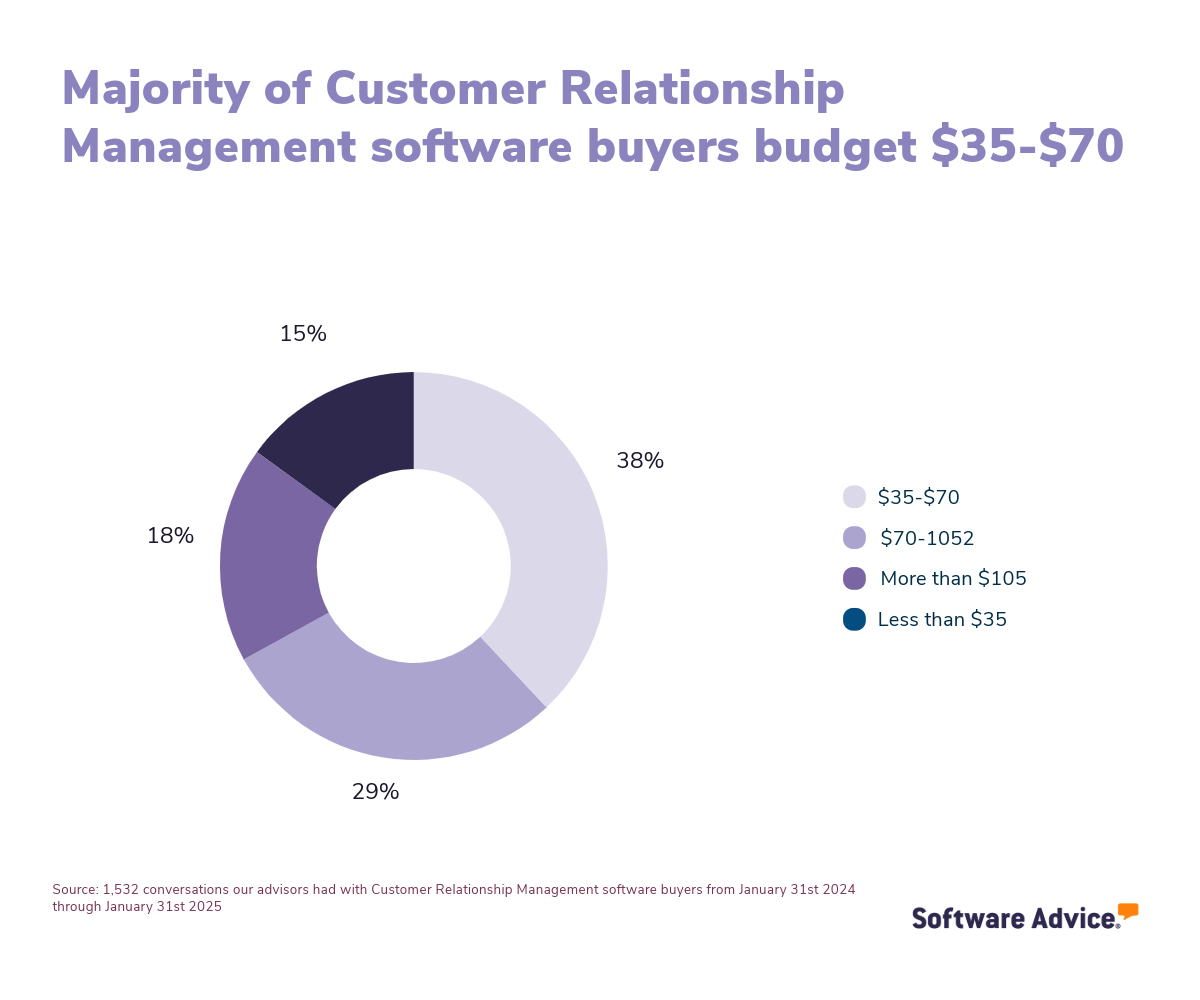
First-time buyers should start evaluating with a budget, number of users, number of clients they need to support, and necessary integrations in mind. Ensure you have consulted with stakeholders on a list of critical questions to help you evaluate systems based on your needs, such as:
How does your pricing structure work?
What kind of support and training do you offer?
How customizable is the software to fit our specific workflows?
How does your software handle multichannel support?
Are there any limitations on the number of users or tickets?
Because there are so many different vendors, choosing the right option can be a daunting process. In this guide, you’ll learn about the features and benefits of customer service software and get step-by-step guidance on choosing the right solution for your business. You’ll also get analyst tips and advice, including insights from experienced customer service software advisor Marty Moore. Reach out to schedule a consultation with him or any of our advisors.
What is customer service software?
Customer service software platforms are tools designed to help businesses manage and resolve customer inquiries. They often use a ticketing system to document, track, and assist in addressing customer queries. These systems consolidate customer requests from various channels, such as phone, email, chat, and social media, into a single portal. This helps to streamline and expedite response times for support agents.
Customer service software allows you to manage all customer interactions on a unified platform, with the ability to access them anytime. It enables you to create tickets for customer issues, communicate with customers via multiple channels, and monitor their resolution status via interaction tracking to ensure customer satisfaction.
Customer service management software is available as a standalone trouble ticketing system or as part of a broader customer relationship management (CRM) suite.
Some customer service support systems may be integrated with other enterprise applications. Examples include service dispatch software (to enable on-site repairs), inventory and cataloging systems (to ensure that exchange parts are in stock), and sales force automation systems (to inform sales reps of critical or chronic issues).
Essential features of customer service software
When evaluating different customer service software tools, it’s necessary to analyze what features you will need and which software supports them. All customer service tools should provide certain default core features, including interaction tracking, multichannel communication, and support ticket management. In addition, products usually have other typical common features, such as call center management, CRM, or email management.
To help you understand what features your business needs, we have analyzed thousands of reviews and spoken to thousands of customer service providers to determine the most critical from those core and common features.
Core customer service features
Support ticket management: Allow customers/users to submit support queries and service requests. 86% of reviewers on our site rate this feature as critical or highly important.
Multichannel communication: Allows communication with customers or users via multiple channels such as phone, email, live chat, etc. 75% of reviewers on our site rate this feature as critical or highly important.
Interaction tracking: Track interaction history by documenting conversations for contacts.
Common customer service features
Email management: Manage, store, and organize emails within the system or via third-party apps. 80% of reviewers on our site rate this feature as critical or highly important.
Call center management: Manage all call center activities including call monitoring, call recording, call answering, call transfer, etc. 81% of reviewers on our site rate this feature as critical or highly important.
Automated routing: Tickets are automatically assigned to specific agents based on predefined rules.
Alerts/Escalation: System alerts about the need to escalate an issue or request.
Conversation intelligence: Recording, transcription, and analysis of sales calls for the purpose of training and generating insights.
CRM: Built-in customer relationship management (CRM) capabilities or integration with a third-party CRM system.
Benefits and competitive advantages of using customer service software
Shep Hyken, a customer service and experience expert explains that companies that don’t invest in the right technology at the right time will soon be playing catch up. He says, “If your competition is doing something that you're not, and you're starting to see churn in your business, perhaps it's time to look at your investments”. [5]
Leveraging various customer service channels (including live chat, phone calls, emails, and social media) has shortened response times and improved efficiency. Additionally, according to the Software Advice Customer Service Technology Survey, 50% of respondents reported that their company's customer service systems incorporate artificial intelligence capabilities. [1] This technology can enhance service quality by automating routine inquiries, providing personalized customer experiences, and offering predictive insights to anticipate customer needs.
Our analysis of verified user reviews shows that customer service tools bring different benefits to businesses, such as:
Improved team collaboration: Customer service tools enhance team collaboration by providing solutions, like team huddles or internal notes, that streamline communication between team members. They centralize information, support cross-department collaboration, and boost efficiency by reducing duplication of efforts.
Multiple communication channels: Customers communicate through different channels, such as email, live chat, social media, and more, organizing them into one platform. It enhances productivity by providing quick access to all necessary information and facilitates consistent and effective communication across various channels.
Workflow automation: Customer service tools automate workflows by enabling ticket creation, task planning, and automated responses. This automation ensures consistent and timely responses to customer inquiries, thereby enhancing overall productivity. Automation also allows for better resource allocation, enabling staff to focus on more complex and value-added activities.
Integration capabilities: Integration capabilities in customer service tools offer substantial benefits by allowing seamless connectivity with various software and platforms. These tools enable businesses to centralize operations, streamline processes, and enhance efficiency by integrating with existing systems, such as CRM, ERP, and other third-party applications. This reduces the need for switching between tools, saves time, and improves productivity.
How to choose the best customer service software for your business
Selecting the right customer service software is crucial for enhancing customer satisfaction and streamlining support operations. However, 42% percent of buyers in our 2024 Tech Trends Survey struggle to identify the right software for their business. [6]
Also, Marty Moore, our customer service software advisor, explains that many customer service buyers are not completely aware of what they need. He says, “A lot of times with customer service and support, there's a big disconnect because help desk is basically the same thing, but help desk is for internal employees... Customer service is help desk for customer facing help only. So a lot of times they'll come in asking for one or the other when they actually belong in one of the other categories.”
To help you find the right customer service tool and avoid possible regrets, we curated a list of key considerations that can guide you in making an informed decision:
1. Define your requirements
When you’re making your final decision, think about:
Your business size: How many contacts should the tool register? How many employees will need to use it?
Budget: How much budget am I allocating for this tool? How much does it cost?
Integrations: Which complementary tools can it support? Which other tools do I need to integrate it with?
What is the cost of customer service software?
The price of customer service software depends on factors that vary by buyer, number of users, number of contacts, required features, or type of integration needed. Generally, most customer service software solutions are priced on a monthly basis, with entry-level plans typically starting at around $9 per month, while premium and advanced subscriptions can exceed $180 per month.
Be aware of potential drawbacks
When it comes to potential drawbacks, users often cite pricing as the most common challenge with customer service software. When creating a shortlist of products, buyers should carefully review pricing tiers to ensure they fit within their company's budget and only pay for the premium features they actually need.
According to our analysis of verified reviews, the second most cited challenge is issue resolution problems, such as bugs and glitches that may lead to slow response times or dysfunctional features.
A third challenge businesses may find when implementing the software is that call management sometimes includes inefficiencies in repetitive actions, technical issues on mobile devices, and increased call volumes due to repeated callbacks.
More broadly, when buying new platforms, 40% of software purchasers disclose that addressing security concerns is a top challenge, while another 36% mention issues with finding software compatible with existing systems. [5]
Integration considerations for customer service software
Our analysis of an extensive reviews database reveals that the three most commonly integrated categories with customer service software are customer relationship management (CRM), email marketing, and project management.
CRM integrations ensure that customer data is synchronized across platforms, enabling agents to access information easily and deliver personalized support.
Email marketing integrations facilitate seamless communication, allowing customer service teams to align with marketing campaigns and provide timely customer updates.
Project management integrations streamline the tracking and resolution of customer issues, promoting better team collaboration and efficient task completion.
Overall, user sentiment regarding these integrations is positive, highlighting their comprehensive capabilities, user-friendly interfaces, and powerful automation features. These integrations can significantly enhance operational efficiency and provide valuable insights through advanced analytics, leading to improved decision-making and customer service outcomes.
2. Make a shortlist of customer service software
To choose the best customer service software, it is helpful to compare how different solutions vary. This will allow you to identify specific strengths and weaknesses that are most relevant to your business’s needs.
Explore our list of Customer Service Frontrunners
For a detailed and reliable comparison, visit Software Advice and explore the FrontRunners for customer service systems. Here we rank top-rated software based on reviews from actual users, providing a clear and user-verified perspective on each software performance.
The report highlights which systems excel in areas like user interface, functionality, and customer support and sheds light on potential shortcomings that could affect your operation. Such comparisons are instrumental in making an informed decision, ensuring you select a system that aligns perfectly with your business’s requirements.
Seek advisor tips
At Software Advice, our advisors like Marty Moore have experience helping hundreds of businesses identify solutions that match their needs and budgets.
As Marty Moore explains, “Customer service software buyers want to be able to service their customers better, get in contact with them more often, or address whatever issues they have and solve them quickly.” That’s why it’s crucial to choose the tool that best fits your needs.
If you need guidance, you can chat online now with an advisor or schedule a phone call. In just a few minutes, your advisor will help you identify a shortlist of options that align with your practice’s requirements.
3. Pick your best option
Once you've narrowed down your options, the next step is to schedule vendor demos. These demonstrations allow you to explore the software's features, gain clarity on pricing, and make an informed investment decision. To maximize the benefits of these sessions, thorough preparation is essential to make some considerations and ask important questions like:
What kind of customer support do you offer during implementation?
How often do you update your software?
What customization options are currently available?
4. Make the most of your customer service software
After selecting and purchasing your customer service software, focus on the implementation process. Whether transitioning from another system or adopting a digital solution for the first time, consider these key aspects:
Data migration: Ensure a smooth transfer of existing customer data to the new system. Collaborate with both your old and new software providers to prevent any data loss.
Training: Ensure your team is well-versed in using the new system. Leverage your vendor's training sessions and materials, and schedule multiple sessions to build confidence and proficiency.
Communication: Inform your stakeholders about the transition to set expectations and reassure them that any temporary issues are part of an effort to enhance service quality.
For more detailed guidance on ensuring a smooth transition, check out our comprehensive guide here.
Software related to customer service
Depending on which customer service software you choose, you may need to supplement certain features with additional software solutions to deliver the most efficient support to your customers. Some types of software closely related to customer service systems, but not always included, are:
CRM software: Customer relationship management (CRM) software automates and manages an organization’s customer life cycle. It is usually used by the sales team, sales reps, and call center reps to maintain contact with customers and quickly respond to their needs.
Contact center software: Contact center software is a technology tool that allows companies to manage high volumes of customer communications across multiple channels, such as email, SMS, telephone, chat, social media, and other digital platforms.
Online CRM software: Online customer relationship management (CRM) software is becoming a popular option for organizations looking to implement CRM software. This deployment model is gaining traction because the upfront investment can be lower than traditional on-premise software installations.
Call center software: Call center software supports the agents who assist customers over the phone or via one of those other channels. It also supports the supervisors who oversee the call center's operations.
Help desk software: Help desk software helps businesses and support teams accept, manage, organize, automate, respond to, and report on customer questions or issues.
Complaint management software: Complaint management (CM) software helps record and collate complaints as customers and employees report them.
Live chat software: Live chat is a communication channel that lets customers and businesses converse in real time on a company’s website via a chat widget. The widget usually appears as a small box or window on the webpage. Depending on how it's configured, a live chat conversation can be initiated by the customer, the company, or both.
More resources for your customer service journey
Unmasking the Sales Saboteurs: 3 Silent Killers of Discovery Calls
An Experienced Marketer Shares His Top 4 Metrics for Lead Generation
Customer Service vs Customer Support: What's the Difference?
About our contributors
Author
Giorgia Pisano is a content associate at Software Advice. She is always in search of the latest technology trends for small and midsize businesses, with a focus on retail and customer experience insights.
Giorgia’s research and analysis is informed by more than 120,000 authentic user reviews on Software Advice and nearly 8,000 interactions between Software Advice software advisors and retail software buyers. Giorgia also regularly analyzes market sentiment by conducting surveys of retail and restaurant leaders, as well as consumers, so she can provide the most up-to-date and helpful information to small and midsize businesses purchasing software or services.
Her research has been featured in various media publications including , , and . She has a bachelor's degree in public relations and a master's degree in marketing and management.
Editor
Parul Sharma is a content editor at Software Advice with expertise in curating content for various niches, including SaaS, digital marketing, and search engine optimization. With over half a decade of experience in content writing and editing, Parul has the expertise to simplify complex terms into engaging, valuable content for targeted audiences. She completed her graduation and post-graduation in English literature from Delhi University and was awarded the Dr. Asha Sahni Memorial Award for being the highest scorer in her graduating class.
Parul has contributed to the news, lifestyle, education, and health verticle of DNA India, India’s premier media channel. Outside of work, she can be found curating healthy recipes, coloring in mandala books, and spending quality time with her family.
Advisor
Marty Moore is a senior software advisor. He joined Software Advice in 2014 as a software advisor, and he is based in Austin, TX.
As part of the software advisor team, Marty helps a wide range of industry professionals who are seeking construction, field service, CRM, and project management software. He provides a short list of personalized technology recommendations based on budget, business goals, and other specific needs.
Marty’s favorite part of being a software advisor is talking to buyers and helping them understand how software works for them and can really help their business.
Sources
Software Advice's 2024 Customer Service Technology Survey was conducted online in May 2024 among 2,307 respondents in the U.S. (n=199), Canada (n=200), Brazil (n=188), Mexico (n=184), the U.K. (n=194), France (n=196), Italy (n=183), Germany (n=187), Spain (n=191), Australia (n=193), India (n=200), and Japan (n=192). The goal of the study was to explore how emerging call center technologies are enabling brands to deliver exceptional customer experiences. Respondents were screened to be full-time employees at organizations with 1 to 2,499 employees. They must be involved in customer service operations, use or buy customer service software, and handle customer service phone calls in-house or externally.
Software Advice advisor call notes: Findings are based on data from telephonic conversations that Software Advice’s advisor team had with small-to-midsize businesses seeking CRM tools. For this report, we analyzed phone interactions from January 31 2024, to January 31, 2025. Read the complete methodology.
Software Advice reviews data: Software Advice reviews are collected from verified users for individual software products. For this report, we analyzed reviews from the past year as of the production date. Read the complete methodology.
Software Advice software pricing data: Only products with publicly available pricing information and qualified software products within the category, as of Feb 3, 2025 are included in the pricing analysis.
Shep Hyken, LinkedIn
Software Advice’s 2024 Tech Trends Survey was designed to understand the timeline, organizational challenges, adoption and budget, vendor research behaviors, ROI expectations, satisfaction levels for software buyers, and how they relate to buyer’s remorse. The survey was conducted online in July 2023 among 3,484 respondents from the U.S., U.K., Canada, Australia, France, India, Germany, Brazil, and Japan, with businesses across multiple industries and company sizes (5 or more employees). This report focuses on the 700 respondents from the U.S. Respondents were screened to ensure involvement in software purchasing decisions.
Customer Service FAQs
- Which software is used for customer service?
Based on our analysis of products with strong market demand and positive reviews, popular choices include Kustomer, Freshdesk, HelpDesk, Groove, Gladly, Front, Salesforce Service, Dynamics 365, Buddy Punch, Clockify, and When I Work.
- What is a CRM system for customer service?
A CRM (Customer Relationship Management) system for customer service helps manage customer interactions, track service requests, and store customer data to improve service efficiency and customer satisfaction.
- What CRM tools are used in customer service?
ll CRM tools that integrate with customer service systems can be utilized effectively.
- What tools are used for customer service?
According to our analysis of products with high market demand and reviews, Kustomer, Freshdesk, HelpDesk, Groove, Gladly, Front, Salesforce Service, Dynamics 365, Buddy Punch, Clockify, and When I Work are popular choices.
- What is the best customer service platform?
According to our analysis of products with high market demand and reviews, Kustomer had the highest overall rating from verified reviewers on Software Advice.
- What is the difference between CRM and customer service?
The difference between CRM and customer service tools is that CRM focuses on managing customer relationships and data, while customer service deals with resolving customer issues and providing support. However, CRM systems can enhance customer service by organizing customer information.
- What is the best customer service platform for startups?
According to our analysis of products with high market demand and reviews, HelpDesk offers the most affordable price plan.
- What tools are used in customer service?
Tools related to customer service users could find useful are CRM software, contact center software, online CRM software, call center software, help desk software, complaint management software, and live chat software.