


Best Help Desk Software of 2026
Updated February 18, 2026 at 8:46 AM

Written by Andrew Blair
Content Analyst

Edited by Caroline Rousseau
Senior Editor

Reviewed by Jakub Vaughn
Senior Advisor

Talk with us for a free 15-min consultation
Expert advisors like Jacqueline, who have helped 1,000+ companies, can find the right software for your needs.
- All Software
- Buyer's Guide
- Software Advice FrontRunners
- Frequently Asked Questions
- Popular Comparisons
Help desk software helps manage customer issues across channels. To help you navigate through more than 300 help desk software available on our website, I worked with our advisors to curate a list of recommended productsi and a list of the help desk software FrontRunners based on user reviews. For further information, read my help desk software buyer's guide.
Help Desk Software
Sort by
Reviews: Sorts listings by the number of user reviews we have published, greatest to least.
Average Rating: Sorts listings by overall star rating based on user reviews, highest to lowest.
Alphabetically (A-Z): Sorts listings by product name from A to Z.

NinjaOne is an IT management software platform designed to consolidate various IT operations into a single console. It provides ...Read more about NinjaOne


NinjaOne's Best Rated Features
See All
NinjaOne's Worst Rated Features
See All

Freshservice is a cloud-based IT Help Desk and service management solution that enables organizations to simplify their IT opera...Read more about Freshservice

Freshservice's Best Rated Features
See All
Freshservice's Worst Rated Features
See All

Zendesk is a cloud-based help desk management solution offering customizable tools to build customer service portal, knowledge b...Read more about Zendesk Suite

Zendesk Suite's Best Rated Features
See All
Zendesk Suite's Worst Rated Features
See All

SysAid is an IT service management (ITSM) platform that helps organizations automate workflows and optimize IT service delivery....Read more about SysAid
SysAid's Best Rated Features
See All
SysAid's Worst Rated Features
See All

ChangeGear is a premier IT Service Management solution. ChangeGear delivers a comprehensive platform for enterprise with innov...Read more about ChangeGear


Software Advice FrontRunners 2026

(11617)

(446)

(343)

(1131)

(3404)

(590)

(138)

(176)

(146)

(1750)
Best for Quick Implementation


According to our user reviews, TeamViewer is the most requested by users for quick implementation out of the most popular tools.
TeamViewer is best suited for organizations needing quick implementation of remote access, as our reviewers point out its rapid setup and ease of connecting to devices across multiple platforms. Users consistently highlight the ability to provide immediate support and resolve issues efficiently, minimizing downtime and travel.
- Reviewers Perspective
"Coming from using SCCM and the built-in Microsoft remote tools, Teamviewer has improved our workflow considerably, allowing our technicians to complete work on external devices as seemlessly as if they were at the physical controls."
MBManny Brown
Senior Desktop and AV Engineer
Used for 2+ years
We analyzed 943 verified user reviews for TeamViewer to find out what actual users really think.
Remote Access
Users rely on TeamViewer to connect to remote devices for troubleshooting, technical support, and daily work tasks across various platforms. They find the software’s intuitive interface and stable connections make remote sessions efficient, whether assisting clients, accessing servers, or collaborating with colleagues. Many reviewers highlight TeamViewer’s secure, fast, and flexible remote control capabilities, which streamline workflows and reduce the need for physical presence.Security and Access Control
Users appreciate TeamViewer’s robust security features, including two-factor authentication, session encryption, and customizable access controls that safeguard sensitive information. They value the flexibility of temporary and permanent passwords, but some reviewers note challenges with password management, occasional security concerns, and the risk of unauthorized access if credentials are shared. While TeamViewer has implemented improvements, users still desire clearer privacy settings and more granular restrictions to address evolving security needs.Ease of Use
Users consistently find TeamViewer easy to use, with a straightforward setup and intuitive interface that benefits both technical and non-technical individuals. They highlight the product’s minimal learning curve and the ability to quickly assist others, even those unfamiliar with remote software, making remote support accessible for all ages. Some reviewers suggest that additional tutorials and minor UI enhancements could further improve the onboarding experience for new users. - Key FeaturesTeamViewer ONE's scoreCategory average
Real-Time Notifications
3.854.53 category average
Ticket Management
3.574.59 category average
- Screenshots

Highly Rated for Automation

Atera

Of the products listed on our FrontRunners report, Atera is the highest rated for automation out of the most popular tools.
Atera is highly rated for automation and is ideal for IT teams or MSPs seeking to streamline workflows and reduce manual tasks. Our reviewers say its automation features, such as remote monitoring and proactive alerts, help improve efficiency and enable quick resolution of IT issues.
- Reviewers Perspective
"It reduces manual work, speeds up issue resolution, and integrates seamlessly with third-party tools, making it a versatile solution for IT professionals."
AKAndrew Kamau
Chief Financial Officer
Used for 2+ years
We analyzed 316 verified user reviews for Atera to find out what actual users really think.
Remote Access
Users value Atera for its robust remote access capabilities, which enable them to connect to client devices instantly and provide support without on-site visits. They highlight the ease of managing and troubleshooting remote systems, as well as the platform’s secure and stable connections for both Windows and Mac environments. Reviewers also appreciate the variety of remote tools and the seamless experience Atera offers when supporting clients from any location.Ticketing System
Users benefit from Atera’s ticketing system, which centralizes helpdesk operations and streamlines the management of client requests. They find that automated ticket assignment, prioritization, and tracking features improve response times and overall service quality. Reviewers also mention that the ticketing interface is user-friendly, integrates well with other IT management tools, and supports efficient communication between technicians and clients.Remote Monitoring
Users rely on Atera’s remote monitoring features to proactively oversee networks, devices, and systems in real time, reducing the need for reactive troubleshooting. They appreciate the comprehensive dashboard, which provides alerts, statistics, and easy access to remote management tools, allowing them to maintain high service standards. Reviewers also note that Atera’s monitoring capabilities help them automate routine tasks and improve the efficiency of their IT operations. - Key FeaturesAtera's scoreCategory average
Real-Time Notifications
4.524.53 category average
Ticket Management
4.384.59 category average
- Screenshots


Best for Customization

ServiceNow

In our analysis of Help Desk products with the most market demand, ServiceNow is the most requested by users for customization out of the most popular tools.
ServiceNow is best for businesses that require extensive customization in their service management platform. Our reviewers say its flexible workflows and customizable modules allow organizations to tailor the system to unique business processes, supporting complex requirements and integrations.
- Reviewers Perspective
"Great experience, ServiceNow used as a ticketing tool for access provisioning, change management processes, as well as to auto provision access to other applications."
RGRoman Gomon
Sr. Manager, Internal Audit
Used for 2+ years
We analyzed 227 verified user reviews for ServiceNow to find out what actual users really think.
Ticket Management
Users rely on ServiceNow for efficient ticket management, appreciating its centralized platform and customizable workflows that streamline ticket creation, tracking, and resolution. They highlight features such as automation, reporting, and notifications, which simplify communication and ensure transparency throughout the ticket lifecycle. Many reviewers note that ServiceNow’s intuitive interface and flexible templates make handling incidents, requests, and changes straightforward, while its robust reporting tools help monitor performance and manage service quality.Service Management
Users value ServiceNow for its comprehensive service management capabilities, noting its ability to centralize IT service management, HR, and customer service functions within a single platform. They appreciate the platform’s versatility, which allows them to tailor modules, automate workflows, and manage service catalogs to fit diverse business needs. Reviewers mention that ServiceNow’s cohesive approach improves internal collaboration and accelerates service delivery, helping organizations handle inquiries, requests, and asset management efficiently.Ease of Use
Users find ServiceNow easy to use, describing its interface as user-friendly and well-organized for managing everyday tasks and service requests. They mention that basic functions are intuitive and accessible, though some note that new users may require initial training to fully leverage the platform’s advanced capabilities. Reviewers appreciate the availability of educational resources and knowledge base articles, which help them quickly adapt and navigate ServiceNow’s broad feature set. - Screenshots


Best for AI powered

Intercom

In our analysis of Help Desk products with the most market demand, Intercom is the most requested by users for AI powered out of the most popular tools.
Intercom is best for businesses seeking AI-powered customer engagement and support, as reviewers highlight its advanced automation, real-time chat, and seamless integration of chatbots to handle inquiries efficiently. Users note that AI-driven features improve response times and customer satisfaction.
- Reviewers Perspective
"What I like most about Intercom is its ability to combine multiple customer service, marketing and sales tools into one platform, making direct and efficient communication with users easier."
GMGustavo Medina
Manager
Used for 1-2 years
We analyzed 525 verified user reviews for Intercom to find out what actual users really think.
Customer Chat
Users rely on Intercom’s live chat to deliver responsive, real-time support and proactive engagement, which helps them address customer inquiries efficiently and build stronger relationships. They appreciate the platform’s ability to centralize conversations, automate workflows, segment audiences, and provide valuable analytics for tracking customer behavior and satisfaction. Reviewers highlight the ease of managing multiple conversations, the intuitive interface, and the AI-powered features that streamline support, although some wish for more customization options and improved chat history loading.Ease of Use
Users find Intercom to be straightforward and user-friendly, making it easy for both beginners and experienced staff to navigate its features. They appreciate the intuitive setup process, clean interface, and the ability to quickly access essential tools without feeling overwhelmed by complexity. While some note that the initial setup and learning all available options can take time, most agree that Intercom’s design and usability allow teams to get up and running with minimal effort.Email
Users value Intercom’s ability to manage customer emails, automate campaigns, and centralize communication, which streamlines outreach and support tasks. They appreciate features like segmentation, tracking, and the integration of email with other messaging channels, but some reviewers find limitations in template customization, formatting, and deliverability, with occasional issues of emails landing in spam or lacking advanced automation options. While Intercom’s email tools are helpful for basic communication and targeted campaigns, users sometimes turn to other platforms for more robust email marketing and template design capabilities. - Key FeaturesIntercom's scoreCategory average
Customizable Fields
4.784.36 category average
Real-Time Notifications
4.464.53 category average
Ticket Management
4.194.59 category average
- Screenshots


Highly Rated for Mobile app

Freshdesk

In our analysis of Help Desk products with the most market demand, Freshdesk is the highest rated for mobile app out of the most popular tools.
Freshdesk is highly rated for its mobile app and is well-suited for teams needing to manage support tickets on the go. Our reviewers say the intuitive mobile interface and robust notification system enable agents to stay updated and resolve customer issues efficiently from anywhere.
- Reviewers Perspective
"We needed a basic helpdesk system for a furniture retail back office, and Freshdesk was a good fit for creating tickets, assigning them to resources, and tracking them to resolution."
MAMichael Alejandrino
Founder
Used for 6-12 months
We analyzed 794 verified user reviews for Freshdesk to find out what actual users really think.
Ticket Management
Users rely on Freshdesk to efficiently organize, prioritize, and track support tickets from various channels in a centralized system. They value features such as automated ticket assignment, customizable workflows, and real-time dashboards, which help teams stay on top of inquiries and ensure timely resolutions. Reviewers also mention the ease of collaboration, ticket merging, and detailed reporting, all of which contribute to a more organized and responsive support process within Freshdesk.Ease of Use
Users describe Freshdesk as intuitive and user-friendly, with a clean interface that simplifies navigation and daily support tasks. They appreciate how even new users can quickly adapt to the platform, aided by helpful documentation, training videos, and logical menu structures. Reviewers also highlight the customizable views, efficient search functions, and streamlined workflows, which make Freshdesk accessible and effective for teams of all sizes.Reporting
Users appreciate Freshdesk's reporting tools for providing valuable insights into team performance, ticket trends, and customer satisfaction, helping them identify areas for improvement. However, some reviewers note that advanced reporting and analytics features are limited to higher-tier plans, and customization options for complex reports can be cumbersome or insufficient. While the platform offers a range of export and dashboard options, users sometimes find it necessary to supplement Freshdesk's reports with external tools for deeper analysis. - Key FeaturesFreshdesk's scoreCategory average
Customizable Fields
4.194.36 category average
Real-Time Notifications
4.554.53 category average
Ticket Management
4.584.59 category average
- Screenshots


Highly Rated for Integrations

Tidio

In our analysis of Help Desk products with the most market demand, Tidio is the highest rated for integrations out of the most popular tools.
Tidio is highly rated for integrations and is ideal for SMBs wanting to centralize communications across multiple platforms. Our reviewers point out its seamless integration with tools like WordPress and Shopify, making onboarding and workflow management straightforward and efficient.
- Reviewers Perspective
"It centralizes student/parent support, automates repetitive questions, enhances communication through emails and messages, and even helps teachers with internal support."
MDMonika Damarla
Software Engineer
Used for 6-12 months
We analyzed 414 verified user reviews for Tidio to find out what actual users really think.
Chat
Users appreciate Tidio for its intuitive dashboard, real-time chat capabilities, and the ability to customize the chat widget to match their website’s branding. They find the live chat feature responsive and helpful for engaging with customers, answering queries instantly, and managing conversations efficiently. Many reviewers note that Tidio’s combination of live chat, chatbot automation, and easy setup makes it a practical solution for businesses seeking streamlined customer communication.Customer Support
Users find Tidio valuable for centralizing customer support, automating responses to common questions, and reducing the workload for support teams. They highlight that Tidio’s ticketing system, AI chatbot, and real-time messaging help resolve inquiries quickly and improve overall customer satisfaction. Reviewers also mention that Tidio’s support team is responsive and helpful, making it easier to address technical issues and maintain smooth customer service operations.Integrations
Users benefit from Tidio’s ability to centralize chats, emails, and messages from multiple channels within a single dashboard, simplifying communication management. They mention that Tidio is easy to integrate with popular platforms such as WordPress, Shopify, Facebook Messenger, and Instagram, making deployment straightforward even for non-technical users. Reviewers also appreciate the seamless setup process and the flexibility to connect Tidio with various third-party tools to enhance their workflow. - Key FeaturesTidio's scoreCategory average
Customizable Fields
3.04.36 category average
Real-Time Notifications
4.644.53 category average
Ticket Management
4.544.59 category average
- Screenshots


Best for Usability

Missive

According to our user reviews, Missive is the highest rated for its usability out of the most popular tools.
Missive is best for teams prioritizing usability in their email and communication workflows. Our reviewers say its intuitive interface and collaborative features, such as shared inboxes and real-time chat, help streamline team communication and task management.
- Reviewers Perspective
"This tool is incredibly useful for ensuring collaboration within a single team: shared mailbox and individual mailboxes, assignment of emails based on projects managed by employees, integrated chat."
MMMargot Monnin
Coworking Manager
Used for 1-2 years
We analyzed 112 verified user reviews for Missive to find out what actual users really think.
Email and Team Collaboration
Teams manage emails, assign tasks, and communicate in one platform. This centralization supports efficient workflows and reduces redundant communication for SMBs handling multiple projects.Customer Support
Missive’s support team addresses questions quickly and thoroughly. Businesses benefit from timely onboarding, bug fixes, and regular updates, which help maintain smooth operations.Features
Users leverage customizable tags, templates, and shortcuts to tailor Missive to their workflow. The adaptable feature set fits diverse team needs and supports evolving communication requirements. - Key FeaturesMissive's scoreCategory average
Customizable Fields
4.684.36 category average
Real-Time Notifications
4.904.53 category average
Ticket Management
4.504.59 category average
- Screenshots


Most Rated for SMBs

HelpDesk

HelpDesk is the most requested by small businesses out of the most popular tools.
HelpDesk is most rated for SMBs looking for a straightforward ticket management and customer support tool. Our reviewers highlight its simple onboarding, organized ticketing interface, and ease of use for non-technical staff, making it accessible for small teams.
- Reviewers Perspective
"I interact with the tool the most when connecting to our tech team on internal issues that affect employees and customers and it is a great way for multiple people to report the same issue at once to bring attention to it."
JSJazzmine Sorrell
Returns and Service
Used for 2+ years
We analyzed 138 verified user reviews for HelpDesk to find out what actual users really think.
Ticket Management
Teams use HelpDesk to simplify ticket tracking, providing clear visibility into ticket status and making it easy to assign, update, and resolve issues across departments. This supports organized workflows in environments where multiple requests need to be managed simultaneously.Ease of Use
Staff quickly learn and navigate HelpDesk’s straightforward interface, reducing onboarding time and daily effort for support tasks. This helps both new and experienced team members efficiently access needed tools and information.Performance and Speed
HelpDesk delivers quick task management and reliable performance, supporting teams that need to streamline workflows and optimize resource usage for timely support operations. - Key FeaturesHelpDesk's scoreCategory average
Real-Time Notifications
3.674.53 category average
Ticket Management
4.424.59 category average
- Screenshots


Most Used By Information Technology and Services

Crisp

Of the products listed on our FrontRunners report, Crisp is the most requested by users in Information Technology and Services out of the most popular tools.
Crisp is most used by information technology and services firms that need flexible live chat and customer support tools. Our reviewers say its integrations with other platforms and unified messaging features help IT teams efficiently manage multiple client conversations.
- Reviewers Perspective
"The ability to swiftly report issues and provide feedback demonstrates a customer-centric approach and contributes to an enhanced user journey within the Crisp ecosystem."
LKLatisha Koeling
Sales support specialist
Used for 6-12 months
We analyzed 121 verified user reviews for Crisp to find out what actual users really think.
Customer Support
Users consistently highlight the responsiveness and helpfulness of the Crisp support team, noting that their questions are answered quickly and thoroughly. They appreciate how Crisp enables seamless communication with customers, making support interactions polished and efficient for both support and engineering teams. Many reviewers mention that the support team is available at all times, offering guidance, troubleshooting, and even implementing requested changes to enhance their experience with Crisp.Live Chat
Users find Crisp’s live chat features intuitive and effective for managing customer conversations, with a user-friendly interface that simplifies real-time communication. They value the ability to switch between chat and email seamlessly, use chatbots, and manage multiple chats across different websites without workflow interruptions. Reviewers also appreciate the customization options, mobile app access, and the ability to maintain ongoing conversations, though some mention a desire for more advanced chat triggers and conversation separation.Ease of Use
Users describe Crisp as an easy-to-use platform with an intuitive interface that makes navigation straightforward, even for first-time users. They highlight the simplicity and convenience of both the desktop and mobile apps, which allow them to work remotely and access features across devices. Reviewers appreciate that Crisp’s design enables quick onboarding and effective use, making it suitable for teams seeking a user-friendly solution for customer communication. - Key FeaturesCrisp's scoreCategory average
Customizable Fields
4.504.36 category average
Real-Time Notifications
4.624.53 category average
Ticket Management
4.364.59 category average
- Screenshots


Highly Rated for Quick Adoption/Easy Adoption

LiveAgent

LiveAgent is the highest rated for easy adoption out of the most popular tools, based on our analysis of Help Desk products with the most market demand.
LiveAgent is highly rated for quick adoption and is ideal for businesses seeking a help desk solution that is easy to implement and use. Our reviewers point out its intuitive interface and rapid onboarding process, allowing teams to provide support with minimal training.
- Reviewers Perspective
"As it handles a lot of enquiries and customer tickets just in a single platform which saves us a good amount of time and manpower effort also the automated responses are much more productive and help our customers to get the support they are looking for."
RKRohit Kumar
Product Manager
Used for 1-2 years
We analyzed 707 verified user reviews for LiveAgent to find out what actual users really think.
Customer Support
Users find LiveAgent valuable for streamlining customer support, allowing them to manage inquiries across multiple channels from a single platform. They appreciate features like real-time chat, automated workflows, and comprehensive reporting, which help them deliver timely and personalized assistance while boosting efficiency. Reviewers highlight the intuitive interface, robust CRM capabilities, and multi-language support, noting that LiveAgent enhances customer satisfaction and strengthens relationships without requiring extensive resources.Live Chat
Users rely on LiveAgent’s live chat feature to provide immediate support and engage with customers directly on their websites and social media platforms. They value the customizable chat widgets, real-time visitor tracking, and chat routing options, which make it easy to resolve issues quickly and maintain high customer satisfaction. Reviewers also mention that LiveAgent’s live chat helps teams collaborate efficiently, manage multiple conversations, and streamline support processes for improved productivity.Ticket Management
Users appreciate LiveAgent’s ticket management system for organizing and prioritizing support requests from various channels in one place. They find automation features, tagging, and customizable workflows helpful for tracking tickets, assigning tasks, and ensuring timely responses to customer inquiries. Reviewers note that LiveAgent’s intuitive dashboard and reporting tools make it easier to monitor ticket status, collaborate across departments, and improve overall support efficiency. - Key FeaturesLiveAgent's scoreCategory average
Customizable Fields
4.414.36 category average
Real-Time Notifications
4.614.53 category average
Ticket Management
4.724.59 category average
- Screenshots


NinjaOne

- Key FeaturesNinjaOne's scoreCategory average
Real-Time Notifications
4.454.53 category average
Ticket Management
4.194.59 category average
- Screenshots


Zoho Desk

- Key FeaturesZoho Desk's scoreCategory average
Customizable Fields
4.364.36 category average
Real-Time Notifications
4.544.53 category average
Ticket Management
4.614.59 category average
- Screenshots


- Key FeaturesEngageBay CRM's scoreCategory average
Customizable Fields
4.674.36 category average
Real-Time Notifications
4.754.53 category average
Ticket Management
4.734.59 category average
- Screenshots


- Key FeaturesJIRA Service Management's scoreCategory average
Customizable Fields
4.454.36 category average
Ticket Management
4.594.59 category average
- Screenshots


- Key FeaturesZendesk Suite's scoreCategory average
Customizable Fields
4.164.36 category average
Real-Time Notifications
4.444.53 category average
Ticket Management
4.534.59 category average
- Screenshots


SysAid

- Key FeaturesSysAid's scoreCategory average
Customizable Fields
4.754.36 category average
Real-Time Notifications
4.604.53 category average
Ticket Management
4.764.59 category average
- Screenshots


Kustomer

- Key FeaturesKustomer's scoreCategory average
Customizable Fields
5.04.36 category average
Real-Time Notifications
5.04.53 category average
Ticket Management
4.834.59 category average
- Screenshots


Bitrix24

- Key FeaturesBitrix24's scoreCategory average
Customizable Fields
4.424.36 category average
Real-Time Notifications
4.394.53 category average
Ticket Management
3.714.59 category average
- Screenshots


Agile CRM

- Key FeaturesAgile CRM's scoreCategory average
Customizable Fields
3.804.36 category average
Real-Time Notifications
4.504.53 category average
Ticket Management
4.864.59 category average
- Screenshots


Groove

- Key FeaturesGroove's scoreCategory average
Customizable Fields
4.04.36 category average
Ticket Management
4.864.59 category average
- Screenshots


- Key FeaturesSalesforce Service Cloud's scoreCategory average
Customizable Fields
4.504.36 category average
Real-Time Notifications
4.214.53 category average
Ticket Management
4.464.59 category average
- Screenshots


Freshservice

- Key FeaturesFreshservice's scoreCategory average
Customizable Fields
4.094.36 category average
Real-Time Notifications
4.504.53 category average
Ticket Management
4.654.59 category average
- Screenshots


Desk Manager

- Key FeaturesDesk Manager's scoreCategory average
Real-Time Notifications
4.444.53 category average
Ticket Management
4.714.59 category average
- Screenshots

Methodology
The research for the best help desk software list was conducted in October 2025. We evaluated data (user reviews and demand signals) from the past 24 months as of the research date. Read the complete methodology.
Popular Help Desk Comparisons


Buyer's Guide
This detailed guide will help you find and buy the right help desk software for you and your business.
Last Updated on October 16, 2025Here's what we'll cover:
What you need to know about help desk software
Essential features of help desk software
Benefits and competitive advantages of using help desk software
How to choose the best help desk software for your business
Software related to help desk software
More resources for your help desk journey
What you need to know about help desk software
Help desk software helps organizations better manage their customer support via features such as ticket management, communication tracking, and issue resolution. By improving operational procedures, enhancing employee efficiency, and increasing management visibility, it helps firms streamline their support processes and deliver more value to their customers.
To give you an idea of the market, we have nearly 400 different help desk vendors on our site, we’ve published nearly 7,000 reviews for help desk products over the past two years, and we've spoken to nearly 446 help desk software buyers. [1] [2]
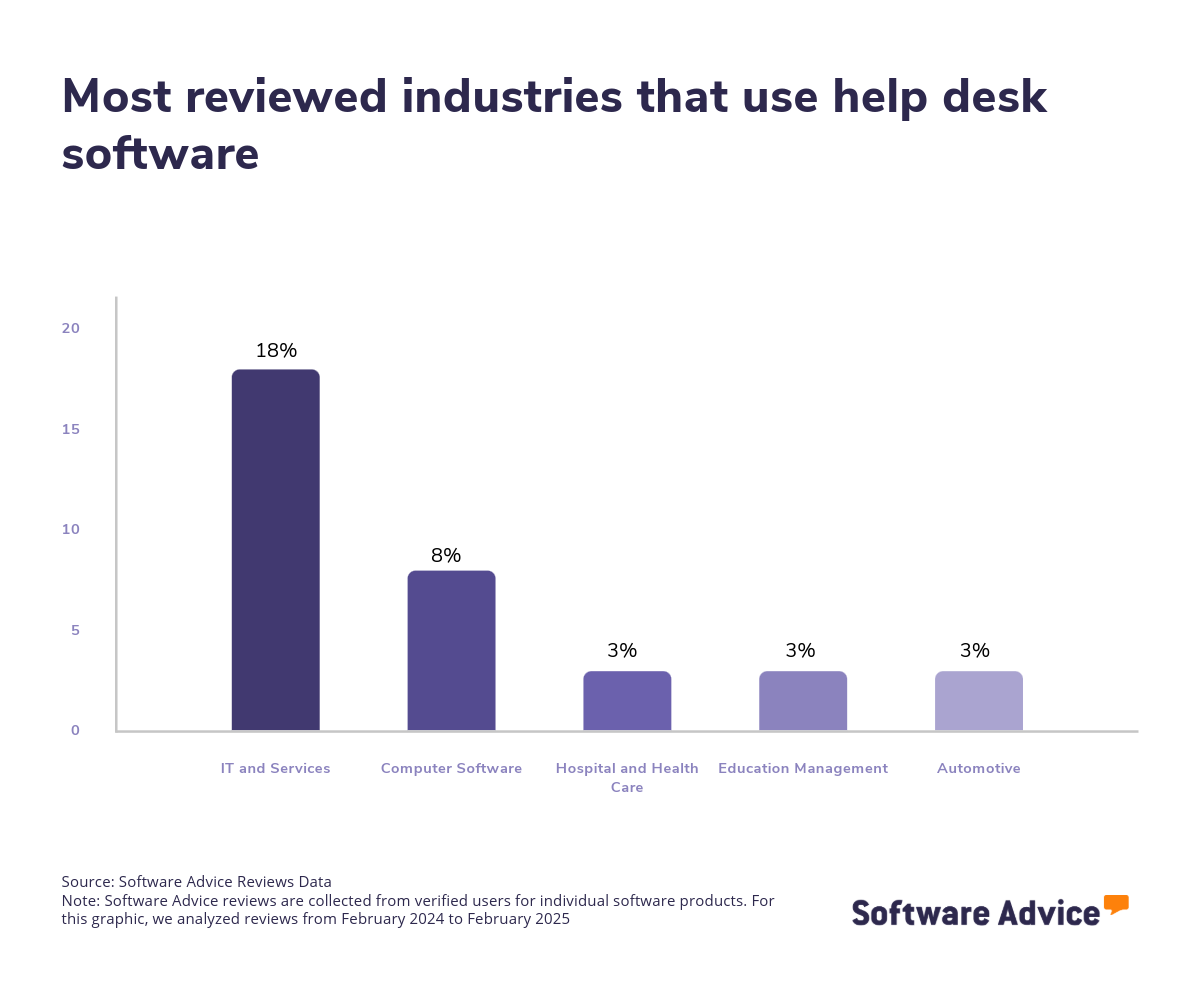
The help desk market is extensive, offering hundreds of solutions tailored to different industries. This variety enables organizations to select a help desk solution crafted to meet the needs of specific sectors, whether in IT and services, computer software, hospital and health care, or education management industries. Nonetheless, the market's size and intricacy can be overwhelming, highlighting the importance for buyers to thoroughly assess their choices.
Pricing for help desk software varies depending on the vendor, features offered, and scalability. Some solutions offer tiered pricing models based on specific organizational requirements. To put things into perspective, we’ve found that prices for high-end plans that have advanced help desk features average $1,434 per month for more than 21 users, mid tier products average $867 per month for 11-20 users while entry-level pricing averages $190 per month for 1-10 users and offers basic functionality. [3]
When considering help desk software, first-time buyers should begin their evaluation by considering their budget, number of users, specific needs, and necessary integrations. It's crucial to consult with stakeholders to compile a list of essential questions that will guide the evaluation process based on organizational needs, such as:
What specific help desk features does the software provide, and how do they align with the organization's support requirements?
Can the software scale to accommodate future increases in support demand and user base?
Does the software offer integration capabilities with other tools and systems currently utilized by your organization?
What level of customization is available to adapt the software to your organization's specific support workflows?
How intuitive is the software for users, and what kind of training and support resources are offered to facilitate its adoption?
Because there are so many help desk tools available, choosing the right option can be a long, daunting process. In this guide, you’ll learn about the essential components of help desk software, get step-by-step guidance on how to choose the right solution for your business, and tap into the expertise of our experienced help desk software advisor, Jakub Vaughn. To get expert guidance, schedule a free consultation or start a chat with us today.
What is help desk software?
Help desk software is a digital tool that assists businesses in efficiently managing their customer support and service requests. Help desk software provides a centralized platform that enables companies to track, prioritize, and resolve customer interactions and concerns with ease. This streamlines processes such as ticket management and knowledge management.
In addition to these core functions, help desk software solutions often come equipped with workflow management, multi-channel communications, and advanced reporting and analytics capabilities. These features offer valuable insights into customer support trends, agent performance, and the effectiveness of service strategies, empowering businesses to make informed, data-driven decisions.
Essential features of help desk software
When comparing help desk software tools, it's important to know what features you can expect to see and which features are more advanced add-ons or uncommon. Some functionalities, like ticket management and knowledge base management, are core features that will be available in every help desk software. Other features, such as reporting/analytics, automated routing, and customer database, are still common. We analyzed thousands of reviews to determine the core and common features of help desk software:
Core help desk software features
Ticket management | Track, manage, or resolve user requests and IT incidents/issues. 90% of our reviewers rate this feature as critical or highly important. |
Knowledge base management | Manage a repository of information that includes articles, FAQs, or tutorials used for self-service support. 82% of our reviewers rate this feature as critical or highly important. |
Common help desk software features
Real-time notifications | Notifications are delivered to users as soon as an event occurs. 84% of our reviewers rate this feature as critical or highly important. |
Alerts/escalation | System alerts about the need to escalate an issue or request. 75% of our reviewers rate this feature as critical or highly important. |
Access controls/permissions | Define levels of authorization for access to specific files or systems. 72% of our reviewers rate this feature as critical or highly important. |
Reporting/analytics | View and track pertinent metrics to find patterns and gain insights from data. 72% of our reviewers rate this feature as critical or highly important. |
Real-time chat | Engage in direct, instant messaging with customers, users, etc. |
Automated routing | Tickets are automatically assigned to specific agents based on predefined rules. |
Customer database | A collection of customer information, such as contact details, demographics, previous interactions, etc. |
Multi-channel communication | Allows communication with customers or users via multiple channels such as phone, email, live chat, etc. |
Self-service portal | Online portal through which end users can access the system, manage tasks, or obtain information. |
"A common misconception about help desk software is related to user roles. Many assume all employees need access to submit tickets, but primarily, it's help desk agents managing and closing tickets,” says Vaughn.
Benefits and competitive advantages of using help desk software
Help desk buyers typically seek help desk systems to streamline issue handling. “Relying solely on email can be risky, especially if systems fail. An IT help desk ticketing system allows users to access support through a company portal, directing issues to the right agent efficiently", says Vaughn.
Our analysis of over 7,000 user reviews from the past two years shows that client management, live chat support, productivity, and customer support are the top-rated benefits of help desk software. These features directly address the core needs of help desk software, including tracking and storing client information and enhancing productivity with ticket management.
Improved client management: Help desk software centralizes customer information and interactions, allowing businesses to manage client relationships more effectively. This leads to more personalized service and streamlined communication, enhancing overall client management.
Live chat support: By offering real-time communication, help desk software enables businesses to provide immediate assistance to customers. This instant support option improves customer engagement and satisfaction by addressing inquiries and issues promptly.
Enhanced productivity: Help desk software automates routine tasks and optimizes workflows, allowing support teams to focus on resolving customer issues efficiently. This increased efficiency boosts overall productivity within the organization.
Increased client satisfaction: Help desk software enhances customer service by providing quick and efficient responses to inquiries and issues. This improved service quality leads to higher client satisfaction, fostering loyalty and positive word-of-mouth for the business.
How to choose the best help desk software for your business
Choosing the right help desk software can be quite overwhelming, with so many options offering varying features and capabilities. Here are some steps that can make this process more streamlined and successful:
Step 1: Define your requirements
When defining your business's requirements for help desk software, it's important to consider several key factors to ensure that you get the solution that aligns with your organizational needs and goals.
Evaluate your business goals and objectives
First, clearly outlining your business goals and how help desk software can achieve them is the best place to start. Ask yourself what is slowing down your business operations and what solutions you need to solve those issues. Consider whether you need to improve client management, enhance productivity, or improve client satisfaction.
Take into account your business size and scalability
It’s important to identify the size of your business and which software is appropriate for your needs. Is your business undergoing exponential growth? Do you plan to invest in help desk software that will grow with your business? Consider the scalability of the software and ensure that it can grow with your business and accommodate an increasing number of users, advanced reporting, and customer tracking functionality without sacrificing performance.
Identify budget constraints
Next, consider how much you want to spend on help desk software. While the price of help desk software is difficult to generalize because of varying individual needs and other factors that can affect price, a good starting point is to identify how many users your business requires and the features you need to fulfill your business objectives. With that in mind, consider initial costs, subscription fees, and any other additional expenses for training and support. Additionally, some vendors may offer unbundled costs, which means that while their prices may seem competitive in comparison, additional costs may place constraints on your original budget.
Step 2: Make a shortlist of help desk software
After carefully defining your requirements, it's time to start narrowing down your options to create a shortlist and seek professional help in making an informed choice.
Get qualified help from an advisor
At Software Advice, our advisors have experience helping hundreds of businesses identify solutions that suit their business needs. If you need guidance on how to make a shortlist or have any doubts regarding your business requirements, you can chat online now with an advisor or schedule a phone consultation.
Explore our list of help desk FrontRunners
If you’re not ready to speak to an advisor just yet, you can also start compiling your shortlist of help desk software with our FrontRunners report. Only products that earn top user ratings make this list. Check out our full methodology description for more details on how the report is compiled.
For more help creating a shortlist and a free, downloadable comparison chart, check out The Ultimate Software Vendor Evaluation Guide. This guide and comparison chart will help you compare software evaluation criteria for each prospective vendor by tracking functionalities, training and support offerings, costs, and deployment options.
Step 3: Pick your best option
Now that you have your curated shortlist, it's time to pick the best option. But how? Picking the best option means you need to try to get hands-on experience with the chosen software to ensure that it can fulfill a set of criteria before making your final choice. Here are a few things to consider before committing to a vendor:
Schedule a vendor demo
Vendor demos are sessions provided by the vendor to help get you familiar with the features of the product, its capabilities, and understand their pricing. Here, you have the chance to learn more about the product and ask questions to ensure that it aligns with your business needs. Be sure to ask about what is included in the price and whether technical support and training resources are available.
Evaluate your integration needs
Assess the software's capability to integrate with your current systems and tools, such as ticketing systems, communication platforms, and IT management software. A help desk software solution with seamless integration is crucial for streamlined workflows and enhanced data consistency across platforms.
Determine customizable options
When making your final choice, it's also important to determine the level of customization the software offers to meet your specific business processes and requirements. A customizable software solution can enhance the software's relevance and effectiveness for your business.
Step 4: Make the most of your help desk software
Finally, once you’ve shortlisted and selected the help desk software that fits your business needs, it's important to take steps to ensure successful implementation and to maximize its benefits. Here are a few things to consider to make the most of your chosen help desk software:
Develop an implementation plan
When onboarding a new software solution, having a detailed implementation plan should include installation, configuration, data migration, and testing to ensure a smooth transition. Additionally, an implementation plan should outline the timeline, key milestones, and responsibilities. Key stakeholders from different departments should also be engaged to gather input to help tailor the software and ensure alignment with business goals.
Provide comprehensive training
Offer thorough training sessions for all users to ensure they understand how to effectively use the software. The training should cover an explanation of the core features of the software, best practices, and any customizable functionalities specific to your organization.
Monitor and evaluate performance
Regularly monitor the software's performance and evaluate its impact on your business operations. Collect user feedback to understand their experiences and challenges with the software. Use this feedback to fine-tune the software so that it continues to meet evolving needs. Finally, use analytics and reporting features to track key metrics and identify areas for improvement.
Software related to help desk software
Depending on which help desk software you select, you might need to supplement certain features with related software systems to support ticket management, communication, knowledge base management, or IT service management. Some types of software that are closely related to help desk software, but may or may not be included in your help desk system, include:
Customer relationship management (CRM) software: CRM software enables customer interaction, support, and relationship management. The purpose of a CRM application is to help organizations better manage their customer interactions through the introduction of reliable systems, processes, and procedures. CRM software integrates organizational processes across marketing, sales, and customer service.
Call center software: Call center software automates and standardizes the process of receiving and responding to customer phone calls. These solutions enable better monitoring of the customer experience, workflow management, and evaluation of employee performance. Whether designed for virtual or site-based locations, Call center applications manage and catalog the process of customer calls and often allow customers to track the progress of their request via the internet.
Complaint management software: Complaint management software helps users track, organize, and resolve customer complaints and maximizes the productivity of the employees who directly deal with customers. These solutions are characterized by the ability to accurately capture, classify, and route complaints, enabling communication across the team and ensuring compliance.
Contact center software: Contact center software automates and standardizes the process of receiving and responding to customer requests across different communication channels.
Customer service software: Customer service software enables businesses to manage and track customer relationships and support services. From ticket tracking to complaint resolution reporting, customer service software solutions allow organizations to manage and assess the quality of their interactions with customers. They also include an internal knowledge base, providing customer service representatives with the information necessary to resolve customer complaints.
IT service management (ITSM) software: ITSM software helps businesses manage the delivery of services to customers, including internal and external IT support. It assists organizations with designing, automating, operating, and controlling IT services.
Issue tracking software: Issue tracking software helps organizations monitor, manage, and resolve issues in a variety of departments, from finance to help desk. These applications keep track of tasks from capture to resolution, producing reports, enforcing compliance and optimizing business resources. Issue tracking software is often web-based and compatible with other software applications.
Knowledge management software: Knowledge management software offers ways to optimize the utility of intellectual capital and intangible assets by capturing, preserving, and organizing institutional knowledge in a measurable format. Knowledge management solutions allow successful strategies to be transferred and replicated throughout an organization. Implementation can be inwardly focused on faster learning, new knowledge creation, and innovation, or directed outwardly, providing a self-guided service path for customers.
Live chat software: Live chat software helps organizations connect with their customers in real time. Live chat applications can be used for customer support, lead generation, and customer engagement. This type of software includes widgets that can be integrated into existing websites, as well as more robust standalone solutions that allow businesses to track customer interactions, response, and conversion rates.
More resources for your help desk journey
Accelerate Your Help Desk Software Implementation by Learning From Buyers With Experience
Customer Service vs Customer Support: What's the Difference?
3 Research-Backed Ways Good Customer Service Benefits Your Small Business
About our contributors
Author
Andrew Blair is a content analyst at Software Advice, covering marketing, cybersecurity, and emerging technologies across industries. He leverages his technical expertise and business acumen, acquired from experience as a web developer in the eCommerce industry, to deliver data-driven insights on market and business operations, empowering businesses to embrace the right technology.
Andrew’s research and analysis are informed by more than 150,000 authentic user reviews on Software Advice and nearly 3,000 interactions between Software Advice software advisors and software buyers. Andrew also regularly analyzes market sentiment by conducting surveys of IT and marketing leaders so he can provide the most up-to-date and helpful information to small and midsize businesses purchasing software or services.
His research and data insights for small and midsize businesses have been featured in SBS Media, IT Brief Australia, and Technology Decisions media publications. Andrew’s commentary on tech trends is published in various content forms, including podcasts, videos, and written interviews. In his free time, he enjoys sports and spending time outdoors.
Editor
Caroline Rousseau is a senior content editor at Software Advice.
A former content analyst, Caroline has, for the past five years, built, written, and edited research reports about technological trends, opportunities, and challenges with an SMB audience in mind. Her content has been featured in French Tier 1 media including Le Monde, L’Express, and Le Figaro, among other publications.
Her previous experience as a graphic designer, translator, and LQA specialist in various industries converged into a skill set that allows her to create compelling content about today’s business matters. Caroline’s personal interests include literature and art and she has a passion for Albert Camus, graphic novels, and drawing.
Advisor
Jakub Vaughn is a senior advisor. He joined Software Advice in 2022 as a software advisor. He is based in Fort Myers, FL.
As part of the software advisor team, Jakub helps professionals from a wide range of industries who are seeking tools including CMMS, manufacturing, inventory management, and help desk software. He provides a short list of personalized technology recommendations based on budget, business goals, and other specific needs.
Jakub’s favorite part of being a software advisor is educating buyers with different needs on software systems available to them and their business.
Sources
Software Advice reviews data: Software Advice reviews are collected from verified users for individual software products. Read the complete methodology.
Software Advice advisor call notes: Findings are based on data from telephonic conversations that Software Advice’s advisor team had with small-to-midsize businesses seeking professional services automation tools. Read the complete methodology.
Software Advice software pricing data: Only products with publicly available pricing information and qualified software products within the category are included in the pricing analysis. Read the complete methodology.
Help Desk FAQs
- What is a help desk software?
Help desk software is a tool designed to efficiently manage customer support and service requests. It centralizes communication, tracks issues, and provides solutions through features like ticket management, real-time chat, and reporting, enhancing customer service and operational efficiency for businesses of all sizes.
- Which ticketing software is best?
According to our analysis of products with high market demand and reviews, ServiceNow has the highest rating for ticket management from verified reviewers on Software Advice. It offers features like automation, incident management, and integrations.
- What is an example of a help desk?
According to our analysis of verified reviewers on Software Advice, Mailchimp has the highest overall rating for the best email marketing tool with a free plan. It includes basic email marketing features, automation, and reporting for up to 500 contacts at no cost.
- What is the difference between a service desk and a help desk?
A service desk offers broader IT service management, including incident, problem, and change management, while a help desk focuses on resolving customer issues and inquiries. Service desks often incorporate help desk functions but extend to managing IT services and processes within an organization.
- How to set up a help desk?
To set up a help desk, define your support goals and select appropriate software. Configure features like ticketing and communication channels, integrate with existing systems, and train staff. Establish workflows and permissions to ensure efficient operations, and continuously monitor performance for improvements.