


Best Time Tracking Software of 2026
Updated February 18, 2026 at 4:50 AM

Written by Bruno Peláez
Senior Content Analyst

Edited by Mehar Luthra
Team Lead, Content

Reviewed by James Rose
Senior Advisor

Talk with us for a free 15-min consultation
Expert advisors like Jacqueline, who have helped 1,000+ companies, can find the right software for your needs.
- All Software
- Buyer's Guide
- Software Advice FrontRunners
- Frequently Asked Questions
- Popular Comparisons
Time tracking software helps teams in HR, finance, field services, and operations monitor work hours, manage payroll, and improve accountability. Navigating more than 680 products, each built for different workflows, team sizes, or compliance needs, can be overwhelming. To help you narrow it down, I worked with our time tracking software advisors to curate a list of recommended productsi and a list of the time tracking software FrontRunners based on user reviews. For further information, read my time tracking software buyer's guide.
Time Tracking Software
Sort by
Reviews: Sorts listings by the number of user reviews we have published, greatest to least.
Average Rating: Sorts listings by overall star rating based on user reviews, highest to lowest.
Alphabetically (A-Z): Sorts listings by product name from A to Z.

Wrike is a cloud-based project management platform for teams of 20+ that is suitable for both large enterprises and SMBs. It sup...Read more about Wrike


Wrike's Best Rated Features
See All
Wrike's Worst Rated Features
See All

monday.com is a work and project management platform that helps teams of all sizes plan, prioritize, manage, and execute work ef...Read more about monday.com

monday.com's Best Rated Features
See All
monday.com's Worst Rated Features
See All

Rocketlane is a next-gen PSA platform that unifies your projects, resources, and time into a single, powerful system. Run your e...Read more about Rocketlane

Rocketlane's Best Rated Features
See All
Rocketlane's Worst Rated Features
See All

Combining powerful project management and easily streamlined operations - we’re the only platform built for managing client proj...Read more about Teamwork.com

Teamwork.com's Best Rated Features
See All
Teamwork.com's Worst Rated Features
See All

Mango Practice Management is a cloud-based, all-in-one practice management solution that is a game-changer for professional serv...Read more about Mango Practice Management


Mango Practice Management's Best Rated Features
See All
Mango Practice Management's Worst Rated Features
See All
Software Advice FrontRunners 2026

(9231)

(1610)

(4552)

(2879)

(2583)

(643)

(708)

(848)

(6988)

(852)
Best for Customer Satisfaction

Clockify

Of the products listed on our FrontRunners report, Clockify is the highest rated for customer satisfaction out of the most popular tools.
Clockify is best for organizations seeking high customer satisfaction, especially those needing flexible, detailed time tracking and reporting. Our reviewers say its customizable reports, seamless integrations, and intuitive interface make it easy to track hours and analyze productivity across teams or projects.
- Reviewers Perspective
"Clockify helps in getting a clear visibility on tasks and sub-tasks, effort estimations and benchmarking, keeping a complete track of team's efforts and then subsequent billing"
PGParul Goel
Sr. Project Manager
Used for 6-12 months
We analyzed 927 verified user reviews for Clockify to find out what actual users really think.
Time Tracking
Teams log hours manually or automatically, categorize by project, and use cross-platform access to support accurate billing and productivity analysis in diverse work environments.Ease of Use
Users set up and manage time entries with minimal training. The clear interface and simple controls enable both new and experienced staff to focus on tasks, not the software.Reporting
Managers generate, filter, and export reports for billing, project analysis, and team performance. Visual summaries and sharing options support informed decision-making and client communication. - Key FeaturesClockify's scoreCategory average
Activity Tracking
4.674.64 category average
Project Time Tracking
4.794.70 category average
Timesheet Management
4.714.62 category average
- Screenshots


Best for Usability

Jibble

Of the products listed on our FrontRunners report, Jibble is the highest rated for its usability out of the most popular tools.
Jibble is best for teams prioritizing usability, particularly those with remote or field-based staff. Our reviewers point out its intuitive interface, fast onboarding, and features like geofencing and mobile access, which streamline attendance and time tracking for distributed teams.
- Reviewers Perspective
"Jibble's free version has enough features for our small private medical practice to easily track employee hours and has the ability to integrate with QuickBooks."
SDSudheer Daka
Practice Manager
Used for 6-12 months
We analyzed 700 verified user reviews for Jibble to find out what actual users really think.
Employee Tracking
Organizations track employee hours with real-time monitoring, GPS verification, and automated timesheets, supporting transparency for both remote and on-site teams.Clock In/Out
Employees clock in/out via mobile, web, or geofencing, allowing managers to oversee productivity and reduce errors across distributed teams.Time Tracking
Teams use multiple clock-in options and automated timesheets, simplifying reporting and supporting productivity in hybrid or remote work environments. - Key FeaturesJibble's scoreCategory average
Activity Tracking
4.754.64 category average
Project Time Tracking
4.794.70 category average
Timesheet Management
4.774.62 category average
- Screenshots


Best for Customization

ClickUp

In our analysis of Time Tracking products with the most market demand, ClickUp is the most requested by users for customization out of the most popular tools.
ClickUp is best for businesses seeking extensive customization in their workflows and project management. Our reviewers say its flexibility in task views, custom fields, and automation options allows teams to tailor the platform to their unique processes and improve efficiency.
- Reviewers Perspective
"The app offers incredible flexibility with task management, allowing you to customize views, set priorities, and track progress all in one place."
KFKarl Fukuda
Property Manager
Used for 1-2 years
We analyzed 786 verified user reviews for ClickUp to find out what actual users really think.
Project Management
Organizations manage projects, documentation, and communication in one place. Boards, lists, and Gantt charts help teams organize workflows and monitor progress across complex or simple projects.Task Management
Teams create custom fields, automate recurring tasks, and break down projects into subtasks. This supports efficient prioritization and tracking for both individuals and groups.Team Management
Managers assign tasks, monitor workloads, and track team progress in real time. Centralized communication and onboarding tools support remote and cross-department collaboration. - Key FeaturesClickUp's scoreCategory average
Activity Tracking
4.614.64 category average
Project Time Tracking
4.634.70 category average
Timesheet Management
4.444.62 category average
- Screenshots


Best for Collaboration
Wrike

According to our user reviews, Wrike is the most requested by users for collaboration out of the most popular tools.
Wrike is best for organizations focused on collaboration, especially those managing projects across multiple teams or locations. Our reviewers highlight its real-time collaboration tools, shared workspaces, and integrated communication features that keep teams connected and projects on track.
- Reviewers Perspective
"I appreciate the ability to tailor workspaces, statuses, and fields to match my team's specific operational needs, whether it’s organizing product specific programs, Consulting Services, or managing special initiatives from leadership."
DSDavid Simmington, CRME, CHBA
Project Manager
Used for 1-2 years
We analyzed 754 verified user reviews for Wrike to find out what actual users really think.
Task and Project Management
Teams organize projects with automation, prioritization, and dashboards. Multiple views (Gantt, Kanban) help manage complex workflows and keep assignments visible.Team Collaboration
Teams share files, communicate, and edit documents in one workspace, reducing meeting needs and ensuring everyone accesses the same project information.Team Management
Managers tailor statuses and fields to operational needs, supporting performance tracking and accountability for both small and large groups. - Key FeaturesWrike's scoreCategory average
Activity Tracking
4.264.64 category average
Project Time Tracking
4.664.70 category average
Timesheet Management
4.574.62 category average
- Screenshots


Best for Mobile app

Toggl Track

Of the products listed on our FrontRunners report, Toggl Track is the most requested by users for mobile app out of the most popular tools.
Toggl Track is best for users needing a robust mobile app for time tracking on the go. Our reviewers say its mobile app is intuitive, offers seamless syncing across devices, and allows for accurate tracking and reporting from anywhere, making it ideal for remote and field teams.
- Reviewers Perspective
"I also use it to track my team's time and workflow to ensure that everything is productive and tasks are being completed in time, to avoid any issues during our projects, and when working with specific clients, this tool comes in handy too."
JNJosh Neuman
Realtor
Used for 2+ years
We analyzed 780 verified user reviews for Toggl Track to find out what actual users really think.
Time Tracking
Teams automate time logging by client, task, or project, reducing manual errors and supporting productivity monitoring across individual and group workflows.Ease of Use
Users set up and navigate the platform easily, logging hours and managing tasks with straightforward controls across devices.Reporting
Managers generate detailed reports for projects and clients, analyze productivity, and export data for billing or internal review, supporting informed workload management. - Key FeaturesToggl Track's scoreCategory average
Project Time Tracking
4.764.70 category average
Timesheet Management
4.554.62 category average
- Screenshots


Highly Rated for Quick Implementation

Harvest

Harvest is the highest rated for quick implementation out of the most popular tools, based on our analysis of Time Tracking products with the most market demand.
Harvest is highly rated for quick implementation, making it ideal for businesses needing to get up and running with time tracking and invoicing fast. Our reviewers note the straightforward setup, intuitive interface, and seamless integration with other tools help teams start tracking and billing with minimal delay.
- Reviewers Perspective
"It automates your invoice and tracks payments, so handy. And I love that it also has an app and you can track time live or go back and change as needed."
SCSierra Corbin
SLP
Used for 2+ years
We analyzed 447 verified user reviews for Harvest to find out what actual users really think.
Time Tracking
Teams log hours across devices, segment tasks, and switch between projects. Calendar syncing and mobile apps support accurate timekeeping for remote and on-site staff.Invoice Management
Managers generate invoices from tracked time and expenses, use recurring billing, and offer online payment options to ensure timely client payments.Ease of Use
Users get started with minimal effort, benefiting from a user-friendly interface that reduces training needs and lets teams focus on billable work. - Key FeaturesHarvest's scoreCategory average
Activity Tracking
4.504.64 category average
Project Time Tracking
4.624.70 category average
Timesheet Management
4.744.62 category average
- Screenshots


Most Rated for SMBs

OnTheClock

Of the products listed on our FrontRunners report, OnTheClock is the most requested by small businesses out of the most popular tools.
OnTheClock is most rated for SMBs, particularly those with mobile or distributed workforces. Our reviewers say it’s easy to onboard, offers reliable mobile clock-in/out with GPS tracking, and streamlines payroll by integrating with accounting software, saving time for managers and employees.
- Reviewers Perspective
"It made managing employee hours straightforward and efficient."
KLKevin Lee
Lawyer
Used for 6-12 months
We analyzed 494 verified user reviews for OnTheClock to find out what actual users really think.
Clock In/Out
Employees record hours from any device or location. This flexibility supports busy workplaces and remote teams, with GPS tracking and reminders reducing errors and manual corrections.Employee Management
Managers set permissions, track PTO, and monitor hours across departments. The platform adapts to different business sizes and technical backgrounds, minimizing training and supporting accountability.Ease of Use
Staff access OnTheClock via computer or mobile with straightforward navigation. Quick setup and a clean interface let teams manage time tracking efficiently, reducing reliance on technical support. - Key FeaturesOnTheClock's scoreCategory average
Project Time Tracking
4.604.70 category average
Timesheet Management
4.594.62 category average
- Screenshots


Most Used By Health, Wellness and Fitness


In our analysis of Time Tracking products with the most market demand, Timesheets.com is the most requested by users in health, wellness and fitness out of the most popular tools.
Timesheets.com is most used by health, wellness, and fitness organizations seeking simple, effective employee time management. Our reviewers highlight its ease of use for remote and on-site staff, flexible reporting, and strong customer support that simplifies payroll and attendance tracking.
- Reviewers Perspective
"Easy to use, easy to add and remove employees, flexible, great pricing, great reporting, easy adaption for employees, most of them use it on their phones, they have geo fencing and great reporting capabilities."
TJTerri Jenisch
Business and Operations
Used for 1-2 years
We analyzed 478 verified user reviews for Timesheets.com to find out what actual users really think.
Customer Support
Support staff guide users through setup and troubleshooting, offering personalized assistance that helps both administrators and employees resolve issues quickly.Employee Management
Managers add, edit, and organize employee records, manage time-off, and oversee staff performance, supporting remote work and flexible scheduling.Clocking In and Out
Employees use mobile, desktop, or location-based tracking, with features like photo stamps and GPS verification supporting accurate payroll and attendance management. - Key FeaturesTimesheets.com's scoreCategory average
Activity Tracking
4.674.64 category average
Project Time Tracking
4.674.70 category average
Timesheet Management
4.734.62 category average
- Screenshots


Highly Rated for Automation


Of the products listed on our FrontRunners report, QuickBooks Time is the highest rated for automation out of the most popular tools.
QuickBooks Time is highly rated for automation, making it a strong fit for businesses aiming to streamline time tracking and payroll processes. Our reviewers point out its automated reminders, mobile access, and seamless integration with payroll systems, which reduce manual work and errors.
- Reviewers Perspective
"It's flexible, it's functions are diverse and allow me and my employer to be on the same page with my time card and PTO."
MRMak Roberts
Success Coordinator
Used for 1-2 years
We analyzed 919 verified user reviews for QuickBooks Time to find out what actual users really think.
Customer Support
Support teams resolve onboarding and technical issues via chat, phone, and tutorials. This helps businesses minimize downtime and ensures smooth adoption across teams.Ease of Use
Users navigate and customize the platform easily, streamlining time tracking and project management for both new and experienced staff.TSheets
Businesses continue to benefit from robust time tracking, reporting, and mobile access, with seamless integration for payroll and evolving feature updates. - Key FeaturesQuickBooks Time's scoreCategory average
Activity Tracking
4.554.64 category average
Project Time Tracking
4.464.70 category average
Timesheet Management
4.534.62 category average
- Screenshots


Highly Rated for Integrations


According to our user reviews, Zoho Projects is the highest rated for integrations out of the most popular tools.
Zoho Projects is highly rated for integrations, suiting teams that need to connect project management with other business tools. Our reviewers say its smooth integration with Zoho and third-party apps, along with customizable workflows, helps teams centralize project data and improve collaboration.
- Reviewers Perspective
"Having a centralized pane that provide us with visibility into all our projects enable us to easily track progress and generate accurate reports on task completion and resource utilization."
PSPereira Santos
Informatics Engineer
Used for 2+ years
We analyzed 513 verified user reviews for Zoho Projects to find out what actual users really think.
Project Management
Teams plan, schedule, and allocate resources with real-time collaboration tools and adaptable workflows, supporting on-time and on-budget project delivery.Task Management
Managers assign, automate, and track tasks with sub-tasks and dependencies, helping teams organize workloads and monitor progress efficiently.Project Tracking
Organizations use Gantt charts, Kanban boards, and analytics to monitor project status, manage workloads, and ensure deadlines are met across multiple initiatives. - Key FeaturesZoho Projects's scoreCategory average
Activity Tracking
4.484.64 category average
Project Time Tracking
4.624.70 category average
Timesheet Management
4.674.62 category average
- Screenshots


Quire

- Reviewers Perspective
"What truly sets this tool apart is its adaptability – whether you need a simple checklist or a robust project management system, it fits all scenarios, from personal tasks to team-based agile workflows."
MGMartha Garcia
Management
Used for 6-12 months
We analyzed 307 verified user reviews for Quire to find out what actual users really think.
Ease of Use
Teams set up projects and onboard members quickly. This reduces barriers to adoption for organizations seeking a user-friendly task management tool.Project Management
Users break down projects into tasks and subtasks, assign responsibilities, and track progress. This supports efficient planning and execution for teams of all sizes.Project Tracking
Managers monitor deadlines, progress, and activity histories in one place. Mobile and desktop access ensures teams stay aligned from anywhere. - Key FeaturesQuire's scoreCategory average
Activity Tracking
4.604.64 category average
Project Time Tracking
5.04.70 category average
- Screenshots


OpenProject

- Reviewers Perspective
"Its features such as task management, Gantt charts, and team collaboration tools can help us streamline our operations and manage projects more effectively."
SLSamuel Latiff
Mortgage Loan Officer
Used for 2+ years
We analyzed 152 verified user reviews for OpenProject to find out what actual users really think.
Features
Organizations access project planning, task management, and collaboration features in one platform. This supports efficient project execution and adapts to diverse industry needs.Workflow Automation
Teams automate processes with Kanban boards and Gantt charts. This reduces manual work and helps manage multiple projects with real-time updates.Project Tracking
Managers track project status, time spent, and resource allocation. Automated time tracking and reporting support informed decisions and reduce manual errors. - Key FeaturesOpenProject's scoreCategory average
Project Time Tracking
4.924.70 category average
Timesheet Management
4.864.62 category average
- Screenshots


Hubstaff

- Reviewers Perspective
"it enables tracking in geo locations when it works, can track working from home not offsite or travel or multiple site that is an area of improvement"
DPDavid P
Engineer
Used for 6-12 months
We analyzed 739 verified user reviews for Hubstaff to find out what actual users really think.
Screenshots
Managers use screenshots to verify productivity and monitor remote teams. Customizable intervals and activity levels support oversight, though privacy concerns may arise.Ease of Use
Teams install and navigate Hubstaff easily, regardless of technical skill. This supports fast onboarding and efficient daily time tracking.Project Management
Organizations assign tasks, monitor project progress, and manage budgets. This aids in transparent billing and streamlined workflows for client-based work. - Key FeaturesHubstaff's scoreCategory average
Activity Tracking
4.874.64 category average
Project Time Tracking
4.414.70 category average
Timesheet Management
4.434.62 category average
- Screenshots


Paymo

- Reviewers Perspective
"The ability to assign tasks, monitor progress, and generate detailed invoices all within one platform saves significant time and effort."
AFAndrea Fiore
Founder
Used for 1-2 years
We analyzed 494 verified user reviews for Paymo to find out what actual users really think.
Invoicing
Teams generate invoices directly from tracked time and expenses. This streamlines billing and ensures accuracy for client-facing businesses needing detailed, professional invoices.Time Tracking
Users log hours via desktop, mobile, or background tracking. This enables accurate billing and productivity monitoring across multiple projects, supporting agencies and consultancies.Project Management
Organizations manage projects with customizable templates and visual tools. This supports clear overviews and resource allocation, helping teams stay organized and automate processes. - Key FeaturesPaymo's scoreCategory average
Activity Tracking
4.434.64 category average
Project Time Tracking
4.674.70 category average
Timesheet Management
4.544.62 category average
- Screenshots


Rocketlane

- Reviewers Perspective
"It allows our team to streamline the monitoring of task progress and completion as well as which needs to be done, so we're prioritizing with the help of the tool"
TMTito Mari Francis Escano
Implementation Consultant
Used for 6-12 months
We analyzed 98 verified user reviews for Rocketlane to find out what actual users really think.
Project Tracking
Teams track project status, timelines, and resource allocation with automated task management. This supports better visibility and decision-making for client-facing projects.Task Management
Organizations use drag-and-drop boards and assignment tools to monitor and prioritize tasks. This helps teams stay organized and efficient in daily operations.Customer Onboarding
Managers centralize communication and track milestones for client onboarding. This supports collaboration among stakeholders and improves onboarding efficiency. - Key FeaturesRocketlane's scoreCategory average
Activity Tracking
4.584.64 category average
Project Time Tracking
4.754.70 category average
Timesheet Management
4.824.62 category average
- Screenshots


Teamwork.com

- Reviewers Perspective
"The platform's ability to centralize communication, track progress, and manage resources has significantly improved project delivery efficiency and team collaboration."
OROtilde Roque Bueno
Product Designer
Used for 1-2 years
We analyzed 463 verified user reviews for Teamwork.com to find out what actual users really think.
Project Tracking
Teams monitor progress, deadlines, and milestones with dashboards and time logging. This supports transparency and organization for multi-role teams.Ease of Use
Organizations onboard quickly thanks to intuitive navigation. This balances simplicity with advanced functionality for diverse user groups.Time Tracking
Users log hours within tasks and projects, using timers and notifications. This supports bandwidth evaluation and accurate billing. - Key FeaturesTeamwork.com's scoreCategory average
Activity Tracking
4.854.64 category average
Project Time Tracking
4.564.70 category average
- Screenshots


My Hours

- Reviewers Perspective
"Very easy to set up and easier to use, it makes one of the more burdensome tasks a snap."
RWRick Watson
Owner
Used for 6-12 months
We analyzed 645 verified user reviews for My Hours to find out what actual users really think.
Ease of Use
Teams set up and start tracking time quickly. This reduces administrative overhead for freelancers and small businesses managing multiple clients.Time Tracking
Users track hours by project, client, or task, with real-time and manual entry options. This supports accurate billing and efficient work monitoring.Reporting
Organizations generate detailed, customizable reports for clients and projects. This aids in analyzing time expenditures and preparing invoices. - Key FeaturesMy Hours's scoreCategory average
Activity Tracking
4.674.64 category average
Project Time Tracking
4.884.70 category average
Timesheet Management
4.684.62 category average
- Screenshots


- Reviewers Perspective
"WebWork Time Tracker is valued for its comprehensive time tracking, productivity monitoring, easy reporting, and suitability for remote teams."
MMMayuresh Magar
QA Engineer
Used for 6-12 months
We analyzed 302 verified user reviews for WebWork Time Tracker to find out what actual users really think.
User Interface
Users access essential features quickly with a responsive layout. This reduces the learning curve for both new and experienced staff.Productivity
Managers monitor productivity with activity tracking, visual reports, and summaries. This supports better time management and accountability for remote teams.Ease of Use
Teams set up and operate the platform with minimal training. This makes it a convenient choice for organizing daily work and tracking hours. - Key FeaturesWebWork Time Tracker's scoreCategory average
Activity Tracking
4.624.64 category average
Project Time Tracking
4.694.70 category average
Timesheet Management
4.524.62 category average
- Screenshots


Everhour

- Reviewers Perspective
"I love the detailed, real-time reports that Everhour generates which give us insights into how much time we’re spending on specific tasks."
DMDavid Makinde
Lead analytics consultant
Used for 6-12 months
We analyzed 323 verified user reviews for Everhour to find out what actual users really think.
Integrations
Everhour integrates with tools like Asana and Trello, letting teams track time without switching apps. This streamlines workflows for project-driven organizations.Time Tracking
Users start/stop timers or enter time manually, linking hours to tasks. This supports billing and workflow analysis across projects.Project Management
Teams organize tasks, track progress, and allocate time efficiently. Integration with project management tools enhances planning and execution. - Key FeaturesEverhour's scoreCategory average
Activity Tracking
5.04.64 category average
Project Time Tracking
4.964.70 category average
Timesheet Management
4.774.62 category average
- Screenshots


- Reviewers Perspective
"The ability to filter by a variety of functions is helpful to me when I need to see only specific employees or job codes."
KEKaren Ellis
Human Resources, Safety, and Environmental
Used for 2+ years
We analyzed 190 verified user reviews for TimeClock Plus to find out what actual users really think.
Clocking In and Out
Employees can clock in and out via computer, mobile app, or physical time clock. This supports accurate hour tracking and reduces manual or paper-based processes, which is especially useful for organizations managing varied work environments.Ease of Use
Administrators and staff quickly adapt to the straightforward interface. This minimizes training needs and supports efficient payroll and time management in both small and large organizations.Customer Support
Support teams assist with setup and troubleshooting through various channels. Organizations benefit from smooth implementation and ongoing guidance, helping them maintain and customize the software. - Key FeaturesTimeClock Plus's scoreCategory average
Project Time Tracking
5.04.70 category average
Timesheet Management
4.294.62 category average
- Screenshots


Time Tracker

- Reviewers Perspective
"Overall, it's so easy to use, great visibility on employees, jobs, expenses, and time allocation."
VCVictoria Chomicki
Community Manager
Used for 1-2 years
We analyzed 876 verified user reviews for Time Tracker to find out what actual users really think.
Time Tracking
Employees track hours from any device, with options to review and adjust entries. This supports accurate payroll and project management for distributed teams.Billing
Organizations generate detailed invoices from tracked hours and expenses. This streamlines financial management for freelancers and businesses with varied billing needs.Employee Management
Managers monitor employee hours, attendance, and payroll in one platform. Mobile access and customizable entries support both small businesses and larger organizations. - Key FeaturesTime Tracker's scoreCategory average
Activity Tracking
4.704.64 category average
Timesheet Management
4.544.62 category average
- Screenshots


Time Doctor

- Reviewers Perspective
"The ease of turning it on when your shift starts, along with the widget that can dock onto any side of the screen, extremely handy!"
JLJeremiah Lachaud
ECommerce Consultant
Used for 6-12 months
We analyzed 371 verified user reviews for Time Doctor to find out what actual users really think.
Task and Project Management
Users switch between tasks, set project goals, and review progress. This helps manage workloads and deadlines for teams handling multiple projects.Screenshot Monitoring
Time Doctor captures screen activity at intervals, supporting accountability. Features like blurred screenshots and activity tracking help verify productivity.Employee Payroll
Employers track hours, automate salary calculations, and generate invoices. This streamlines payroll for remote teams and freelancers. - Key FeaturesTime Doctor's scoreCategory average
Activity Tracking
4.04.64 category average
Project Time Tracking
4.134.70 category average
Timesheet Management
4.414.62 category average
- Screenshots


Trackabi

- Reviewers Perspective
"The platform is intuitive, feature-rich, and thoughtfully designed. Whether you’re a solo professional or managing a team, Trackabi offers a seamless, dependable solution for keeping time and tasks on track."
TRToni Rodgers
Owner
Used for 6-12 months
We analyzed 135 verified user reviews for Trackabi to find out what actual users really think.
Tracking Features
Trackabi monitors time and user activity with lightweight software. This supports accurate records and efficient tracking for both individuals and teams.Ease of Use
Users set up and navigate Trackabi easily on desktop and web. This helps organizations train staff quickly and manage work without complications.Productivity Tracking
Managers analyze productivity with detailed metrics and customizable reports. This supports better planning and resource management for distributed teams. - Key FeaturesTrackabi's scoreCategory average
Activity Tracking
4.814.64 category average
Project Time Tracking
4.704.70 category average
Timesheet Management
4.634.62 category average
- Screenshots


Monitask

- Reviewers Perspective
"The URL tracking feature gives us peace of mind about data security and ensures staff are only accessing approved websites."
CWColton Walker
Project Management
Used for 1-2 years
We analyzed 116 verified user reviews for Monitask to find out what actual users really think.
Features
Monitask logs work hours and captures periodic screenshots automatically. This supports transparency and accountability for teams working remotely or on sensitive projects.Ease of Use
Administrators and employees install and operate the platform with little effort. This is useful for organizations seeking quick deployment and low overhead.Tracking
Managers monitor attendance, application usage, and productivity patterns. This enables effective oversight of remote teams without constant manual updates. - Key FeaturesMonitask's scoreCategory average
Activity Tracking
4.614.64 category average
Project Time Tracking
4.684.70 category average
Timesheet Management
4.724.62 category average
- Screenshots


Avaza

- Reviewers Perspective
"With clean layouts, drag-and-drop functionality, and clearly labeled features, Avaza reduces complexity and helps teams stay focused on what really matters: getting work done efficiently. Whether you're assigning tasks, setting deadlines, or reviewing progress, Avaza keeps everything straightforward and accessible."
KKKarolina Krzeska
CEO, owner
Used for 6-12 months
We analyzed 342 verified user reviews for Avaza to find out what actual users really think.
Invoice Management
Businesses track hours, generate invoices, and manage payments in one place. This supports efficient billing and financial reporting, especially for service-based firms.Ease of Use
Teams onboard quickly thanks to a straightforward interface. This enables small and midsize organizations to manage projects and collaborate without complexity.Project Management
Managers assign tasks, monitor progress, and generate reports. This helps teams stay aligned and productive, even when handling multiple projects. - Key FeaturesAvaza's scoreCategory average
Activity Tracking
5.04.64 category average
Project Time Tracking
4.504.70 category average
Timesheet Management
4.574.62 category average
- Screenshots


Methodology
The research for the best Time Tracking software list was conducted in October 2025. We evaluated data (user reviews and demand signals) from the past 24 months as of the research date. Read the complete methodology.
Popular Time Tracking Comparisons


Buyer's Guide
This detailed guide will help you find and buy the right time tracking software for you and your business.
Last Updated on April 23, 2025Here's what we'll cover:
What you need to know about time tracking software
What is time tracking software?
Essential features of time tracking software
Benefits and competitive advantages of using time tracking software
How to choose the best time tracking software for your business
Software related to time tracking
More resources for your time tracking journey
What you need to know about time tracking software
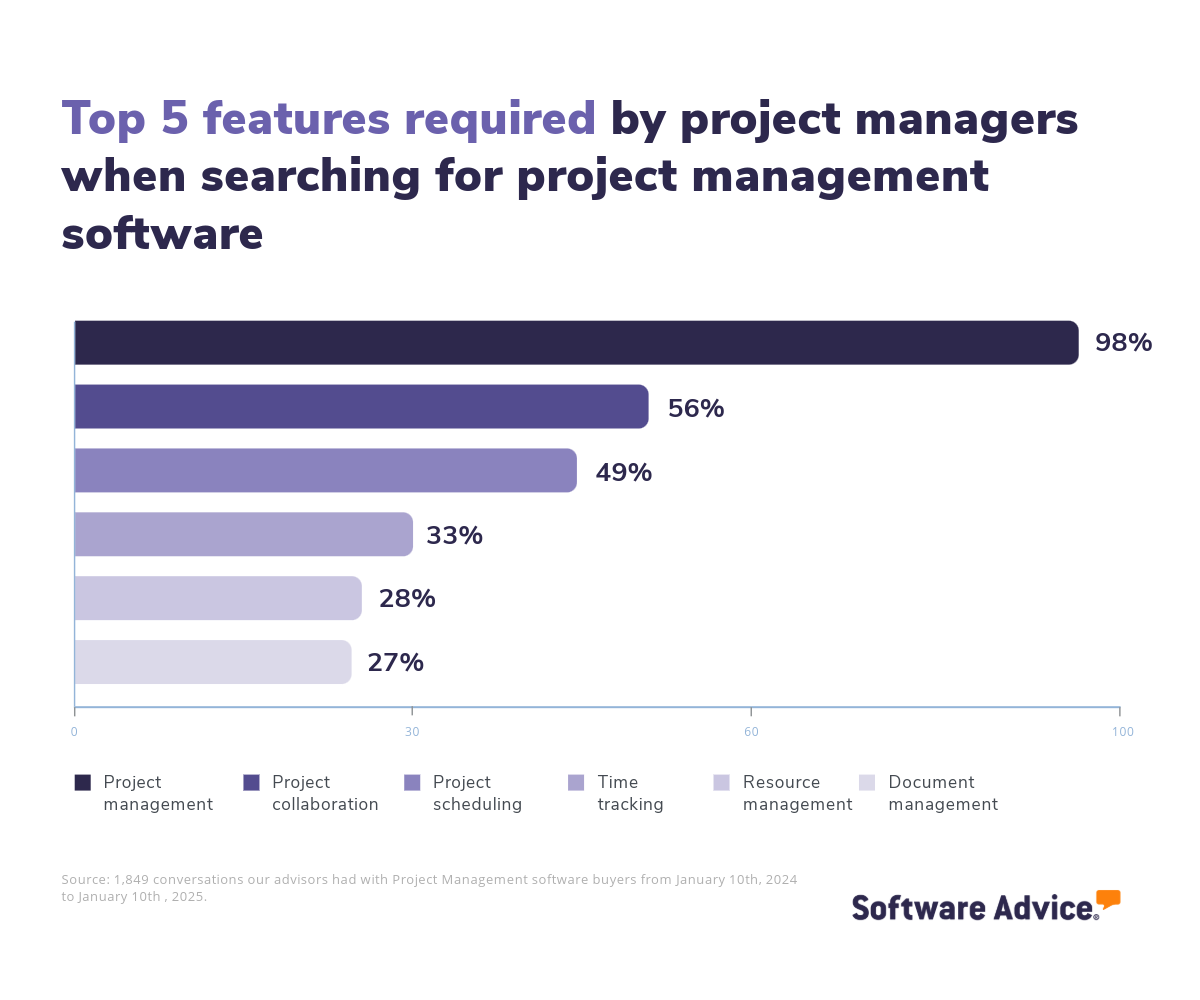
Time tracking software automates billable hour monitoring across tasks and projects, enhancing efficiency by tracking employee time and generating reports to aid in accurate project scheduling. Such software also aids project management professionals in maintaining payroll accuracy, evaluating performance, and optimizing resource allocation. Of the more than 1,800 conversations our advisors had with project management software buyers in the last year, 33% of them indicated that a time tracking feature is a requirement when they look for this type of software. [1]
To give you an idea of the market, we have over 650 different time tracking products listed on Software Advice, and have published more than 18,000 reviews for this software category in the past year alone. [2]
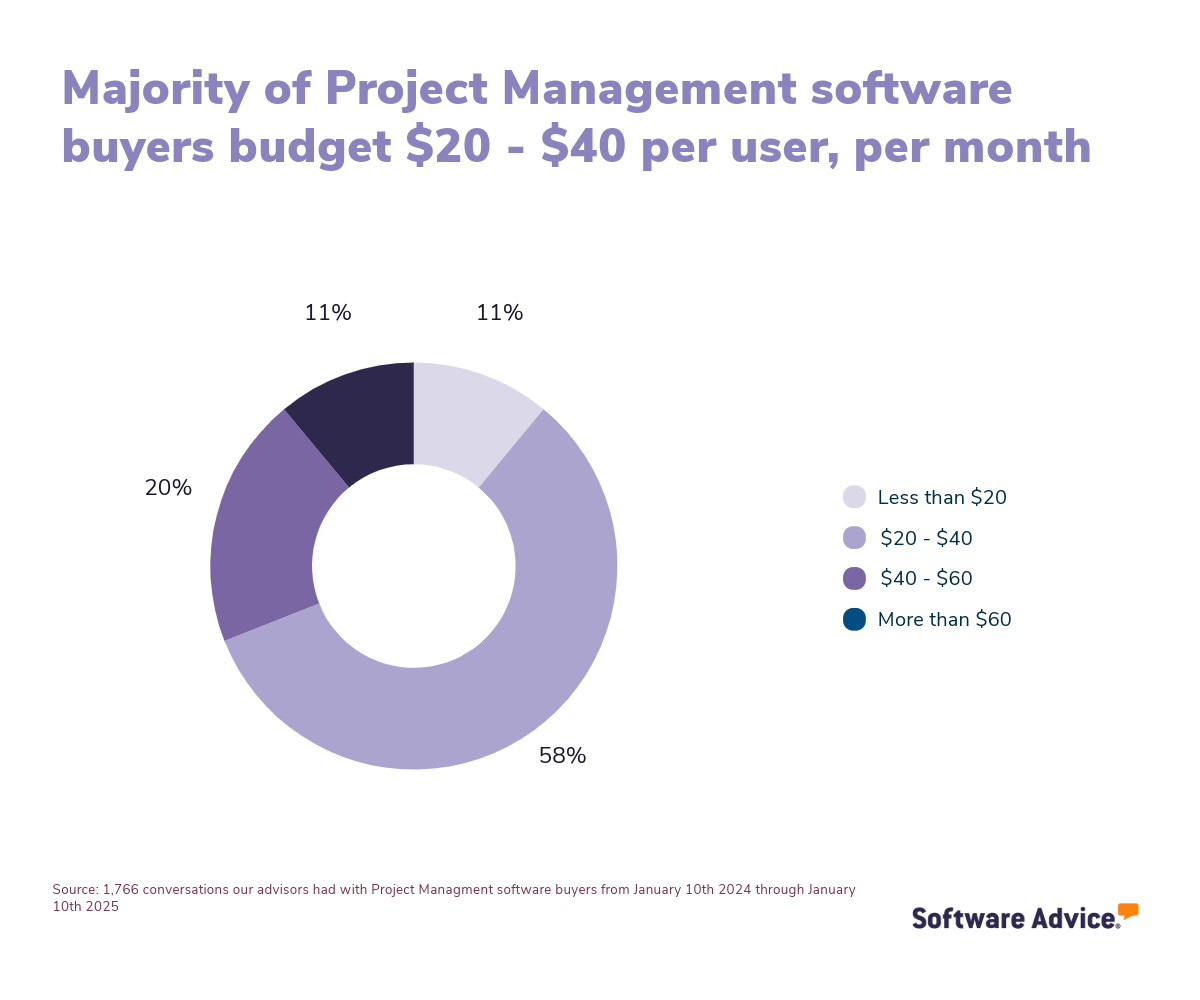
When it comes to how much you can expect to pay for such platforms, pricing would depend on factors like the number of users, basic or advanced features, locations, etc. You can find vendors that offer free versions of their software but those typically come with limitations. For paid plans, an average entry-level subscription price is $1.99 per user, per month while a high-end subscription plan can cost $20 or more, which includes the most advanced versions of the software features. [3]
When choosing time tracking software, first-time buyers should consider their budget, predicted user count, use cases, and integrations. Ensure the software supports timesheet management, client billing, and productivity metrics, and integrates well with payroll and project management tools. Key questions include:
Does it manage time entries and categorize billable/non-billable hours?
Can it generate productivity reports and optimize performance?
Does it offer task prioritization and calendar integrations?
How easily can the software integrate with existing payroll and project management systems?
This guide will help you navigate the selection process of a time tracking software.
What is time tracking software?
Time tracking software monitors the time employees spend on specific tasks during a project, providing insights to help improve productivity and efficiency. It automates the tracking of billable hours across tasks and projects, supporting professionals such as project managers, accountants, and freelancers. Once integrated with payroll and project management systems, it helps ensure accurate data entry, precise payroll calculations, and facilitates seamless workflow management.
Common features of time tracking software include timesheet management, project tracking, client billing, and reporting/analytics. These assist businesses in streamlining payroll, optimizing resource allocation, and maintaining compliance with labor laws. Additionally, the detailed reports generated by time tracking solutions help project managers plan more accurate project schedules and identify areas for improvement, ultimately aiding in enhancing operational efficiency and productivity.
Interestingly, time tracking tools are a part of the larger software categories of project management solutions and professional service automation software, meaning they can easily be clubbed with such kinds of tools. However, they are also available as stand-alone tools with specific functionalities required for tracking the time employees spend working on projects.
Essential features of time tracking software
It’s important to understand the essential features of time tracking software when comparing systems to find the best fit for your business. Core features that are typically included in every time tracking software are timesheet management, reporting/analytics, and vacations and leave tracking, which help in organizing work hours, generating productivity insights, and managing time-off requests. Other features that are common in many systems include project time tracking, online time tracking, and employee scheduling. Additionally, many systems offer task management, as well as calendar management.
We analyzed thousands of user reviews and consulted with project managers to identify what we consider to be the core features of time tracking software.
Core features
Reporting/analytics | View and track pertinent metrics to spot patterns and gain insights from data. |
Timesheet management | Track the amount of time spent on a job or task. |
Vacation/leave tracking | Request, track, and manage time off and vacation time requests. |
Common features
Activity dashboard | Dashboard to view the status of ongoing processes and tasks, identify current incidents, and track past activities. |
Activity tracking | Track and document all activities across devices, networks, and other systems. |
Automatic time capture | Automate time recording to reduce the chances of human error. |
Billable & non-billable hours | Track billable and/or non-billable hours for work performed. |
Billing & invoicing | Create, manage, and send invoices or bills to customers. |
Clock in/out | Track employees' arrival and departure timings for payroll purposes. |
Employee database | Store staff/employee contact information and job status in a centralized repository. |
Employee scheduling | Assign work shifts or tasks to employees based on their availability. |
Overtime calculation | Manage and record overtime hours for hourly employees. |
Project time tracking | Measure time to completion or hours worked for projects. |
Task management | Create, manage, and track all task activities and progression. |
Third-party integrations | Set up connections to third-party platforms to improve business processes. |
Benefits and competitive advantages of using time tracking software
Based on verified user reviews on our site, time tracking software can benefit a business in aspects like project tracking, HR management, productivity, team collaboration, and business management. Here’s how:
Optimizes project tracking: Time tracking software helps monitor time spent on projects and tasks, aiding project managers in progress tracking and resource allocation. It supports teams in managing multiple projects with streamlined data entry and project tracking. Such tools also provide insights through dashboards and reports, optimizing productivity and accurate billing. In addition, by categorizing tasks and tracking billable hours, they supports project management and better decision-making.
Streamlines HR management: Time tracking software can streamline HR processes such as payroll, employee management, and task scheduling. It assists in managing employee records, time-off requests, and performance reviews, while offering a centralized platform for document management and time tracking. The software's integration capabilities with other HR tools also support cohesive workflows.
Improves productivity: Time tracking software helps businesses enhance productivity by providing insights into time management and workflow efficiency. It enables users to monitor their work habits, identify areas for improvement, and optimize processes. Features like reporting and analytics offer insights into performance and productivity trends.
How to choose the best time tracking software for your business
Step 1: Define your requirements
Before selecting a time tracking solution, it's crucial to evaluate the cost implications and requirements for your business. These include the functionality of the software, but also your budget, training assistance, data migrations, and the integrations you need.
What is the cost of time tracking software
The price of time tracking software can vary based on factors such as:
Number of users: More users typically translate to higher costs.
Required features: Advanced functionalities like GPS tracking or integration capabilities can quickly add up.
Also, consider your entire tech budget, as time tracking software might need to be integrated with other tools like project management systems or payroll software. Ensure that the software aligns with your project management tech stack, financial resources, and operational needs.
Budget for your business project management tech stack
When planning and budgeting for your time tracking software, it's important to consider your entire management tool suite. While time tracking software is a tool for monitoring productivity and managing resources, it's not the only system your business might need. You may also require project management software for task coordination, budgeting tools for financial oversight, or resource planning systems for optimizing team workloads.
Be aware of potential drawbacks
While time tracking software offers many benefits, there are some potential drawbacks to consider when you’re selecting a product. Here are some key concerns to keep in mind:
Data security: Ensuring employee data protection and compliance with regulations is crucial. Verify that the software includes standard security features.
User adoption: Employees may struggle with new systems if they're used to manual methods. Providing adequate training can ease the transition.
Integration challenges: Ensure the software integrates smoothly with existing tools like payroll and project management systems to maintain workflow efficiency.
It's also important to recognize that time tracking software may not cover all needs, such as comprehensive project management or detailed financial analysis, which may require additional tools. Understanding these limitations helps in making an informed decision.
Consider integration capabilities
When selecting time tracking software, it's crucial to consider how the new system will integrate with your existing tools and processes. Does your business rely on project management software, payroll systems, accounting, or CRM platforms? Do you use specific applications for calendar management, employee scheduling, or task management? If so, you'll need time tracking software that can seamlessly integrate with these systems to ensure smooth data flow.
Additionally, verify that the software can support any specialized tools your business uses, such as GPS tracking for field staff or expense management systems. While many time tracking solutions offer integration capabilities, some standalone products may require third-party integrations to connect with your existing tech stack.
Step 2: Make a shortlist of time tracking software
With scores of product options available, creating a shortlist of potential time tracking solutions can streamline your decision-making process. Consider these steps:
Assess your business needs: Identify essential features like timesheet management, reporting, project time tracking, and integrations.
Explore deployment options: Decide between cloud-based or on-premise solutions based on your IT capabilities and data security preferences.
Consider free vs. paid versions: Free versions may suffice for basic needs, but paid plans offer advanced features and scalability.
Use comparison tools and user reviews to evaluate software options. Pay attention to user experiences with free plans and consider both forever-free versions and free trials of paid solutions.
Get qualified help from an advisor
At Software Advice, our advisors have experience helping hundreds of business owners and managers identify solutions that match their needs and budgets.
If you need guidance, you can chat online now with an advisor or schedule a phone call. In just a few minutes, your advisor will help you identify a shortlist of options that align with your requirements. To help you after your free consultation, check out After Your Advisor Call: 4 Tips To Keep Your Software Purchase on Track.
Explore our list of time tracking FrontRunners
If you're not quite ready to consult with an advisor just yet, you can begin creating your shortlist using our FrontRunners report, which features only the highest-rated products. For a detailed explanation of how the report is compiled, view our full methodology description.
For additional assistance in developing a shortlist, as well as access to a free, downloadable comparison chart, take a look at The Ultimate Software Vendor Evaluation Guide. This guide and chart will aid you in comparing software evaluation criteria for each potential vendor by assessing functionalities, training and support options, costs, and deployment methods.
Step 3: Pick your best option
Once you’ve narrowed down your options, the next step is to engage with vendors through demos and discussions. This will help you explore features, understand pricing, and make an informed decision. Some questions you should consider asking vendors include:
What core features does the software include, and are there any additional modules available?
Understanding the core features and available modules helps ensure the software meets your business needs. Plus, it's important to know if the software can handle your specific requirements or if additional modules are necessary for expanded functionality.
What integrations are available with other tools we currently use, such as project management or payroll systems?
Integration capabilities are crucial for maintaining efficient workflows. Knowing which tools the software integrates with can prevent disruptions and ensure seamless data flow between systems.
Can the software be customized to fit our specific workflows and reporting needs?
Customization options allow the software to align with your unique processes and reporting requirements. This flexibility can enhance user adoption and ensure the software effectively supports your business operations.
What pricing plans are available, and what features are included in each tier?
Knowing the pricing structure and included features helps you assess the software's value and ensure it fits within your budget.
What type of customer support is available?
Customer support is vital for resolving issues and ensuring smooth operations. Understanding the support options and availability helps you gauge the level of assistance you can expect.
How often is the software updated, and are updates included in the subscription?
Regular updates indicate active development and responsiveness to user feedback. Knowing the update schedule and whether it’s included in the subscription helps you anticipate improvements and maintain software relevance.
Step 4: Make the most out of your time tracking software
Once you've selected and implemented your time tracking software, focus on maximizing its benefits:
Data migration: Ensure a smooth data transition by coordinating with both your old and new software providers.
Training: Provide comprehensive training to your team to ensure they can effectively use the new system.
Communication: Keep your team informed about the software transition to manage expectations and minimize disruptions.
By following these steps and considering your business's specific needs, you can choose the best time tracking software to enhance productivity and streamline operations. You can also check our guide, 5 Critical Steps to a Successful Software Implementation Plan.
Software related to time tracking
Depending on which time tracking software you choose, you may need to support some features with related software systems to optimize your business operations. Some types of software that are closely related to time tracking are:
Billing and invoicing software: Automates the creation and distribution of invoices and the receipt of payments, streamlining accounts across multiple customers and product lines. It often integrates contract data and CRM tools.
Legal billing software: Enables lawyers and law firms to track consulting time and receive payment for their services. It supports legal-style hourly billing and expense recording and often integrates with case management, workflow, accounting, and payroll tools across multiple office locations.
Professional services automation (PSA) software: PSA software is a suite of applications tailored for service-oriented organizations to automate processes and manage operations. It functions like enterprise resource planning (ERP) software but is specifically designed for professional services firms, focusing on managing services delivered through human resources rather than physical assets.
Project management software: Automates task assignment, resource allocation, and milestone tracking throughout a project's lifecycle. Features such as project tracking, resource management, and collaboration tools help identify and resolve issues quickly for smoother project execution.
Time clock software: Conducts employee attendance tracking, scheduling, and vacation management, offering insights into how employees spend their time and analyzes labor costs per project.
Time and expense software: Enables professional services organizations to monitor and control labor and project costs, streamlining invoicing, improving bid accuracy, and reducing unnecessary expenses.
More resources for your time tracking journey
About our contributors
Author
Bruno Peláez is a senior content analyst at Software Advice, covering the B2B software industry, with a current focus on the human resources and finance and accounting industries. His Software Advice research has been featured in various Spanish-speaking publications including El Economista (Mexico), Forbes México (Mexico), El Universal (Mexico), El Financiero (Mexico) and El Periódico (Spain), among others.
Bruno’s research and analysis is informed by more than 300,000 authentic user reviews on Software Advice and over 35,000 interactions between Software Advice software advisors and accounting or HR software buyers. Bruno also regularly analyzes market sentiment by conducting surveys of HR leaders and practitioners, as well as leaders in the finance and accounting space, so he can provide the most up-to-date and helpful information to small and midsize businesses purchasing software or services.
Bruno has been writing about consumer technology for almost two decades. He has a master's degree in digital arts, as well as professional experience in video production.
Editor
Mehar Luthra is a team lead at Software Advice and specializes in editing reports that cover the latest trends affecting small businesses. With nearly a decade of experience, she has edited a multitude of research articles, top-rated software reports, and thought leadership articles for diverse markets such as Brazil, Japan, Canada, France, Australia, and India. She finds it particularly rewarding to produce content that provides small-business owners with practical tips and helpful advice on topics such as the digitalisation of small businesses, eCommerce trends, and HR developments.
Armed with a double bachelor’s in law (LL.B.) and business economics from Delhi University, she won a full scholarship to study for a master’s in creative writing at the National University of Ireland, Galway. In addition, she has written blog articles spanning a variety of topics such as fiction and non-fiction books, mental health and anxiety, the latest restaurants, and more. Her articles have been featured in Ireland’s national magazine The Village, among other publications. A die-hard journaling fan, she enjoys watching psychological thrillers, reading fiction books, and drinking iced coffee (even in the winter).
Advisors
Matt Ramsey is a software advisor who joined the Software Advice advisor team in 2016 and is based in Austin, Texas.
As a software advisor, Matt works directly with small business leaders seeking to find the right HR, CRM, accounting, project management, and manufacturing software. They connect businesses with best fit software providers by assessing technology needs through one-to-one conversations and providing a short list of potential matches. Their favorite part of being a software advisor is connecting small businesses with software that helps grow their businesses.
They hold a bachelor's degree in criminal justice, and are experienced in retail management and social work.
James Rose is a senior advisor. He joined Software Advice in 2021 as a software advisor. He is based in Fort Myers, FL.
As part of the software advisor team, James helps HR and project management professionals who are seeking recruiting, learning management, and scheduling software. He provides a short list of personalized technology recommendations based on budget, business goals, and other specific needs.
James’s favorite part of being a software advisor is knowing he helps save buyers time and energy on their software search with no additional cost.
Sources
Software Advice advisor call notes: Findings are based on data from telephonic conversations that Software Advice’s advisor team had with businesses seeking project management software. For this report, we analyzed phone interactions from January 10th, 2024 to January 10th, 2025. Read the complete methodology.
Software Advice reviews data: Software Advice reviews are collected from verified users for individual software products. For this report, we analyzed reviews from the past year as of the production date. Read the complete methodology.
Software Advice software pricing data: Only products with publicly available pricing information and qualified software products within the category, as of December 2023, are included in the pricing analysis. Read the complete methodology.
Time Tracking FAQs
- What is the #1 employee time tracking tool for daily office use?
Out of the most popular time tracking products, Clockify has the highest rating on Software Advice.
- What is the best software for time management in a company?
Out of the most popular products, Harvest was most requested by users for timesheet management.
- Is there a free tool to track hours?
Yes there are plenty of options, but out of the most popular products, Toggl Track was the highest rated that also offers a free plan.
- How do small businesses keep track of employee hours?
Small businesses keep track of employee hours using time tracking software, which automates the recording of work hours and integrates with payroll systems. Additionally, they may use manual time sheets for a straightforward, low-cost method, or employ physical time clocks that employees punch in and out of to log their hours.
- Is there an app to keep track of employees hours?
Yes, time tracking software apps are available to monitor employee hours. These apps automate the recording of work hours and often offer features like real-time tracking, reporting, and integration with payroll systems for streamlined operations. Out of the most popular products, Clockify has the highest rating on Software Advice.