


Best HR Software for Nonprofits of 2026
Updated March 20, 2026 at 7:26 AM
- Popular Comparisons
- Buyers Guide
Compare Products
Showing 1 - 25 of 480 products
Compare Products
Sort by
Reviews: Sorts listings by the number of user reviews we have published, greatest to least.
Average Rating: Sorts listings by overall star rating based on user reviews, highest to lowest.
Alphabetically (A-Z): Sorts listings by product name from A to Z.

BambooHR centralizes your HR data, automating key tasks like payroll, benefits, and employee management. Streamline processes fr...Read more about BambooHR


BambooHR's Best Rated Features
See All
BambooHR's Worst Rated Features
See All

Paycom is the most automated HCM platform and the only HR and payroll software built on a truly single, unique database that aut...Read more about Paycom


Paycom's Best Rated Features
See All
Paycom's Worst Rated Features
See All

Rippling is an integrated workforce management platform that unifies HR, IT, and finance tools to streamline operations. It cent...Read more about Rippling


Rippling's Best Rated Features
See All
Rippling's Worst Rated Features
See All

TriNet's HR Plus is outsourced HR services plus HR technology to help your business thrive. Our all-in-one HR platform helps you...Read more about TriNet HR Plus

TriNet HR Plus's Best Rated Features
See All
TriNet HR Plus's Worst Rated Features
See All

UKG Pro Human Capital Management (HCM) software is a workforce management solution designed to align people strategy with busine...Read more about UKG Pro
UKG Pro's Best Rated Features
See All
UKG Pro's Worst Rated Features
See All

RUN Powered by ADP is a smart, simple payroll and HR solution designed to help small businesses pay people confidently and stay ...Read more about RUN Powered by ADP

RUN Powered by ADP's Best Rated Features
See All
RUN Powered by ADP's Worst Rated Features
See All

ApplicantPRO by JobMatch is a cloud-based applicant tracking (ATS) system designed for small to midsized companies that are work...Read more about isolved Talent Acquisition

isolved Talent Acquisition's Best Rated Features
See All
isolved Talent Acquisition's Worst Rated Features
See All

ADP Workforce Now is an HR suite that combines all core payroll and HR management processes into a single database-driven platfo...Read more about ADP Workforce Now


ADP Workforce Now's Best Rated Features
See All
ADP Workforce Now's Worst Rated Features
See All

Asure’s end-to-end Payroll, HR, and Time and Attendance solutions were developed specifically for small to mid-sized businesses....Read more about Asure


Asure's Best Rated Features
See All
Asure's Worst Rated Features
See All

Vista is a comprehensive human capital management (HCM) software solution. It is designed for mid-size companies and enterprises...Read more about PDS Vista

AcquireTM Applicant Tracking Software is a cloud-based talent management and recruiting solution designed to meet the hiring req...Read more about AcquireTM


Dayforce is an AI-powered people platform, delivering simplicity at scale with a full-suite HCM solution. Designed as a single, ...Read more about Dayforce HCM

Dayforce HCM's Best Rated Features
See All
Dayforce HCM's Worst Rated Features
See All

Tired of juggling disconnected systems for HR, Finance, and IT? Wasted time and manual work slow your business down. Paylocity i...Read more about Paylocity

Paylocity's Best Rated Features
See All
Paylocity's Worst Rated Features
See All

TriNet provides a full-service solution that offers HR products tailored to the industry and strategic HR services for small to ...Read more about TriNet

TriNet's Best Rated Features
See All
TriNet's Worst Rated Features
See All

Patriot Payroll is a cloud-based payroll solution that supports multiple pay rates, enabling businesses to cater to various comp...Read more about Patriot Payroll

Patriot Payroll's Best Rated Features
See All
Patriot Payroll's Worst Rated Features
See All

HiBob is a human resources management platform that combines HR, talent management, payroll, and financial planning tools in one...Read more about HiBob
HiBob's Best Rated Features
See All
HiBob's Worst Rated Features
See All

emPerform is a hybrid employee performance management solution that helps organizations to automate performance reviews and alig...Read more about emPerform

emPerform's Best Rated Features
See All
emPerform's Worst Rated Features
See All

ClearCompany is a unified talent management platform designed to help organizations recruit, develop and retain their workforce....Read more about ClearCompany
ClearCompany's Best Rated Features
See All
ClearCompany's Worst Rated Features
See All

ICIMS is a leading provider of talent acquisition technology that enables organizations everywhere to build winning workforces. ...Read more about iCIMS Hire


iCIMS Hire's Best Rated Features
See All
iCIMS Hire's Worst Rated Features
See All

Eddy is the all-in-one HR Suite built for local businesses. With Eddy, businesses can streamline tedious HR processes and improv...Read more about Eddy

Eddy's Best Rated Features
See All
Eddy's Worst Rated Features
See All

Employment Hero is a cloud-based human resource management (HRM) system for small and medium businesses on the up. The solution ...Read more about Employment Hero
Employment Hero's Best Rated Features
See All
Employment Hero's Worst Rated Features
See All

Nowsta is a cloud-based workforce management solution designed to help businesses streamline the entire employee lifecycle, from...Read more about Nowsta


Nowsta's Best Rated Features
See All
Nowsta's Worst Rated Features
See All

Rise is a cloud-based human resources (HR) solution that helps companies engage with their employees and action all HR functions...Read more about Rise
Rise's Best Rated Features
See All
Rise's Worst Rated Features
See All

Breeze 360 is a cloud-based employee time / attendance and scheduling software that manages time and/or attendance workflows for...Read more about Breeze 360

An applicant tracking system is the foundation of strategic talent management. ApplicantStack capably empowers all stakeholders:...Read more about ApplicantStack

ApplicantStack's Best Rated Features
See All
ApplicantStack's Worst Rated Features
See All
Popular Comparisons


Buyers Guide
This detailed guide will help you find and buy the right hr software for nonprofits for you and your business.
Last Updated on January 27, 2025When running a nonprofit, managing the human resources (HR) aspect of your organization is often a huge challenge. You have to deal with full- and part-time staff as well as volunteers. Most of them don't work from the office regularly and may be located in (or frequently traveling to) other cities or states.
To top it all off, nonprofits have distinctive staffing needs. For instance, zoos and aquariums need seasonal volunteers during the holidays. Aid organizations regularly recruit local personnel in different regions or countries, while disaster relief organizations have to quickly move their personnel to affected areas.
Despite these unique needs, nonprofits don't often have huge budgets or a skilled IT team. For this reason, you need HR software that's specifically suited to nonprofit organizations.
HR software for nonprofits allows you to organize the information of each person, track attendance and time off, and automate payroll and benefits. It can streamline recruitment and manage training modules for employees and volunteers.
This guide aims to help you find the right HR software for your nonprofit. Here's what we have covered:
What is HR software for nonprofits?
HR software for nonprofits are tools for managing, recruiting, and training an organization's employees and volunteers. Some solutions, such as CiviHR, have been designed specifically for nonprofits. However, a few generic HR solutions can also suffice for the needs of most nonprofits.
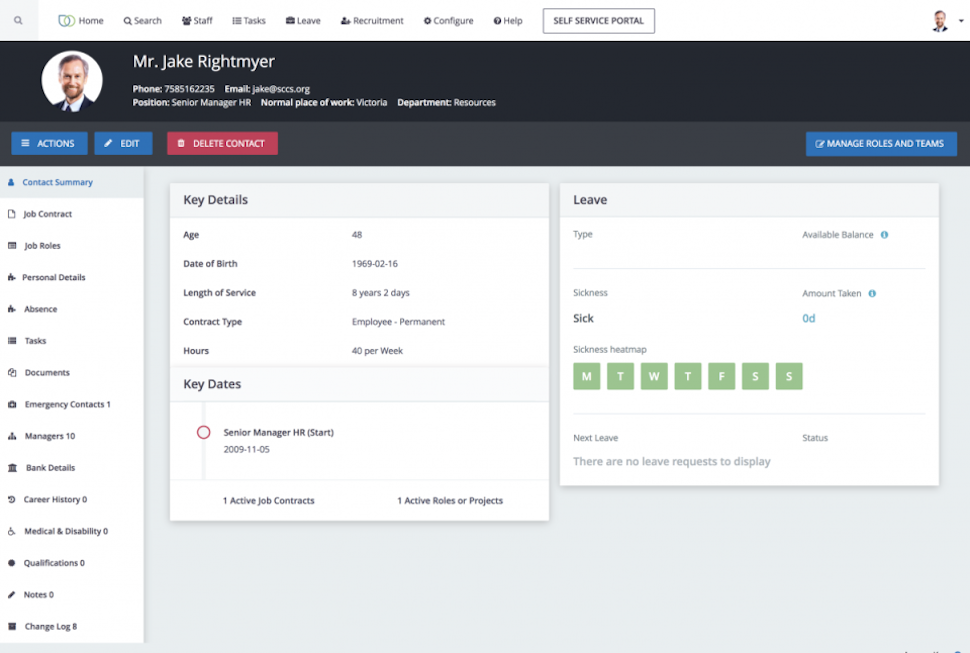
An employee profile in CiviHR (Source)
HR software is broadly categorized into the following three types:
Human resource information system (HRIS): This is a tool to manage, track, and automate the core HR needs via a digital portal. It includes features such as personnel tracking, payroll, benefits, time and attendance, and recruiting. However, not all HRIS vendors offer all five features—some only offer personnel tracking or 2-3 features.
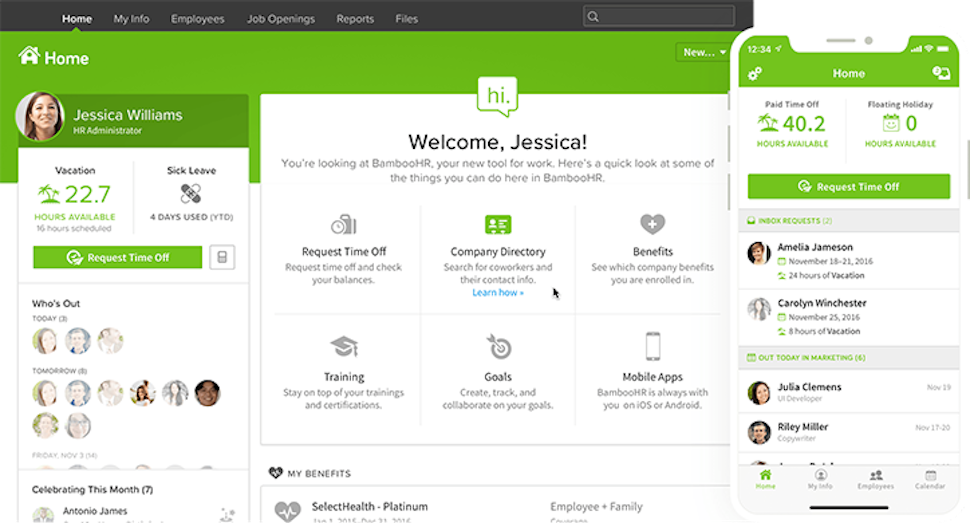
Employee dashboard in BambooHR (Source)
Human resource management system (HRMS): This is an integrated suite that combines core HR functions with analytics. It helps you analyze trends and create reports. Though it's similar to an HRIS, an HRMS offers talent management and performance review in addition to the core HR features.
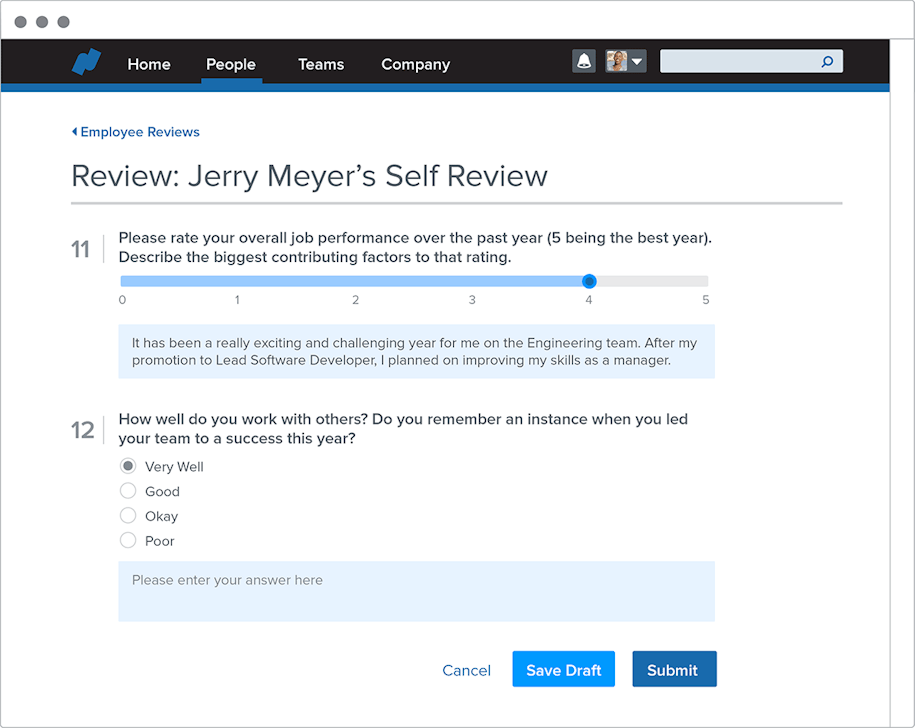
Performance reviews in Namely (Source)
Human capital management (HCM): This covers a wide range of core and strategic HR functions. An HCM tool can handle the entire employee lifecycle, from recruitment, to management, to development, to retention. Gartner's Market Guide for HCM Suite Applications report (content available to only Gartner clients) notes that HCM features support the following four key capabilities:
HR administration: Organizing and managing an employee's personal information, benefits, and payroll.
HR service delivery: Creating an organizational knowledge base and providing access to policy and procedure guidance.
Talent management: Recruiting, onboarding, and managing employees as well as enabling learning and development.
Workforce management: Managing scheduling as well as tracking time and attendance.
HCM solutions also offer advanced analytics and reporting.
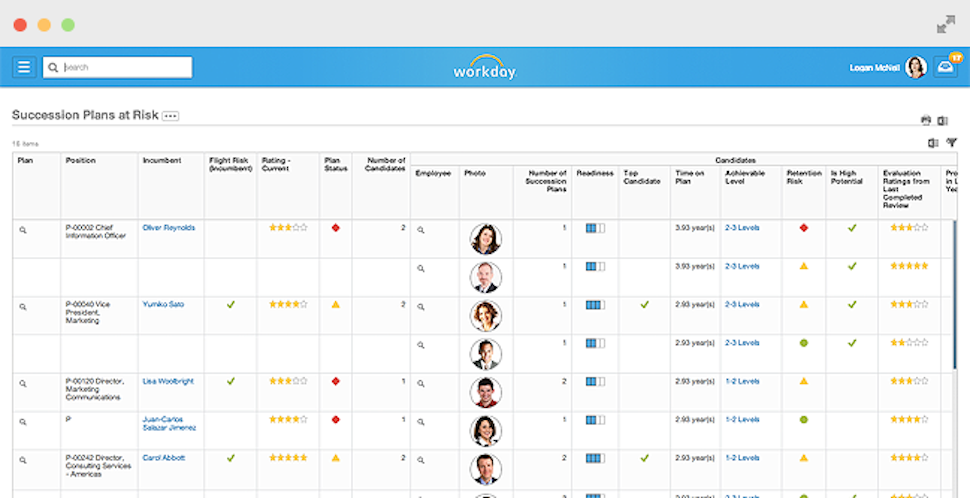
Succession planning in Workday (Source)
To help you understand which type of HR solution will suit your nonprofit, our HRIS vs. HRMS vs. HCM: What's the Difference? report tackles the differences and lists some of the popular solutions in the market.
Common features of HR software for nonprofits
Most HR solutions aimed at nonprofits offer the following essential features:
According to our research, these are the common features of a GPS tracking solution:
Time and attendance management | Track staff attendance and schedules in various departments, locations, and projects. Also, manage paid time-off (PTO), sick days, maternity/paternity leaves, and other absences. |
Personnel tracking and management | Centralize and store staff data such as contact information, banking details, salary history, chosen benefits, and insurance plans. Also, create profiles that consolidate all their data on a single page for viewing only. |
Payroll | Manage your staff's salaries and pay rates, set a payment schedule, and automate payroll runs. Also, track tax information for each individual and generate tax forms when needed. |
Benefits management | Administer and manage employee benefits such as healthcare, life insurance, retirement plans, and travel compensation. Some solutions also allow staff to access their information via the self-service portals and select plans that suit them. |
Applicant tracking | Manage the processes of hiring, track incoming resumes, and store data on all candidates in a central location. This information can be used to draft descriptions of new roles or analyze trends in the job market. |
Staffing management | Map personnel to different departments, projects, and temporary roles. Also, get alerts when the staffing changes or staff numbers are inadequate. |
Talent management | Track the key performance indicators (KPIs) for each employee and evaluate their performance. Manage their reviews and feedback. If needed, conduct behavioral and competency tests. |
Reporting | Generate custom reports on various HR modules such as staffing, benefits, and payroll. |
Learning and professional development | Manage ongoing staff skill development and training programs. Use the vendor's available training modules, create new training modules, or integrate with third-party learning management systems. Also, keep track of each employee's certifications. |
Recruiting and hiring | Automate HR tasks such as posting job openings to multiple websites and social platforms as well as evaluating resumes. Create customized hiring workflows, manage the incoming resumes, and score applicants on multiple parameters. Also, facilitate background check, send job offers, and onboard new hires. |
Employee self-service portal | Create a self-service portal for staff to access their data, perform HR tasks (i.e., request PTOs or view benefits), and train, as required. The portal should also allow them to raise tickets for IT and HR issues or queries. |
Employee onboarding and exits | Automate the onboarding and exit workflows for your staff and volunteers. Allow them to sign-in via the self-service portal to start onboarding, without any assistance from an HR personnel. |
Integrations | Integrate with third-party platforms that offer project management, learning and development, accounting, and other functions that tie in to the larger HR needs of your nonprofit. |
Knowledge base | Create a centralized knowledge base about the policies, processes, and benefits for your staff. Embed this database in the employees' self-service portal. |
What type of buyer are you?
Nonprofits of different sizes and types will have different requirements from HR software—for instance, not all of them will need the same features. Hence, you should understand your needs as a buyer before choosing a solution. In general, nonprofits that need HR software fall into one of the following categories:
Grassroots nonprofits: These nonprofits have an annual budget of up to $1 million. They likely have a small team of full-time employees and seasonal volunteers, based in one location. They may not have a dedicated HR or IT staff. For these reasons, these buyers can use a basic HR solution with payroll and time and attendance functionalities.
We recommend exploring free versions of generic HR software as well. If the free tools don't meet your basic needs, check out cloud-based solutions. The primary benefit of cloud software is that it eliminates the costs of implementing and maintaining the tool. The vendor undertakes these tasks, with the cost included in the per user monthly fee.
Small and midsize nonprofits: Such nonprofits have an annual budget of $2-10 million. They likely have more fixed staff and seasonal volunteers than grassroots organizations. They could be working on one or multiple projects, and be based out of one or multiple locations. They may also have dedicated HR and IT personnel and a defined budget for these functions.
A huge challenge for them is managing volunteers and requests for volunteering, internships, and part-time jobs. These buyers should consider cloud software that offers personnel tracking, applicant tracking, performance management, and the core HR features. Check with your vendor about enrolling the seasonal volunteers for free.
Large nonprofits:These buyers have an annual budget over $10 million. They have numerous full-time staff, seasonal volunteers, and part-time workers. They could have projects in more than one country that also require managing travel. They need communication tools to stay remotely connected with staff in different countries.
With bigger budgets, they should consider an HCM solution with numerous features, including recruiting and hiring, compensation management, and learning management. We recommend checking both on-premise and cloud-based solutions. While you can fully customize on-premise tools, cloud software allows your staff to work remotely.
Benefits of HR software for nonprofits
HR software helps nonprofits create and follow a standardized process for everyday HR tasks, thus improving the organization's efficiency and effectiveness. Here's a list of the software's key benefits:
Manage staff and volunteers efficiently: The software makes it easy to schedule slots for your volunteers and staff so that you can maximize their hourly productivity. It also helps you avoid overstaffing or volunteers sitting idle.
Maintain accurate personnel records: With organized and accurate records for each employee and volunteer, you won't have to go searching for contact details, leave history, or financial details. The software prevents incorrect salary deductions or inaccurate records on health or insurance plans.
Automate repetitive HR tasks: If you have frequent volunteer and staff changes, you may be spending a substantial amount of time on repetitive tasks and processes such as onboarding, payroll, and expense reporting. The software can automate these tasks and save you a lot of time and effort.
Streamline recruitment, hiring, and staffing: The software streamlines recruiting and hiring to help you find volunteers with the right experience. It helps you prepare for seasonal staffing needs by reducing the time taken to review applicants and set up interviews. It also helps you create staffing plans for contingencies.
Key considerations when buying HR software for nonprofits
After detailing the features and benefits of the software, let's look at a few key considerations. Keep these in mind as you begin the selection and purchase process:
Use a features checklist: Whether you are a grassroots, small, midsize, or large nonprofit, it's important to identify what you require from the HR software. Our HR software needs cycle report will help you create a features checklist. Check the features offered by a vendor to find the right solution and avoid overpaying.
Review pricing and hosting models: Deciding the deployment model is crucial. Cloud solutions have no hosting costs and offer per user/month plans. On the other hand, you pay an upfront fee to host and maintain an on-premise tool on your own servers. Read our reports on HR software pricing and hosting models and typical costs of HR software.
Check the tool's scalability: Most vendors allow you to scale-up when your user numbers increase. But you also need to scale down when seasonal requirements end. Check with the vendor on scaling down, the time to implement, and any additional fees. Ensure that your final agreement reflects these conditions and offers you this flexibility.
Assess the usability: Some solutions can be "clunky" and hard to use, resulting in an unpleasant user experience. To get the maximum return on your investment, thoroughly review a solution's user experience and interface. Sign up for software demos and trials to get a feel of the tool.
Ask for discounts or donations: Some vendors have standing discounts for nonprofits, while others donate their software.