


Best Human Resources Software of 2026
Updated March 3, 2026 at 1:41 AM

Written by Emilie Audubert
Content Analyst

Edited by Mehar Luthra
Team Lead, Content

Reviewed by Daniel Harvey
Software Advisor

Talk with us for a free 15-min consultation
Expert advisors like Jacqueline, who have helped 1,000+ companies, can find the right software for your needs.
- All Software
- Software Advice FrontRunners
- Popular Comparisons
- Buyer's Guide
- Frequently Asked Questions
Human resources (HR) software streamlines recruiting, onboarding, payroll, and performance management. With more than 1000 tools on Software Advice, knowing where to start is tough. To help you narrow it down, I worked with our HR software advisors to curate a list of recommended productsi and a list of the human resources software FrontRunners based on user reviews. For further information, read my human resources software buyer's guide.
Human Resources Software
Sort by
Reviews: Sorts listings by the number of user reviews we have published, greatest to least.
Average Rating: Sorts listings by overall star rating based on user reviews, highest to lowest.
Alphabetically (A-Z): Sorts listings by product name from A to Z.

BambooHR centralizes your HR data, automating key tasks like payroll, benefits, and employee management. Streamline processes fr...Read more about BambooHR


BambooHR's Best Rated Features
See All
BambooHR's Worst Rated Features
See All

Rippling is an integrated workforce management platform that unifies HR, IT, and finance tools to streamline operations. It cent...Read more about Rippling


Rippling's Best Rated Features
See All
Rippling's Worst Rated Features
See All

Paycom is the most automated HCM platform and the only HR and payroll software built on a truly single, unique database that aut...Read more about Paycom


Paycom's Best Rated Features
See All
Paycom's Worst Rated Features
See All

UKG Pro Human Capital Management (HCM) software is a workforce management solution designed to align people strategy with busine...Read more about UKG Pro
UKG Pro's Best Rated Features
See All
UKG Pro's Worst Rated Features
See All

TriNet's HR Plus is outsourced HR services plus HR technology to help your business thrive. Our all-in-one HR platform helps you...Read more about TriNet HR Plus

TriNet HR Plus's Best Rated Features
See All
TriNet HR Plus's Worst Rated Features
See All
Software Advice FrontRunners 2026

(4595)

(4261)

(7163)

(1171)

(1818)

(4189)

(3103)

(850)

(1782)

(3031)
Best for Customer Satisfaction
Rippling

Rippling is the highest rated for customer satisfaction out of the most popular tools, based on our analysis of Human Resources products with the most market demand.
Rippling is best suited for organizations prioritizing customer satisfaction, especially those seeking a unified platform to streamline HR, payroll, and IT tasks. Our reviewers say the platform’s intuitive interface and integrated workflows save time and reduce manual work, making daily operations more efficient.
- Reviewers Perspective
"What I like the most is all the different areas of my job position and the company that can be handled through Rippling, from tracking hours, payroll, escalating concerns, to applying for new positions and following improvement plans."
YSYoel Sanchez
Form and Signature Coordinator
Used for 6-12 months
We analyzed 730 verified user reviews for Rippling to find out what actual users really think.
Ease of Use
Teams access HR, IT, and finance tools in one place. The intuitive interface reduces training needs and confusion, supporting day-to-day operations for all skill levels.Payroll
Payroll processes are automated and managed from a single dashboard. Managers can access paystubs, tax documents, and make adjustments efficiently, reducing errors and saving time.Employee Management
HR teams consolidate employee records, automate compliance, and monitor leave balances. Onboarding, time tracking, and benefits are managed without frequent HR intervention. - Key FeaturesRippling's scoreCategory average
Employee Database
4.824.55 category average
Employee Management
4.764.50 category average
HR Management
4.794.52 category average
- Screenshots


Best for Usability

Deel

Of the products listed on our FrontRunners report, Deel is the highest rated for its usability out of the most popular tools.
Deel is ideal for businesses seeking top usability, particularly those managing global teams and international payments. Our reviewers point out that its intuitive interface, seamless onboarding, and flexible payment options simplify complex processes and make it accessible even for teams without dedicated HR staff.
- Reviewers Perspective
"The platform also automates the invoicing and compliance paperwork (like generating annual tax forms), which saves significant time and administrative hassle."
DPDhruvkumar Panchal
Design Engineer
Used for 6-12 months
We analyzed 784 verified user reviews for Deel to find out what actual users really think.
Payment Management
You can manage contracts, invoices, and payroll from one platform. This streamlines payment tracking, offers multiple withdrawal options, and automates compliance and tax handling for international transactions.Ease of Use
Teams navigate contracts, payments, and work hours easily. Both desktop and mobile versions are organized, with simple setup and clear instructions that reduce confusion.Customer Support
Customer support resolves issues efficiently through chat, email, and help articles. This assists remote work and global payroll management, though response times may vary during busy periods. - Key FeaturesDeel's scoreCategory average
Employee Database
4.754.55 category average
Employee Management
4.294.50 category average
HR Management
4.724.52 category average
- Screenshots


Best for Quick Adoption/Easy Adoption


Of the products listed on our FrontRunners report, ADP Workforce Now is the highest rated for its ease of adoption out of the most popular tools.
ADP Workforce Now is best for organizations needing quick and easy adoption of a comprehensive HR and payroll solution. Our reviewers say the platform’s all-in-one design and user-friendly interface make onboarding straightforward and help streamline payroll, benefits, and time tracking tasks.
- Reviewers Perspective
"With it being an all in one app for time tracking, payroll, employee info, and benefit sign up, it makes for a seamless approach to not have multiple places to find these."
JGJonathana Gurney
Director of Plumbing
Used for 2+ years
We analyzed 877 verified user reviews for ADP Workforce Now to find out what actual users really think.
Ease of Use
Managers and employees adapt quickly to ADP Workforce Now’s features. Menus, work hour input, and access to pay, PTO, and benefits are organized for efficient daily use.Payroll
Payroll processing, time tracking, and benefits management are handled in one platform. The system supports complex payroll needs and comprehensive reporting for businesses of varying sizes.Employee Information
Employee records, schedules, and personal data are accessible for both managers and staff. Onboarding, profile updates, and time-off requests reduce administrative workload and improve transparency. - Key FeaturesADP Workforce Now's scoreCategory average
Employee Database
4.514.55 category average
Employee Management
4.434.50 category average
HR Management
4.304.52 category average
- Screenshots


Best for Quick Implementation
Paycom

In our analysis of Human Resources products with the most market demand, Paycom is the most requested by users for quick implementation out of the most popular tools.
Paycom is best for companies seeking quick implementation of a comprehensive HR and payroll system. Our reviewers say the platform’s efficient onboarding, single sign-on, and integrated workflows enable rapid setup and allow users to manage payroll and HR functions with minimal training.
- Reviewers Perspective
"I like that we can utilize one system for so many different things including Recruiting, Onboarding, Training, payroll processing, benefits administration, time and attendance, etc. Since joining Paycom a few years ago, they have continued to make improvements to the system and there are monthly trainings on those improvements- large strides in truly providing ROI for their customers"
CSCrystal Swanson
Sr Director of HR
Used for 2+ years
We analyzed 633 verified user reviews for Paycom to find out what actual users really think.
Payroll
HR teams process payroll, manage benefits, and track time in one platform. Monthly trainings and ongoing improvements support compliance and streamline audits for administrators.Employee Management
Employees manage their own information, reducing HR workload. Document management and mobile access support tracking time, benefits, and employment records for both managers and staff.Ease of Use
Clear navigation and helpful tutorials enable quick adaptation. All HR and payroll functions are accessible from desktop or mobile, simplifying daily tasks for users with limited technical experience. - Key FeaturesPaycom's scoreCategory average
Employee Database
4.424.55 category average
Employee Management
4.514.50 category average
HR Management
4.344.52 category average
- Screenshots


Highly Rated for Mobile app

Paylocity

According to our user reviews, Paylocity is the highest rated for mobile app out of the most popular tools.
Paylocity is highly rated for its mobile app, making it a strong choice for businesses with a mobile or distributed workforce. Our reviewers say the app provides convenient access to payroll, time tracking, and HR features, enhancing workflow efficiency and employee engagement on the go.
- Reviewers Perspective
"Paylocity took our growing company from a manual payroll system without HR recordkeeping and has streamlined many processes, saving many hours with reporting and HR tracking."
SMSue Mailman
HR Director
Used for 2+ years
We analyzed 644 verified user reviews for Paylocity to find out what actual users really think.
Payroll Management
Administrators use Paylocity to consolidate payroll, HR, and reporting tasks. Real-time previews and integrated compliance tools reduce manual work and improve efficiency for both employees and managers.Customer Support
Support is available through multiple channels and a comprehensive knowledge base. While guidance is helpful, users report inconsistent response times and frequent changes in representatives.Ease of Use
Paylocity’s design enables quick learning and adaptation. Users manage work hours, request time off, and access information easily, supporting efficient daily HR and payroll tasks. - Key FeaturesPaylocity's scoreCategory average
Employee Database
4.454.55 category average
Employee Management
4.324.50 category average
HR Management
4.04.52 category average
- Screenshots


Highly Rated for User Interface

Gusto

According to our user reviews, Gusto is the highest rated for user interface out of the most popular tools.
Gusto is highly rated for its user interface, making it ideal for small and midsize businesses seeking an intuitive payroll and HR platform. Our reviewers say its clean design and easy navigation simplify payroll processing, onboarding, and benefits management for users of all experience levels.
- Reviewers Perspective
"Gusto is a one stop shop for our employees who are enrolled in health benefits, its easy to navigate to your benefit details in the app for each employee and on the back end as the company, its a nice dashboard and easy to see what is being paid."
HDHannah Derr
Warehouse assistant manager
Used for 2+ years
We analyzed 796 verified user reviews for Gusto to find out what actual users really think.
Payroll
Payroll, benefits, and HR tasks are managed with minimal effort. Automated tax filing, direct deposit, and contractor support reduce manual errors and save time for small businesses.Ease of Use
Users follow straightforward prompts for setup and daily tasks. The intuitive interface makes ongoing management quick and accessible, even for those without prior payroll experience.Pay and Paystubs
Employees and administrators access paystubs, pay history, and direct deposits through a user-friendly dashboard. Mobile access and timely payments streamline financial management. - Key FeaturesGusto's scoreCategory average
Employee Database
4.564.55 category average
Employee Management
4.474.50 category average
HR Management
4.534.52 category average
- Screenshots


Highly Rated for Customization
BambooHR

In our analysis of Human Resources products with the most market demand, BambooHR is the highest rated for customization out of the most popular tools.
BambooHR is highly rated for customization, making it a great fit for organizations needing tailored HR processes and workflows. Our reviewers say the platform’s customizable fields and automation options help streamline onboarding, time tracking, and performance management to fit unique business needs.
- Reviewers Perspective
"It delivers all the core HR functionality we need—employee data management, onboarding, time-off tracking, and solid reporting—without bogging us down with extras we’d never use."
MAManshuk A. Kerey
HR Generalist
Used for 1-2 years
We analyzed 779 verified user reviews for BambooHR to find out what actual users really think.
Employee Management
HR teams use BambooHR to manage employee data, onboarding, time-off tracking, and performance reviews. The platform automates HR tasks and improves transparency for small and mid-sized organizations.Customer Support
BambooHR provides live help, tutorials, and proactive guidance during setup and ongoing use. Support resources make implementation and maintenance easier, though some users want more in-depth guidance.Ease of Use
Administrators and employees navigate BambooHR easily. The clean design and straightforward workflows simplify HR processes, reducing complexity and supporting quick learning. - Key FeaturesBambooHR's scoreCategory average
Employee Database
4.634.55 category average
Employee Management
4.494.50 category average
HR Management
4.564.52 category average
- Screenshots


Highly Rated for Automation

NEOGOV

In our analysis of Human Resources products with the most market demand, NEOGOV is the highest rated for automation out of the most popular tools.
NEOGOV is highly rated for automation, making it well-suited for public sector and mid-sized organizations aiming to reduce manual HR tasks. Our reviewers point out that automating over 100 processes has freed up staff time and improved workflow efficiency across departments.
- Reviewers Perspective
"Overall the Neogov has automated over 100 processes for ur organization freeing up more time for our employees to do more of what they love rather than the administrative burdens."
KBKale Brinley
Senior HR Consultant
Used for 1-2 years
We analyzed 479 verified user reviews for NEOGOV to find out what actual users really think.
Customer Support
NEOGOV’s support team provides ongoing communication, regular updates, and listens to feedback. Training and implementation resources help maximize platform benefits and maintain efficient operations.Training and Learning Curve
HR teams use NEOGOV’s training modules and learning resources for onboarding and ongoing education. The variety of courses and user-friendly materials make adaptation easier, even for complex platforms.Ease of Use
Departments adapt NEOGOV’s interface and navigation to their needs. The platform simplifies complex processes, reduces administrative time, and supports quick training of new staff. - Key FeaturesNEOGOV's scoreCategory average
Employee Database
4.274.55 category average
Employee Management
4.334.50 category average
HR Management
4.394.52 category average
- Screenshots


Most Rated for SMBs

Paychex Flex

In our analysis of Human Resources products with the most market demand, Paychex Flex is the most requested by small businesses out of the most popular tools.
Paychex Flex is most rated for SMBs, making it a strong choice for small and midsize businesses seeking a reliable payroll and HR platform. Our reviewers say its intuitive dashboard, easy onboarding, and accessible employee self-service features simplify payroll management and HR tasks.
- Reviewers Perspective
"I like that Paychex flex allows multiple users to log in and work on payroll to allow for each person in each department to enter there staff hours."
KSKayla Schneeberger
Program Director
Used for 2+ years
We analyzed 772 verified user reviews for Paychex Flex to find out what actual users really think.
Payroll
You can use Paychex Flex’s dashboard to onboard employees, process payroll, and manage HR tasks. It enables easy access to pay records and benefits, improving accuracy and saving time.Ease of Use
Administrators and managers navigate Paychex Flex with minimal training. The platform’s setup and interface simplify entering time and accessing information for daily HR and payroll tasks.Customer Support
Paychex Flex offers dedicated representatives and responsive support teams for onboarding and troubleshooting. However, users report inconsistent service quality and slow response times for technical issues. - Key FeaturesPaychex Flex's scoreCategory average
Employee Database
4.274.55 category average
Employee Management
4.754.50 category average
HR Management
4.084.52 category average
- Screenshots


Most Rated for Enterprise

Paycor

Of the products listed on our FrontRunners report, Paycor is the most requested by enterprises out of the most popular tools.
Paycor is most rated for enterprise organizations, making it well-suited for larger businesses needing robust HR and payroll management. Our reviewers say its comprehensive feature set, customizable reporting, and user-friendly interface support efficient payroll processing and workforce management at scale.
- Reviewers Perspective
"The mobile-friendly capability that allows both employers and employees to access HR tasks and payroll information remotely, enhancing flexibility and convenience."
JMJenifer Medina
Professional Learning Events and Programs Coordinator
Used for 6-12 months
We analyzed 814 verified user reviews for Paycor to find out what actual users really think.
Ease of Use
Paycor’s clean interface lets employees and administrators manage HR functions without extensive training. Customizable features and easy setup streamline onboarding and daily use.Payroll
Payroll management automates calculations, tracks hours, and handles compliance requirements. Reporting and benefits administration are integrated, supporting timely payments and flexible workflows.Customer Support
Paycor’s support channels include chat and dedicated representatives. While basic questions are resolved efficiently, users report slow response times and inconsistent follow-through for complex issues. - Key FeaturesPaycor's scoreCategory average
Employee Database
4.224.55 category average
Employee Management
4.364.50 category average
HR Management
4.174.52 category average
- Screenshots


Oyster

- Key FeaturesOyster's scoreCategory average
Employee Database
4.534.55 category average
Employee Management
4.674.50 category average
HR Management
4.554.52 category average
- Screenshots


Workable

- Key FeaturesWorkable's scoreCategory average
Employee Database
4.124.55 category average
Employee Management
4.444.50 category average
HR Management
3.954.52 category average
- Screenshots


- Key FeaturesEmployee Navigator's scoreCategory average
- Screenshots


Lattice

- Key FeaturesLattice's scoreCategory average
Employee Database
4.504.55 category average
Employee Management
4.504.50 category average
HR Management
4.564.52 category average
- Screenshots


Calamari

- Key FeaturesCalamari's scoreCategory average
Employee Database
4.704.55 category average
Employee Management
4.464.50 category average
HR Management
4.394.52 category average
- Screenshots


PurelyHR

- Key FeaturesPurelyHR's scoreCategory average
Employee Database
4.474.55 category average
Employee Management
4.464.50 category average
HR Management
4.404.52 category average
- Screenshots


- Key FeaturesRUN Powered by ADP's scoreCategory average
Employee Database
4.514.55 category average
Employee Management
4.674.50 category average
HR Management
4.714.52 category average
- Screenshots


HR Cloud

- Key FeaturesHR Cloud's scoreCategory average
Employee Database
4.634.55 category average
HR Management
4.04.52 category average
- Screenshots


Remote

- Key FeaturesRemote's scoreCategory average
Employee Database
4.294.55 category average
Employee Management
4.404.50 category average
HR Management
4.04.52 category average
- Screenshots


Workday HCM

- Key FeaturesWorkday HCM's scoreCategory average
Employee Database
4.504.55 category average
Employee Management
4.574.50 category average
HR Management
4.464.52 category average
- Screenshots


Netchex

- Key FeaturesNetchex's scoreCategory average
Employee Database
4.04.55 category average
HR Management
5.04.52 category average
- Screenshots


OnPay

- Key FeaturesOnPay's scoreCategory average
Employee Database
4.734.55 category average
Employee Management
4.674.50 category average
HR Management
4.674.52 category average
- Screenshots


Deputy

- Key FeaturesDeputy's scoreCategory average
Employee Database
3.964.55 category average
Employee Management
4.734.50 category average
HR Management
4.094.52 category average
- Screenshots


isolved

- Key Featuresisolved's scoreCategory average
Employee Database
4.194.55 category average
Employee Management
4.304.50 category average
- Screenshots


WorkforceHub

- Key FeaturesWorkforceHub's scoreCategory average
Employee Database
3.04.55 category average
Employee Management
4.544.50 category average
HR Management
5.04.52 category average
- Screenshots


Methodology
The research for the best HR software list was conducted in October 2025. We evaluated data (user reviews and demand signals) from the past 24 months as of the research date. Read the complete methodology.
Popular Human Resources Comparisons


Buyer's Guide
This detailed guide will help you find and buy the right 2026 hr buyer’s guide: how to choose human resources software for you and your business.
Last Updated on March 03, 2026Here's what we'll cover:
Step 1. Define your HR software needs and goals
Step 2. Build your shortlist and seek expert advice
Step 3. Narrow your options and make your move
Step 4. Negotiate contract terms and pricing
Step 5. Prepare for implementation and long-term success
What is HR software?
Human resources (HR) software helps businesses manage key workforce processes such as recruiting, onboarding, time tracking, payroll, and employee records. It centralizes staff data, automates recurring tasks, and supports compliance work—helping HR teams cut manual steps and reduce administrative errors.
As HR responsibilities expand, many teams turn to HR software to keep up with rising operational demands. In our latest HR trends survey, 63% of HR leaders expect their workforce to grow, and 70% anticipate an increase in HR technology spending, reflecting how organizations are preparing for expansion and more complex workforce needs. [1]
Strategic partner: Beyond handling everyday tasks, HR systems are increasingly viewed as strategic enablers. In fact, the same survey revealed that 50% of HR leaders now consider HR technology a critical component of their operations, underscoring the role these tools play in supporting decision‑making, improving documentation, and helping teams stay ahead of evolving workforce expectations. [1]
Why you should read on: This guide uses verified user insights and advisor expertise to help you define your HR needs, evaluate software options, and avoid common pain points such as unclear requirements, feature mismatches, and integration gaps. By following our comprehensive five‑step process in the sections ahead, you can make a confident software choice and reduce the chance of post‑purchase disappointment.
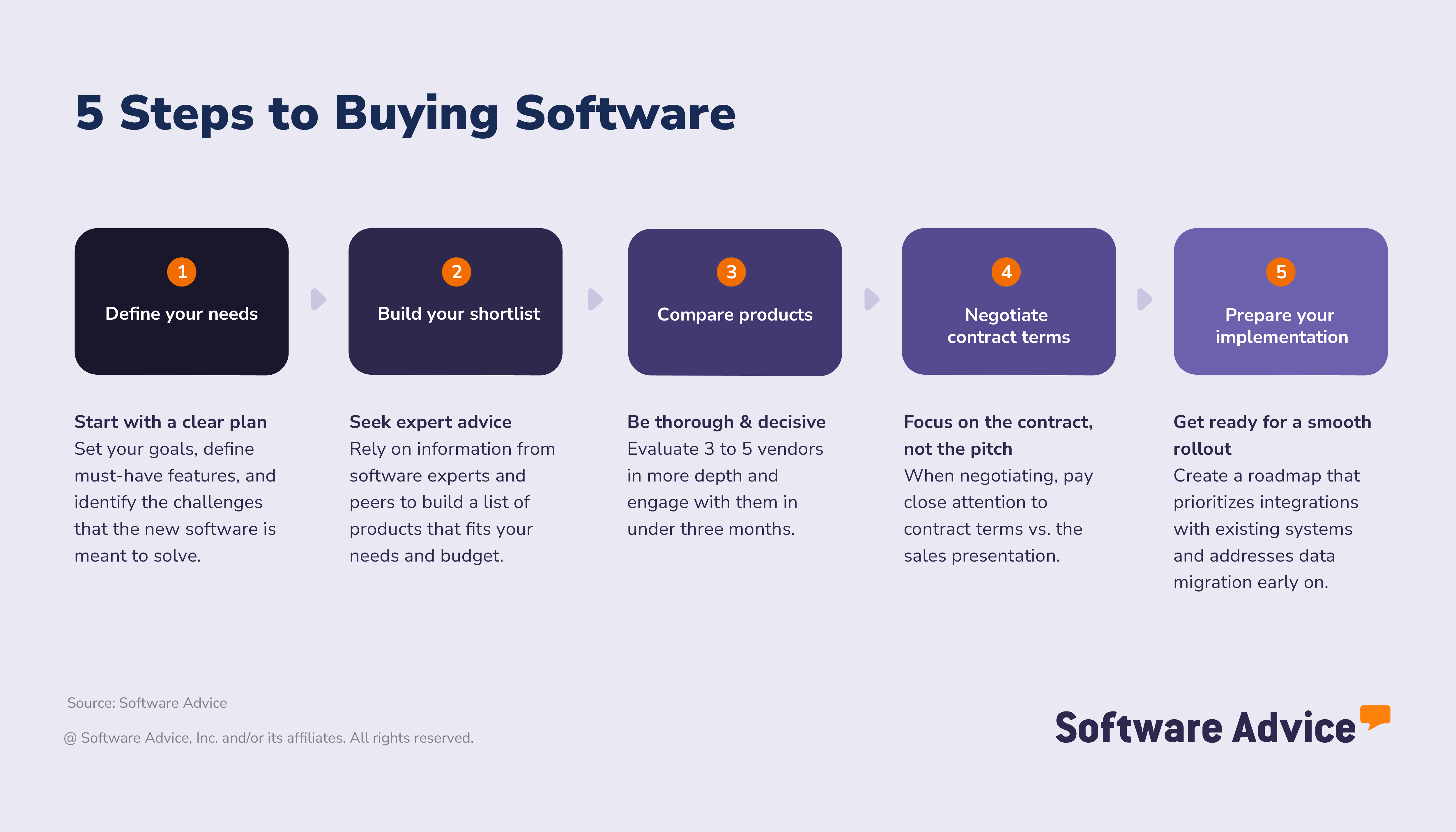
5 Steps to buying HR software
When evaluating HR systems, buyers consistently prioritize security, ease of use, and customer support.
How do we know this? According to our 2026 Software Buying Trends Survey, these three criteria rank highest for HR professionals comparing tools, reflecting the importance of protecting employee data, reducing administrative effort, and ensuring reliable help during setup and everyday use. [2]
Choosing HR software is a significant investment. The survey also shows that HR professionals plan to increase their software budget this year, with the top driver being the desire to add new functionality such as AI features (46%). Despite this increased spending, buying confidence remains mixed: 60% of HR buyers experienced disruption after implementation, and 51% reported disappointment with at least one software purchase over the past year.
These results reveal a clear divide:
Some buyers succeed: They select tools that fit their workflows, integrate cleanly with existing systems, and support long‑term growth.
Others struggle: This is often due to unclear requirements, overlooked integration needs, or insufficient support during rollout.
What’s the solution? This five‑step buyer’s guide outlines the practices associated with successful buyers. It’s designed to help HR teams avoid common pitfalls and choose software that aligns with their goals, operational needs, and future plans.
Step 1. Define your HR software needs and goals
Define what you expect the system to deliver and what a successful implementation should achieve.
More than half (52%) of HR software buyers who reported disappointment said they would have approached the process differently by conducting a more thorough needs assessment. [2] This early clarity helps prevent mismatches between expectations and functionality once the system is deployed.
Set your goals: What challenges do you want to solve with your human resources software?
Before selecting an HR system, define what success looks like for your organization. Goals should reflect your daily HR workflows, growth plans, and areas where manual processes create delays or inconsistencies.
Common goals include:
Improve payroll accuracy: Reduce manual entries and reconcile time and compensation data more efficiently.
Standardize time and attendance: Capture hours consistently across locations and teams.
Streamline personnel tracking: Maintain accurate, centralized employee records.
Strengthen onboarding: Organize forms, tasks, and training into a clear, repeatable workflow.
Enhance hiring workflows. Manage job postings, candidates, and interview steps in a single system.
Success metrics to consider include:
Reduction in payroll adjustments
Time saved in onboarding or hiring cycles
Consistency of employee records across systems
Percentage of employees using self‑service tools
Completion rates for required documentation or training
Reduced time‑to‑fill for open roles
Clear goals and measurable outcomes make it easier to compare vendors and ensure the system supports the work your team performs most often.
Set your requirements: Map business goals to features
While HR systems can vary in scope, most offer a mix of core capabilities that every organization needs and common features that support broader HR workflows. Each year, we speak to hundreds of human resources software users to understand which of these capabilities matter most in real‑world use for HR professionals, and here’s a handy breakdown: [3]
Core HR software features
Feature | Description |
Employee database | Centralized electronic storage of employee contact information, job details, and employment status to maintain accurate workforce records. |
HR management | Automate essential HR functions such as performance evaluations, talent development, and learning workflows to keep HR processes consistent and organized. |
Reporting and analytics | Provide dashboards and reports that help HR teams identify trends, monitor workforce activity, and support compliance documentation. |
Common HR software features
Feature | Description |
360‑degree feedback | Gather feedback from peers, managers, and direct reports to support employee development. |
Activity dashboard | Show the status of ongoing HR tasks and past activity to help teams stay organized. |
Applicant tracking | Manage job postings, applications, resumes, and interview stages throughout the recruiting cycle. |
Compensation management | Support processes for salaries, bonuses, and benefits payouts to maintain structured compensation practices. |
Customizable reports | Allow teams to modify report layouts and select which metrics to highlight. |
Employee management | Track schedules, performance, and availability across teams and roles. |
Onboarding | Guide new hires through required documentation, training tasks, and company orientation. |
Payroll management | Handles wage calculations, deductions, and payroll tax processes to ensure accurate employee payments. |
Self‑service portal | Lets employees update personal information, access pay details, and manage time‑off requests. |
Time and attendance | Captures work hours and supports payroll accuracy through time‑tracking tools and attendance records. |
How do you map payroll software features to outcomes?
Start with the fundamentals. Connecting your goals to the features that support them helps you understand which capabilities are essential and which are optional.
To streamline your selection process, start by outlining your software’s core tasks and operational standards by detailing both operational tasks and performance standards. Once defined, map every requirement directly to a corresponding feature. This alignment ensures your final shortlist remains strictly focused on essential business objectives, preventing you from being distracted by sophisticated yet irrelevant tools that don't serve your primary goals.
Goal area | Business goal (outcome) | Helpful features |
Payroll | Improve payroll accuracy and reduce manual reconciliation | Payroll management, time & attendance, and reporting/analytics |
Time & attendance | Capture hours consistently across teams and locations | Time tracking, scheduling, and mobile time capture |
Personnel tracking (core HR) | Maintain accurate employee records | Employee database, document management, and HR management |
Onboarding | Standardize new‑hire processes and documentation | Onboarding workflows, task lists, and learning & development |
Hiring (ATS) | Reduce manual steps and organize hiring workflows | Applicant tracking, recruitment management, and workflow automation |
Once goals and requirements are defined, the next step is anticipating how your needs may evolve. Many SMBs start with essential HR workflows, then expand into analytics, automation, or system integrations as headcount and operational complexity increase.
Identify stakeholders: Who needs to be involved for a successful human resources software purchase?
Selecting HR software requires input from multiple parts of the organization. Bringing the right stakeholders into the process early helps ensure that the system supports daily HR work, aligns with broader business processes, and integrates smoothly with existing tools.
Key stakeholders to involve include:
HR manager and payroll lead: Defines essential HR workflows such as onboarding, time tracking, personnel management, and hiring processes.
Finance director or controller: Evaluates budget considerations, reporting requirements, and how HR data connects with financial systems.
IT representative: Reviews security standards, data migration needs, integrations, and long‑term technical compatibility.
1–2 frequent users (e.g., HR coordinators, onboarding specialists): Offer practical insight into day‑to‑day tasks like processing new hires, updating employee files, or moving candidates through hiring steps.
Expert tip for SMBs:
"Involving HR leadership, finance, IT, and regular users from the start helps build a clear picture of your organization’s HR processes. Each group contributes different expectations—whether related to data accuracy, workflow consistency, system security, or day‑to‑day usability—leading to a more informed and successful software selection." - Emilie Audubert
Step 2. Build your shortlist and seek expert advice
Not every source of information about HR software provides the same level of clarity or relevance. How you research tools at this stage directly shapes the quality of your shortlist. In fact, the success of your purchase is directly related to the quality of the information you rely on to create your list of software vendors.
HR professionals rely on several key sources when evaluating software:
42% consult software comparison websites
41% use generative AI
36% turn to industry experts or vendor materials
This mix of inputs gives buyers a broad view of the market, but also highlights the importance of verifying information and balancing perspectives.
Get real advice from real people
Reviewing HR systems side‑by‑side helps you understand differences in usability, integrations, support, and deployment options. Verified user reviews offer insight into real‑world experiences, highlighting challenges and strengths that may not appear in marketing materials—especially helpful for SMBs with limited time for hands-on testing.
Software Advice provides access to more than 1000 HR products backed by verified user reviews and comparison tools, giving you an evidence‑based starting point for evaluating HR systems.
You can use our Software Comparison Chart to compare up to three software vendors across key product functionality, support resources, and deployment options.
How to leverage user reviews
User reviews are an essential source of insight for software buyers. Nearly one‑third human resources buyers say reviews have the greatest influence on their final decision. For HR software, reviews help validate how well a system supports everyday tasks such as onboarding, time tracking, payroll coordination, and hiring workflows.
Make reviews work for you by doing the following:
Filter by similar organizations: Prioritize feedback from companies with comparable headcount, industry demands (e.g., construction, healthcare, manufacturing), or staffing structures.
Look for workflow‑specific comments: Focus on insights about onboarding setup, time‑tracking reliability, payroll alignment, and ease of managing candidate pipelines.
Prioritize recent feedback: Sort reviews from the last 6–12 months to understand current functionality, updates, and support responsiveness.
Read ratings in context: A detailed 3‑star review explaining “time‑tracking integration required more setup than expected” is more actionable than an uncontextualized 5‑star comment.
Identify recurring themes: If multiple reviewers mention onboarding complexity, reporting limitations, or customer support responsiveness, these are areas to probe during demos.
Expert tip for SMBs:
"Use reviews to identify questions you want answered during demos. If several reviewers mention onboarding setup, reporting limitations, or support response times, make these topics part of your evaluation. This ensures the demo reflects your real priorities and helps you validate whether the system fits the way your HR team works." - Emilie Audubert
How much does HR software typically cost?
Most HR software buyers budget within well‑defined ranges.
Per‑user monthly pricing: Often falls between $5 and $15 for basic needs, around $125 for mid‑tier capabilities, and up to $650 for advanced functionality. Only a small share of buyers pays outside these ranges, making mid‑tier pricing the most common expectation. [4]
Flat-rate pricing: Typical monthly costs start between $140 and $280, increase to around $445 for mid‑tier plans, and may reach up to $2,500 for more complex implementations. These options are often suitable for organizations that prefer predictable, organization‑wide billing. [4]
Pricing varies based on the features you need, the size of your workforce, and how much integration or configuration your workflows require. To set a realistic budget:
Identify essential features such as payroll, time and attendance, personnel management, onboarding, and applicant tracking.
Consider optional capabilities like advanced analytics, AI‑supported tools, or integrations with payroll and benefits systems.
Account for one‑time costs—such as implementation, training, and data migration—which vary by vendor.
Expert tip for SMBs:
"Focus your budget on the tools your HR team uses most frequently. Features like time tracking, onboarding workflows, or hiring tools can deliver significant value when they reduce manual steps or centralize scattered information—helping you avoid unnecessary add‑ons and stay within budget." - Emilie Audubert
Step 3. Narrow your options and make your move
Once you have a shortlist, the next step is to evaluate vendors against critical criteria to ensure the solution aligns with your workflows and minimizes implementation risks.
Evaluation checklist
Use this checklist to assess whether an HR software product aligns with your requirements, workflows, and long‑term plans. It’s designed to help you focus on practical considerations that are often missed during demos or free trials, especially those affecting usability, data consistency, and scalability.
Core functionality fit
Does the system support your essential HR workflows (payroll, time tracking, personnel files, onboarding, and applicant tracking)?
Are the workflows flexible enough to match how your HR team operates today?
Are compliance‑related features (documents, training, certifications) easy to manage?
Integration readiness
Can the software integrate with your existing payroll provider, time‑tracking apps, or finance tools?
Does the vendor offer guidance or support during integration setup?
Are data syncs reliable and automated?
Ease of use for all roles
Is the interface intuitive for HR staff, managers, and employees?
Are mobile features strong enough for distributed teams or field‑based staff?
Do recent reviews reflect positive experiences regarding usability and support?
Support, training, and rollout
What onboarding assistance is included—guided setup, training modules, or live support?
How long does implementation typically take for businesses of your size?
Is post‑launch support available and well‑rated?
Scalability and long‑term fit
Does the system offer optional modules or analytics tools you may need later?
Are pricing tiers transparent as your organization grows?
Can the software support more locations, departments, or complexity over time?
A structured comparison checklist helps you assess vendors consistently and stay focused on your priorities during demos and trials. Pair it with your Software Comparison Chart to help you avoid overlooked details and maintain objectivity across all vendors you evaluate.
Expert tip for SMBs: How to get the most from your Software Comparison Chart?
Prioritize what matters most: Assign greater weight to the criteria that matter most to your HR workflows.
Balance features with business needs: Consider both feature-specific needs and broader business requirements.
Weigh compliance, cost, and experience: Evaluate factors such as compliance alignment, automation potential, total cost, and user experience.
Bring the right teams to the table: Involve stakeholders from HR, finance, IT, and frequent system users to ensure balanced scoring. - Emilie Audubert
How to schedule demos with HR software vendors
A live demo is the most effective way to understand how an HR platform supports your workflows, data needs, and daily tasks. It moves you beyond feature lists and into real‑world usability.
What the data tells us: HR buyers typically engage with 2.62 vendors from their shortlist and take 4.45 months on average to make a final decision. Planning demos intentionally can help shorten this timeline and ensure you gather the information needed for a confident selection.
Here’s how:
Request personalized demos: Ask vendors to walk through scenarios that match your daily HR activities—adding a new employee, assigning training, processing time entries, posting a job, or completing onboarding tasks. Seeing your actual workflows in action reveals whether the system fits how your team operates.
Try available free or lite versions: If the vendor offers a free trial or limited version, explore it before the demo. Hands-on experience with navigation, self‑service features, or time‑tracking tools will help you ask sharper questions during the live session.
Include a technical review: Plan a second demo for IT or operational stakeholders. Focus on data security, role‑based permissions, integrations with payroll or time‑tracking tools, and how data is migrated or synced. This ensures technical requirements are addressed before you move to contracting.
Expert tip for SMBs: Run identical tasks across products to spot the difference
"Schedule demos with your top three vendors and use identical workflows—such as onboarding a new hire, submitting time‑off, or moving a candidate through the hiring process—to compare systems consistently. This side‑by‑side approach gives you a clearer view of usability and highlights which platforms align best with your HR needs." - Emilie Audubert
What should you ask vendors when evaluating software?
A general product tour won’t give you enough information to make a confident decision.
Consider asking these questions during demos:
How does your platform handle onboarding workflows from start to finish?
Can managers and employees access the system through mobile devices?
What integrations are available with payroll, time tracking, or scheduling tools?
How flexible are user roles and permission settings?
Does the system support document management, training tracking, and compliance workflows?
How long does implementation typically take for an organization of our size?
What support options are available during setup and after go‑live?
These questions help reveal how well a vendor understands HR operations, and whether their system fits your organization’s current workflows and future plans.
Step 4. Negotiate contract terms and pricing
Get clarity before you commit.
Before selecting an HR system, make sure you understand the full cost structure, contract terms, and internal approval process. Transparent pricing and well‑defined agreements help prevent unexpected fees and reduce risk during implementation.
Glossary of HR contract terms
When reviewing HR software contracts, it’s important to understand provisions and clauses that affect data control, service quality, renewals, and long‑term flexibility.
Master services agreement (MSA): Outlines the overall business relationship, including scope of services, responsibilities, and payment terms.
Service level agreement (SLA): Defines expected system performance, including uptime guarantees and support response times.
Data ownership and portability: Clarifies who owns employee data and how it can be exported or transferred if you switch systems.
User permissions and access controls: Specifies how administrator, manager, and employee access levels are configured within the platform.
Cancellation and renewal terms: Explains renewal cycles, notice periods, and any penalties tied to early termination.
Implementation and onboarding scope: Details what setup includes—such as data migration, workflow configuration, and administrator training.
Integration support: Indicates which integrations are supported and whether the vendor assists with setup and ongoing maintenance.
Data retention and deletion policies: Describes how long employee records are stored and how data is removed or anonymized when no longer needed.
Pricing and module changes: Outlines how pricing is structured and how adding new modules or users affects your subscription.
Support and training commitments: Specifies available support channels, response times, and what training resources are included.
Expert tip for SMBs:
Before signing, ask your legal or compliance team to review any clauses that affect access to employee data, renewal timing, or integration responsibilities. These terms often have the biggest impact on day‑to‑day HR operations and can determine how easily your team manages onboarding, records, and system updates over time. - Emilie Audubert
What tips can help negotiate with human resources software vendors?
Negotiating HR software isn’t only about price—it’s about ensuring the agreement reflects how your organization actually works. Clear questions and contract awareness help you avoid hidden costs and secure terms that support your HR team long‑term.
Use these strategies to prepare for your conversation with HR vendors:
Clarify what’s included in core HR modules: Ask which features come standard with your plan—such as onboarding workflows, document storage, reporting, and ATS functionality—and which require an upgrade. Some vendors bundle features, while others charge separately for items like training tracking or automation.
Ask about integration commitments: If your HR system must connect to existing payroll, time tracking, or finance tools, request written confirmation of what is included in the contract. Clarify whether integration setup, maintenance, or troubleshooting incurs additional fees.
Understand user‑based access and license structure: If your staff includes seasonal employees, contract workers, or fluctuating headcount, ask whether licenses adjust accordingly. Some vendors offer flexible user tiers or usage‑based billing that better match varying HR staffing patterns.
Negotiate implementation and support terms: Implementation can be resource‑intensive for HR teams. Request clarity on what setup includes—data migration, onboarding workflows, permissions configuration—and ask whether administrator training or post‑launch support is covered in your initial contract.
Review renewal and pricing‑change clauses: Confirm how pricing may shift at renewal, whether modules can be removed without penalty, and how far in advance you must give notice to avoid automatic renewal.
Step 5. Prepare for implementation and long-term success
Choosing your HR software is only the beginning. To get the most value from it, you need a structured implementation process and a clear plan for long‑term use. Here’s how to position your HR team for a smooth rollout.
A well-defined implementation strategy helps minimize disruptions and ensures teams adopt the new HR system with confidence. Start with these foundational steps:
Onboarding
Designate a project lead: Pick someone who will coordinate tasks, manage communication with the vendor, and keep the rollout on schedule.
Create training paths for different user groups: HR staff, managers, and employees interact with the system in different ways. Develop focused training, e.g., how HR updates personnel files, how managers approve requests, how employees clock in or complete documents.
Set realistic phases for rollout: Break implementation into manageable stages—e.g, data import, configuration, HR testing, manager onboarding, and full employee launch. A phased schedule helps avoid bottlenecks.
Share expectations across teams: Communicate early how and when each group will start using the new system, what actions they’re responsible for, and where to get help if issues arise.
Compile support resources in one place: Provide easy access to vendor documentation, internal guides, FAQ documents, and training videos to minimize confusion during early use.
Integration and mobility
Connect the HR system to existing tools: Work with your vendor to link payroll, time‑tracking, benefits, or scheduling systems. Seamless integrations prevent inconsistent records and reduce manual work.
Enable mobile‑friendly workflows: If your workforce includes field staff, hourly teams, or multiple locations, ensure key tasks—time entry, approvals, job updates—work smoothly on mobile devices.
Verify data sync behavior: Test how employee details, schedule changes, and time entries move between systems. Confirm sync frequency, error handling, and troubleshooting processes.
Testing
Pilot with a small group first: Run trial workflows with the HR team and a few managers to surface issues before full rollout. Test onboarding, time tracking, approvals, job postings, and performance workflows.
Prepare for go‑live assistance: Ensure the vendor provides hands‑on support during your first days of full usage. Quick responses in the early weeks help maintain confidence and reduce disruptions.
Documentation and rollout
Confirm data accuracy before launch: Review employee profiles, job titles, reporting lines, and permissions to ensure migrated data is correct. Even small errors in HR data can create downstream issues for payroll or scheduling.
Roll out the system gradually: Introduce the platform in phases, starting with HR, then managers, then all employees. This approach helps contain issues and adjust training where needed.
Create ongoing feedback loops: Encourage HR staff, managers, and employees to report issues or suggestions. Gathering early feedback helps refine processes and improve adoption.
About our contributors
Author
Emilie is a content analyst at Software Advice. Always on the lookout for the latest technological and strategic trends for small and midsize businesses, she specializes in human resources topics.
Emilie’s research and analysis is informed by more than 250,000 authentic user reviews on Software Advice and over 20,000 interactions between Software Advice software advisors and HR software buyers. Emilie also regularly analyzes market sentiment by conducting surveys of HR leaders and practitioners so she can provide the most up-to-date and helpful information to small and midsize businesses purchasing software or services.
Her research has been featured in Forbes, CB News, Sud-Ouest, BPI France, and Siècle Digital, as well as on BSMART TV channel, covering topics such the challenges of employee retention or the state of women in the workplace.
Passionate about writing and storytelling in all its forms, she produces audio podcasts. She is fond of pugs and '70s rock.
Editor
Mehar Luthra is a team lead at Software Advice and specializes in editing reports that cover the latest trends affecting small businesses. With nearly a decade of experience, she has edited a multitude of research articles, top-rated software reports, and thought leadership articles for diverse markets such as Brazil, Japan, Canada, France, Australia, and India. She finds it particularly rewarding to produce content that provides small-business owners with practical tips and helpful advice on topics such as the digitalisation of small businesses, eCommerce trends, and HR developments.
Armed with a double bachelor’s in law (LL.B.) and business economics from Delhi University, she won a full scholarship to study for a master’s in creative writing at the National University of Ireland, Galway. In addition, she has written blog articles spanning a variety of topics such as fiction and non-fiction books, mental health and anxiety, the latest restaurants, and more. Her articles have been featured in Ireland’s national magazine The Village, among other publications. A die-hard journaling fan, she enjoys watching psychological thrillers, reading fiction books, and drinking iced coffee (even in the winter).
Advisor
Daniel Harvey is a software advisor. He joined Software Advisor in 2015, and he is based in Austin, TX. Daniel works directly with small business leaders to connect them with best fit software providers. He assesses the technology needs of small businesses seeking HR and learning management software through one-to-one conversations and provides a short list of potential matches.
Daniel's favorite part of being a software advisor is providing insight and information to individuals who are typically very busy and crunched on resources and time.
Sources
Software Advice's 2025 HR Software Trends Survey was conducted in April 2025 among 3,256 respondents in Australia (n=278), Brazil (n=300), Canada (n=289), France (n=300), Germany (n=300), India (n=294), Italy (n=300), Mexico (n=300), Spain (n=300), the U.K. (n=296), and the U.S. (n=300), (including 91 respondents in HR roles). The goal of the study was to understand the HR software that companies are buying, their benefits and challenges, and the impact of AI on HR. Respondents were screened for employment at companies with more than one employee, working in management-level roles or above. Respondents were also confirmed to be at least partially responsible for HR software purchase decisions within their organization.
Software Advice's 2026 Software Buying Trends survey was conducted online in August 2025 among 3,385 respondents in Australia (n=281), Brazil (n=278), Canada (n=293), France (n=283), Germany (n=279), India (n=260), Italy (n=263), Mexico (n=288), Spain (n=273), the U.K. (n=299), and the U.S. (n=588), at businesses across multiple industries, ages (1 year in business or longer), and sizes (5 or more employees). Business sizes represented in the survey include: 1,676 small (5-249 full-time employees), 822 midsize (250-999), and 887 enterprise (1,000+). The goal of this study was to understand the timelines, organizational challenges, research behaviors, and adoption processes of business software buyers. Respondents were screened to ensure their involvement in business software purchasing decisions.
Software Advice reviews data: Reviews are collected from verified users for individual software products.
Software Advice software pricing data: Only products with publicly available pricing information and qualified software products within the category are included in the pricing analysis.
Human Resources FAQs
- What is HR software?
HR software is a tool that centralizes employee data and automates tasks such as hiring, onboarding, time tracking, and recordkeeping. It helps teams stay organized and reduce manual work.
- What are the 3 types of HR systems?
The three main types are human resources information system (HRIS), human resource management system (HRMS), and human capital management (HCM) systems. An HRIS handles core HR data and basic processes, an HRMS adds broader functions like recruiting and performance management, and an HCM system is the most comprehensive with analytics and workforce planning.
- Who uses HR software?
Business owners, HR managers, generalists, office managers, and finance or operations staff use HR systems to manage daily people operations.
- How much does HR software cost?
Per‑user pricing typically ranges from $5 to $15 per user, per month for basic plans and up to $650 per user, per month for advanced needs. Flat‑rate plans range from $140 to $2,500 per month, depending on complexity.
- What features should I expect in HR software?
Core features include centralized employee records, HR management, and analytics. Common additions include time tracking, payroll alignment, onboarding, and applicant tracking. Advanced tools may include AI‑driven analytics or automated workflows.
- How do I choose the right HR software?
Match your needs to the features, test workflows in demos, review integrations, and compare vendors using a structured checklist. Quality of fit is more important than feature quantity.
- What should I ask during demos?
Ask vendors to show real workflows—onboarding, approvals, time entry, hiring steps—and clarify integrations, permissions, setup time, and support options.
- Is HR software secure?
Most platforms use role‑based access, encryption, and audit logs. Confirm how the vendor protects employee data and manages updates.
- Does HR software work for remote or multi‑site teams?
Yes. Many systems support mobile access, location‑based time tracking, and multi‑site scheduling, which are common needs in healthcare, construction, retail, and field services.