


Best IT Ticketing Systems software of 2026

- FrontRunners
- Popular Comparisons
- Buyers Guide
Compare Products
Showing 1 - 25 of 201 products
Compare Products
Sort by
Reviews: Sorts listings by the number of user reviews we have published, greatest to least.
Average Rating: Sorts listings by overall star rating based on user reviews, highest to lowest.
Alphabetically (A-Z): Sorts listings by product name from A to Z.

Claritysoft is a cloud-based customer relationship management (CRM) solution designed for midsize and large enterprise businesse...Read more about Claritysoft CRM


Claritysoft CRM's Best Rated Features
See All
Claritysoft CRM's Worst Rated Features
See All

Shape's cloud-based solution offers tools designed to manage online marketing and promotions, capture leads from online sources,...Read more about Shape


Shape's Best Rated Features
See All
Shape's Worst Rated Features
See All

SalesNOW by Interchange Solutions Inc. is a cloud-based customer relationship management (CRM) and sales force automation soluti...Read more about SalesNOW
SalesNOW's Best Rated Features
See All
SalesNOW's Worst Rated Features
See All

Zoho CRM is a cloud-based business management platform that caters to businesses of all sizes. It offers sales and marketing aut...Read more about Zoho CRM


Zoho CRM's Best Rated Features
See All
Zoho CRM's Worst Rated Features
See All

Rock Solid OneView is a Microsoft Dynamics-based citizen engagement platform that helps citizens and local governments work as o...Read more about Rock Solid
No reviews yet
recommendations


An Inc. 5000 fastest growing private company, recognized by Gartner as a top viable vendor for Integrated Revenue and Customer M...Read more about Symphony

Zendesk is a cloud-based help desk management solution offering customizable tools to build customer service portal, knowledge b...Read more about Zendesk Suite


Zendesk Suite's Best Rated Features
See All
Zendesk Suite's Worst Rated Features
See All

SAP Customer Experience is a cloud-based customer relationship management solution that helps small and mid-size businesses mana...Read more about SAP Customer Experience
SAP Customer Experience's Best Rated Features
See All
SAP Customer Experience's Worst Rated Features
See All

SalesOutlook CRM is a comprehensive customer relationship management (CRM) and email marketing system that embeds into Microsoft...Read more about SalesOutlook CRM

SalesOutlook CRM's Best Rated Features
See All
SalesOutlook CRM's Worst Rated Features
See All

HelpCrunch is a customer communication platform combining live chat, email marketing automation and a help desk in one solution....Read more about HelpCrunch

HelpCrunch's Best Rated Features
See All
HelpCrunch's Worst Rated Features
See All

TeamSupport is purpose-built for B2B SaaS companies to gain a 365° view of the customer. Centralize every interaction, sentiment...Read more about TeamSupport

TeamSupport's Best Rated Features
See All
TeamSupport's Worst Rated Features
See All

Workbooks is the 'No-BS' CRM. Workbooks designs, develops and implements its own software, which is targeted specifically at m...Read more about Workbooks

Workbooks's Best Rated Features
See All
Workbooks's Worst Rated Features
See All

Quickbase is a work management and application platform designed to help organizations centralize and manage complex projects an...Read more about Quickbase
Quickbase's Best Rated Features
See All
Quickbase's Worst Rated Features
See All

Salesforce Service Cloud is a customer service platform designed to support organizations in managing interactions across multip...Read more about Salesforce Service Cloud


Salesforce Service Cloud's Best Rated Features
See All
Salesforce Service Cloud's Worst Rated Features
See All

NetSuite is an AI-powered cloud-based business management suite that incorporates ERP, financial management, CRM and eCommerce f...Read more about NetSuite

NetSuite's Best Rated Features
See All
NetSuite's Worst Rated Features
See All

Flowlu is a cloud-based, all-in-one business management solution designed for teams of all sizes and industries. Whether you're ...Read more about Flowlu
Flowlu's Best Rated Features
See All
Flowlu's Worst Rated Features
See All

ScreenConnect is a cloud-based operations management solution that allows technicians to perform remote support, gain remote acc...Read more about ScreenConnect


ScreenConnect's Best Rated Features
See All
ScreenConnect's Worst Rated Features
See All

The Mortgage Office is a loan servicing solution designed for companies of all sizes. It offers loan tracking, payment processin...Read more about The Mortgage Office


The Mortgage Office's Best Rated Features
See All
The Mortgage Office's Worst Rated Features
See All

LiveAgent is a multichannel help desk solution with advanced AI features, live chat, ticketing, and call center capabilities. St...Read more about LiveAgent
LiveAgent's Best Rated Features
See All
LiveAgent's Worst Rated Features
See All

Asset Panda is a cloud-based platform for facility managers that offers a suite of applications including asset tracking and mai...Read more about Asset Panda
Asset Panda's Best Rated Features
See All
Asset Panda's Worst Rated Features
See All

Yonyx is a cloud-based solution designed to help call centers and customer service businesses create and manage interactive guid...Read more about Yonyx

Yonyx's Best Rated Features
See All
Yonyx's Worst Rated Features
See All

Pulseway is an integrated IT assets and network monitoring solution designed for IT administrators to remotely monitor and contr...Read more about Pulseway
Pulseway's Best Rated Features
See All
Pulseway's Worst Rated Features
See All

Creatio is a new era CRM to manage all customer and operational workflows with no-code and AI at its core. Creatio Sales is an ...Read more about Creatio CRM
Creatio CRM's Best Rated Features
See All
Creatio CRM's Worst Rated Features
See All

Hiver is a modern, AI help desk software designed for sleek, fast-moving teams. It rejects the false trade-off that power must m...Read more about Hiver

Hiver's Best Rated Features
See All
Hiver's Worst Rated Features
See All

Tracker is a web-based, integrated recruitment ATS and CRM designed for recruiting and staffing firms across industries. The sol...Read more about Tracker
Tracker's Best Rated Features
See All
Tracker's Worst Rated Features
See All
Popular Comparisons



Your Guide to Top IT Ticketing Systems Software, November 2022
Software Advice uses reviews from real software users to highlight the top-rated IT Ticketing Systems products in North America.
Learn how products are chosenExplore FrontRunners


“Usability” includes user ratings for Functionality and Ease of Use.
“Customer Satisfaction” includes user ratings for Customer Support, Likelihood to Recommend and Value for Money.
Reviews analysis period: The reviews analysis period spans two years and ends the 15th of the month prior to publication.

Buyers Guide
This detailed guide will help you find and buy the right it ticketing systems software for you and your business.
Last Updated on January 27, 2025As a business, you use a range of digital systems. To ensure the smooth functioning of these systems, you need a support team to resolve IT issues such as system bugs and software glitches.
You can help your support team be more effective at their job by investing in an IT ticketing system. IT ticketing software automatically assigns incoming IT requests to the right service desk agent, helping your support team tackle IT requests from employees as well as customers.
This guide will help you better understand the role of IT ticketing systems. It’ll explain how they fit into a general IT services management strategy, as well as what to consider when purchasing an IT help desk ticketing system.
Here’s what we’ll cover:
What is an IT ticketing system?
Common features of an IT ticketing system
Key considerations when purchasing an IT ticketing system
What is an IT ticketing system?
IT ticketing software allows your IT department to track and consolidate support requests from your team in one easy-to-manage location. This type of software is extremely common and goes by many different names. Incident management software, incident tracking software, trouble ticket software, IT helpdesk software, and helpdesk ticketing system are just a few examples.
Though there can be slight functional differences, all of these systems typically serve the following purposes:
Assign individual case numbers, or “tickets,” to each problem or issue reported by an end user.
Help process that ticket by assigning it to the support agent or department whose responsibility it is to address the particular problem it identifies.
Track the progress of the ticket as internal teams work toward a resolution.
Coordinate the work of different teams and the end user or customer, based on the ticket’s level of priority.
Provide a centralized, real-time view of the problems customers are having.
Offer insights into developing problems and help companies plan for future service needs.
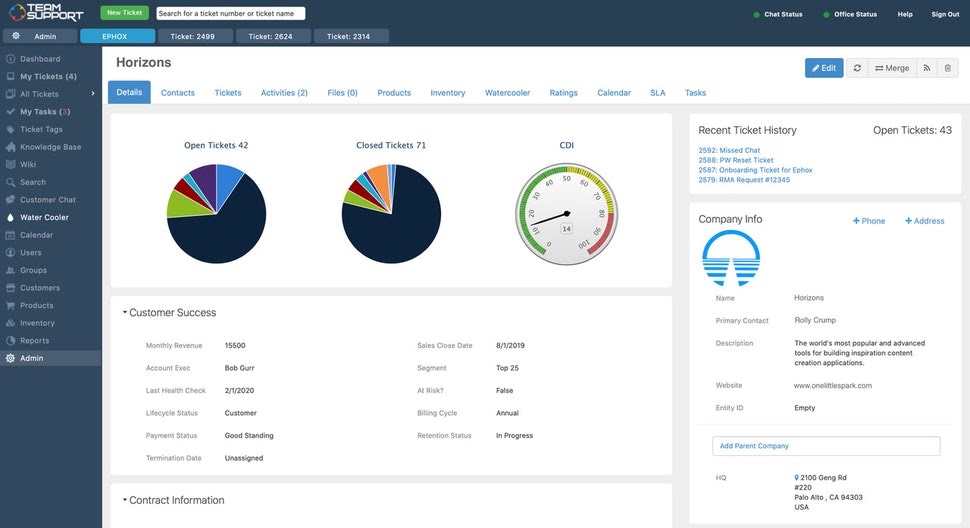
Tracking the status of customer support tickets in TeamSupport (Source)
Common features of an IT ticketing system
While IT ticketing systems come in a variety of industry-specific platforms (more on those below), there’s a group of core features common to most. These include:
Ticket creation | Allows tickets to be created by employees (or, occasionally, end users) to initiate a service request. Some platforms can automatically create tickets from emailed service requests. |
Ticket ownership | Maintains a record of each ticket’s ownership status, showing which agents have previously collaborated on it and which party is ultimately responsible for its resolution. |
Automated handling | Ticket ownership is updated and (re-)assigned automatically, based on a company’s specific workflow and predetermined conditions. |
Policy enforcement | Ticket policy enforcement helps make sure employees follow company policies and procedures. For example, it ensures they’ve completed all the necessary steps before opening, closing, or reassigning a ticket. |
Knowledge base | A knowledge base is a centralized repository of information that agents can refer to, learn from, and add to when handling tickets and collaborating with co-workers. |
Reporting and analytics | These tools measure the company’s ticket processing and provide insights into, for example, changes in ticket volume (which may suggest problems with a product) or the productivity of employees working on different types of tickets. |
Custom fields | The ability to add custom fields to IT tickets lets companies tailor and expand the system’s capabilities to their own specific needs, the needs of their industry, or the needs of customers. |
What type of buyer are you?
To make the right software purchase decision, you need to understand which buyer group you belong to and the group’s key concerns. Most buyers belong to the following categories:
Small and midsize businesses (fewer than 1,000 employees): These buyers are usually looking for an affordable solution that serves as a ticket management system for resolving employee or customer queries regarding IT issues. A cloud-based IT ticketing system with a low monthly or annual subscription fee is an ideal option for these buyers.
Enterprise buyers (1,000+ employees): These buyers are usually looking for a full-suite helpdesk ticketing system that comes with advanced functionality, such as the ability to add custom fields to tickets. They also need a system that offers integration capabilities with tools such as human resources (HR) software for faster tracking and assigning of tickets.
Key considerations when purchasing an IT ticketing system
There are many different kinds of IT ticketing systems available on the market. To find the right one for your business, keep these considerations in mind:
Niche ticketing management needs: IT ticketing systems are often bundled with other software applications and suites. However, a niche ticketing system can be beneficial for certain business use cases. For instance, if you’re a software development company then a bug tracking solution, which offers ticketing functionality, can be your choice for servicing customer tickets.
Employee service vs. customer service: If you’re looking for a ticketing management system to manage service requests from only employees, then help desk software can be useful as it bundles an IT ticketing system. But if you want a ticket system to help your customer support team handle customer issues effectively, then using customer service software would be a better choice.
Total cost of software ownership: The cost of IT support ticket software can rise when you want more features, such as live chat and a self service portal, besides ticket management. There can also be additional costs for services such as priority customer support, training, and user onboarding. Clarify all such costs during vendor discussions, so there aren’t any last-minute surprises.
Note: The application selected in this article is an example to show a feature in context and is not intended as an endorsement or a recommendation. It was obtained from sources believed to be reliable at the time of publication.