


Best Electronic Medical Records Software of 2026
Updated February 18, 2026 at 9:40 AM

Written by Lisa Morris
Associate Principal Analyst

Edited by Carolyn Santa Maria
Senior Editor

Reviewed by Rocco Mangione
Senior Medical Software Advisor

Talk with us for a free 15-min consultation
Expert advisors like Jacqueline, who have helped 1,000+ practices, can find the right software for your needs.
- All Software
- Software Advice FrontRunners
- Popular Comparisons
- Buyer's Guide
- Frequently Asked Questions
Electronic medical or health records (EMR or EHR) are used by medical practitioners to create and store digital versions of patient charts. With more than 400 products, the market is huge and complex. To help you narrow it down, I worked with our medical software advisors to curate a list of recommended productsi and a list of the EMR and EHR FrontRunners based on user reviews. For further information, read my guide to buying EMR software.
Electronic Medical Records Software
Sort by
Reviews: Sorts listings by the number of user reviews we have published, greatest to least.
Average Rating: Sorts listings by overall star rating based on user reviews, highest to lowest.
Alphabetically (A-Z): Sorts listings by product name from A to Z.

CharmHealth is a comprehensive suite of healthcare solutions designed to streamline practice management, revenue cycle managemen...Read more about CharmHealth


CharmHealth's Best Rated Features
See All
CharmHealth's Worst Rated Features
See All

RXNT’s cloud-based, ONC-certified medical software—Billing, Practice Management, EHR, and more—improves clinical outcomes & reve...Read more about RXNT


RXNT's Best Rated Features
See All
RXNT's Worst Rated Features
See All

The AdvancedMD EHR Software offers a comprehensive Electronic Medical Record (EMR) service designed to streamline and optimize v...Read more about AdvancedMD EHR
AdvancedMD EHR's Best Rated Features
See All
AdvancedMD EHR's Worst Rated Features
See All

athenaOne is an integrated solution designed for healthcare practices, offering electronic health records, revenue cycle managem...Read more about athenaOne


athenaOne's Best Rated Features
See All
athenaOne's Worst Rated Features
See All

Tebra helps independent medical practices plug the revenue leaks caused by no-shows, manual processes, and slow reimbursements. ...Read more about Tebra


Tebra's Best Rated Features
See All
Tebra's Worst Rated Features
See All
Software Advice FrontRunners 2026

(526)

(488)

(363)

(644)

(446)

(752)

(96)

(83)

(74)

(117)
Best for Customer Satisfaction

EHR YOUR WAY

In our analysis of Electronic Medical Records products with the most market demand, EHR YOUR WAY is the highest rated for customer satisfaction out of the most popular tools.
EHR YOUR WAY is best for organizations prioritizing customer satisfaction, including behavioral health and medical practices seeking tailored solutions. Our reviewers say the platform is highly customizable, with responsive support that streamlines onboarding, reduces documentation errors, and adapts to unique workflow needs.
- Reviewers Perspective
"I like the features it offers for things like treatment plans and intake forms and I appreciate the reminders it offers for deadlines since this is something I often rely on."
DRDana Robinson
Therapist
Used for 2+ years
We analyzed 332 verified user reviews for EHR YOUR WAY to find out what actual users really think.
EHR
Clinics use EHR YOUR WAY to streamline documentation, note-taking, scheduling, and provider communication. The platform adapts to various specialties and supports efficient clinical workflows.Training and Learning Curve
Teams benefit from hands-on sessions, video resources, and continued support. Practices find onboarding manageable, with most users adapting quickly after initial training.Treatment Plans
Behavioral health providers document treatment plans using customizable templates, free text options, and reminders. Coordination across providers is supported, though some workflows require further customization. - Key FeaturesEHR YOUR WAY's scoreCategory average
Charting
4.794.37 category average
HIPAA Compliant
4.884.78 category average
Patient Records Management
4.914.49 category average
- Screenshots


Best for Quick Implementation

Jane

In our analysis of Electronic Medical Records products with the most market demand, Jane is the most requested by users for quick implementation out of the most popular tools.
Jane is best for practices seeking quick implementation, such as clinics and solo providers who value a smooth onboarding process. Our reviewers point out that Jane offers clear training resources and responsive support, making setup and day-to-day use efficient even for new users.
- Reviewers Perspective
"Ease of use for clinician and client, availability to create surveys for clients to fill out, or for clinicians to use valuable measures online, helpful team members who are qualified to answer any questions."
TWTricia Wilson
Clinical Traumatologist
Used for 2+ years
We analyzed 327 verified user reviews for Jane to find out what actual users really think.
Clinic Management
Jane consolidates scheduling, staff coordination, and workflow automation. Clinics of all sizes use it to manage communication and documentation, adapting to solo and multi-provider settings.Patient Management
Practices leverage Jane for easy appointment booking, secure record access, and efficient note management. Customizable features and telemedicine options support effective patient care.Billing and Payment
Jane handles billing, scheduling, and payment processing in one platform. Clinics manage financial tasks efficiently, though insurance billing and report customization can be challenging for complex needs. - Key FeaturesJane's scoreCategory average
Charting
4.734.37 category average
HIPAA Compliant
4.884.78 category average
Patient Records Management
4.684.49 category average
- Screenshots


Best for Quick Adoption/Easy Adoption

ModMed

ModMed is the highest rated for its ease of adoption out of the most popular tools, based on our analysis of Electronic Medical Records products with the most market demand.
ModMed is best for practices focused on quick and easy adoption, particularly in dermatology and specialty care. Our reviewers say the intuitive iPad interface and robust training resources help staff of varying tech skills become proficient quickly, reducing charting time and improving workflow.
- Reviewers Perspective
"It has made charging patients so much easier. Because of the ease, you can spend more time focusing on patients and less time in an iPad."
TKTracy K
Office Manager
Used for 2+ years
We analyzed 239 verified user reviews for ModMed to find out what actual users really think.
Ease of Use
Staff can quickly navigate patient records, complete charting, and manage daily tasks with minimal effort. This streamlines workflows in medical practices, freeing up time for patient care and reducing administrative burden.Customer Support
ModMed’s support team addresses questions and technical issues efficiently. Practices benefit from quick turnaround times and the ability to resolve concerns through various channels, though some report inconsistencies in post-implementation service.Training and Learning Curve
New staff can access webinars, videos, and hands-on sessions to become comfortable with ModMed. Medical practices value ongoing learning resources, which help teams adapt quickly—even those without prior healthcare experience. - Key FeaturesModMed's scoreCategory average
Charting
4.694.37 category average
HIPAA Compliant
4.864.78 category average
Patient Records Management
4.674.49 category average
- Screenshots


Highly Rated for Customization

ClinicSense

Of the products listed on our FrontRunners report, ClinicSense is the highest rated for customization out of the most popular tools.
ClinicSense is highly rated for customization, making it ideal for massage therapists and small clinics wanting to tailor workflows and forms. Our reviewers say it streamlines scheduling, SOAP notes, and client management, with flexible options that save time and support efficient practice operations.
- Reviewers Perspective
"It’s a professional, user-friendly platform that streamlines booking, reminders, SOAP notes, and invoicing, making practice management much easier. While there are some drawbacks with scheduling gaps, mobile SOAP note entry, and limited access to other practitioners’ notes, the benefits far outweigh the cons."
MAMaria Awad
REGISTERED MASSAGE THERAPIST
Used for 2+ years
We analyzed 464 verified user reviews for ClinicSense to find out what actual users really think.
Appointment Scheduling
Practitioners use ClinicSense to manage appointment scheduling, enabling both staff and clients to book, reschedule, and receive reminders. Online booking, automated notifications, and control over availability help reduce administrative workload and optimize calendars for health and wellness practices.Customer Support
ClinicSense’s support team provides prompt, knowledgeable help through written guides and personalized video responses. Ongoing updates and attentive communication ensure practitioners’ questions and technical issues are addressed quickly, supporting daily operations in small clinics.Online Booking
ClinicSense’s online booking lets clients schedule appointments anytime, reducing scheduling errors and administrative time. Seamless integration with practice management features enhances client satisfaction and streamlines workflows for massage and wellness businesses. - Key FeaturesClinicSense's scoreCategory average
Charting
4.794.37 category average
HIPAA Compliant
4.934.78 category average
Patient Records Management
4.834.49 category average
- Screenshots


Most Rated for Enterprise

Epic

According to our user reviews, Epic is the most requested by enterprises out of the most popular tools.
Epic is most rated for enterprise use, making it well-suited for large healthcare organizations and hospitals. Our reviewers say it supports complex workflows, integrates records across facilities, and offers robust customization and interoperability for high-volume environments.
- Reviewers Perspective
"Epic is a very comprehensive electronic medical record system and seamlessly integrates all outpatient and inpatient records for patients."
STShirley Tran
Professional Development Leader
Used for 2+ years
We analyzed 303 verified user reviews for Epic to find out what actual users really think.
Patient Charting
Providers use Epic to access, document, and review patient information efficiently. Customizable templates and smart phrases streamline charting and support thorough documentation across care teams.Hospital Use
Epic manages large volumes of patient data, supporting workflows across departments and care settings. Hospitals standardize processes for inpatient and outpatient care, facilitating collaboration among staff.Patient Information
Clinicians rely on Epic for timely access to patient data, secure sharing, and communication across facilities. Patient portals and telemedicine support enhance provider workflows and patient engagement. - Key FeaturesEpic's scoreCategory average
Charting
4.554.37 category average
HIPAA Compliant
4.934.78 category average
Patient Records Management
4.474.49 category average
- Screenshots
Best for User Interface

Carepatron

Carepatron is the highest rated for its user interface out of the most popular tools, based on our analysis of Electronic Medical Records products with the most market demand.
Carepatron is best for those seeking a strong user interface, such as solo practitioners and small clinics needing an intuitive, all-in-one platform. Our reviewers point out its user-friendly design, efficient workflow, and easy document management help streamline daily tasks and improve organization.
- Reviewers Perspective
"I believe that this app has been very useful for healthcare professionals, the best feature so far has been the introduction of AI that helps with note taking. Once there are new options for note taking or the ability to record calls that may not be through video, it would also be helpful."
JSJoanna Stewart
Mental Health Therapist
Used for 6-12 months
We analyzed 303 verified user reviews for Carepatron to find out what actual users really think.
Templates
Practices use Carepatron’s templates to streamline documentation and adapt forms for specific needs. The platform allows easy creation, modification, and organization of templates, supporting diverse clinical workflows.Patient Practice Management
Clinics manage records, appointments, and patient engagement efficiently with Carepatron. Features like secure document storage and customizable care plans support daily operations in solo and growing practices.Client Management
Practitioners organize client records, track progress, and securely store information. Customizable folders and online sharing benefit both practitioners and clients, though onboarding and communication limitations may arise. - Key FeaturesCarepatron's scoreCategory average
Charting
4.424.37 category average
HIPAA Compliant
4.784.78 category average
Patient Records Management
4.614.49 category average
- Screenshots


Highly Rated for Automation


Of the products listed on our FrontRunners report, Practice Better is the highest rated for automation out of the most popular tools.
Practice Better is highly rated for automation, making it a strong fit for health and wellness professionals who want to streamline scheduling, billing, and client management. Our reviewers say automation features reduce administrative workload and help keep practices organized and efficient.
- Reviewers Perspective
"I love that the platform has everything I need in one place: Booking, invoicing, charting, online course building and secure messaging with my clients. When I need to learn how to use something in the platform, the easy-to-follow instructions and videos are very helpful!"
PTPamela Tessmann
International Board Certified Lactation Consultant
Used for 1-2 years
We analyzed 73 verified user reviews for Practice Better to find out what actual users really think.
Client Scheduling
Practices consolidate appointment booking, messaging, client records, and invoicing in one platform. Group and individual scheduling is managed efficiently, supporting organized workflows for wellness and healthcare providers.Ease of Use
Practice Better offers an intuitive platform with fast onboarding and accessible design. Teams and clients of varying experience levels can navigate features easily, reducing operational friction.Client Support
Practices streamline administrative work and client-facing tasks with Practice Better. Onboarding is simplified, and features support communication, program management, and HIPAA compliance for diverse client needs. - Key FeaturesPractice Better's scoreCategory average
Charting
4.744.37 category average
HIPAA Compliant
4.954.78 category average
Patient Records Management
4.854.49 category average
- Screenshots


Most Rated for SMBs

OptiMantra

In our analysis of Electronic Medical Records products with the most market demand, OptiMantra is the most requested by small businesses out of the most popular tools.
OptiMantra is most rated for SMBs, making it ideal for small and midsize health and wellness practices seeking flexibility. Our reviewers say it offers customizable templates, efficient workflows, and supportive onboarding, allowing teams to tailor the platform to their unique needs.
- Reviewers Perspective
"One of the standout features for me is the seamless integration of Fullscript directly into the chart note—this alone has saved me an incredible amount of time and streamlined my patient workflow."
ACAlexis Chesney
Naturopathic Physician, Owner
Used for 1-2 years
We analyzed 67 verified user reviews for OptiMantra to find out what actual users really think.
Customer Support
Practices can rely on OptiMantra’s support team for onboarding, troubleshooting, and ongoing help. Multiple channels and proactive staff make transitions and daily use smoother for clinics of all sizes.Charting
Clinicians document sessions, order labs, and e-prescribe directly within chart notes. Charting layouts adapt to different practice types, supporting efficient claims submission and reducing documentation time.Clinic Management
OptiMantra supports small and multidisciplinary clinics with robust templates and reasonable pricing. The platform maintains organization and efficiency, aided by ongoing support for diverse healthcare specialties. - Key FeaturesOptiMantra's scoreCategory average
Charting
4.654.37 category average
HIPAA Compliant
4.914.78 category average
Patient Records Management
5.04.49 category average
- Screenshots


Best for Usability

DocVilla

DocVilla is the highest rated for its usability out of the most popular tools, based on our analysis of Electronic Medical Records products with the most market demand.
DocVilla is best for usability, appealing to clinics and practices that want an all-in-one EHR that is easy to learn and navigate. Our reviewers say the platform simplifies daily tasks, offers responsive support, and is accessible even for users with limited technical experience.
- Reviewers Perspective
"Simple to use, has everything is one place, lot of psych templates and also has the ability to create custom templates, customer service is super helpful."
LJLa’Risha Jeter
NP - Owner
Used for 6-12 months
We analyzed 68 verified user reviews for DocVilla to find out what actual users really think.
Ease of Use
Administrative and clinical staff use DocVilla for daily tasks, finding it accessible across devices and easy to navigate. The interface supports efficient workflows and helps both staff and patients manage records and appointments with minimal training.Medical Practice Management
DocVilla enables practices to schedule appointments, manage patient records, and use templates tailored to their workflows. The platform suits various practice sizes and specialties, providing secure management and helpful customer support for medical offices.Customer Support
DocVilla’s support team is available on weekends and offers patient, professional assistance. Practices benefit from smooth transitions and quick issue resolution, ensuring efficient operation and reliable support for medical staff. - Key FeaturesDocVilla's scoreCategory average
Charting
4.984.37 category average
HIPAA Compliant
4.984.78 category average
Patient Records Management
5.04.49 category average
- Screenshots


Most Used By Health, Wellness and Fitness

Healthie

Healthie is the most requested by users in health, wellness and fitness out of the most popular tools, based on our analysis of Electronic Medical Records products with the most market demand.
Healthie is most used by health, wellness, and fitness professionals who need a versatile platform for client management and virtual care. Our reviewers say it is intuitive, easy to onboard, and supports efficient workflows for practices of all sizes.
- Reviewers Perspective
"Enjoying the interaction with clients as I look to scale more programs in the platform coming out of my beta testing with a small cohort of clients I'd like the way healthy is constantly adding more features. As a PT using Healthie, I'd also like to see more remote measuring outcome tools like 2D pose estimation for monitoring mobility and joint range of motion improvements."
DDDavid Dansereau
Owner
Used for 1-2 years
We analyzed 93 verified user reviews for Healthie to find out what actual users really think.
Practice Management
Clinicians use Healthie to manage scheduling, billing, and telehealth from a single interface. The platform supports practice growth, clinician onboarding, and HIPAA compliance, with a mobile app for remote management.Customization Options
Practices tailor documentation, forms, and embedded features to fit their workflows. The clean design and website integration help maintain organization and professionalism, though some want more flexibility.Charting
Healthcare professionals keep client records, document sessions, and access previous notes within Healthie. Charting, scheduling, billing, and messaging are unified, streamlining workflow and follow-up care. - Key FeaturesHealthie's scoreCategory average
Charting
4.344.37 category average
HIPAA Compliant
4.684.78 category average
Patient Records Management
4.504.49 category average
- Screenshots


Praxis EMR

- Reviewers Perspective
"Praxis is intuitive, seamlessly integrates various components of the EMR like scheduling , patient demographics, medical records, consult notes, labs results electronic prescriptions ,medication list among others."
LQLarry Quirit
Physician
Used for 2+ years
We analyzed 176 verified user reviews for Praxis EMR to find out what actual users really think.
Practice Management
Practices customize Praxis EMR to fit specialty and reporting needs. The software learns and evolves with each encounter, supporting growth and efficient operations.Ease of Use
Teams write notes in their own words with Praxis EMR. The interface adapts to documentation style, avoiding rigid templates and enabling quick productivity for new staff.Physician Practice
Physicians document encounters in ways that match clinical thinking. Praxis EMR supports independent practice and adapts to regulatory requirements, though prescription management and compliance can be challenging. - Key FeaturesPraxis EMR's scoreCategory average
Charting
4.934.37 category average
HIPAA Compliant
4.984.78 category average
Patient Records Management
5.04.49 category average
- Screenshots


RXNT

- Reviewers Perspective
"RXNT strikes a great balance between simplicity and functionality."
LALisa Abern
PMHNP
Used for 1-2 years
We analyzed 331 verified user reviews for RXNT to find out what actual users really think.
Ease of Use
Staff navigate RXNT’s clean layout to streamline charting and daily tasks. Access across devices and customizable templates help manage workflows without unnecessary complexity.E-Prescribing
Clinicians use RXNT’s e-prescribing tools for efficient medication management. The platform supports compliance, handles controlled substances, and enables prescription access from mobile devices.Training and Learning Curve
Teams leverage RXNT’s training sessions and video resources to learn functions quickly. Even staff with limited technical experience can integrate the software and train others efficiently. - Key FeaturesRXNT's scoreCategory average
Charting
4.144.37 category average
HIPAA Compliant
4.784.78 category average
Patient Records Management
4.134.49 category average
- Screenshots


athenaOne

- Reviewers Perspective
"AthenaOne is very quick with posting test results and visit notes so that patients can review and consult with their provider about them."
LLLaWanda Lewis
Patient Coordinator
Used for 1-2 years
We analyzed 14 verified user reviews for athenaOne to find out what actual users really think.
- Key FeaturesathenaOne's scoreCategory average
Charting
4.184.37 category average
HIPAA Compliant
4.694.78 category average
Patient Records Management
4.274.49 category average
- Screenshots


Tebra

- Reviewers Perspective
"The user interface is intuitive and well-designed, making it a breeze for our staff to navigate and utilize its full potential."
CBColey Bennett
Administrator
Used for 2+ years
We analyzed 540 verified user reviews for Tebra to find out what actual users really think.
Ease of Use
Staff navigate Tebra’s interface to locate features and complete daily tasks quickly. The platform’s clear organization supports efficient management for both new and experienced users.Training and Learning Curve
Teams use Tebra’s onboarding coaches, video tutorials, and self-guided modules for manageable learning. Live sessions and webinars make it easy to teach new staff and revisit topics.Customer Support
Onboarding specialists and training resources help early adoption. After onboarding, users report slow response times and unresolved issues, impacting reliability for ongoing support. - Key FeaturesTebra's scoreCategory average
Charting
3.744.37 category average
HIPAA Compliant
4.364.78 category average
Patient Records Management
3.744.49 category average
- Screenshots


Remedly

- Reviewers Perspective
"Remedly is very easy to use!"
CEChristine Eros
medical director
Used for 1-2 years
We analyzed 60 verified user reviews for Remedly to find out what actual users really think.
Ease of Use
Staff manage daily tasks with Remedly’s intuitive design. Minimal training is needed to navigate features, streamlining workflows and improving access to information.Patient Management
Clinics organize medical records and communications in Remedly. Fast note-taking and integrated billing, scheduling, and engagement tools support timely care and well-documented histories.Scheduling
Teams book and manage appointments using Remedly’s intuitive interface. Coordinating providers and streamlining patient check-ins helps maintain smooth workflows for staff and patients. - Key FeaturesRemedly's scoreCategory average
Charting
4.484.37 category average
HIPAA Compliant
4.724.78 category average
Patient Records Management
4.654.49 category average
- Screenshots


- Reviewers Perspective
"It has simplified practice management by reducing the need for multiple systems, and it has supported better client engagement through its telehealth tools. While there’s a small learning curve, once you get comfortable, it’s a powerful and efficient solution for therapists looking to streamline their workflow."
MRMohamed Rauf
Designer
Used for 6-12 months
We analyzed 62 verified user reviews for TheraPlatform to find out what actual users really think.
Therapist and Client Management
Therapists use TheraPlatform to simplify onboarding and scheduling. The platform supports multiple therapy disciplines and maintains client engagement throughout the therapy process.Ease of Use
Clinicians and clients navigate TheraPlatform’s user-friendly interface to manage daily tasks. Minimal training is needed, reducing administrative time and making the system accessible.Billing and Notes
Practices combine telehealth, scheduling, documentation, and billing in TheraPlatform. Customizable templates and streamlined claim submissions help manage invoices and payments efficiently. - Key FeaturesTheraPlatform's scoreCategory average
Charting
4.574.37 category average
HIPAA Compliant
4.914.78 category average
Patient Records Management
4.774.49 category average
- Screenshots


- Reviewers Perspective
"I LIKE THE SET UP FOR UPLOADING DOCUMENTS, IT'S EASY EVEN WITH THE RECENT CHANGES, I CREATE THE PROFILE AND LOAD ALL INITIAL DOCS."
FRFreda Rowe
CLIENT CARE MGR.
Used for 2+ years
We analyzed 25 verified user reviews for Checkpoint EHR to find out what actual users really think.
- Key FeaturesCheckpoint EHR's scoreCategory average
Charting
4.814.37 category average
HIPAA Compliant
4.954.78 category average
Patient Records Management
4.504.49 category average
- Screenshots


- Reviewers Perspective
"Althea was easy to use, adaptable, and improved our practice management."
VRVelina Ruelas
Administrator
Used for 2+ years
We analyzed 33 verified user reviews for Althea Smart EHR to find out what actual users really think.
- Key FeaturesAlthea Smart EHR's scoreCategory average
Charting
4.924.37 category average
HIPAA Compliant
5.04.78 category average
Patient Records Management
5.04.49 category average
- Screenshots


Medesk

- Reviewers Perspective
"It is very easy to use and is intuitive, making it user-friendly."
JDJosé David Tavera Vega
Psicólogo
Used for 6-12 months
We analyzed 92 verified user reviews for Medesk to find out what actual users really think.
Ease of Use
Teams use Medesk’s clear interface to streamline daily tasks. The platform adapts to varying technical experience, helping eliminate paperwork and enabling quick learning.Appointment Scheduling
Staff organize appointments and telehealth visits with Medesk’s scheduling tools. Secure data management supports coordination, though rescheduling and calendar viewing can be time-consuming for high-volume organizations.Medical Records
Clinics digitize records and store files in Medesk. The user-friendly design and robust storage help streamline workflows, build patient loyalty, and maintain clinical care standards. - Key FeaturesMedesk's scoreCategory average
Charting
3.384.37 category average
Patient Records Management
4.294.49 category average
- Screenshots


Juvonno

- Reviewers Perspective
"Juvonno is a very intuitive platform that makes managing daily clinic operations straightforward for both our administrative and clinical teams."
DMDavid McKay
Assistant Clinic Director
Used for 2+ years
We analyzed 53 verified user reviews for Juvonno to find out what actual users really think.
- Key FeaturesJuvonno's scoreCategory average
Charting
4.594.37 category average
HIPAA Compliant
4.834.78 category average
Patient Records Management
4.504.49 category average
- Screenshots


Practice EHR

- Reviewers Perspective
"The software is user-friendly, clean, and just overall great to use!"
FZFaalik Zahra
Manager
Used for 2+ years
We analyzed 66 verified user reviews for Practice EHR to find out what actual users really think.
Ease of Use
Teams navigate Practice EHR’s clean interface to access information quickly. Sentence shortcuts and simple checkbox selections speed up documentation, supporting smooth operations across multiple locations.Customer Support
Staff rely on Practice EHR’s support team for prompt answers and regular check-ins. Courteous, knowledgeable representatives help resolve technical issues and implement changes, maintaining workflow continuity.Patient Scheduling
Front office staff use Practice EHR’s scheduling tools for quick appointment booking and insurance verification. Integrated text and email reminders streamline check-in, though overlapping appointments and limited printing options remain challenges. - Key FeaturesPractice EHR's scoreCategory average
Charting
4.404.37 category average
HIPAA Compliant
4.954.78 category average
Patient Records Management
4.614.49 category average
- Screenshots


CharmHealth

- Reviewers Perspective
"Charm is user friendly and the support staff has been great."
CGCassaundra Graves
Billing Administrator
Used for 6-12 months
We analyzed 107 verified user reviews for CharmHealth to find out what actual users really think.
Charting
Clinics transition from paper records using CharmHealth’s intuitive charting. Personalized templates and secure uploads help maintain professional notes and streamline workflows in a HIPAA-compliant environment.Charm
Practices use CharmHealth for labs, billing, and scheduling. The platform adapts to various devices and practice requirements, offering affordability and responsive feedback for implementation.Customization
Healthcare teams create custom intake forms and automate processes with CharmHealth. The platform adapts features to unique needs and evolves based on user feedback, enhancing efficiency across settings. - Key FeaturesCharmHealth's scoreCategory average
Charting
4.154.37 category average
HIPAA Compliant
4.674.78 category average
Patient Records Management
4.454.49 category average
- Screenshots


Nexus EHR

- Reviewers Perspective
"Perhaps the single greatest feature that we love about Nexus EHR is our ability to personalize the software program to meet our individual provider and specialty practice needs!"
CGCynthia Garrett
Practice Administrator
Used for 2+ years
We analyzed 32 verified user reviews for Nexus EHR to find out what actual users really think.
- Key FeaturesNexus EHR's scoreCategory average
Charting
4.734.37 category average
HIPAA Compliant
4.544.78 category average
- Screenshots


- Reviewers Perspective
"I love this software and how easy it was to use."
EMEzra Myers
Owner
Used for 1-2 years
We analyzed 252 verified user reviews for AdvancedMD EHR to find out what actual users really think.
Ease of Use
Staff adapt quickly to AdvancedMD EHR’s accessible tools. The software is less complicated than others, enabling both experienced and inexperienced users to complete daily tasks efficiently.User Interface
Teams operate AdvancedMD EHR’s interface with ease. Helpful video guides and responsive support make the PM and EHR modules simple to use and understand for daily operations.Customization
Practices tailor AdvancedMD EHR’s forms, templates, and workflows to fit specific needs. The software’s flexibility supports various specialties and administrative preferences, enhancing efficiency. - Key FeaturesAdvancedMD EHR's scoreCategory average
Charting
3.154.37 category average
HIPAA Compliant
4.524.78 category average
Patient Records Management
3.954.49 category average
- Screenshots


MDnet EHR

- Reviewers Perspective
We analyzed 13 verified user reviews for MDnet EHR to find out what actual users really think.
- Key FeaturesMDnet EHR's scoreCategory average
Charting
4.534.37 category average
HIPAA Compliant
4.604.78 category average
Patient Records Management
4.744.49 category average
- Screenshots
Methodology
The research for the best EMR software list was conducted in October 2025. We evaluated data (user reviews and demand signals) from the past 24 months as of the research date. Read the complete methodology.
Popular Electronic Medical Records Comparisons


Buyer's Guide
This detailed guide will help you find and buy the right electronic medical records (EMR) software for you and your business.
Last Updated on September 25, 2025Here's what we'll cover:
Essential features of EMR software
Benefits and competitive advantages of using EMR software
How to choose the best EMR software for your practice
Key insights from our 2025 Medical Tech Trends Report
More resources for your EMR journey
What you need to know about EMR software
Electronic medical records (EMR) software is a record keeping system that digitizes paper medical charts for healthcare professionals. Our research shows that 99% of medical providers are already using an EMR system—clearly an essential tool for healthcare. [1] EMR is also the number one type of medical software buyers ask about when they call Software Advice for help. Of more than 17,000 conversations with software buyers over the past year (nearly 6,000 of which were solo practices), 86% asked about EMRs. [2]
To give you an idea of the market, we have over 400 different EMR vendors on our site, and we’ve published more than 3,000 reviews for EMR products in the past year alone. For medical practices, it’s not a question of whether or not you should have an EMR system in place, the question is what kind of EMR system do you need?
Factors like pricing will obviously have a big impact on this answer. Although prices for more sophisticated systems can run as much as $9,000 per month, entry-level plans cost an average of $274 per month and many products offer free versions. [3]
First-time buyers should begin evaluating with a budget, number of users, specific use cases, and necessary integrations in mind. Ensure you’ve consulted with stakeholders on a list of critical questions to help you evaluate systems based on your needs, such as:
Does the software offer a self-service portal for patients?
What type of assessment templates are included?
Can the assessment templates be easily customized?
How can your business migrate the patients data into the software database?
Is the software HIPAA compliant?
Because there are so many different vendors, choosing the right option can be a long, daunting process. In this guide, you’ll learn about the essential components of EMR software, get step-by-step guidance on how to choose the right solution for your practice, and tap into the expertise of our experienced medical software advisors, Lexi Smith and Rocco Mangione, who have been leading buyers to the right software for over a combined 10 years. Reach out to schedule a consultation with them or any of our advisors.
What is EMR software?
Electronic medical records software (EMR), often used interchangeably with electronic health records software (EHR), is a collection of features and tools that allow medical providers to create, store, share, and update patients' digital health records more easily and more securely than with paper charts.
Common features of EMR software include digital charting, order entry, decision support, and clinical reporting. In addition to making life easier and processes faster for healthcare workers, this software can also help physicians qualify for government incentives, meet regulatory requirements, and improve overall care quality.
Essential features of EMR software
When comparing EMR software systems to choose the best system for your practice, it's important to know what features you can expect to see. Some functionality, like charting and patient records management, are core features that will be available in every EMR system. Other features are still common, such as documents management and e-prescribing. We analyzed thousands of reviews and spoke to thousands of healthcare providers to determine what we believe are core features of EMR software.
Core EMR features
Patients record management | Consolidate all patient's clinical history along with administrative and billing information in one place. 96% of reviewers on our site rate this feature as critical or highly important. |
Charting | Prepare digital charts in real time related to patients’ medical problems and diagnoses. Merge all patient record information into a single chart. For charting, many EMR solutions offer customizable templates and users can select desired fields as per their needs. Charting is an essential component of modern EMR software, and 89% of our reviewers rate this feature as critical or highly important. |
Common EMR features
Document management | Store, manage, and track all electronic documents in a centralized location. 90% of our reviewers rate this feature as critical or highly important. |
Medical billing | Manage billing and payments for a healthcare provider. 68% of reviewers rate this feature as critical or highly important. |
E-prescribing | Electronically print and transmit prescriptions to pharmacies of the patient's choice. Receive automatic notifications related to various interactions with pharmacies such as dosage amounts, allergies, and prescriptions. 66% of our reviewers rate this feature as critical or highly important. |
Patient portal | Enable patients to login and access various information such as their medication history, number of visits to the doctor, and lab results. Improve patient engagement by promoting active participation and ownership of their own healthcare. |
Order entry | Enter, store, and transmit orders for lab tests, medication orders, and other services. |
Decision support | Receive automated treatment alerts, reminders, or recommendations meant to help patients based on their specific conditions and demographics. |
As an advisor specializing in medical software, Mangione confirms buyers can expect to see certain newer features more frequently in the coming years. For example, telehealth has become a lot more common in EMR systems since the pandemic, enabling users to connect with patients remotely via secure video conferencing. Many vendors are already including these features or partnering with outside telemedicine platforms.
Another forward-looking feature that we are already seeing integrated into EMR systems: artificial intelligence (AI). Mangione states, “AI scribing has become a popular new feature among providers, and many vendors are adapting to meet this demand. More advanced systems will allow for quicker documentation features and macros, which helps save the provider's time."
If you’d like to know more about EMR features and get recommendations for your practice, schedule a call with Mangione, Smith, or one of our other medical software advisors to discuss your options.
Benefits and competitive advantages of using EMR software
Smith has been helping medical organizations find software to run their practices for 3 years and counting. Based on her conversations with buyers, the two biggest benefits to adopting an EMR are automatic workflows and improving the insurance claims and billing process. She notes that purchasing an EMR can “allow an office to see more patients rather than spending so much time on keeping paper trails, scheduling, or billing. They also automate the insurance billing process, which allows for claims to be approved more quickly, resulting in providers being paid sooner.”
In addition to streamlined operations and more efficient collections, our data shows that EMR software gives medical practices other benefits directly impacting patients, including:
Better quality of patient care: Features such as integrated drug databases, symptom checks, and drug interaction verification help physicians prescribe the correct medications and dosages.
Improved clinical reporting: When patient information and medical record systems are digitized, it's much easier to create reports that identify and track health risks for individuals or groups of people. These reports can help physicians intervene earlier when a patient is developing a worsening health condition. An EMR's reporting tools can also make it possible for practices to participate in Medicare payment programs such as the Merit-Based Incentive Payment System (MIPS).
Enhanced care coordination: It's important for charts to be easily accessible and legible so they can be shared with all authorized providers on a patient's care team, such as specialists and technicians. An EMR system provides a standardized format to clearly present dated patient information that can be shared digitally—which is more secure than printing and transporting or faxing sensitive medical records to authorized colleagues.
These are just benefits of general EMR systems, but when specialty providers adopt EMRs with specialty-specific features they can expect even more. For example, by using specialized mental health EHRs, therapists can expect access to telemedicine features like video conferencing, allowing providers and patients to more quickly and easily conduct appointments without having to leave their homes.
There are specialized EMR systems for nearly every medical specialty, and all of these systems will have the competitive advantage of offering unique, specialty-specific features in addition to the core functionality of general EMRs.
How to choose the best EMR software for your practice
Step 1: Define your requirements
Before selecting an EMR system, it’s important to start by outlining your practice’s specific needs. These will guide you towards the system that aligns with your present operational demands and supports your long-term goals.
What is the cost of EMR software?
The price of EMR software is difficult to generalize because it depends on factors that vary by buyer, such as:
Number of users
Required features
Size of patient panel
Availability of IT support staff
Patient data migration needs
That said, we have some data-backed insights that can help small, midsize, and large practices determine how much they should budget for a stand-alone EMR system (excluding setup costs).
Budget for your whole medical tech stack
It’s important to consider your entire medical tech stack as you plan and budget for your EMR purchase. EMR software is a critical system to have in place for a well-run (and legally compliant) practice, but it’s not the only necessary tool. You may also benefit from additional tools like practice management systems for streamlining operations, revenue cycle management for optimizing billing and collections, or telemedicine platforms for offering remote care options.
The question is, do you want all of these different feature sets to be rolled into one system—a more comprehensive EHR platform? Or do you want to purchase these tools as separate standalone systems?
Either way, your records-keeping system is likely to account for the largest chunk of your tech budget, so it’s important to choose the right system from the jump—especially considering typical vendor contract terms.
Prepare for a long-term contract—and negotiate
In our experience, most EMR vendors prefer buyers to sign contracts for 3-5 years. Fortunately, practices have the opportunity to negotiate some elements of these contracts, such as setup costs, that can have an impact on the bottom line.
But these long term contracts make it even more important for practices to ask all the right questions before signing on with a vendor. “Buyers often want to go with the cheapest solution, but they don’t realize there may be limitations with functionality, integrations, or even customer support,” Smith points out.
“The worst thing a buyer can do is commit to a system solely based on pricing, and then realize after a few weeks or months that they need a more comprehensive EHR solution.”
Read more about different EMR pricing options in our guide to understanding EMR pricing.
Consider federal regulations when selecting your EMR
Many practices are in the market for an EMR specifically because they want to participate in government health care initiatives that incentivize the use of health IT.
Whether you were one of the thousands of physicians who got an EMR to cash in on Meaningful Use incentives or you're a first-time buyer preparing for the Medicare Access and CHIP Reauthorization Act of 2015 (MACRA), it's clear that regulatory compliance is a huge purchase driver for practitioners.
Your best bet for ensuring a system has the robust functionality necessary to meet government health care regulations is to choose an "ONC-certified" EMR. These systems have been tested and certified to confirm they offer a set of technological capabilities, functionalities, and security requirements approved by the Office of the National Coordinator for Health Information Technology (ONC).
Be aware of potential drawbacks
While there are many benefits of implementing EMR software, there are also potential pitfalls you may encounter while purchasing EMR. The good news is, they’re very avoidable. Here are some of the most important ones to be aware of:
Security: One common concern for EMR software buyers is data security. Patient privacy and HIPAA compliance are typically on the front of providers' minds, so buyers should make sure that the EMR is implemented properly and that standard security features exist in the system. Most vendors are well aware of buyers' security concerns and have taken steps to ensure proper data encryption technology is in place for both on-premise and web-based systems. Additionally, a digitized medical record is often safer than a paper chart.
User adoption: A second consideration is user adoption, primarily among providers. Some providers find EMRs difficult to use because they are used to working with paper charts. Most user adoption issues can be solved with adequate training. The amount necessary depends on the user's tech savviness.
Interoperability challenges: Interoperability is the transfer of patient data between different EMR systems so authorized providers can access and interpret that data. While vendors are making progress toward achieving interoperability, it's still an issue the industry is struggling with. Fortunately, technologies such as direct messaging make it easier to share records electronically.
Additionally, it’s important to recognize what EMR software can’t do. For example, you will likely have to find a payroll system outside of your EMR, as things like time tracking and scheduling for employees aren’t available in many EMRs.
Plan around integration options
Another important consideration when selecting EMR software is how the new system will integrate with your existing hardware and operational software.
Does your practice use diagnostic machinery like X-rays, MRI scans, or bloodwork? Do you utilize telemedicine? Does your specialty require more specific tools that general practitioners don’t use? Do you use a patient portal to communicate with patients and allow self scheduling? If so, you need an EMR that will be able to collect, store, and display results from any of these systems.
Likewise, you need to check your billing options to make sure those programs are compatible with your new EMR. While many EMR systems come with a fully integrating billing module these days, there are still some standalone products that require third party billing integrations.
Step 2: Make a shortlist of EMR software
With so many EMR software options to choose from, it can be a challenge to narrow down the options that are right for your practice—but with the right resources and support, it doesn’t have to be.
Get qualified help from an advisor
At Software Advice, our advisors like Mangione and Smith have experience helping hundreds of healthcare providers identify solutions that match their needs and budgets.
If you need guidance, you can chat online now with an advisor or schedule a phone call. In just a few minutes, your advisor will help you identify a shortlist of options that align with your practice’s requirements.
Explore our list of EMR FrontRunners
If you’re not ready to speak to an advisor just yet, you can also start compiling your shortlist of EMR software with our FrontRunners report. Only products that earn top user ratings make this list. To be eligible for consideration, a product must:
Have at least 20 unique user reviews in the last 24 months
Be a stand-alone EMR software product
Offer these features:
Charting
Decision support
Coding assistance
Check out our full methodology description for more detail on how the report is compiled.
Step 3: Pick your best option
Vendor demos are the next step after narrowing down your options. These sessions help you explore features, understand pricing, and ultimately make the right investment. Preparation is key to getting the most out of these sessions.
How to prepare for vendor demos
Once you’ve compiled your shortlist of EMR software systems, you’ll begin to schedule demo sessions with each vendor in order to learn more about their product. This is your chance to ask questions about the features they offer, pricing, technical support, training tools, and anything else that might be an important factor in choosing the right EMR system for your practice.
Some questions you should consider asking vendors in each demo include:
What kind of customer support do you offer during implementation?
One of the major reasons implementations fail is a lack of proper customer support and assistance. Be sure to ask vendors what plan they have to assist your staff members during the implementation process.
How often do you update your EMR software and what updates are you planning for your next release?
Look for answers such as, "Yes, we update our software regularly and offer free updates to our customers," or "Yes, we update our software regularly and our next version is scheduled to be released in three months." Products that are updated regularly are usually better when it comes to addressing customer requests and offering functionality to meet changing regulatory requirements.
What customization options are currently available?
The ability to customize existing EMR features can help you get exactly what you want from your new software. A given system may include specialty-specific features that don't apply to your practice, for example, so the ability to tailor a system to your specific needs will make it more efficient and cost effective.
To help you keep track of the questions you want to ask each vendor and their answers, we’ve created an EHR vendor scorecard. Use this checklist to ensure you’re asking the right questions and objectively considering their answers.
Step 4: Make the most of your EMR software
Once you’ve made your selection and finalized your EMR software purchase, you’ll begin the implementation process. Whether you’re switching from one EMR to another or going from paper charts to your first electronic system, there are some important considerations you’ll want to pay attention to during this process:
Data migration: Transferring all of your patient data and records from an existing EMR to a new system is time consuming, but it’s crucial to get this part of the process right. Communicate with both your old and new EMR providers to make sure nothing gets missed in this part of the process.
Training: Once you have the new system in place, you’ll want to make sure your staff fully understands how to use it. If possible, you should lean on your new EMR provider to run staff training sessions and provide training materials. Be aware that this will take some time, so plan on holding multiple training sessions and refresher courses until everyone feels confident with the new EMR.
Communication: Realistically, the implementation process may cause some delays or confusion for your staff that could impact patients. In order to head off any potential issues, it’s helpful to communicate with patients that you’re in the middle of an EMR transition. This is a great way to set expectations, reassure patients that any issues will be temporary, and remind them that you’re doing this in order to provide even better care.
For more details on how to ensure a smooth transition, check out our guide here.
Software related to EMR
Depending on which EMR you choose, you may need to supplement some features with related software systems in order to provide the most convenient care to your patients. Some types of software that are closely related to EMR, but may or may not be included in your EMR system, include:
Behavioral/mental health EHR software: Electronic medical record (EMR) systems for mental and behavioral health providers have unique features for counselors, mental health clinics, and group practices.
Medical billing software: Medical billing systems help providers generate patient statements and submit claims. This software is ideal for practices that want to handle billing in-house.
Patient portal software: Patient portal systems allow patients to access their own healthcare information, pay bills, schedule appointments, and communicate directly with providers. This software is an ideal way to keep patients engaged with their own care and improve outcomes.
Patient scheduling software: Patient scheduling systems make it easier to set and manage your schedules by automating the process. You can enable patients to schedule their own appointments without needing to call your office, and automated appointment confirmation and reminder notifications can be sent to decrease no-show rates.
Telemedicine software: Telemedicine systems are HIPAA-compliant tools that allow medical professionals to provide care to patients remotely using features such as secure video conferencing, chat, and messaging.
Key insights from our 2025 Medical Tech Trends Report
Software Advice conducts an annual Tech Trends survey to assess the key initiatives among software buyers. This year, we surveyed 364 healthcare organizations to identify three key insights. Here’s what we found.
IT and cybersecurity are still a top priority
When asked about their priorities for budgeting and investment in 2025, healthcare organizations in our survey identified IT security—specifically cybersecurity and data protection—and IT management as their top two most important considerations.
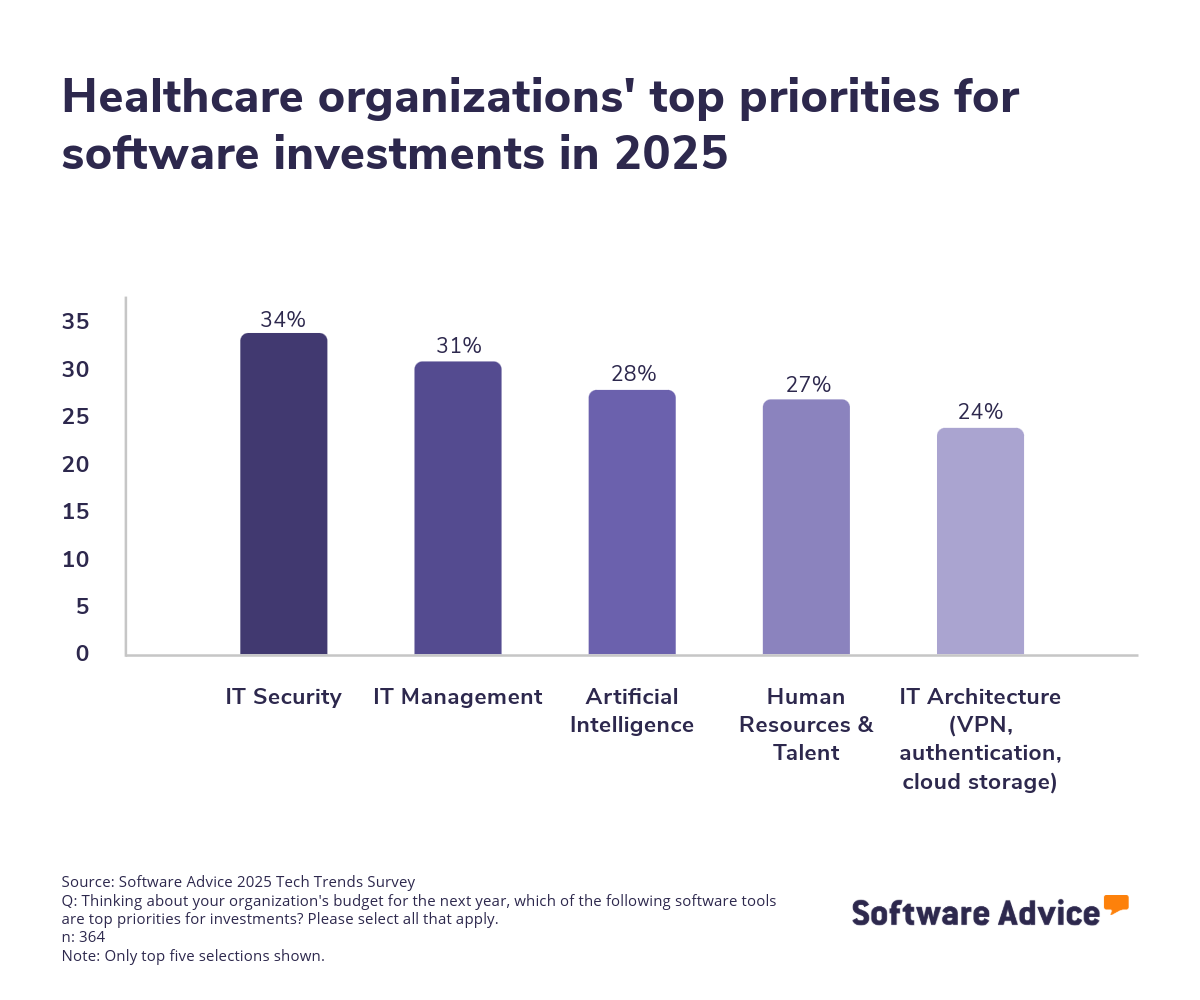
We also asked what challenges healthcare organizations face when planning to purchase new software, and 45% say security is the biggest concern for software adoption.
This is consistent with data from last year’s survey, in which we found healthcare organizations were also prioritizing data security in their software budgets, and it’s not at all surprising considering healthcare leads all industries in the highest costs associated with data breaches.
The longer it takes to choose software, the higher the risk of buyer’s remorse
This year’s survey shows that, while careful consideration is crucial to choosing software, the longer it takes for healthcare organizations to go through the research and software selection process, the more likely they are to regret their purchase. On average, software buyers in the medical field who say they regret their purchase took five months to evaluate and choose their software. On the other hand, buyers who did not indicate regret only took an average 3.7 months to go through the same process.
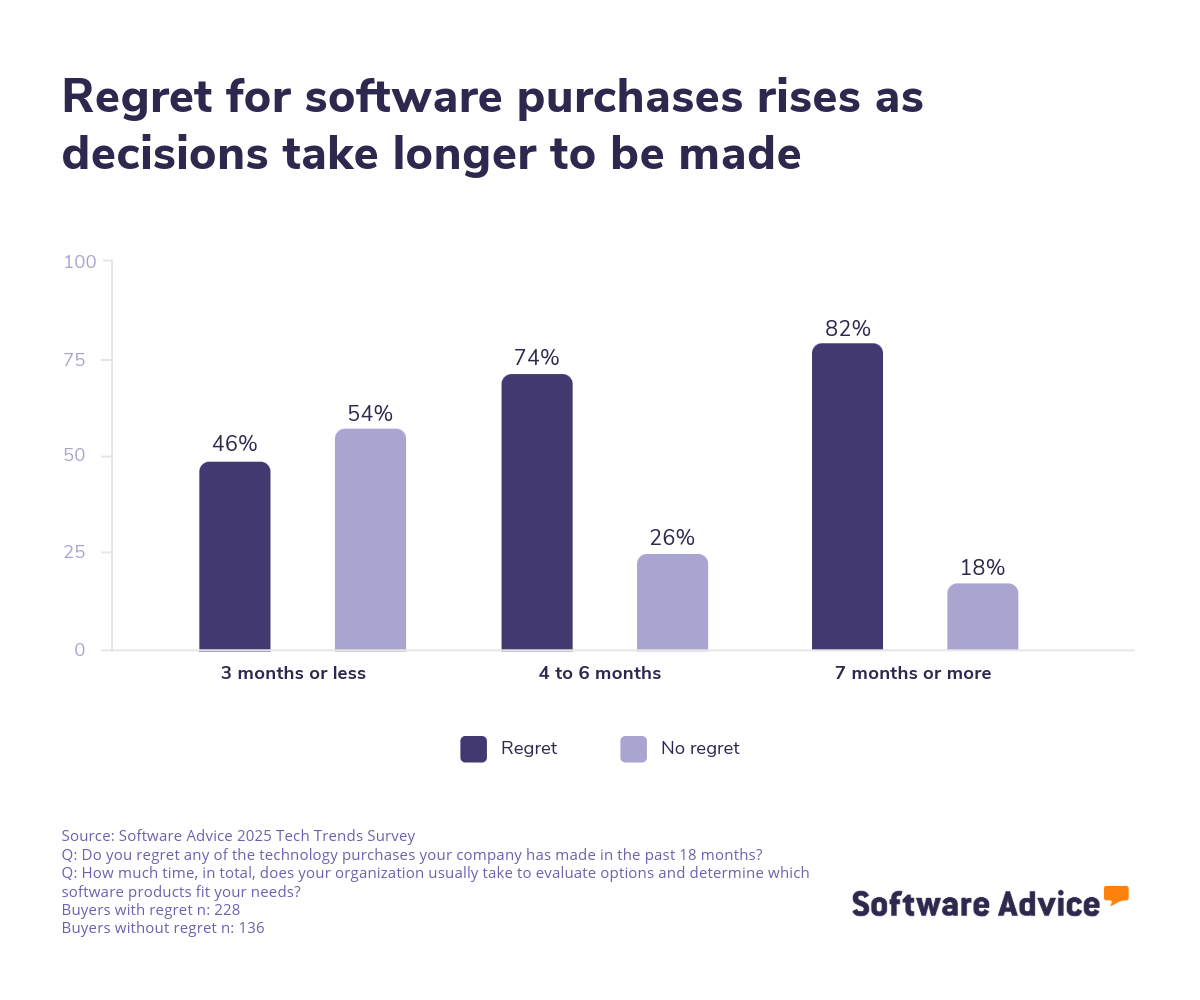
Successful buyers are more likely to make their decision quickly, with 64% determining the right product for them in three months or less. But speed alone is not the best way to ensure you won’t regret your software purchase—you should also follow the right steps to properly vet your options.
Most orgs anticipate growth in 2025
Lastly, and perhaps most positively, our survey finds that most medical organizations expect to grow in 2025, with 85% anticipating at least 5% in revenue growth—and a quarter expecting to grow in revenue by 15% or more. Some factors like finding and hiring the right talent remain a challenge, but healthcare is largely considered recession-resistant due to its essential nature.
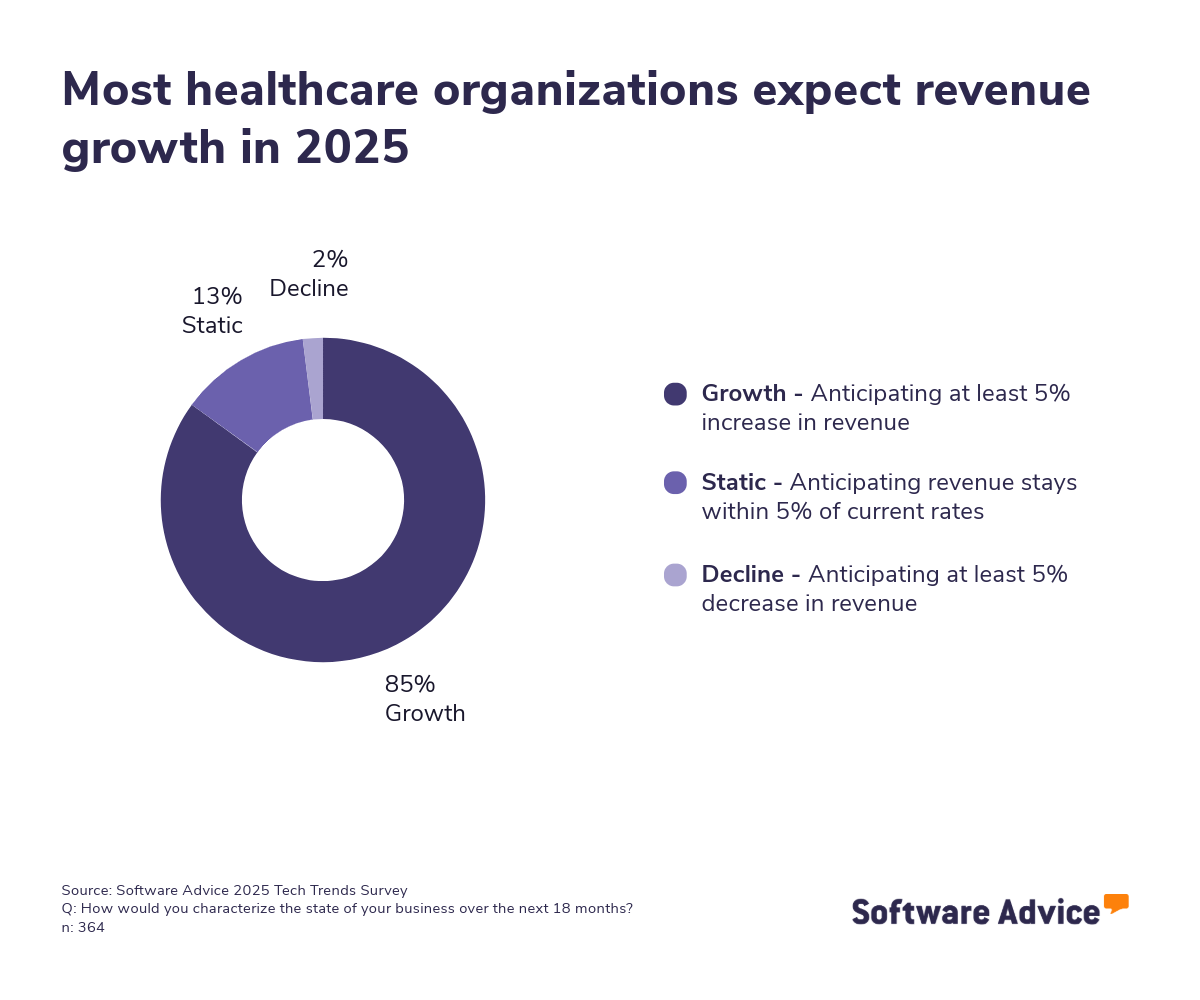
This expectation is informing budgeting decisions as well. Our survey finds that 75% plan to spend more on software in 2025 than they did last year.
More resources for your EMR journey
About our contributors
Author
Lisa Morris is an associate principal analyst at Software Advice, covering the healthcare and medical industry, with a focus on technologies impacting independent practices and mental healthcare, such as electronic medical records and practice management tools.
Lisa’s research and analysis is informed by more than 15,000 authentic user reviews on Software Advice and over 20,000 interactions between Software Advice software advisors and medical software buyers. Lisa also regularly analyzes market sentiment by conducting surveys of medical practitioners and administrators so she can provide the most up-to-date and helpful information to small and midsize businesses purchasing software or services.
She presented her research on medical wearable devices at the 2022 Sensors Summit in La Jolla, California, and also appeared on the Health Innovation Matters podcast with Logan Plaster. Her work has been featured in multiple publications, including Becker’s Hospital Review, Healthcare IT News, and AP News.
Editor
Carolyn Santa Maria is a senior editor at Software Advice. Carolyn has been working in content for more than five years as an editor. With her keen eye for detail, technical experience, and cross-team collaborative expertise, she has developed new content types, briefs, and processes for a variety of different projects and teams. She has edited a large variety of content, including research reports, white papers, eBooks, email marketing campaigns, and many other types of technical papers.
When she isn’t correcting grammar or changing the structural flow of an article, Carolyn is spending her time with her nose in a book, cuddling with her dog Mac, or traversing Austin looking for the best meal.
Advisors
Rocco Mangione is a senior software advisor. He joined Software Advice in 2020 as a software advisor. He is based in Austin, Texas.
As part of the software advisor team, Rocco helps medical professionals who are seeking electronic medical records, mental health, telehealth, or home health software. He provides a short list of personalized technology recommendations based on their budget, business goals, and other specific needs. Rocco’s favorite part of being a software advisor is helping people save time as they look for the right software tool for their medical practices.
Rocco holds a bachelor’s degree in business and sports management. He has spent nearly five years advising small businesses and medical practices through their software selection process.
Lexi Smith is a software advisor at Software Advice. She joined the Software Advice advisor team in 2018, and she is based in Austin, Texas.
As a software advisor, Lexi works directly with small business leaders to connect them with best fit software providers. She assesses the technology needs of small businesses seeking medical, mental health, telehealth, and home health software through one-to-one conversations and provides a short list of potential matches. Her favorite part of being on the Software Advice advisor team is being an unbiased resource software buyers can rely on.
Lexi holds a bachelor’s degree in business marketing, and she has spent nearly three years helping members of the medical field identify the right technology for their practices.
Sources
Software Advice's 2023 Digital Minimalism survey was conducted in July 2023 among 100 doctors, RNs, nurse practitioners, and physician assistants. We used screening questions to ensure respondents' titles fit our criteria and that everyone who participated in our survey had worked at their current practice for at least two years. We conducted this survey to gain insight into what software platforms are commonly used by these healthcare workers, how much time they spend learning and using them, and to what extent software contributes to medical employee burnout.
Software Advice advisor call notes: Findings are based on data from telephonic conversations that Software Advice’s advisor team had with small-to-midsize businesses seeking ophthalmologic tools. For this report, we analyzed phone interactions from August 1, 2023, to August 1, 2024. Read the complete methodology.
Software Advice software pricing data: Only products with publicly available pricing information and qualified software products within the category, as of November 29, 2023, are included in the pricing analysis. Read the complete methodology.
Software Advice’s 2025 Tech Trends Survey was conducted online in August 2024 among 3,500 respondents in the U.S. (n=700), U.K. (n=350), Canada (n=350), Australia (n=350), France (n=350), India (n=350), Germany (n=350), Brazil (n=350), and Japan (n=350), at businesses across multiple industries (including 364 in the healthcare industry) and company sizes (5 or more employees). The survey was designed to understand the timeline, organizational challenges, adoption & budget, vendor research behaviors, ROI expectations, and satisfaction levels for software buyers. Respondents were screened to ensure their involvement in business software purchasing decisions.
Electronic Medical Records FAQs
- What is the purpose of EMR?
An EMR system digitally stores and manages patients' medical information digitally, making it easily accessible to healthcare providers. EMRs streamline the documentation process, enabling quick retrieval of patient histories, treatment plans, and diagnostic results. In a nutshell, the purpose of an EMR is to make your job as a medical provider easier.
- What are electronic medical record systems?
EMRs are digital medical records systems that improve accuracy and reduce errors by providing decision support tools and standardized templates.They also help ensure compliance with regulatory requirements by following HIPAA regulations and standardizations, and they facilitate billing and insurance claims processing by automating tasks like coding services and electronically submitting claims to insurance companies.
- What is the difference between EHR and EMR?
The main difference is that EMRs are designed for use by a single healthcare provider, whereas EHRs are built to facilitate the exchange of information between different healthcare providers. EMRs are generally not designed to share patient records outside of an individual practice, which limits their ability to exchange information with other healthcare providers or systems.
- How many electronic health records systems are there?
Although it’s hard to come up with a concrete number for how many EMR or EHR systems exist, we have 468 profiles for individual EMR products on our website. Additionally, we have published nearly 3,500 verified user reviews for EMR products on our site in the past year—345 in the last month alone [3].
- What is the best electronic medical record system?
Our FrontRunners research, which analyzes recently published user reviews to come up with products that are highly rated, has identified EHR YOUR WAY as the leading EHR system. Using reviews, FrontRunners ranks products that score highly with users based on two criteria: Usability and Customer Satisfaction. Products are ranked according to their ratings for both of these categories.