


Best SMS Marketing Software of 2026
Updated February 18, 2026 at 5:06 AM

Written by David Jani
Content Analyst

Edited by Mehar Luthra
Team Lead, Content

Talk with us for a free 15-min consultation
Expert advisors like Jacqueline, who have helped 1,000+ companies, can find the right software for your needs.
- All Software
- Buyer's Guide
- Software Advice FrontRunners
- Frequently Asked Questions
- Popular Comparisons
SMS marketing software helps marketing teams and business owners connect with customers, launch campaigns, and drive engagement through text messaging. With more than 350 products tailored to different industries, compliance needs, and campaign goals, choosing the right fit can be tough. To help you narrow it down, I worked with our SMS marketing software advisors to curate a list of recommended productsi and a list of the SMS Marketing software FrontRunners based on user reviews. For further information, read my SMS marketing software buyer's guide.
SMS Marketing Software
Sort by
Reviews: Sorts listings by the number of user reviews we have published, greatest to least.
Average Rating: Sorts listings by overall star rating based on user reviews, highest to lowest.
Alphabetically (A-Z): Sorts listings by product name from A to Z.

Thryv is an AI-powered marketing and sales platform built specifically for small businesses, helping you market smarter, sell mo...Read more about Thryv


Thryv's Best Rated Features
See All
Thryv's Worst Rated Features
See All

EZ Texting is an SMS marketing software designed for businesses to send mass text messages and MMS messages to their audiences. ...Read more about EZ Texting


EZ Texting's Best Rated Features
See All
EZ Texting's Worst Rated Features
See All

Twilio is a cloud communications platform that enables businesses to build, scale and operate their own customized communication...Read more about Twilio


Twilio's Best Rated Features
See All
Twilio's Worst Rated Features
See All

Avochato is a messaging and reputation management solution designed for companies of all sizes. It offers customer review manage...Read more about Avochato


Voxie is the conversational AI text marketing leader that helps businesses connect with and learn from their customers to drive ...Read more about Voxie
No reviews yet
recommendations


Software Advice FrontRunners 2026

(17550)

(647)

(1193)

(2903)

(834)

(907)

(523)

(268)

(245)

(195)
Best for Quick Implementation

Mailchimp

In our analysis of SMS Marketing products with the most market demand, Mailchimp is the most requested by users for quick implementation out of the most popular tools.
Mailchimp is best for SMBs seeking quick implementation of email marketing, as our reviewers highlight its easy setup, intuitive interface, and the ability to launch campaigns and manage lists with minimal onboarding time.
- Reviewers Perspective
"With Mailchimp, I am able to automatically create, customize and send high volume outbound marketing emails that boost ROI in real-time."
SDSegun David
Digital Marketing Manager
Used for 2+ years
We analyzed 862 verified user reviews for Mailchimp to find out what actual users really think.
Email Sending
Teams design, schedule, and send professional emails to large audiences. Automation and analytics streamline communication and campaign management for marketing and operations.Ease of Use
Users set up and operate campaigns with minimal technical skill. The platform’s intuitive design and tutorials reduce onboarding time for marketing teams.Email Campaigns
Marketers segment audiences, schedule sends, and track campaign performance. Templates and analytics support both beginners and experienced users in managing campaigns. - Screenshots


Best for Customer Satisfaction


Project Broadcast is the highest rated for customer satisfaction out of the most popular tools, based on our analysis of SMS Marketing products with the most market demand.
Project Broadcast is best for organizations prioritizing customer satisfaction, with reviewers noting its customizable messaging, time-saving automation, and ability to maintain personalized communication at scale.
- Reviewers Perspective
"I like that it makes contacting everyone with the same message easy and I like that I can send groups."
DCDonna Cray
Owner
Used for 6-12 months
We analyzed 474 verified user reviews for Project Broadcast to find out what actual users really think.
Customer Support
Businesses receive quick, knowledgeable support for technical issues and training. Community resources and ongoing communication help teams maximize platform features.Ease of Use
Users organize and send messages with a straightforward interface. The platform supports both tech-savvy and less technical staff, improving communication workflows.Training and Learning Curve
Teams access videos and guides to learn features and overcome initial challenges. Self-paced materials support onboarding and effective platform use. - Key FeaturesProject Broadcast's scoreCategory average
Mass Texting
4.884.66 category average
Message Personalization
4.834.64 category average
SMS Messaging
4.824.71 category average
- Screenshots


Highly Rated for Customization

Text Request

Of the products listed on our FrontRunners report, Text Request is the highest rated for customization out of the most popular tools.
Text Request is highly rated for customization, making it ideal for teams needing tailored SMS workflows; our reviewers say its flexible integrations and configurable group messaging streamline communication and protect staff privacy.
- Reviewers Perspective
"What I like best about Text Request is that as an agency, we can plan ahead and send mass text messages in order to create engagement with our customers."
ADAnette Dopico
Customer Service Rep
Used for 6-12 months
We analyzed 643 verified user reviews for Text Request to find out what actual users really think.
Ease of Use
Teams navigate and manage conversations with a straightforward dashboard. The platform enables quick messaging and access to features without extensive training.Customer Support
Organizations receive timely support for questions and troubleshooting. Demonstrations and ongoing guidance help maintain strong customer relationships.Patient Communication
Healthcare providers send appointment reminders and updates directly to patients. Group messaging and templates support privacy and reduce missed appointments. - Key FeaturesText Request's scoreCategory average
Mass Texting
4.474.66 category average
Message Personalization
4.514.64 category average
SMS Messaging
4.684.71 category average
- Screenshots


Highly Rated for Automation


Constant Contact is the highest rated for automation out of the most popular tools, based on our analysis of SMS Marketing products with the most market demand.
Constant Contact is highly rated for automation, best suited to users who want to streamline email campaigns; reviewers point out its robust workflow automation, easy-to-use templates, and effective segmentation tools.
- Reviewers Perspective
"Constant Contact allows me to automatically create, customize and send high volume outbound marketing emails."
ZNZacharia Njogu
Sales Attendant
Used for 2+ years
We analyzed 863 verified user reviews for Constant Contact to find out what actual users really think.
Customer Support
Teams access knowledgeable support via phone and online resources. Support staff resolve questions efficiently, aiding onboarding and troubleshooting for marketing teams.Templates
Users design professional emails using a variety of templates. Customization options support different occasions, though some users seek more flexibility.Ease of Use
Organizations set up and send emails quickly with intuitive navigation. The platform’s clear instructions and straightforward process reduce the learning curve. - Screenshots


Highly Rated for User Interface

Omnisend

In our analysis of SMS Marketing products with the most market demand, Omnisend is the highest rated for user interface out of the most popular tools.
Omnisend is highly rated for its user interface, making it a strong fit for users who value an intuitive design; our reviewers say the drag-and-drop editor and seamless platform integrations simplify campaign creation and management.
- Reviewers Perspective
"Overall, Omnisend is a solid email marketing tool that brings powerful automation and excellent customer support. Despite a few cons regarding pricing, its ease of use and robust features make it a great choice for businesses looking to streamline their marketing efforts."
PCPatrica Cruz
Marketing Assistant
Used for 1-2 years
We analyzed 551 verified user reviews for Omnisend to find out what actual users really think.
Ease of Use
Marketing teams manage tasks quickly using Omnisend’s clear interface and accessible workflows. Both new and experienced users accomplish goals without a steep learning curve.Features
Businesses automate campaigns, save templates, and use analytics to streamline marketing. Regular updates and feedback-driven enhancements expand the platform’s capabilities.Email Marketing
Retailers and agencies integrate Omnisend with e-commerce platforms to launch campaigns, segment audiences, and track results, supporting engagement and sales growth. - Key FeaturesOmnisend's scoreCategory average
Mass Texting
4.484.66 category average
Message Personalization
4.644.64 category average
SMS Messaging
4.784.71 category average
- Screenshots


Highly Rated for Integrations


According to our user reviews, EngageBay CRM is the highest rated for integrations out of the most popular tools.
EngageBay CRM is highly rated for integrations, ideal for SMBs seeking an all-in-one platform; our reviewers highlight its seamless integration of marketing, sales, and support tools, which streamlines workflows and centralizes data.
- Reviewers Perspective
"Its standout features include marketing automation, sales pipeline management, email marketing, customer support tools, and contact management, all integrated into a single platform."
LSLinda Simiyu
Marketing
Used for 1-2 years
We analyzed 523 verified user reviews for EngageBay CRM to find out what actual users really think.
Marketing and Sales
Businesses manage sales pipelines, automate campaigns, and track interactions in one platform. This integration saves time and reduces the need for multiple subscriptions.Ease of Use
Teams navigate tasks and onboard quickly with an intuitive dashboard. The design supports both beginners and experienced users in daily workflow management.Email Marketing
Marketers automate campaigns, segment contacts, and track open rates within the CRM. The drag-and-drop builder and analytics tools support both small and large campaigns. - Screenshots


Highly Rated for Quick Adoption/Easy Adoption

Klaviyo

In our analysis of SMS Marketing products with the most market demand, Klaviyo is the highest rated for quick adoption/easy adoption out of the most popular tools.
Klaviyo is highly rated for quick adoption and easy onboarding, making it well-suited for e-commerce businesses needing to rapidly implement advanced email marketing; our reviewers say its intuitive setup, robust automation, and strong Shopify integration accelerate time to value.
- Reviewers Perspective
"In addition to the excellent tools for attracting customers, such as registration forms, automated flows and email campaigns that you can segment in great detail so that each message reaches the right customers."
DVDANIEL VELAZQUEZ DE LA TORRE
Consultor
Used for 1-2 years
We analyzed 379 verified user reviews for Klaviyo to find out what actual users really think.
Email Automation
Teams automate follow-ups and reminders for e-commerce customers. Klaviyo’s automation tools support audience segmentation, campaign triggers, and analytics for tracking engagement and sales impact.Customer Support
Businesses use Klaviyo’s live chat and educational resources to resolve setup and troubleshooting issues. The support team helps with onboarding and ongoing questions, though phone support is limited.Email Marketing
Marketers segment audiences, automate campaigns, and analyze results. The platform’s templates and customization options help e-commerce teams schedule and optimize communications for measurable outcomes. - Key FeaturesKlaviyo's scoreCategory average
Mass Texting
4.504.66 category average
Message Personalization
4.804.64 category average
SMS Messaging
4.314.71 category average
- Screenshots


Most Rated for SMBs

SlickText

According to our user reviews, SlickText is the most requested by small businesses out of the most popular tools.
SlickText is most rated for SMBs, recommended for small and midsize businesses needing straightforward SMS marketing; our reviewers point out its ease of use, responsive customer support, and helpful onboarding resources.
- Reviewers Perspective
"It's a great tool for staying in touch with my customers, as the messages are delivered instantly, and the open rate is much higher compared to emails."
TBtiffany brown
Teller
Used for 2+ years
We analyzed 223 verified user reviews for SlickText to find out what actual users really think.
Customer Support
Organizations access responsive support for onboarding, troubleshooting, and ongoing questions. Tutorials and real-person assistance make navigation and issue resolution straightforward for teams.Text Messaging
Teams send mass messages, promotions, and updates to customers or staff. Batch messaging, mobile coupons, and two-way conversations streamline outreach and boost engagement.Ease of Use
Users launch campaigns and manage messages with minimal training. The interface, instructions, and video tutorials enable both new and experienced staff to operate efficiently. - Key FeaturesSlickText's scoreCategory average
Mass Texting
4.844.66 category average
Message Personalization
4.624.64 category average
SMS Messaging
4.804.71 category average
- Screenshots


Most Used By Health, Wellness and Fitness
EZ Texting

Of the products listed on our FrontRunners report, EZ Texting is the most requested by users in health, wellness and fitness out of the most popular tools.
EZ Texting is most used by health, wellness, and fitness organizations, with reviewers noting its simple group messaging, scheduling features, and ability to quickly reach clients for appointment reminders and updates.
- Reviewers Perspective
"The ability to reach a large audience efficiently and the immediate nature of SMS make it a powerful tool for marketing, reminders, and alerts."
JLJared Lewis
HR Manager
Used for 6-12 months
We analyzed 183 verified user reviews for EZ Texting to find out what actual users really think.
Ease of Use
Staff onboard quickly and manage communications with an intuitive interface. The platform’s simple design supports efficient daily operations for teams.Scheduled Texts
Users schedule and automate reminders, event notifications, and campaigns. Recurring messages and group targeting ensure timely, consistent communication.Client Support
Organizations maintain regular, efficient contact with clients. Importing data, targeting campaigns, and receiving feedback are supported for ongoing and one-time outreach. - Key FeaturesEZ Texting's scoreCategory average
Mass Texting
4.804.66 category average
Message Personalization
4.504.64 category average
SMS Messaging
4.734.71 category average
- Screenshots


Most Used By Marketing and Advertising

Telnyx Suite

In our analysis of SMS Marketing products with the most market demand, Telnyx Suite is the most requested by users in marketing and advertising out of the most popular tools.
Telnyx Suite is most used by marketing and advertising teams, as reviewers highlight its flexible API integrations, reliable SMS and voice services, and responsive technical support for scalable communication needs.
- Reviewers Perspective
"The platform is flexible and supports custom integrations for sending and receiving SMS, which allowed us to build exactly what our customers needed."
GGGilles Guinet
CTO
Used for 2+ years
We analyzed 144 verified user reviews for Telnyx Suite to find out what actual users really think.
Customer Support
IT teams resolve technical issues and configure integrations with help from Telnyx’s knowledgeable support staff. Support follows up on cases and provides actionable guidance for complex workflows.SMS and Voice Services
Organizations implement high-volume SMS and voice workflows using Telnyx’s infrastructure. Features like number masking and robust API documentation support secure, scalable communication.API
Developers integrate SMS and voice features into business systems using Telnyx’s well-documented API. The dashboard and provisioning tools simplify telecom workflow management. - Screenshots

Birdeye

- Reviewers Perspective
"The Birdeye platform is super helpful to allow us to see all of our feedback in one place and respond accordingly so we can consistently monitor our online reputation."
LMLisbeth McCracking
Marketing Manager
Used for 2+ years
We analyzed 462 verified user reviews for Birdeye to find out what actual users really think.
Review Management
Users find Birdeye highly effective for consolidating and managing reviews from multiple platforms, allowing them to monitor and respond to feedback in one central location. They appreciate the automation features, such as sending review requests and generating AI-powered responses, which help boost review volume and improve their online reputation. Additionally, users value the ability to customize review campaigns, track performance, and address negative feedback privately, making review management streamlined and impactful.Customer Support
Users consistently highlight Birdeye's customer support team as responsive, knowledgeable, and quick to resolve issues, which makes setup and troubleshooting straightforward. They appreciate having access to detailed FAQs, training resources, and dedicated account managers, helping them maximize the platform's features and improve customer engagement. Many reviewers note that Birdeye's support enhances their overall experience, making it easier to capture feedback, address concerns, and maintain strong customer relationships.Ease of Use
Users describe Birdeye as a user-friendly and intuitive platform, making it simple to onboard new team members and manage daily operations. They appreciate the straightforward interface, easy navigation, and helpful mobile app, which allow them to access features and respond to reviews quickly. Many reviewers mention that setup and ongoing use require minimal training, enabling businesses to efficiently manage reputation and customer feedback without technical barriers. - Key FeaturesBirdeye's scoreCategory average
Mass Texting
4.524.66 category average
Message Personalization
4.754.64 category average
SMS Messaging
4.354.71 category average
- Screenshots


Emitrr

- Reviewers Perspective
"Our business has many segments that reach different customers, so its nice to be able to segment them out and send quickly."
TBThomas Blackwell
Director, Leagues
Used for 1-2 years
We analyzed 106 verified user reviews for Emitrr to find out what actual users really think.
Customer Support
Users consistently highlight Emitrr’s customer support for being responsive, adaptable, and attentive to their needs and feedback. They find the support team quick to address issues, offer solutions, and even accommodate requests for new features or system changes. Reviewers appreciate how easy it is to reach out for help, noting that customer service is thorough, efficient, and enhances their overall experience with the platform.Text Messaging
Users value Emitrr’s text messaging capabilities for enabling fast, reliable, and efficient communication with both customers and employees. They appreciate the user-friendly interface, the ability to send long or custom SMS messages, and the convenience of managing contact groups and campaigns in one place. Reviewers also mention that Emitrr’s texting features help improve outreach, engagement, and conversion rates for their businesses.Message Sending
Users find Emitrr’s message sending features helpful for bulk messaging, personalized communication, and organizing large volumes of messages throughout the day. They appreciate the ease of sending mass messages, attaching files, and assigning messages to specific team members, but some mention occasional issues such as slow refresh rates, lost messages, and difficulty searching older messages. Despite these challenges, reviewers note that Emitrr’s support team is quick to resolve problems and that the platform remains useful for their communication needs. - Key FeaturesEmitrr's scoreCategory average
Mass Texting
4.764.66 category average
Message Personalization
4.894.64 category average
SMS Messaging
4.974.71 category average
- Screenshots


Textla

- Reviewers Perspective
"Setting up campaigns and automation doesn’t feel overwhelming & the ability to segment contacts is a BIG plus."
KCKelly Callaghan
Owner
Used for 1-2 years
We analyzed 61 verified user reviews for Textla to find out what actual users really think.
- Key FeaturesTextla's scoreCategory average
Mass Texting
5.04.66 category average
Message Personalization
4.624.64 category average
SMS Messaging
5.04.71 category average
- Screenshots


Sender

- Reviewers Perspective
"The drag-and-drop email builder is smooth, automation is super intuitive, and it doesn’t take long to get campaigns up and running."
LALahaga Aondowase
CEO
Used for 1-2 years
We analyzed 171 verified user reviews for Sender to find out what actual users really think.
Email Marketing
Users rely on Sender for managing newsletters, promotional campaigns, and automation, finding it reliable and easy to learn for their email marketing needs. They value the platform’s deliverability, template options, and the ability to segment audiences and automate campaigns, which helps them reach the right subscribers consistently. Many reviewers highlight that Sender’s features and support make it a practical choice for both newcomers and experienced marketers seeking effective campaign management.Automation
Users benefit from Sender’s automation tools, which enable them to set up targeted follow-ups, promos, and behavior-based campaigns with minimal effort. They find the automation features easy to configure, especially for small businesses, and appreciate the time saved through predefined workflows and auto-resend options. Some reviewers mention that while the automation setup may require a brief learning period, Sender’s clear interface and helpful support make the process manageable and effective.Ease of Use
Users describe Sender as an easy-to-use platform with a straightforward interface that simplifies the process of creating and managing campaigns. They appreciate the clear dashboard, step-by-step tutorials, and intuitive design, which help beginners and experienced users alike get started quickly. Many reviewers note that Sender’s user-friendly approach saves them time and reduces the learning curve often associated with email marketing tools. - Screenshots


ClickSend

- Reviewers Perspective
"It supports multiple communication channels such as SMS, MMS, email, voice calls, and direct mail, making it an all-in-one solution for business communication"
PMPaul Mutokoma
Head of Department
Used for 6-12 months
We analyzed 92 verified user reviews for ClickSend to find out what actual users really think.
Send SMS
Users value ClickSend for its ability to send both individual and bulk SMS messages, making communication with customers and teams efficient and reliable. They appreciate the platform’s versatility, allowing them to automate reminders, marketing campaigns, and transactional notifications, while also benefiting from features like scheduling, delivery tracking, and compliance with opt-in requirements. Many reviewers highlight ClickSend’s user-friendly interface, dependable message delivery, and multi-channel options, which help streamline communication workflows and reduce the time spent on manual messaging tasks.Customer Support
Users consistently describe ClickSend’s customer support as responsive, patient, and helpful, noting that support is available around the clock to address questions and resolve issues. They find it easy to get assistance via phone or chat, and appreciate that the support team provides clear guidance, even during setup or when troubleshooting minor glitches. Reviewers also mention that ClickSend’s support staff make them feel valued and supported, which contributes positively to their overall experience with the platform.Ease of Use
Users find ClickSend remarkably easy to set up and navigate, with an intuitive interface that accommodates both technical and non-technical users. They appreciate how quickly they can learn the system, manage contacts, and launch campaigns without extensive training or prior experience. Many reviewers highlight that ClickSend’s straightforward design and helpful onboarding resources make it simple to integrate into daily operations, allowing them to focus on communication rather than technical hurdles. - Key FeaturesClickSend's scoreCategory average
Mass Texting
4.544.66 category average
Message Personalization
4.624.64 category average
SMS Messaging
4.754.71 category average
- Screenshots


Whippy

- Reviewers Perspective
"The level of customer service and support consistently exceeds expectations. Whenever an issue arises, the support team responds promptly and ensures an effective resolution. When new products were introduced, our CS Specialist, [sensitive content hidden] , collaborated closely with us to customize solutions that fit our unique needs, streamlining workflows and maximizing efficiency."
BBBrandon Buytaert
Operations Manager
Used for 2+ years
We analyzed 64 verified user reviews for Whippy to find out what actual users really think.
Customer Support
Users consistently praise Whippy for its responsive and knowledgeable customer support team, who address issues promptly and tailor solutions to meet unique business needs. They highlight the proactive approach of the support staff, who provide hands-on assistance, training, and ongoing communication to ensure smooth platform adoption and continued satisfaction. Reviewers value the collaborative relationship with Whippy, noting that customer service remains strong even as the platform evolves and new features are introduced.Team Collaboration
Users describe Whippy as a valuable tool for team collaboration, noting that the Whippy team provides strong support during onboarding and ongoing use. They find that Whippy helps streamline processes, enables efficient communication, and allows teams to save time through automation and shared access. Reviewers also appreciate the openness of the Whippy staff to feedback and their willingness to provide training and adapt the platform to evolving team needs.Automation
Users highlight Whippy's automation features as a major benefit, allowing them to save time and streamline repetitive tasks such as scheduling and campaign management. They appreciate the availability of advanced tools like sequences, automated forms, and job board automation, which help maximize productivity and efficiency. Reviewers also note that Whippy provides training and support to help teams fully utilize automation, and they look forward to continued enhancements in this area. - Key FeaturesWhippy's scoreCategory average
Mass Texting
4.954.66 category average
Message Personalization
4.944.64 category average
SMS Messaging
4.884.71 category average
- Screenshots


Twilio

- Reviewers Perspective
"They have the best UI for omnichannel messaging for SMS, MMS, RCS, WhatsApp and conversational AI."
DBDiana Bao
Founder
Used for 2+ years
We analyzed 357 verified user reviews for Twilio to find out what actual users really think.
SMS Sending
Users rely on Twilio for sending SMS notifications, marketing campaigns, and automated reminders to customers across various industries. They appreciate how Twilio’s programmable messaging APIs allow for both simple alerts and advanced messaging flows, supporting features like bulk messaging, international reach, and integration with platforms such as WhatsApp and CRMs. Users find Twilio’s SMS sending robust, efficient, and easy to implement, with helpful reporting tools and customization options that streamline customer communication and engagement.Integrations
Users value Twilio’s ability to connect seamlessly with a variety of business applications, programming languages, and automation tools, making it easy to incorporate messaging and communication features into their workflows. They highlight the straightforward setup process, availability of SDKs, and pre-built connectors, which help both developers and non-developers quickly integrate Twilio with platforms like WordPress, CRMs, and other third-party software. Users find that Twilio’s flexible integration capabilities enhance their operations by automating notifications, reminders, and customer interactions.API
Users appreciate Twilio’s powerful and reliable APIs, which enable them to build, customize, and scale communication solutions for a wide range of use cases. They find the API-centric approach, comprehensive documentation, and availability of SDKs in multiple languages make it easy to integrate Twilio’s features into their applications and automate communication processes. Users also mention that Twilio’s APIs are flexible and developer-friendly, supporting advanced functionality and efficient management of messaging, voice, and other communication channels. - Key FeaturesTwilio's scoreCategory average
Mass Texting
4.344.66 category average
Message Personalization
4.404.64 category average
SMS Messaging
4.324.71 category average
- Screenshots


Bitrix24

- Reviewers Perspective
"Some of the features I like most about Britix24 are; helpful and responsive customer support team, highly customizable to suit various business contexts, user friendly and quick to learn and automated invoicing."
PMPetras Masiulis
CEO
Used for 2+ years
We analyzed 526 verified user reviews for Bitrix24 to find out what actual users really think.
Project Management
Users value Bitrix24 for its comprehensive project management tools, which include task tracking, Gantt charts, and time management features. They appreciate the ability to organize projects, monitor progress, and collaborate within a unified workspace that supports various project needs. Reviewers highlight that Bitrix24's flexibility and visual dashboards help teams stay organized and efficient, making it suitable for managing complex projects across departments.Task Management
Users rely on Bitrix24 for effective task management, appreciating features such as task assignment, progress tracking, and automation that streamline daily workflows. They find the platform useful for organizing schedules, setting deadlines, and monitoring team performance, which enhances productivity and coordination. Reviewers also highlight the intuitive interface, customizable task lists, and real-time reporting as strengths that help them manage both individual and team tasks efficiently.Team Communication
Users benefit from Bitrix24's team communication features, which include instant messaging, video conferencing, and real-time file sharing. They find it convenient to centralize conversations, coordinate across departments, and maintain effective collaboration within the platform. Reviewers note that Bitrix24's unified communication tools improve workflow, keep everyone informed, and facilitate seamless interaction among team members, whether working remotely or in-office. - Key FeaturesBitrix24's scoreCategory average
Mass Texting
5.04.66 category average
SMS Messaging
4.04.71 category average
- Screenshots


Textmagic

- Reviewers Perspective
"I also like the addition of users under one account and it will show the name of who sent the message which is helpful when communicating with clients."
JSJillian Shurley
Administrative Assistant
Used for 1-2 years
We analyzed 219 verified user reviews for Textmagic to find out what actual users really think.
Message Sending
Users find Textmagic convenient for sending bulk and individual SMS, appreciating its intuitive interface and detailed message tracking. They value features like mass messaging, scheduled delivery, and the ability to view delivery reports, which help streamline communication with clients and teams. However, users report challenges with high costs, character limits, occasional delivery delays, and difficulties with MMS and undelivered message notifications, which can hinder efficiency and reliability.Ease of Use
Users consistently describe Textmagic as easy to set up and operate, making it accessible for both tech-savvy and less technical employees. They appreciate the straightforward layout, intuitive navigation, and quick learning curve, which allow them to manage communications without confusion or extensive training. Many users highlight that Textmagic’s simplicity and efficiency help them automate tasks and improve workflow, especially for small businesses and teams.Customer Support
Users praise Textmagic’s customer support for being responsive, helpful, and quick to resolve issues, which enhances their overall experience with the service. They find onboarding and setup processes smooth, and appreciate the availability of support through multiple channels, including chat and documentation. Many reviewers note that technical support and customer service are reliable, making Textmagic a dependable choice for business communications. - Key FeaturesTextmagic's scoreCategory average
Mass Texting
4.484.66 category average
Message Personalization
4.304.64 category average
SMS Messaging
4.444.71 category average
- Screenshots


- Reviewers Perspective
"We were able to run multiple client campaigns using one platform instead of different ones, which helped us to keep everything organized and consistent."
IRImogen R. Agnew
Digital Marketing Specialist
Used for 2+ years
We analyzed 231 verified user reviews for Zoho Campaigns to find out what actual users really think.
Email Campaigns
Users appreciate how Zoho Campaigns enables them to manage multiple email campaigns efficiently from a single platform, keeping their marketing efforts organized and consistent. They find the platform's range of customizable templates, automation features, and segmentation tools valuable for creating targeted, visually appealing campaigns that can be scheduled and tracked with ease. Many reviewers highlight that Zoho Campaigns simplifies the process of launching, monitoring, and optimizing campaigns, allowing them to focus on strategy while benefiting from real-time insights and detailed performance metrics.Email Marketing
Users rely on Zoho Campaigns as a comprehensive solution for managing and executing their email marketing strategies, appreciating its intuitive interface and robust feature set. They highlight the platform's ability to facilitate personalized marketing emails, automate campaigns, and track performance, which contributes to improved audience engagement and business growth. Many reviewers find Zoho Campaigns cost-effective and suitable for businesses of various sizes, noting that it supports both promotional and transactional email marketing needs efficiently.Customer Support
Users describe Zoho Campaigns' customer support as responsive and helpful, making it easier for them to deploy and troubleshoot the software. They mention that the support team provides useful resources, guidance, and timely assistance through various channels, which helps users maximize the platform's capabilities. Many reviewers also appreciate the availability of training materials, quality information, and follow-up from the support staff, which contributes to a positive overall experience. - Key FeaturesZoho Campaigns's scoreCategory average
Mass Texting
5.04.66 category average
Message Personalization
4.674.64 category average
SMS Messaging
5.04.71 category average
- Screenshots


Textdrip

- Reviewers Perspective
"The customer service has been excellent from the very start."
SWSamantha Weigand
Senior Agent
Used for 2+ years
We analyzed 84 verified user reviews for Textdrip to find out what actual users really think.
Customer Support
Users describe Textdrip’s customer support as responsive, professional, and consistently helpful across various channels such as phone, video chat, and Zoom. They value the support team’s attention to detail, quick problem resolution, and the ease of communication when questions arise. Many reviewers mention that the support staff’s friendliness and efficiency have made onboarding, troubleshooting, and ongoing use of Textdrip straightforward and stress-free.Ease of Use
Users find Textdrip highly intuitive, with a user-friendly interface that makes navigation and setup simple for both beginners and experienced individuals. They appreciate that the platform streamlines business processes, allowing them to manage appointments, contacts, and campaigns with minimal effort. Reviewers frequently highlight that Textdrip’s straightforward design enables them to quickly understand features and get their operations running smoothly without a steep learning curve.Client Communication
Users rely on Textdrip to efficiently communicate with multiple clients at once, making it easy to maintain consistent outreach and follow-up. They appreciate the ability to organize, categorize, and track client interactions, which helps them stay connected and responsive to both new and existing customers. Many reviewers note that Textdrip’s messaging features save time, increase client engagement, and support business growth by simplifying client communication. - Key FeaturesTextdrip's scoreCategory average
Message Personalization
4.944.64 category average
SMS Messaging
4.804.71 category average
- Screenshots


Emotive

- Reviewers Perspective
"Some of my clients see even greater ROI, and it all has to do with conversational messaging which allows shoppers to interact and speak to a real person via SMS."
TATrevor Antunez
Owner
Used for 1-2 years
We analyzed 97 verified user reviews for Emotive to find out what actual users really think.
Customer Support
Users consistently find Emotive's customer support team attentive, knowledgeable, and proactive in addressing their needs throughout the onboarding and ongoing use of the platform. They appreciate the personalized assistance, whether it’s help with campaign setup, copywriting, or strategic guidance, which allows them to focus on core business tasks. Many reviewers highlight the reliability, responsiveness, and dedication of Emotive’s staff, noting that their support has fostered stronger customer relationships and improved engagement.SMS Marketing
Users value Emotive for making SMS marketing accessible and effective, with features that enable two-way conversations and personalized messaging for their customer base. They mention the intuitive campaign builder, hands-on support, and automation tools that help them grow their SMS subscriber lists and drive conversions. Reviewers also appreciate the platform’s ability to manage large-scale campaigns efficiently, though some note that pricing and consolidation with other marketing tools are considerations for smaller businesses.Broadcast Messaging
Users find Emotive’s broadcast messaging easy to set up and schedule, with options for segmenting lists and tailoring campaigns to specific customer actions. They appreciate the helpful suggestions and resources provided for planning and implementing broadcasts, as well as the ability to track results for each campaign. However, some reviewers report challenges with message delivery timing, limited segmentation, and a desire for more detailed performance metrics and control over notifications. - Key FeaturesEmotive's scoreCategory average
Mass Texting
4.054.66 category average
Message Personalization
4.284.64 category average
SMS Messaging
4.654.71 category average
- Screenshots


Podium

- Reviewers Perspective
"I love that I can respond to customer inquiries via SMS quickly, while not switching between platforms including sending reviews requests directly after making a sale while the luster of excitement is still there."
ISIlayda Simms
Marketing Director
Used for 2+ years
We analyzed 402 verified user reviews for Podium to find out what actual users really think.
Review Management
Users rely on Podium to automate review requests, track customer feedback, and consolidate reviews from multiple platforms, which helps them improve their online reputation. They value the ability to send review invitations via text or email, respond quickly to reviews, and monitor trends through a unified dashboard. Many users highlight how Podium’s review management features have increased their review volume and made it easier to engage with clients and address feedback efficiently.Ease of Use
Users consistently describe Podium as easy to use, with a user-friendly interface and intuitive navigation that simplifies daily operations. They find the software straightforward to learn, regardless of their technical background, and appreciate how quickly they can access features and manage communications. Many reviewers mention that Podium’s design allows them to efficiently interact with customers and monitor business performance without unnecessary complexity.Setup
Users appreciate Podium’s simple and quick setup process, which enables them to get started with minimal training or technical expertise. They find onboarding new team members and deploying the software across their organization to be hassle-free, with helpful tutorials and a user-friendly interface. Some reviewers note that while initial setup may require a short learning curve, Podium’s overall organization and ease of installation make it accessible for businesses of all sizes. - Key FeaturesPodium's scoreCategory average
Mass Texting
2.754.66 category average
SMS Messaging
3.504.71 category average
- Screenshots


HighLevel

- Reviewers Perspective
"Among my favourites is the converation tab where all communications with a customer are logged in one thread making it so much easier to review the history and provide accurate information to our customers."
DGDesirae Graham
Owner
Used for 6-12 months
We analyzed 51 verified user reviews for HighLevel to find out what actual users really think.
Training and Learning Curve
Users recognize that HighLevel offers a robust platform with many features, which contributes to a significant learning curve when first starting out. They appreciate the training resources, including videos and hands-on guidance, that help them understand and utilize the software effectively. Many users find that, once they invest time in learning HighLevel, it becomes easier to use and teach to others, making it suitable for both beginners and experienced users.Marketing Platform
Users rely on HighLevel as a comprehensive solution for managing their marketing and sales activities in one centralized platform. They appreciate the wide range of features that streamline advertising, sales pipelines, and analytics, allowing them to enhance their business offerings. Many reviewers highlight the flexibility and convenience HighLevel provides, making it easier to scale and simplify digital marketing operations.Community and Organization
Users enjoy the sense of organization HighLevel brings by consolidating their business tools and processes into a single platform. They find the supportive community valuable, with members sharing advice and resources that help everyone get the most out of the software. Many reviewers mention that HighLevel’s user-friendly design and active community contribute to a pleasant and well-organized experience. - Screenshots


TapMango

- Reviewers Perspective
"The app is very streamlined, helping us monitor our customers and put out important campaigns and promotions for our company."
ARAryanna Raskin
General manager
Used for 1-2 years
We analyzed 160 verified user reviews for TapMango to find out what actual users really think.
Customer Support
Users find TapMango’s customer support team approachable and responsive, often receiving assistance through chat, phone, or email whenever questions arise. They appreciate that staff members proactively follow up, offer training, and help strategize solutions tailored to their business needs, making setup and ongoing use smooth. Many reviewers highlight the ease of reaching support and the willingness of representatives to go above and beyond, which helps them maximize TapMango’s features and maintain strong customer engagement.Customer Rewards
Users value TapMango’s customizable rewards program, noting that it provides a variety of options for incentivizing both new and returning customers. They appreciate being able to offer points, discounts, and special promotions, which are easy for customers to access and redeem through multiple methods. Reviewers mention that TapMango’s rewards system is straightforward to manage, and customers enjoy participating, leading to increased loyalty and repeat visits.Ease of Use
Users describe TapMango as user-friendly, with an intuitive dashboard and simple navigation that make daily operations efficient. They find the software easy to learn and highlight that most functions are straightforward, allowing staff to quickly adapt and manage customer interactions. Reviewers appreciate that TapMango’s interface streamlines processes, helping them track activities and run promotions without unnecessary complexity. - Key FeaturesTapMango's scoreCategory average
Mass Texting
5.04.66 category average
Message Personalization
5.04.64 category average
SMS Messaging
5.04.71 category average
- Screenshots


Methodology
The research for the best SMS marketing software list was conducted in October 2025. We evaluated data (user reviews and demand signals) from the past 24 months as of the research date. Read the complete methodology.
Popular SMS Marketing Comparisons


Buyer's Guide
This detailed guide will help you find and buy the right sms marketing software for you and your business.
Last Updated on March 27, 2025Here's what we'll cover:
What you need to know about SMS marketing software
What is SMS marketing software?
Essential features of SMS marketing software
Benefits and competitive advantages of using SMS marketing software
How to choose the best SMS marketing software for your business
Software related to SMS marketing
More resources for your SMS marketing journey
What you need to know about SMS marketing software
Marketers reaching out to customers via text messages can use SMS marketing software to launch and manage promotional text campaigns. Features such as automated responses, the ability to text message a wide audience, and schedule marketing SMS texts can prove critical when trying to reach your client base with alerts and offers. This, in turn, can drive subscriptions and engage customers better. In the last year, more than a third (35%) of the marketers we spoke to were actively seeking a mobile marketing solution to drive engagement and sales with their audience. [1]
To give you an idea of the market, we have almost 400 SMS marketing software tools available on our site. There’s still a large audience for SMS marketing, and with a lot of business done through mobile channels, it’s vital to pair a text messaging strategy with the right platform to get the job done well.
In terms of pricing, SMS marketing systems are usually priced on a ‘per user, per month’ basis. They start from as little as $19-$28 per user, per month for basic systems and can go up to $59 or higher per month for more advanced options. [2]
If you’re a first-time buyer of SMS marketing software, it’s a good idea to start by evaluating elements such as your budget, the number of users who’ll need access, ideal use cases, and systems that will need to connect with the chosen product. It’s important to fully discuss these factors with stakeholders in your business to compare options based on requirements such as:
What volume of SMS messages will be sent on a regular basis?
How is lead and contact data collected and stored in the system?
What automation features are included?
What analytics capabilities are offered by the software to track and measure audience activity?
Does the system integrate with other tools used for marketing and data?
There are hundreds of SMS marketing systems available to marketers, and choosing the right one is imperative. In this guide, you’ll learn about the features and benefits of SMS marketing software and get step-by-step guidance on choosing the right solution for your business.
What is SMS marketing software?
SMS (short message service) marketing software enables businesses to target consumers and potential clients through mobile text messaging. It helps users create and manage mobile SMS messaging campaigns, track customer responses, and analyze the effectiveness of different marketing strategies. In addition, the tool personalizes SMS messaging content based on individual preferences or customers’ previous interactions with the business.
Sales and marketing managers can use SMS marketing software to automate scheduling, audience segmenting, and sending bulk messages at specific times or intervals. The software also measures performance metrics across multiple channels, such as third-party chat applications and social media platforms.
Essential features of SMS marketing software
Knowing the features that can deliver the most value for your business can be a game changer when choosing an SMS marketing system. Some functions like scheduling, mass texting, and automating replies come with most systems as standard (also called core features). Personalization and more granular campaign management features are also commonly offered. We analyzed thousands of reviews from SMS marketing software users and spoke to hundreds of marketers to pinpoint what we believe are the most important features of these systems. [3]
Core SMS marketing features
Mass texting | Automate marketing campaigns by sending out bulk SMSes to large audiences using personalized templates for each recipient. 91% of reviewers rate this feature as important or highly important. |
Scheduled messaging | Set schedules for sending notifications, reminders, or alerts at predefined intervals while ensuring peak customer engagement. 84% rate this feature as important or highly important. |
Automated responses | Create automatic reply templates that can be used to respond to incoming messages from clients and customers. |
Common SMS marketing features
Message personalization | Create personalized SMS messages using tools such as templates and customer fields. 91% of reviewers rate this feature as important or highly important. |
Campaign scheduling | Set up scheduled campaigns and input start, pause, and end dates. 84% rate this feature as important or highly important. |
Contact management | Organize customer contact information, such as email and phone numbers, in one place. Users can also add new contacts and manage existing ones. 80% rate this feature as important or highly important. |
2-way messaging | Send and receive SMS messages to communicate with clients and lead prospects in real time. 77% rate this feature as important or highly important. |
Benefits and competitive advantages of using SMS marketing software
Our research analysis of over 5,500 reviews from the past 12 months reveals that improved client communication, business growth, intra-team collaboration, and better customer support are the most important benefits of SMS marketing software. These help marketers fulfill their key goals when running SMS campaigns, allowing teams to work together, reach clients effectively, and boost leads and sales. Here’s a breakdown of the benefits:
Improves client communication: Supports more direct contact with your audience, creating a back-and-forth communication channel where you can respond to customers' issues and reach a wider community with your marketing efforts.
Boosts sales and growth: Increase the effectiveness and volume of your mobile marketing activity to grow sales and revenue through text messaging campaigns.
Enhanced collaboration: Teams can work together more effectively and efficiently to achieve CRM goals through SMS messaging commercial channels by centralizing communication among stakeholders and streamlining working processes.
Better support for customers: Prompt, personalized responses to customer queries plus automated responses to specific types of customer engagement activity help deliver better customer service.
How to choose the best SMS marketing software for your business
Step 1: Define your requirements
When choosing an SMS marketing system for your business, a good starting point is to determine the specific needs you need fulfilled by the software. Understanding the core requirements you need to achieve your goals can help you more effectively choose a system that fits in well with your marketing activities and achieves the targets set.
Some of the core requirements to consider at this stage include elements like the budget available, integrations with other software tools used by your company, and the level of customer support or training assistance needed. Additionally, this step should take into account the functionality needed, and if you need specific features such as specialized market segmentation, application programming interfaces (APIs), or compliance management tools.
What is the cost of SMS marketing software?
The overall cost of an SMS marketing platform for a business can vary depending on a few factors. Most prices are set based on a ‘per user, per month’ model, meaning that the total cost will shift contingent on how many users you have.
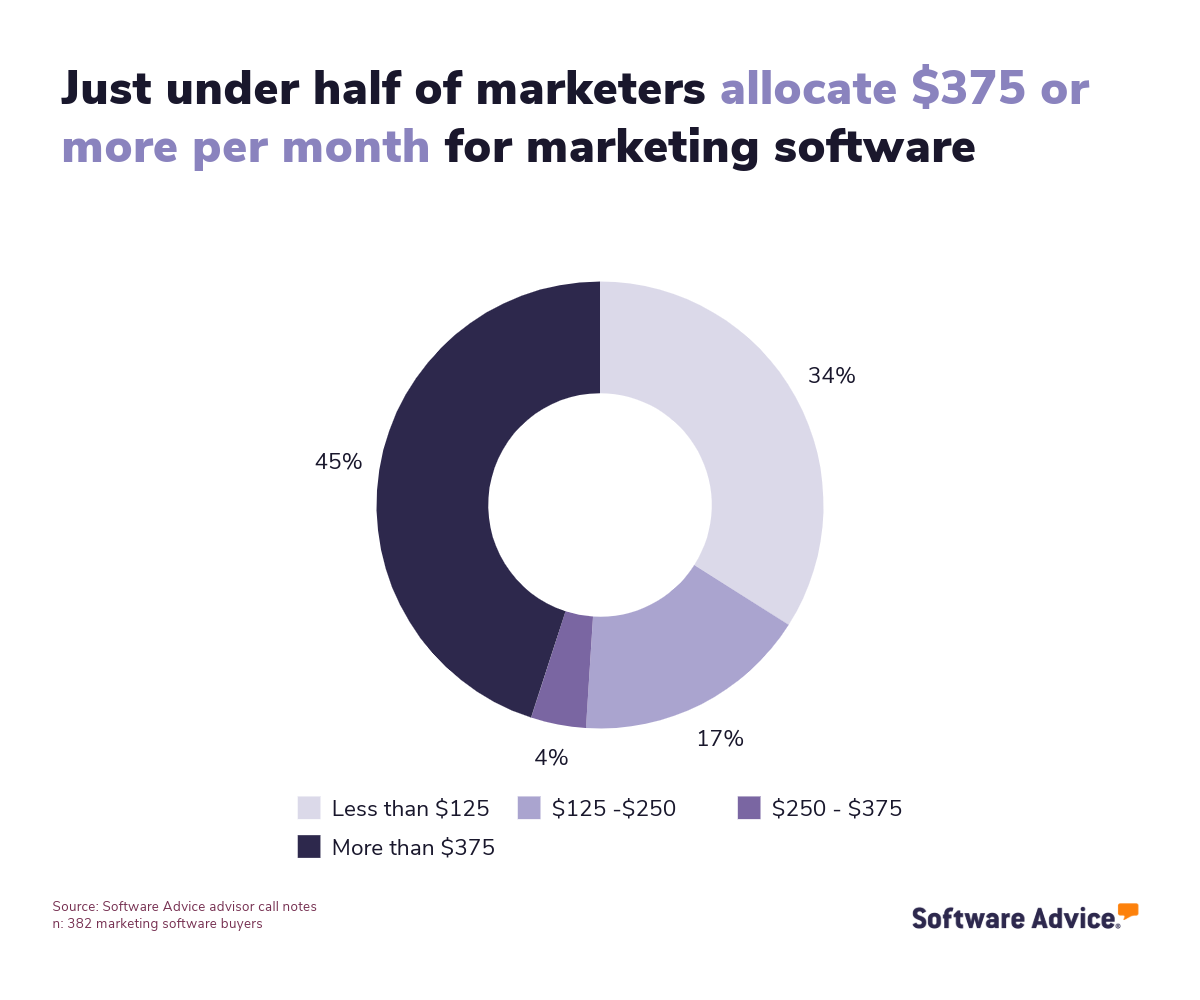
Pricing per user, per month can vary from $19-$28 for an entry-level system, $29-$59 for mid-tier products, and up to $59 or higher for the most expensive options. As demonstrated by the graph below, this falls well within the range of many marketers. However, as an SMS tool is just one of many software systems a marketer could use, it might have to compete for budget with other marketing-specific software acquisitions.
Be aware of potential drawbacks
There are many positive aspects of using an SMS marketing platform in your business. However, there are also some significant, but avoidable, drawbacks that can arise. We highlighted some of the key roadblocks to avoid below:
Payment and unclear cancellation policies:
As with the use of any software, understanding the pricing, subscription, and cancellation policies is key to going into an acquisition. Issues may occur down the line or a lack of clarity could arise if this is not fully understood from the start. This is why it’s important to discuss the contract terms with the vendor to a level that helps you fully grasp how the pricing or process of ending a subscription works.
Deliverability issues:
SMS marketing relies on smooth delivery rates. Connectivity and deliverability issues, however, can interrupt that process and lead to messages not reaching their intended recipients or being sent late. This can harm the performance of campaigns, especially when time sensitivity is a factor, and lead to lost revenue and additional costs when trying to re-send messages.
Contact management usability:
Your contact database is a key part of your SMS marketing capacity. Therefore, it’s important to ensure that the system’s contact management features are suitable for your team. Poor user experience, overly complicated systems that exceed the technical capabilities of staff, and a lack of clarity around the pricing based on the number of contacts you have in your database are all issues that could arise and lead to extra costs or lost productivity.
Plan around integration options
It’s important to assess how the SMS marketing options available to you will work with your current systems before implementing them. If not, you could experience more downtime, difficulties syncing contact data, and a challenging user experience. Before selecting a system, it’s best to do a thorough check of which platforms it is compatible with in your tech stack.
Below, we’ve looked over some of the common integrations you may need to plan around when managing an SMS marketing system:
Social media marketing: Connect with social network users, share content, and run marketing campaigns on social platforms.
Customer relationship management (CRM): Manage multi-channel campaigns and centralize your marketing operations and database of customers.
Ecommerce: Sell to customers and create offers, products, and promotions that your audience can engage with.
Content management systems: Create original content for your campaigns and formulate centralized, consistent brand messaging
Reporting and data tools: Analyze the performance of your SMS campaigns with data collection and extrapolation tools.
Step 2: Make a shortlist of SMS marketing software
There are hundreds of possible SMS marketing solutions available, and choosing the best one for your business should be a carefully thought-out, deliberate process. Moreover, with the right resources and assistance, it can be made simpler.
If you want to explore top-rated SMS marketing software, our FrontRunners report is a good starting point. In this list, we chart products that earn the top user ratings.
Additionally, for extra help in shortlist creation and a free, downloadable comparison chart, The Ultimate Software Vendor Evaluation Guide can make the process easier. This gives more details on comparing assessment criteria for available vendors, based on the functions, training and support, costs, and deployment options on offer.
Step 3: Pick your best option
At this point, you should have a fair idea of the most suitable SMS marketing systems available, and the next step is to try out the software. This gives you an opportunity to understand definitively if the selections are what your business is looking for. Here’s how you can approach this:
How to prepare for vendor demos
After narrowing down your options, you should start focusing on hands-on tests, such as demos or trials, of your shortlisted software. This is also your opportunity to ask vendors and their sales representatives questions about the key features available, pricing, technical support and training, as well as other essential factors required of an SMS marketing tool in your company.
We’ve listed some of the most useful questions to ask at this stage below:
What customer support and training is provided during implementation (and beyond)?
In the initial stages of a new system, questions about operability and teething troubles are more likely to occur, so you’ll need extra support. There also remains the question of how much support is expected further down the line, should faults occur, and whether the vendor offers any training materials. It’s also a good idea to understand if you’ll have access to user-generated forums, webinars, or even course materials to help you get familiar with the platform. Clarity on these points from the start can help you plan for onboarding and maintenance.
What are the limits of my subscription and what can incur overages?
Pricing can vary between different software packages and in some cases, the volume of messages you send or the number of contacts added to your database could incur costs beyond the subscription price. It’s important to check these elements when speaking with vendors to avoid overspending at a later stage.
How does your software integrate with other systems in my tech stack?
If you want your SMS marketing system to connect with other software, such as database management, CRM tools, or CMS systems, it’s important to understand how interoperability will work at this stage.
What customization options are currently available?
While SMS messages are simpler in format than emails and social media posts, customization options can still prove valuable. This is especially true if you are looking at a system with wider functions extending into other marketing channels. It's also worth exploring the extent to which you can adapt and customize user interface features to make working processes easier.
For more support at this stage of the buyer's journey, our guide on How To Cut Through the Sales Pitch During Software Demos provides helpful pointers on preparing for the demonstrations and identifying the best questions to ask vendor representatives.
Step 4: Make the most of your SMS marketing software
When you’ve selected an SMS marketing software, the next step is to implement it into the business. To help streamline this process, we’ve highlighted some important points you’ll want to consider:
Establish key implementation stakeholders: Choose an implementation person or team that can take on vital roles in introducing the software to the business. This team should factor in responsibilities such as technical management and project management in the early stages and develop a plan for longer-term management and maintenance.
Provide resources for data migration: If you have a contact database that already exists and needs to be migrated, it’s important to plan around this. That means providing time for the data to be assessed, prepared, transferred, and then reviewed to ensure nothing was lost or incorrectly assigned in the process, and that compliance standards are met.
Provide team training: Set aside some time with your marketing team to introduce the software to the main users. This training should include where functions can be located, whom to contact for support, and introduce some of the main workflows for its use.
To learn more about approaching this process, check out our guide 5 Critical Steps to a Successful Software Implementation Plan.
Software related to SMS marketing
The system you choose to run your SMS marketing activities may come with all the features and functionalities needed to run campaigns. However, in cases where some functions aren’t included, it might be necessary to consider other related options. Some common software that has similarities with SMS marketing platforms but may or not feature in your chosen system include:
Channel management software: Used for client segmentation and marketing outreach tracking. This, in turn, can support streamlined sales and marketing efforts.
Email marketing software: Gives marketers the tools to create and automate bulk email sends. It provides features for creating email content, scheduling sends, and tracking the effectiveness of campaigns.
Marketing automation software: Provides automation functions for workflows, campaign creation, and analysis. This can help firms evaluate their multichannel performance and centralize business information.
Mobile marketing software: Helps businesses reach and engage with consumers via mobile devices. This provides marketers with tools for setting up mobile alerts and creating and tracking mobile campaigns.
More resources for your SMS marketing journey
Want To Boost Revenue and Loyalty? Retailers Should Invest in Digital Accessibility
5 Top-Rated Marketing Automation Software for Small Businesses
About our contributors
Author
David Jani is a content analyst at Software Advice. With a background in tech journalism, public relations, professional training, and marketing, he uses his extensive experience to investigate small business technology trends, with a focus on marketing and cybersecurity, to provide timely, actionable insights for small and midsize businesses.
David’s research and analysis is informed by more than 150,000 authentic user reviews on Software Advice and nearly 3,000 interactions between Software Advice software advisors and software buyers. David also regularly analyzes market sentiment by conducting surveys of IT and marketing leaders so he can provide the most up-to-date and helpful information to small and midsize businesses purchasing software or services.
His thought leadership work has been featured in TechRadar, Maddyness, Daily Express, Startups Magazine and Raconteur.
Editor
Mehar Luthra is a team lead at Software Advice and specializes in editing reports that cover the latest trends affecting small businesses. With nearly a decade of experience, she has edited a multitude of research articles, top-rated software reports, and thought leadership articles for diverse markets such as Brazil, Japan, Canada, France, Australia, and India. She finds it particularly rewarding to produce content that provides small-business owners with practical tips and helpful advice on topics such as the digitalisation of small businesses, eCommerce trends, and HR developments.
Armed with a double bachelor’s in law (LL.B.) and business economics from Delhi University, she won a full scholarship to study for a master’s in creative writing at the National University of Ireland, Galway. In addition, she has written blog articles spanning a variety of topics such as fiction and non-fiction books, mental health and anxiety, the latest restaurants, and more. Her articles have been featured in Ireland’s national magazine The Village, among other publications. A die-hard journaling fan, she enjoys watching psychological thrillers, reading fiction books, and drinking iced coffee (even in the winter).
Sources
Software Advice advisor call notes: Findings are based on data from telephonic conversations that Software Advice’s advisor team had with businesses seeking marketing software. For this report, we analyzed phone interactions from January 10, 2024, to January 10, 2025. Read the complete methodology.
Software Advice software pricing data: Only products with publicly available pricing information and qualified software products within the category, as of January 2023, are included in the pricing analysis. Read the complete methodology.
Software Advice reviews data: Software Advice reviews are collected from verified users for individual software products. For this report, we analyzed reviews from the past year as of the research date. Read the complete methodology.
SMS Marketing FAQs
- What is SMS marketing software?
SMS marketing software platforms are systems for creating, organizing, and bulk-sending text message communications to customers’ mobile devices.
- Is SMS marketing worth it?
An SMS marketing system can be highly beneficial to businesses that want to create two-way channels with their customers or promote their marketing materials via text message systems. This form of marketing benefits from advantages such as good retention and high conversion rates.
- How much does SMS marketing cost?
SMS marketing systems prices are usually set per user, per month, starting from $19-$28 for entry-level systems, and rising up to $29-$59 for mid-tier products. More advanced options cost $59 or higher per user, per month.
- How do I start SMS marketing?
To start sending SMS marketing messages, you will, at the very least, need a list of contacts, concise and convincing message templates, and a software system that can manage tasks such as sending messages and managing contacts and opt-outs.
- What is the success rate of SMS marketing?
SMS marketing has many advantages, such as higher responses, and open and conversion rates compared to other marketing channels.
- Do you need consent for SMS marketing?
In many territories, SMS leads must opt-in to receive messages, and clear sign-up processes must be in place when gathering contact data. Messaging systems should also provide a transparent means for recipients to cancel or end subscriptions. You should always check local and federal regulations to ensure compliance.
- How often should you send SMS marketing?
It is usually better to send no more than one or two SMS messages per week. This will help maintain a positive relationship with customers while protecting your retention rates.
- Does SMS marketing still work?
SMS marketing may seem like an old-fashioned way of communicating with a marketing audience in the 2020s, but marketers still consider it useful due to its high overall open and conversion rates.
- What is an example of SMS marketing?
An example of using SMS messages for marketing purposes may involve sending information about a flash sale to your customers or sharing voucher codes via text message to boost sales.