


Best Primary Care EHR Software of 2026
Updated January 27, 2025 at 9:58 AM
- Popular Comparisons
- Buyers Guide
- Related Software
Compare Products
Showing 1 - 25 of 135 products
Compare Products
Sort by
Reviews: Sorts listings by the number of user reviews we have published, greatest to least.
Average Rating: Sorts listings by overall star rating based on user reviews, highest to lowest.
Alphabetically (A-Z): Sorts listings by product name from A to Z.

RXNT’s cloud-based, ONC-certified medical software—Billing, Practice Management, EHR, and more—improves clinical outcomes & reve...Read more about RXNT


RXNT's Best Rated Features
See All
RXNT's Worst Rated Features
See All

The AdvancedMD EHR Software offers a comprehensive Electronic Medical Record (EMR) service designed to streamline and optimize v...Read more about AdvancedMD EHR
AdvancedMD EHR's Best Rated Features
See All
AdvancedMD EHR's Worst Rated Features
See All

athenaOne is an integrated solution designed for healthcare practices, offering electronic health records, revenue cycle managem...Read more about athenaOne


athenaOne's Best Rated Features
See All
athenaOne's Worst Rated Features
See All

CharmHealth is a comprehensive suite of healthcare solutions designed to streamline practice management, revenue cycle managemen...Read more about CharmHealth


CharmHealth's Best Rated Features
See All
CharmHealth's Worst Rated Features
See All

Elation Health is the most trusted technology platform for high-value primary care. Since 2010, the company has delivered clinic...Read more about Elation


Elation's Best Rated Features
See All
Elation's Worst Rated Features
See All

NextGen® Office is an all-in-one, cloud-based support system designed to help independent practices improve clinical outcomes, i...Read more about NextGen Office


NextGen Office's Best Rated Features
See All
NextGen Office's Worst Rated Features
See All

AdvancedMD is a medical office software suite with cloud-based, integrated physician-patient workflow solutions including: pract...Read more about AdvancedMD Billing Services

ReLi Med Solutions' suite gives small to midsize ambulatory care practices a completely integrated EHR and Practice Management s...Read more about ReLiMed

PrognoCIS EHR and PrognoCIS Telemedicine have earned a reputation for fast, flexible individual provider workflow. The software ...Read more about PrognoCIS


PrognoCIS's Best Rated Features
See All
PrognoCIS's Worst Rated Features
See All

NextGen Healthcare provides ambulatory practices of all sizes award-winning solutions along with dedicated support and professio...Read more about NextGen Enterprise

NextGen Enterprise's Best Rated Features
See All
NextGen Enterprise's Worst Rated Features
See All

AllegianceMD is a cloud-based medical software system that is designed to serve the needs of small and midsize practices, as wel...Read more about AllegianceMD

Compulink Advantage is an all-in-one database EHR solution for specialty practices such as optometry, ophthalmology, orthopaedic...Read more about Compulink Healthcare Solutions

Compulink Healthcare Solutions's Best Rated Features
See All
Compulink Healthcare Solutions's Worst Rated Features
See All

TotalMD is an extremely affordable, extremely intuitive Practice Management solution that offers small and growing practices the...Read more about TotalMD


TotalMD's Best Rated Features
See All
TotalMD's Worst Rated Features
See All

Advanced Data Systems provides healthcare software designed to streamline clinical and administrative workflows for various medi...Read more about Advanced Data Systems
Advanced Data Systems's Best Rated Features
See All
Advanced Data Systems's Worst Rated Features
See All

IMS (Intelligent Medical Software) by Meditab Software is an Electronic Health Records (EHR) and Practice Management solution th...Read more about Intelligent Medical Software

iCare is the modern cloud-based EHR for health systems, clinics, and physician practices. iCare provides a unified Electronic H...Read more about iCare
iCare's Best Rated Features
See All
iCare's Worst Rated Features
See All

eClinicalWorks (eCW) is a comprehensive platform designed to streamline healthcare IT for value-based care. The technology cover...Read more about eClinicalWorks


eClinicalWorks's Best Rated Features
See All
eClinicalWorks's Worst Rated Features
See All

Harmony e/Notes is a hybrid integrated solution that offers functionalities for electronic medical records, practice management,...Read more about HARMONY Medical
HARMONY Medical's Best Rated Features
See All
HARMONY Medical's Worst Rated Features
See All

TriMed offers a complete software suite that includes: Electronic Health Records, Revenue Cycle Management, Patient Portal, Mobi...Read more about TriMed Complete
TriMed Complete's Best Rated Features
See All
TriMed Complete's Worst Rated Features
See All

Qualifacts InSync streamlines essential healthcare functions like charting, billing, scheduling, medication management, and tele...Read more about Qualifacts Insync
Qualifacts Insync's Best Rated Features
See All
Qualifacts Insync's Worst Rated Features
See All

Praxis is the #1 rated, award-winning, easy to use, artificial intelligence (AI) based EMR/EHR that has no cumbersome templates....Read more about Praxis EMR


Praxis EMR's Best Rated Features
See All
Praxis EMR's Worst Rated Features
See All

OptiMantra is an EMR and practice management platform focused on helping integrative and wellness practices. It serves individu...Read more about OptiMantra


OptiMantra's Best Rated Features
See All
OptiMantra's Worst Rated Features
See All

Practice Mate is a cloud-based medical practice management solution offered by Office Ally, designed to meet the needs of health...Read more about Practice Mate

Practice Mate's Best Rated Features
See All
Practice Mate's Worst Rated Features
See All

Althea Smart EHR is a game changing platform for physicians. Equipped with Artificial Intelligence (AI), Althea leverages the iO...Read more about Althea Smart EHR
Althea Smart EHR's Best Rated Features
See All
Althea Smart EHR's Worst Rated Features
See All

Sevocity is a cloud-based medical solution best suited to practices seeking a very customizable EHR. The system includes unlimit...Read more about Sevocity

Sevocity's Best Rated Features
See All
Sevocity's Worst Rated Features
See All
Popular Comparisons


Buyers Guide
This detailed guide will help you find and buy the right primary care ehr software for you and your business.
Last Updated on January 27, 2025Doctors' offices may have a different end goal than most businesses, but one thing they share in common is the need for software to help make their day-to-day management easier and smoother. A wide variety of medical software exists for just this purpose, from electronic medical records (EMR) to medical accounting tools.
However, primary care physicians face unique challenges that require the implementation of software that differs from the types used by specialists or hospitals. Whether they are clinics or family practices, these primary care physicians need versatile, adaptable software that can both maintain records and help run the office, assisting with both the medical and business sides of their practice.
This buyer's guide will describe the two sides of primary care EHRs, explore the most popular features and help you figure out what key questions to ask of software vendors—and of yourself—before making a purchase.
Here are the key issues that we'll cover:
What Is Primary Care EHR Software?
Common Features of Primary Care EHRs
What Is Primary Care EHR Software?
Primary care software is a subset of medical software, which contains features that are useful both for doctors' medical work and for the daily management of their office as a business.
Though both parts should work together in integrated harmony, here's a look at these two sides of primary care software:
Electronic Health Records
Electronic health records, or EHR, is the primary type of software used by doctors to help them take care of their patients. EHRs serve as digital databases that store patient charts, while also allowing practices to track patient demographics, histories, SOAP notes, test results, medications, prescriptions and more.
The goal of an EHR is to increase doctors' efficiency so they can spend more time with patients, provide post-visit care via prescription management and check-ins on a patient portal, better support claims sent to insurance companies and generally improve the quality of patient care.
You may also see them referred to as electronic medical records (EMRs), computerized medical records or digital medical records.
Practice Management
Practice management software, on the other hand, is more focused on helping doctors and their administrative staff run the business side of a practice. It helps those practices record patient information and demographics, manage patient charts, perform billing procedures, generate reports and schedule appointments through patient scheduling applications.
The goal of practice management software is to improve physicians' workflow efficiency, allowing them to spend more time tending to patients, and often to boost the amount of reimbursements obtained from insurance providers.
You may also see them referred to as physician's office management software and medical information systems (POMIS).
Common Features of Primary Care EHRs
Patient history | Houses patient charts as part of the EMR database. It's crucial that primary care physicians are able to maintain a detailed, accurate history of their interactions with patients in order to provide the best, most personalized level of medical care. |
Patient correspondence | Provides a primary care practice with quick access to common forms of correspondence, including work/school excuse letters and automated health maintenance/checkup reminders that can be sent out based on the patient's record. |
General practice SOAP notes templates | Because primary care physicians see such a wide variety of medical conditions and problems, they need an EMR that has hundreds of specialized note templates to accommodate those various conditions. |
Laboratory, medical device and pharmacy integration | Many EMRs provide automatic importing of lab results and/or medical device data, eliminating time-consuming and error-prone transcription. Similarly, direct integration with pharmacies allows for e-prescriptions and direct communication between doctors and pharmacists in order to avoid potentially dangerous drug interactions. |
Referral integration | EMR software for primary care practices will include tools to make referrals to specialists as quick and easy as possible. Common features include an online referral network, automated printing of referral letters and even the ability to send the entire electronic patient record to the doctor of referral. |
General practice billing and treatment protocols | Because primary care physicians deal with such a broad swath of potential conditions, primary care EMRs often provide assistance on ICD-10 and CPT coding and billing for common and unusual patient visits. The integration between administrative and clinical workflows can make the claims process faster and more accurate. |
Automatic billing | One of the core functionalities of practice management software is automated medical billing, along with real-time verification of insurance coverage and eligibility. |
Claim tracking | Streamline the tracking of various claims across the overall revenue cycle. |
Customized patient scheduling | Scheduling/calendar features which enable appointments to be color coded to indicate information such as provider, duration, time and type of complaint. |
Automatic reminders | Send automated electronic reminders to patients via email or text message. In addition to providing a service for patients, this helps reduce the number of no-shows and can maintain an optimum volume of appointments. |
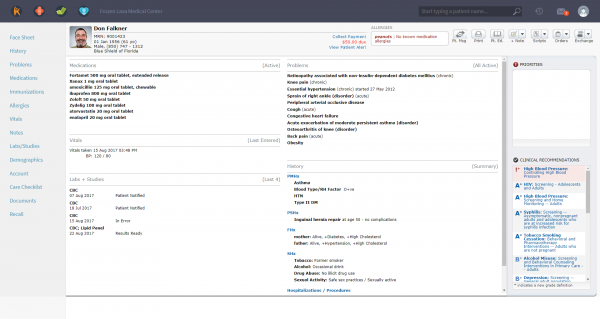
An example of a patient chart in Kareo
What Type of Buyer Are You?
Medical practices can vary widely in size, shape and form, which leads them to require different functions and features in their primary care software. Your practice is likely to fall into one of the following categories:
Single doctor. A practice with a single doctor, and consequently a small staff, will have fewer patients to keep track of, but they may have a greater need for automation due to a lack of resources. As such, these practices may want primary care software that is heavy on practice management features, such as automatic billing, patient scheduling and laboratory/pharmacy/referral integration, in addition to a base level of EMR features such as patient history and correspondence.
Small practice (two to five doctors). Practices with a handful of doctors and a moderate-sized staff will want all the features of a practice with just one doctor, plus a more robust array of features for both EMR (such as SOAP note templates) and practice management (such as claim tracking and automatic reminders).
Large practice (more than five doctors). Practices with a large number of doctors and a large staff will need the most robust primary care software available, featuring all of the useful features provided by both EMR and practice management functionality.
Key Considerations
Other factors to take into consideration when picking the best primary care software for your practice may include:
Integration with other systems. One of the key components of primary care software is integration, specifically between the EMR and the practice management sides of the software. However, it's possible that you may choose two different software systems or vendors for each aspect of your practice. In that case, you'll want to be extremely sure that those two systems can integrate with one another, so that you don't accidentally build a wall between the medical and business sides of your practice. You will also want to ensure that you can integrate with any other relevant software systems, such as those used for medical tests and results.
Cloud-based software vs. on-premise software. Increasingly, software of all kinds is cloud-based and available online. Previously, the most popular method of housing software was on-premise, meaning that a business or practice would actually own the hardware necessary to run the software. This required a large amount of storage space and access to IT resources for setup and troubleshooting. Today, you're most likely to get a cloud-based primary care software solution, which is housed off-premise and requires much lower upfront costs. It also reduces your need for IT help once you have the software running.
Patient portals. The easiest, most popular way for doctors to keep in touch with their patients, and for those patients to manage their prescriptions and referrals, is through dedicated patient portals that can be accessed online. These portals should integrate with your EMR so that a patient can see their records and test results, send and receive messages, manage prescriptions and make appointments. A well-maintained patient portal can save physicians and their staff hundreds of hours of administrative work, and make patients feel that they have quicker and more complete access to their doctor.
Mobile support. Our world is increasingly mobile, with apps for everything from social media to banking. Medical needs are no different, and patients want to be able to send and receive messages from their doctor, manage their prescriptions and access their records and results while on the go. Similarly, physicians live busy lives, and may need to respond to urgent business when working on their phones or tablets. You will want to check the mobile support of the software that you select, so you can ensure that both doctors and patients have the high level of access that they desire.