


Best IVR software of 2026

- Popular Comparisons
- FrontRunners
- Buyers Guide
Compare Products
Showing 1 - 25 of 216 products
Compare Products
Sort by
Reviews: Sorts listings by the number of user reviews we have published, greatest to least.
Average Rating: Sorts listings by overall star rating based on user reviews, highest to lowest.
Alphabetically (A-Z): Sorts listings by product name from A to Z.

Amazon Connect is a cloud-based contact center service that offers omnichannel customer service using machine learning, interact...Read more about Amazon Connect


Amazon Connect's Best Rated Features
See All
Amazon Connect's Worst Rated Features
See All

Zendesk is a cloud-based help desk management solution offering customizable tools to build customer service portal, knowledge b...Read more about Zendesk Suite


Zendesk Suite's Best Rated Features
See All
Zendesk Suite's Worst Rated Features
See All

Five9 is an all-in-one cloud contact center solution for inbound, outbound, blended and omnichannel contact centers world-wide. ...Read more about Five9


Five9's Best Rated Features
See All
Five9's Worst Rated Features
See All

ULTATEL enables people to work together and get the information they need to do their best work, anywhere they are. Our cloud p...Read more about Ultatel Cloud Business Phone System
Ultatel Cloud Business Phone System's Best Rated Features
See All
Ultatel Cloud Business Phone System's Worst Rated Features
See All

80% of customers believe they’re delivering a great customer experience, but only 8% of customers agree. Businesses like yours n...Read more about Intermedia Contact Center

Twilio is a cloud communications platform that enables businesses to build, scale and operate their own customized communication...Read more about Twilio
Twilio's Best Rated Features
See All
Twilio's Worst Rated Features
See All

Ringover is the no.1 business phone system that gives you unlimited calls to 110 countries, video conferencing, SMS and group me...Read more about Ringover
Ringover's Best Rated Features
See All
Ringover's Worst Rated Features
See All

Phonexa is an enterprise-grade tracking software for performance, affiliate and partner marketing. The Phonexa Suite is the unde...Read more about Phonexa

Phonexa's Best Rated Features
See All
Phonexa's Worst Rated Features
See All

XCALLY is an on-premise and cloud-based contact center solution that handles multiple channels including voice, chat, SMS, email...Read more about XCALLY

XCALLY's Best Rated Features
See All
XCALLY's Worst Rated Features
See All

PhoneBurner is an outbound dialer and call center solution that empowers agents to conduct wildly efficient yet highly personali...Read more about PhoneBurner

PhoneBurner's Best Rated Features
See All
PhoneBurner's Worst Rated Features
See All

Bright Pattern is a cloud-based contact center software solution which helps businesses manage multichannel service including in...Read more about Bright Pattern

Bright Pattern's Best Rated Features
See All
Bright Pattern's Worst Rated Features
See All

CTM is a conversation analytics software designed to provide tracking and insights for sales and marketing teams. It helps organ...Read more about CTM
CTM's Best Rated Features
See All
CTM's Worst Rated Features
See All

AVOXI Genius is a cloud-based call center solution that helps small to large enterprises streamline customer service operations ...Read more about AVOXI
AVOXI's Best Rated Features
See All
AVOXI's Worst Rated Features
See All

Kixie: AI-Powered Revenue Communication for High-Performing Teams Kixie is a next-generation revenue engagement platform that h...Read more about Kixie PowerCall
Kixie PowerCall's Best Rated Features
See All
Kixie PowerCall's Worst Rated Features
See All

ZIWO is a cloud-based call center workforce management solution that helps streamline customer interactions via virtual phone nu...Read more about ZIWO

ZIWO's Best Rated Features
See All
ZIWO's Worst Rated Features
See All

VoIPstudio is a cloud-based call center management solution designed for businesses of all sizes. It offers features that includ...Read more about VoIPstudio
VoIPstudio's Best Rated Features
See All
VoIPstudio's Worst Rated Features
See All

Channels is a customer service solution for call centers and client success teams that offers tools including channel management...Read more about Channels


wolkvox is the most innovative, reliable, easy to use and fast to deploy all-in-one cloud contact center solution on the market....Read more about wolkvox


wolkvox's Best Rated Features
See All
wolkvox's Worst Rated Features
See All

uContact is a Cloud & Omnichannel solution that enables its users to manage all their voice and text interactions in the same pl...Read more about uContact
uContact's Best Rated Features
See All
uContact's Worst Rated Features
See All

Plum Voice powers automated communications solutions - IVR systems, virtual agents, chatbots, messaging campaigns, etc. - to sim...Read more about Plum Voice

UJET is a cloud-based call center application that integrates with customer relationship management (CRM) solutions. It offers b...Read more about UJET
UJET's Best Rated Features
See All
UJET's Worst Rated Features
See All

TalkChief isn't just a business phone system; it's your partner in enhancing communication for call centers, startups, enterpris...Read more about TalkChief
TalkChief's Best Rated Features
See All
TalkChief's Worst Rated Features
See All

NUACOM is a call center and business VoIP solution that helps manage business operations using softphones, IVR, auto-attendant, ...Read more about NUACOM

CallShaper is a cloud-based call center management solution suitable for small to midsize businesses. Key features include lead ...Read more about CallShaper


Voiso is a cloud-based contact center software for sales and support teams that use phone calls, SMS, messengers, and social med...Read more about Voiso
Voiso's Best Rated Features
See All
Voiso's Worst Rated Features
See All
Popular Comparisons



Your Guide to Top IVR Software, November 2024
Software Advice uses reviews from real software users to highlight the top-rated IVR products in North America.
Learn how products are chosenExplore FrontRunners


“Usability” includes user ratings for Functionality and Ease of Use.
“Customer Satisfaction” includes user ratings for Customer Support, Likelihood to Recommend and Value for Money.
Reviews analysis period: The reviews analysis period spans two years and ends the 15th of the month prior to publication.
Buyers Guide
This detailed guide will help you find and buy the right ivr systems software for you and your business.
Last Updated on January 27, 2025Interactive voice response (IVR) systems are a foundational technology for inbound contact centers. They allow callers to complete tasks over the phone, either via voice response or numerical keypad input.
IVR software can dramatically streamline the performance of a contact center—particularly when used in conjunction with customer relationship management (CRM) software. But it isn’t the best fit for all business models. IVR systems offer complex, specialized functionality, and are packaged in different ways by different vendors.
That’s why we’ve written this guide to help you better understand which systems will work best for your needs. In it, we’ll cover the following topics:
Benefits of Using IVR Software
IVR Systems vs. Auto-Attendants
Best-of-Breed Systems vs. Contact Center Suites
What Is IVR Software?
IVR software accomplishes two major goals:
It helps callers help themselves through “self-service.” These systems provide automated menus that allow callers to complete tasks without assistance from support agents.
In conjunction with an automated call distribution (ACD) system, an IVR system helps route callers to the right support agent when their needs can’t be met by self-service options. (An ACD system parks incoming calls in a queue until agents are available to answer, and then distributes calls to agents using rules that factor in agent skills, performance metrics, etc.) For instance, if a caller says or enters the numerical option for “billing” using the IVR system, they’ll be routed into the call queue (controlled by the ACD system) for an agent in that department.
IVR systems follow a branching menu structure known as a “menu tree.” The top-level menu may include options for, say, “support” and “billing.” If the caller selects “support,” they’ll be funneled into a submenu that contains numerous self-service options for support issues (e.g., instructions on how to reset a device). If these options don’t meet the caller’s needs, the caller will be routed to a support agent.
Branching Prompts in an IVR Menu Tree
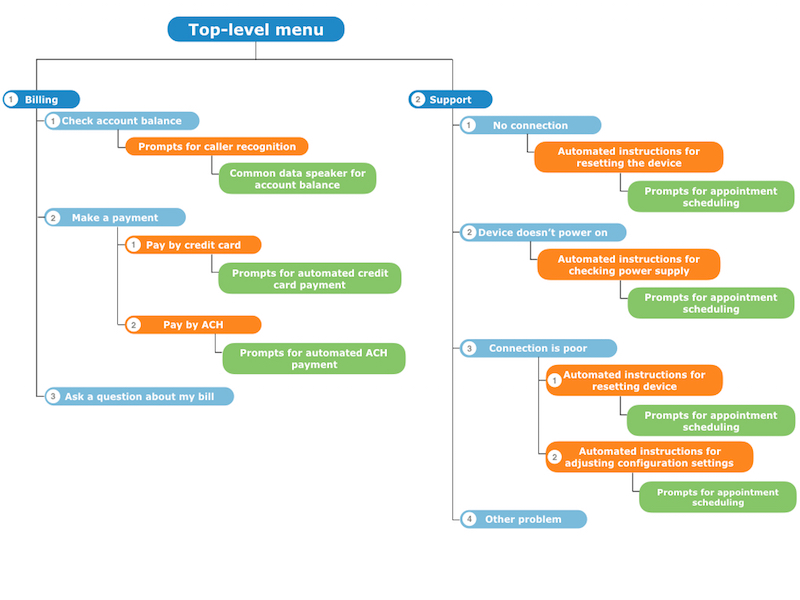
As mentioned, the IVR menu tree also assists in call routing through integration with ACD systems, which use callers’ spoken or touch-tone responses as they navigate the IVR system to route calls to the right agent.
Benefits of Using IVR Software
Customers may not know what the term “IVR” means—but they do know what they like and don’t like, and many perceive IVR technology as annoying and difficult to use. So why does your call center need an IVR system in the first place?
The answer is that IVR can cut down on the number of calls agents have to handle by enabling callers to resolve certain issues through self-service options. By reducing the overall number of calls your contact center handles, you can slash your top expense: personnel.
Moreover, even though consumers tend to dislike IVR technology, they probably aren’t thinking through the alternative: a drawn-out interaction with a support agent. When we interviewed call center benchmarking expert Bruce Belfiore about IVR design best practices, he noted that some consumers (particularly younger callers) prefer to avoid interacting with a support agent whenever possible. These callers actually prefer IVR and other self-service technologies.
Additionally, even if an IVR system isn’t able to fully meet a caller’s needs, it can still automate the initial steps of collecting information and routing the caller to the right group of agents. Without an IVR, these steps would need to be handled by human workers—increasing the number of transfers (and, most likely, the caller’s level of frustration) before getting the call to the right agent.
Simply think back to the times you’ve been bounced around like a ping-pong ball between multiple contact center agents who couldn’t answer your question, and you’ll quickly realize the value of IVR.
Common Functionality
The following list of IVR capabilities includes standard offerings of most systems. This list also includes more advanced capabilities offered by niche vendors or enabled via integrations with other contact center applications:
Visual IVR designer | A drag-and-drop graphical user interface for designing IVR call flows (the branching menus through which callers pass as they select options for support, sales, billing etc.). |
Automated speech recognition (ASR) | Allows callers to speak responses instead of using touch-tone input. Frequently requires the use of third-party ASR software, though many IVR vendors partner with ASR vendors to deliver a complete solution. Some systems allow for voiceprint authentication (comparing audio data from a call with a model of the caller’s voice) to verify caller identity. |
Text-to-speech (TTS)/common data speaker | Text-to-speech enables the system to read information from databases out loud for customers (payment history, account balances, etc.), as opposed to simply playing recorded prompts. Also assists in the development of IVR menu prompts. A common data speaker is a more basic capability that only allows highly structured data, such as dates and numbers, to be converted into speech. |
Multilingual support | Enables the IVR menu structure to play prompts and recognize spoken responses in multiple languages. |
Data retrieval from Web server | Allows customer data to be retrieved from a Web server in order to verify response input (e.g., checking a spoken account number against a stored account number) and otherwise assist agents. |
Computer telephony integration (CTI) | Data collected from the IVR system (e.g., a customer’s name) is displayed on an agent’s screen to help the agent better assist the caller. |
ACD integration | Data collected from the IVR is used to prioritize calls within queues and to distribute calls to various agent skill groups (if the ACD system offers skills-based routing). Users can also enable options such as hold music and estimated wait times to keep callers on the line. |
Customer satisfaction surveys | IVR surveys can collect voice or touch-tone responses from callers about their levels of satisfaction with the agent or the IVR system itself. These responses are fed into contact center reporting tools for visibility into key performance indicators. |
Outbound IVR/notification system | Outbound notifications such as surveys, appointment reminders, and account alerts can be delivered to customers via voice, email, fax, SMS text, etc. Voice notifications include IVR self-service options that can help the caller resolve the issue (e.g., pay an unpaid bill). |
Visual IVR | Allows customers to navigate a visual representation of an IVR menu on a website or within a native app running on a desktop, laptop or smartphone. This is a new technology many vendors don’t yet offer, though a handful of niche vendors specialize in adding visual IVR capabilities to solutions from major contact center vendors. |
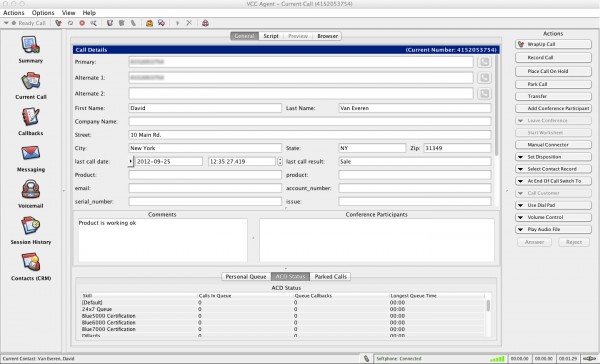
Visual IVR designer in Five9
IVR Systems vs. Auto Attendants
Businesses frequently think they need an IVR system when they actually only need an auto attendant. IVR systems are sophisticated solutions that are offered on a stand-alone basis or as components of integrated contact center suites. Auto attendants, on the other hand, are standard components of office phone systems.
The basic difference between an auto attendant and an IVR system is: An auto attendant merely routes callers to extensions in a business’s directory, whereas an IVR provides callers with automated self-service options. Auto attendants also tend to lack advanced features such as speech recognition. Nearly every office with a phone system uses some kind of auto attendant, but in most cases, only contact centers use IVR systems.
You can consult our guide to auto attendants for more information on what they do and how they differ from IVRs.
Best-of-Breed Systems vs. Contact Center Suites
Vendors offer IVR systems two different ways: as “best-of-breed” systems sold on a stand-alone basis, or packaged within integrated suites of contact center applications.
Stand-alone IVR solutions are designed to be integrated with systems businesses have already deployed, such as:
Standard business phone systems (also known as Private Branch eXchange or PBX systems)
By opting for a stand-alone IVR, organizations can avoid replacing the above systems, which frequently represent significant expenditures. PBX integrations allow IVR data to be used in call routing and enable call recording, among other capabilities.
Integrating an IVR and a standard business phone system can provide benefits, such as improved call routing. However, IVR systems usually need to be integrated with a suite of dedicated contact center applications in order to maximize those positive results.
In a contact center environment, data collected by the IVR can be pushed to agents’ computer screens or fed into reporting tools. The IVR integrates with the ACD system to provide sophisticated call routing. Finally, customers who don’t want to interact via voice have other options with a multi-channel contact center solution.