


Best Collaboration software of 2026

- FrontRunners
- Popular Comparisons
- Buyers Guide
Compare Products
Showing 1 - 25 of 881 products
Compare Products
Sort by
Reviews: Sorts listings by the number of user reviews we have published, greatest to least.
Average Rating: Sorts listings by overall star rating based on user reviews, highest to lowest.
Alphabetically (A-Z): Sorts listings by product name from A to Z.

Smartsheet is a work execution platform and collaboration tool with a familiar spreadsheet-like interface that helps teams plan,...Read more about Smartsheet


Smartsheet's Best Rated Features
See All
Smartsheet's Worst Rated Features
See All

monday.com is a work and project management platform that helps teams of all sizes plan, prioritize, manage, and execute work ef...Read more about monday.com
monday.com's Best Rated Features
See All
monday.com's Worst Rated Features
See All

Wrike is a cloud-based project management platform for teams of 20+ that is suitable for both large enterprises and SMBs. It sup...Read more about Wrike

Wrike's Best Rated Features
See All
Wrike's Worst Rated Features
See All

Quickbase is a work management and application platform designed to help organizations centralize and manage complex projects an...Read more about Quickbase
Quickbase's Best Rated Features
See All
Quickbase's Worst Rated Features
See All

Kantata helps professional services organizations of 50 to 5,000+ employees ensure consistent excellence and profitability acros...Read more about Kantata

Kantata's Best Rated Features
See All
Kantata's Worst Rated Features
See All

Mango Practice Management is a cloud-based, all-in-one practice management solution that is a game-changer for professional serv...Read more about Mango Practice Management


Mango Practice Management's Best Rated Features
See All
Mango Practice Management's Worst Rated Features
See All

Autodesk Forma provides best-in-class solutions to unite office and field teams throughout the entire project lifecycle. Connect...Read more about Autodesk Construction Cloud
Autodesk Construction Cloud's Best Rated Features
See All
Autodesk Construction Cloud's Worst Rated Features
See All

NetSuite is an AI-powered cloud-based business management suite that incorporates ERP, financial management, CRM and eCommerce f...Read more about NetSuite


NetSuite's Best Rated Features
See All
NetSuite's Worst Rated Features
See All

Procore is a cloud-based construction management platform designed to connect field and office teams throughout the project life...Read more about Procore

Procore's Best Rated Features
See All
Procore's Worst Rated Features
See All

Designed for businesses in real estate, human resources, legal and other industries, DigiSigner is a cloud-based digital signatu...Read more about DigiSigner

DigiSigner's Best Rated Features
See All
DigiSigner's Worst Rated Features
See All

CaptivateIQ is a platform designed for managing sales commissions and planning incentive compensation workflows. It is used by p...Read more about CaptivateIQ
CaptivateIQ's Best Rated Features
See All
CaptivateIQ's Worst Rated Features
See All

Dostoevsky said that beauty will save the world. Padlet offers beautiful boards and canvases for visual thinkers and learners....Read more about Padlet

Padlet's Best Rated Features
See All
Padlet's Worst Rated Features
See All

Google Workspace (formerly G Suite) is a cloud-based suite of collaboration and document management tools designed to help busin...Read more about Google Workspace
Google Workspace's Best Rated Features
See All
Google Workspace's Worst Rated Features
See All

Notion is a digital workspace that lets small to large businesses streamline and manage notes, tasks, projects, records, calenda...Read more about Notion
Notion's Best Rated Features
See All
Notion's Worst Rated Features
See All

Bigin by Zoho CRM is a pipeline-centric CRM that is built and priced for small businesses. Minimal by design and focused on grea...Read more about Bigin by Zoho CRM

Bigin by Zoho CRM's Best Rated Features
See All
Bigin by Zoho CRM's Worst Rated Features
See All

Flowlu is a cloud-based, all-in-one business management solution designed for teams of all sizes and industries. Whether you're ...Read more about Flowlu
Flowlu's Best Rated Features
See All
Flowlu's Worst Rated Features
See All

Zulip is the only modern team chat app that is designed for both live and asynchronous conversations. Zulip topics create a sepa...Read more about Zulip

Zulip's Best Rated Features
See All
Zulip's Worst Rated Features
See All

MeisterTask is a web-based task, project, and work management software perfect for teams of any size. Its easy-to-use interfac...Read more about MeisterTask
MeisterTask's Best Rated Features
See All
MeisterTask's Worst Rated Features
See All

Ziflow is the leading online proofing software. It empowers agencies and brands to deliver exceptional creative work by streamli...Read more about Ziflow
Ziflow's Best Rated Features
See All
Ziflow's Worst Rated Features
See All

Project.co is a cloud-based solution that helps small to large enterprises manage multiple elements of projects including paymen...Read more about Project.co
Project.co's Best Rated Features
See All
Project.co's Worst Rated Features
See All

Figma is a cloud-based design tool, which helps businesses create, test, and deliver product designs in a collaborative manner. ...Read more about Figma

Figma's Best Rated Features
See All
Figma's Worst Rated Features
See All

Slack is a cloud-based project collaboration and team interaction tool designed to facilitate communication across organizations...Read more about Slack
Slack's Best Rated Features
See All
Slack's Worst Rated Features
See All

Freelo is a simple-to-use collaboration tool that gives freelancers and teams full control over their projects. Organize your pr...Read more about Freelo

Freelo's Best Rated Features
See All
Freelo's Worst Rated Features
See All

Miro is a visual workspace for innovation that enables distributed teams of any size to dream, design, and build the future toge...Read more about Miro
Miro's Best Rated Features
See All
Miro's Worst Rated Features
See All

ScreenConnect is a cloud-based operations management solution that allows technicians to perform remote support, gain remote acc...Read more about ScreenConnect


ScreenConnect's Best Rated Features
See All
ScreenConnect's Worst Rated Features
See All
Popular Comparisons



Your Guide to Top Collaboration Software, March 2025
Software Advice uses reviews from real software users to highlight the top-rated Collaboration products in North America.
Learn how products are chosenExplore FrontRunners


“Usability” includes user ratings for Functionality and Ease of Use.
“Customer Satisfaction” includes user ratings for Customer Support, Likelihood to Recommend and Value for Money.
Reviews analysis period: The reviews analysis period spans two years and ends the 15th of the month prior to publication.
Buyers Guide
This detailed guide will help you find and buy the right collaboration software for you and your business.
Last Updated on January 27, 2025American entrepreneur and industrialist Henry Ford once famously remarked, “If everyone is moving forward together, then success takes care of itself.” This quest for collective success is what forms the basis of a collaboration platform.
Businesses of all sizes are increasingly reaching out to global audiences, which requires them to focus on enterprise collaboration. They have to work with employees, partners, and customers spread across the globe. With traditional collaboration methods such as email, it’s difficult to control the various versions of files or documents shared with multiple stakeholders across time zones.
That’s where collaboration tools can help. A collaboration tool offers features that allow multiple stakeholders to combine their knowledge and skills to achieve a common goal without having to be together in the same place.
This guide can help potential buyers find the best team collaboration software for their needs.
Here’s what we’ll cover:
What is collaboration software?
Common functionality of collaboration software
Benefits of collaboration software
What is collaboration software?
Collaboration software is a type of software tool that lets multiple users communicate, collaborate, and coordinate among themselves in real time.
A collaboration platform facilitates team communication through emails, instant messages, voice and video calls, and discussion threads. It also helps with online collaboration via file sharing and document management. These features allow an entire team to work simultaneously on the same file, which gets updated in real time.
All types of organizations can benefit from collaboration software, including those in:
Advertising
Banking
Construction
Government
Healthcare
Marketing
Nonprofits
Retail
Technology
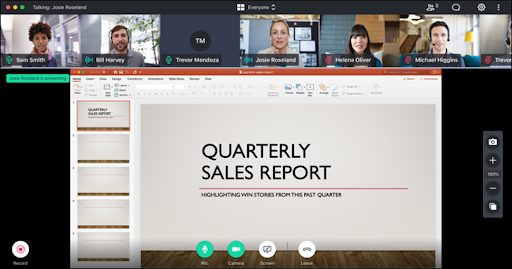
Screen sharing during a video conference in GoToMeeting (Source)
Common functionality of collaboration software
Most collaboration tools come with some or all of the following capabilities:
Allows collaboration between several authors to create and edit the same document in real time. Enables users to highlight text or add comments, which can be incorporated when editing. Some solutions also allow users to organize and structure content according to the document type. | |
Enables users to upload and share files such as documents, videos, and images. Also allows users to store, track, and manage different versions of a document and apply role-based permissions to disable access to specific sections of a document. | |
Calendar management | Users can view individual and team-wide calendars to schedule appointments or meetings on the calendars of team members they are working with, irrespective of their locations. This feature may also include synchronization with third-party calendar management applications (e.g., Apple's Calendar, Google Calendar). |
Allows users to maintain a repository of all available resources (documents, files, etc.) related to completed and ongoing projects in their organization. This process facilitates knowledge sharing within an organization. | |
Communication software | Provides communication tools that allow users to engage with other project members. These tools include internal messengers, video conferencing, discussion forums, and team-specific group creation capabilities. Some solutions also allow for the creation of an internal social network with the capability to build individual and team bios, so users can like and comment on project updates. |
Enables the tracking of project progress by breaking projects into several tasks and setting completion milestones for each. This allows managers to assign tasks, track project dependencies, set timelines for tasks or projects, and reschedule tasks according to team schedules. Certain solutions provide Gantt chart representation to visualize project completion timelines. | |
Third-party integration | Most of the collaboration tools on the market are “best-of-breed,” focusing on a specific group of features. However, some organizations may seek software that can manage their core tasks as well as integrate with the other software tools they use, such as email software, instant messaging app, VoIP software, video conferencing software, and project management software. |
Benefits of collaboration software
Businesses can reap multiple benefits from a collaboration tool, including:
Centralized information: Organizations with distributed teams often have problems with remote project collaboration. For teams based in different time zones, emails become ineffective when different groups work on the same document, due to issues with version control. Collaboration software centralizes content at a single location and updates it in real time, so everyone can view accurate information. Online collaboration software also creates a central repository of documents, consolidating the knowledge sharing efforts of an organization.
Savings on operational costs: A collaboration solution offers a combination of features, such as document management, content curation, version control, task management, knowledge management, and communication tools. Paying for a number of different proprietary solutions specializing in these individual areas can be costly. Online collaboration software can help save on project costs by performing multiple functions that would ordinarily require several different tools to accomplish.
Increased employee productivity: A collaboration solution can cut out unnecessary meetings, allowing users to spend more time on project-related tasks and make faster, more effective decisions.
What type of buyer are you?
Choosing the right collaboration software depends on the size of your business. Consider the following buyer types:
Small and midsize businesses: These businesses typically operate as establishments with up to 100 employees and focus on specific operational areas. Such companies might consider a best-of-breed system that specializes solely in communication, offering capabilities such as instant messaging and audio and video conferencing.
For example, a small team that manages limited projects and has team members who prefer remote work, may want to consider a collaboration app that will help members communicate with each other and centralize information.
A midsize organization with an active sales force might, instead, prioritize a solution with advanced communication and conferencing features, such as web conferencing, community boards and forums, and instant messaging.
Large enterprises: Big companies typically operate in multiple areas with employees based at different locations. For such businesses, coordination is key. These businesses may want to consider an enterprise collaboration software tool that is a modular suite, allowing them to pick and choose the different modules they need.
For example, a large enterprise that has teams spread across different time zones might seek software that helps them manage complex projects or tasks that are dependent on each other. They may require software that offers document management, task scheduling, and content curation besides communication and conferencing features.
Market trends to understand
BYOD is becoming the new normal. Many small and midsized enterprises are adopting BYOD, or bring your own device, to avoid spending on devices upfront. The technology not only helps businesses save on infrastructure costs but also ensures employees feel more productive and satisfied, as they get to work on their own devices from anywhere they want. Given the dual benefits, this trend is likely to gain more popularity in the future.
Rise of smart meeting rooms. Organizations are transitioning toward smart meeting rooms that can integrate hardware and software elements to make meetings more productive and creative. These meeting rooms have smart control panels that let employees get together and collaborate in real time irrespective of their location. Businesses are expected to continue investing in mobile technologies to boost active collaboration via smart meeting rooms and enable work from anywhere.
Note: The application selected in this article is an example to show a feature in context and is not intended as an endorsement or recommendation. It has been obtained from sources believed to be reliable at the time of publication.