


Best Email Marketing Software of 2026
Updated February 18, 2026 at 9:33 AM

Written by Andrew Blair
Content Analyst

Edited by Caroline Rousseau
Senior Editor

Reviewed by Marty Moore
Senior Advisor

Talk with us for a free 15-min consultation
Expert advisors like Jacqueline, who have helped 1,000+ companies, can find the right software for your needs.
- All Software
- Buyer's Guide
- Software Advice FrontRunners
- Frequently Asked Questions
- Popular Comparisons
Email marketing software helps marketing teams and business owners send targeted messages, nurture leads, and drive engagement. With 500 tools suited to different operational models, integration needs, and regulatory contexts, finding the right fit isn’t always straightforward. To help you narrow it down, I worked with our email marketing software advisors to curate a list of recommended productsi and a list of the email marketing software Frontrunners based on user reviews. For further information, read my email marketing software buyer's guide.
Email Marketing Software
Sort by
Reviews: Sorts listings by the number of user reviews we have published, greatest to least.
Average Rating: Sorts listings by overall star rating based on user reviews, highest to lowest.
Alphabetically (A-Z): Sorts listings by product name from A to Z.

Net-Results is a cloud-based marketing automation solution for small, midsize and large businesses. Primary features include lea...Read more about Paminga

The emfluence Marketing Platform is designed for marketers who want powerful automation without unnecessary complexity. It’s an ...Read more about emfluence Marketing Platform
emfluence Marketing Platform's Best Rated Features
See All
emfluence Marketing Platform's Worst Rated Features
See All

SalesAndMarketing.ai is a marketing platform that helps streamline marketing technology for businesses. It caters to a variety o...Read more about SalesAndMarketing.ai

HubSpot is a leading growth platform. Over 52,000 total customers in more than 100 countries use HubSpot’s award-winning softwar...Read more about HubSpot Marketing Hub
HubSpot Marketing Hub's Best Rated Features
See All
HubSpot Marketing Hub's Worst Rated Features
See All

Systeme.io is an all-in-one marketing platform that helps businesses create and launch sales funnels, affiliate programs, email ...Read more about Systeme.io
Systeme.io's Best Rated Features
See All
Systeme.io's Worst Rated Features
See All
Software Advice FrontRunners 2026

(3388)

(2126)

(17549)

(333)

(2254)

(2900)

(183)

(1365)

(652)

(168)
Best for Quick Implementation

Brevo

Of the products listed on our FrontRunners report, Brevo is the most requested by users for quick implementation out of the most popular tools.
Brevo is best suited for SMBs and teams seeking quick implementation of email marketing and automation tools. Our reviewers say setup is fast and intuitive, with features like campaign scheduling, segmentation, and robust analytics enabling users to launch effective campaigns and improve workflow efficiency with minimal ramp-up time.
- Reviewers Perspective
"The free tier allows a healthy amount of daily emails that I was able to use before I had any revenue/paying customers, and then as I have grown into getting more valuable leads I happily went into the paid plan because it was right when I needed it."
JWJaxon Williams
Co-Founder
Used for 6-12 months
We analyzed 713 verified user reviews for Brevo to find out what actual users really think.
Email Sending
Brevo offers a free plan and pay-as-you-go pricing based on emails sent. Automation and deliverability controls help SMBs manage transactional and marketing emails efficiently.Ease of Use
Users set up campaigns and manage contacts with an intuitive interface. Onboarding resources support beginners and experienced marketers in daily workflow tasks.Customer Support
Brevo’s support team resolves technical challenges quickly, with tutorials and personalized assistance. Even free users report positive interactions, contributing to platform reliability. - Key FeaturesBrevo's scoreCategory average
Email Campaign Management
4.634.62 category average
Email Tracking
4.584.61 category average
- Screenshots


Best for Customer Satisfaction
Systeme.io

According to our user reviews, Systeme.io is the highest rated for customer satisfaction out of the most popular tools.
Systeme.io is ideal for SMBs prioritizing customer satisfaction in an all-in-one marketing platform. Our reviewers point out the ease of setting up funnels, responsive customer support, and comprehensive onboarding resources, making it accessible for users at any experience level to build and manage their online business efficiently.
- Reviewers Perspective
"The platform combines an intuitive interface with an incredible support team that goes above and beyond to assist when needed. While there are some minor quirks with the web editor, the ease of use, affordability, and top-notch support make it a valuable tool for online business owners."
MZMatej Zlatic
The Tech Guy
Used for 2+ years
We analyzed 747 verified user reviews for Systeme.io to find out what actual users really think.
Customer Support
Systeme.io’s support team resolves issues quickly, with email-based help and detailed resources. Tutorials and a helpful community make onboarding easier for SMBs and digital coaches.Ease of Use
Users set up workflows, edit systems, and build websites without technical expertise. The platform’s design streamlines navigation for newcomers and experienced managers alike.Training and Learning Curve
Extensive tutorials and step-by-step instructions support users at all skill levels. Consistent practice and responsive support help SMBs master Systeme.io’s features and workflows. - Key FeaturesSysteme.io's scoreCategory average
Email Campaign Management
4.734.62 category average
Email Sequences
5.04.57 category average
- Screenshots


Highly Rated for Automation

Mailchimp

Mailchimp is the highest rated for automation out of the most popular tools, based on our analysis of Email Marketing products with the most market demand.
Mailchimp is highly rated for automation and is well-suited to SMBs looking to streamline marketing with powerful, easy-to-use automation features. Our reviewers say automation workflows, campaign scheduling, and insightful analytics are straightforward to set up, helping users efficiently manage campaigns and track engagement.
- Reviewers Perspective
"With Mailchimp, I am able to automatically create, customize and send high volume outbound marketing emails that boost ROI in real-time."
SDSegun David
Digital Marketing Manager
Used for 2+ years
We analyzed 862 verified user reviews for Mailchimp to find out what actual users really think.
Email Sending
Mailchimp enables teams to design and send emails efficiently. Robust analytics, automation, and customization options help target audiences and track campaign performance for SMBs.Ease of Use
Administrative users benefit from Mailchimp’s straightforward setup and clear instructions. Onboarding resources and intuitive design make campaign management accessible for non-technical staff.Email Campaigns
Mailchimp supports audience management, campaign scheduling, and engagement tracking. Small businesses and nonprofits use these tools to automate and analyze campaigns, with segmentation for targeted outreach. - Key FeaturesMailchimp's scoreCategory average
Email Campaign Management
4.584.62 category average
Email Sequences
4.214.57 category average
Email Tracking
4.384.61 category average
- Screenshots


Best for Integrations

Levitate

According to our user reviews, Levitate is the most requested by users for integrations out of the most popular tools.
Levitate is best for organizations seeking strong integration capabilities with existing CRM and communication tools. Our reviewers say its seamless CRM integration and tagging features simplify client outreach and content management, improving workflow consistency and lead generation efforts.
- Reviewers Perspective
"So many other email formats look like form emails but levitate makes it possible for us to send messages that feel very personal in a quick and timely way."
YVYasmine Vaughan
Technical Advisor for Global Health
Used for 1-2 years
We analyzed 181 verified user reviews for Levitate to find out what actual users really think.
Email Marketing
Levitate lets SMBs send bulk emails that appear individually crafted. AI-driven suggestions and customizable templates streamline outreach while maintaining a personal touch.Client Communication
Teams use Levitate to track client interactions and send timely updates. Tools for managing contact information and educational content help improve retention and engagement.Content
Levitate’s library offers customizable, pre-written articles and creative resources. Continuous updates and AI-powered suggestions support SMBs in maintaining a strong online presence. - Screenshots


Highly Rated for User Interface

MailerLite

Of the products listed on our FrontRunners report, MailerLite is the highest rated for user interface out of the most popular tools.
MailerLite is highly rated for its user interface and is ideal for SMBs and individuals seeking a simple, intuitive platform for email marketing. Our reviewers say the clean design, drag-and-drop editor, and easy campaign setup make it accessible for beginners while still offering robust customization and automation options.
- Reviewers Perspective
"MailerLite is like the Swiss Army knife of email marketing - but way less intimidating. Whether you're a small business owner or a creative genius (or both), their drag-and-drop editor and automation tools make sending emails feel less like work."
EZEmilija Zelenkauskaitė
Communications specialist
Used for 1-2 years
We analyzed 735 verified user reviews for MailerLite to find out what actual users really think.
Customer Support
MailerLite’s support agents provide clear instructions and follow up until issues are resolved. Live chat and email support build trust for SMBs and new users.Email Management
Teams use MailerLite’s clean interface to manage templates, segment lists, and schedule emails. Reliable deliverability and easy automation support efficient communication.Ease of Use
Users quickly set up campaigns and manage contacts with a logical layout. Tutorials and responsive support help both beginners and experienced marketers focus on goals. - Key FeaturesMailerLite's scoreCategory average
Email Campaign Management
4.754.62 category average
Email Sequences
4.464.57 category average
Email Tracking
4.684.61 category average
- Screenshots


Best for Customization


Of the products listed on our FrontRunners report, Constant Contact is the most requested by users for customization out of the most popular tools.
Constant Contact is best for users who need extensive customization options for email templates and campaigns. Our reviewers say the platform offers a wide range of customizable templates, flexible design tools, and segmentation features, allowing businesses to tailor communications to their brand and audience needs.
- Reviewers Perspective
"Constant Contact allows me to effectively automate marketing strategies, design websites and create landing pages in one place."
AOAdewale Olaore
Sales Funnel and Marketing Automation Expert
Used for 2+ years
We analyzed 863 verified user reviews for Constant Contact to find out what actual users really think.
Customer Support
Constant Contact provides phone support with live representatives and extensive online resources. Timely help and clear communication make onboarding and troubleshooting manageable for SMBs.Templates
Teams design campaigns quickly with adaptable templates. Branding, colors, and images can be customized for newsletters, announcements, and promotions, supporting efficient campaign creation.Ease of Use
Users create and manage campaigns with minimal training. Clear navigation and accessible tools streamline tasks like contact management and reporting for both individuals and teams. - Key FeaturesConstant Contact's scoreCategory average
Email Campaign Management
4.604.62 category average
Email Tracking
4.804.61 category average
- Screenshots


Most Used By Marketing and Advertising

PosterMyWall

In our analysis of Email Marketing products with the most market demand, PosterMyWall is the most requested by users in marketing and advertising out of the most popular tools.
PosterMyWall is most used by marketing and advertising professionals who need an accessible design tool for creating a variety of marketing materials. Our reviewers say the intuitive interface and large selection of customizable templates enable quick creation of eye-catching graphics, even for users without design experience.
- Reviewers Perspective
"Once I figured out how to use well, I have been able to utilize efficiently to make slides and more for our Displai (previously Raydiant) system, and show on our monitor and in our Orientations."
BBBrandon Buckley
Office Manager
Used for 1-2 years
We analyzed 151 verified user reviews for PosterMyWall to find out what actual users really think.
Poster Creation
Teams create flyers, posters, banners, and social media graphics using PosterMyWall’s intuitive drag-and-drop tools. The platform’s template library and customization options streamline design work for SMBs needing professional content without hiring external designers.Templates
Businesses modify PosterMyWall’s vast template library to fit industry needs. Quick access and easy editing help accelerate project timelines and spark creative ideas, supporting frequent marketing and event tasks.Ease of Use
Staff members navigate PosterMyWall’s user-friendly layout and drag-and-drop functionality to produce quality designs efficiently. The straightforward tools minimize training and let teams avoid the complexity of traditional graphic design software. - Screenshots


Highly Rated for Quick Adoption/Easy Adoption

GMass

In our analysis of Email Marketing products with the most market demand, GMass is the highest rated for easy adoption out of the most popular tools.
GMass is highly rated for quick adoption and is best for SMBs and professionals who need to rapidly launch personalized email campaigns within Gmail. Our reviewers point out its seamless Gmail integration, easy onboarding, and time-saving features like mail merge, auto follow-ups, and campaign analytics.
- Reviewers Perspective
"What I LOVE the most from G Mass is that I can set up templates, I can organize my leads in google sheets and integrate it with G MASS to send an email campaign."
JLJorge Lopez
Sales associate
Used for 1-2 years
We analyzed 554 verified user reviews for GMass to find out what actual users really think.
Email Sending
You can send personalized mass emails directly from Gmail, saving time and avoiding bulk email limitations. Automated follow-ups, real-time tracking, and scheduling help maintain campaign authenticity and deliverability for SMBs.Ease of Use
GMass operates within Gmail, reducing complexity for daily tasks. Administrative users can quickly set up and manage campaigns, benefiting from a straightforward interface that minimizes training and technical hurdles.Email Campaigns
Teams launch and monitor campaigns with detailed analytics and reporting. Real-time engagement tracking lets SMBs adjust strategies for improved outreach, while template creation and scheduling simplify campaign workflows. - Key FeaturesGMass's scoreCategory average
Email Campaign Management
4.754.62 category average
Email Tracking
4.824.61 category average
- Screenshots


Most Rated for SMBs

EmailOctopus

According to our user reviews, EmailOctopus is the most requested by small businesses out of the most popular tools.
EmailOctopus is most rated for SMBs looking for an affordable, user-friendly email marketing solution. Our reviewers say setup is straightforward, templates are easy to customize, and customer support is responsive, making it a practical choice for small businesses and beginners.
- Reviewers Perspective
"I find it very easy to create email campaigns that have helped my business to grow- the templates are great and if I needed any assistance the team reply to emails on the same day and give excellent support and tutorials to help you create what you need on the platform."
ACANGELA COSTELLO
Hypnotherapist NLP Master Coach
Used for 6-12 months
We analyzed 436 verified user reviews for EmailOctopus to find out what actual users really think.
Customer Support
You can rely on EmailOctopus’s support team for quick responses and clear guidance. Live chat and support articles help resolve issues efficiently, supporting SMBs and nonprofits with approachable service.Email Sending
EmailOctopus lets teams schedule and automate emails, ensuring communications reach subscribers without hassle. Analytics and compliance support make it suitable for both beginners and experienced senders.Email Marketing
Small businesses use EmailOctopus to segment lists, automate campaigns, and access clear reporting. The platform’s user-friendly interface and essential features help grow audiences and communicate effectively. - Key FeaturesEmailOctopus's scoreCategory average
Email Campaign Management
4.784.62 category average
Email Sequences
4.434.57 category average
- Screenshots


Most Rated for Enterprise

Braze

Braze is the most requested by enterprises out of the most popular tools.
Braze is most rated for enterprise organizations seeking advanced customer engagement and multi-channel marketing automation. Our reviewers say its robust segmentation, journey orchestration, and comprehensive analytics support complex campaigns and drive measurable engagement at scale.
- Reviewers Perspective
"One of my favorite things about Braze is they work to adapt their product to our business use cases - whether or not the feature already exists or not! Plus, they are always helpful in creating a work around for our unique asks/campaigns."
JOJosh Ostrander
Associate Manager, Lifecycle Marketing
Used for 2+ years
We analyzed 140 verified user reviews for Braze to find out what actual users really think.
Marketing Campaigns
Marketing teams use Braze to automate campaigns across email, push, and in-app messaging. Segmentation and personalized messaging help reach target audiences efficiently, supporting fast campaign launches and optimization.Ease of Use
Users benefit from Braze’s straightforward interface and tutorials. Both new and experienced marketers can quickly learn the system, focusing on campaign goals without complex workflows.Features
Braze offers flexible campaign customization, dynamic content, and robust testing tools. Continuous updates and user-friendly design support a range of marketing strategies for SMBs. - Screenshots


Klaviyo

- Reviewers Perspective
"It provides a lot of emails templates and a lot of drag sections to quick launch a Email marketing campaign and also you could design workflows to facilitate the EDM process."
EDElena Dong
Marketing Manager
Used for 2+ years
We analyzed 380 verified user reviews for Klaviyo to find out what actual users really think.
Email Automation
Teams use Klaviyo to schedule and trigger personalized emails for welcome sequences, abandoned carts, and promotions. This automation helps e-commerce businesses drive sales and maintain customer engagement.Customer Support
Klaviyo’s support channels, including live chat and a robust knowledge base, help users onboard and troubleshoot efficiently. Educational resources and webinars make it easier for SMBs to maximize platform features.Email Marketing
Klaviyo’s tools allow businesses to manage targeted campaigns, monitor performance, and optimize strategies. Pre-built templates and analytics help marketers track ROI and refine their approach for better results. - Screenshots


- Reviewers Perspective
"It has brought structure and efficiency to our sales and marketing alignment, improved visibility across teams, and allowed us to run data-driven campaigns at scale."
OMOrietta Mendez
COO
Used for 2+ years
We analyzed 920 verified user reviews for HubSpot Marketing Hub to find out what actual users really think.
Marketing
HubSpot Marketing Hub centralizes marketing activities, streamlining campaign management and analytics. Teams use it to align sales and marketing, run data-driven campaigns, and improve visibility across operations.Ease of Use
HubSpot’s clean interface and straightforward workflows allow both beginners and experienced marketers to efficiently organize campaigns and data. Minimal technical knowledge is needed for daily tasks.Customer Support
HubSpot offers live chat, tutorials, and a knowledge base for troubleshooting and feature guidance. Support staff help users navigate complex features, though response times may vary by plan. - Key FeaturesHubSpot Marketing Hub's scoreCategory average
Email Campaign Management
4.584.62 category average
Email Sequences
4.184.57 category average
Email Tracking
5.04.61 category average
- Screenshots


Flodesk

- Reviewers Perspective
"It saves me (and my clients) so much time because the drag-and-drop builder is seamless, the layouts are stunning, and the branding stays consistent without hours of tweaking."
KLKayla Leed
CEO and Creative Director
Used for 2+ years
We analyzed 123 verified user reviews for Flodesk to find out what actual users really think.
Email Templates
You can quickly build professional emails with Flodesk’s drag-and-drop templates. This helps maintain brand consistency and saves time for marketing teams, especially those without dedicated designers.Ease of Use
Flodesk’s clean dashboard lets new and experienced marketers focus on designing and sending emails, reducing the need for tutorials or lengthy onboarding. This streamlines daily workflow for small business teams.Email Marketing
Flodesk supports unlimited subscribers and flat-rate pricing, enabling businesses to scale campaigns without worrying about costs. Audience segmentation and straightforward campaign tools help SMBs engage and grow their lists. - Screenshots


- Reviewers Perspective
"The automation capabilities will enable me to create a more complicated pre-arrival sequence to automatically deliver check-in instructions and upsell offers to the guests prior to their arrival."
PGPatricia Gomez
Customer Service Lead
Used for 2+ years
We analyzed 817 verified user reviews for ActiveCampaign to find out what actual users really think.
Automation
ActiveCampaign lets teams automate repetitive marketing, sales, and support tasks. Visual drag-and-drop builders help create complex workflows and targeted communications without coding.Customer Support
Users benefit from responsive support, tutorials, and onboarding sessions. These resources help SMBs set up and optimize campaigns, keeping communication organized and marketing personalized.Campaign
Marketers rely on ActiveCampaign to create, manage, and track campaigns with segmentation, automation, and analytics. The drag-and-drop builder and integration options support quick launches and targeted outreach. - Key FeaturesActiveCampaign's scoreCategory average
Email Campaign Management
4.554.62 category average
Email Sequences
4.434.57 category average
Email Tracking
4.504.61 category average
- Screenshots


Kit

- Reviewers Perspective
"I have Kit integrated with WP, LearnWorlds (previously with Patreon and Teachable) and I could tag all subscribers to drive campaigns to specific audiences."
JMJavier Morales
Oracle DBA - Teacher - Content Creator
Used for 2+ years
We analyzed 158 verified user reviews for Kit to find out what actual users really think.
Automation
Kit’s automation tools let businesses streamline marketing tasks and build multi-step workflows. The visual interface supports campaign management without advanced technical skills.Training and Learning Curve
Kit provides instructional videos, webinars, and help articles for beginners. Most tasks are intuitive, and educational materials help new users become comfortable with the platform.Customer Support
Kit’s customer support team responds quickly with solutions. Tutorials, articles, and a supportive community make it easier to resolve questions and learn new features. - Key FeaturesKit's scoreCategory average
Email Campaign Management
4.724.62 category average
Email Sequences
4.504.57 category average
Email Tracking
4.534.61 category average
- Screenshots


Sender

- Reviewers Perspective
"They have a free option which works for us due to the limited number of emails that we send per month."
MYMandie Yannitti
Director of Engagement, Marketing, Chief Compliance Officer
Used for 1-2 years
We analyzed 171 verified user reviews for Sender to find out what actual users really think.
Email Marketing
Sender supports newsletters, promotional campaigns, and automations with easy-to-use templates and strong deliverability. Segmentation tools help businesses reach their audiences and track campaign results.Automation
Sender’s automation tools enable behavior-based campaigns and list management. Features like auto-resend and predefined e-commerce automations help businesses streamline communication and increase engagement.Email Send
Sender’s email builder and deliverability tools make sending campaigns straightforward. Reporting and design features support daily marketing operations, though advanced customization options may be limited. - Screenshots


- Reviewers Perspective
"The lead scoring and segmentation help us engage HCPs effectively, while CRM integration improves sales follow-ups. Plus, the analytics tools are essential for measuring success in a regulated environment."
YYYuta Yoshikawa
Manager
Used for 2+ years
We analyzed 403 verified user reviews for Marketo Engage to find out what actual users really think.
Marketing Automation
Marketo Engage’s automation tools help businesses personalize communications and optimize campaigns across channels. Dynamic segmentation and real-time analytics support efficient management of repetitive tasks.Campaign Management
Marketers use Marketo Engage to create, execute, and track campaigns with customizable templates and segmentation. Analytics and automation enable efficient management of multi-channel campaigns.Integrations
Marketo Engage integrates with Salesforce, Adobe, and third-party platforms for unified management of leads, campaigns, and analytics. Robust integration capabilities streamline processes and improve collaboration. - Screenshots


- Reviewers Perspective
"It has enabled us to go beyond casual campaigns to truly personalized marketing, driving customer engagement and more than doubling our return rates on offers at our primary sales seasons."
ISIlayda Simms
Marketing Director
Used for 1-2 years
We analyzed 278 verified user reviews for Salesforce Marketing Cloud to find out what actual users really think.
Email Campaigns
Marketers use Salesforce Marketing Cloud to segment audiences, automate workflows, and track campaign performance across email, SMS, and social channels. This supports precise targeting and multichannel engagement.Sales Management
Salesforce Marketing Cloud links sales and marketing teams, enabling efficient tracking of opportunities and client relationships. Forecasting and reporting tools help identify gaps and improve productivity.Integrations
Businesses benefit from seamless integration with Salesforce CRM and third-party tools. API capabilities allow for custom workflows and unified data management, supporting diverse industry needs. - Screenshots


Bento

- Reviewers Perspective
"I particularly like that the tool cleans your list in advance, checking and verifying emails when they're added to a list"
BTBrendan Tully
Principal Consultant
Used for 1-2 years
We analyzed 55 verified user reviews for Bento to find out what actual users really think.
- Key FeaturesBento's scoreCategory average
Email Campaign Management
4.934.62 category average
Email Tracking
5.04.61 category average
- Screenshots

SendPulse

- Reviewers Perspective
"Overall, it was SendPulse that changed my life, as it allowed us to build an innovative company by integrating our AI/nutrition service into WhatsApp. After our service proved successful, I was able to leave my job at the Federal Revenue Service."
FCFelipe Cazeca
CEO
Used for 2+ years
We analyzed 450 verified user reviews for SendPulse to find out what actual users really think.
Email Marketing
SendPulse lets businesses send promotions, newsletters, and transactional emails with automation and analytics. Customizable templates and affordable plans support both new and experienced marketers.Ease of Use
Small businesses and beginners can set up campaigns and manage features without extensive training. The practical design and pricing help users accomplish tasks efficiently.Chatbot
SendPulse’s chatbot tools enable conversational flows and automate customer interactions across email, SMS, and chat. Integrated marketing and customer service tasks streamline operations for SMBs. - Key FeaturesSendPulse's scoreCategory average
Email Campaign Management
4.674.62 category average
Email Tracking
5.04.61 category average
- Screenshots


AWeber

- Reviewers Perspective
"I really like using this software to design emails and really customize this for our list. And the analytics are great."
VCVanessa Cervantes
Marketing Associate
Used for 2+ years
We analyzed 214 verified user reviews for AWeber to find out what actual users really think.
Customer Support
AWeber’s support team is available via live chat and phone, providing quick and thorough responses. Tutorials and documentation help users onboard and troubleshoot efficiently.Marketing for Small Businesses
AWeber supports small businesses with tools for launching campaigns, tracking metrics, and building sales funnels. Segmentation and affiliate marketing features are accessible for those new to digital marketing.Integrations
AWeber integrates with websites, CMS, and e-commerce solutions like WordPress and Salesforce. This streamlines workflows and enhances functionality for businesses using multiple tools. - Key FeaturesAWeber's scoreCategory average
Email Campaign Management
4.474.62 category average
Email Sequences
4.04.57 category average
Email Tracking
4.04.61 category average
- Screenshots


- Reviewers Perspective
"We’ve benefited from its strong automation features, including abandoned cart, browse abandonment, best sellers, and welcome journeys, all of which have helped us improve engagement, revenue, and customer retention."
SASmaro Arampatzidou
Social Media Manager
Used for 1-2 years
We analyzed 231 verified user reviews for ContactPigeon to find out what actual users really think.
Cart Abandonment
Retailers use ContactPigeon’s automation tools for cart and browse abandonment, setting up flows like push notifications and pop-ups. These features help boost retention and revenue.Campaign Management
Marketers manage campaign creation, scheduling, and analytics from one platform. Custom dashboards and reporting tools provide insights for optimizing strategies and tracking performance.Features
ContactPigeon’s wide feature set supports complex workflows and business goals. Ongoing support and new capabilities help businesses experiment, streamline processes, and achieve better results. - Key FeaturesContactPigeon's scoreCategory average
Email Campaign Management
4.964.62 category average
Email Tracking
4.674.61 category average
- Screenshots


- Reviewers Perspective
"Zoho Campaigns facilitates a drag-and-drop editor that streamlines the entire process of creating and customizing marketing emails."
MMMichele Mack
Team Coordinator
Used for 2+ years
We analyzed 231 verified user reviews for Zoho Campaigns to find out what actual users really think.
Email Marketing
Zoho Campaigns enables businesses to send personalized marketing emails, organize contacts, and automate campaigns. Affordable pricing and detailed tracking support both small and large teams.Integrations
Zoho Campaigns integrates with Zoho CRM, Mail, and other tools, centralizing marketing, sales, and communication processes. This simplifies data sharing and lead management for businesses in the Zoho ecosystem.Customer Support
Zoho Campaigns offers accessible support via ebooks, videos, and a knowledgeable team. Quick responses and guidance in multiple languages help users resolve issues and maximize platform capabilities. - Screenshots


SendGrid

- Reviewers Perspective
"Excellent detailed insights with filter options to track emails/SMS to customers and comprehensive Analytic features like delivery rates and click through rates."
RPRaxit Patel
Programmer Analyst
Used for 2+ years
We analyzed 438 verified user reviews for SendGrid to find out what actual users really think.
Email Campaigns
SendGrid enables businesses to create, manage, and analyze email campaigns with scalable delivery and comprehensive performance metrics. Customizable templates and scheduling support targeted marketing.Email Deliverability
SendGrid’s real-time analytics and domain authentication tools help ensure high deliverability rates. Dedicated IP options and clear metrics support sender reputation and campaign optimization.Email Marketing
SendGrid’s segmentation and automation features support both transactional and promotional emails. Businesses use the platform to send newsletters, automate campaigns, and track marketing performance. - Key FeaturesSendGrid's scoreCategory average
Email Campaign Management
4.324.62 category average
Email Tracking
4.094.61 category average
- Screenshots


iContact

- Reviewers Perspective
"Using iContact for composing, sending and monitoring promotional emails has been invaluable to us for many years."
NLNicholas Lucas
Operations Manager
Used for 2+ years
We analyzed 430 verified user reviews for iContact to find out what actual users really think.
Email Marketing
iContact supports high-volume email marketing with segmentation, automation, and analytics. Businesses use these tools to optimize campaigns and reach targeted audiences efficiently.Ease of Use
iContact’s user-friendly interface and visual editor help users create professional emails without coding. Clear layout and tutorials make onboarding and campaign management straightforward.Customer Support
iContact’s support team provides dedicated representatives and accessible channels for troubleshooting and learning new features. Staff offer advice, training, and follow-up to maximize platform use. - Key FeaturesiContact's scoreCategory average
Email Campaign Management
4.714.62 category average
Email Tracking
4.504.61 category average
- Screenshots


Methodology
The research for the best Email Marketing software list was conducted in October 2025. We evaluated data (user reviews and demand signals) from the past 24 months as of the research date. Read the complete methodology.
Popular Email Marketing Comparisons


Buyer's Guide
This detailed guide will help you find and buy the right email marketing software for you and your business.
Last Updated on October 16, 2025Here's what we'll cover:
What you need to know about email marketing software
What is email marketing software?
Essential features of email marketing software
Benefits and competitive advantages of using email marketing software
How to choose the best email marketing software for your business
Software related to email marketing
More resources for your email marketing journey
What you need to know about email marketing software
Email marketing software helps businesses monitor the effectiveness of their marketing campaigns and supports the production and management of email communication with prospects and customers. Of nearly 400 marketing software buyers our advisors talked to in the past year, 60% requested marketing software with email marketing capabilities.[1] Buyers most often come from businesses with less than 500 contacts, and from a wide variety of industries, including manufacturing, non-profit, healthcare, and general contractors.
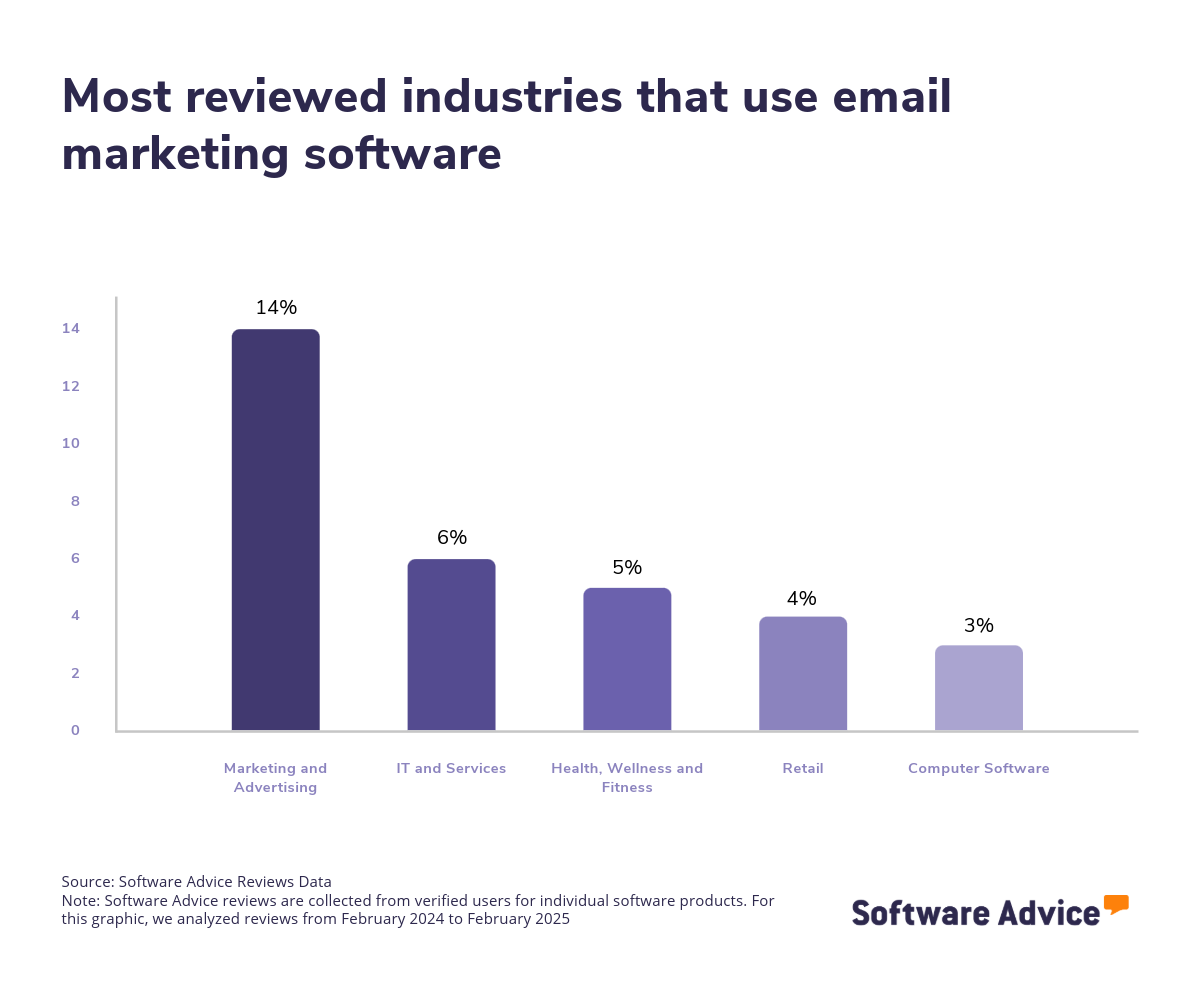
With over 500 different email marketing software products to choose from, with over 9,000 reviews published on our site in the last two years, navigating this purchase decision can be daunting. How do you find the best email marketing software for your needs?
Knowing how much to budget for your new software is a good starting point. Basic systems can be found for as little as $7 per month, while advanced offerings can cost $1,499 per month or more, depending on the number of users and the functionality offered. [2] Free versions (forever free or limited-time free trials) are also common.
But there are other factors you need to consider with your purchase as well, such as feature needs, necessary integrations, and ease of use. You should meet with other stakeholders to figure out answers to critical questions about your purchase, like:
Does the software support campaign scheduling, audience segmentation, and channel optimization?
What measurement and reporting features are available for tracking performance and ROI?
What are the tool's capabilities for managing customer profiles and data?
Can the platform automate lead capture, scoring, and routing?
Does the software integrate with CRM systems or sales tools?
Buying new software can feel like a long and arduous task. To help, we offer this guide to tell you everything you need to know about buying email marketing software—with advice from our experienced email marketing software advisors James McKechnie and Marty Moore. To get expert guidance, schedule a free consultation or start a chat with us today.
What is email marketing software?
Email marketing software is a digital tool that enables businesses to create, launch, and track email campaigns to promote a company’s marketing message. Email marketing software offers a centralized platform that allows marketers to manage and automate numerous characteristics of email marketing, including building and segmenting email lists, designing, scheduling and delivering emails, and analyzing their results through various metrics. Email marketing software includes core features such as email campaign management, list management, and template management.
In addition to these core functions, email marketing software solutions often come equipped with robust reporting and analytics capabilities. These features provide valuable insights for ongoing customer relationship management efforts and the effectiveness of marketing strategies, enabling businesses to make data-driven decisions.
Email marketing systems are closely related to contact management systems, CRM software, campaign management software, and all-in-one marketing platforms, which are commonly deployed via the cloud. These systems offer flexibility and scalability to meet the needs of businesses of all sizes.
Essential features of email marketing software
When comparing email marketing software, it's important to know what features you can expect to see and which features are more advanced add-ons or uncommon. Some functionalities like email campaign management, list management, and template management are core features that will be available in every email marketing software. Other features, such as campaign scheduling, reporting/analytics, and contact management, are still common. We analyzed thousands of reviews to determine the core features of email marketing software: [3]
Email campaign management | Plan, execute, and analyze email marketing campaigns. 94% of our reviewers rate this feature as critical or highly important. |
List management | Manage contacts across multiple mailing lists. 80% of our reviewers rate this feature as critical or highly important. |
Template management | Create, save, and re-purpose templates for emails, forms, etc. 80% of our reviewers rate this feature as critical or highly important. |
Common email marketing software features
Reporting/analytics | View and track pertinent metrics to find patterns and gain insights from data. 86% of our reviewers rate this feature as critical or highly important. |
Campaign scheduling | Set campaign schedules by selecting start, pause, and end dates. 85% of our reviewers rate this feature as critical or highly important. |
Contact management | Manage, organize, and store contact information. 84% of our reviewers rate this feature as critical or highly important. |
Mobile optimization | Optimize content to ensure it is easily accessible for mobile users. 84% of our reviewers rate this feature as critical or highly important. |
Customizable fields | Customize data fields to support various needs and use cases. 83% of our reviewers rate this feature as critical or highly important. |
Campaign analytics | Track and interpret campaign performance metrics. 83% of our reviewers rate this feature as critical or highly important. |
Event-triggered actions | Predefined actions automatically performed on the occurance of specific events. 72% of our reviewers rate this feature as critical or highly important. |
CAN-SPAM compliance | Ensure all emails are compliant with anti-spam guidelines, as required by the CAN-SPAM Act. 71% of our reviewers rate this feature as critical or highly important. |
Subscriber management | Add or remove subscribers from mailing lists. 69% of our reviewers rate this feature as critical or highly important. |
Benefits and competitive advantages of using email marketing software
Automation is a key benefit in email marketing systems. As McKechnie notes, “Email marketing software buyers primarily seek to automate processes to avoid inefficiencies of manual tasks. With large contact lists, managing individual communications becomes impractical.” The goal of email marketing is to automate workflows and to ensure emails are dispatched effortlessly, adds McKechnie.
Our analysis of over 9,000 user reviews from the past year shows that team support, lead generation, email campaigns, and customer service in marketing are the top-rated benefits of email marketing software. These features directly address the core needs of email marketing, including communication and coordination across teams, optimal use of time and resources for promising leads, and tracking interactions with automated email marketing.
Improved team collaboration: Email marketing software fosters enhanced team support and collaboration by providing a centralized platform where team members can share templates, track campaign progress, and access metrics in real-time, ensuring all team members are on the same page.
Optimized lead acquisition: Email marketing software streamlines lead generation by automating the process of capturing and nurturing leads through targeted campaigns. With features like segmentation and personalization, businesses can tailor their messages to resonate with specific audiences to increase the likelihood of conversion. By optimizing lead generation efforts, email marketing software helps businesses increase their sales pipeline.
Targeted email outreach: Email marketing software enhances the effectiveness of email campaigns by offering advanced tools for design, automation, and analytics. Email marketers can create email campaigns by using customizable templates to ensure brand consistency. Automation features allow users to schedule and trigger email campaigns based on user behaviour which ensures timely and relevant communication.
Proactive customer engagement: Email marketing software supports customer service efforts by enabling personalized and proactive communication with customers. Automated responses and follow-up emails ensure that customers receive timely support and information, which enhances their overall experience.
How to choose the best email marketing software for your business
Step 1: Define your requirements
The first step in any software purchase is to meet with stakeholders and define your requirements. These should include the use cases for your email marketing software, the goals and desired outcomes from your purchase, the features you need, and any necessary integrations with your current software stack.
This ensures everyone is aligned on the needs with your new software, and also gives you a way to measure if your chosen email marketing software successfully meets your needs after it’s implemented.
Here are some other things to keep in mind early on with your purchase.
Budget for how much email marketing software really costs
As you might expect, the biggest component baked into the price of any new software system is going to be the license cost. That’s no different for email marketing software, where the license cost most often scales based on the number of employees who will use it and the level of functionality offered.
But there are often other costs to consider as well, some of which vendors may not be as upfront about. These include charges for implementation, data migration, customization, user training, or premium customer support. Knowing the costs you might run into and asking vendors about them can help you avoid sticker shock.
Decide on a standalone tool or an integrated suite
If you have other marketing software needs, like that for CRM or marketing automation, it’s best to seek out an integrated suite with all of your needs packaged into one tool, such as an all-in-one marketing platform. Integrated suites can save you money and provide you with scalable solutions as your business grows.
Get ahead of potential email marketing software challenges
According to the email marketing software reviews on our site, some of the most common challenges with this type of software include spam filtering, payment plans, and contact management.
Keep these potential issues in mind when reading reviews and talking to vendors.
Step 2: Make your email marketing software shortlist
After carefully defining your requirements, it's time to start narrowing down your options to create a shortlist and seek professional help in making an informed choice.
Here are some useful resources to help you pare down your options and create a reliable shortlist with ease.
Get qualified help from an advisor
At Software Advice, our advisors have experience helping hundreds of businesses identify solutions that suit their business needs. If you need guidance on how to make a shortlist or have any doubts regarding your business requirements, you can chat online now with an advisor or schedule a phone consultation.
Explore our list of email marketing FrontRunners
If you’re not ready to speak to an advisor just yet, you can also start compiling your shortlist of email marketing software with our FrontRunners report. Only products that earn top user ratings make this list.
Check out our full methodology for more details on how the FrontRunners report is compiled.
For more help creating a shortlist and a free, downloadable comparison chart, check out our Ultimate Software Vendor Evaluation Guide. This guide and comparison chart will help you compare software evaluation criteria for each prospective vendor by tracking functionalities, training and support offerings, costs, and deployment options.
Step 3: Pick the best option
Now that you have your curated shortlist, it's time to pick the best option. But how? Picking the best option means you need to try to get hands-on experience with the chosen software to ensure that it can fulfill a set of criteria before making your final choice. Here are a few things to consider before committing to a vendor:
Schedule a vendor demo
Vendor demos are sessions provided by the vendor to help get you familiar with the features of the product, its capabilities, and understand their pricing. Here, you have the chance to learn more about the product and ask questions to ensure that it aligns with your business needs. Be sure to ask about what is included in the price and whether technical support and training resources are available.
Evaluate your integration needs
Check the software’s ability to integrate with your existing systems and tools, such as email marketing software, website builder software, and project management software. A software solution with seamless integration is vital to streamlined workflows and improved data consistency across platforms.
Determine customizable options
When making your final choice, it's also important to determine the level of customization the software offers to meet your specific business processes and requirements. A customizable software solution can enhance the software's relevance and effectiveness for your business.
Step 4: Make the most of your email marketing software
Once you’ve purchased your email marketing software, the implementation process begins. Here are some important considerations you’ll want to pay attention to during this process:
Training: Offer thorough training sessions for all users to ensure they understand how to use the software effectively. The training should cover an explanation of the software's core features, best practices, and any customizable functionalities specific to your organization.
Feature rollout: Users can become overwhelmed if you roll out every performance management feature at once. Start with the most critical components, like annual performance reviews, and then, once all the bugs and hiccups are figured out, you can open up users to more functionality.
Integration: Map out all of the important integrations you need with your new email marketing software, then work closely with your IT personnel and vendor to ensure that everything runs smoothly.
“Integrations are crucial for email marketing software buyers, as many seek a comprehensive marketing solution that seamlessly connects with their existing CRM systems,” says Moore.
Check out our five critical steps to a successful software implementation for more help with this step.
Software related to email marketing
Depending on which email marketing software you choose, you may need to supplement some features with related software systems in order to support sales, lead generation, contact management, or marketing. Some types of software that are closely related to email marketing software, but may or may not be included in your email marketing setup, include:
All-in-one marketing software: All-in-one marketing platform provides multiple digital marketing tools for businesses as part of one comprehensive package. The solution offers marketing automation, campaign management, email and social marketing, lead management, landing pages/web forms, dynamic content, and various other marketing features.
Campaign management software: Campaign management software enables organizations to automate the tracking, delivery, reporting, and analysis of marketing campaigns and promotions through the integration of customer data sources and the ability to parse the data through a broad range of analytic searches.
Contact management software: Contact management software enables the storage, tracking, and management of contact information throughout an organization.
Customer relationship management (CRM) software: CRM software enables customer interaction, support, and relationship management. The purpose of a CRM application is to enable organizations to better manage their customers through the introduction of reliable systems, processes, and procedures.
Marketing automation software: Marketing automation software enables organizations to automate their marketing functions, including campaign creation, marketing workflows, and outcome analysis.
Survey software: Survey software lets users design and manage electronic surveys, polls, and questionnaires for market research, measuring customer satisfaction, collecting employee feedback, and more. It helps automate designing, scheduling, publishing, and conducting surveys using various user feedback-capturing formats, including radio buttons, check boxes, drop-down menus, and free-form text fields.
More resources for your email marketing journey
About our contributors
Author
Andrew Blair is a content analyst at Software Advice, covering marketing, cybersecurity, and emerging technologies across industries. He leverages his technical expertise and business acumen, acquired from experience as a web developer in the eCommerce industry, to deliver data-driven insights on market and business operations, empowering businesses to embrace the right technology.
Andrew’s research and analysis are informed by more than 150,000 authentic user reviews on Software Advice and nearly 3,000 interactions between Software Advice software advisors and software buyers. Andrew also regularly analyzes market sentiment by conducting surveys of IT and marketing leaders so he can provide the most up-to-date and helpful information to small and midsize businesses purchasing software or services.
His research and data insights for small and midsize businesses have been featured in SBS Media, IT Brief Australia, and Technology Decisions media publications. Andrew’s commentary on tech trends is published in various content forms, including podcasts, videos, and written interviews. In his free time, he enjoys sports and spending time outdoors.
Editor
Caroline Rousseau is a senior content editor at Software Advice.
A former content analyst, Caroline has, for the past five years, built, written, and edited research reports about technological trends, opportunities, and challenges with an SMB audience in mind. Her content has been featured in French Tier 1 media including Le Monde, L’Express, and Le Figaro, among other publications.
Her previous experience as a graphic designer, translator, and LQA specialist in various industries converged into a skill set that allows her to create compelling content about today’s business matters. Caroline’s personal interests include literature and art and she has a passion for Albert Camus, graphic novels, and drawing.
Advisor
Marty Moore is a senior software advisor. He joined Software Advice in 2014 as a software advisor, and he is based in Austin, TX.
As part of the software advisor team, Marty helps a wide range of industry professionals who are seeking construction, field service, CRM, and project management software. He provides a short list of personalized technology recommendations based on budget, business goals, and other specific needs.
Marty’s favorite part of being a software advisor is talking to buyers and helping them understand how software works for them and can really help their business.
Sources
Software Advice advisor call notes: Findings are based on data from telephonic conversations that Software Advice’s advisor team had with small-to-midsize businesses seeking professional services automation tools. For this report, we analyzed phone interactions from January 1, 2023 to January 1, 2025. Read the complete methodology.
Software Advice software pricing data: Only products with publicly available pricing information and qualified software products within the category are included in the pricing analysis. Read the complete methodology.
Software Advice reviews data: Software Advice reviews are collected from verified users for individual software products. For this report, we analyzed reviews from the past year as of the production date. Read the complete methodology.
Email Marketing FAQs
- What is the most popular email marketing software?
According to our analysis of products with high market demand and reviews, Mailchimp, Constant Contact, and Klaviyo are the most searched products. However, each product is most popular for specific reasons, such as “best free”, “best for engagement tracking”, and so on. To find out which email marketing software is most popular, our FrontRunners research can help you find popular email marketing software based on our verified reviews.
- What email platform is best for small business?
According to our analysis, Omnisend was rated the most affordable email marketing tool from verified reviewers on Software Advice, making it ideal for small businesses on a budget. Omnisend’s tiered pricing gives small businesses an affordable entry but also allows them to scale as their business grows.
- What is the best free email platform?
According to our analysis of verified reviewers on Software Advice, Mailchimp has the highest overall rating for the best email marketing tool with a free plan. It includes basic email marketing features, automation, and reporting for up to 500 contacts at no cost.
- How much should I budget for email marketing?
Budgeting for email marketing varies based on business size and needs. Small businesses might spend $7 monthly on basic, entry-level plans, while larger enterprises could invest from $1,499 for advanced features and larger contact lists. When budgeting, consider factors like campaign frequency, list size, and desired features.
- Can I start email marketing for free?
Yes, you can start email marketing for free. SoftwareAdvice lists over 500 email marketing products, many of which offer a free trial or forever forever-free version. Bear in mind free trials are restricted by the amount of time you can use them, and forever-free versions will have basic features suited for individuals or small teams just getting started with email marketing.