


Best Performance Management System Software of 2026
Updated February 18, 2026 at 5:37 AM

Written by Brian Westfall
Associate Principal Analyst

Edited by Caroline Rousseau
Senior Editor

Reviewed by Jennifer McClure
Contributor

Talk with us for a free 15-min consultation
Expert advisors like Jacqueline, who have helped 1,000+ companies, can find the right software for your needs.
- All Software
- Software Advice FrontRunners
- Popular Comparisons
- Buyer's Guide
- Frequently Asked Questions
Performance management software helps HR teams and people managers set goals, track progress, and support employee development. Choosing from over 300 products—each built for different team structures, review cycles, or feedback models—can be daunting. To help you narrow it down, I worked with our performance management software advisors to curate a list of recommended productsi and a list of the Performance Management software Frontrunners based on user reviews. For further information, read my Performance management software buyer's guide.
Performance Management System Software
Sort by
Reviews: Sorts listings by the number of user reviews we have published, greatest to least.
Average Rating: Sorts listings by overall star rating based on user reviews, highest to lowest.
Alphabetically (A-Z): Sorts listings by product name from A to Z.

BambooHR centralizes your HR data, automating key tasks like payroll, benefits, and employee management. Streamline processes fr...Read more about BambooHR


BambooHR's Best Rated Features
See All
BambooHR's Worst Rated Features
See All

Rippling is an integrated workforce management platform that unifies HR, IT, and finance tools to streamline operations. It cent...Read more about Rippling


Rippling's Best Rated Features
See All
Rippling's Worst Rated Features
See All

TriNet's HR Plus is outsourced HR services plus HR technology to help your business thrive. Our all-in-one HR platform helps you...Read more about TriNet HR Plus

TriNet HR Plus's Best Rated Features
See All
TriNet HR Plus's Worst Rated Features
See All

ADP Workforce Now is an HR suite that combines all core payroll and HR management processes into a single database-driven platfo...Read more about ADP Workforce Now


ADP Workforce Now's Best Rated Features
See All
ADP Workforce Now's Worst Rated Features
See All

Paycor’s HR & payroll platform connects leaders to people, data, and expertise. Our comprehensive HR and talent platform combine...Read more about Paycor


Paycor's Best Rated Features
See All
Paycor's Worst Rated Features
See All
Software Advice FrontRunners 2026

(4538)

(7136)

(1695)

(3098)

(850)

(201)

(1717)

(440)

(174)

(693)
Best for Usability
Rippling

Of the products listed on our FrontRunners report, Rippling is the most requested by users for mobile app out of the most popular tools.
Rippling is best for organizations seeking robust mobile app capabilities to manage HR, payroll, and IT tasks on the go. Our reviewers say the mobile app is intuitive and enables employees and administrators to efficiently access paystubs, benefits, and time-off requests, streamlining daily HR operations from any location.
- Reviewers Perspective
"I do like the one stop shop function of how we use Rippling for everything from payroll fuctions, to IT management, to app management and user enrollment in the various tech platforms we utilize."
JLJames Line
Director of Finance
Used for 2+ years
We analyzed 730 verified user reviews for Rippling to find out what actual users really think.
Ease of Use
Staff complete HR and payroll tasks with minimal training. Clearly labeled features and a clean layout streamline daily operations for SMBs.Payroll
Organizations manage pay, tax filing, and employee data in one system. Automation reduces manual errors and supports efficient onboarding and payroll runs.Employee Management
HR teams track leave, compliance, and organizational charts in one place. Employees self-manage information, reducing administrative overhead and supporting distributed teams. - Key FeaturesRippling's scoreCategory average
Employee Management
4.784.48 category average
Performance Review Management
5.04.46 category average
Reporting & Statistics
4.444.38 category average
- Screenshots


Best for Quick Adoption/Easy Adoption

Of the products listed on our FrontRunners report, ADP Workforce Now is the highest rated for easy adoption out of the most popular tools.
ADP Workforce Now is ideal for organizations prioritizing quick adoption and easy onboarding. Our reviewers point out that employees and managers benefit from the user-friendly interface, self-service features, and comprehensive support resources, which help streamline payroll and HR processes with minimal training.
- Reviewers Perspective
"With it being an all in one app for time tracking, payroll, employee info, and benefit sign up, it makes for a seamless approach to not have multiple places to find these."
JGJonathana Gurney
Director of Plumbing
Used for 2+ years
We analyzed 877 verified user reviews for ADP Workforce Now to find out what actual users really think.
Payroll
HR teams process payroll, track time, and manage compliance in one platform. Robust reporting and device access support businesses of varying sizes and complexity.Employee Information
Managers and employees update records, schedules, and benefits through ADP Workforce Now’s self-service features. Centralized documentation streamlines onboarding and daily management.Pay and Paystubs
Employees view paystubs, track hours, and manage compensation details securely. The platform’s clear breakdown of pay and benefits reduces manual record keeping and HR inquiries. - Key FeaturesADP Workforce Now's scoreCategory average
Employee Management
4.444.48 category average
Performance Review Management
4.224.46 category average
Reporting & Statistics
4.804.38 category average
- Screenshots


Best for Quick Implementation

Paylocity

Of the products listed on our FrontRunners report, Paylocity is the highest rated for automation out of the most popular tools.
Paylocity is highly rated for automation and suits organizations looking to streamline payroll and HR workflows. Our reviewers say automated time tracking, payroll processing, and integrated modules significantly reduce manual work and improve overall efficiency.
- Reviewers Perspective
"The timesheet functionality is good, as well; it allows us to track billable hours across various client jobs, and access relevant notes per subsection of times worked."
MEMichelle Egner
Senior Manager, Marketing and Operations
Used for 6-12 months
We analyzed 644 verified user reviews for Paylocity to find out what actual users really think.
Payroll Management
Organizations streamline payroll, HR, and time tracking in one platform. Reporting tools and real-time previews help reduce errors and save administrative time.Customer Support
HR teams access support via chat, email, and a knowledge base. While responses are generally prompt, some users face inconsistent service and delayed resolutions.Ease of Use
Both administrators and employees learn Paylocity quickly. The intuitive design and straightforward workflows support efficient HR and payroll management. - Key FeaturesPaylocity's scoreCategory average
Employee Management
4.344.48 category average
Performance Review Management
3.934.46 category average
Reporting & Statistics
4.124.38 category average
- Screenshots


Best for User Interface
BambooHR

According to our user reviews, BambooHR is the highest rated for customization out of the most popular tools.
BambooHR is highly rated for customization and is well-suited to organizations needing flexible HR management tailored to their processes. Our reviewers say customizable workflows, fields, and integrations help streamline onboarding, performance tracking, and employee data management.
- Reviewers Perspective
"The availability of integrations enabled us to combine records from multiple payroll platforms so we had one unified system for reporting & analytics."
KWKaty Williamson, SHRM-CP
Sr. Director, Talent Management
Used for 2+ years
We analyzed 779 verified user reviews for BambooHR to find out what actual users really think.
Employee Management
HR teams centralize onboarding, time-off, and performance tracking. Self-service tools and reporting features improve transparency and efficiency for both administrators and employees.Customer Support
HR departments access live chat, tutorials, and follow-ups. Support resolves onboarding and complex issues quickly, helping teams stay productive.Ease of Use
Both administrators and employees navigate BambooHR’s clean interface easily. Time tracking, leave requests, and personal information are accessible with minimal learning curve. - Key FeaturesBambooHR's scoreCategory average
Employee Management
4.504.48 category average
Performance Review Management
4.374.46 category average
Reporting & Statistics
4.194.38 category average
- Screenshots


Best for Automation Capabilities

NEOGOV

NEOGOV is the most requested by users for automation capabilities out of the most popular tools.
NEOGOV is best for organizations focused on automation capabilities in HR processes. Our reviewers point out that the platform’s robust automation tools have significantly reduced manual tasks, improved workflow efficiency, and enabled easy customization for complex organizational needs.
- Reviewers Perspective
"Overall the Neogov has automated over 100 processes for ur organization freeing up more time for our employees to do more of what they love rather than the administrative burdens."
KBKale Brinley
Senior HR Consultant
Used for 1-2 years
We analyzed 479 verified user reviews for NEOGOV to find out what actual users really think.
Customer Support
HR departments rely on NEOGOV’s support staff for prompt answers and follow-up. The team provides helpful resources and keeps users informed about product changes, supporting smooth implementation and ongoing use.Training and Learning Curve
Organizations use NEOGOV’s online courses, training videos, and community support to onboard new users. Staff learn at their own pace, making it easier to master features and teach others.Ease of Use
Departments streamline daily tasks with NEOGOV’s user-friendly interface. The design supports quick training and cross-departmental adoption, improving process efficiency for both new and experienced staff. - Key FeaturesNEOGOV's scoreCategory average
Employee Management
4.334.48 category average
Performance Review Management
4.324.46 category average
Reporting & Statistics
3.644.38 category average
- Screenshots


Highly Rated for Customization

Lattice

According to our user reviews, Lattice is the highest rated for customization out of the most popular tools.
Lattice is highly rated for users who need extensive customization in performance management and feedback. Our reviewers say the platform’s flexible review cycles, customizable templates, and seamless Slack integration help tailor performance processes to unique team requirements and foster ongoing feedback.
- Reviewers Perspective
"Lattice has been a great tool to help manage the team, have effective communication as a group, and individually, conduct performance reviews, and give the team a greater sense that the company truly cares about their development as employees."
JLJames Line
Director of Finance
Used for 2+ years
We analyzed 136 verified user reviews for Lattice to find out what actual users really think.
Performance Review
Managers centralize feedback, 1:1s, and goal tracking in Lattice, making performance management more efficient. Customizable templates and visibility into trends support productivity and review consistency.Ease of Use
Teams transition smoothly to Lattice with its straightforward navigation and accessible design. Both employees and administrators quickly learn to manage reviews and goals without steep learning curves.Employee Management
HR professionals use Lattice to oversee employee engagement, praise, and troubleshooting. The platform supports managers and staff in managing the full employee lifecycle and improving retention. - Key FeaturesLattice's scoreCategory average
Employee Management
4.504.48 category average
Performance Review Management
4.464.46 category average
Reporting & Statistics
4.134.38 category average
- Screenshots


Highly Rated for Mobile app

Workday HCM

According to our user reviews, Workday HCM is the highest rated for mobile app out of the most popular tools.
Workday HCM is highly rated for its mobile app, making it ideal for organizations with a mobile or distributed workforce. Our reviewers say the mobile experience is intuitive and comprehensive, allowing employees to access pay, benefits, and HR tasks on the go, improving engagement and efficiency.
- Reviewers Perspective
"It's an all-in-one application that centralizes so many business needs such as internal opportunities and positions, employee referrals, and additional company information."
TFTrinidad Flores
Remote Assistance Operator
Used for 1-2 years
We analyzed 783 verified user reviews for Workday HCM to find out what actual users really think.
Ease of Use
Staff complete HR tasks such as time entry and benefits management quickly using Workday HCM’s intuitive interface. Both web and mobile access support daily workflows in organizations with varying technical expertise.Features
HR teams utilize Workday HCM’s broad feature set for benefits, payroll, performance management, and time tracking. The platform’s flexibility and scalability support both standard and advanced HR operations.Employee Management
Organizations centralize employee data and streamline onboarding through Workday HCM. Self-service options and mobile access enable employees to manage personal information and performance reviews efficiently. - Key FeaturesWorkday HCM's scoreCategory average
Employee Management
4.574.48 category average
Performance Review Management
4.504.46 category average
Reporting & Statistics
5.04.38 category average
- Screenshots


Most Rated for SMBs

PurelyHR

In our analysis of Performance Management System products with the most market demand, PurelyHR is the most requested by small businesses out of the most popular tools.
PurelyHR is most rated for SMBs looking for effective time-off and attendance tracking. Our reviewers say it offers quick onboarding, strong customization for different locations, and an easy-to-use interface that simplifies PTO management for both managers and employees.
- Reviewers Perspective
"It has everything you could need for your small business including the ability to customize holidays based on workers locations which as an organization with employees in multiple provinces is important."
AHAngela Hodgson
Director of Operations
Used for 2+ years
We analyzed 331 verified user reviews for PurelyHR to find out what actual users really think.
Ease of Use
Users navigate PurelyHR’s clean interface to manage HR tasks with minimal training. Administrators and employees in small and midsize organizations benefit from accessible tutorials and clear layout, streamlining processes like time-off booking and sick day tracking.Employee Management
Teams customize PurelyHR to fit varying labor laws and business needs. HR managers can efficiently add or remove staff, update records, and manage time-off requests, supporting transparency and autonomy across distributed workforces.Customer Support
Organizations rely on PurelyHR’s support for prompt assistance during setup and troubleshooting. The support team helps resolve issues and guides users through ongoing platform use, contributing to smoother HR operations. - Key FeaturesPurelyHR's scoreCategory average
Employee Management
4.464.48 category average
Performance Review Management
3.864.46 category average
Reporting & Statistics
5.04.38 category average
- Screenshots


Most Used By Human Resources

PerformYard

PerformYard is the most requested by users in human resources out of the most popular tools, based on our analysis of Performance Management System products with the most market demand.
PerformYard is most used by human resources teams seeking robust performance management tools. Our reviewers say the platform’s flexibility, customizable review forms, and user-friendly interface make it easy to manage assessments and streamline performance review processes.
- Reviewers Perspective
"I really like flexibility, and as a human resources manager, its important to me because it allows me to manage multiple types of assessments within the platform, which saves a lot of time and also allows me to tailor feedback to the actual needs of the team."
HAHasina Akter
IT Operations
Used for 6-12 months
We analyzed 132 verified user reviews for PerformYard to find out what actual users really think.
Performance Management
HR teams digitize and streamline performance management with PerformYard, customizing assessments and feedback to fit team needs. Goal tracking and progress monitoring reduce manual admin work.Ease of Use
Administrators and employees adapt quickly to PerformYard’s organized layout and clear instructions. The platform’s simplicity supports fast onboarding and daily use without technical barriers.Customer Support
Organizations receive quick help from PerformYard’s knowledgeable support team during setup and ongoing use. Documentation and training videos are available for troubleshooting and user guidance. - Key FeaturesPerformYard's scoreCategory average
Employee Management
3.844.48 category average
Performance Review Management
4.514.46 category average
Reporting & Statistics
4.824.38 category average
- Screenshots


Most Rated for Enterprise

UKG Pro

According to our user reviews, UKG Pro is the most requested by enterprises out of the most popular tools.
UKG Pro is most rated for enterprise organizations needing comprehensive HR and payroll capabilities. Our reviewers point out that the platform’s integrated suite, powerful reporting, and user-friendly design support large-scale operations and provide real-time insights for better decision-making.
- Reviewers Perspective
"UKG Pro's features including managing teams, a user-friendly interface, seamless integration of payroll, time tracking, and other HR features made it very efficient tool."
SHSuman Humagain
Software Engineer
Used for 2+ years
We analyzed 433 verified user reviews for UKG Pro to find out what actual users really think.
Employee Information
Organizations manage and update employee data, payroll, and benefits in one location. Self-service features let employees track time and retrieve documents without HR intervention.Navigation
Staff use clear menus and customizable dashboards to locate features and complete tasks. Mobile access and help resources support daily HR and payroll operations.Ease of Use
Users perform time entry, benefits management, and time-off requests efficiently. UKG Pro’s design supports quick learning and task completion for all organizational levels. - Key FeaturesUKG Pro's scoreCategory average
Employee Management
4.314.48 category average
Performance Review Management
4.174.46 category average
Reporting & Statistics
3.504.38 category average
- Screenshots


isolved

- Reviewers Perspective
"It offers a robust, all-in-one HCM platform that has allowed us to streamline payroll, benefits, and employee management into a single system. Once the setup and initial learning curve are behind you, the system becomes a powerful tool for automating processes and reducing manual effort."
MZMelanie Zakrzewski
Payroll Benefits Supervisor
Used for 2+ years
We analyzed 337 verified user reviews for isolved to find out what actual users really think.
Payroll
You can manage paystubs, time tracking, and benefits in one platform. Automation and reporting features help reduce manual effort for SMB payroll teams.Ease of Use
HR admins and employees can quickly learn and navigate daily tasks. The intuitive interface supports onboarding and ongoing payroll operations.Training and Learning Curve
Teams can access videos, articles, and an online university. This supports smoother transitions and ongoing proficiency, even with an initial learning curve. - Key Featuresisolved's scoreCategory average
Employee Management
4.304.48 category average
Performance Review Management
3.804.46 category average
Reporting & Statistics
3.504.38 category average
- Screenshots


- Reviewers Perspective
"The self-service portal for employees is a great feature too—it empowers staff to manage their own information and leave requests without having to go through HR every time."
JSJane Symons
Executive Assistant
Used for 6-12 months
We analyzed 167 verified user reviews for Employment Hero to find out what actual users really think.
Employee Management
Users rely on Employment Hero to manage employee records, access personal information, and streamline communication across their organizations. They appreciate the self-service features, which empower employees to update details, view documents, and handle requests independently. Reviewers highlight the platform’s ability to centralize employee data, support various employment types, and facilitate quick onboarding, making HR management more efficient and accessible.Onboarding
Users praise Employment Hero for automating and simplifying the onboarding process, allowing new hires to complete induction tasks and submit documents efficiently. They find the platform’s onboarding tools easy to use, reducing manual data entry and saving significant time for HR teams. Some reviewers note that while onboarding is generally smooth and comprehensive, they would like more flexibility and dynamic options to tailor the process for different roles or contractors.Policy and Leave Management
Users appreciate Employment Hero for providing a centralized location to manage policies, leave requests, and employee documents, making HR processes more transparent and accessible. They find the self-service portal beneficial for staff to initiate and track leave, access files, and acknowledge policy updates without relying on HR for every request. Reviewers highlight the automation of leave approvals, policy tracking, and compliance management, which streamlines document control and reduces administrative workload. - Key FeaturesEmployment Hero's scoreCategory average
Employee Management
4.264.48 category average
Performance Review Management
4.04.46 category average
Reporting & Statistics
4.204.38 category average
- Screenshots


HR Cloud

- Reviewers Perspective
"The HR Cloud platform has been instrumental in streamlining our HR processes, particularly in areas like onboarding, attendance tracking, and performance management."
KTKrishna Trivedi
Senior HR Operations
Used for 2+ years
We analyzed 70 verified user reviews for HR Cloud to find out what actual users really think.
Onboarding Process
Users describe HR Cloud as a valuable tool for simplifying and organizing the onboarding process, allowing new hires to complete documents and tasks digitally from any location. They appreciate the customizable checklists, compliance tracking, and the ability to manage onboarding workflows for different roles, which helps ensure nothing is overlooked. Reviewers also note that HR Cloud’s onboarding features save time, reduce paperwork, and provide a more organized and welcoming experience for both HR staff and new employees.Customer Support
Users consistently praise HR Cloud’s customer support for being responsive, helpful, and attentive to their needs throughout implementation and ongoing use. They value the quick response times, knowledgeable representatives, and the willingness of support staff to address questions and offer workarounds when needed. Reviewers also highlight the positive impact of dedicated account managers and the flexibility of the support team, which contributes to a smooth and satisfying experience with HR Cloud.Customization
Users appreciate the high level of customization available in HR Cloud, which allows them to tailor workflows, forms, and content to fit their organization’s specific needs. They note that the platform’s flexibility enables them to create unique onboarding experiences, dynamic forms, and company-specific pages, making the software adaptable to various business requirements. Reviewers also mention that while some advanced features require extra configuration, the HR Cloud team is receptive to feedback and works to implement requested customizations. - Screenshots


Teamflect

- Reviewers Perspective
"Teamflect provides tools for goal setting, feedback, and recognition, which helps create a more structured and consistent approach to employee development, according to multiple software review platforms."
THTerrance Hagan
Patient Access
Used for 1-2 years
We analyzed 117 verified user reviews for Teamflect to find out what actual users really think.
Team Meetings
Users find Teamflect valuable for organizing and documenting team meetings, especially when working remotely or managing distributed teams. They appreciate features such as shared notes, talking points, and the ability to keep meeting agendas and tasks accessible to all team members directly within their daily workflow. Reviewers highlight how Teamflect fosters collaboration, accountability, and communication, making it easier to stay aligned and recognize contributions across the organization.Goal and Task Management
Users rely on Teamflect to streamline goal setting, task assignment, and progress tracking, which helps teams stay focused and productive. They note that the platform’s ability to monitor individual, team, and organizational goals, as well as manage tasks and deadlines, supports efficient collaboration and accountability. Reviewers mention that Teamflect’s integration with daily workflows and customizable features make it simple to track achievements and align efforts with broader company objectives.Ease of Use
Users consistently describe Teamflect as intuitive and straightforward, with a clean interface that makes navigation and task completion simple. They find the platform easy to understand, requiring minimal training, and appreciate the visual clarity and helpful documentation available. Reviewers highlight that Teamflect’s user-friendly design allows them to quickly access features and manage their work without unnecessary complexity. - Key FeaturesTeamflect's scoreCategory average
Employee Management
4.404.48 category average
Performance Review Management
4.694.46 category average
Reporting & Statistics
5.04.38 category average
- Screenshots


WorkforceHub

- Reviewers Perspective
"WorkforceHub is user-friendly, offers excellent time tracking and scheduling, integrates well with payroll systems, and provides a convenient self-service portal for employees"
MWMorgan Williams
Property Developer
Used for 6-12 months
We analyzed 74 verified user reviews for WorkforceHub to find out what actual users really think.
Employee Scheduling
Users appreciate how WorkforceHub centralizes employee scheduling, allowing managers to prepopulate and adjust schedules efficiently. They find it convenient to track shifts, swap coverage, and access the schedule from anywhere, which supports consistent staffing and reduces administrative workload. Reviewers also mention that WorkforceHub combines scheduling with other workforce management features, making it easier to manage timekeeping and onboarding in one platform.Time Tracking
Users rely on WorkforceHub for accurate and efficient time tracking, which simplifies payroll and attendance management. They highlight the platform’s ability to handle PTO, shift differentials, and timekeeping in a single system, reducing the need for multiple tools. Many reviewers find that WorkforceHub meets their needs for tracking employee hours and benefits, making workforce management more organized and less time-consuming.Ease of Use
Users find WorkforceHub easy to use, with a straightforward interface that allows them to quickly access all employee management tools in one place. They appreciate how the platform streamlines navigation for both administrators and employees, making onboarding and daily tasks less complicated. Many reviewers highlight that WorkforceHub reduces reliance on third parties for updates and simplifies timekeeping, scheduling, and reporting, which is especially helpful for small businesses. - Key FeaturesWorkforceHub's scoreCategory average
Employee Management
4.544.48 category average
Performance Review Management
4.04.46 category average
Reporting & Statistics
5.04.38 category average
- Screenshots


Culture Amp

- Reviewers Perspective
"I like the ability to be able to create multiple surveys for a variety of different purposes within Culture Amp from Onboarding and Engagement to 360 Reviews and Exit Interviews, it is helpful and can be as simple or complex as needed with the aid of the presets and templates offered."
JLJulie Lewis
Director
Used for 2+ years
We analyzed 102 verified user reviews for Culture Amp to find out what actual users really think.
Surveys
Users value Culture Amp for its versatile survey capabilities, noting the ease of creating, customizing, and deploying surveys for various purposes such as onboarding, engagement, and exit interviews. They appreciate the wide selection of well-designed templates, real-time analytics, and benchmarking features, which help them gather actionable insights efficiently. Reviewers mention that the platform supports anonymous feedback, automated reminders, and post-survey workshops, enhancing their ability to drive meaningful organizational change.Employee Performance
Users rely on Culture Amp to manage employee performance, track development, and facilitate feedback across all levels of their organizations. They find the platform beneficial for organizing performance reviews, goal setting, and employee engagement activities, with an interface that supports both HR managers and staff. Reviewers note that Culture Amp provides valuable insights for recognizing achievements, identifying areas for improvement, and supporting training and development initiatives.Feedback
Users utilize Culture Amp to collect, organize, and act on employee feedback, benefiting from features like 360-degree feedback cycles and transparent performance reviews. They find it easy to send and receive feedback, with options for both structured and open-ended responses that encourage participation and growth. Reviewers highlight that the platform’s intuitive design and proactive approach to product improvements help them foster a culture of continuous feedback and development. - Key FeaturesCulture Amp's scoreCategory average
Employee Management
4.04.48 category average
Performance Review Management
4.554.46 category average
Reporting & Statistics
5.04.38 category average
- Screenshots


Dayforce HCM

- Reviewers Perspective
"What I appreciate most about Dayforce HCM is how seamlessly it brings together payroll, HR, time tracking, and benefits into one centralized platform."
APAnthoinette Palogan
Project Manager
Used for 6-12 months
We analyzed 601 verified user reviews for Dayforce HCM to find out what actual users really think.
Payroll
Users value how Dayforce HCM centralizes payroll, HR, benefits, and time tracking in one platform, making workforce management more efficient. They appreciate the real-time payroll processing, customizable pay policies, and robust reporting tools, which help reduce errors and streamline pay runs. Many reviewers note that Dayforce HCM’s intuitive interface and audit features simplify payroll administration, support compliance, and save time, especially for organizations with complex payroll needs or multiple employee groups.Employee Management
Users find Dayforce HCM effective for managing the entire employee lifecycle, from onboarding and document management to performance reviews and benefits administration. They highlight the convenience of having all employee data, self-service options, and communication tools in one accessible system, which empowers both employees and managers. Reviewers also appreciate the platform’s ability to support complex organizations, provide real-time updates, and facilitate accountability through easy tracking of schedules, time off, and employee records.Pay and Paystubs
Users appreciate how Dayforce HCM provides easy access to paystubs, earnings statements, and tax documents, allowing them to review pay details and manage direct deposit information conveniently. They find the platform’s clear display of pay information, real-time updates, and mobile accessibility helpful for tracking hours, requesting time off, and ensuring pay accuracy. Many reviewers also value features like on-demand pay, automated calculations, and the ability to view historical pay data, which enhance transparency and employee autonomy. - Key FeaturesDayforce HCM's scoreCategory average
Employee Management
4.404.48 category average
Performance Review Management
4.054.46 category average
- Screenshots


- Reviewers Perspective
"Adding employee info is very simple, the Recognition feature has boosted morale, and the 1-on-1/Employee Review feature helps us keep track of employee productivity throughout the year."
ADAaron Decker
Tech Specialist
Used for 2+ years
We analyzed 125 verified user reviews for Quantum Workplace to find out what actual users really think.
Customer Support
Users consistently find Quantum Workplace’s customer support team to be responsive, knowledgeable, and genuinely invested in their success, making the implementation and ongoing use of the platform seamless. They value the personalized assistance, proactive guidance, and quick resolution of questions or issues, which help them maximize the platform’s capabilities. Many reviewers note that Quantum Workplace’s support staff communicate clearly, understand HR industry needs, and provide resources that make the experience efficient and positive for both administrators and employees.Surveys
Users appreciate Quantum Workplace’s survey flexibility, robust analytics, and the ability to customize templates and questions to fit their organization’s needs. They find the AI tools and reporting features helpful for gaining insights, but some reviewers mention that survey creation can be cumbersome, especially when managing multiple languages or custom configurations. While the platform offers valuable benchmarking and action planning, users would like improvements in survey organization, feedback detail, and certain user interface aspects to streamline the process further.Features
Users highlight Quantum Workplace’s wide range of features, such as recognition tools, 1-on-1 meeting tracking, and customizable action planning, which support employee engagement and performance management. They find the platform user-friendly for both administrators and employees, with continuous updates that keep the tool relevant and adaptable to organizational needs. Reviewers also appreciate the AI-driven content suggestions and the ability to centralize important HR processes, making Quantum Workplace a comprehensive solution for workforce management. - Key FeaturesQuantum Workplace's scoreCategory average
Employee Management
3.04.48 category average
Performance Review Management
4.444.46 category average
- Screenshots


HiBob

- Reviewers Perspective
"User-Friendly Interface: Bob's modern, intuitive design makes it easy for employees and managers to navigate and complete HR tasks seamlessly."
BFBenjamin Franck
product manager
Used for 2+ years
We analyzed 138 verified user reviews for HiBob to find out what actual users really think.
Employee Management
You can manage onboarding, offboarding, time tracking, and performance reviews. The platform centralizes employee records and supports engagement initiatives.Customer Support
HR teams can access responsive support and robust help resources. The support staff guide setup and resolve issues, supporting ongoing HR operations.HR Management
You can manage payroll, benefits, performance, and feedback in one platform. This reduces administrative workload and supports culture-building for SMBs. - Key FeaturesHiBob's scoreCategory average
Employee Management
4.624.48 category average
Performance Review Management
4.364.46 category average
Reporting & Statistics
4.504.38 category average
- Screenshots


UKG Ready

- Reviewers Perspective
"It has allowed a fast, efficient means of accessing everything from tax documents, to timesheets, and time-off requests seamlessly."
JVJacquelyn Velles
Parole Transition Program Case Manager
Used for 1-2 years
We analyzed 512 verified user reviews for UKG Ready to find out what actual users really think.
Employee Payroll
You can streamline payroll, time tracking, and employee data management in one place. This helps SMBs access tax documents, timesheets, and pay information efficiently, reducing administrative burden.Reporting
You can customize and export reports in multiple formats. This supports recurring payroll and HR reporting needs, though some advanced customizations may require workarounds or support.Ease of Use
Teams can quickly learn to manage hours, pay, and HR tasks. The straightforward interface makes daily payroll and HR operations accessible for new and experienced staff. - Key FeaturesUKG Ready's scoreCategory average
Employee Management
4.504.48 category average
Performance Review Management
4.674.46 category average
- Screenshots


StaffCircle

- Reviewers Perspective
"It allows your direct reports to express areas of support required prior to the meeting which allows for the meeting to be better planned."
COCliona O'Hanlon
Fundraising Manager
Used for 2+ years
We analyzed 114 verified user reviews for StaffCircle to find out what actual users really think.
Employee Management
Users value StaffCircle for its ability to centralize employee management, making it easier to communicate company updates, recognize achievements, and facilitate regular check-ins between staff and managers. They highlight features such as internal news feeds, reward systems, and staff directories, which help foster engagement and collaboration across different branches and teams. Many reviewers mention that StaffCircle supports a positive workplace culture by enabling transparent communication, efficient people management, and accessible recognition tools.Holiday Booking
Users appreciate how StaffCircle consolidates holiday booking and absence management alongside other HR tasks, allowing them to handle requests and view calendars within a single platform. They find it easy to book time off, check team availability, and keep track of their own leave, which reduces unnecessary back-and-forth with managers. Some users suggest enhancements such as improved visibility of colleagues’ holidays or the ability to update requests, but overall, they find the holiday management features clear and convenient.Customer Support
Users consistently praise StaffCircle’s customer support, describing the team as attentive, responsive, and knowledgeable throughout onboarding and ongoing use. They highlight the helpfulness of the customer success team, who provide thorough training, resolve queries promptly, and offer guidance tailored to their business needs. Many reviewers mention that support is readily available when needed, which contributes to a positive experience and smooth adoption of the platform. - Key FeaturesStaffCircle's scoreCategory average
Performance Review Management
4.564.46 category average
Reporting & Statistics
5.04.38 category average
- Screenshots


Leapsome

- Reviewers Perspective
"I would really love the Org chart to be more interactive, and allow me to display certain fields values under each employee (e.g. performance review results, age, locations, 9-box grid square, etc) and the Compensation Review feature could also work on some polishing since it's a huge long form instead of displaying the whole team for evaluation at the same time as a interactive spradhseet"
RTRosario Tobias Panizza
Sr. People Ops
Used for 1-2 years
We analyzed 78 verified user reviews for Leapsome to find out what actual users really think.
Feedback and Reviews
Users value Leapsome for its comprehensive feedback and review features, which foster a culture of continuous development and transparent performance tracking. They highlight the platform's ability to centralize reviews, facilitate 360-degree feedback, and encourage ongoing dialogue between colleagues and managers. Although the feedback process is generally simple and well-structured, a few reviewers note that certain aspects could be more intuitive and suggest additional ways to showcase positive performance reviews.Employee Development
Users rely on Leapsome to implement effective learning and development strategies, using features like structured learning paths and goal tracking to support career growth. They find the platform helpful for onboarding, HR management, and employee engagement, with tools that make training and development processes more transparent and organized. Some reviewers mention that not all employees fully utilize every feature and suggest improvements such as enhanced organization charts and centralized career data for managers.Employee Performance Tracking
Users appreciate Leapsome's ability to streamline performance tracking, making it easy to monitor evaluations, set goals, and manage company-wide objectives. They benefit from features that support self-evaluation, progress monitoring, and productivity improvements, as well as tools for auditing and data analysis across departments. While the platform provides a uniform experience for annual reviews and development tracking, some reviewers suggest that certain tracking tasks and self-evaluation tests could be refined for greater efficiency. - Key FeaturesLeapsome's scoreCategory average
Employee Management
4.04.48 category average
Performance Review Management
4.454.46 category average
- Screenshots


TalentHR

- Reviewers Perspective
"It’s easy to monitor and track our employees, and it’s very helpful for creating job postings and managing candidates from application to interview."
JMJennie Mae Dailo
Onboarding Manager
Used for 6-12 months
We analyzed 48 verified user reviews for TalentHR to find out what actual users really think.
Employee Management
Users rely on TalentHR to streamline recruitment, onboarding, and employee management, allowing them to track candidates, monitor staff, and manage data efficiently. They value features like secure information access, easy PTO tracking, and the ability to organize employee records in one place, which helps keep HR processes organized and transparent. Reviewers also highlight that TalentHR is responsive to user suggestions, regularly implementing improvements that enhance the overall employee management experience.Small Teams
Users in small businesses and startups appreciate TalentHR for its cost-effectiveness and suitability for teams with limited HR needs. They find the platform meets the essential requirements of small organizations, offering a value-for-money solution that is easy to set up and use. Reviewers mention that the free plan and responsive support make TalentHR particularly appealing for small teams looking to streamline their HR processes without high costs.Processes
Users describe TalentHR as a tool that simplifies and streamlines HR processes, making workforce management smoother and more efficient. They find the setup process quick and the onboarding experience straightforward, with clear instructions and helpful customer service. Reviewers note that TalentHR integrates seamlessly into existing workflows, allowing for easy tracking of time off, employee registration, and other daily HR tasks with minimal disruption. - Key FeaturesTalentHR's scoreCategory average
Employee Management
4.634.48 category average
Performance Review Management
4.04.46 category average
Reporting & Statistics
4.04.38 category average
- Screenshots


Sage HR

- Reviewers Perspective
"It covers a broad range of HR functions, including recruitment, performance management, and payroll, which is beneficial for managing the entire employee lifecycle in one place."
JLJared Lewis
HR Manager
Used for 1-2 years
We analyzed 291 verified user reviews for Sage HR to find out what actual users really think.
Ease of Use
Users describe Sage HR as highly user-friendly, noting that its intuitive interface and straightforward navigation make it accessible for both new and experienced staff. They appreciate how quickly processes can be automated and tasks completed, which reduces the need for extensive training and helps teams stay organized. Additionally, users find that the platform’s clear layout and simple workflows allow them to manage HR operations efficiently without unnecessary complexity.Customer Support
Users consistently praise Sage HR’s customer support, emphasizing the responsiveness and helpfulness of the support team when addressing questions or technical issues. They value the prompt assistance provided through live chat, calls, and follow-up meetings, which makes onboarding and troubleshooting much smoother. Furthermore, users note that the support team is receptive to feedback and often implements requested features or improvements, enhancing the overall experience for both managers and employees.HR Management
Users report that Sage HR streamlines HR management by automating processes such as performance tracking, document management, and communication between staff and management. They appreciate having a comprehensive platform that consolidates all HR activities, making it easier to manage employee records, time-off, and compliance tasks. Additionally, users highlight the platform’s ability to enhance administrative efficiency and employee engagement, allowing HR teams to focus on more strategic initiatives. - Key FeaturesSage HR's scoreCategory average
Employee Management
5.04.48 category average
Performance Review Management
4.504.46 category average
- Screenshots


Profit.co

- Reviewers Perspective
"It adapts to evaluate and follow up on what is important to your company, I really like the surveys section, we have used it a lot for our work environment surveys, the support from the technical support team is fast and they have a very good attitude to address questions despite the time differences, we are in Mexico and they are in Colombia."
DGDaniel García
Human Resources Business Partner
Used for 1-2 years
We analyzed 182 verified user reviews for Profit.co to find out what actual users really think.
OKRs
Users find Profit.co valuable for standardizing and managing OKRs, which helps improve visibility and goal alignment across teams. They appreciate the customizable features, intuitive interface, and the ability to track progress, assign tasks, and leverage templates for easier OKR adoption. Reviewers also note that Profit.co streamlines quarterly reviews and supports both top-down and bottom-up goal setting, making the OKR process more effective for organizations.Ease of Use
Users describe Profit.co as intuitive and easy to use, which makes managing OKRs and team goals straightforward. They value the platform’s user-friendly design, clear explanations, and built-in KPIs that help guide decision-making and reduce the learning curve. Reviewers also mention that Profit.co’s interface allows for both simple and complex goal management, adapting to the needs of different organizations and teams.Integrations
Users appreciate that Profit.co can connect with a variety of third-party tools, including Jira, Salesforce, Microsoft Teams, and Google Sheets, which helps streamline workflows and reporting. They find the integration features useful for syncing data, automating updates, and facilitating collaboration across platforms. While some reviewers mention occasional limitations or technical issues with certain integrations, they note that Profit.co continues to expand and improve its integration capabilities. - Key FeaturesProfit.co's scoreCategory average
Employee Management
4.754.48 category average
Performance Review Management
4.174.46 category average
Reporting & Statistics
5.04.38 category average
- Screenshots


Methodology
The research for the best Performance Management System software list was conducted in October 2025. We evaluated data (user reviews and demand signals) from the past 24 months as of the research date. Read the complete methodology.
Popular Performance Management System Comparisons


Buyer's Guide
This detailed guide will help you find and buy the right performance review & appraisal software for you and your business.
Last Updated on October 16, 2025Here's what we'll cover:
Essential features of performance management system software
Benefits and competitive advantages of using performance management system software
How to choose the best performance management system software for your business
More resources for your performance management system journey
What you need to know about performance management systems
Performance management system software helps managers and their direct reports automate performance review processes and more accurately track employee performance over time. Of the more than 8,000 HR software buyers our advisors talked to in the past year, 12% requested software with performance management capabilities.[1] Buyers most often come from businesses with 101-250 employees, and from a wide variety of industries, including non-profit, manufacturing, healthcare, construction, and retail.
With over 400 different performance management software products to choose from, with nearly 8,500 reviews published on our site in the last year alone, navigating this purchase decision can be daunting. How do you find the best performance management system for your needs?
Knowing how much to budget for your new software is a good starting point. Basic systems can be found for as little as $4 per month, while advanced offerings can cost $3,750 per month or more, depending on the number of employees you have and the functionality offered. [2] Free versions (forever free or limited-time free trials) are common.
But there are other factors you need to consider with your purchase as well, such as feature needs, necessary integrations, and ease of use. You should meet with other stakeholders to figure out answers to critical questions about your purchase, like:
How often do we want to do performance reviews, and what should that process look like?
Do we need software features that support peer or 360 feedback?
What types of performance data do we need, and how are we going to gather and analyze that data?
What kind of user training resources do we require with our new software?
How much implementation support do we need?
Buying new software can feel like a long and arduous task. To help, we offer this guide to tell you everything you need to know about buying performance management software, with advice from our experienced performance management software advisor, Daniel Harvey, and former HR executive and professional HR strategist, Jennifer McClure.
What is performance management system software?
How are your employees doing at their jobs? Who should be up for a promotion, and who needs more training? Performance management software helps answer these questions and more by giving businesses the tools to monitor and manage employee performance effectively.
Differentiated from other core HR systems like those for payroll or compliance, Harvey describes performance management software as “more of a competency-based, goal management type of system.”
Common features of performance management software include goal setting, ongoing performance tracking, and self-assessments. Not only can these tools make performance management processes less distracting from day-to-day operations, but they can also provide more insights to improve employee management decisions.
Essential features of performance management system software
All performance management systems have core features like goal setting/tracking and performance review management. Many have common features like 360 feedback, skills assessments, and training management as well.
To help you hone in on the most essential performance management features, here are the ones that reviewers rate as the most important. [3]
Core performance management software features
Performance review management | Create, fill out, and send performance reviews to individual employees. 91% of our reviewers rate this feature as critical or highly important. |
Goal setting/tracking | Establish measurable employee goals and track their progress over a specific period of time. 81% of our reviewers rate this feature as critical or highly important. |
Common performance management software features
Ongoing performance tracking | Provides continuous, real-time feedback and assessments on employee performance, skills, and accomplishments. 86% of our reviewers rate this feature as critical or highly important. |
Self assessment | Allows for an employee to evaluate their own strengths, weaknesses, and skills on the job. 81% of our reviewers rate this feature as critical or highly important. |
Employee database | Store important employee information and job status in a centralized repository. 77% of our reviewers rate this feature as critical or highly important. |
360 degree feedback | Collect comprehensive feedback on an employee from peers, subordinates, and their manager. |
Skills assessment | Grade an employee’s ability in specific skill areas. |
Another thing to keep in mind with these features is the utilization of artificial intelligence (AI). Jennifer says AI has become increasingly common in performance management systems to make processes more efficient and help users draw greater insights from performance data. “You can use AI to assess the skills of people in your organization. There are a lot of really cool things that AI can do, helping to craft that learning journey and provide a mentor or coach with useful data,” McClure says.
Benefits and competitive advantages of using performance management system software
Whether you do annual performance reviews or more frequent performance check-ins, setting goals, gathering metrics, and having performance conversations with every employee can take up a lot of a manager's time if you do it manually. One of the biggest benefits of adopting performance management software is that it can automate a lot of tedious tasks so managers can spend more time on what matters most: aligning employees with company goals and giving them the support they need to be at their best.
Jennifer says performance management software can also give managers the data to inform employee development plans—fueling better learning and engagement. “It can help [employees] to look at what their skills are, and match them up with jobs in the organization, or see what gaps they may have in their current position. It gives them career paths and opportunities, and that's a big factor in employee engagement,” McClure says.
Some other benefits that reviewers say performance management software can bring include:
Better organizational insight: Instead of only seeing performance at an employee level, performance management software can aggregate performance data at the team, department, or company level so you can see more clearly what the biggest skills gaps are in your business.
Improved task management: Features like email notifications and automated alerts ensure that everyone remembers to leave peer feedback or complete performance reviews on time.
Tighter data integration: By integrating performance management software with other HR software systems, you can feed employee performance data directly into related processes like recruiting, compensation management, and workforce planning.
How to choose the best performance management system software for your business
Step 1: Define your requirements
The first step in any software purchase is to meet with stakeholders and define your requirements. These should include the use cases for your performance management software, the goals and desired outcomes from your purchase, the features you need, and any necessary integrations with your current software stack.
This ensures everyone is aligned on the needs with your new software, and also gives you a way to measure if your chosen performance management system successfully meets your needs or not after it’s implemented.
Here are some other things to keep in mind early on with your purchase.
Budget for how much performance management software really costs
As you might expect, the biggest component baked into the price of any new software system is going to be the license cost. That’s no different for performance management software, where the license cost most often scales based on the number of employees you have and the level of functionality offered. For context, half of the buyers requesting performance management software that our advisors have spoken to in the past year budgeted between $5 and $10 per employee, per month for this cost.
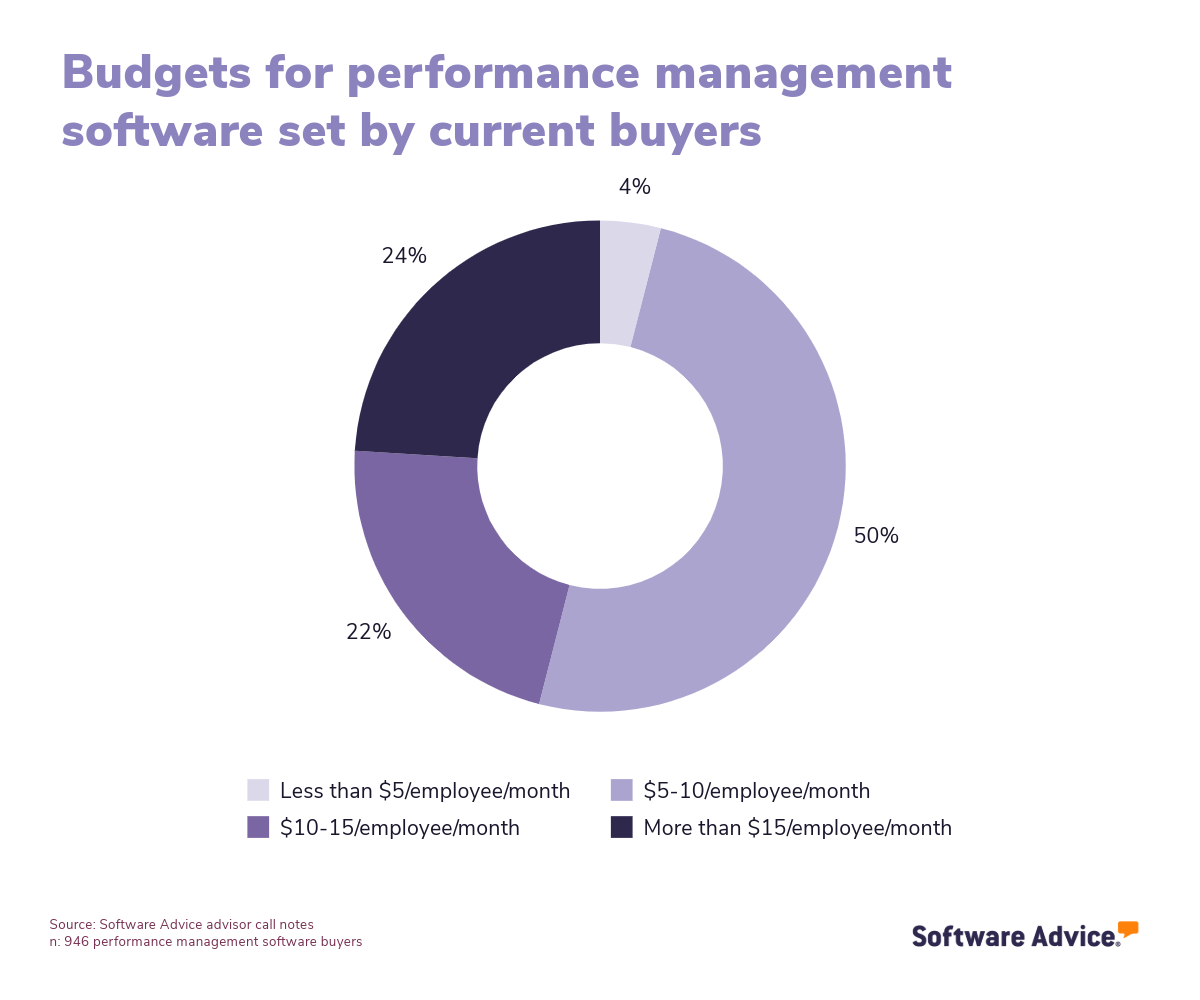
But there are often other costs to consider as well, some of which vendors may not be as upfront about. These include charges for implementation, data migration, customization, user training, or premium customer support. Knowing the costs you might run into and asking vendors about them can help you avoid sticker shock.
Decide on a standalone tool or an integrated suite
If you have other HR software needs, like that for payroll or learning management, it’s best to seek out an integrated suite with all of your needs packaged into one platform. “Pretty commonly, an HR system has performance management as a module within it,” Harvey says.
This can save you money and make integration less of a concern. Overwhelmingly, we find that performance management software buyers prefer integrated suites (88%) to standalone tools (11%) or buying multiple products (1%).
Get ahead of potential performance management software challenges
According to the performance management software reviews on our site, some of the most common challenges with this type of software include overwhelming email notifications, occasional errors, and reporting options that are lackluster or not user-friendly.
Keep these potential issues in mind when reading reviews and talking to vendors.
Step 2: Make your performance management software shortlist
After you’ve finalized your requirements, it’s time to do research. The goal? Create a shortlist of 2-3 performance management products that show the most promise.
Here are some useful resources to help you pare down your options and create a reliable shortlist with ease.
Get qualified help from our advisors
At Software Advice, our advisors like Daniel Harvey have experience helping organizations identify performance management systems that match their needs and budgets.
If you need help, you can either schedule a phone call with an advisor or chat online with one right now. In just a few minutes, your advisor will help you identify a shortlist of performance management software options that best align with your requirements.
Explore our list of performance management FrontRunners
If you’d rather do the research yourself, a good place to start is our performance management FrontRunners report. Using reviews data, we map the top products in the category based on customer satisfaction and usability.
Step 3: Pick the best option
Once you have your shortlist, it’s time to talk to vendors, do demos, and take advantage of free trial periods. Here’s some tips at this stage.
Come prepared with the right questions during demos
Even though software demos are led by vendors, this is still a good time to gain a better picture of whether a specific system will check all the necessary boxes. To do so, consider asking questions like:
Can you show how this feature works on mobile?
How often do you update your software, and what kinds of features are on your roadmap for future updates?
Once we have employee performance data, how can we utilize it in different applications?
What kind of user training resources and support do you offer?
Use our ultimate software vendor comparison chart to keep track of how you score different products and the answers you receive.
Get everyone involved during free trials
Performance management systems have a wide variety of users, from IT administrators and HR staff to managers and rank-and-file employees. When doing free trials of different options (which we recommend), ensure all of these different users get a chance to try out the software. One user may have no problems, but another surfaces an issue you wouldn’t have seen otherwise.
This can also start to breed familiarity with the new software among your workforce, so employees become more likely to use it when it’s adopted.
Read reviews and case studies from organizations like yours
If you’re still unsure about a product, seek out testimonials from companies like yours that are already using it. “Talking to others who are using the software or getting case study examples from the vendor could be a great way to open up the possibilities for what the investment could actually yield,” McClure says.
Step 4: Make the most of your performance management software
Once you’ve purchased your performance management software, the implementation process begins. Here are some important considerations you’ll want to pay attention to during this process:
Training: “A lot of buyers can feel like the software is being underutilized or too complicated if they don’t do proper training,” Harvey says. Because training is so critical to adoption, ask your vendor about all of the training materials they provide, and see if they’ll run staff training sessions with new users.
Feature rollout: Users can become overwhelmed if you roll out every performance management feature at once. Start with the most critical components, like annual performance reviews, and then, once all the bugs and hiccups are figured out, you can open up users to more functionality.
Integration: Map out all of the important integrations you need with your new performance management software, then work closely with your IT personnel and vendor to ensure that everything runs smoothly.
Check out our five critical steps to a successful software implementation for more help with this step.
Software related to performance management systems
Are you in the market for additional HR software, or simply looking for something that’s not quite performance management software? Here are some types of software that are closely related to performance management systems:
Human resources (HR) software: This is our page for the HR software market, which describes any software that helps businesses recruit, hire, manage, engage, or develop their employees.
360 degree feedback software: These systems help with gathering holistic performance feedback on employees from their peers, managers, and direct reports.
Talent management software: These are HR suites that often have performance management functionality, alongside applications for needs like learning management and employee engagement.
Employee recognition software: This type of software allows employees to recognize each other’s work achievements in a social media-like feed, and earn badges and other rewards for their accomplishments.
Mentoring software: This software helps companies set up and manage formal mentoring programs, allowing mentors and mentees within the organization to be connected for developmental purposes.
More resources for your performance management system journey
3 Key 360 Degree Feedback Software Features and Top Products That Offer Them
After Your Advisor Call: 4 Tips To Keep Your Software Purchase on Track
About our contributors
Author
Brian Westfall is an associate principal analyst at Software Advice, covering human resources, with a focus on recruiting, talent management, and employee engagement. Over the past decade, Brian’s research on the intersection of talent and technology has been featured in Bloomberg, Fortune, SHRM, TIME, and The Wall Street Journal.
Brian’s research and analysis is informed by more than 250,000 authentic user reviews on Software Advice and over 20,000 interactions between Software Advice software advisors and HR software buyers. Brian also regularly analyzes market sentiment by conducting surveys of HR leaders and practitioners so he can provide the most up-to-date and helpful information to small and midsize businesses purchasing software or services.
Editor
Caroline Rousseau is a senior content editor at Software Advice.
A former content analyst, Caroline has, for the past five years, built, written, and edited research reports about technological trends, opportunities, and challenges with an SMB audience in mind. Her content has been featured in French Tier 1 media including Le Monde, L’Express, and Le Figaro, among other publications.
Her previous experience as a graphic designer, translator, and LQA specialist in various industries converged into a skill set that allows her to create compelling content about today’s business matters. Caroline’s personal interests include literature and art and she has a passion for Albert Camus, graphic novels, and drawing.
Contributor
Jennifer McClure
Experience
With decades of leadership and executive experience, I have worked in and with startups, privately held companies, and Fortune 500 organizations across various industries. As an entrepreneur, keynote speaker, and high-performance coach, I help leaders leverage their influence, increase their impact, and accelerate results.
My journey led me to found Unbridled Talent, LLC, where I provide education, coaching, and strategy consulting services. As the Chief Excitement Officer of DisruptHR, I lead a global community designed to innovate talent strategies in the workplace. My role as a Board Member for the Defense Business Board and CareerPoint.com further extends my influence in strategic leadership.
Expertise
I am recognized globally as an expert on the future of work, strategic leadership, and innovative people strategies. My specialties include keynote speaking, executive coaching, and strategic consulting. I have shared insights with thousands of leaders at conferences and corporate events worldwide, working with clients like Procter & Gamble, General Electric, and LinkedIn.
My workshops blend research, best practices, and storytelling, inspiring audiences to take actionable steps. As a sought-after speaker and consultant, I focus on recruiting, employment branding, and effective use of social media. My podcast, Impact Makers, shares conversations with changemakers building impactful careers.
Education
I hold a Bachelor of Business Administration in Management from Middle Tennessee State University. My educational journey continued at the University of Cincinnati, where I earned an Executive Coaching Certification.
Sources
Software Advice advisor call notes: Findings are based on data from telephonic conversations that Software Advice’s advisor team had with small-to-midsize businesses seeking HR software. For this report, we analyzed phone interactions from the past year as of the production date. Read the complete methodology.
Software Advice software pricing data: Only products with publicly available pricing information and qualified software products within the category, as of the production date, are included in the pricing analysis. Read the complete methodology.
Software Advice reviews data: Software Advice reviews are collected from verified users for individual software products. For this report, we analyzed reviews from the past year as of the production date. Read the complete methodology.
Performance Management System FAQs
- What is the best performance management tool?
According to our analysis of products with high market demand and reviews, PerformYard had the highest overall rating from verified reviewers on Software Advice.
- What does a good performance management system look like?
We believe a good performance management system should automate tedious performance management processes, be customizable to your company’s unique way of evaluating employee performance, and be easy to use for both employees and managers. It should also be accessible on mobile devices and give you tons of actionable performance data and insights to leverage.
- What are the 3 P's of performance management?
The 3 P’s of performance management are purpose, people and process. Before buying a performance management system, companies should identify the purpose of their performance management strategy, the different people involved, and the ideal process to achieve their desired results.
- What is the most difficult part of the performance management process?
The most difficult part of the performance management process is accurately capturing employee performance. While some roles will have definitive data (like the number of sales made) that you can use to measure performance, other roles require more subjective evaluation. This highlights the importance of collecting performance data from a wide variety of sources (managers, peers, output) to create a more comprehensive view of an employee’s performance.
- How to build a performance management system?
If you’re interested in building a performance management system from scratch, a good place to start is finding an open source performance management system as a foundation. Open source products give users the source code to further customize the platform to their needs, making them ideal for companies looking to build a proprietary system.