


Best Recruiting Software of 2026
Updated February 18, 2026 at 5:25 AM

Written by Brian Westfall
Associate Principal Analyst

Edited by Kathryn Todd
Senior Editor

Reviewed by Daniel Harvey
Software Advisor

Talk with us for a free 15-min consultation
Expert advisors like Jacqueline, who have helped 1,000+ companies, can find the right software for your needs.
- All Software
- Software Advice FrontRunners
- Popular Comparisons
- Buyer's Guide
- Frequently Asked Questions
Recruiting software helps human resources professionals, hiring managers, and recruiters optimize the hiring process, from sourcing and attracting candidates to screening resumes and sending offer letters. This software streamlines workflows by centralizing applicant data and automating repetitive tasks like interview scheduling and candidate communication. With more than 600 tools covering varied operational models, integration needs, or regulatory contexts, choosing the right system can be daunting. To help you narrow it down, I worked with our recruiting software advisors to curate a list of recommended productsi and a list of the recruiting software Frontrunners based on user reviews. For further information, read my recruiting software buyer's guide.
Recruiting Software
Sort by
Reviews: Sorts listings by the number of user reviews we have published, greatest to least.
Average Rating: Sorts listings by overall star rating based on user reviews, highest to lowest.
Alphabetically (A-Z): Sorts listings by product name from A to Z.

BambooHR centralizes your HR data, automating key tasks like payroll, benefits, and employee management. Streamline processes fr...Read more about BambooHR


BambooHR's Best Rated Features
See All
BambooHR's Worst Rated Features
See All

Rippling is an integrated workforce management platform that unifies HR, IT, and finance tools to streamline operations. It cent...Read more about Rippling


Rippling's Best Rated Features
See All
Rippling's Worst Rated Features
See All

Paycom is the most automated HCM platform and the only HR and payroll software built on a truly single, unique database that aut...Read more about Paycom


Paycom's Best Rated Features
See All
Paycom's Worst Rated Features
See All

UKG Pro Human Capital Management (HCM) software is a workforce management solution designed to align people strategy with busine...Read more about UKG Pro
UKG Pro's Best Rated Features
See All
UKG Pro's Worst Rated Features
See All

Paycor’s HR & payroll platform connects leaders to people, data, and expertise. Our comprehensive HR and talent platform combine...Read more about Paycor


Paycor's Best Rated Features
See All
Paycor's Worst Rated Features
See All
Software Advice FrontRunners 2026

(1090)

(737)

(658)

(464)

(1184)

(1188)

(332)

(150)

(59)

(654)
Best for Usability

100Hires

100Hires is the highest rated for its usability out of the most popular tools, based on our analysis of Recruiting products with the most market demand.
100Hires is best suited for SMBs seeking top usability in an ATS, with reviewers noting its intuitive interface, easy navigation, and streamlined workflows that simplify candidate management and recruitment tasks.
- Reviewers Perspective
"It makes my life as a recruiter easier since it has the feature that will show your interview schedule and you dont have to go ro your calendar just to go in to the calendar to get in to the meeting, also for candidate experience i has the feature where you can see you threads with the candidate text or email."
SHSharina Hamid
Recruitment Specialist
Used for 1-2 years
We analyzed 489 verified user reviews for 100Hires to find out what actual users really think.
Candidate Management
Recruiters track applicants, manage interviews, and communicate with candidates in one platform. Automated emails, reminders, and AI-powered scoring streamline the process and support team collaboration.Recruitment Process
Talent teams manage job postings, candidate pipelines, and communications with customizable workflows and automation. Analytics support efficient hiring from sourcing to selection, suitable for small to midsize teams.Recruiter Experience
Recruiters use automation, AI-driven job descriptions, and Chrome extensions to save time and reduce manual work. The platform supports both experienced and new recruiters in managing daily tasks and campaigns. - Key Features100Hires's scoreCategory average
Applicant Tracking
4.914.54 category average
Application Management
4.884.55 category average
Candidate Management
4.894.50 category average
- Screenshots


Best for User Interface

Greenhouse

Greenhouse is the highest rated for its user interface out of the most popular tools, based on our analysis of Recruiting products with the most market demand.
Greenhouse is ideal for organizations prioritizing a strong user interface, as reviewers highlight its intuitive design, customizable workflows, and ease of scheduling interviews and managing feedback.
- Reviewers Perspective
"Greenhouse's flexibility and extensive integrations have allowed us to optimize our recruitment process, enabling us to attract and hire top talent for our team."
MCMathew Carlile
IT Director - Systems and Infrastructure Service
Used for 2+ years
We analyzed 456 verified user reviews for Greenhouse to find out what actual users really think.
Recruiting Process
Recruitment teams use Greenhouse to centralize and streamline candidate pipelines and workflows. The platform’s customization, automation, and reporting features reduce manual tasks and enable consistent candidate evaluation.User Interface
Hiring managers and recruiters navigate Greenhouse’s clean, organized interface with ease. The user-friendly design simplifies access to job postings, candidate information, and feedback tools.Hiring Process
Greenhouse helps teams organize every stage of hiring, from posting jobs to onboarding. Collaborative features and customizable workflows keep hiring managers and recruiters aligned and improve process transparency. - Key FeaturesGreenhouse's scoreCategory average
Applicant Tracking
4.504.54 category average
Application Management
4.424.55 category average
Candidate Management
4.454.50 category average
- Screenshots


Best for Automation Capabilities

Workable

Of the products listed on our FrontRunners report, Workable is the most requested by users for automation capabilities out of the most popular tools.
Workable is well-suited for SMBs looking to automate recruitment processes, with reviewers saying its automation features save significant time in interview scheduling, candidate screening, and workflow management.
- Reviewers Perspective
"The automated interview scheduling feature alone has saved us hours each week by eliminating the typical email ping-pong of finding mutual availability. While the email templates are solid as-is, being able to customize them for specific roles or company voice is a nice touch."
KKKieran Kilbride-Singh
Marketing Director
Used for 2+ years
We analyzed 405 verified user reviews for Workable to find out what actual users really think.
Recruitment Process
Hiring teams use Workable’s workflows, job posting, and collaboration tools to manage recruitment from start to finish. The platform adapts to different company sizes and supports efficient pipeline management.Customer Support
Recruiters reach support through various channels for quick issue resolution. The support team is proactive, responsive, and incorporates user feedback into ongoing improvements.User Interface
Teams post jobs, manage candidates, and navigate Workable’s clean interface with ease. Customizable workflows and visual design support efficient collaboration and adaptation to recruitment needs. - Key FeaturesWorkable's scoreCategory average
Applicant Tracking
4.494.54 category average
Application Management
4.474.55 category average
Candidate Management
4.464.50 category average
- Screenshots


Best for Customer Satisfaction

Recruit CRM

In our analysis of Recruiting products with the most market demand, Recruit CRM is the highest rated for customer satisfaction out of the most popular tools.
Recruit CRM is best for teams that value high customer satisfaction, as our reviewers say its responsive support and customizable workflows make onboarding and daily use efficient and user-friendly.
- Reviewers Perspective
"The standout features are its customizable workflows and excellent customer support, though minor bugs and occasional system slowdowns have occurred, these were usually resolved quickly by their team."
PGPaschalis Georgiadis
Senior Recruitment Consultant
Used for 2+ years
We analyzed 340 verified user reviews for Recruit CRM to find out what actual users really think.
Customer Support
Recruiters access live chat, video tutorials, and dedicated account managers for quick problem-solving. The support team addresses queries efficiently and implements user feedback to improve the platform.Team
Onboarding new team members is straightforward, and collaborative features help manage tasks and data. The team listens to feedback and adapts the platform to fit specific workflow needs.Ease of Use
Recruit CRM’s clear layout allows users to manage records and workflows with minimal effort. The intuitive design reduces workload and lets teams focus on recruitment rather than navigating complex tools. - Key FeaturesRecruit CRM's scoreCategory average
Applicant Tracking
4.744.54 category average
Application Management
4.744.55 category average
Candidate Management
4.774.50 category average
- Screenshots


Most Used By Staffing and Recruiting

JobDiva

In our analysis of Recruiting products with the most market demand, JobDiva is the most requested by users in staffing and recruiting out of the most popular tools.
JobDiva is most used by staffing and recruiting firms, with reviewers noting its robust candidate database, integrated search tools, and efficient process management tailored to high-volume recruiting environments.
- Reviewers Perspective
"This tool is very helpful in integrating all the job boards at same place, it helps in managing the complete cycle of recruitment starting with Sourcing, interviewing, and initiating job offers until joining with the help of advanced functions and features it has, which further help recruiter to check the onboarding status, contract status and all over connect with the candidates very easily."
KSKaran Sharma
Technical Recruiter
Used for 2+ years
We analyzed 634 verified user reviews for JobDiva to find out what actual users really think.
Candidate Management
Recruiters manage sourcing, interviews, and onboarding in one place. Advanced search and AI matching streamline profile management and communication, integrating data from multiple job boards.Ease of Use
Teams use JobDiva’s intuitive interface to manage recruitment tasks across devices. The platform’s straightforward design supports efficient workflows for both new and experienced users.Recruitment Process
Recruiters handle sourcing, onboarding, and reporting with JobDiva’s robust database and customizable workflows. Communication tools help track progress and enable effective collaboration. - Key FeaturesJobDiva's scoreCategory average
Applicant Tracking
4.624.54 category average
Application Management
4.474.55 category average
Candidate Management
4.584.50 category average
- Screenshots


Best for Quick Implementation

Zoho Recruit

Of the products listed on our FrontRunners report, Zoho Recruit is the most requested by users for quick implementation out of the most popular tools.
Zoho Recruit is best for SMBs needing quick implementation, with reviewers pointing out its easy setup, customizable workflows, and seamless integration that help teams get started and stay organized rapidly.
- Reviewers Perspective
"The interactive dashboards and the ability to tailor the platform to our specific needs have been instrumental in optimizing our hiring processes, making it a top-tier choice that delivers both high performance and excellent value for money."
BCBruno Chouinard
CEO
Used for 1-2 years
We analyzed 622 verified user reviews for Zoho Recruit to find out what actual users really think.
Recruitment Process
HR teams streamline recruitment from job posting to onboarding with Zoho Recruit’s customizable workflows and automation. Centralized data management supports efficient hiring and collaboration across all stages.Candidate Management
Recruiters track, evaluate, and communicate with applicants using resume parsing, interview scheduling, and customizable pipelines. Reporting and automation features help teams make informed decisions and save time.Customization
Organizations tailor fields, workflows, and dashboards to fit unique business requirements. Zoho Recruit’s customization options enhance workflow efficiency and adapt to a wide range of recruitment needs. - Key FeaturesZoho Recruit's scoreCategory average
Applicant Tracking
4.444.54 category average
Application Management
4.384.55 category average
Candidate Management
4.394.50 category average
- Screenshots


Best for Customization


According to our user reviews, Recruiterflow is the most requested by users for customization out of the most popular tools.
Recruiterflow is best for organizations seeking extensive customization, as reviewers highlight its flexible workflows, pipeline management, and ability to tailor processes for diverse recruiting needs.
- Reviewers Perspective
"What I like most about Recruiterflow is how easy it is to use and navigate. If I ever have a problem and need help there live chat is amazing, they respond quickly and they will go above and beyond to make sure you get the answers you need."
MSMia Shelley
Administrator
Used for 6-12 months
We analyzed 265 verified user reviews for Recruiterflow to find out what actual users really think.
Customer Support
Recruiterflow’s support team resolves issues quickly via live chat, tutorials, and direct meetings. Account managers proactively address questions and feature requests, making onboarding and ongoing use smoother.Ease of Use
Recruiters manage tasks efficiently with Recruiterflow’s modern, intuitive interface. The straightforward setup and customizable features help teams get productive quickly, regardless of experience level.Recruiter Recruitment
Recruitment teams automate job postings, candidate pipelines, and outreach. The platform’s tools support both agency and internal teams by organizing processes and enabling collaboration. - Key FeaturesRecruiterflow's scoreCategory average
Applicant Tracking
4.744.54 category average
Application Management
4.844.55 category average
Candidate Management
4.744.50 category average
- Screenshots


Most Used By Human Resources

Monster+

In our analysis of Recruiting products with the most market demand, Monster+ is the most requested by users in human resources out of the most popular tools.
Monster+ is most used by human resources professionals, with reviewers noting its powerful candidate search, large talent pool, and flexible filters that support efficient sourcing for various roles.
- Reviewers Perspective
"Monster+ gives an easy way to post jobs and received qualified candidates."
CWChelsey Wright
Project Manager
Used for 6-12 months
We analyzed 110 verified user reviews for Monster+ to find out what actual users really think.
Candidate Search
Recruiters source candidates for entry-level and high-volume roles using Monster+’s extensive pool and flexible search options. The platform organizes candidates by skill and industry for easier selection.Resume Search
Teams access and review resumes quickly with Monster+’s filters and database tools. The platform supports fast uploads and recommendations, though some users note outdated resumes and view limits.Search Functionality
Recruiters refine job and candidate searches using keywords, location, and experience filters. Features like radius and power search help narrow results to specific requirements. - Screenshots


Most Rated for SMBs

IdealTraits

In our analysis of Recruiting products with the most market demand, IdealTraits is the most requested by small businesses out of the most popular tools.
IdealTraits is most rated by SMBs, especially in insurance, with reviewers emphasizing its ease of use, integrated personality assessments, and streamlined hiring workflows that help identify and coach top candidates.
- Reviewers Perspective
"Helps me hire the right personalities for my team, and also helps me coach current staff, as every personality type responds to different coaching."
JOJeremy Olson
Owner
Used for 2+ years
We analyzed 49 verified user reviews for IdealTraits to find out what actual users really think.
Candidate Personality
Teams use IdealTraits to identify and hire candidates whose personalities align with their roles. The detailed personality assessments support both selection and ongoing staff development, making it easier to evaluate and coach employees.Hiring Process
Managers organize the entire hiring process in one place, from job posting to onboarding. The platform’s templates and process guidance help streamline recruiting tasks and ensure consistency across all stages.Ease of Use
Administrators and managers benefit from IdealTraits’ straightforward interface, which simplifies daily candidate management and delegation. Minimal training is required, allowing teams to access information and complete tasks efficiently. - Screenshots
Most Used By Information Technology and Services

Lever

Lever is the most requested by users in Information Technology and Services out of the most popular tools.
Lever is most used by IT and services organizations, with reviewers saying its seamless integration with email and calendar tools, customizable interview workflows, and efficient feedback collection support tech-driven hiring teams.
- Reviewers Perspective
"Lever provided our team with a great degree of communication, whether that was internally or externally, which played a crucial role in our recruitment processes."
CDCara DeBlois
Recruiter
Used for 2+ years
We analyzed 458 verified user reviews for Lever to find out what actual users really think.
Features
Recruiters manage bulk candidates, customize workflows, and access robust reporting. Lever’s automation and collaboration tools support both small and growing teams in daily recruiting activities.User Interface
Hiring managers and recruiters navigate Lever’s minimalist, logical interface with ease. The straightforward workflows reduce clutter and speed up onboarding for new users.Customer Support
Teams access implementation specialists, training resources, and ongoing support. The support team addresses questions and provides guidance throughout onboarding and daily use. - Key FeaturesLever's scoreCategory average
Applicant Tracking
4.634.54 category average
Candidate Management
4.594.50 category average
- Screenshots


CEIPAL ATS

- Reviewers Perspective
"The AI-driven candidate matching feature helps find the best-suited candidates quickly by analyzing job requirements and skills, reducing the time spent on manual screening."
GRGangadhar Reddy
Team Lead
Used for 2+ years
We analyzed 664 verified user reviews for CEIPAL ATS to find out what actual users really think.
Candidate Sourcing
Recruiters leverage AI-powered matching, advanced search filters, and mass mailing to quickly identify and communicate with qualified talent. The dashboard and integrations streamline sourcing from job posting to placement.Recruitment Process
Organizations automate workflows, track candidates, and generate analytics to optimize hiring strategies. Integration with job boards and CRMs enhances productivity and supports collaboration across recruitment teams.Ease of Use
Staffing teams navigate the platform with minimal training. The clear layout and simple workflow reduce onboarding time and help recruiters focus on core staffing activities. - Key FeaturesCEIPAL ATS's scoreCategory average
Applicant Tracking
4.714.54 category average
Application Management
4.704.55 category average
Candidate Management
4.684.50 category average
- Screenshots


Top Echelon

- Reviewers Perspective
"How easy it is to access information re: candidates, clients and prospects and the efficiency of entering notes in the system as I am interviewing candidates."
BSBrian Shaw
Director of Recruiting
Used for 2+ years
We analyzed 345 verified user reviews for Top Echelon to find out what actual users really think.
Ease of Use
Recruiters set up and adapt workflows quickly. The straightforward interface supports efficient management of candidate, company, and job records with minimal training.Customer Support
Agencies receive guidance and solutions promptly, including outside regular hours. The support team listens to feedback and continuously improves the software and services.Training and Learning Curve
Teams use webinars, Q&A sessions, and a help desk to learn the software. Onboarding and ongoing education are supported by clear, regular training materials. - Key FeaturesTop Echelon's scoreCategory average
Applicant Tracking
4.654.54 category average
Candidate Management
4.744.50 category average
- Screenshots


- Reviewers Perspective
"The use of templates in ApplicantStack ensures that candidates receive consistent communication and are kept informed about the status of their applications PLUS it saves me the time of writing the same communications over and over."
HTHeather Tenny
HR Generalist
Used for 2+ years
We analyzed 744 verified user reviews for ApplicantStack to find out what actual users really think.
Applicant Management
HR teams organize and track candidates using customizable workflows, scoring, and automated communication. Screening questions and notes help quickly sort applicants and keep all information accessible in one place.Ease of Use
Recruiters manage applications and candidate data with minimal training. The straightforward interface and clear organization simplify onboarding and daily tasks.Customer Support
Users access support via email, phone, and online resources. Prompt responses and training materials help resolve technical issues and guide new users through onboarding. - Key FeaturesApplicantStack's scoreCategory average
Applicant Tracking
4.374.54 category average
Application Management
4.534.55 category average
Candidate Management
4.354.50 category average
- Screenshots


Crelate

- Reviewers Perspective
"The LinkedIn plug-in is a great, allowing for quick data transfer. Plus, the customizable dashboards provide excellent flexibility and help keep everything organized at a glance."
DODave O'Farrell
President
Used for 2+ years
We analyzed 318 verified user reviews for Crelate to find out what actual users really think.
Customer Support
Recruiting teams access prompt assistance and training resources during onboarding and daily use. The support staff provides detailed guidance and listens to user feedback.Ease of Use
Teams master the platform with minimal training. The clear layout and logical organization streamline daily recruiting operations for both new and experienced users.Recruiting
Recruiters track candidate pipelines and progress across job orders. The platform supports both small and large teams, enabling efficient workflow customization and data organization. - Key FeaturesCrelate's scoreCategory average
Applicant Tracking
4.554.54 category average
Application Management
4.414.55 category average
Candidate Management
4.394.50 category average
- Screenshots


Breezy

- Reviewers Perspective
"It’s intuitive to use and helps save time at every stage of recruitment."
SQSamantha Quazza
HR Manager
Used for 2+ years
We analyzed 713 verified user reviews for Breezy to find out what actual users really think.
Candidate Management
Teams visually organize, sort, and move candidates through customizable hiring stages. Drag-and-drop functionality and automated screening streamline communication and decision-making, supporting efficient handling of large candidate pools.Ease of Use
Recruiters set up job postings, manage workflows, and access support quickly. The straightforward navigation reduces onboarding time and keeps recruitment tasks organized for both new and experienced users.Hiring Process
Hiring managers centralize job posting, applicant screening, and team collaboration in real time. Customizable workflows and integrated communication tools keep teams aligned and candidates moving efficiently through each stage. - Key FeaturesBreezy's scoreCategory average
Applicant Tracking
4.594.54 category average
Application Management
4.394.55 category average
Candidate Management
4.624.50 category average
- Screenshots


- Reviewers Perspective
"Outstanding product that works intuitively and smoothly and helps us in all stages of our recruitment process, from onboarding new clients to managing full cycle hiring"
SHStephanie Hodes
CEO
Used for 2+ years
We analyzed 104 verified user reviews for iSmartRecruit to find out what actual users really think.
Recruitment Process
Agencies and organizations manage recruitment from sourcing to onboarding with automation and customizable features. The platform supports efficient reporting and adapts to diverse hiring needs.Candidate Management
Recruiters import, filter, and organize candidate data with automated workflows and bulk emailing. Interview scheduling and notifications help teams quickly identify qualified applicants.Customization
Businesses adjust workflows, templates, and notifications to fit specific requirements. The system’s flexibility supports evolving processes and operational control. - Key FeaturesiSmartRecruit's scoreCategory average
Applicant Tracking
4.414.54 category average
Application Management
4.644.55 category average
Candidate Management
4.544.50 category average
- Screenshots


Jobin.cloud

- Reviewers Perspective
"The support was quick when I needed it and it's pretty easy to use."
CHChris Hampson
Senior Consultant
Used for 6-12 months
We analyzed 89 verified user reviews for Jobin.cloud to find out what actual users really think.
Customer Support
Users consistently highlight the responsiveness and helpfulness of the customer support team at Jobin.cloud, noting their quick and knowledgeable assistance with any inquiries or issues. They find the support staff approachable, attentive, and always willing to provide further explanations or guidance, which contributes to a positive experience with the platform. Many reviewers mention that Jobin.cloud’s customer service is available when needed, offering clear solutions and making the overall use of the software more straightforward.Recruitment Process
Users describe Jobin.cloud as a comprehensive tool that streamlines the recruitment process, offering features that help manage candidates from sourcing to placement. They value having all recruitment tools, including ATS and CRM functionalities, in one platform, which allows them to track applicants, segment leads, and manage job listings efficiently. Reviewers appreciate that Jobin.cloud supports remote work opportunities and caters to both individual recruiters and small agencies, making it easier to handle various recruitment tasks.Ease of Use
Users find Jobin.cloud very user-friendly, with a simple and logical interface that makes navigation and task completion straightforward. They appreciate that the platform saves time and streamlines operations, allowing them to focus on their core responsibilities without unnecessary complications. Many reviewers mention that Jobin.cloud is easy to set up and enjoyable to use, contributing to a smooth workflow for both new and experienced users. - Key FeaturesJobin.cloud's scoreCategory average
Applicant Tracking
5.04.54 category average
Candidate Management
4.394.50 category average
- Screenshots


Pinpoint

- Reviewers Perspective
"Not only has Pinpoint made our recruitment process more efficient, saving us valuable time and money, but it's enhanced the candidate experience meaning we can build a talent pipeline for the future."
STSophie Tait
HR Director
Used for 1-2 years
We analyzed 77 verified user reviews for Pinpoint to find out what actual users really think.
Ease of Use
Hiring managers and candidates navigate job postings and applications easily. The platform’s clear layout and customization options support remote collaboration and reduce training needs.Recruitment Process
HR teams centralize candidate data, automate administrative tasks, and manage compliance. AI-powered features help reach broader talent pools and maintain consistent hiring standards.Customer Support
Organizations receive support throughout onboarding and ongoing use. The support team addresses issues quickly and values customer feedback to ensure smooth implementation. - Key FeaturesPinpoint's scoreCategory average
Applicant Tracking
4.804.54 category average
Application Management
4.414.55 category average
Candidate Management
4.714.50 category average
- Screenshots


JazzHR

- Reviewers Perspective
"It makes it easy for multiple people to monitor and play a part in the hiring process."
KEKaylyne Eichler
Training and Employee Development
Used for 1-2 years
We analyzed 373 verified user reviews for JazzHR to find out what actual users really think.
Hiring Process
Recruitment teams centralize job postings and candidate selection. Collaborative features enable multiple team members to participate and maintain clear communication throughout each hiring stage.Customer Support
Users access support via email, phone, and chat. Tutorials and training resources are available, and the support team responds promptly to inquiries and feedback.Candidate Management
Recruiters organize, rate, and communicate with applicants efficiently. The system supports tracking candidate progress, customizing evaluations, and handling bulk feedback. - Key FeaturesJazzHR's scoreCategory average
Applicant Tracking
4.334.54 category average
Application Management
4.114.55 category average
Candidate Management
4.034.50 category average
- Screenshots


AvaHR

- Reviewers Perspective
"From posting jobs across multiple boards in just a few clicks to AI-powered resume screening, it saves so much time and effort."
OPOctavia Price
Office Manager
Used for 6-12 months
We analyzed 79 verified user reviews for AvaHR to find out what actual users really think.
Customer Support
HR teams receive quick assistance and regular check-ins. Support staff help with onboarding and address feature requests, ensuring a smooth user experience.Hiring
Organizations streamline candidate tracking and interview scheduling. The platform reduces time-to-hire and supports efficient hiring for teams of various sizes.Multiple Job Postings
Recruiters post job ads to multiple platforms at once, saving time and broadening reach. A single dashboard helps manage and track applicant flow efficiently. - Key FeaturesAvaHR's scoreCategory average
Applicant Tracking
4.784.54 category average
Candidate Management
4.484.50 category average
- Screenshots


GoHire

- Reviewers Perspective
"The layout is clear and straightforward, allowing us to post jobs, track candidates, and review applications efficiently."
HTHermi Tang
Senior HR Officer
Used for 1-2 years
We analyzed 119 verified user reviews for GoHire to find out what actual users really think.
Candidate Interview
Users find GoHire's candidate interview features efficient for posting jobs, tracking applicants, and organizing interviews, which streamlines the recruitment process. They appreciate being able to rate, sort, and communicate with candidates directly through the platform, as well as the customizable pipeline stages that help manage candidates at different steps. Reviewers note that GoHire simplifies collaboration among team members, offers useful tools for screening and evaluating candidates, and centralizes all candidate information, making the interview process more manageable and organized.Customer Support
Users describe GoHire's customer support as responsive, helpful, and attentive to their needs, often resolving issues quickly and efficiently. They value the team's willingness to listen to feedback and the consistent communication provided during setup and ongoing use. Reviewers highlight that GoHire's support staff are approachable and knowledgeable, which contributes to a positive experience and helps them get the most out of the platform.Applicant Tracking
Users rely on GoHire for consolidating all applicant information in one dashboard, making it easy to track candidates through every stage of the hiring process. They appreciate being able to organize, filter, and communicate with applicants efficiently, which saves time and reduces the need for multiple tools. Reviewers also mention that GoHire's applicant tracking features simplify evaluation, streamline communication, and provide a clear overview of all candidates, regardless of the source. - Key FeaturesGoHire's scoreCategory average
Applicant Tracking
4.404.54 category average
Application Management
4.04.55 category average
Candidate Management
4.04.50 category average
- Screenshots


Methodology
The research for the best recruiting software list was conducted in October 2025. We evaluated data (user reviews and demand signals) from the past 24 months as of the research date. Read the complete methodology.
Popular Recruiting Comparisons


Buyer's Guide
This detailed guide will help you find and buy the right recruiting software for you and your business.
Last Updated on January 27, 2025Here’s what we’ll cover:
Recruiting Software Functionality
Benefits of Recruiting Software
What Is Recruiting Software?
Recruiting software helps recruiters manage the entire recruitment process—from posting jobs to on-boarding new hires—with one, easy to use system.
The term recruiting software refers to a category of software applications that automate the sourcing and hiring process. These are typically standalone solutions that can be incorporated with a company’s human resources management software (HRMS), often integrating seamlessly with other functions like payroll, talent management and compensation management.
But while these solutions can make your life easier once they're implemented, finding the perfect software for your needs can be as difficult as finding the right candidate for that open position. We’ve created this buyer’s guide to help you do just that.
Recruiting Software Functionality
The primary application within any recruitment management suite is applicant tracking, which makes it easy to track requisitions in the hiring workflow and manage candidates’ profiles and status in the recruiting process. However, recruitment management systems include additional functionality that makes it more versatile than a simple applicant tracking system (ATS).
According to Gartner, Inc., a leading information technology research and advisory company, a standard ATS will manage applicant workflow, correspondence with candidates, interviews, background checks and the onboarding process. However, a full suite of recruiting software will offer, in addition to applicant tracking, functionality for requisitioning and acquiring candidates, as well as the ability to generate reports and advanced HR analytics.
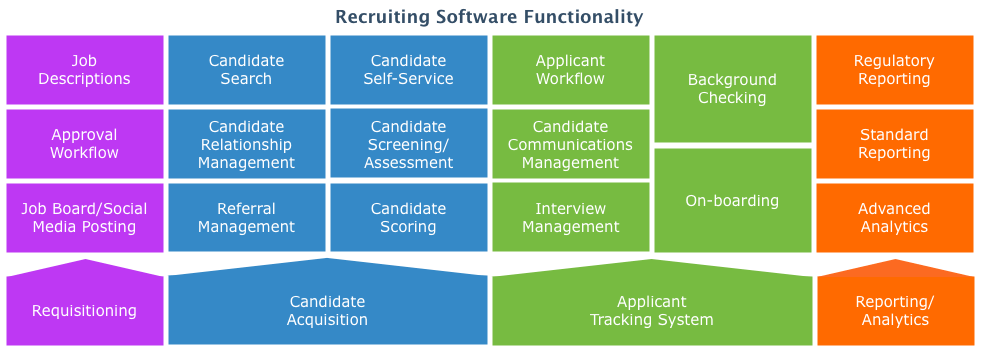
Source: Gartner RAS Core Research, “Magic Quadrant for E-Recruitment Software”
Benefits of Recruiting Software
Whether used by recruiting and staffing professionals or by in-house corporate recruiters, recruiting tracking software saves companies time and money. Instead of tracking applicants in spreadsheets or email, these solutions let recruiters upload and store all candidate information in a searchable database, so there’s no time wasted on manual entry.
Recruitment systems also increase efficiency. They include automated tools to screen out unqualified applicants, and route qualified applications to the appropriate recruiter or hiring manager. This saves time, reduces the administrative burden and increases the speed of the hiring process.
Yet another benefit of recruiting tools is better communication with candidates—improving the likelihood your top choice will select the position. And, finally, many systems offer reporting capabilities that allow you to track where the best hires are coming from, so you can focus your efforts on the channels with the best return on investment.
What Type of Buyer Are You?
There are two broad types of recruitment software buyer: recruiting and staffing firms, and corporate or in-house recruiters. (For more information, watch this video from Newton, an ATS vendor.)
A recruiting or staffing agency will have needs different from those of an in-house corporate recruiter. While many of the core features remain the same, there are a few notable differences in the functionality that an agency might look for in its software, as compared to what a corporate recruiter would seek, and vice versa.
Agencies often require solutions that are more candidate-driven. Their primary function is to fill positions based on information given to them by their clients. As such, these firms need to house large amounts of easily searchable candidate data in one place in order to find both active and passive candidates for open positions that they can then send on to the client. Additionally, they may need extra features, such as contractor portals and timesheets in order to manage placed candidates, as well as the option to manage client information and job requests.
Some vendors designing solutions specifically for recruiting agencies are: PCRecruiter, Bullhorn, myStaffingPro and COMPAS for Staffing. Recruitment, staffing and other types of employment agencies should refer to our recruitment agency software guide to learn about products for their unique needs.
In-house recruiters will generally need software that allows them to post open jobs to their company’s careers page, as well as allow them to screen applicants, share applicants’ information with the relevant department’s hiring manager and gather feedback from interviews. Employers must also ensure that the solution they choose can integrate with their current HRMS (if they have one), and that they comply with EEO laws. These systems are job-driven, and each function revolves around matching a candidate to a particular open position.
Vendors offering solutions tailored to the needs of corporate or in-house recruiters include iCIMS, BALANCEtrak, COMPAS for Corporate and Simplicant.
However, it is important to note that sometimes the needs of recruiting and staffing agencies and in-house recruiters may overlap, and the central functionality of most ATS systems will cover both types of buyers’ basic needs. A client may wish a recruiting agency to post the career page to various job boards, while an in-house recruiter may also need a database to house past candidates’ information, and both types of recruiters will most likely benefit from referral technology that increases the number of candidates applying for the job.
Depending on your company’s needs, recruiting software can be purchased either as a standalone solution or as part of a larger human resources information system (HRIS), and there are also options for cost-conscious buyers—but keep in mind which type of recruiter will be using the software and the functionality required.
Market Trends to Understand
In addition to our 2013 Recruiting Channels Survey, which found that social recruiting is on the rise, there are several other trends buyers should be aware of.
Software as a Service (SaaS). Sometimes called cloud or Web-based software, SaaS refers to the delivery model whereby an application is hosted by the vendor and accessed by users through a Web browser. This has become increasingly popular in the recruiting field due to the flexible access it affords recruiters, hiring managers, employees and candidates. Instead of being confined to access while in the office, recruiters can see their candidate queue from virtually any device with an Internet connection, and candidates are able to apply for jobs or check their status online.
Recruiters are going mobile. Finding that purple squirrel—a term recruiters use to refer to that elusive perfect candidate—is time consuming, and often recruiters have to act quickly to secure an interview with a candidate. Unsurprisingly, the use of mobile apps, primarily on tablets and smartphones, ha s taken off. Mobile and video technology designed specifically for recruiters is multiplying, and the best recruitment software vendors are developing applications with this in mind.
Online job applications are becoming the norm. Dwindling are the days of countless resumes, cover letters and reference sheets flooding the fax machines or mailboxes of hiring professionals. Candidate tracking software developers have been hard at work creating tools that allow users to create their own online job board and effectively route and organize incoming applications. This means hiring managers can more easily filter unqualified applicants and organize candidates automatically. With the increase in organization and efficiency, hiring professionals can simplify and expedite the hiring process for all parties involved.
Recruiting FAQs
- What is the best software for recruitment?
The best recruitment software is 100Hires, based on Recruitment FrontRunners highest overall user ratings.
- What is a CRM for recruiting?
A CRM for recruiting is a system designed to manage and nurture relationships with candidates throughout the hiring process. It helps recruiters organize candidate data, track interactions, and maintain engagement over time.
- What is ATS and RMS?
An ATS manages job postings and tracks candidates. A Recruiting Management System adds CRM, analytics, and automation for a complete talent acquisition solution.
- How much does recruitment software cost?
As of January 2026, the entry-level plans typically start around $16 per user per month, while comprehensive solutions with advanced functionality can exceed $93 per user per month. Many providers also offer free trials or tiered pricing to accommodate different firm sizes.
- Does recruitment software integrate with other systems?
Yes, recruitment software integrates with HR management systems (e.g., BambooHR, Workday), payroll solutions (e.g., ADP), and job boards (e.g., LinkedIn, Indeed). Examples taken from Recruiting FrontRunners as of Jan. 2026.