


Best iPad EMR Software of 2026
Updated March 27, 2026 at 1:54 AM
- Popular Comparisons
- Buyers Guide
Compare Products
Showing 1 - 25 of 352 products
Compare Products
Sort by
Reviews: Sorts listings by the number of user reviews we have published, greatest to least.
Average Rating: Sorts listings by overall star rating based on user reviews, highest to lowest.
Alphabetically (A-Z): Sorts listings by product name from A to Z.

CharmHealth is a comprehensive suite of healthcare solutions designed to streamline practice management, revenue cycle managemen...Read more about CharmHealth


CharmHealth's Best Rated Features
See All
CharmHealth's Worst Rated Features
See All

RXNT’s cloud-based, ONC-certified medical software—Billing, Practice Management, EHR, and more—improves clinical outcomes & reve...Read more about RXNT


RXNT's Best Rated Features
See All
RXNT's Worst Rated Features
See All

athenaOne is an integrated solution designed for healthcare practices, offering electronic health records, revenue cycle managem...Read more about athenaOne


athenaOne's Best Rated Features
See All
athenaOne's Worst Rated Features
See All

Elation Health is the most trusted technology platform for high-value primary care. Since 2010, the company has delivered clinic...Read more about Elation


Elation's Best Rated Features
See All
Elation's Worst Rated Features
See All

AestheticsPro is an all-in-one, cloud-based software platform built exclusively for medical spas, wellness centers, and aestheti...Read more about AestheticsPro


AestheticsPro's Best Rated Features
See All
AestheticsPro's Worst Rated Features
See All

PatientNow is an EMR practice management software designed for aesthetic and wellness providers. It supports various specialties...Read more about PatientNow


PatientNow's Best Rated Features
See All
PatientNow's Worst Rated Features
See All

Nextech is redefining what’s possible in specialty healthcare. As an award-winning technology partner for specialty practices an...Read more about Nextech EHR & PM

Nextech EHR & PM's Best Rated Features
See All
Nextech EHR & PM's Worst Rated Features
See All

NextGen® Office is an all-in-one, cloud-based support system designed to help independent practices improve clinical outcomes, i...Read more about NextGen Office


NextGen Office's Best Rated Features
See All
NextGen Office's Worst Rated Features
See All

Advanced Data Systems provides healthcare software designed to streamline clinical and administrative workflows for various medi...Read more about Advanced Data Systems
Advanced Data Systems's Best Rated Features
See All
Advanced Data Systems's Worst Rated Features
See All

ReLi Med Solutions' suite gives small to midsize ambulatory care practices a completely integrated EHR and Practice Management s...Read more about ReLiMed

ZENOTI is a cloud-based business solution used by spas, salons, med spas, yoga, and fitness studios of all sizes. Business featu...Read more about ZENOTI


ZENOTI's Best Rated Features
See All
ZENOTI's Worst Rated Features
See All

IMS (Intelligent Medical Software) by Meditab Software is an Electronic Health Records (EHR) and Practice Management solution th...Read more about Intelligent Medical Software

Looking to simplify billing, increase efficiency, and maximize revenue? CollaborateMD is a cloud-based medical billing and pract...Read more about CollaborateMD


CollaborateMD's Best Rated Features
See All
CollaborateMD's Worst Rated Features
See All

RevolutionEHR is a cloud-based electronic health record (EHR) solution built specifically for optometry practices. RevolutionEHR...Read more about RevolutionEHR

RevolutionEHR's Best Rated Features
See All
RevolutionEHR's Worst Rated Features
See All

TotalMD is an extremely affordable, extremely intuitive Practice Management solution that offers small and growing practices the...Read more about TotalMD


TotalMD's Best Rated Features
See All
TotalMD's Worst Rated Features
See All

AllegianceMD is a cloud-based medical software system that is designed to serve the needs of small and midsize practices, as wel...Read more about AllegianceMD

AdvancedMD is a medical office software suite with cloud-based, integrated physician-patient workflow solutions including: pract...Read more about AdvancedMD Billing Services

Harmony e/Notes is a hybrid integrated solution that offers functionalities for electronic medical records, practice management,...Read more about HARMONY Medical
HARMONY Medical's Best Rated Features
See All
HARMONY Medical's Worst Rated Features
See All

TheraOffice is an integrated physical therapy EMR software that seamlessly manages patient intake, scheduling, documentation, bi...Read more about TheraOffice

Compulink Healthcare Solutions is a practice management platform offering electronic health records, billing, patient engagement...Read more about Compulink

Compulink's Best Rated Features
See All
Compulink's Worst Rated Features
See All

MedEZ is a web-based Electronic Health Record (EHR) and revenue cycle management platform designed specifically for behavioral h...Read more about MedEZ


NextGen Healthcare provides ambulatory practices of all sizes award-winning solutions along with dedicated support and professio...Read more about NextGen Enterprise

NextGen Enterprise's Best Rated Features
See All
NextGen Enterprise's Worst Rated Features
See All

ModMed is a cloud-based electronic health record (EHR) and practice management system designed for specialty medical practices. ...Read more about ModMed

ModMed's Best Rated Features
See All
ModMed's Worst Rated Features
See All

ChiroTouch is the leading all-in-one chiropractic EHR and practice management software, trusted by over 12,500 practices across ...Read more about ChiroTouch


ChiroTouch's Best Rated Features
See All
ChiroTouch's Worst Rated Features
See All

zHealth is an industry-leading, all-in-one chiropractic software with features - custom SOAP notes, integrated billing, scheduli...Read more about zHealth
zHealth's Best Rated Features
See All
zHealth's Worst Rated Features
See All
Popular Comparisons


Buyers Guide
This detailed guide will help you find and buy the right ipad emr software for you and your business.
Last Updated on January 27, 2025Apple’s iPad is making rounds in healthcare. Its ergonomic design, long battery life and beautiful user interface (UI) gives other tablets a run for their money. As the iPad grows in popularity among physicians, more and more EHR vendors are releasing iPad-specific versions of their EMRs. Some offer native iPad EMRs; others offer web browser access through the iPad.
Here’s what we’ll cover:
What is iPad EMR software?
iPad EMR Software is electronic medical record (EMR) software specifically designed to run on Apple's operating system, iOS. These iPad exclusive EMRs come in three main versions:
Web-based: available to be accessed through the iPad’s Safari browser
Remote access: a remote server accessible through a secure app (e.g., Citrix)
Native: requires an app to be directly downloaded to the user's iPad. Offers the most data security.
Web-based EMRs
Until more native iPad EMRs hit the market, we think physicians are best off using web-based EMRs. There are a number of viable web-based systems in the market, so physicians will be able to find one that has capabilities for their size and type of practice (e.g., WebPT for physical therapists).
Also, many web-based EMR vendors have received ONC-ATCB certification. This is a requirement for doctors who want to receive HITECH Act funds.
To see a full list of options, visit our Web-based EMR guide.
EMRs with Remote Access
As noted in our table above, several leading vendors offer remote access to their EMR. Using this deployment model, your EMR runs on a server (likely in your IT closet), but is remotely displayed on the iPad over a network. There isn’t really an EMR application running on the iPad. Instead, the remote access application is allowing you to view the application as if you were at a desktop or laptop.
This approach will allow you to access Allscripts, GE Centricity or any other number of major EMR systems. However, you’ll be seeing the usual Windows UI, not an iPad interface. This means you’re not taking full advantage of the iPad’s slick UI (the reason you bought the iPad to begin with). It’s a little kludgy, but it works.
Native iPad EMRs
The third option is to purchase a native iPad EMR app. However, options are fairly limited; we’ve only identified a few such native apps, such as Dr. Chrono, Nimble, Mediforms, MediMobile, IQMax and Capzule EMR. Dr. Chrono and Nimble are the most impressive (and attractive); they do the kind of stuff the iPad was designed to do. For example, Nimble has an application called “Medical Art” that allows doctors to view and markup images (e.g., X-Rays, EKGs and anatomical diagrams) with the swipe of a finger. It’s a great tool for educating patients and communicating diagnoses.
These systems make great use of the design elements that lead to a fluid user experience on the relatively smaller, touchscreens of tablets. (To read more about general design considerations when it comes to EHRs, see our guide on medical software interfaces.)
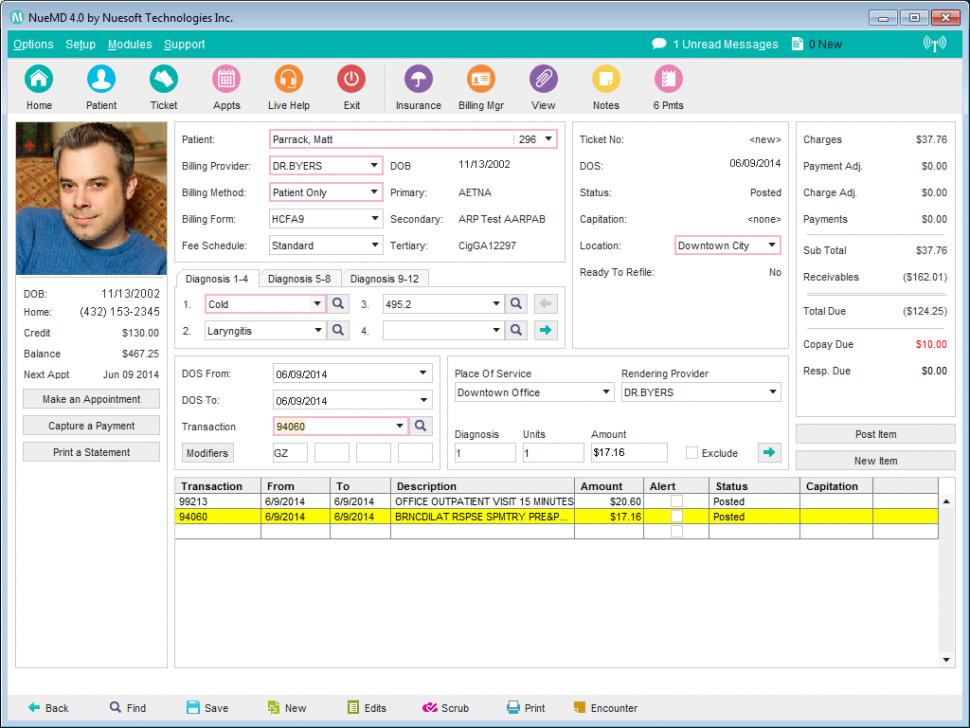
Patient registration in NueMD
Unfortunately, native iPad EMRs can have drawbacks too. Many of them have limited functionality. Physicians can perform basic tasks, such as capture billing charges, view a patient record or track patient schedules.
But, some native iPad EMRs don’t offer a complete set of features that other web-based and on-premise EMRs offer. This is mostly because these apps are new to the market. It took years, even decades, for the leading EMRs to offer the depth of functionality they now offer. iPad app startups aren’t going to catch up anytime soon.
h2>Common Features
Scheduling: Medical professionals can view and manage their schedules directly from their iPads. The scheduling feature can be used by both patients and doctors to find free slots, specify clinic locations and manage clinic capacity. You can add and edit appointments, manage multiple locations and create schedules for single or multiple providers.
Billing: Cloud-based and native EMR apps support billing, invoicing and collections features as well. The medical billing features also help you manage insurance and patient payments. Advanced billing features can help you generate reports and manage accounts receivables and claims.
Document management: Healthcare practices need to maintain a large volume of documents. Document management features help manage EMRs and images and reduce records retention costs. Electronic document storage and management features eliminate the need for off-site storage facility. The app should be able to handle multiple file types and may also offer document scanning capabilities.
Patient charts and notes: EMR iPad applications help create digital versions of patient charts that include their whole medical history and previous diagnosis and treatments. This feature helps track and store patient data and access them from anywhere. Physicians can also add notes about patients that will be stored for future use. Many EMR software offer customizable templates that help you choose the fields required for patient charts and notes.
e-Prescribing: This feature sends prescriptions to patients and pharmacies over the internet. e-Prescribing reduces medication errors, reviews previous prescriptions, searches for pharmacy locations and provides alerts regarding drug allergies, dosage levels and duplicates. It allows doctors to create and refill prescriptions, view dosage history, contact pharmacies and manage medications.
Alerts and reminders: EMR applications send appointment reminders to patients via text messages or email. This automates the routine task of sending reminders about upcoming appointments and reduces revenue loss due to no shows.
HIPAA compliance: Using HIPAA-compliant EMR applications is essential in complying with federal regulations. While choosing an EMR application, you should ensure that it is compliant with all aspects of HIPAA regulation and has all the latest updates.