Best Knowledge Management Software of 2026
Updated March 27, 2026 at 9:52 AM
- FrontRunners
- Popular Comparisons
- Buyers Guide
Compare Products
Showing 1 - 25 of 367 products
Compare Products
Sort by
Reviews: Sorts listings by the number of user reviews we have published, greatest to least.
Average Rating: Sorts listings by overall star rating based on user reviews, highest to lowest.
Alphabetically (A-Z): Sorts listings by product name from A to Z.

Freshservice is a cloud-based IT Help Desk and service management solution that enables organizations to simplify their IT opera...Read more about Freshservice


Freshservice's Best Rated Features
See All
Freshservice's Worst Rated Features
See All

Document360 is an AI-powered knowledge base platform built for enterprises that need secure, scalable documentation. It centrali...Read more about Document360

Document360's Best Rated Features
See All
Document360's Worst Rated Features
See All

Zendesk is a cloud-based help desk management solution offering customizable tools to build customer service portal, knowledge b...Read more about Zendesk Suite

Zendesk Suite's Best Rated Features
See All
Zendesk Suite's Worst Rated Features
See All

SysAid is an IT service management (ITSM) platform that helps organizations automate workflows and optimize IT service delivery....Read more about SysAid
SysAid's Best Rated Features
See All
SysAid's Worst Rated Features
See All

The AI-Powered Helpdesk for Modern B2B Teams Supportbench is the most complete helpdesk platform built specifically for B2B sup...Read more about Supportbench

Supportbench's Best Rated Features
See All
Supportbench's Worst Rated Features
See All

SolarWinds Service Desk is suitable for companies seeking a help desk solution that offers IT service management (ITSM) function...Read more about SolarWinds Service Desk

SolarWinds Service Desk's Best Rated Features
See All
SolarWinds Service Desk's Worst Rated Features
See All

Salesforce Service Cloud is a customer service platform designed to support organizations in managing interactions across multip...Read more about Salesforce Service Cloud

Salesforce Service Cloud's Best Rated Features
See All
Salesforce Service Cloud's Worst Rated Features
See All

HelpCrunch is a customer communication platform combining live chat, email marketing automation and a help desk in one solution....Read more about HelpCrunch

HelpCrunch's Best Rated Features
See All
HelpCrunch's Worst Rated Features
See All

Top-rated artificial intelligence knowledge management software - Rated #1 by analysts such as Gartner and infused with AI and ...Read more about eGain AI Knowledge Hub
No reviews yet
recommendations

Guru is the AI Source of Truth that unifies your company’s data and delivers cited, permission-aware answers, chat, and research...Read more about Guru
Guru's Best Rated Features
See All
Guru's Worst Rated Features
See All

Notion is a digital workspace that lets small to large businesses streamline and manage notes, tasks, projects, records, calenda...Read more about Notion

Notion's Best Rated Features
See All
Notion's Worst Rated Features
See All

livepro is a purpose-built cloud knowledge management platform for staff, customers, and partners. livepro offers the ability to...Read more about livepro
livepro's Best Rated Features
See All
livepro's Worst Rated Features
See All

Knowledge base software you'll enjoy using! If you're a documentation manager, customer success leader, or IT professional who...Read more about KnowledgeOwl

KnowledgeOwl's Best Rated Features
See All
KnowledgeOwl's Worst Rated Features
See All

Shelf is a cloud-based platform that helps modern businesses thrive with on-demand answers to the questions that block customer ...Read more about Shelf
Shelf's Best Rated Features
See All
Shelf's Worst Rated Features
See All

LiveAgent is a multichannel help desk solution with advanced AI features, live chat, ticketing, and call center capabilities. St...Read more about LiveAgent

LiveAgent's Best Rated Features
See All
LiveAgent's Worst Rated Features
See All

Reamaze is a cloud-based help desk and customer messaging solution that helps businesses support, engage and convert customers u...Read more about Re:amaze


Gist is a cloud-based help desk platform that helps small to large enterprises manage customer queries and streamline communicat...Read more about Gist
Gist's Best Rated Features
See All
Gist's Worst Rated Features
See All

Malcom! is a customer self service platform that helps businesses of all sizes in any sector provide a self service solution to ...Read more about Malcolm!

JustClip is a collaboration tool that helps businesses of all sizes in education, sales, accounting, law and other industries co...Read more about JustClip

Slab is a knowledgebase and collaborations management solution designed to help businesses create a database of documents, polic...Read more about Slab

Helpjuice is a cloud-based knowledge base management solution suitable for businesses of all sizes and in any industry segment. ...Read more about Helpjuice
Helpjuice's Best Rated Features
See All
Helpjuice's Worst Rated Features
See All

BOSSDesk ITSM Help Desk Ticketing System on the Cloud and On Premise Turning ticket management into an exceptional customer exp...Read more about BOSSDesk


BOSSDesk's Best Rated Features
See All
BOSSDesk's Worst Rated Features
See All

ProcedureFlow is a cloud-based knowledge management solution. The solution converts organizations’ processes and information int...Read more about ProcedureFlow

Bettermode is an all-in-one customer community platform to engage customers and build meaningful experiences. A community built...Read more about Bettermode
Bettermode's Best Rated Features
See All
Bettermode's Worst Rated Features
See All

HelpSite is a cloud-based solution that helps businesses create and build customizable knowledge bases and FAQs to resolve clien...Read more about HelpSite
HelpSite's Best Rated Features
See All
HelpSite's Worst Rated Features
See All
Popular Comparisons



Your Guide to Top Knowledge Management Software, May 2025
Software Advice uses reviews from real software users to highlight the top-rated Knowledge Management products in North America.
Learn how products are chosenExplore FrontRunners


“Usability” includes user ratings for Functionality and Ease of Use.
“Customer Satisfaction” includes user ratings for Customer Support, Likelihood to Recommend and Value for Money.
Reviews analysis period: The reviews analysis period spans two years and ends the 15th of the month prior to publication.
Buyers Guide
This detailed guide will help you find and buy the right knowledge management software for you and your business.
Last Updated on January 27, 2025Knowledge management systems allow you to tame the waves of data flooding your business to streamline training, customer support and other vital operations. We've written this buyer's guide to help you narrow down the many options on the market and find one that fits your needs.
Here's what we'll cover:
What Is Knowledge Management Software?
The Benefits of Organizing Company Data
Common Features of Knowledge Management Software
Pricing and Purchasing Options
What Is Knowledge Management Software?
Basically, this kind of software transforms the raw data accumulated by a company into useful information. It accomplishes this goal by collecting data in a central knowledge base, contextualizing it and making it easily searchable, so that users can find the information they need on their own.
These applications help a company to build and maintain a knowledge base, which is essentially a specialized database that can be searched and browsed by customers. This allows customers to find answers to their own questions before they contact support agents.
Modern knowledge bases are generally components of company websites, with either intranet or extranet access. Many software packages allow you to customize the design of your customer self-service portal so that it fits with your brand. Employees can write content to publish in the knowledge base. The articles can then be indexed in popular search engines for easy access.
Knowledge bases can also be created for internal use, to assist employees with functions such as document sharing, training and resolving support calls. Employee self-service features can interface with other kinds of customer relationship management (CRM) software in order to optimize the performance of support agents.
Why Do I Need It?
The day-to-day activities of even a small business can produce a bewildering array of data. If this data remains unorganized, it isn't worth much to the company. By using software to organize this data, companies can vastly reduce the time that employees spend searching for answers to questions about their jobs and dealing with customer inquiries.
Enterprises and certain markets—particularly IT, telecommunications and finance—practically demand the use of knowledge bases to survive in the information economy. Small to medium-sized businesses can use them to eliminate cluttered filing cabinets and to help ease the transition to a paperless office.
Knowledge bases also have the potential to streamline training processes for companies facing growing pains. And companies that are contending with a high-turnover rate may want to utilize one in order to keep awareness of best practices alive and to ease the responsibilities of trainers.
Common Feautres of Knowledge Management Software
Knowledge management software offers a diverse array of features. The following table lists some of the most important ones to help you focus your search:
Publishing options | Look for formatting options for content such as rich text, hyperlinks and images. Workflow customization options can streamline content generation, as does the ability to publish emails directly to knowledge bases by CC’ing them to a special address. |
Decision trees | Many knowledge management systems can help you create "Q&"-style decision trees, which enable customers to troubleshoot their own issues. |
Advanced search and browse options | Look for search filters, auto-suggest capability, natural language search and search engine indexing options. Intent-based search, which matches keywords to common reasons why users search the knowledge base (e.g., how to clear a paper jam in a printer), is another powerful feature included in many knowledge bases. |
Feedback options | Your knowledge base should have built-in feedback options that allow users both to vote on the relevance and helpfulness of articles and to add comments when necessary. |
RSS feeds | Many knowledge bases feature RSS feeds to keep users on top of new and useful articles. |
Self-service portals | Self-service portals or help Web pages for customers and employees are a major part of the foundation for knowledge bases. Make sure that your portal can be customized to fit your brand and the design of the rest of your company's website. |
The Benefits of Organizing Company Data
Almost all customer service-oriented businesses can benefit from organizing their data for employee and customer access. Benefits include:
Helping customers help themselves. Collating information to create self-service portals for customers helps to ease the workload of support agents. This is the function of specialized complaint management software.
Centralizing data for support agents. Support agents can also find data about common issues in a single location, which enables them to reduce the amount of time spent on a given ticket.
Centralizing data for sales agents. Similarly, sales agents can find centralized information about tactics for converting leads, in order to reduce their time-per-sale.
Streamlining training. New employees can find answers to questions they encounter as they learn the ropes in one convenient place.
Archiving best practices. The know-how of experienced employees can be preserved so the company doesn't hemorrhage brain power when they leave.
Easy document sharing. Providing employees with centralized, remote access to all vital documents reduces the barrage of internal communications that can snarl the daily workings of a company.
Keeping management informed. Managers have access to key data at their fingertips, which empowers them to make more informed decisions.
Pricing and Purchasing Options
There are two basic market trends that you need to understand to make an informed purchase: inclusion of knowledge management applications in integrated CRM suites and the Web-based deployment model.
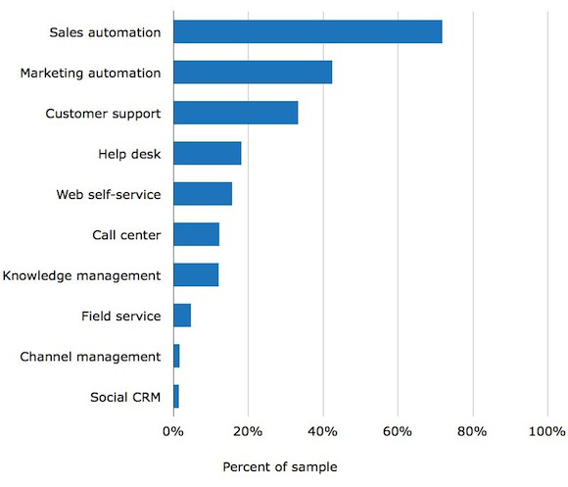
Integrated suites vs. “best-of-breed” systems. Knowledge management tools are frequently bundled, along with other applications, as part of an integrated CRM software suite. If you choose an integrated suite, consider whether the other applications in the package meet your needs. If you choose a standalone or “best-of-breed” application instead, you will need to ensure that it integrates with your existing software, such as your customer service, help desk automation and call center automation solutions. Here are some frequently requested applications among buyers we recently surveyed who chose an integrated CRM suite:
Integrated-Suite Buyers' Top-Requested Applications
Web-based vs. on-premise systems. CRM software can be licensed to users in two different ways: Web-based (meaning, the software is hosted in the cloud and accessed online using an Internet browser) or on-premise (installed on your company’s own servers). The Web-based deployment model, or “Software-as-a-Service (SaaS),” is generally more popular for CRM software, and is priced according to a monthly subscription model. With an on-premise model, on the other hand, you get a perpetual license—meaning you pay the licensing fee once for ongoing use of the software.
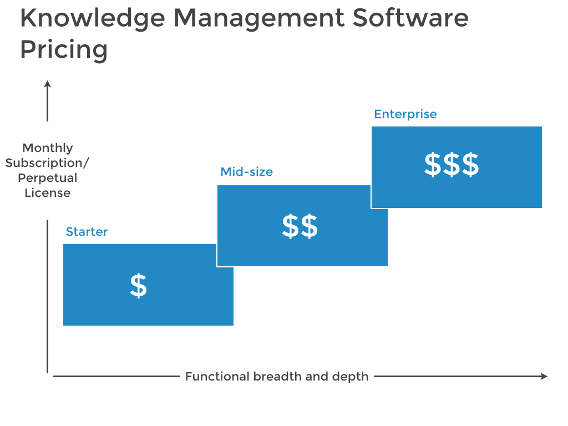
Pricing scales up based on functionality. No matter which package type and deployment model you choose, if you want a richer feature set, you can generally expect to pay more for the software. You may have to pay for an enterprise-level subscription to create and maintain a fully featured knowledge base on a large scale: