


Best CRM Software of 2026
Updated February 18, 2026 at 9:59 AM

Written by Andrew Blair
Content Analyst

Edited by Caroline Rousseau
Senior Editor

Reviewed by Marty Moore
Senior Advisor

Talk with us for a free 15-min consultation
Expert advisors like Jacqueline, who have helped 1,000+ companies, can find the right software for your needs.
- All Software
- Buyer's Guide
- Software Advice FrontRunners
- Frequently Asked Questions
- Popular Comparisons
CRM software helps sales, marketing, and support teams manage customer relationships, track interactions, and improve retention. With 900 tools built for varied operational models and integration and regulatory needs, picking the right tool can be tough. To help you narrow it down, I worked with our CRM software advisors to curate a list of recommended productsi and a list of the CRM software Frontrunners based on user reviews. For further information, read my CRM software buyer's guide.
CRM Software
Sort by
Reviews: Sorts listings by the number of user reviews we have published, greatest to least.
Average Rating: Sorts listings by overall star rating based on user reviews, highest to lowest.
Alphabetically (A-Z): Sorts listings by product name from A to Z.

Thryv is an AI-powered marketing and sales platform built specifically for small businesses, helping you market smarter, sell mo...Read more about Thryv


Thryv's Best Rated Features
See All
Thryv's Worst Rated Features
See All

Claritysoft is a cloud-based customer relationship management (CRM) solution designed for midsize and large enterprise businesse...Read more about Claritysoft CRM


Claritysoft CRM's Best Rated Features
See All
Claritysoft CRM's Worst Rated Features
See All

LeadMaster is a SaaS-based all-in-one lead management solution that offers capabilities to capture, track and follow up with lea...Read more about LeadMaster

BNTouch Mortgage CRM is a fully integrated digital mortgage system, CRM, marketing, and POS tool offering a comprehensive mortga...Read more about BNTouch Mortgage CRM


BNTouch Mortgage CRM's Best Rated Features
See All
BNTouch Mortgage CRM's Worst Rated Features
See All

Supercharge your sales process with Sales Hub, a powerful and easy-to-use sales CRM that includes sales engagement tools, config...Read more about HubSpot Sales Hub

HubSpot Sales Hub's Best Rated Features
See All
HubSpot Sales Hub's Worst Rated Features
See All
Software Advice FrontRunners 2026

(18761)

(6960)

(5806)

(522)

(1289)

(645)

(851)

(3042)

(618)

(907)
Best for Customization


Salesforce Sales Cloud is the most requested by users for customization out of the most popular tools.
Salesforce Sales Cloud is best suited for organizations that require extensive customization to match their unique business processes. Our reviewers say its flexible dashboard, non-code customization tools, and ability to tailor workflows and data fields help teams adapt the platform to their specific needs and improve efficiency.
- Reviewers Perspective
"We were able to bring almost all of our sales processes into Sales Cloud; legal/contracts, AR/PO's, scheduling, invoicing, marketing, etc."
LNLarry Noel
Customer Service Coordinator
Used for 2+ years
We analyzed 835 verified user reviews for Salesforce Sales Cloud to find out what actual users really think.
Customization
Administrators tailor dashboards, workflows, and data fields to specific business requirements. The flexibility supports diverse industries, though advanced changes may need technical expertise.Data Management
Salesforce Sales Cloud centralizes customer and sales data, offering reporting, analytics, and security features. Teams use customizable dashboards to track progress and make informed decisions.Customer Support
Support teams maintain detailed records and track interactions in a centralized database. Automation tools streamline communication and ensure timely responses to customer inquiries. - Key FeaturesSalesforce Sales Cloud's scoreCategory average
Activity Dashboard
4.524.46 category average
Contact Management
4.464.51 category average
Sales Reports
4.434.41 category average
- Screenshots


Highly Rated for Automation

Zoho CRM

According to our user reviews, Zoho CRM is the highest rated for automation out of the most popular tools.
Zoho CRM is highly rated for automation, making it a strong fit for businesses seeking to streamline repetitive sales and marketing tasks. Our reviewers point out that automation rules, blueprints, and workflow customization have significantly improved their productivity and sales follow-up processes.
- Reviewers Perspective
"The CRM of Zoho allows me to view all machines, issues, and discussions of a customer at a single location, which makes the collaboration between the support and sales smoother."
DMDavid Martinez
Technical Support Engineer
Used for 2+ years
We analyzed 837 verified user reviews for Zoho CRM to find out what actual users really think.
Integrations
Businesses connect Zoho CRM with a wide range of Zoho apps and third-party tools to streamline workflows. Some integrations require additional setup or technical expertise.Customization
Teams personalize modules, fields, workflows, and dashboards to match business requirements. The platform’s flexibility supports evolving needs, though complex changes may need technical knowledge.Sales Management
Sales managers use Zoho CRM to manage pipelines, automate processes, and track customer interactions. Robust analytics and AI-powered tools support forecasting and performance evaluation. - Key FeaturesZoho CRM's scoreCategory average
Activity Dashboard
4.564.46 category average
Contact Management
4.414.51 category average
Sales Reports
4.314.41 category average
- Screenshots


Highly Rated for Quick Implementation


According to our user reviews, HubSpot CRM is the highest rated for quick implementation out of the most popular tools.
HubSpot CRM is highly rated for quick implementation, ideal for SMBs needing a fast, low-barrier CRM rollout. Our reviewers say setup is straightforward, onboarding is smooth, and the intuitive interface enables teams to start managing contacts and sales pipelines with minimal training.
- Reviewers Perspective
"We are able to set custom content for each of our campaigns and connect them to our sales team territories all with a simple workflow."
SSSude Sönmez
Paid User Acquisition Specialist
Used for 2+ years
We analyzed 841 verified user reviews for HubSpot CRM to find out what actual users really think.
Sales and Marketing
Teams manage campaigns, track leads, and monitor customer interactions from a single platform. Automation and analytics help align sales and marketing for better business outcomes.Customer Support
Support teams use HubSpot CRM’s centralized customer information and engagement tracking tools to deliver personalized service and maintain strong relationships across teams.Lead Management
Managers capture, organize, and nurture leads with automated workflows and customizable pipelines. All lead interactions and notes are stored in one place for efficient follow-up. - Key FeaturesHubSpot Service Hub's scoreCategory average
Activity Dashboard
4.04.46 category average
Contact Management
4.614.51 category average
- Screenshots


Best for Integrations

Dynamics 365

Of the products listed on our FrontRunners report, Dynamics 365 is the most requested by users for integrations out of the most popular tools.
Dynamics 365 is best for businesses prioritizing integrations, especially those using Microsoft products. Our reviewers highlight its seamless integration with Office 365, Power BI, and other Microsoft tools, which streamlines workflows and centralizes business data for greater productivity.
- Reviewers Perspective
"As a non-profit, we find the flexibility to develop a number of different applications and processes to manage multiple revenue streams, track donor, supporter and customer data, giving us a genuine 360 view of those we engage with."
MGMark Green
Head of Digital
Used for 2+ years
We analyzed 877 verified user reviews for Dynamics 365 to find out what actual users really think.
Sales and Marketing
Organizations manage the entire sales cycle and automate marketing campaigns in Dynamics 365. Tools like pipeline management and lead tracking centralize processes and support data-driven decisions.Integrations
Businesses connect Dynamics 365 with Office 365, Power BI, Teams, and select third-party apps. This integration streamlines workflows and enables cohesive management of CRM and ERP functions.Customer Relationship Management
Teams use Dynamics 365’s centralized database and customizable features to track customer interactions and automate processes. AI-driven insights help improve engagement and streamline operations. - Key FeaturesDynamics 365's scoreCategory average
Activity Dashboard
4.364.46 category average
Contact Management
4.424.51 category average
- Screenshots


Highly Rated for Mobile app

Klaviyo

Klaviyo is the highest rated for mobile app out of the most popular tools.
Klaviyo is highly rated for its mobile app, making it a good choice for teams that need to manage email marketing and automation on the go. Our reviewers say the mobile app is intuitive, supports campaign management, and provides real-time analytics, enhancing flexibility for remote work.
- Reviewers Perspective
"It provides a lot of emails templates and a lot of drag sections to quick launch a Email marketing campaign and also you could design workflows to facilitate the EDM process."
EDElena Dong
Marketing Manager
Used for 2+ years
We analyzed 379 verified user reviews for Klaviyo to find out what actual users really think.
Email Automation
Users find Klaviyo highly effective for automating email workflows, allowing them to send targeted, personalized messages based on customer actions and behaviors. They appreciate the robust segmentation, detailed analytics, and ease of creating flows for abandoned carts, welcome sequences, and post-purchase follow-ups, which help drive sales and improve engagement. Many users mention that Klaviyo’s automation features are intuitive and powerful, though some note the platform’s pricing can increase as their email lists grow.Customer Support
Users consistently highlight Klaviyo’s customer support as knowledgeable, responsive, and helpful, especially when they encounter technical questions or need guidance. They value the availability of live chat, helpful articles, and prompt responses, which make onboarding and troubleshooting smoother. While most users are satisfied, some wish for more immediate phone support and note occasional delays, but overall, they find the support team reliable and resourceful.Email Marketing
Users rely on Klaviyo for managing comprehensive email marketing campaigns, leveraging its segmentation tools and analytics to create targeted communications that resonate with their audiences. They appreciate the platform’s user-friendly interface, wide range of templates, and automation capabilities, which simplify campaign setup and performance tracking. Many users find Klaviyo’s features well-suited for e-commerce businesses, helping them grow their customer base and increase sales through effective email marketing strategies. - Key FeaturesKlaviyo's scoreCategory average
Activity Dashboard
4.224.46 category average
Contact Management
4.354.51 category average
- Screenshots


Highly Rated for Quick Adoption/Easy Adoption

Odoo

In our analysis of CRM products with the most market demand, Odoo is the highest rated for quick adoption out of the most popular tools.
Odoo is highly rated for quick adoption and easy onboarding, making it well-suited for SMBs seeking a unified business platform without a steep learning curve. Our reviewers say its modular structure, integrated apps, and straightforward setup enable businesses to digitize operations efficiently.
- Reviewers Perspective
"Its modular approach, open-source nature, user-friendliness, and support make it an attractive choice, particularly for small and mid-sized businesses looking to streamline their operations without the high costs of traditional ERP systems."
DBDidier Belrose
Product Owner
Used for 2+ years
We analyzed 567 verified user reviews for Odoo to find out what actual users really think.
Customer Support
Users access Odoo’s support through various channels, but many report inconsistent service quality and slow response times, especially on lower-tier plans or outside core regions. This impacts reliability for SMBs needing timely issue resolution.Customization
Teams tailor Odoo modules, workflows, and interfaces to fit unique business needs. The open-source platform enables deep modifications, supporting a wide range of industries, though technical skills may be required for advanced changes.Modules
Organizations expand Odoo’s capabilities by adding or customizing modules for CRM, accounting, HR, and inventory. The unified interface simplifies adoption, while the modular approach supports evolving business requirements. - Key FeaturesOdoo 's scoreCategory average
Activity Dashboard
4.344.46 category average
Contact Management
4.144.51 category average
Sales Reports
4.224.41 category average
- Screenshots


Most Used By E-Learning


In our analysis of CRM products with the most market demand, Less Annoying CRM is the most requested by users in e-learning out of the most popular tools.
Less Annoying CRM is most used by e-learning organizations that value simple contact management and collaborative features. Our reviewers point out that its shared contact lists, easy task assignment, and intuitive interface help teams stay organized and improve customer support.
- Reviewers Perspective
"It's also very simple to manage the contact information, including creating task and event follow-ups, sending email, and easily reviewing past interaction history."
SLSteve Levine
Business Development Representative
Used for 2+ years
We analyzed 420 verified user reviews for Less Annoying CRM to find out what actual users really think.
Customer Support
Users find Less Annoying CRM's customer support to be responsive, knowledgeable, and consistently available, making onboarding and troubleshooting straightforward. They appreciate being able to reach real people quickly by phone or email, and value the personalized assistance and training resources provided. Many reviewers highlight how the support team listens to their needs, offers practical solutions, and follows up promptly, which helps them maximize the software's benefits for their business.Ease of Use
Users describe Less Annoying CRM as exceptionally easy to use, with a simple and intuitive interface that requires minimal training. They appreciate how quickly they can get started, navigate features, and tailor the platform to fit their business needs without feeling overwhelmed by complexity. Reviewers consistently mention the software’s affordability and flexibility, noting that it streamlines daily tasks and adapts well to various workflows.Contact Management
Users rely on Less Annoying CRM to efficiently organize and manage their contacts, including tracking interactions, segmenting lists, and linking related information. They find importing, exporting, and updating contacts straightforward, and appreciate features like reminders, attachments, and customizable fields that help keep their data organized. Reviewers highlight how the platform simplifies collaboration, allowing teams to access shared contact lists and maintain accurate records for ongoing customer support. - Key FeaturesLess Annoying CRM's scoreCategory average
Activity Dashboard
4.714.46 category average
Contact Management
4.874.51 category average
- Screenshots


Most Rated for SMBs

Act!

According to our user reviews, Act! is the most requested by small businesses out of the most popular tools.
Act! is most rated for SMBs looking for reliable contact and client management with customization options. Our reviewers say it efficiently manages large contact databases, allows custom fields, and supports tailored workflows, making it practical for growing small businesses.
- Reviewers Perspective
"The excellent support their technology team provides give me piece of mind that I don't have to concern myself with issues that come up from time to time."
KWKevin Waide
Manager
Used for 2+ years
We analyzed 487 verified user reviews for Act! to find out what actual users really think.
Ease of Use
Act! offers a user-friendly interface that simplifies daily tasks and contact management. Both beginners and experienced users can quickly navigate the system, reducing onboarding time.Customization
Administrators customize fields, templates, and workflows to fit unique business needs. The system supports a range of industries, though complex customizations may require extra time.Contact Management
Managers efficiently organize and categorize large contact databases, track interactions, and set reminders. This supports effective communication and follow-up with clients and prospects. - Key FeaturesAct!'s scoreCategory average
Activity Dashboard
4.364.46 category average
Contact Management
4.384.51 category average
- Screenshots


Best for User Interface

Pipedrive

According to our user reviews, Pipedrive is the highest rated for its user interface out of the most popular tools.
Pipedrive is best for users who prioritize a user-friendly interface for managing sales pipelines. Our reviewers say its visual pipeline, drag-and-drop deal management, and customizable views make tracking sales stages and activities straightforward and efficient.
- Reviewers Perspective
"The tool has allowed us to build powerful sales automation (Activecampaign, Zapier, Calendly, Clickfunnels, etc) to empower our team to focus on closing more deals."
JPJonathan Pinet
CEO
Used for 6-12 months
We analyzed 832 verified user reviews for Pipedrive to find out what actual users really think.
Sales Management
Sales teams use Pipedrive’s visual pipeline and customizable stages to track deals and activities. The intuitive interface and mobile access help teams focus on closing deals and improving efficiency.Ease of Use
New users get up to speed fast with Pipedrive’s clean interface and straightforward onboarding. Tutorials and documentation reduce training time, letting staff focus on work instead of software.Sales Pipeline
Sales managers track deals through customizable pipeline stages, using drag-and-drop tools and real-time reporting. Multiple pipelines and easy collaboration adapt to varied sales workflows. - Key FeaturesPipedrive's scoreCategory average
Activity Dashboard
4.214.46 category average
Contact Management
4.444.51 category average
Sales Reports
4.404.41 category average
- Screenshots


Most Used By Marketing and Advertising

Nutshell

According to our user reviews, Nutshell is the most requested by users in marketing and advertising out of the most popular tools.
Nutshell is most used by marketing and advertising teams that need streamlined lead and email management. Our reviewers highlight its intuitive interface, strong email integration, and workflow tools that help teams track leads, automate follow-ups, and collaborate effectively.
- Reviewers Perspective
"Nutshell is also committed to improving the platform with new features, a better UI, and excellent customer support. Whenever I have an issue, they respond promptly and work until the issue is resolved. But I rarely have a problem with it."
PGPatrick Garrett
Chief Drinking Officer
Used for 2+ years
We analyzed 457 verified user reviews for Nutshell to find out what actual users really think.
Lead Management
Sales teams track, organize, and nurture leads using customizable pipelines and an intuitive drag-and-drop interface. Reporting and collaboration features help teams stay aligned and responsive.Customer Support
Users access help via chat, email, or tutorials, making onboarding and troubleshooting straightforward. The support team is open to feedback and implements user-suggested enhancements.Features
Organizations leverage customizable workflows, automation, and reporting to support diverse business needs. Regular updates and new features help SMBs tailor the platform to their processes. - Key FeaturesNutshell's scoreCategory average
Activity Dashboard
5.04.46 category average
Contact Management
4.464.51 category average
- Screenshots


- Reviewers Perspective
"Its standout features include marketing automation, sales pipeline management, email marketing, customer support tools, and contact management, all integrated into a single platform."
LSLinda Simiyu
Marketing
Used for 1-2 years
We analyzed 523 verified user reviews for EngageBay CRM to find out what actual users really think.
Marketing and Sales
Teams consolidate marketing, sales, and customer service tools in one platform. This integration streamlines campaign management, sales pipelines, and customer tracking for SMBs.Ease of Use
Organizations set up EngageBay CRM easily, with features organized to minimize the learning curve. The intuitive interface helps users manage customer relationships efficiently.Email Marketing
Staff create, send, and monitor personalized email campaigns with built-in analytics. Segmentation and automation tools help SMBs improve engagement and campaign performance. - Key FeaturesEngageBay CRM's scoreCategory average
Activity Dashboard
4.734.46 category average
Contact Management
4.664.51 category average
- Screenshots


- Reviewers Perspective
"It enables you to manage your leads, contacts, and customers data more efficiently and you can easily drill down to the minute details."
SCSachin Chauhan
Marketing Lead
Used for 1-2 years
We analyzed 415 verified user reviews for Kylas Sales CRM to find out what actual users really think.
Lead Management
Sales teams capture, track, and follow up with leads in a user-friendly interface. Automated reminders and detailed data management support organized sales workflows.Customer Support
Staff receive prompt support during onboarding and daily use. The support team listens to feedback, helps with implementation, and provides ongoing training for SMBs.Ease of Use
Teams navigate Kylas Sales CRM with minimal training. The platform’s design and training resources make sales activity management efficient for new and experienced users. - Key FeaturesKylas Sales CRM's scoreCategory average
Activity Dashboard
4.834.46 category average
Contact Management
4.774.51 category average
- Screenshots


monday CRM

- Reviewers Perspective
"Its ease of integration with various applications and services such as Slack, Facebook, Gmail, among others, helps to centralize information, facilitating communication within the application itself."
CCCristian Cendales
IT Analyst
Used for 2+ years
We analyzed 284 verified user reviews for monday CRM to find out what actual users really think.
Ease of Use
Teams organize projects, manage contacts, and collaborate efficiently with monday CRM’s clear layout. Onboarding new staff requires minimal training, supporting SMBs with streamlined communication and centralized updates.Customization
Managers tailor dashboards, templates, and workflows to fit unique business needs. This adaptability supports different industries and evolving team structures, keeping processes efficient as organizations grow.Email Integration
Staff send mass emails, set reminders, and track communications within monday CRM, reducing reliance on external tools. Email tracking and automated follow-ups support relationship management, though some manual workarounds remain. - Key Featuresmonday CRM's scoreCategory average
Activity Dashboard
4.574.46 category average
Contact Management
4.474.51 category average
Sales Reports
5.04.41 category average
- Screenshots


- Reviewers Perspective
"The customisation options and pipeline management tools are perfect for small to medium-sized businesses, ensuring efficient tracking of sales and client interactions."
TPThomson Philip
CEO
Used for 1-2 years
We analyzed 432 verified user reviews for Bigin by Zoho CRM to find out what actual users really think.
Pipeline Management
Teams customize pipelines, manage leads, and automate tasks with drag-and-drop tools. This supports small businesses in organizing workflows and maintaining sales visibility.Small Business
Organizations set up Bigin by Zoho CRM quickly, accessing essential CRM features without unnecessary complexity. The platform supports growth for teams with limited resources.Customer Support
Staff receive onboarding, troubleshooting, and ongoing support. Training resources help teams adapt quickly and maximize CRM benefits, especially for small organizations. - Key FeaturesBigin by Zoho CRM's scoreCategory average
Activity Dashboard
4.504.46 category average
Contact Management
4.584.51 category average
Sales Reports
4.04.41 category average
- Screenshots


Copper

- Reviewers Perspective
"It's integrations with Google workspace streamlines every aspect of the sales process and has even streamlined our servicing and policy renewal process."
PSPaul Scalone
Owner
Used for 1-2 years
We analyzed 418 verified user reviews for Copper to find out what actual users really think.
Integrations
Organizations integrate Copper with Gmail, Google Calendar, and Drive to manage CRM tasks in their existing environment. This streamlines communication and collaboration for teams using Google tools.Ease of Use
Users access information and features with minimal effort due to Copper’s clean interface. The straightforward setup reduces onboarding time for teams with varying technical backgrounds.Sales Management
Sales teams track opportunities and manage pipelines with minimal training. Copper’s logical workflow helps new hires become productive quickly, supporting SMBs in fast-paced sales environments. - Key FeaturesCopper's scoreCategory average
Activity Dashboard
4.114.46 category average
Contact Management
4.384.51 category average
- Screenshots


- Reviewers Perspective
"its simplicity and speed to set up—it’s designed for small teams, so you can get started quickly without needing a Salesforce admin."
LLLucy Lynch
Project Coordinator
Used for 6-12 months
We analyzed 123 verified user reviews for Salesforce Starter to find out what actual users really think.
Customer Support
Teams manage customer relationships by quickly accessing information, tracking previous interactions, and using Desk for case management. This supports SMBs needing reliable support and documentation.Ease of Use
Staff navigate Salesforce Starter’s interface to track historical data and organize records. The design helps reduce time spent on routine tasks, especially for new users in growing businesses.Team Collaboration
Small teams set up Salesforce Starter rapidly and use mass actions, integrated knowledge bases, and automatic updates to coordinate projects and deals. This improves communication and productivity for SMBs. - Key FeaturesSalesforce Starter's scoreCategory average
Activity Dashboard
4.384.46 category average
Contact Management
4.674.51 category average
- Screenshots


Bitrix24

- Reviewers Perspective
"Bitrix24 is a customizable and easily integrated multi-tool that allows you to build literally any pre-sales, sales and post-sales process on it."
JSJohann Sebastian Kreusch
Líder Técnico
Used for 2+ years
We analyzed 526 verified user reviews for Bitrix24 to find out what actual users really think.
Project Management
Teams manage projects, assign roles, and monitor progress with Gantt charts and Kanban boards. Real-time tracking supports collaboration for organizations with diverse workflows.Task Management
Managers assign tasks, set deadlines, and monitor progress. Automation and visual tools like Gantt charts help keep work organized and boost team accountability.Team Communication
Staff use instant messaging, video conferencing, and file sharing to coordinate across departments. Centralized communication channels streamline collaboration and project execution. - Key FeaturesBitrix24's scoreCategory average
Activity Dashboard
3.474.46 category average
Contact Management
4.374.51 category average
- Screenshots


CustomerBase

- Reviewers Perspective
"Great lots of team work and enthusiasm same people keep focused on your product"
AMAhmad Morshedi
Owner
Used for 1-2 years
We analyzed 46 verified user reviews for CustomerBase to find out what actual users really think.
- Key FeaturesCustomerBase's scoreCategory average
Activity Dashboard
4.924.46 category average
Contact Management
5.04.51 category average
- Screenshots


Keap

- Reviewers Perspective
"I use Keap to manage marketing campaigns and automate sales for my small business — it combines CRM, email marketing, and automation, so I can keep all my customer interactions in one place."
SYSalimata Yatassaye
Officer,Financial Center Assistant Manager
Used for 6-12 months
We analyzed 645 verified user reviews for Keap to find out what actual users really think.
Marketing Automation
Small businesses automate marketing, manage contacts, and streamline sales with Keap. Centralized interactions and follow-ups save time and improve operational efficiency.Campaigns
Staff design and manage multi-step campaigns with a drag-and-drop interface. This flexibility supports audience segmentation and engagement tracking for SMB marketers.Customer Marketing
Organizations use Keap to segment audiences and automate campaigns, tracking customer journeys and enabling targeted communications for more effective marketing. - Key FeaturesKeap's scoreCategory average
Activity Dashboard
4.504.46 category average
Contact Management
4.204.51 category average
- Screenshots


folk

- Reviewers Perspective
"Team has been helpful and reactive when needed, to help me set my first trackers and also to connect it to my website."
TBThomas BORIE
cofounder
Used for 6-12 months
We analyzed 46 verified user reviews for folk to find out what actual users really think.
- Key Featuresfolk's scoreCategory average
Contact Management
4.384.51 category average
Sales Reports
4.04.41 category average
- Screenshots


Vanillasoft

- Reviewers Perspective
"VanillaSoft offers solid value, especially for sales teams that need a structured cadence tool for lead management and outbound calling."
AOAndrew Otalvaro
Sales Manager
Used for 2+ years
We analyzed 175 verified user reviews for Vanillasoft to find out what actual users really think.
Lead Management
Sales teams organize, track, and follow up with leads using grouping, callbacks, and pipeline tools. This supports productivity and conversion rates for outbound-focused organizations.Customer Support
Staff resolve technical issues quickly with VanillaSoft’s support team, using clear guidance and onboarding resources. This reliability aids SMBs needing dependable CRM support.Email and Text Integration
Teams send prewritten emails and SMS messages, automate outreach, and access all communication tools in one platform. This saves time and supports efficient lead interaction. - Key FeaturesVanillasoft's scoreCategory average
Activity Dashboard
5.04.46 category average
Contact Management
4.514.51 category average
Sales Reports
4.04.41 category average
- Screenshots


Agile CRM

- Reviewers Perspective
"It also comes with integration with other tools we use like Jira and Github, so automatically updates made here are synced with other integrated tools."
AAAlfiya ashfaque Mukadam
Software Engineer - QA
Used for 1-2 years
We analyzed 328 verified user reviews for Agile CRM to find out what actual users really think.
Email Campaigns
Teams use Agile CRM’s campaign builder and templates to segment contacts, schedule emails, and track performance. Marketing automation tools streamline outreach for SMBs.Ease of Use
Organizations set up Agile CRM with minimal training. Video tutorials and guides help new staff get started, making daily tasks accessible for small businesses.Sales and Marketing
Staff manage sales pipelines, marketing campaigns, and customer interactions in one platform. Integrated features support sales tracking, lead management, and reporting. - Key FeaturesAgile CRM's scoreCategory average
Activity Dashboard
4.04.46 category average
Contact Management
3.884.51 category average
- Screenshots


Ricochet360

- Reviewers Perspective
"Ricochet360 redesigned outbound calling by bringing an auto-dialer through which agents are connected to leads per second and such benefits come with a level of competition."
MWMike Weiss
IT Project Manager
Used for 6-12 months
We analyzed 61 verified user reviews for Ricochet360 to find out what actual users really think.
Ease of Use
Teams navigate Ricochet360’s clear interface to streamline daily tasks. Customization options let SMBs tailor workflows, while ongoing training unlocks advanced capabilities as familiarity grows.Customer Support
Managers rely on Ricochet360’s accessible support staff for onboarding and troubleshooting. The team answers questions thoroughly and offers solutions that fit specific business needs.Call Dialer
Sales teams use Ricochet360’s auto-dialer to boost outbound call efficiency. Integrated telemarketing, CRM, and VOIP tools streamline workflows and maximize productivity. - Key FeaturesRicochet360's scoreCategory average
Activity Dashboard
4.944.46 category average
Contact Management
4.604.51 category average
- Screenshots


Nimble

- Reviewers Perspective
"The best aspect of this tool is that it is a contact builder that can easily record contacts on any social media site."
SKSally Kang
designer
Used for 1-2 years
We analyzed 718 verified user reviews for Nimble to find out what actual users really think.
Integrations
Nimble pulls in social profiles, tracks conversations, and centralizes information from email and social media. This helps SMBs manage relationships and streamline workflows.Contact Management
Teams use automatic profile building, business card scanning, and browser extensions to keep contact data current. Centralized databases reduce duplicate entries and support collaboration.Ease of Use
Organizations set up Nimble quickly and train staff with little technical expertise. The simple interface and tutorials make daily CRM management straightforward for small teams. - Screenshots


Insightly

- Reviewers Perspective
"I love it. If not for Insightly I'd be using spreadsheets and going crazy trying to track my long list of clients that includes boiler system bids, direct commercial and industrial system sales, building and maintaining relationships with mechanical engineers and architects, and a good number of residential boiler prospects."
JVJim Van Valkenburgh
VP Sales and Marketing
Used for 2+ years
We analyzed 354 verified user reviews for Insightly to find out what actual users really think.
Ease of Use
Teams adapt quickly to Insightly’s interface, reducing the learning curve for new CRM users. The design supports individuals and teams in focusing on core work.Professional Use
Organizations use Insightly’s scalable features and affordable pricing to manage leads, projects, and operations. Customization options suit entrepreneurs and growing businesses.Integrations
Staff link Insightly with Google Apps, Mailchimp, QuickBooks, and Zapier to automate tasks and centralize workflows. API access and app connections enhance productivity. - Key FeaturesInsightly's scoreCategory average
Activity Dashboard
5.04.46 category average
Contact Management
4.354.51 category average
- Screenshots


Methodology
The research for the best CRM software list was conducted in October 2025. We evaluated data (user reviews and demand signals) from the past 24 months as of the research date. Read the complete methodology.
Popular CRM Comparisons


Buyer's Guide
This detailed guide will help you find and buy the right customer relationship management software for you and your business.
Last Updated on October 16, 2025Here's what we'll cover:
What you need to know about CRM software
Essential features of CRM software
Benefits and competitive advantages of using CRM software
How to choose the best CRM software for your business
More resources for your CRM journey
What you need to know about CRM software
CRM software helps organizations better manage their interactions with customers via features such as contact management, interaction tracking, and lead management. By improving operational procedures, enhancing employee value, and increasing management visibility, it helps firms streamline their processes and deliver more value to their customers.
To give you an idea of the market, we have over 1,000 different CRM vendors on our site, we’ve published over 9,000 reviews for CRM products [1], and we've spoken to nearly 3,000 CRM software buyers in the past year alone. [2]
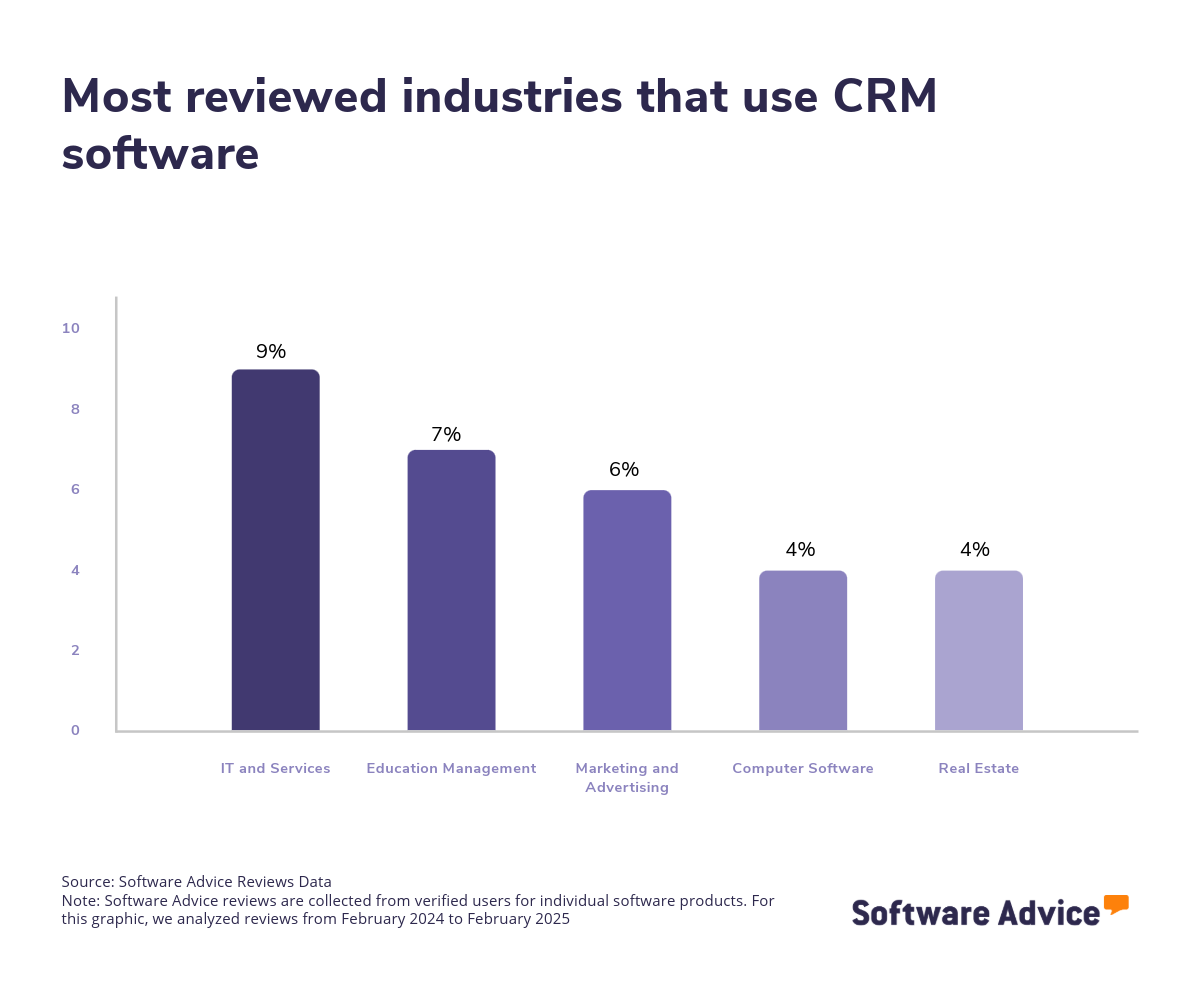
Needless to say, the CRM market is vast, with hundreds of solutions available to cater to various industries. This diversity allows organizations to find a CRM solution designed to support specific industries, whether they are in real estate, construction, finance, healthcare, insurance, nonprofit, or social industries. However, the market size and complexity can be daunting, making it essential for buyers to evaluate their options carefully.
Pricing for CRM software varies depending on the vendor, features offered, and scalability. Some solutions offer tiered pricing models based on specific organizational requirements. To put things into perspective, we’ve found that entry-level pricing averages $1,292 per month for basic functionality, while high-end plans that have advanced CRM features average $17,664 per month for more than 250 users. [3]
First-time buyers should begin evaluating with a budget, number of users, specific needs, and necessary integrations in mind. Ensure you’ve consulted with stakeholders on a list of critical questions to help you evaluate systems based on your needs, such as:
What specific features does the software offer, and how do they align with the organization's needs?
Is the software scalable to accommodate future growth?
Does the software integrate with other tools and systems your organization currently uses?
What level of customization is available to tailor the software to your specific processes?
How user-friendly is the software, and what kind of support and training is provided?
Because there are so many CRM systems available, choosing the right option can be a long process. In this guide, you’ll learn about the essential components of CRM software, get step-by-step guidance on how to choose the right solution for your business, and tap into the expertise of our experienced CRM software advisors, James McKechnie, and Marty Moore. To get expert guidance, schedule a free consultation or start a chat with us today.
What is CRM software?
CRM software is a digital tool that helps businesses efficiently manage their interactions with both current and potential customers. It offers a centralized platform that allows companies to store, organize, and access customer data and interaction histories. This streamlines processes such as lead management, interaction tracking, and contact management.
In addition to these core functions, CRM software solutions often come equipped with robust reporting and analytics capabilities. These features provide valuable insights into customer behavior, sales performance, and the effectiveness of marketing strategies, enabling businesses to make data-driven decisions.
CRM systems are closely related to contact management systems and are commonly deployed via the cloud, offering flexibility and scalability to meet the needs of businesses of all sizes.
Essential features of CRM software
When comparing CRM software systems, it's important to know what features you can expect to see and which features are more advanced add-ons or uncommon. Some functionalities, like contact management, interaction tracking, and lead management, are core features that will be available in every CRM software. Other features, such as reporting/analytics, sales pipeline management, and customer journey mapping, are still common. We analyzed thousands of reviews to determine what we believe are CRM software's core features.
Core CRM software features
Contact management | Manages, organizes, and stores contact information. This feature helps businesses maintain a comprehensive and up-to-date database of customer and prospect details, facilitating efficient communication and personalized customer service. 90% of our reviewers rate this feature as critical or highly important. |
Interaction tracking | Tracks interaction history by documenting conversations for contacts. It ensures that all team members have access to a complete record of past interactions, enabling consistent and informed communication with customers and prospects, and enhancing relationship-building efforts. 84% of our reviewers rate this feature as critical or highly important. |
Lead management | Stores information about leads or contacts and tracks, manages, and nurtures them throughout the sales process. This feature is essential for optimizing the sales pipeline, ensuring that no potential opportunities are overlooked, and systematically guiding leads through the buying journey to conversion. 84% of our reviewers rate this feature as critical or highly important. |
Common CRM software features
Email management | Manage, store, and organize emails within the system or via third-party applications. This feature centralizes communication, ensuring that all email interactions are easily accessible and integrated with other customer data. 85% of our reviewers rate this feature as critical or highly important. |
Reporting/analytics | View and track pertinent metrics to find patterns and gain insights from data. This feature helps organizations make informed decisions by providing a clear understanding of customer behaviors, sales trends, and marketing effectiveness. 83% of our reviewers rate this feature as critical or highly important. |
Sales pipeline management | Pipeline view and tracking lead status. This feature enables sales teams to visualize the entire sales process, monitor the progress of leads through different stages, and prioritize efforts on high-potential opportunities. 82% of our reviewers rate this feature as critical or highly important. |
Workflow management | Create, design, and manage workflows for repetitive tasks. This feature streamlines operations by automating routine processes, reducing manual effort, and minimizing errors. 82% of our reviewers rate this feature as critical or highly important. |
Task management | Create, manage, and track all task activities and progression. This feature ensures that all team members are aligned on their responsibilities and deadlines, promoting accountability and enhancing productivity. 79% of our reviewers rate this feature as critical or highly important. |
Lead capture | Score a lead on their quality or likelihood to buy based on certain behaviors. This feature benefits organizations by allowing them to focus their resources on the most promising leads, improving the efficiency of the sales process, and increasing the chances of successful conversions. 77% of our reviewers rate this feature as critical or highly important. |
“Many buyers mistakenly believe that lead generation systems are comprehensive software solutions. In reality, they often function more as services. When buyers search for lead generation, they frequently encounter CRM systems, which are designed for lead tracking rather than generating new leads”, says Moore.
Benefits and competitive advantages of using CRM software
CRM software buyers are seeking to move away from using Excel spreadsheets for tracking names, numbers, emails, and addresses. “They desire a centralized system for easier access and organization”, says McKechnie. Moore adds, “They also aim to monitor sales more effectively and a shared system provides clear visibility, akin to navigating a queue.”
Our analysis of over 9,500 user reviews from the past year shows that team collaboration, sales management, email marketing automation, and customer service are the top-rated benefits of CRM software. These features directly address the core needs of CRM, including communication and coordination across teams, optimal use of time and resources for promising leads, and tracking interactions with automated email marketing.
Enhanced collaboration: CRM software fosters enhanced collaboration by providing a centralized platform where team members can access and share up-to-date customer information, communication histories, and task statuses.
Improved sales: CRM software improves sales by offering tools that help sales teams manage leads, track opportunities, and streamline the sales process. By providing insights into customer behavior and preferences, CRM systems enable sales teams to tailor their approaches and prioritize high-potential leads.
Automation of repetitive tasks: CRM software automates repetitive tasks such as data entry, follow-up emails, and scheduling, freeing up valuable time for employees to focus on more strategic activities. Automation reduces the risk of human error, ensures consistency in processes, and enhances productivity.
Increased client satisfaction: CRM software increases client satisfaction by enabling businesses to deliver personalized and timely customer service. With access to comprehensive customer data and interaction histories, teams can anticipate needs, address concerns promptly, and provide tailored solutions.
How to choose the best CRM software for your business
Choosing the right CRM software can be quite overwhelming, with so many options offering varying features and capabilities. Here are some steps that can make this process more streamlined and successful.
1. Define your requirements
When defining your business's requirements for CRM software, it's important to consider several key factors to ensure that you get the solution that aligns with your organizational needs and goals.
Evaluate your business goals and objectives
First, clearly outlining your business goals and how CRM software can achieve them is the best place to start. Ask yourself what is slowing down your business operations and what solutions you need to solve those issues. Consider whether you need to improve team collaboration, enhance client satisfaction, or optimize resource utilization for effective lead tracking.
Take into account your business size and scalability
It’s important to identify the size of your business and which software is appropriate for your needs. Is your business undergoing exponential growth or do you plan to invest in CRM software that will grow with your business? Consider the scalability of the software and ensure that it can grow with your business and accommodate an increasing number of users, or advanced reporting and customer tracking functionality without sacrificing performance.
Identify budget constraints
Next, consider how much you want to spend on CRM software. While the price of CRM software is difficult to generalize because of varying individual needs and other factors that can affect price, a good starting point is to identify how many users your business requires and the features you need to fulfill your business objectives. With that in mind, consider initial costs, subscription fees, and any other additional expenses for training and support. Additionally, some vendors may offer unbundled costs which means that while their prices may seem competitive in comparison, additional costs may place constraints on your original budget.
2. Make a shortlist of CRM software
After carefully defining your requirements, it's time to start narrowing down your options to create a shortlist and seek professional help in making an informed choice.
Get qualified help from an advisor
At Software Advice, our advisors have experience helping hundreds of businesses identify solutions that suit their business needs. If you need guidance on how to make a shortlist or have any doubts regarding your business requirements, you can chat online now with an advisor or schedule a phone consultation.
Explore our list of CRM FrontRunners
If you’re not ready to speak to an advisor just yet, you can also start compiling your shortlist of CRM software with our FrontRunners report. Only products that earn top user ratings make this list. Check out our full methodology description for more details on how the report is compiled.
For more help creating a shortlist and a free, downloadable comparison chart, check out The Ultimate Software Vendor Evaluation Guide. This guide and comparison chart will help you compare software evaluation criteria for each prospective vendor by tracking functionalities, training and support offerings, costs, and deployment options.
3. Pick your best option
Now that you have your curated shortlist, it's time to pick the best option. But how? Picking the best option means you need to try to get hands-on experience with the chosen software to ensure that it can fulfill a set of criteria before making your final choice. Here are a few things to consider before committing to a vendor.
Schedule a vendor demo
Vendor demos are sessions provided by the vendor to help get you familiar with the features of the product and its capabilities and understand their pricing. Here, you have the chance to learn more about the product and ask questions to ensure that it aligns with your business needs. Be sure to ask about what is included in the price and whether technical support and training resources are available.
Evaluate your integration needs
Check the software’s ability to integrate with your existing systems and tools, such as email marketing software, website builder software, and project management software. A software solution with seamless integration is vital to streamlined workflows and improved data consistency across platforms.
Determine customizable options
When making your final choice, it's also important to determine the level of customization the software offers to meet your specific business processes and requirements. A customizable software solution can enhance the software's relevance and effectiveness for your business.
4. Make the most of your CRM software
Finally, once you’ve shortlisted and selected the CRM software that fits your business needs, it's important to take steps to ensure successful implementation and maximize its benefits. Here are a few things to consider to make the most of your chosen CRM software.
Develop an implementation plan
When onboarding a new software solution, having a detailed implementation plan should include installation, configuration, data migration, and testing to ensure a smooth transition. Additionally, an implementation plan should outline the timeline, key milestones, and responsibilities. Key stakeholders from different departments should also be engaged to gather input to help tailor the software and ensure alignment with business goals.
Provide comprehensive training
Offer thorough training sessions for all users to ensure they understand how to effectively use the software. The training should cover an explanation of the core features of the software, best practices, and any customizable functionalities specific to your organization.
Monitor and evaluate performance
Monitor the software's performance regularly and evaluate its impact on your business operations. Collect user feedback to understand their experiences and challenges with the software. Use this feedback to fine-tune the software so that it continues to meet evolving needs. Finally, use analytics and reporting features to track key metrics and identify areas for improvement.
Purchasing CRM software will generate a solid return on investment (ROI) for your business. You can use this ROI as a selling point when trying to justify the purchase price, as we explain in detail in our article, “How to Build a Business Case for CRM Software.”
Software related to CRM
Depending on which CRM software you choose, you may need to supplement some features with related software systems in order to support sales, lead generation, contact management, or marketing. Some types of software that are closely related to CRM software, but may or may not be included in your CRM system, include:
Contact management software: Enables the storage, tracking, and management of contact information throughout an organization.
Lead management software: Enables the forecasting, collection and tracking of sales leads. Through the use of lead management solutions, organizations can automate and manage their prospect database as well as share and distribute leads throughout the enterprise.
Marketing automation software: Allows organizations to automate their marketing functions including campaign creation, marketing workflows, and outcome analysis.
Sales force automation software: Sales force automation (SFA) software helps manage and automate an organization's sales processes, which can include contact management, customer relationship management, sales activity tracking, and more. SFA systems may also provide insights for pipeline management, opportunity management, and forecasting.
Sales tracking software: Enables businesses and sales teams to monitor pipelines, analyze all steps throughout the sales process and track key performance metrics.
More resources for your CRM journey
About our contributors
Author
Andrew Blair is a content analyst at Software Advice, covering marketing, cybersecurity, and emerging technologies across industries. He leverages his technical expertise and business acumen, acquired from experience as a web developer in the eCommerce industry, to deliver data-driven insights on market and business operations, empowering businesses to embrace the right technology.
Andrew’s research and analysis are informed by more than 150,000 authentic user reviews on Software Advice and nearly 3,000 interactions between Software Advice software advisors and software buyers. Andrew also regularly analyzes market sentiment by conducting surveys of IT and marketing leaders so he can provide the most up-to-date and helpful information to small and midsize businesses purchasing software or services.
His research and data insights for small and midsize businesses have been featured in SBS Media, IT Brief Australia, and Technology Decisions media publications. Andrew’s commentary on tech trends is published in various content forms, including podcasts, videos, and written interviews. In his free time, he enjoys sports and spending time outdoors.
Editor
Caroline Rousseau is a senior content editor at Software Advice. A former content analyst, Caroline has, for the past five years, built, written, and edited research reports about technological trends, opportunities, and challenges with an SMB audience in mind. Her content has been featured in French Tier 1 media including Le Monde, L’Express, and Le Figaro, among other publications. Her previous experience as a graphic designer, translator, and LQA specialist in various industries converged into a skill set that allows her to create compelling content about today’s business matters.
Caroline’s personal interests include literature and art and she has a passion for Albert Camus, graphic novels, and drawing.
Advisor
Marty Moore is a senior software advisor. He joined Software Advice in 2014 as a software advisor, and he is based in Austin, TX.
As part of the software advisor team, Marty helps a wide range of industry professionals who are seeking construction, field service, CRM, and project management software. He provides a short list of personalized technology recommendations based on budget, business goals, and other specific needs.
Marty’s favorite part of being a software advisor is talking to buyers and helping them understand how software works for them and can really help their business.
Sources
Software Advice advisor call notes: Findings are based on data from telephonic conversations that Software Advice’s advisor team had with small-to-midsize businesses seeking professional services automation tools. Read the complete methodology.
Software Advice reviews data: Software Advice reviews are collected from verified users for individual software products. Read the complete methodology.
Software Advice software pricing data: Only products with publicly available pricing information and qualified software products within the category, are included in the pricing analysis. Read the complete methodology.
CRM FAQs
- What is CRM software?
CRM (Customer Relationship Management) software is a tool that enables businesses to handle interactions with both existing and prospective customers. It offers a unified platform for storing, organizing, and assessing customer information and communication history. It streamlines processes like sales, marketing, and customer service, and provides insights through analytics.
- What are the 3 types of CRM?
The three types of CRM are analytical, operational, and collaborative. Analytical CRM focuses on analyzing customer data for insights, while operational CRM focuses on automating customer-facing processes, such as chatbots. Lastly, collaborative CRM facilitates information sharing across departments to improve customer service.
- What is the best free CRM?
According to our analysis of products with high market demand and reviews, Capsule has the highest overall rating for “best free” from verified reviewers on Software Advice. It offers features such as contact management, task tracking, and sales pipeline visualization at no cost.
- What is the best CRM tool?
According to our analysis of products with high market demand and reviews, Less Annoying CRM has the highest overall rating from verified reviewers on Software Advice. It offers features like contact management, calendar integration, and task tracking.
- What are some examples of CRM?
Examples of CRM software include Less Annoying CRM, Thryv, HubSpot CRM, Zoho CRM, and Pipedrive to name a few. Each product offers unique features catering to different business sizes, needs, and industries, such as real estate, consulting, and insurance. Our FrontRunners research can help you find the best CRM software based on our verified reviews.