


Best Project Management Software of 2026
Updated March 16, 2026 at 3:33 AM

Written by Olivia Montgomery, PMP
Associate Principal Analyst

Edited by Mehar Luthra
Team Lead, Content

Reviewed by Bryan Dengler
Senior Advisor

Talk with us for a free 15-min consultation
Expert advisors like Jacqueline, who have helped 1,000+ companies, can find the right software for your needs.
- All Software
- Buyer's Guide
- Software Advice FrontRunners
- Frequently Asked Questions
- Popular Comparisons
Project management (PM) software helps teams stay organized, manage tasks, and hit deadlines. However, the PM software market is crowded with over 800 products listed on Software Advice, making it tough to choose one. To help you narrow it down, I worked with our project management software advisors to curate a list of recommended productsi and a list of the Project Management software Frontrunners based on user reviews. For further information, read my project management software buyer's guide.
Project Management Software
Sort by
Reviews: Sorts listings by the number of user reviews we have published, greatest to least.
Average Rating: Sorts listings by overall star rating based on user reviews, highest to lowest.
Alphabetically (A-Z): Sorts listings by product name from A to Z.

Smartsheet is a work execution platform and collaboration tool with a familiar spreadsheet-like interface that helps teams plan,...Read more about Smartsheet


Smartsheet's Best Rated Features
See All
Smartsheet's Worst Rated Features
See All

monday.com is a work and project management platform that helps teams of all sizes plan, prioritize, manage, and execute work ef...Read more about monday.com
monday.com's Best Rated Features
See All
monday.com's Worst Rated Features
See All

Wrike is a cloud-based project management platform for teams of 20+ that is suitable for both large enterprises and SMBs. It sup...Read more about Wrike

Wrike's Best Rated Features
See All
Wrike's Worst Rated Features
See All

Kintone is a cloud-based, customizable workflow management platform suitable for businesses of all sizes. The key features of th...Read more about kintone
kintone's Best Rated Features
See All
kintone's Worst Rated Features
See All

Project Insight (PI) is award-winning work & project management software that helps companies manage and visualize projects, all...Read more about Project Insight
Project Insight's Best Rated Features
See All
Project Insight's Worst Rated Features
See All
Software Advice FrontRunners 2026

(13538)

(15298)

(2699)

(23478)

(4554)

(5714)

(3476)

(2881)

(14404)

(1289)
Best for Collaboration

Asana

Asana is the most requested by users for collaboration out of the most popular tools, based on our analysis of Project Management products with the most market demand.
Asana is best for teams seeking strong collaboration and streamlined project tracking. Our reviewers say its intuitive interface, customizable workflows, and real-time updates make it easy to manage tasks, communicate, and keep everyone aligned, reducing email clutter and improving team productivity.
- Reviewers Perspective
"Some of the features I like are that you can customise the fields, easily duplicate projects, track tasks (with integrated time management tools if needed) and stay very organised across a team."
SKSara Keli
Comms Specialist
Used for 2+ years
We analyzed 842 verified user reviews for Asana to find out what actual users really think.
Task and Project Management
Teams customize fields, duplicate projects, and track tasks with integrated time management tools. Asana’s collaborative workspace and automation options streamline workflows and improve visibility.Project Tracking
Managers monitor project progress, visualize timelines, and keep tasks on track using Asana’s dashboards and reporting tools. Custom workflows and real-time updates support efficient management of multiple projects.Ease of Use
Asana’s straightforward interface allows teams to adapt quickly and manage tasks without technical expertise. Helpful tutorials and clear navigation make onboarding easier for new members. - Key FeaturesAsana's scoreCategory average
Multiple Projects
4.624.59 category average
Project Planning/Scheduling
4.654.55 category average
Task Management
4.674.59 category average
- Screenshots


Best for Customization

Jira

In our analysis of Project Management products with the most market demand, Jira is the most requested by users for customization out of the most popular tools.
Jira is best for organizations that require extensive customization in their workflows. Our reviewers point out that Jira’s flexible boards, custom fields, and automation capabilities allow teams to tailor processes, track tasks in detail, and integrate with tools like Confluence for enhanced visibility and efficiency.
- Reviewers Perspective
"Jira gave us structure during periods of high output and complexity especially for cross-functional projects. While we’ve scaled back our usage due to budget reasons, we still rely on it for certain planning processes. If you have the resources to configure and manage it properly, it’s a brilliant tool for visibility and accountability across teams."
ATAlice Taylor Shrubsole
Associate Operations Manager
Used for 6-12 months
We analyzed 916 verified user reviews for Jira to find out what actual users really think.
Project Management
Teams use Jira to manage a wide range of project types, tracking progress and facilitating collaboration. Customizable boards and reporting tools support efficient handling of complex projects in industries from software development to marketing.Ease of Use
Once familiar with Jira’s interface, users navigate tasks efficiently. Tutorials and mobile access help streamline daily work, but initial onboarding can be challenging for new users in fast-paced environments.Task Management
Jira’s task management lets teams assign, prioritize, and monitor tasks. Custom workflows and real-time updates help organize work and ensure deadlines are met, supporting productivity in organizations with high task volumes. - Key FeaturesJira's scoreCategory average
Multiple Projects
4.594.59 category average
Project Planning/Scheduling
4.544.55 category average
Task Management
4.584.59 category average
- Screenshots


Highly Rated for Mobile app

Notion

In our analysis of Project Management products with the most market demand, Notion is the highest rated for mobile app out of the most popular tools.
Notion is highly rated for users who prioritize a robust mobile app experience. Our reviewers say the mobile app enables seamless access to tasks and collaboration on the go, with real-time editing, cross-platform syncing, and customizable templates that help teams stay organized and productive anywhere.
- Reviewers Perspective
"It allows users to create and organize information in a way that suits their needs, whether for personal projects, team collaboration, or even complex workflows."
A.Abubakkar .
Developer
Used for 1-2 years
We analyzed 761 verified user reviews for Notion to find out what actual users really think.
Training and Learning Curve
Getting started with Notion requires users to invest time in learning its flexible structure. Teams benefit from online tutorials and community resources, but onboarding can be overwhelming for beginners, especially in industries with complex workflows.Project Management
Teams organize projects and centralize information using Notion’s adaptable dashboards. This supports both personal and collaborative work, but advanced project management may require additional setup compared to specialized tools.Templates
Users leverage Notion’s broad template library to quickly create pages for project planning, habit tracking, or content management. Customization and community-driven templates help streamline workflows across different business needs. - Key FeaturesNotion's scoreCategory average
Multiple Projects
4.574.59 category average
Project Planning/Scheduling
4.594.55 category average
Task Management
4.564.59 category average
- Screenshots


Highly Rated for User Interface

Trello

Of the products listed on our FrontRunners report, Trello is the highest rated for user interface out of the most popular tools.
Trello is highly rated for users who value an intuitive user interface and visual task management. Our reviewers say its card-based system, drag-and-drop functionality, and customizable boards make organizing projects simple, while mobile access and real-time updates support efficient teamwork.
- Reviewers Perspective
"Absolutely amazing at helping team members manage tasks and have visibility over workloads, help clients keep up to date with the progress of current campaigns, and also have the opportunity to respond to questions in real time."
TKTimea Koppandi
Account Planner
Used for 1-2 years
We analyzed 824 verified user reviews for Trello to find out what actual users really think.
Task Management
Teams manage daily tasks and monitor progress using Trello’s visual boards and drag-and-drop interface. Checklists, deadlines, and automation streamline communication and keep everyone aligned.Ease of Use
Trello’s intuitive design enables fast onboarding and easy organization of information. Both beginners and experienced users can manage projects and tasks efficiently with minimal training.Team Collaboration
Teams track updates, assign tasks, and share project progress in real time. Boards and tagging features clarify roles and reduce redundant communication, supporting remote and cross-functional groups. - Key FeaturesTrello's scoreCategory average
Multiple Projects
4.534.59 category average
Project Planning/Scheduling
4.564.55 category average
Task Management
4.624.59 category average
- Screenshots


Highly Rated for Automation

ClickUp

Of the products listed on our FrontRunners report, ClickUp is the highest rated for automation out of the most popular tools.
ClickUp is highly rated for teams seeking advanced automation in their workflows. Our reviewers say its built-in automation features streamline repetitive tasks, speed up project updates, and improve coordination across departments, allowing teams to focus on higher-value work.
- Reviewers Perspective
"ClickUp has amazing project visualization tools like project boards and lists that allows us to easily monitor our progress towards completing projects."
JKJames Kent
Brand Ambassador
Used for 2+ years
We analyzed 786 verified user reviews for ClickUp to find out what actual users really think.
Project Management
Teams manage everything from simple tasks to complex workflows in ClickUp’s unified workspace. Boards, lists, and customizable templates help visualize progress and adapt to diverse project management styles.Task Management
ClickUp’s task management lets users create subtasks, set dependencies, and automate repetitive actions. Personalizing workflows keeps teams accountable and projects on track across industries.Team Management
Managers assign tasks, set deadlines, and monitor progress across teams. Customization and real-time collaboration tools improve transparency and communication, supporting both remote and in-person operations. - Key FeaturesClickUp's scoreCategory average
Multiple Projects
4.574.59 category average
Project Planning/Scheduling
4.614.55 category average
Task Management
4.644.59 category average
- Screenshots


Highly Rated for Quick Implementation
monday.com

According to our user reviews, monday.com is the highest rated for quick implementation out of the most popular tools.
monday.com is highly rated for organizations needing quick implementation of project management tools. Our reviewers say its user-friendly interface, customizable templates, and fast onboarding process help teams get up and running efficiently, minimizing setup time and accelerating productivity.
- Reviewers Perspective
"All along, it has enables me to save time by enhancing collaboration, instant messaging, project management, time tracking etc all-in-one place."
ZMZakaria Mairami
Assistant Manager
Used for 2+ years
We analyzed 851 verified user reviews for monday.com to find out what actual users really think.
Team Collaboration
Monday.com centralizes project information, making it easy to assign roles, track progress, and communicate in real time. File sharing, task comments, and customizable boards keep teams organized across multiple projects.Task Management
Teams create, assign, and prioritize tasks using monday.com’s intuitive interface. Custom boards and automation tools help track deadlines, monitor progress, and manage workloads efficiently.Ease of Use
Monday.com’s user-friendly design and clear navigation allow both beginners and experienced users to quickly adapt and manage their work. Tutorials and simple setup support fast onboarding. - Key Featuresmonday.com's scoreCategory average
Multiple Projects
4.624.59 category average
Project Planning/Scheduling
4.604.55 category average
Task Management
4.624.59 category average
- Screenshots


Highly Rated for Quick Adoption/Easy Adoption
Smartsheet

According to our user reviews, Smartsheet is the highest rated for quick adoption out of the most popular tools.
Smartsheet is highly rated for businesses seeking quick and easy adoption of spreadsheet-based project management. Our reviewers point out that its familiar interface, customizable templates, and real-time collaboration features enable teams to transition smoothly and start managing projects without a steep learning curve.
- Reviewers Perspective
"The platform facilitated the generation of real-time reports, offering valuable insights into the advancement of projects, allocation of resources, and identification of potential bottlenecks."
ENEdmond Nguzo
Research Project Support Coordinator
Used for 6-12 months
We analyzed 814 verified user reviews for Smartsheet to find out what actual users really think.
Project Planning and Management
Smartsheet automates workflows and streamlines resource management for organizing projects. Real-time updates and customizable templates support both simple and complex initiatives across teams.Training and Learning Curve
Users with spreadsheet experience find Smartsheet intuitive for basic features. Mastering advanced capabilities requires additional training and support, especially for complex functions.Team Collaboration
Teams communicate, share documents, and track project status with internal and external stakeholders. Customizable permissions and notifications enhance teamwork and transparency across distributed teams. - Key FeaturesSmartsheet's scoreCategory average
Multiple Projects
4.524.59 category average
Project Planning/Scheduling
4.574.55 category average
Task Management
4.504.59 category average
- Screenshots


Highly Rated for AI powered
Wrike

In our analysis of Project Management products with the most market demand, Wrike is the highest rated for AI powered out of the most popular tools.
Wrike is highly rated for organizations looking to leverage AI-powered features in project management. Our reviewers say its AI tools help automate routine tasks, provide actionable insights, and streamline workflows, making it easier for teams to manage complex projects efficiently.
- Reviewers Perspective
"I find Wrike to be one of the more adaptive and useful softwares available for managing projects and groups. As someone who manages multiple projects with different audiences, timetables, and needs - having the ability to stay in the same software and tailor my use of it to the skill level of the group I'm working with has been tremendously helpful in allowing me to keep things organized."
MJMelissa Jarus
Manager
Used for 1-2 years
We analyzed 754 verified user reviews for Wrike to find out what actual users really think.
Task and Project Management
Wrike’s task assignment, timeline views, and automation tools help teams organize workflows and streamline collaboration. Managers coordinate multiple projects and audiences in a centralized platform, improving efficiency.Team Collaboration
Wrike’s collaborative workspace brings communication, file sharing, and project updates together. Teams discuss tasks and share documents in real time, supporting remote and cross-departmental projects.Team Management
Managers use Wrike to organize teams, assign roles, and track performance. Reporting and time tracking features support productivity across departments and remote locations, though initial training may be needed. - Key FeaturesWrike's scoreCategory average
Multiple Projects
4.494.59 category average
Project Planning/Scheduling
4.494.55 category average
Task Management
4.584.59 category average
- Screenshots


Highly Rated for Security and Access Control

Basecamp

In our analysis of Project Management products with the most market demand, Basecamp is the highest rated for security and access control out of the most popular tools.
Basecamp is highly rated for teams prioritizing security and access control in their project management. Our reviewers say its permission settings, centralized communication, and organized document sharing help teams manage sensitive information while maintaining efficient collaboration.
- Reviewers Perspective
"Basecamp enables us (teams) to work together which lead to high performance and in turn high ROI through allocation of project management and team collaboration in one spot."
JGJoy Gulley
Owner and Graphic Designer
Used for 2+ years
We analyzed 980 verified user reviews for Basecamp to find out what actual users really think.
Project Management
Basecamp provides a centralized and organized workspace for project tasks, files, and discussions. Teams collaborate efficiently, assign responsibilities, and track progress, supporting both small and large projects.Ease of Use
Basecamp’s simple interface and clear instructions allow teams to manage tasks and projects efficiently. Most features are accessible in a few clicks, making onboarding straightforward for all users.Team Communication
Teams centralize communication with message boards, group chats, and notifications. Basecamp reduces reliance on scattered emails and supports remote collaboration, keeping everyone informed and aligned. - Key FeaturesBasecamp's scoreCategory average
Multiple Projects
4.554.59 category average
Project Planning/Scheduling
4.344.55 category average
Task Management
4.454.59 category average
- Screenshots


Odoo

- Reviewers Perspective
"The fact that everything is integrated into one system – sales, accounting, inventory, and marketing – really helps make workflows smoother and improves overall visibility into operations."
GMGustavo Medina
Manager
Used for 1-2 years
We analyzed 567 verified user reviews for Odoo to find out what actual users really think.
Customer Support
Users find Odoo’s customer support to be helpful and responsive in many cases, with some reviewers highlighting prompt assistance and knowledgeable representatives. However, they often encounter slow response times, inconsistent support quality, and difficulty reaching the right staff, especially on lower-tier plans or in certain regions. Many users feel frustrated by unresolved issues, lack of accountability, and poor communication, which can hinder their ability to fully utilize Odoo’s features.Customization
Users appreciate Odoo’s extensive customization options, which allow them to tailor workflows, modules, and reports to their specific business needs. They find the open-source nature and modular architecture make it possible to personalize the platform, though deeper customizations may require technical expertise or support from experienced partners. While many users value the flexibility, some note that advanced customization can be complex, time-consuming, and may require additional investment or coding skills.Modules
Users benefit from Odoo’s wide range of modules, which cover various business functions such as CRM, accounting, human resources, and inventory management. They appreciate the ability to add, remove, or customize modules as their business evolves, making the platform adaptable to different organizational needs. Some users mention that certain modules require more development or lack depth, but overall, they find the modular approach effective for managing diverse operations. - Key FeaturesOdoo 's scoreCategory average
Multiple Projects
4.274.59 category average
Project Planning/Scheduling
4.084.55 category average
Task Management
4.224.59 category average
- Screenshots


- Reviewers Perspective
"Having a centralized pane that provide us with visibility into all our projects enable us to easily track progress and generate accurate reports on task completion and resource utilization."
PSPereira Santos
Informatics Engineer
Used for 2+ years
We analyzed 514 verified user reviews for Zoho Projects to find out what actual users really think.
Project Management
Users find Zoho Projects to be a comprehensive solution that supports a wide range of project management needs, from planning and scheduling to resource allocation and team collaboration. They appreciate the customizable dashboards, intuitive interface, and the ability to manage multiple projects efficiently, which helps streamline workflows and maintain clear accountability across teams. Reviewers highlight that Zoho Projects adapts well to different methodologies and offers robust tools for organizing tasks, tracking progress, and facilitating communication, making it suitable for both simple and complex project environments.Task Management
Users value Zoho Projects for its flexible task management features, such as task assignment, automation, and detailed tracking, which help them organize and prioritize work efficiently. They note that the platform offers useful options like sub-tasks, dependencies, and customizable fields, but some reviewers mention challenges with the user interface, task visibility, and limited customization for certain workflows. While Zoho Projects streamlines daily task planning and collaboration, users would like to see improvements in ease of use, better hierarchical structuring, and enhanced options for recurring or private tasks.Project Tracking
Users rely on Zoho Projects for its robust project tracking capabilities, which allow them to monitor progress, manage timelines, and generate detailed reports with ease. They appreciate features like Gantt charts, Kanban boards, and time tracking, which help visualize tasks and ensure projects stay on schedule. Reviewers find that Zoho Projects makes it simple to assign responsibilities, track billable hours, and keep all stakeholders informed about project status, contributing to improved organization and team productivity. - Key FeaturesZoho Projects's scoreCategory average
Multiple Projects
4.534.59 category average
Project Planning/Scheduling
4.524.55 category average
Task Management
4.554.59 category average
- Screenshots


Businessmap

- Reviewers Perspective
"Perfect solution for Flight Levels approach and ORK and Kanban management, with complete functions for project alignment, objective handling and measuring, and the brand new AI features."
ECEnrico Corinti
CEO
Used for 2+ years
We analyzed 144 verified user reviews for Businessmap to find out what actual users really think.
Kanban
Users find Businessmap to be a comprehensive solution for implementing Kanban methodology across a variety of teams and industries, supporting both simple and complex workflows. They appreciate the platform’s flexibility, intuitive interface, and robust features such as customizable boards, value stream mapping, and built-in analytics that help visualize and improve delivery flow. Reviewers highlight that Businessmap enables transparency, continuous improvement, and adherence to Kanban principles, making it suitable for both beginners and advanced practitioners seeking to manage work efficiently.Team Collaboration
Users value how Businessmap brings together teams from different departments, allowing them to collaborate on projects and align with organizational strategy in a single platform. They note that the tool encourages transparency, simplifies task distribution, and provides managers with clear visibility into team progress and priorities. Reviewers also appreciate the responsive support from the Businessmap team, which helps teams quickly adapt and maximize the platform’s collaborative features.Project Portfolio Management
Users rely on Businessmap to manage portfolios, projects, and initiatives at both strategic and operational levels, appreciating its versatility and visual project tracking capabilities. They find the platform effective for connecting business objectives, tracking progress across multiple projects, and customizing views to suit different management needs. Reviewers highlight the ability to organize, prioritize, and analyze project data, noting that Businessmap supports comprehensive portfolio management for organizations of varying sizes. - Key FeaturesBusinessmap's scoreCategory average
Multiple Projects
4.724.59 category average
Project Planning/Scheduling
4.534.55 category average
Task Management
4.814.59 category average
- Screenshots


Hive

- Reviewers Perspective
"The agency benefited from Hive in terms of centralizing storage of documents, streamlining day-to-day work, and securing information, leading to easier goal attainment and hassle-free project creation for Villalba Propiedades."
ISIgnacio Stone
Real Estate Agent
Used for 2+ years
We analyzed 169 verified user reviews for Hive to find out what actual users really think.
Project Management
Users rely on Hive for comprehensive project management, benefiting from its ability to centralize documents, track progress, and support multiple methodologies like agile and waterfall. They value the platform’s flexibility, intuitive design, and range of planning tools, which make it suitable for managing complex projects across different industries and departments. Reviewers mention that Hive’s features, such as Gantt charts and customizable workflows, help teams stay organized and ensure timely project completion, though some suggest improvements in visual design and initial setup.Ease of Use
Users describe Hive as user-friendly, with a minimal learning curve and an intuitive, customizable interface that makes navigation straightforward. They appreciate the clear instructions, simple layout, and flexibility to personalize views, which allow both new and experienced users to quickly adapt to the platform. Reviewers note that Hive’s design helps them onboard easily and efficiently manage tasks, although some mention that additional tutorials could further simplify the initial setup process.Mobile App
Users appreciate having access to Hive on their mobile devices, which allows them to manage projects and communicate while away from their desktops. They find the chat function and remote control features convenient, but many reviewers report that the mobile app lacks the full functionality of the desktop version and experiences glitches, lag, and limited notifications. Users express a desire for a more robust and reliable mobile experience, noting that improvements would help them stay productive on the go. - Key FeaturesHive's scoreCategory average
Multiple Projects
4.224.59 category average
Project Planning/Scheduling
4.464.55 category average
Task Management
4.444.59 category average
- Screenshots


OpenProject

- Reviewers Perspective
"Openproject also generate reports that help us view project metrics such as time tracking and resources allocation, providing us with insights that aid in decision making"
MNMamute Nicholas Dannias, MBA
Sales and Marketing Specialist
Used for 2+ years
We analyzed 152 verified user reviews for OpenProject to find out what actual users really think.
Project and Task Management
Users rely on OpenProject for coordinating projects from inception to completion, appreciating its comprehensive suite of project management tools. They benefit from features like task management, Gantt charts, and real-time collaboration, which help streamline operations and keep teams aligned across multiple locations. With OpenProject, they can visualize progress, prioritize tasks, and customize workflows, ensuring that communication and project delivery remain efficient and organized.Features
Users find OpenProject to be a versatile platform packed with features that support project planning, scheduling, and collaboration across various industries. They appreciate the customization options, user-friendly interface, and the ability to manage projects of all sizes, noting that most essential features are available even in the free version. While OpenProject’s extensive feature set enhances productivity and project visibility, some users mention that the breadth of options can be overwhelming for newcomers.Workflow Automation
Users highlight how OpenProject streamlines and automates workflows, reducing manual processes and boosting productivity in project planning and management. They value the customizable tools, such as Kanban boards and Gantt charts, which help visualize timelines, track dependencies, and adapt to changing project needs. OpenProject enables teams to organize tasks, manage resources, and maintain efficient communication, making it easier to achieve project goals and deliver results on time. - Key FeaturesOpenProject's scoreCategory average
Multiple Projects
4.674.59 category average
Project Planning/Scheduling
4.724.55 category average
Task Management
4.774.59 category average
- Screenshots


Paymo

- Reviewers Perspective
"The ability to assign tasks, monitor progress, and generate detailed invoices all within one platform saves significant time and effort."
AFAndrea Fiore
Founder
Used for 1-2 years
We analyzed 494 verified user reviews for Paymo to find out what actual users really think.
Invoicing
Generating invoices directly from tracked work lets SMBs streamline billing. Recurring invoices, customizable templates, and payment links reduce manual effort and help keep client payments organized.Time Tracking
Tracking hours across tasks and projects is essential for accurate billing. Desktop widgets, mobile apps, and automatic tracking options make it easy for teams to capture every billable minute and review entries without complexity.Project Management
Managing multiple projects, assigning tasks, and monitoring progress is simplified with templates and Gantt charts. Teams can visualize timelines, keep files and communication in one place, and stay on top of deadlines and resources. - Key FeaturesPaymo's scoreCategory average
Multiple Projects
4.614.59 category average
Project Planning/Scheduling
4.284.55 category average
Task Management
4.474.59 category average
- Screenshots


Quire

- Reviewers Perspective
"Quire is a all in one package software, where everything I need about managing projects comes to me handy and the user interface can be easily navigated coupled with the ability for me to share my project with other people."
JUJohn Udoumoh
Software engineer
Used for 6-12 months
We analyzed 307 verified user reviews for Quire to find out what actual users really think.
Task Management
Breaking down complex projects into subtasks is supported by Quire’s Kanban boards, real-time updates, and permission controls. Teams use flexible task hierarchies to streamline assignment, progress tracking, and communication.Ease of Use
Quire’s user-friendly interface and helpful tutorials enable quick onboarding. The platform adapts to different needs, helping teams stay organized and productive with minimal effort.Project Management
Organizing work at multiple levels is facilitated by Quire’s collaborative features. Teams invite members, share plans, and use customizable views and automation tools to streamline project execution and monitoring. - Key FeaturesQuire's scoreCategory average
Multiple Projects
4.674.59 category average
Project Planning/Scheduling
4.644.55 category average
Task Management
4.774.59 category average
- Screenshots


- Reviewers Perspective
"It's intuitive in design, robust in the scope of work it can manage and organize, and allows for teams, such as national ones, to increase their productivity, clarity and understanding of work's purpose."
AMAdam Messano
eCommerce Project Manager
Used for 2+ years
We analyzed 680 verified user reviews for Adobe Workfront to find out what actual users really think.
Project Management
Users find Adobe Workfront to be a comprehensive platform that centralizes project management, resource planning, and collaboration, making it easier to coordinate large and complex projects across teams. They appreciate how the software streamlines workflows, enhances visibility, and supports a wide range of industries and methodologies, including both Agile and Waterfall approaches. Reviewers highlight the platform’s intuitive interface, customizable templates, and robust reporting features as key factors that help teams stay organized, meet deadlines, and improve productivity.Reporting
Users value Adobe Workfront’s reporting capabilities, noting that the platform offers customizable dashboards and a variety of report templates to track project status and team performance in real time. They appreciate the ability to create detailed, tailored reports that provide actionable insights for decision-making and resource allocation, even though mastering advanced reporting features may require some learning. While most reporting needs are met, some reviewers mention that building highly complex or visually dynamic reports can be challenging and may require additional effort or workarounds.Features
Users describe Adobe Workfront as a feature-rich and flexible solution that adapts to a wide range of business needs, from small teams to large enterprises. They appreciate the platform’s extensive customization options, robust functionality, and continuous improvements, which allow them to tailor workflows, manage resources, and streamline communication. However, reviewers note that the sheer volume of features can be overwhelming at first, and it may take time and training to fully leverage all the available capabilities. - Key FeaturesAdobe Workfront's scoreCategory average
Multiple Projects
4.494.59 category average
Project Planning/Scheduling
4.504.55 category average
Task Management
4.564.59 category average
- Screenshots


GanttPRO

- Reviewers Perspective
"Collaboration is seamless with real-time updates, task assignments, and the ability to set dependencies, which ensures that all team members are aligned and aware of their responsibilities."
FSfirooz shahriari
PhD student
Used for 1-2 years
We analyzed 407 verified user reviews for GanttPRO to find out what actual users really think.
Project Task Management
Users find GanttPRO highly effective for organizing, tracking, and visualizing complex projects with multiple tasks, deadlines, and dependencies. They appreciate the intuitive interface, real-time updates, and advanced features like workload management, customizable templates, and progress tracking, which help prevent missed deadlines and improve team coordination. Additionally, users value the ability to break down large assignments, assign resources, and monitor progress visually, making project planning and execution more manageable and less stressful.Gantt Chart
Users highlight GanttPRO’s intuitive Gantt chart functionality, which allows them to visually plan, schedule, and track project timelines with ease. They appreciate the drag-and-drop interface, customizable chart options, and the ability to set dependencies, milestones, and critical paths, making it suitable for both beginners and experienced project managers. Additionally, users find the export options, real-time updates, and visually appealing design helpful for presentations, collaboration, and maintaining a clear overview of project progress.Ease of Use
Users consistently describe GanttPRO as exceptionally easy to use, with an intuitive and user-friendly interface that minimizes the learning curve. They find the platform accessible even for those without prior project management experience, thanks to clear tutorials, helpful guides, and straightforward navigation. As a result, users are able to quickly set up projects, manage tasks, and collaborate efficiently without needing extensive training or technical expertise. - Key FeaturesGanttPRO's scoreCategory average
Multiple Projects
4.884.59 category average
Project Planning/Scheduling
4.894.55 category average
Task Management
4.864.59 category average
- Screenshots


Teamwork.com

- Reviewers Perspective
"The platform's ability to centralize communication, track progress, and manage resources has significantly improved project delivery efficiency and team collaboration."
OROtilde Roque Bueno
Product Designer
Used for 1-2 years
We analyzed 463 verified user reviews for Teamwork.com to find out what actual users really think.
Project and Task Management
Users find Teamwork.com highly effective for organizing and automating project and task management, allowing them to centralize communication, set priorities, and track progress across teams. They appreciate the platform’s robust features, such as templates, recurring tasks, time tracking, and customizable workflows, which help streamline complex projects and reduce manual work. Reviewers value the intuitive interface and real-time collaboration tools, which enable them to assign responsibilities, monitor deadlines, and keep everyone aligned, whether working remotely or in the office.Project Tracking
Users rely on Teamwork.com to track project progress, deadlines, and milestones in one centralized location, which helps them stay organized and focused on priorities. They benefit from features like time logging, visual dashboards, and real-time updates, making it easier to monitor team workload, manage resources, and ensure accountability throughout the project lifecycle. Reviewers note that the platform’s flexible tracking tools, including calendar views and reporting, allow them to oversee multiple projects efficiently and keep all stakeholders informed.Ease of Use
Users describe Teamwork.com as intuitive and easy to use, with a thoughtfully designed interface that supports quick setup and onboarding for new team members. They find that navigating the platform and accessing key features is straightforward, which helps them manage tasks and projects without a steep learning curve. Reviewers appreciate that Teamwork.com balances simplicity with robust functionality, making it suitable for both basic and advanced project management needs. - Key FeaturesTeamwork.com's scoreCategory average
Multiple Projects
4.604.59 category average
Project Planning/Scheduling
4.454.55 category average
Task Management
4.634.59 category average
- Screenshots


Freedcamp

- Reviewers Perspective
"It helps manage tasks carried out by more than two thousand volunteers working in different areas, all with the shared goal of making the festival a success."
RMRob Malerman
Volunteer - IT
Used for 1-2 years
We analyzed 329 verified user reviews for Freedcamp to find out what actual users really think.
Project Management
Managing multiple projects and teams is supported by Freedcamp’s comprehensive tools. Organizations—from nonprofits to tech teams—use its flexibility and intuitive interface to streamline communication, task allocation, and project tracking.Ease of Use
Freedcamp’s user-friendly interface allows new team members to get started with minimal training. The platform’s clear visual organization supports both experienced users and those new to project management software.Task Management
Setting due dates, assigning responsibilities, and monitoring progress is made easier with Freedcamp’s task lists, sub-tasks, and progress features. Teams keep aligned and ensure nothing is overlooked across multiple projects. - Key FeaturesFreedcamp's scoreCategory average
Project Planning/Scheduling
4.674.55 category average
Task Management
4.724.59 category average
- Screenshots


Workzone

- Reviewers Perspective
"Thanks to its space to handle multiple projects with the ability to keep things clear and organized and communicate with each other, this was the best option for our team."
OROtilde Roque Bueno
Product Designer
Used for 1-2 years
We analyzed 166 verified user reviews for Workzone to find out what actual users really think.
Project Management
Keeping teams organized and communication clear is enabled by Workzone’s visual workload management and flexible configuration. Teams prioritize urgent projects and prevent information overload using robust filtering tools.Customer Support
Questions are addressed quickly by knowledgeable support staff. Dedicated customer success managers provide ongoing guidance, ensuring needs are met throughout implementation and daily use.Training and Learning Curve
Instructional videos, webinars, and personalized onboarding make adoption straightforward. Even those new to project management software can get started quickly, supported by a well-structured knowledge base and responsive customer service. - Key FeaturesWorkzone's scoreCategory average
Multiple Projects
4.894.59 category average
Project Planning/Scheduling
4.634.55 category average
Task Management
4.944.59 category average
- Screenshots


Avaza

- Reviewers Perspective
"With clean layouts, drag-and-drop functionality, and clearly labeled features, Avaza reduces complexity and helps teams stay focused on what really matters: getting work done efficiently. Whether you're assigning tasks, setting deadlines, or reviewing progress, Avaza keeps everything straightforward and accessible."
KKKarolina Krzeska
CEO, owner
Used for 6-12 months
We analyzed 342 verified user reviews for Avaza to find out what actual users really think.
Invoice Management
Users value Avaza for streamlining their invoicing processes, allowing them to track hours, record payments, and manage client billing efficiently. They appreciate the intuitive interface and the ability to customize invoices, generate insightful reports, and handle recurring invoices, which supports both freelancers and small businesses. While users find Avaza comprehensive for invoicing and financial management, some wish for additional customization options, such as more editable invoice templates and enhanced workflow features, to better align with their branding and operational needs.Ease of Use
Users consistently find Avaza easy to set up and navigate, highlighting its user-friendly design and straightforward configuration options. They appreciate that the platform centralizes essential functions, making it simple to manage projects, time sheets, and tasks without extensive training or onboarding. Although some users mention a brief adjustment period, they quickly adapt to Avaza’s clear layout and enjoy the efficient workflow it provides for daily business operations.Project Management
Users rely on Avaza to organize projects, delegate tasks, and monitor progress with its comprehensive project management tools. They appreciate features like Gantt charts, customizable project views, and real-time collaboration, which help teams stay productive and aligned across multiple projects. While most users find Avaza effective for managing small to medium-sized projects, some mention limitations in advanced automation and scalability for larger, more complex project requirements. - Key FeaturesAvaza's scoreCategory average
Multiple Projects
4.744.59 category average
Project Planning/Scheduling
4.814.55 category average
Task Management
4.684.59 category average
- Screenshots


Nuclino

- Reviewers Perspective
"The simplicity of its interface and the intuitive design allow you to organize information seamlessly, which is great for teams or individuals looking for a straightforward tool to manage knowledge."
PLPetrisor Lacatus
Solution architect
Used for 6-12 months
We analyzed 78 verified user reviews for Nuclino to find out what actual users really think.
Ease of Use
Quickly organizing information for teams or individuals is enabled by Nuclino’s clear interface and logical navigation. Minimal training is needed to get started, allowing users to focus on managing knowledge without distraction.Team Collaboration
Sharing ideas, documents, and task instructions is streamlined with Nuclino’s real-time editing and easy onboarding. Teams keep information current and accessible, supporting both remote and in-office collaboration.Documentation
Maintaining company wikis, employee handbooks, and technical protocols is simplified by Nuclino’s intuitive interface. Teams can manage large volumes of documentation and collaborate on editing and updating content efficiently. - Key FeaturesNuclino's scoreCategory average
Multiple Projects
4.754.59 category average
Project Planning/Scheduling
4.644.55 category average
Task Management
4.274.59 category average
- Screenshots


Breeze

- Reviewers Perspective
"Transparent pricing and analytics make budgeting and ROI tracking easy."
PTPeter Tshiguvho
Chief Executive Officer
Used for 6-12 months
We analyzed 45 verified user reviews for Breeze to find out what actual users really think.
- Key FeaturesBreeze's scoreCategory average
Multiple Projects
4.504.59 category average
Project Planning/Scheduling
4.084.55 category average
Task Management
4.804.59 category average
- Screenshots


Methodology
The research for the best Project Management software list was conducted in October 2025. We evaluated data (user reviews and demand signals) from the past 24 months as of the research date. Read the complete methodology.
Popular Project Management Comparisons


Buyer's Guide
This detailed guide will help you find and buy the right project management software for you and your business.
Last Updated on March 16, 2026Here's what we'll cover:
What is project management software?
Your software selection roadmap: A 5‑step guide to pick the right project management software
What are the features of project management software?
What advanced PM capabilities should you consider?
Who uses project management software?
What are the common use cases of PM software by industry?
What are the benefits of project management software?
Software related to project management
What is project management software?
Project management (PM) software is a system that helps teams plan work, organize tasks, and monitor progress as projects move from kickoff to completion. It gives project managers and team members a single place to view updates, track deadlines, and understand who is responsible for what. Industry outlook: With many businesses planning to expand their software investments over the next year [1], interest in PM tools continues to grow as businesses seek more efficient ways to manage complex initiatives and cross‑functional work. “Many buyers we talk to start from spreadsheets and email threads. PM software gives them a shared view of timelines, tasks, and risks so they can anticipate issues. Not just react to them,” says Bryan Dengler, senior PM software adviser. PM software is used across industries such as manufacturing, management consulting, engineering, and information technology/software services. Certain systems also support related needs like help desk operations, quality management, and work management. [2]
Your software selection roadmap: A 5‑step guide to pick the right project management software
Today’s software buyers are more intentional than ever: 82% of businesses expect revenue growth in the next 18 months, and 77% plan to increase their software budgets. But with 45% of buyers regretting at least one software purchase in the past year, the pressure to choose wisely has never been higher. [1]
Before comparing vendors, it’s important to define your priorities.
Our research into global software buyers shows a consistent pattern: prepared buyers report higher satisfaction because they invest more time upfront in defining needs, aligning stakeholders, and evaluating options.
What we found:
34% found the right software without disappointment or disruption. These buyers typically spent more time clarifying requirements, mapping workflows, and checking fit before shortlisting products.
40% experienced disappointment or disruption after purchase. This is often due to skipping early planning steps such as documenting must‑have features or reviewing implementation needs.
This five‑step buyer’s guide outlines methods successful adopters use when buying project management software. It’s designed to help small and midsize businesses (SMBs) avoid common mistakes and choose PM software that supports long‑term growth.
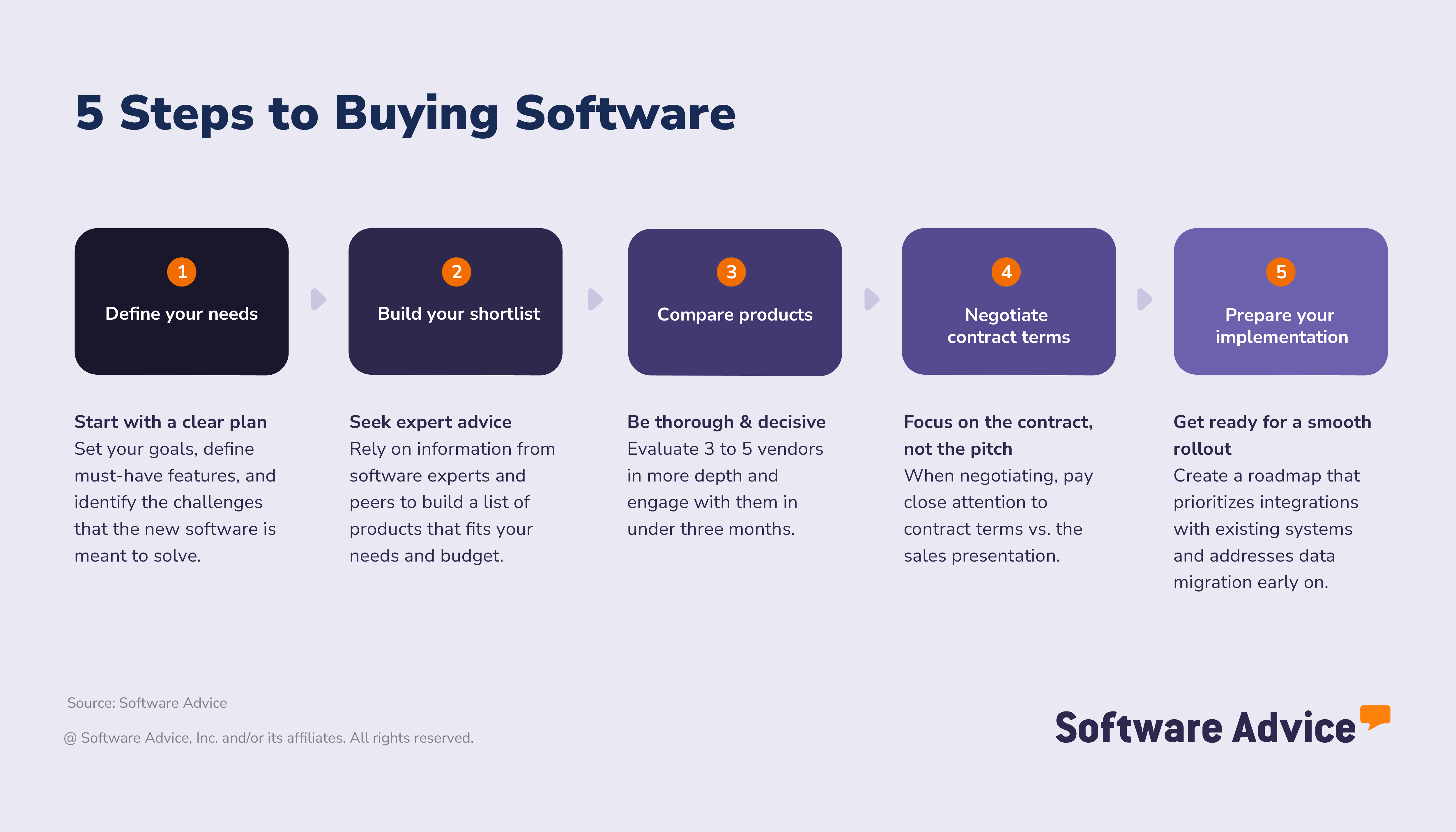
Bottom line: A clear plan reduces regret. Unclear goals and weak stakeholder alignment are two of the most common drivers of disappointment after purchase.
Step 1. Define your project management needs and goals
Teams that plan ahead and clearly define desired outcomes are more likely to succeed in implementation and achieve a positive return on investment (ROI). Starting with a clear vision helps you choose a system that fits your goals and avoids costly missteps. From there, set specific objectives, understand the benefits of PM software, and identify the features and stakeholders that matter most to your organization.
Set your goals: What challenges do you want to solve with PM software?
Think first about outcomes, not features. Define what success looks like for your teams and stakeholders, and use real‑world scenarios to connect daily challenges with measurable goals.
Examples of common business goals and PM software benefits:
On‑time delivery: Build dependable timelines and monitor slippage early with baselines, dependencies, and critical path views.
Cycle‑time reduction: Automate recurring tasks and standardize handoffs to reduce wait states and rework.
Risk visibility: Log risks and issues, assign owners, and surface triggers in dashboards that leadership reviews regularly.
Collaboration quality: Centralize comments, @mentions, file annotations, and approvals to reduce the need for status meetings.
Resource utilization: Use workload and capacity views to balance assignments, avoid overloads, and reduce idle time.
Portfolio alignment: Link projects to objectives and key results (OKRs) or outcomes and roll up reporting to help leaders prioritize.
Why it works: This approach ensures your software choice addresses specific operational needs rather than generic requirements.
Set your requirements: Map business goals to features
Mapping goals to features helps you choose tools that enable real outcomes.
Goal area | Business goal (outcome) | Helpful features (examples) |
Planning & scheduling | Build realistic timelines and reduce reschedule risk | Gantt or roadmap views, dependencies, critical path, baseline comparisons |
Task execution | Keep work flowing and visible | Kanban/boards, custom fields, recurring tasks, automations/SLAs |
Collaboration | Reduce context switching and status meetings | Comments, @mentions, file annotations, meeting notes linked to tasks |
Resource & capacity | Avoid overloads and idle time | Workload heatmaps, skills tags, utilization forecasts, time tracking |
Risk & issue control | Surface risks early and keep scope stable | Risk/issue registers, change logs, approvals, audit trails |
Reporting & portfolio | Align projects to outcomes and benefits | Dashboards, portfolio views, OKR alignment, benefits tracking |
Set measurable success metrics
Use performance data to track progress, demonstrate ROI, and prove the value of your PM investment.
Examples of PM success metrics for SMBs:
% of planned work vs. unplanned work each sprint or month
Resource utilization balance (by role or skill)
Risk exposure trend (open risks by severity, time to mitigation)
Benefits realization milestone attainment
Identify stakeholders: Who needs to be involved?
Selecting PM software is a team effort. Involve project managers, team leads, IT/security, data/business intelligence (BI), finance, and legal/procurement early so you can align requirements and avoid rework. Dashboards and resource views may be priorities for delivery teams, while IT will focus on identity management, data controls, and integrations, and finance will care about tiers, renewal caps, and chargeback reporting.
"Expert tip for SMBs: Close the strategy‑to‑value gap by asking: Which decisions will this tool inform each week, and who has the rights to make them? If decision rights are unclear, software alone will not fix it."
Step 2. Build your shortlist and seek expert advice
A key difference between successful and disappointed buyers is how they research. Successful adopters compare vendors using structured, expert‑backed sources and verified reviews. Disappointed buyers often rely on quick summaries that lack depth and verification.
In our analysis of successful vs disappointed buyers:
52% of successful adopters used industry experts (vs. 38%)
43% used comparison sites (vs. 35%)
33% used user reviews (vs. 32%)
Disappointed buyers leaned on generative AI tools (42% vs. 32%)
While AI-generated tools can provide quick summaries, they lack human-in-the-loop analysis and do not always base their analysis on verified data, making them less reliable for high risk decisions, such as software selection.
Get real advice from real people
Expert input from Software Advice advisers can help avoid common mistakes because they bring practical implementation context, not just feature lists. An advisor will help you:
Align features with workflows, company size, and industry
Compare vendors on support, usability, and integration risks
Plan implementation with fewer disruptions
If you want personalized guidance, you can connect with an advisor to refine your shortlist.
How to leverage user reviews
User feedback is a reliable signal when filtered thoughtfully. Here are some tips to make reviews work for you:
Match your context: Filter by industry, team size, and use case.
Prioritize recency: Focus on the last 6–12 months for current user experience (UX) and support signals.
Compare stars and substance: A lower rating with a detailed rationale may be more actionable than a generic five‑star.
Spot patterns: Recurrent comments about integrations, mobile, or reporting are prompts for demos and proofs of concept.
How much does PM software typically cost?
Most PM tools use per‑user, per‑month SaaS pricing with tiers. Subscription plans for PM tools average $16 - $44 per month, per user, depending on whether it’s an entry-level or a high-end system. [3]
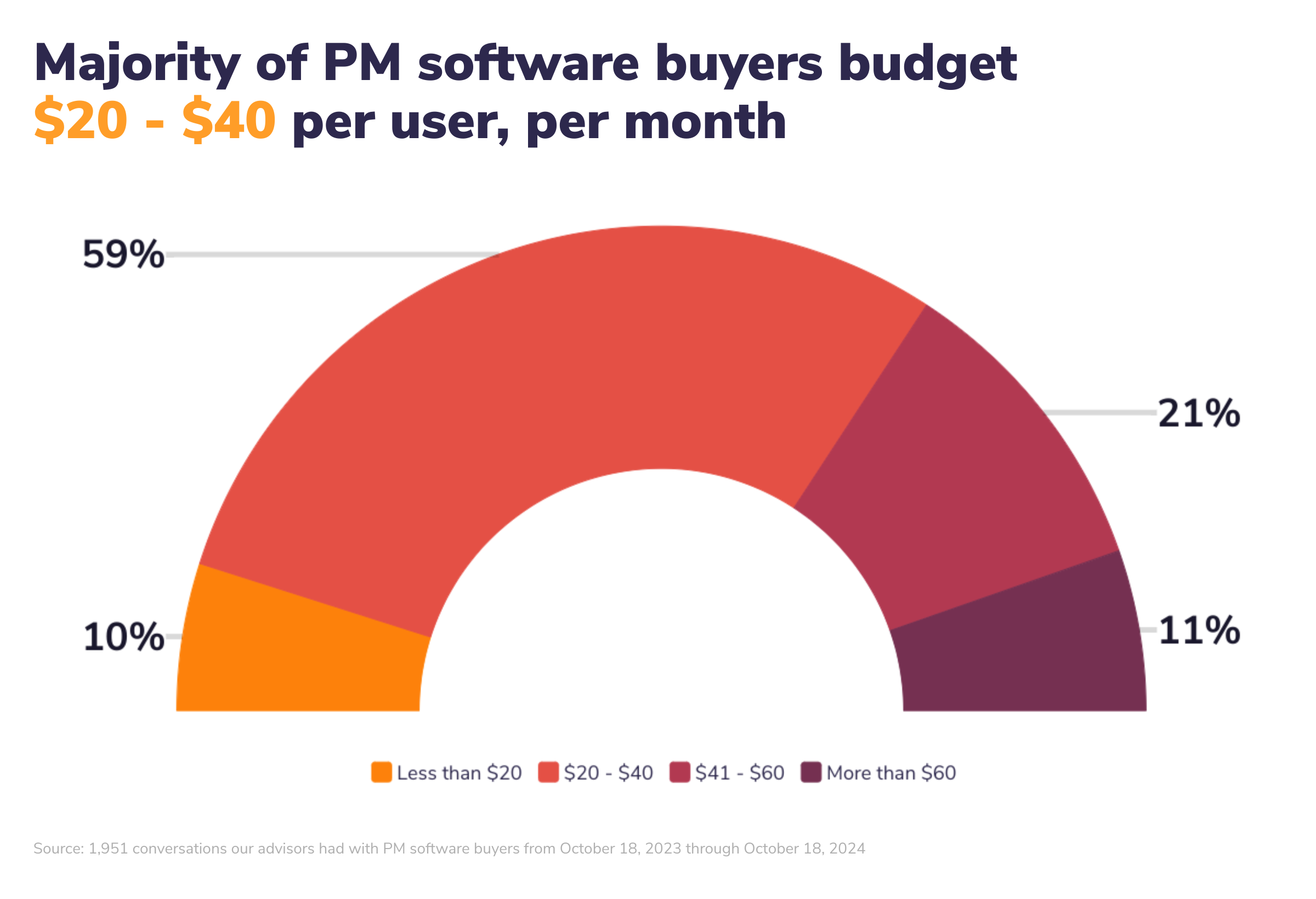
Average budget: In advisor calls, the majority of buyers budget $20–$40 per user, per month, and most cap near $60 or less (further costs may apply for storage, advanced reporting, automations, and support).
Budgeting tip: Build a total cost view that includes implementation, training, data migration, and ongoing support. Clarify who needs a full license vs. collaborator or viewer access to avoid over‑buying seats.
How do PM pricing models compare?
Understanding how project management software is priced helps you avoid hidden fees and choose the best value for your business. Typical offerings include:
Subscription model: Monthly or annual, often per user.
Tiers and add‑ons: Features may be gated at higher tiers; check automation and reporting limits.
Hidden costs to check: Onboarding, integrations, storage, premium support, API/automation quotas.
Because models differ, look for clear pricing pages and ask vendors to document any limits that could trigger overages later.
Step 3. Compare products and take action decisively
Now that you have a focused list, move to hands‑on evaluation: Free trials, targeted demos, and scripted scenarios that reflect your workflows. Evaluate 3–5 vendors in depth and aim to make a decision in under three months to maintain momentum and comparability.
Screen vendors on:
Business fit: Single team vs. multi‑team or multi‑project portfolio.
Industry alignment: Evidence of success in your sector (e.g., professional services, engineering, marketing).
Security and compliance: Single sign-on (SSO), role-based access, audit logs, data residency.
Integration depth: Ensuring it connects with email, calendars, file storage, customer relationship management (CRM), dev tools, and finance platforms.
Implementation support: Training, migration guidance, and admin enablement.
Pricing transparency: Tier inclusions, limits, and renewal terms.
User experience: Verified reviews focused on onboarding and day‑to‑day workflows.
Use a software comparison scorecard
Evaluating multiple PM products can get confusing, especially after a few demos. Without a structured way to compare vendors, important details can get lost. Our Software Comparison Scorecard helps you keep everything organized and aligned to your priorities.
The scorecard lets you evaluate your shortlisted vendors across functionality, support, training, operating specifications, integrations, and pricing. It also includes scoring fields and space for demo notes so you can capture insights as you go.
To get started, consider adding criteria such as:
Functionality
Must‑have features like Gantt/roadmap views, automations, or custom fields
Nice‑to‑have features such as time tracking or built‑in approvals
Role‑based permissions that match how your teams work
Training
Availability of onboarding support
Live or recorded training options for new users
Whether implementation assistance requires an added fee
Support
Email, phone, or 24/7 case submission availability
Response time expectations
Access to a knowledge base or help center
Operating specifications
Deployment options (web, app, or on‑premise)
Supported operating systems for your teams
Mobile compatibility for on‑the‑go updates
Integrations
Connections to tools like CRM, file storage, or email
Whether key integrations require additional cost
API availability for custom workflows
Pricing
Total cost per user, per month
Billing frequency and contract length
Additional fees for storage, automations, or premium features
Get your free software comparison scorecard here.
How to schedule demos with PM vendors
Request two focused sessions:
Workflow demo: Build a project from your template, adjust dependencies, run a stand‑up using boards (if Agile), and walk through risk/issue handling.
Technical demo: Review security, data management and storage, and integration needs.
What should you ask vendors when evaluating software?
How does mobile access work (notifications, offline, field updates)?
What is the onboarding and admin training plan?
How are backups, encryption, and audit logging handled?
Which integrations are native vs. via API or third‑party?
What are the usage caps for automations, storage, and API calls at each tier?
Step 4. Negotiate contract terms and pricing
Once you’ve identified the PM system you want to move forward with, the next step is to request and review a contract from the vendor. The contract determines what you pay, what support you receive, and how the tool scales as your needs grow.
Focus first on the terms, not the pitch. Clear language around pricing, renewals, data, and onboarding helps you avoid surprises later, especially at renewal time. You can also request a statement of work (SOW) that outlines what the vendor will deliver during setup, such as data migration, training, and configuration support.
Glossary of PM contract terms
Term | What it means | Why it matters for PM software |
Master services agreement (MSA) | A foundational contract that governs the overall relationship between you and the vendor | Sets the legal and operational framework for all future purchases, renewals, and service levels, especially important for multi-year or multi-product deals |
Service level agreement (SLA) | Defines uptime guarantees, support response times, and service expectations | Ensures reliability for time-sensitive projects and team coordination |
Auto-renewal | Automatically extends the contract unless canceled in advance | Prevents surprise renewals or lock-ins if you plan to reassess tools in the future |
Usage limits | Caps on users, storage, API calls, or features | Helps avoid unexpected overage fees as your team or project load grows |
Termination clause | Outlines how and when either party can exit the agreement | Gives you flexibility if the tool doesn’t meet expectations. |
Data ownership | Specifies who owns your data and how it can be exported or deleted | Critical for compliance, offboarding, and vendor transitions |
User role and seat flexibility | Defines how licenses are assigned and whether they can be reassigned | Important for teams with shifting roles or seasonal contributors |
Data portability and project archiving | Details how project data can be exported or archived | Ensures you retain access to historical project data if you switch tools |
Feature availability by plan tier | Clarifies which features are included in your plan vs. locked behind upgrades | Prevents surprises when essential features are only in premium tiers |
Price lock or renewal cap | Limits how much the vendor can increase pricing at renewal | Helps you forecast long-term costs and avoid budget shocks |
Implementation and onboarding scope | Defines what’s included in setup, training, and support | Ensures you’re not surprised by extra fees or limited onboarding help |
What tips can help negotiate with PM software vendors?
Negotiations should include concessions on price, but also making sure the agreement fits your actual usage patterns and avoids future constraints. Focus on clarity, flexibility, and total cost.
Practical negotiation tips:
Secure export rights and a sandbox: Supports testing, governance, and data controls.
Include onboarding and migration in the SOW: Avoids unexpected service costs.
Request a sample contract early: Gives legal or procurement time to review before the final negotiation phase.
Step 5. Prepare for implementation and long‑term success
Choosing PM software is the start. A structured rollout and clear operating model ensure adoption and value realization.
How to create an implementation roadmap from onboarding to data migration
A clear implementation roadmap helps businesses avoid disruption and sets the foundation for long‑term value. The steps below outline what to prepare from the first onboarding call through rollout.
Onboarding
Point of contact: Assign owners on the business side and the vendor side. These contacts will coordinate setup tasks, answer questions, and track progress.
Timeframe: Set milestone dates for initial configuration, team testing, and full rollout.
Participation: Identify which groups, such as delivery, PMO, IT, finance, will review workflows, validate access, and support launch.
Integration and data migration
Data scope: Decide which projects, tasks, files, and historical records to migrate. Excluding outdated or unused information reduces migration time.
Integrations: List required connections such as email, calendars, file storage, development tools, or accounting systems.
Vendor support: Confirm which migration tools are available, what the vendor handles, and what your team must prepare.
Testing
Configuration checks: Validate workflows, fields, permissions, and notifications to ensure they reflect actual processes.
Pilot: Start with one team and confirm dashboards, capacity views, and risk‑tracking features work as expected before scaling.
Documentation and rollout
Process documentation: Capture templates, naming standards, user roles, and governance so teams follow consistent practices.
Training: Provide role‑based training for project managers, team leads, and contributors. Share short reference guides that users can keep open during their first projects.
"Expert tip: Schedule a post‑launch review 30–60 days after go‑live to gather feedback, address issues, and optimize templates and automations. Continuous improvement supports long‑term value."
What are the features of project management software?
When comparing PM software systems to choose the best system for your business, it's important to know what features you can expect to see. Some functionality, like project planning/scheduling and task management, are core features that will be available in every PM system. Other features, such as document management, budget management, and customized templates, are commonly offered.
We analyzed thousands of reviews and spoke to thousands of users to understand which features matter most in buying project management software. [4]
Core project management software features
Feature | Description |
Task management | Create, organize, prioritize, and assign tasks, making it easier to stay on schedule, optimize resource use, and support accountability. 94% of our reviewers rate this feature as critical or highly important. |
Project planning/scheduling | Helps visualize timelines and dependencies, ensuring tasks are completed on time and resources are efficiently allocated. 94% rate this feature as critical or highly important. |
Reporting/project tracking | Provides real-time insights and progress updates, enabling better decision-making and helping keep projects on track. 92% rate this feature as critical or highly important. |
Collaboration tools | Facilitate centralized communication and information sharing among team members, enhancing teamwork and project coordination. 91% rate this feature as critical or highly important. |
Common project management software features
Feature | Description |
Multiple projects | Provides oversight and coordination across various initiatives, optimizing resource allocation and ensuring consistent execution. 94% of our reviewers rate this feature as critical or highly important. |
Commenting/notes | Allows team members to leave feedback and document important details, improving communication and handoffs throughout the project. 93% rate this feature as critical or highly important. |
Activity dashboard | Provides a real-time overview of project progress and task activities, enhancing visibility and enabling quick, informed decisions. 90% rate this feature as critical or highly important. |
Customizable templates | Speeds up project setup and standardizes processes, saving time and ensuring consistency across projects. 82% rate this feature as critical or highly important. |
Artificial intelligence (AI) is also quickly becoming a key feature in PM systems. As Dengler notes, “Many project management systems are adopting AI to streamline task management, prioritize workflows, and even handle content management. It's cool to see the system can analyze and prioritize tasks or content on its own, saving time and improving project flow.”
If you’d like to know more about PM features and get recommendations for your practice, reach out to Bryan Dengler, or one of our other PM software advisors and schedule a consultation.
What advanced PM capabilities should you consider?
Basic project management features may support small teams and early-stage work, but growing businesses often need more advanced capabilities to manage complexity, improve visibility, and make faster decisions.
Beyond core scheduling, task management, and collaboration, consider whether vendors offer capabilities such as:
Workflow automation for recurring steps (such as approvals or task routing) to reduce manual work and support consistent processes
Timeline slippage alerts to notify PMs when tasks or milestones fall behind schedule
Reporting dashboards to visualize performance, budget status, and resource allocation in real time
Mobile access so teams can work from anywhere
Many project management vendors are expanding beyond traditional functionality to support more proactive planning, data-driven decisions, and cross‑team alignment. Examples include:
Predictive analytics to estimate project risk, forecast delays, or highlight resource constraints.
Generative AI to draft project plans, summaries, or status updates based on existing data, helping project leads save time on administrative tasks.
Resource planning intelligence to analyze workload patterns to suggest staffing adjustments or identify capacity issues before they affect delivery.
Sustainability and cost analytics to help track energy usage, material waste, travel emissions, or other environmental inputs alongside cost data.
Portfolio‑level scenario planning to enable project management offices (PMOs) and executive teams to model changes to timelines, staffing, or budgets, and compare potential outcomes.
Integrated risk registers to centralize risks, mitigation plans, and triggers with reporting that surfaces what needs attention most.
Why these capabilities matter
Advanced features help SMBs shift from reacting to issues to anticipating them. They also make it easier to connect project decisions with organizational goals, reduce administrative work, and give leaders the insights they need to prioritize effectively. As you compare vendors, look at which capabilities match your company’s growth plans and which internal stakeholders need to be included early in the selection process.
"Expert tip for SMBs: Once you move past basic task scheduling, start asking for predictive insights and mobile dashboards. These capabilities help teams stay ahead of problems rather than just react to them."
Who uses project management software?
Project management software is used by businesses that need to coordinate multi‑step project work across teams. It is typically used by project managers, team leads, department managers, PMO leaders, and cross‑functional contributors.
Whether managing a single team or a multi‑project portfolio, these roles use PM tools to improve delivery predictability, monitor progress, and keep work aligned to business goals. Our conversations with thousands of software buyers show that PM software is often used in the following industries/sectors:
Professional services and consulting
Engineering and product development
Manufacturing and operations
Marketing and creative teams
Healthcare and nonprofits
Construction and field services
Software and IT
What are the common use cases of PM software by industry?
Here is how project management software is used across industries.
Professional services
Project budgeting and time tracking for billable work
Resource allocation across engagements
Client reporting via dashboards
Engineering and product development
Roadmaps with dependencies and baselines
Risk and change control to protect scope
Cross‑functional collaboration on requirements
Marketing and creative
Campaign calendars and content workflows
Approvals, annotations, and asset versioning
Capacity planning for designers and writers
Manufacturing and operations
New product introduction (NPI) schedules
Supplier coordination and milestone tracking
Issue logs tied to quality and cost impact
Healthcare and nonprofits
Grant or program timelines and compliance tasks
Stakeholder reporting and audit trails
Coordination across clinical and administrative teams
Understanding how PM software is used across sectors helps you prioritize features that are essential to your environment, whether that is resource forecasting, portfolio reporting, or mobile collaboration.
Dengler notes, “Smaller teams often manage projects ‘in their heads’ or across email. Centralizing timelines, tasks, and handoffs in one place is usually the first big win.”
What are the benefits of project management software?
Project management software supports teams by centralizing work, improving coordination, and helping users stay aligned as projects progress. Insights from recent reviewer feedback point to collaboration, workflow automation, project tracking, and organization as the most consistently cited benefits.
It also brings several broader advantages to businesses, including the following:
Operational efficiency Workflow automations reduce the manual effort required for repetitive steps such as assigning tasks or sending reminders. This allows teams to focus on higher‑value work, keep projects on track, and move more efficiently through key activities.
Improved team collaboration A centralized platform for comments, approvals, and document sharing helps teams stay aligned and reference the latest updates. Shared workspaces and communication tools also create visibility across tasks, which can reduce miscommunication and keep work progressing smoothly.
Optimized project oversight Real‑time views of timelines, progress, and resource needs help project managers spot bottlenecks earlier and provide more accurate forecasting. Clear tracking also supports leadership visibility, making it easier to intervene when risks or delays emerge.
Better organization Centralizing tasks, deadlines, resource assignments, and progress updates helps teams coordinate efforts and avoid common pitfalls, such as missed deadlines or resource conflicts. An organized workspace reduces time spent searching for information and clarifies priorities across teams.
Expert insight from advisers also highlights time tracking, budgeting, and resource allocation as common benefits. These capabilities support project managers in balancing constraints around time, money, and staffing—ensuring teams can deliver work more efficiently.
Software related to project management
Depending on which PM software you choose, you may need to supplement some features with related software systems in order to support time tracking, non-project task management, or specialized PM teams and requirements. Some types of software that are closely related to project management software, but may or may not be included in your PM system, include:
Collaboration software: Lets multiple users communicate, collaborate, and coordinate among themselves in real time.
Requirements management software: Helps document and share project requirements with multiple stakeholders.
Task management software: Task management software is execution-oriented, centered on organizing and managing non-project-based tasks. It allows users to create to-do lists and manage their daily work tasks.
Workflow management software: Helps businesses by automating repetitive processes and provides an overview of all workflows, including metrics on execution to monitor and measure individual and company-wide performance.
IT project management software: Designed to support the tasks, workflows and collaboration methods used by teams that work in IT fields and particularly software development.
Project portfolio management (PPM) software: Project portfolio management (PPM) refers to a collective effort by an organization to centralize and coordinate project efforts across a portfolio of work.
Time tracking software: Used for tracking the time employees spend on specific tasks during a project to help project managers plan accurate project schedules.
About our contributors
Author
Olivia Montgomery is an associate principal analyst at Software Advice, covering program and project management with a focus on the strategic alignment of IT and operations to optimize digital transformation. Drawing from her experience as a former IT PMO leader and her background in humanities studies, Olivia delivers data-driven insights that empower business leaders to drive business growth through projects. Olivia’s research and analysis is informed by nearly 200,000 authentic user reviews on Software Advice and over 10,000 interactions between Software Advice software advisors and project management software buyers. Olivia also regularly analyzes market sentiment by conducting surveys of project managers and PMO leaders so she can provide the most up-to-date and helpful information to small and midsize businesses purchasing software or services. Her expertise is featured in Forbes, Bloomberg, CIO Dive, and TechRepublic, as well as in podcasts, such as The Digital Project Manager. Recently, she presented her research on emotional intelligence (EQ) and decision-making at PMI's Global Summit conference, shedding light on the crucial role of EQ in driving project success. When she's not analyzing tech trends, you can find Olivia horseback riding or re-watching Jurassic Park.
Editor
Mehar Luthra is a team lead at Software Advice and specializes in editing reports that cover the latest trends affecting small businesses. With nearly a decade of experience, she has edited a multitude of research articles, top-rated software reports, and thought leadership articles for diverse markets such as Brazil, Japan, Canada, France, Australia, and India. She finds it particularly rewarding to produce content that provides small-business owners with practical tips and helpful advice on topics such as the digitalization of small businesses, eCommerce trends, and HR developments. Armed with a double bachelor’s in law (LL.B.) and business economics from Delhi University, she won a full scholarship to study for a master’s in creative writing at the National University of Ireland, Galway. In addition, she has written blog articles spanning a variety of topics such as fiction and non-fiction books, mental health and anxiety, the latest restaurants, and more. Her articles have been featured in Ireland’s national magazine The Village, among other publications. A die-hard journaling fan, she enjoys watching psychological thrillers, reading fiction books, and drinking iced coffee (even in the winter).
Advisor
Bryan Dengler is a senior advisor at Software Advice. He engages with approximately 25 small and midsize business owners weekly, enabling them to pinpoint their perfect software match. By nailing down their unique requirements and streamlining the selection process, he narrows a vast array of options down to the top three to five tools in a single consultation.
Expertise Through personalized consultations, he specializes in identifying the software needs of businesses within his core areas of expertise:
Accounting
Manufacturing
Learning Management Systems (LMS)
Supply Chain Management
The software landscape can be daunting, and he frequently hears the hurdles business leaders encounter during their discussions. For him, providing guidance that genuinely impacts their decisions is deeply fulfilling. What he loves most about assisting software buyers is reaching the end of a call and realizing he has positively influenced someone’s life and work.
Sources
The 2025 Tech Trends Survey was conducted online in August 2024 among 3,500 respondents from the U.S. (n=700), U.K. (n=350), Canada (n=350), Australia (n=350), France (n=350), India (n=350), Germany (n=350), Brazil (n=350), and Japan (n=350), at businesses across multiple industries and company sizes (5 or more employees). The survey was designed to understand the timeline, organizational challenges, adoption & budget, vendor research behaviors, ROI expectations, and satisfaction levels for software buyers. Respondents were screened to ensure their involvement in business software purchasing decisions.
Software Advice advisor call notes: Findings are based on data from telephonic conversations that Software Advice’s advisor team had with small to mid-sized businesses seeking PM tools between February 13, 2024, to February 13, 2026.
Software Advice software pricing data: Only products with publicly available pricing information and qualified software products within the category are included in the pricing analysis.
Software Advice reviews data: Reviews are collected from verified users for individual software products.
Project Management FAQs
- What does project management software do?
Project management software centralizes planning, task execution, collaboration, and reporting, enabling teams to coordinate work, monitor progress, and manage risks.
- What are the main features of PM software?
Core capabilities of project management software include task management, project scheduling, collaboration tools, and reporting. Common additions include multi‑project views, activity dashboards, and customizable templates.
- How much does PM software cost?
Most project management products use per‑user, per‑month pricing. Many buyers budget $20–$40 per user per month, and most cap at $60 or less; plan tiers and add‑ons can affect total cost.
- Which integrations matter most?
Email, calendars, file storage, CRM, software development tools, HRIS, and finance systems are frequently requested for integrations in adviser calls with PM software buyers.
- What is the difference between PM and PPM software?
Project management (PM) software focuses on planning and executing individual projects. Project portfolio management (PPM) adds portfolio‑level prioritization, capacity planning, and scenario modeling across many projects.
- What is the best project management software?
“Best” depends on your goals, team size, workflows, and budget. Follow our buyer’s guide for details on how to effectively evaluate and buy the best project management software for your business. Or, better yet, schedule a call with an advisor.
- What are the four main types of project management software?
The four types of project management software include task management, project collaboration, project scheduling, and resource management software. Task management software handles creating, assigning, and tracking tasks. Project collaboration software improves communication and teamwork. Project scheduling software helps plan and visualize timelines with tools like Gantt charts. Resource management software tracks and allocates resources such as personnel, budget, and equipment.
- Is Excel a project management tool?
Microsoft Excel is not specifically designed for project management but can handle basic tasks like creating to-do lists, schedules, and budgets. However, it lacks real-time collaboration, advanced automation, and scalability for complex projects. For small projects and teams, Excel can be useful, but for larger efforts, consider dedicated tools like the ones in our Software Advice FrontRunners list.
- Is project management software worth it?
Project management software is worth the investment if you’re looking to effectively manage tasks, deadlines, and resources to help project teams coordinate efforts and avoid common pitfalls like missed deadlines or resource conflicts. PM tools provide the benefits of streamlined workflows, better communication, and enhanced project visibility that make them a valuable investment.