


Best IT Project Management Software of 2026
Updated January 27, 2025 at 9:59 AM
- Popular Comparisons
- FrontRunners
- Buyers Guide
- Related Software
Compare Products
Showing 1 - 25 of 163 products
Compare Products
Sort by
Reviews: Sorts listings by the number of user reviews we have published, greatest to least.
Average Rating: Sorts listings by overall star rating based on user reviews, highest to lowest.
Alphabetically (A-Z): Sorts listings by product name from A to Z.

Project Insight (PI) is award-winning work & project management software that helps companies manage and visualize projects, all...Read more about Project Insight


Project Insight's Best Rated Features
See All
Project Insight's Worst Rated Features
See All

Wrike is a cloud-based project management platform for teams of 20+ that is suitable for both large enterprises and SMBs. It sup...Read more about Wrike
Wrike's Best Rated Features
See All
Wrike's Worst Rated Features
See All

Combining powerful project management and easily streamlined operations - we’re the only platform built for managing client proj...Read more about Teamwork.com

Teamwork.com's Best Rated Features
See All
Teamwork.com's Worst Rated Features
See All

Striven is a cloud-based enterprise resource planning (ERP) solution suitable for many industries and organizations of all sizes...Read more about Striven


Striven's Best Rated Features
See All
Striven's Worst Rated Features
See All

Nimble - Collaborative Lean/ Agile Work Management Platform. Nimble comes with a unique combination of features to manage tradit...Read more about Nimble Enterprise


Nimble Enterprise's Best Rated Features
See All
Nimble Enterprise's Worst Rated Features
See All

Scoro is a professional services automation (PSA) software purpose-built for consultancies, agencies, IT firms, architecture com...Read more about Scoro

Scoro's Best Rated Features
See All
Scoro's Worst Rated Features
See All

BigTime is the AI-powered platform purpose-built for finance and operations leaders at growing professional services firms—inclu...Read more about BigTime

BigTime's Best Rated Features
See All
BigTime's Worst Rated Features
See All

Smartsheet is a work execution platform and collaboration tool with a familiar spreadsheet-like interface that helps teams plan,...Read more about Smartsheet
Smartsheet's Best Rated Features
See All
Smartsheet's Worst Rated Features
See All

Planview® ProjectAdvantage is a cloud-based project and portfolio management solution for enterprises that allows to strategical...Read more about Planview ProjectAdvantage

Planview ProjectAdvantage's Best Rated Features
See All
Planview ProjectAdvantage's Worst Rated Features
See All

Grow your firm - and your impact Projectworks is professional services automation software (PSA) designed for consulting firms ...Read more about Projectworks

Projectworks's Best Rated Features
See All
Projectworks's Worst Rated Features
See All

GanttPRO is a cloud-based project management solution for small to midsize companies, as well as individual users. The software ...Read more about GanttPRO
GanttPRO's Best Rated Features
See All
GanttPRO's Worst Rated Features
See All

Your all‑in‑one control center for managing your team's tasks, project, calendar, and chat. All-in one intuitive app that costs ...Read more about Any.do
Any.do's Best Rated Features
See All
Any.do's Worst Rated Features
See All

Exciting news: WorkOtter is now Prism PPM! Prism PPM (formerly WorkOtter) is a project portfolio management (PPM) solution purpo...Read more about Prism PPM

Prism PPM's Best Rated Features
See All
Prism PPM's Worst Rated Features
See All

MeisterTask is a web-based task, project, and work management software perfect for teams of any size. Its easy-to-use interfac...Read more about MeisterTask
MeisterTask's Best Rated Features
See All
MeisterTask's Worst Rated Features
See All

Resource Guru is a resource management, planning, and scheduling solution that helps organizations manage teams, equipment, and ...Read more about Resource Guru

Resource Guru's Best Rated Features
See All
Resource Guru's Worst Rated Features
See All

For over 23 years, Workzone has been the trusted project management software for organizations that run complex, high-volume pro...Read more about Workzone
Workzone's Best Rated Features
See All
Workzone's Worst Rated Features
See All

ClickUp is a productivity platform designed to unify work tools within a single workspace. It supports various teams and industr...Read more about ClickUp
ClickUp's Best Rated Features
See All
ClickUp's Worst Rated Features
See All

Avaza is a business management solution which includes features for project management, resource scheduling, online timesheets, ...Read more about Avaza
Avaza's Best Rated Features
See All
Avaza's Worst Rated Features
See All

GitLab is a cloud-based project management platform that allows software developers to develop and manage codes collaboratively....Read more about GitLab
GitLab's Best Rated Features
See All
GitLab's Worst Rated Features
See All

Primetric is a cloud-based resource, project and finance management platform dedicated to IT business services. It is an interna...Read more about Primetric

Primetric's Best Rated Features
See All
Primetric's Worst Rated Features
See All

actiTIME is time tracking software that combines time, team and project management functionality. Keep control of your project...Read more about actiTIME
actiTIME's Best Rated Features
See All
actiTIME's Worst Rated Features
See All

Zenkit is a cloud-based project management solution designed for businesses of all sizes. It offers collaboration, calendar mana...Read more about Zenkit
Zenkit's Best Rated Features
See All
Zenkit's Worst Rated Features
See All

Productboard is the customer-driven product management system that empowers teams to get the right products to market, faster. I...Read more about Productboard

Productboard's Best Rated Features
See All
Productboard's Worst Rated Features
See All

It's easy for clients and teams to leave website feedback and report on bugs when they use BugHerd. There's no need for client...Read more about BugHerd
BugHerd's Best Rated Features
See All
BugHerd's Worst Rated Features
See All

InLoox is the modern project and portfolio management platform that enables teams and departments throughout the company to reli...Read more about InLoox


Popular Comparisons



Your Guide to Top IT Project Management Software, October 2022
Software Advice uses reviews from real software users to highlight the top-rated IT Project Management products in North America.
Learn how products are chosenExplore FrontRunners


“Usability” includes user ratings for Functionality and Ease of Use.
“Customer Satisfaction” includes user ratings for Customer Support, Likelihood to Recommend and Value for Money.
Reviews analysis period: The reviews analysis period spans two years and ends the 15th of the month prior to publication.

Buyers Guide
This detailed guide will help you find and buy the right it project management software for you and your business.
Last Updated on January 27, 2025Project management (PM) software is one of the most popular genres of software among small and midsize businesses (SMBs) and enterprises alike. And among all the PM software buyers we speak with at Software Advice, the largest group (roughly 20 percent) are looking for software to manage their information technology (IT) projects. This shouldn't come as a surprise. After all, IT projects can rival all other business projects in terms of scope, complexity and the number of participants they involve.
IT project management software is a specialized form of PM software. It's designed to mesh well with the tasks, workflows and collaboration methods used by teams that work in IT fields and particularly software development.
This IT project management Buyer's Guide will help software buyers make better purchase decisions. It discusses the following topics and questions:
What Is IT Project Management Software?
Common Features of IT Project Management Tools
Questions to Answer Before You Purchase IT Project Management Software
What Is IT Project Management Software?
General PM software can be used to manage a very wide variety of business projects. Of course, small projects that can be completed in a day by a single person don't typically need much in the way of management. So it's understandable that most companies use PM software for longer-term projects, like those that are expected to take weeks, months or years to complete.
The main purpose of PM software is to increase a company's working efficiency, allowing it to launch, revise and complete projects faster. It accomplishes this by improving the visibility team members have of project as a whole and of its various related components. At the same time, team members can customize how their individual tasks are presented, letting them prioritize their work while still meeting the project's overall timeline and goals.
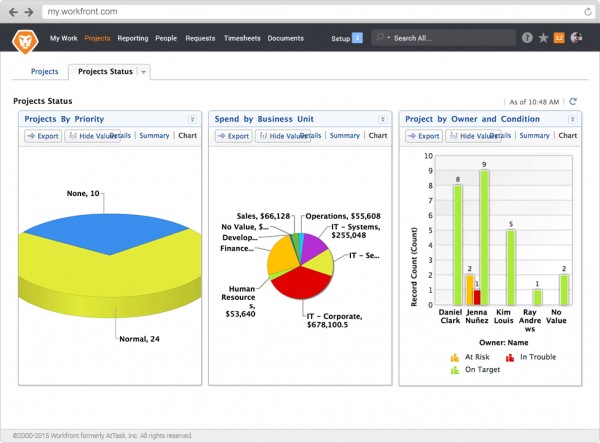
Project dashboard in Workfront IT Project Management
IT department project management software is simply a specialized form of PM software, so all of the above holds true. Its primary goal is also to increase efficiency, and it does so partly by helping keep all team members on the same page and IT projects on the right track. How does it do this? By using the applications and features highlighted in the following section.
Common Features of IT Project Management Tools
The field of project management software is very wide and includes solutions with varying degrees of customization for the management of IT-specific projects. As with all software purchase decisions, your long-term success will be determined mostly by how well the software aligns with your existing and planned workflows and management goals.
Gives an overview of all ongoing projects, providing details on each regarding timelines and deadlines, collaboration, team-member participation and more. | |
Access control | Gives management the tools needed to control account and team member permissions to specify which users can access, create and change specific PM items. |
Deadline alerts | Set up automated alerts based on project deadlines and progress to help team members complete more tasks on time and keep complex projects on schedule. |
Charts and timelines | Know the status of any project at a glance. Timeline tools give quick visual representations of project and task statuses with Gantt charts and scrum boards. |
Provide forums and communication tools (such as chat) with which team members can collaborate on projects in real time, even if in different offices and time zones. | |
Time and expense tracking tools are especially helpful when using outsourced developers and when billing third-party clients for development work. | |
Project templates | Reuse common project outlines and workflows, so that they don't need to be created from scratch each time. |
File management | File management apps help organize project files, ensuring team members can access files when needed, helping track changes over time and manage permissions. |
Request forms | Templated forms for request submission that help ensure requests are monitored, organized and implemented into the correct schedules and workflows. |
Remember that vendors name and describe their product features differently. The above list provides a basic outline of features and applications and can be used to begin your search. Alternatively, call our advisors for a free FastStart consultation (844) 680-2046 and we'll help you tick off all the right boxes in 15 minutes or less.

Project Gantt chart, schedule and workload overviews in Sciforma Project Management
Questions to Answer Before You Purchase IT Project Management Software
Are you looking for a cloud or on-premise IT project management solution?
While many vendors still offer on-premise PM solutions, a majority of buyers in the SMB space are opting instead for cloud-deployed solutions, also termed Software-as-a-Service or SaaS. Cloud PM solutions have many advantages, including faster deployment and lower startup costs, easier access (especially for remote workers) and the fact that the vendor handles security and updates for you and behind the scenes.
What is your current method of IT project management?
Companies upgrading existing PM solutions have different requirements and expectations than companies buying for the first time. The most full-featured IT PM solution will not always be the best fit, especially if your team is used to using manual methods (spreadsheets and emails), as are a majority of the buyers we speak with.

Current management methods used by buyers we speak with
Does your company prefer a particular project management methodology?
Agile, waterfall, scrum and PRINCE2 are a few examples of PM methodologies. Some PM solutions work better with particular methodologies; some can be used more broadly. Ensure that whatever solution you choose will work well with your company's chosen or preferred management tactic.
Aside from matching your PM methodology, you'll also want to ensure that you choose an IT PM solution that can seamlessly support your team's preferred communication channel, whether that's email, chat, Slack or something else.
Have questions of your own? Give us a call at (844) 680-2046 for a free no-obligation FastStart consultation. A specialist project management advisor will answer your questions and provide you with a shortlist of products to help you narrow down your search.