


Best Project Portfolio Management Software of 2026
Updated March 20, 2026 at 7:51 AM
- Popular Comparisons
- FrontRunners
- Buyers Guide
Compare Products
Showing 1 - 25 of 228 products
Compare Products
Sort by
Reviews: Sorts listings by the number of user reviews we have published, greatest to least.
Average Rating: Sorts listings by overall star rating based on user reviews, highest to lowest.
Alphabetically (A-Z): Sorts listings by product name from A to Z.

Smartsheet is a work execution platform and collaboration tool with a familiar spreadsheet-like interface that helps teams plan,...Read more about Smartsheet


Smartsheet's Best Rated Features
See All
Smartsheet's Worst Rated Features
See All

monday.com is a work and project management platform that helps teams of all sizes plan, prioritize, manage, and execute work ef...Read more about monday.com
monday.com's Best Rated Features
See All
monday.com's Worst Rated Features
See All

Wrike is a cloud-based project management platform for teams of 20+ that is suitable for both large enterprises and SMBs. It sup...Read more about Wrike

Wrike's Best Rated Features
See All
Wrike's Worst Rated Features
See All

Project Insight (PI) is award-winning work & project management software that helps companies manage and visualize projects, all...Read more about Project Insight
Project Insight's Best Rated Features
See All
Project Insight's Worst Rated Features
See All

NetSuite OpenAir offers buyers a collection of applications designed to support every stage of the professional services deliver...Read more about NetSuite SuiteProjects Pro


Nimble - Collaborative Lean/ Agile Work Management Platform. Nimble comes with a unique combination of features to manage tradit...Read more about Nimble Enterprise


Nimble Enterprise's Best Rated Features
See All
Nimble Enterprise's Worst Rated Features
See All

Planview ProjectAdvantage is a cloud-based project and portfolio management solution for enterprises that allows to strategicall...Read more about Planview ProjectAdvantage

Planview ProjectAdvantage's Best Rated Features
See All
Planview ProjectAdvantage's Worst Rated Features
See All

Quickbase is a work management and application platform designed to help organizations centralize and manage complex projects an...Read more about Quickbase
Quickbase's Best Rated Features
See All
Quickbase's Worst Rated Features
See All

Combining powerful project management and easily streamlined operations - we’re the only platform built for managing client proj...Read more about Teamwork.com

Teamwork.com's Best Rated Features
See All
Teamwork.com's Worst Rated Features
See All

Rocketlane is a next-gen PSA platform that unifies your projects, resources, and time into a single, powerful system. Run your e...Read more about Rocketlane
Rocketlane's Best Rated Features
See All
Rocketlane's Worst Rated Features
See All

Kantata helps professional services organizations of 50 to 5,000+ employees ensure consistent excellence and profitability acros...Read more about Kantata
Kantata's Best Rated Features
See All
Kantata's Worst Rated Features
See All

Planisware Enterprise is a global provider of solutions that break the boundaries of traditional PPM by connecting strategy, fin...Read more about Planisware Enterprise


Autodesk Construction Cloud is a construction management software platform. It serves as a central source of information for eve...Read more about Autodesk Construction Cloud
Autodesk Construction Cloud's Best Rated Features
See All
Autodesk Construction Cloud's Worst Rated Features
See All

NetSuite is an AI-powered cloud-based business management suite that incorporates ERP, financial management, CRM and eCommerce f...Read more about NetSuite

NetSuite's Best Rated Features
See All
NetSuite's Worst Rated Features
See All

BigTime is the AI-powered platform purpose-built for finance and operations leaders at growing professional services firms—inclu...Read more about BigTime
BigTime's Best Rated Features
See All
BigTime's Worst Rated Features
See All

Deltek Costpoint is an enterprise resource planning (ERP) and management solution designed to meet the requirements of midsize a...Read more about Deltek Costpoint

Deltek Costpoint's Best Rated Features
See All
Deltek Costpoint's Worst Rated Features
See All

GanttPRO is a cloud-based project management solution for small to midsize companies, as well as individual users. The software ...Read more about GanttPRO
GanttPRO's Best Rated Features
See All
GanttPRO's Worst Rated Features
See All

Exciting news: WorkOtter is now Prism PPM! Prism PPM (formerly WorkOtter) is a project portfolio management (PPM) solution purpo...Read more about Prism PPM

Prism PPM's Best Rated Features
See All
Prism PPM's Worst Rated Features
See All

Miro is a visual workspace for innovation that enables distributed teams of any size to dream, design, and build the future toge...Read more about Miro
Miro's Best Rated Features
See All
Miro's Worst Rated Features
See All

Project.co is a cloud-based solution that helps small to large enterprises manage multiple elements of projects including paymen...Read more about Project.co
Project.co's Best Rated Features
See All
Project.co's Worst Rated Features
See All

Airtable is the AI-powered app platform that unifies data, maximizes collaboration, and powers smarter workflows — no code requi...Read more about Airtable
Airtable's Best Rated Features
See All
Airtable's Worst Rated Features
See All

Resource Guru is a resource management, planning, and scheduling solution that helps organizations manage teams, equipment, and ...Read more about Resource Guru

Resource Guru's Best Rated Features
See All
Resource Guru's Worst Rated Features
See All

ClickUp is a productivity platform designed to unify work tools within a single workspace. It supports various teams and industr...Read more about ClickUp
ClickUp's Best Rated Features
See All
ClickUp's Worst Rated Features
See All

Businessmap (formerly Kanbanize) is the most flexible Lean project & portfolio management platform for complete strategy executi...Read more about Businessmap
Businessmap's Best Rated Features
See All
Businessmap's Worst Rated Features
See All

Workzone is a project management platform, purpose-built for Marketing, Operations & IT teams, that need all the power of a PM t...Read more about Workzone
Workzone's Best Rated Features
See All
Workzone's Worst Rated Features
See All
Popular Comparisons



Your Guide to Top Project Portfolio Management Software, February 2025
Software Advice uses reviews from real software users to highlight the top-rated Project Portfolio Management products in North America.
Learn how products are chosenExplore FrontRunners


“Usability” includes user ratings for Functionality and Ease of Use.
“Customer Satisfaction” includes user ratings for Customer Support, Likelihood to Recommend and Value for Money.
Reviews analysis period: The reviews analysis period spans two years and ends the 15th of the month prior to publication.

Buyers Guide
This detailed guide will help you find and buy the right project portfolio management software for you and your business.
Last Updated on January 27, 2025Project portfolio management software refers to a class of systems that provide support for organizations managing complex and often concurrent projects, i.e., a portfolio.
These systems help increase project awareness and visibility, allowing managers to allocate resources to current and future projects more effectively.
Over time, project portfolio management software offers a wealth of performance data. Decision-makers can better analyze the risk versus reward for different types of project initiatives. This allows leaders to make more informed decisions on the types of projects they choose to fund.
It can be difficult to know when, if ever, your organization should graduate to portfolio management from traditional project management. Adding to the confusion, many vendors straddle the divide and offer solutions that serve both needs.
While the benefits are many, project portfolio management systems are more advanced than traditional project tools. They require a significant investment of time and resources to implement and manage.
This buyer’s guide will help you better understand the differences between project portfolio management and project management. This way, you can make a more informed purchase decision about which is the right software to support your needs.
Here’s what we’ll cover:
What Is Project Portfolio Management Software?
When to Invest in PPM Software?
Core Functionality to Look for in PPM Software
What Is Project Portfolio Management Software?
Project portfolio management (PPM) refers to a collective effort by an organization to centralize and coordinate project efforts across a portfolio of work. PPM software helps automate processes, streamlining the planning, managing and delivery of each project.
While traditional project tools are designed to support teams at a project or department level, PPM software is designed to support project processes at an organizational level.
This means that while each system will have similar capabilities, such as project planning, PPM software will offer additional capabilities beyond what’s available in traditional PM tools.
For example, traditional planning allow managers to map out a project’s critical path and identify task dependencies and constraints. PPM software does this and more, allowing decision-makers to map out the dependencies and constraints between projects and identify potential scheduling issues, budget conflicts and overlapping objectives.
Ultimately, this allows leaders to better weigh one initiative against another so the business can eliminate waste and execute on the projects that deliver the greatest value.
When to Invest in PPM Software?
According to Gartner, businesses follow a natural, progressive development of project management processes and strategy referred to as "project and portfolio management (PPM) maturity."
There are five levels, with level one being the least mature and level five being the most mature. Organizations gradually develop and refine their PM processes, moving away from manual PM methods and investing in tools to support their workflows. By doing this, their PPM maturity advances.
PPM Maturity Levels
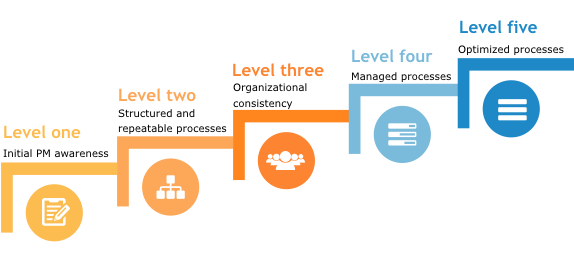
At a level one PPM maturity, businesses may be using basic scheduling and task management tools on a one-off project basis. As they move into level two, most businesses have invested in PM software that they consistently use as a centralized and collaborative project space.
It’s not until businesses reach a level three PPM maturity that they should consider investing in PPM software.
SMBs at a level three PPM maturity have most likely established a project management office (PMO) to help them oversee and institute PM processes at an organizational level. The PMO acts as a governing unit that evaluates project initiatives to ensure they align with organizational goals and strategy.
Prior to investing in PPM software, your organization should evaluate whether it has followed portfolio management best practices:
Portfolio Management Best Practices
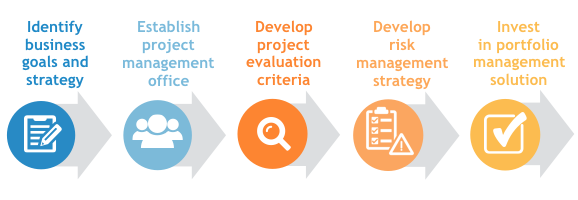
Following these steps, in this order, helps ensure structured processes are in place before implementing a solution and that there is a governing body in place to oversee the implementation. This gives your business the best chance of successfully adopting portfolio management and implementing PPM software.
Core Functionality to Look for in PPM Software
As you evaluate PPM solutions, look for the following critical capabilities to ensure your organization has the portfolio support it needs:
Project life cycle management | Manage projects from initial concept to final delivery. Create risk-return profiles to compare initiatives so that all the projects within a portfolio align with strategic goals and deliver business value. |
Risk management | Identify known risks, assign to staff for evaluation and monitoring and create risk management plans. Establish issue/change management protocols to deal with change requests and new issues that arise during project execution. |
Advanced resource management | Assess employee skill levels and allocate resources across multiple projects based on skill sets and availability. Practice resource capacity planning and ensure that high-priority projects are staffed first. |
Dashboards | Track project and portfolio progress against criteria such as budget, timeline and progress toward milestones and achievement of business objectives. Customize views according to specific user needs, e.g., executive, manager and/or customer. |
Reporting and analytics | Monitor key performance indicators and export data for a snapshot of current standing. Analyze data, and compare with previous reports to better understand organizational performance. |
What Type of Buyer Are You?
Not every small business will progress to a level of PPM maturity or project complexity that warrants an investment in PPM software. These tools are designed for organizations that need to effectively allocate and manage resources across multiple concurrent projects. These businesses will have portfolio management processes already in place.
In short, if your small business is still running one-off projects and has not thought strategically about instituting portfolio management processes, you probably do not need PPM software. Instead, you’re likely better off with a traditional project management solution that can help you streamline workflows and project processes at a project or department level.
Out of the thousands of software buyers who contact us each year, the following are the types of buyers who most often need more advanced PPM software:
Industry-specific, speciality buyers: Small and midsize businesses (SMBs) in fast-paced fields can break from the traditional PPM maturity-mold when it comes to PPM software. These buyers struggle to match limited resources with high project demand and as such, PPM solutions can help them streamline their efforts.
Industries that often require more advanced PPM solutions include information technology (IT) services, software/technology and related fields, as well as marketing firms, professional services organizations, construction and engineering.
Small and midsized businesses (SMBs): SMBs at a level three PPM maturity can use PPM software to help coordinate project efforts across the portfolio. This can provide the level of visibility and oversight needed to successfully manage projects from conception to completion. At this stage, businesses might consider PPM solutions such as Mavenlink or Microsoft Project.
Growing SMBs and enterprise organizations: Growing SMBs and larger enterprise organizations are likely at a level three PPM maturity or higher. The size and complexity of their projects makes them good candidates for PPM software. PPM solutions to consider include Clarizen and Workfront.
Expected Benefits
Organizations needing support for their project portfolio can benefit from investing in PPM software in several ways. The following are a few examples of ways PPM software might help:
More efficient resource allocation: Awareness of current and future project requirements allow business leaders to more effectively allocate resources—employees, time and money—across the entire portfolio.
Improve balance: Understanding the resources required for various types of projects allows businesses to achieve a better balance between short-term and long-term projects which allows them to maintain optimal resource capacity.
Increase value: Using project evaluation criteria to weigh initiatives against the other projects in the portfolio helps businesses eliminate waste and execute on those initiatives that deliver the most value.