


Best Contact Management Software of 2026
Updated January 27, 2025 at 9:56 AM
- Popular Comparisons
- FrontRunners
- Buyers Guide
- Related Software
Compare Products
Showing 1 - 25 of 283 products
Compare Products
Sort by
Reviews: Sorts listings by the number of user reviews we have published, greatest to least.
Average Rating: Sorts listings by overall star rating based on user reviews, highest to lowest.
Alphabetically (A-Z): Sorts listings by product name from A to Z.

Sales Cloud is equipped with customer relationship management (CRM) functionality that encompasses lead management, marketing au...Read more about Salesforce Sales Cloud


Salesforce Sales Cloud's Best Rated Features
See All
Salesforce Sales Cloud's Worst Rated Features
See All

monday CRM is a sales platform that helps businesses streamline sales cycle. The platform caters to a range of industries, such ...Read more about monday CRM
monday CRM's Best Rated Features
See All
monday CRM's Worst Rated Features
See All

*What is Topline?* Topline OS is an all-in-one growth operating system that brings together all the tools you need to run and gr...Read more about Topline


Topline's Best Rated Features
See All
Topline's Worst Rated Features
See All

Shape's cloud-based solution offers tools designed to manage online marketing and promotions, capture leads from online sources,...Read more about Shape


Shape's Best Rated Features
See All
Shape's Worst Rated Features
See All

Pipeliner has revolutionized CRM with our unique visual interface, no-code workflow automation engine, and instant, dynamic insi...Read more about Pipeliner CRM

Pipeliner CRM's Best Rated Features
See All
Pipeliner CRM's Worst Rated Features
See All

LeadSquared is a cloud-based marketing automation and customer relationship management (CRM) solution for businesses of all size...Read more about LeadSquared

LeadSquared's Best Rated Features
See All
LeadSquared's Worst Rated Features
See All

Lone Wolf Relationships is a customer relationship management (CRM) system designed for real estate professionals to manage lead...Read more about Lone Wolf Relationships
No reviews yet
recommendations


Creatio is a new era CRM to manage all customer and operational workflows with no-code and AI at its core. Creatio Sales is an ...Read more about Creatio CRM

Creatio CRM's Best Rated Features
See All
Creatio CRM's Worst Rated Features
See All

Zoho CRM is a cloud-based business management platform that caters to businesses of all sizes. It offers sales and marketing aut...Read more about Zoho CRM
Zoho CRM's Best Rated Features
See All
Zoho CRM's Worst Rated Features
See All

Rolldog is a customer relationship management (CRM) solution, with the perks of sales enablement all rolled into one. Rolldog he...Read more about Rolldog

Rolldog's Best Rated Features
See All
Rolldog's Worst Rated Features
See All

Workbooks is the 'No-BS' CRM. Workbooks designs, develops and implements its own software, which is targeted specifically at m...Read more about Workbooks

Workbooks's Best Rated Features
See All
Workbooks's Worst Rated Features
See All

AllyPro is a complete web-based solution designed for the portable sanitation and service industries. It was built to provide a ...Read more about AllyPro
No reviews yet
recommendations


SalesOutlook CRM is a comprehensive customer relationship management (CRM) and email marketing system that embeds into Microsoft...Read more about SalesOutlook CRM
SalesOutlook CRM's Best Rated Features
See All
SalesOutlook CRM's Worst Rated Features
See All

Shared Contacts for Gmail is a cloud-based contact management software for Gmail and Google Workspace (previously known as G Sui...Read more about Shared Contacts for Gmail
Shared Contacts for Gmail's Best Rated Features
See All
Shared Contacts for Gmail's Worst Rated Features
See All

NetSuite is an AI-powered cloud-based business management suite that incorporates ERP, financial management, CRM and eCommerce f...Read more about NetSuite

NetSuite's Best Rated Features
See All
NetSuite's Worst Rated Features
See All

Thryv is an all-in-one business management solution designed to help small businesses with essential business functions. With Th...Read more about Thryv
Thryv's Best Rated Features
See All
Thryv's Worst Rated Features
See All

We built Less Annoying CRM 17 years ago for the thousands of independent consultants, agents, and small business owners who are ...Read more about Less Annoying CRM

Less Annoying CRM's Best Rated Features
See All
Less Annoying CRM's Worst Rated Features
See All

Google Contacts is a cloud-based solution that allows enterprises to store and manage contacts in a built-in directory. Professi...Read more about Google Contacts
Google Contacts's Best Rated Features
See All
Google Contacts's Worst Rated Features
See All

HoneyBook is a client relationship platform designed to help small businesses manage proposals, contracts, invoices, payments, a...Read more about HoneyBook
HoneyBook's Best Rated Features
See All
HoneyBook's Worst Rated Features
See All

ClickUp is a productivity platform designed to unify work tools within a single workspace. It supports various teams and industr...Read more about ClickUp
ClickUp's Best Rated Features
See All
ClickUp's Worst Rated Features
See All

EngageBay is an AI-powered all-in-one CRM that helps small businesses and startups manage marketing, sales, and customer service...Read more about EngageBay CRM
EngageBay CRM's Best Rated Features
See All
EngageBay CRM's Worst Rated Features
See All

98% of customers rate VipeCloud's Value For Money at 4 stars and above! VipeCloud is the Sales CRM with Marketing Suite that bui...Read more about VipeCloud

VipeCloud's Best Rated Features
See All
VipeCloud's Worst Rated Features
See All

Teamgate is a user-friendly, yet extremely powerful CRM for Sales and SaaS teams of all sizes. We pride ourselves on empowering...Read more about Teamgate
Teamgate's Best Rated Features
See All
Teamgate's Worst Rated Features
See All

Tracker is a web-based, integrated recruitment ATS and CRM designed for recruiting and staffing firms across industries. The sol...Read more about Tracker

Tracker's Best Rated Features
See All
Tracker's Worst Rated Features
See All

OnePageCRM is a simple contact management tool. While it has all the usual features of a customer relationship management (CRM) ...Read more about OnePageCRM
OnePageCRM's Best Rated Features
See All
OnePageCRM's Worst Rated Features
See All
Popular Comparisons



Your Guide to Top Contact Management Software, January 2025
Software Advice uses reviews from real software users to highlight the top-rated Contact Management products in North America.
Learn how products are chosenExplore FrontRunners


“Usability” includes user ratings for Functionality and Ease of Use.
“Customer Satisfaction” includes user ratings for Customer Support, Likelihood to Recommend and Value for Money.
Reviews analysis period: The reviews analysis period spans two years and ends the 15th of the month prior to publication.

Buyers Guide
This detailed guide will help you find and buy the right contact management software for you and your business.
Last Updated on January 27, 2025Effectively managing contacts is one of the most mission-critical tasks of running a business. Sales and marketing need the ability to quickly find the current status of an active opportunity in their database, while support teams should be able to quickly find a contact’s entire customer history.
This buyer’s guide will provide a brief overview of contact management software, which is designed for these purposes (among others). Here’s what we’ll cover:
What Is Contact Management Software?
Common Features of Contact Management Software
Contact Management vs CRM: What's the Difference?
What Is Contact Management Software?
At its core, contact management programs store customer contact information. This can include customers’ names, addresses, phone numbers, email addresses and even social media profile information. These databases are often easily searchable and store important documents within each contact profile.
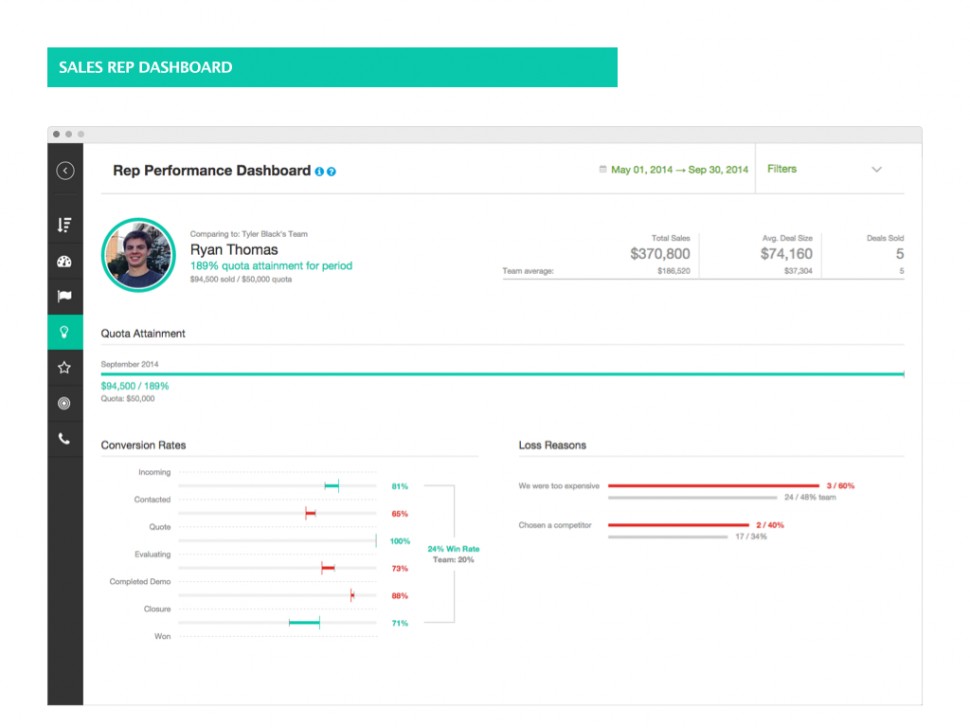
Screenshot of Base user dashboard
These systems are designed to increase efficiency by consolidating critical customer data into one tool. Rather than trapping contact information in your team’s individual inboxes or address books, everyone maintains a single view of the customer.
Common Features of Contact Management Software
In addition to the core capabilities described in the previous section, contact tracking systems might also include the following features.
Calendaring & notifications | These features allow users to schedule events and tasks and associate them with a contact in your database. This might include reminders to follow-up with an active opportunity in your pipeline, or a task for an account manager to send a renewal contract to one of your customers. |
Note-taking | In addition to storing contact information, your team might also want to make notes about a particular customer or opportunity. This might be notes from a recent call or meeting, or comments about the best time or day of the week to reach a certain person. |
File-sharing | Your team likely creates a variety of documents during the course of their relationship with each customer. These features allow them to easily store these contracts, proposals and other files in account profiles. Often, users can simply drag and drop files from their desktop; or, they can quickly click to upload them to the contact profile. |
Tags | Tagging features allow users to quickly pull subsets of customers at once. These tags are often highly customizable, so businesses can create groups by geographic region or project, for example. Think of it as a sort of index for your accounts, allowing you to quickly find customers of a certain type. |
To-do lists | Allows you to create to-dos for your team within each contact profile. Often, staff will be notified when a to-do is assigned to them. Then, when that person closes out the task, management receives an alert. Often, these tasks can be selected from a drop-down menu, which allows you to standardize workflow. |
Contact Management vs CRM: What's the Difference?
Contact tracking software is essentially a more basic version of a customer relationship management (CRM) system, although vendors sometimes use these terms interchangeably, particularly when discussing CRM systems designed for small businesses.
Typically, CRM systems include the most common contact management features described in the previous section; however, they might also incorporate more robust workflow automation, reporting and interaction tracking, among other features. Depending on the CRM application, the system might also offer features for marketing automation, sales force automation, customer service, field service and help desk and call center management. For more information on CRM software, visit our buyer’s guide.
Despite many vendors differentiating their systems in this way, you might still encounter systems that have more features than another product described as being a CRM system, and vice versa. Regardless of what the system is called, deciding between a basic contact management system or a more robust CRM system could depend on a variety of factors.
Most of the buyers we speak with are smaller businesses, or smaller departments within larger businesses, which don't require capabilities beyond tracking contact information. These buyers most often can function exclusively with the core capabilities described in the “common features” section.
Meanwhile, CRM software buyers need more capabilities that extend well beyond simple contact management. They may need features specific to their industry (e.g., field service) or for a particular operational role, such as customer service. Very large enterprises might also need contact managing features to work in concert with other types of automation, so they would buy an integrated CRM suite.
Market Trends
The world of business software has offered contact management solutions for many years, probably longer than most other types of business software. But just because contact management apps have existed for many years, that doesn’t mean the products and their functionalities aren’t still evolving. Vendors of contact management software continue to refine their products in light of the changes brought by increasingly digital business environments. Modern contact management systems are often designed to be:
Always omnichannel. Omnichannel software allows companies to seamlessly engage with customers and clients across all common communication channels, from personal and business email addresses, to phone calls, live chat conversations and more. Omnichannel contact management systems ensure that information regarding preferred communication channels, and contact details, are stored with every contact’s entry.
Increasingly integrated. Contact management software is often combined (integrated) with other CRM functionalities into broader software suites. Integrated suites add efficiency to internal workflow processes by minimizing the number of interfaces employees use to complete individual tasks. While in years past contact management systems were often sold as standalone products, today, they’re more often found combined with other applications, like those used specifically for sales, service or marketing.
Interdepartmentally available. As more and more businesses find value in increasing the cooperation between their internal departments, more software vendors are designing platforms to facilitate cross-departmental information sharing. Contact managment solutions that allow all internal departments to share and work from the same database are increasingly common.