


Best Telephony software of 2026

- Popular Comparisons
- FrontRunners
- Buyers Guide
Compare Products
Showing 1 - 25 of 257 products
Compare Products
Sort by
Reviews: Sorts listings by the number of user reviews we have published, greatest to least.
Average Rating: Sorts listings by overall star rating based on user reviews, highest to lowest.
Alphabetically (A-Z): Sorts listings by product name from A to Z.

Amazon Connect is a cloud-based contact center service that offers omnichannel customer service using machine learning, interact...Read more about Amazon Connect


Amazon Connect's Best Rated Features
See All
Amazon Connect's Worst Rated Features
See All

Zendesk is a cloud-based help desk management solution offering customizable tools to build customer service portal, knowledge b...Read more about Zendesk Suite


Zendesk Suite's Best Rated Features
See All
Zendesk Suite's Worst Rated Features
See All

CallTools offers an advanced predictive dialer and inbound call center management solution that streamlines and optimizes call c...Read more about CallTools

CallTools's Best Rated Features
See All
CallTools's Worst Rated Features
See All

Five9 is an all-in-one cloud contact center solution for inbound, outbound, blended and omnichannel contact centers world-wide. ...Read more about Five9

Five9's Best Rated Features
See All
Five9's Worst Rated Features
See All

Dialpad is an AI-enabled customer communications platform that includes a phone system, video conferencing, cloud contact center...Read more about Dialpad
Dialpad's Best Rated Features
See All
Dialpad's Worst Rated Features
See All

ULTATEL enables people to work together and get the information they need to do their best work, anywhere they are. Our cloud p...Read more about Ultatel Cloud Business Phone System
Ultatel Cloud Business Phone System's Best Rated Features
See All
Ultatel Cloud Business Phone System's Worst Rated Features
See All

DialedIn is a cloud-based Contact Center as a Service (CCaaS) solution designed to optimize outbound, inbound, and blended call ...Read more about DialedIn CCaaS
DialedIn CCaaS's Best Rated Features
See All
DialedIn CCaaS's Worst Rated Features
See All

Convoso is an AI-powered virtual agent software designed to help automate customer interactions for call centers across various ...Read more about Convoso

Convoso's Best Rated Features
See All
Convoso's Worst Rated Features
See All

Twilio is a cloud communications platform that enables businesses to build, scale and operate their own customized communication...Read more about Twilio
Twilio's Best Rated Features
See All
Twilio's Worst Rated Features
See All

Ringover is the no.1 business phone system that gives you unlimited calls to 110 countries, video conferencing, SMS and group me...Read more about Ringover
Ringover's Best Rated Features
See All
Ringover's Worst Rated Features
See All

XCALLY is an on-premise and cloud-based contact center solution that handles multiple channels including voice, chat, SMS, email...Read more about XCALLY

XCALLY's Best Rated Features
See All
XCALLY's Worst Rated Features
See All

PhoneBurner is an outbound dialer and call center solution that empowers agents to conduct wildly efficient yet highly personali...Read more about PhoneBurner

PhoneBurner's Best Rated Features
See All
PhoneBurner's Worst Rated Features
See All

VICIdial is an open-source, cloud-based contact center solution suitable for small to large call centers in a variety of industr...Read more about VICIdial

VICIdial's Best Rated Features
See All
VICIdial's Worst Rated Features
See All

Intermedia Unite is a cloud-based voice over internet protocol (VoIP) solution that provides small to large enterprises with sev...Read more about Intermedia Unite

Intermedia Unite's Best Rated Features
See All
Intermedia Unite's Worst Rated Features
See All

Tenfold is a computer-telephony integration (CTI) solution that integrates Salesforce and Microsoft Dynamics CRM with most major...Read more about TenFold


Bright Pattern is a cloud-based contact center software solution which helps businesses manage multichannel service including in...Read more about Bright Pattern

Bright Pattern's Best Rated Features
See All
Bright Pattern's Worst Rated Features
See All

CTM is a conversation analytics software designed to provide tracking and insights for sales and marketing teams. It helps organ...Read more about CTM
CTM's Best Rated Features
See All
CTM's Worst Rated Features
See All

AVOXI is a global communications provider specializing in cloud-based contact center and virtual number solutions. Their platfor...Read more about AVOXI
AVOXI's Best Rated Features
See All
AVOXI's Worst Rated Features
See All

Kixie: AI-Powered Revenue Communication for High-Performing Teams Kixie is a next-generation revenue engagement platform that h...Read more about Kixie PowerCall
Kixie PowerCall's Best Rated Features
See All
Kixie PowerCall's Worst Rated Features
See All

ZIWO is a cloud-based call center workforce management solution that helps streamline customer interactions via virtual phone nu...Read more about ZIWO
ZIWO's Best Rated Features
See All
ZIWO's Worst Rated Features
See All

VoIPstudio is a cloud-based call center management solution designed for businesses of all sizes. It offers features that includ...Read more about VoIPstudio
VoIPstudio's Best Rated Features
See All
VoIPstudio's Worst Rated Features
See All

wolkvox is the most innovative, reliable, easy to use and fast to deploy all-in-one cloud contact center solution on the market....Read more about wolkvox


wolkvox's Best Rated Features
See All
wolkvox's Worst Rated Features
See All

uContact is a Cloud & Omnichannel solution that enables its users to manage all their voice and text interactions in the same pl...Read more about uContact
uContact's Best Rated Features
See All
uContact's Worst Rated Features
See All

VirtualPBX is a cloud-based phone solution that caters to all-sized businesses. VirtualPBX enables companies to streamline and i...Read more about VirtualPBX
VirtualPBX's Best Rated Features
See All
VirtualPBX's Worst Rated Features
See All

UJET is a cloud-based call center application that integrates with customer relationship management (CRM) solutions. It offers b...Read more about UJET
UJET's Best Rated Features
See All
UJET's Worst Rated Features
See All
Popular Comparisons



Your Guide to Top Telephony Software, April 2025
Software Advice uses reviews from real software users to highlight the top-rated Telephony products in North America.
Learn how products are chosenExplore FrontRunners


“Usability” includes user ratings for Functionality and Ease of Use.
“Customer Satisfaction” includes user ratings for Customer Support, Likelihood to Recommend and Value for Money.
Reviews analysis period: The reviews analysis period spans two years and ends the 15th of the month prior to publication.
Buyers Guide
This detailed guide will help you find and buy the right computer telephony integration software for you and your business.
Last Updated on January 27, 2025Imagine you’re an agent at a busy call center: you’re fielding dozens of phone calls a day with customers you’ve never met, and you want to make a good impression on all of them. Don’t you want to be as prepared and efficient as possible?
One of the best ways to set up your call center team for success in the environment described is by investing in a system with computer telephony integration (CTI). CTI is an important category of call center software: It enables phone and computer systems to work together for the benefit of your agents and your customers.
In this guide, we’ll break down everything you need to know to choose the right CTI system for your company, such as:
What Is CTI?
CTI, or computer telephony integration, is also known as “computer-telephone integration” or “computer telephony.” These terms may sound intimidating, but their basic meaning is straightforward: CTI is technology that lets you use a computer to initiate, manage and enhance your phone calls.
CTI is often used as a jargon term for describing integrations between a phone system and a customer relationship management (CRM) system that has already been deployed. These integrations add features to enhance both systems and help agents better handle interactions.
An example of how they do this is “screen pops”—a window that pops up on an agent's computer screen when they have an incoming phone call. That window displays information about the caller, e.g., address and interaction history, which is pulled from the call center’s existing CRM program.
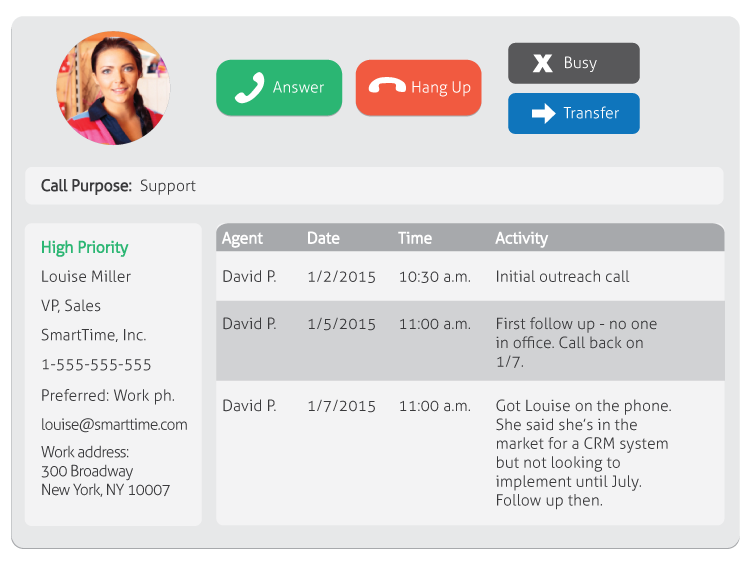
This is what a screen pop might look like in a typical CTI solution.
This phone system-computer coordination is made possible through CTI. Though it’s most common for CTI to be used for CRM integrations, it is also good for other types of integrations.
For instance, many organizations now use CTI to allow their accounting software to interface with their phone system. Agents can call customers with unpaid invoices directly from their accounting software through functionality called “click-to-dial” (more details on this below).
To recap: CTI software acts as a bridge for the exchange of data and functionalities between a company’s phone system and other existing programs, such as CRM or accounting solutions.
Common Functionality of CTI
Vendors offer a variety of functional breadth and depth in their CTI solutions. Here are some of the most common capabilities:
Screen pops | In addition to what we’ve already described, screen pops can indicate the priority level of an interaction with a caller based on customer history data from your CRM program. They can also use a customer’s Interactive Voice Response (IVR) system answers to display the purpose of a call (e.g., sales or support). |
Click-to-dial | This function adds outbound dialing capabilities to the databases of contacts you'd find in a CRM or accounting system. Agents can skip manual dialing and simply click a phone number on their computer screen to place a call. |
Caller authentication | CTI software screens incoming calls and uses the phone number to find a match in your CRM system. It can confirm the caller’s identity before the call even starts. |
Phone controls | Users can manage their phone controls through the computer instead of dialing buttons manually. These include the ability to answer, hang-up, conference, forward and transfer calls. |
Logging and notes | Basic information is automatically logged in the CRM system while the call is in progress, such as the time/date of the call and agent handling it. Agents can also add manual notes directly into the CRM or accounting program. |
Coordinated voice/data transfer | If a call needs to be transferred from one member of your team to another, this function allows all onscreen customer information (e.g., screen pops) to be transferred when the line is reassigned. |
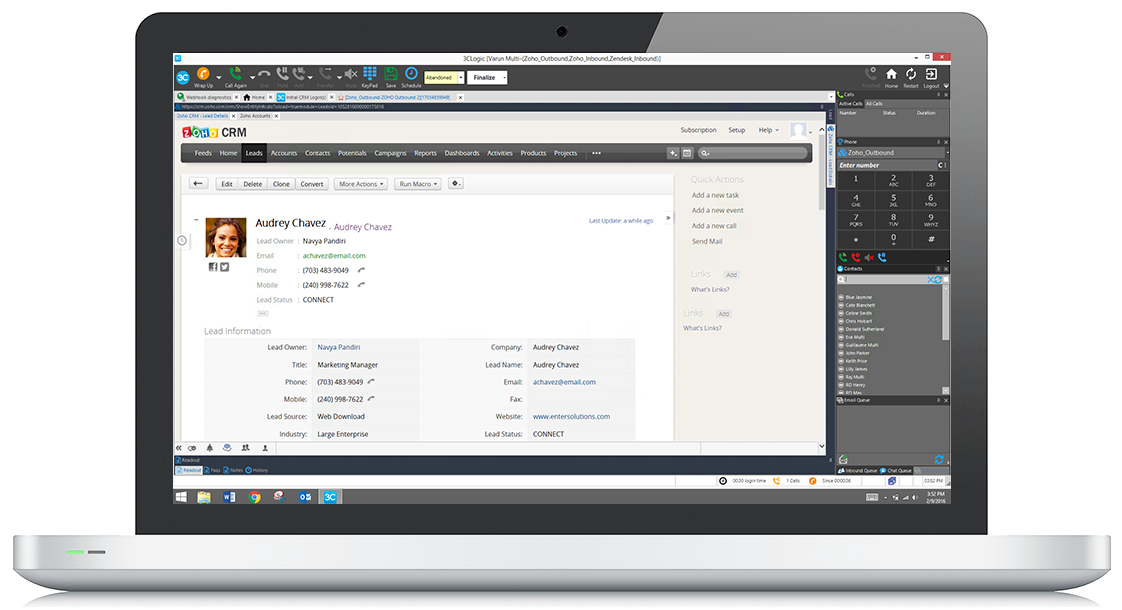
3CLogic and Zoho CRM integration showing the “click-to-dial” function
CTI Benefits
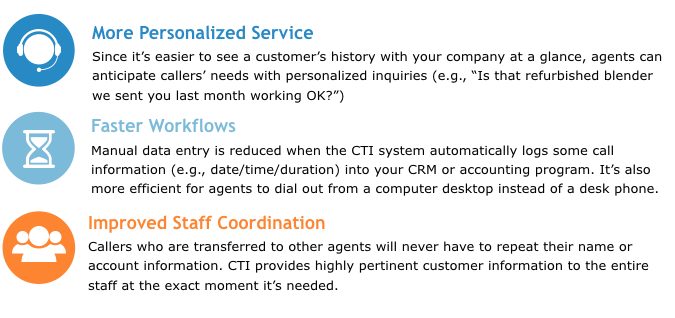
Here are some benefits that explain how CTI can empower call center agents and companies to have more productive customer interactions:
Top Benefits of CTI Software
CTI Implementation Options
CTI can be implemented in one of two ways:
As a best-of-breed application
As part of a call center suite that has CTI capabilities built in, in addition to other applications (e.g., automatic call distribution or workforce scheduling)
It’s important to note that best-of-breed CTI software is a relatively niche offering. It could be a good option for companies with older phone systems who aren’t ready to buy a new one just yet, but still want to reap the benefits of CTI sooner rather than later.
The vast majority of buyers are better off with the second option: You’ll need an established phone system for calls to be able to work on your computers at all. It’s easier to implement a phone system that supports CTI from the start, rather than trying to retrofit or replace it later on.
Also worth noting: Some of the more basic CTI capabilities (e.g., click-to-dial and even screen pops, in some cases) can be achieved with a PBX system as an alternative to using CTI with a call center system.
Integration Considerations
Once you’ve decided on an implementation model, you can evaluate vendors. As we’ve explained, CTI is intended to be used with computer programs that call centers are already using, such as existing CRM or accounting systems. It’s important to ensure that any CTI vendor on your shortlist can interface with this existing software. You can usually find this information listed on vendors’ websites.