


Best Applicant Tracking Software of 2026
Updated February 18, 2026 at 10:25 AM

Written by Bruno Peláez
Senior Content Analyst

Edited by Mehar Luthra
Team Lead, Content

Reviewed by Jenn Tardy
Contributor

Talk with us for a free 15-min consultation
Expert advisors like Jacqueline, who have helped 1,000+ companies, can find the right software for your needs.
- All Software
- Buyer's Guide
- Software Advice FrontRunners
- Frequently Asked Questions
- Popular Comparisons
Appointment scheduling software helps book and manage external-facing meetings, with features like automatic reminders to boost attendance and built-in payment collection to support cash flow. With 896 products, some tools are tailored to industries like healthcare or beauty. To help you narrow it down, I worked with our appointment scheduling software advisors to curate a list of recommended productsi and a list of the appointment scheduling software Frontrunners based on user reviews. For further information, read my appointment buyer's guide.
Applicant Tracking Software
Sort by
Reviews: Sorts listings by the number of user reviews we have published, greatest to least.
Average Rating: Sorts listings by overall star rating based on user reviews, highest to lowest.
Alphabetically (A-Z): Sorts listings by product name from A to Z.

BambooHR centralizes your HR data, automating key tasks like payroll, benefits, and employee management. Streamline processes fr...Read more about BambooHR


BambooHR's Best Rated Features
See All
BambooHR's Worst Rated Features
See All

Rippling is an integrated workforce management platform that unifies HR, IT, and finance tools to streamline operations. It cent...Read more about Rippling


Rippling's Best Rated Features
See All
Rippling's Worst Rated Features
See All

ApplicantPRO by JobMatch is a cloud-based applicant tracking (ATS) system designed for small to midsized companies that are work...Read more about isolved Talent Acquisition

isolved Talent Acquisition's Best Rated Features
See All
isolved Talent Acquisition's Worst Rated Features
See All

Workable is an HR platform designed to support hiring, employee data management, time tracking, and payroll processes. It is sui...Read more about Workable

Workable's Best Rated Features
See All
Workable's Worst Rated Features
See All

ADP Workforce Now is an HR suite that combines all core payroll and HR management processes into a single database-driven platfo...Read more about ADP Workforce Now


ADP Workforce Now's Best Rated Features
See All
ADP Workforce Now's Worst Rated Features
See All
Software Advice FrontRunners 2026

(850)

(1079)

(736)

(654)

(658)

(464)

(1184)

(1183)

(332)

(59)
Best for Quick Adoption/Easy Adoption

NEOGOV

In our analysis of Applicant Tracking products with the most market demand, NEOGOV is the highest rated for its ease of adoption out of the most popular tools.
NEOGOV is best for organizations seeking quick adoption of HR and employee management solutions. Our reviewers say onboarding is straightforward, and the platform streamlines workflows, reducing administrative burdens and enabling teams to efficiently manage processes with minimal training.
- Reviewers Perspective
"Overall the Neogov has automated over 100 processes for ur organization freeing up more time for our employees to do more of what they love rather than the administrative burdens."
KBKale Brinley
Senior HR Consultant
Used for 1-2 years
We analyzed 479 verified user reviews for NEOGOV to find out what actual users really think.
Customer Support
HR professionals receive timely assistance during implementation and daily use. Support teams follow up on issues, provide resources, and adapt to user feedback, helping organizations maintain system reliability.Training and Learning Curve
Users access online modules, videos, and community tools for efficient learning. While the system is user-friendly, some teams request additional training content to ease the initial learning curve.Ease of Use
Departments complete HR tasks with minimal complexity. The intuitive interface supports quick onboarding and adaptation, streamlining workflows for organizations with varied needs. - Key FeaturesNEOGOV's scoreCategory average
Candidate Profiles
4.434.54 category average
Candidate Tracking
4.604.61 category average
Job Posting
4.584.59 category average
- Screenshots


Best for Usability

100Hires

According to our user reviews, 100Hires is the highest rated for its usability out of the most popular tools.
100Hires is best for teams prioritizing usability in their applicant tracking system. Our reviewers say the interface is intuitive, making it easy to manage candidates, automate tasks, and onboard new users with minimal effort, which streamlines recruiting for small and midsize businesses.
- Reviewers Perspective
"I would say that 100Hires give recruiters most of the tools that they need to have and perform their job to find best hires for their company, plus for manager of recruiting it is very helpful for them to manage to hiring process with reporting feature where they can easily get information needed to manage the team and make any adjustment when need to make the hiring campaign successful."
DTDat Tran
Talent Acquisition Manager
Used for 6-12 months
We analyzed 489 verified user reviews for 100Hires to find out what actual users really think.
Candidate Management
Recruiters track application stages, schedule interviews, and communicate with candidates in one platform. Automation features and integrated scheduling tools support efficient management of large candidate pools.Recruitment Process
Talent teams use 100Hires to organize applicants, automate repetitive tasks, and adapt workflows to different hiring needs. The platform’s design helps teams stay organized and improve hiring speed.Recruiter Experience
Recruiters manage candidate tracking, resume parsing, and workflow automation from a single dashboard. The intuitive interface and Chrome extension support collaboration and reduce manual work for both new and experienced users. - Key Features100Hires's scoreCategory average
Candidate Profiles
4.874.54 category average
Candidate Tracking
4.904.61 category average
Job Posting
4.874.59 category average
- Screenshots


Best for User Interface

Greenhouse

In our analysis of Applicant Tracking products with the most market demand, Greenhouse is the highest rated for its user interface out of the most popular tools.
Greenhouse is best for organizations valuing a strong user interface in their recruiting software. Our reviewers point out that its intuitive design and customizable workflows make it easy to manage hiring processes, schedule interviews, and collaborate efficiently across teams.
- Reviewers Perspective
"Greenhouse's flexibility and extensive integrations have allowed us to optimize our recruitment process, enabling us to attract and hire top talent for our team."
MCMathew Carlile
IT Director - Systems and Infrastructure Service
Used for 2+ years
We analyzed 456 verified user reviews for Greenhouse to find out what actual users really think.
Recruiting Process
Hiring managers coordinate recruiting funnels and analytics in a centralized system. Custom workflows and integrations help teams streamline activities and scale hiring as organizations grow.User Interface
Recruiters and managers navigate a clean, user-friendly layout across devices. The interface lowers the learning curve and supports efficient management of job postings and candidate profiles.Hiring Process
Organizations manage every hiring stage with collaborative tools and centralized information. Customizable workflows and scorecards help maintain consistency and reduce bias in candidate evaluation. - Key FeaturesGreenhouse's scoreCategory average
Candidate Profiles
4.334.54 category average
Candidate Tracking
4.494.61 category average
Job Posting
4.434.59 category average
- Screenshots


Best for Quick Implementation

Lever

Of the products listed on our FrontRunners report, Lever is the most requested by users for quick implementation out of the most popular tools.
Lever is best for businesses needing quick implementation of an ATS with robust interview management. Our reviewers say setup is fast and the system integrates easily with tools like Gmail and Google Calendar, enabling efficient scheduling and feedback collection from day one.
- Reviewers Perspective
"Lever provided our team with a great degree of communication, whether that was internally or externally, which played a crucial role in our recruitment processes."
CDCara DeBlois
Recruiter
Used for 2+ years
We analyzed 458 verified user reviews for Lever to find out what actual users really think.
Features
Teams manage candidate pipelines, reporting, and workflow automation in one system. Lever’s features support collaboration, nurture campaigns, and data-driven hiring decisions for growing organizations.User Interface
Recruiters and hiring managers navigate an intuitive, clean interface. The logical design helps both new and experienced users quickly adapt and efficiently manage daily recruiting tasks.Customer Support
Support teams assist with onboarding, troubleshooting, and ongoing use. Users benefit from extensive resources and responsive staff, helping maximize platform value and address concerns. - Key FeaturesLever's scoreCategory average
Candidate Profiles
4.604.54 category average
Candidate Tracking
4.784.61 category average
Job Posting
4.564.59 category average
- Screenshots


Best for Automation Capabilities
Workable

Workable is the most requested by users for automation capabilities out of the most popular tools, based on our analysis of Applicant Tracking products with the most market demand.
Workable is best for organizations seeking advanced automation capabilities in recruitment. Our reviewers say its automated interview scheduling, AI-powered screening, and customizable workflows save significant time and help teams coordinate hiring efficiently across multiple roles.
- Reviewers Perspective
"The automated interview scheduling feature alone has saved us hours each week by eliminating the typical email ping-pong of finding mutual availability. While the email templates are solid as-is, being able to customize them for specific roles or company voice is a nice touch."
KKKieran Kilbride-Singh
Marketing Director
Used for 2+ years
We analyzed 405 verified user reviews for Workable to find out what actual users really think.
Recruitment Process
HR teams manage job postings, candidate pipelines, and team collaboration in one platform. Built-in workflows and AI-powered sourcing help standardize and accelerate recruitment across departments.Customer Support
Support staff provide quick resolutions and proactive communication. Teams receive guidance during setup and ongoing use, ensuring recruitment operations stay productive and confident.User Interface
Recruiters and hiring managers use an intuitive, visually appealing interface. The design supports efficient task management and seamless collaboration, reducing the learning curve for new users. - Key FeaturesWorkable's scoreCategory average
Candidate Profiles
4.204.54 category average
Candidate Tracking
4.554.61 category average
Job Posting
4.514.59 category average
- Screenshots


Best for Customer Satisfaction

Recruit CRM

Of the products listed on our FrontRunners report, Recruit CRM is the highest rated for customer satisfaction out of the most popular tools.
Recruit CRM is best for those seeking high customer satisfaction in a recruiting platform. Our reviewers say the standout is responsive customer support and customizable workflows, which make onboarding smooth and allow teams to adapt the system to their unique processes.
- Reviewers Perspective
"The standout features are its customizable workflows and excellent customer support, though minor bugs and occasional system slowdowns have occurred, these were usually resolved quickly by their team."
PGPaschalis Georgiadis
Senior Recruitment Consultant
Used for 2+ years
We analyzed 340 verified user reviews for Recruit CRM to find out what actual users really think.
Customer Support
Recruitment teams get fast help via live chat, calls, and tutorials. Account managers and support staff guide users through onboarding and troubleshooting, ensuring minimal disruption to daily operations.Team
Recruit CRM centralizes client data and simplifies onboarding for new team members. Staffing and HR firms use these features to coordinate work, implement feedback, and roll out updates efficiently.Ease of Use
Users manage records and business tasks with minimal effort. The interface is designed for quick access to features, reducing time spent on administrative work for both small and large teams. - Key FeaturesRecruit CRM's scoreCategory average
Candidate Profiles
4.714.54 category average
Candidate Tracking
4.734.61 category average
Job Posting
4.524.59 category average
- Screenshots


Most Used By Staffing and Recruiting

JobDiva

According to our user reviews, JobDiva is the most requested by users in staffing and recruiting out of the most popular tools.
JobDiva is most used by staffing and recruiting firms that need a comprehensive, industry-focused platform. Our reviewers say its vast candidate database, customizable search, and integrated workflows help agencies efficiently manage sourcing, submissions, and placements.
- Reviewers Perspective
"This tool is very helpful in integrating all the job boards at same place, it helps in managing the complete cycle of recruitment starting with Sourcing, interviewing, and initiating job offers until joining with the help of advanced functions and features it has, which further help recruiter to check the onboarding status, contract status and all over connect with the candidates very easily."
KSKaran Sharma
Technical Recruiter
Used for 2+ years
We analyzed 634 verified user reviews for JobDiva to find out what actual users really think.
Candidate Management
Recruiters manage sourcing, interviewing, and onboarding from multiple job portals in one place. Advanced search filters and communication logs support efficient candidate identification and engagement.Ease of Use
Users access JobDiva from any device with a web connection. The intuitive interface and mobile app simplify navigation and daily recruiting tasks for both new and experienced staff.Recruitment Process
Staffing teams streamline recruitment with customizable workflows and automated tools. The platform supports full-cycle recruiting, from job posting to onboarding, with robust candidate databases and matching features. - Key FeaturesJobDiva's scoreCategory average
Candidate Profiles
4.544.54 category average
Candidate Tracking
4.634.61 category average
Job Posting
4.504.59 category average
- Screenshots


Highly Rated for Customization

Zoho Recruit

Zoho Recruit is the highest rated for customization out of the most popular tools, based on our analysis of Applicant Tracking products with the most market demand.
Zoho Recruit is highly rated for customization, making it ideal for organizations needing tailored recruitment workflows. Our reviewers say its flexible fields, customizable pipelines, and integration options allow businesses to adapt the system to their specific hiring needs.
- Reviewers Perspective
"The interactive dashboards and the ability to tailor the platform to our specific needs have been instrumental in optimizing our hiring processes, making it a top-tier choice that delivers both high performance and excellent value for money."
BCBruno Chouinard
CEO
Used for 1-2 years
We analyzed 622 verified user reviews for Zoho Recruit to find out what actual users really think.
Recruitment Process
HR teams automate recruitment from candidate sourcing to onboarding. Customizable workflows and analytics help centralize activities, speed up hiring, and keep communication organized across departments.Candidate Management
Recruiters track applications, schedule interviews, and manage profiles in one place. Automated workflows and secure dashboards support efficient collaboration and transparent evaluation.Customization
Organizations tailor fields, forms, and dashboards to fit unique business needs. This flexibility allows for personalized recruitment pipelines and career pages, supporting diverse hiring strategies. - Key FeaturesZoho Recruit's scoreCategory average
Candidate Profiles
4.504.54 category average
Candidate Tracking
4.524.61 category average
Job Posting
4.454.59 category average
- Screenshots


Most Rated for SMBs


Of the products listed on our FrontRunners report, Recruiterflow is the most requested by small businesses out of the most popular tools.
Recruiterflow is most rated for SMBs seeking an ATS that fits smaller teams. Our reviewers say it offers easy onboarding, strong automation, and customizable pipelines, helping SMBs streamline recruiting processes and manage candidates efficiently from the start.
- Reviewers Perspective
"What I like most about Recruiterflow is how easy it is to use and navigate. If I ever have a problem and need help there live chat is amazing, they respond quickly and they will go above and beyond to make sure you get the answers you need."
MSMia Shelley
Administrator
Used for 6-12 months
We analyzed 265 verified user reviews for Recruiterflow to find out what actual users really think.
Customer Support
Users can access live chat, explainer videos, and personalized assistance for quick problem resolution. This is especially useful for SMBs in fast-paced recruitment environments where timely support helps maintain workflow continuity and reduces downtime.Ease of Use
Recruitment teams quickly adapt to Recruiterflow’s clean design and logical navigation. Even with limited technical skills, staff can manage recruitment tasks efficiently, minimizing training time and allowing focus on core hiring activities.Recruiter Recruitment
Recruiters automate job postings and candidate management, reducing manual effort. The platform supports both agency and in-house recruitment, making it easier for firms to stay organized and productive across diverse hiring needs. - Key FeaturesRecruiterflow's scoreCategory average
Candidate Profiles
4.714.54 category average
Candidate Tracking
4.824.61 category average
Job Posting
4.554.59 category average
- Screenshots


Most Used By E-Learning

IdealTraits

Of the products listed on our FrontRunners report, IdealTraits is the most requested by users in e-learning out of the most popular tools.
IdealTraits is most used by e-learning and insurance organizations looking for tools to assess candidate fit. Our reviewers say the platform’s personality assessments and guided hiring process make it easy to identify and onboard candidates who align with team needs.
- Reviewers Perspective
"Helps me hire the right personalities for my team, and also helps me coach current staff, as every personality type responds to different coaching."
JOJeremy Olson
Owner
Used for 2+ years
We analyzed 49 verified user reviews for IdealTraits to find out what actual users really think.
Candidate Personality
Teams use IdealTraits’ personality assessments to match candidates to team dynamics. In insurance and similar sectors, managers leverage these insights for both hiring and ongoing staff coaching, supporting tailored management approaches and effective team building.Hiring Process
Managers streamline applicant tracking, job postings, and prescreening in one place. The platform’s structured process and built-in guidance help SMBs maintain focus and efficiency throughout recruiting and onboarding.Ease of Use
Administrative users navigate IdealTraits with minimal training. The straightforward design allows for quick task completion and easy delegation, making it practical for both new and experienced staff. - Screenshots

CEIPAL ATS

- Reviewers Perspective
"The AI-driven candidate matching feature helps find the best-suited candidates quickly by analyzing job requirements and skills, reducing the time spent on manual screening."
GRGangadhar Reddy
Team Lead
Used for 2+ years
We analyzed 663 verified user reviews for CEIPAL ATS to find out what actual users really think.
Candidate Sourcing
Recruiters leverage CEIPAL ATS’s dashboard and advanced search to quickly identify qualified profiles. AI-driven matching and customizable filters streamline sourcing, mass communication, and candidate engagement, supporting large pools and organized workflows.Resume Management
Teams use bulk uploads, parsing, and a searchable database to organize resumes. Integration with job boards and note-taking features aid tracking, though duplicate and outdated resumes, missing details, and slow loading can hinder efficiency.Recruitment Process
Recruiters automate workflows, track candidates, and generate reports using CEIPAL ATS. Integrations with job boards and communication tools enhance productivity, while analytics support hiring decisions. Some users note a learning curve and occasional system lags. - Key FeaturesCEIPAL ATS's scoreCategory average
Candidate Profiles
4.714.54 category average
Candidate Tracking
4.734.61 category average
Job Posting
4.664.59 category average
- Screenshots


- Reviewers Perspective
"The use of templates in ApplicantStack ensures that candidates receive consistent communication and are kept informed about the status of their applications PLUS it saves me the time of writing the same communications over and over."
HTHeather Tenny
HR Generalist
Used for 2+ years
We analyzed 744 verified user reviews for ApplicantStack to find out what actual users really think.
Applicant Management
ApplicantStack centralizes applicant information, enabling easy candidate tracking, note management, and customizable workflow stages. Automated rejection emails, screening questions with scoring, and text/email communication streamline workflows and maintain transparency.Ease of Use
HR teams navigate ApplicantStack’s user-friendly interface with minimal training. The clean design and tutorials simplify setup, customization, and daily tasks, making onboarding efficient for new users and experienced staff alike.Customer Support
ApplicantStack users access timely support via email or phone. The support team guides users through features, resolves issues, and considers suggestions. Tutorials and a comprehensive knowledge base facilitate independent troubleshooting and learning. - Key FeaturesApplicantStack's scoreCategory average
Candidate Profiles
4.304.54 category average
Candidate Tracking
4.484.61 category average
Job Posting
4.494.59 category average
- Screenshots


TalentHR

- Reviewers Perspective
"Used this app for more than a year now and besides some minor things it provides all we need in a modern style and intuitive frontend."
AHArmin Haller
CEO
Used for 1-2 years
We analyzed 48 verified user reviews for TalentHR to find out what actual users really think.
Ease of Use
HR teams and employees navigate TalentHR’s clean interface with ease. Even less tech-savvy users access essential features quickly, and available support minimizes adoption challenges.Employee Management
Managers monitor staff, handle onboarding, PTO tracking, and secure data storage. TalentHR organizes HR processes, responds to feedback, and implements suggestions to improve employee management.Small Teams
Small businesses use TalentHR for essential HR functions without complexity. Features are tailored for small teams, supporting growth and daily HR tasks, with responsive support and a valuable free plan. - Screenshots


- Reviewers Perspective
"It has the app and web version which gives you two different interface and types of access, gives you more option to explore it!"
JAJason Andre Mick
Assistant Project Manager
Used for 6-12 months
We analyzed 41 verified user reviews for Workforce.com to find out what actual users really think.
- Screenshots


Breezy

- Reviewers Perspective
"So easy and effortless."
KDKym Den Hartog, PHR
HR Business Partner
Used for 2+ years
We analyzed 713 verified user reviews for Breezy to find out what actual users really think.
Ease of Use
HR teams quickly set up accounts, post jobs, and manage workflows with Breezy’s straightforward interface. The design supports both new and experienced users, minimizing complexity and making daily tasks simple.Hiring Process
Breezy centralizes hiring, from job posting to applicant organization and team collaboration. Customizable workflows and candidate status tracking enable efficient decision-making and transparency among hiring managers.Recruitment Process
Recruiters use Breezy to customize workflows, automate communications, and manage candidates from sourcing to hiring. Ready-made templates, collaborative tools, and dashboards support team-based recruiting and save time. - Key FeaturesBreezy's scoreCategory average
Candidate Profiles
4.574.54 category average
Candidate Tracking
4.694.61 category average
Job Posting
4.514.59 category average
- Screenshots


Avature

- Reviewers Perspective
"Its intuitive interface and powerful analytics facilitate efficient workflows, making it a valuable tool for organizations aiming to streamline hiring processes and improve candidate engagement."
PSPrashana Shankar
TA Ops Manager
Used for 2+ years
We analyzed 60 verified user reviews for Avature to find out what actual users really think.
Customization
Admins tailor candidate profiles, visuals, and workflows to evolving business needs. Avature’s vast customization options support both novice and advanced users, though flexibility can introduce a steeper learning curve.Features
Recruiters combine Avature’s functionalities for efficient workflows. Frequent updates address gaps, but some releases require time to mature. Technical aspects and reporting can lag behind competitors, and users desire more advanced automation.Client Configuration
Admins build, modify, and personalize solutions to fit organizational needs. Pinpoint’s setup is easy, adaptable for self-service and admin-driven features, and ongoing improvements are supported by responsive design and customer support. - Key FeaturesAvature's scoreCategory average
Candidate Tracking
4.644.61 category average
Job Posting
4.774.59 category average
- Screenshots


- Reviewers Perspective
"Outstanding product that works intuitively and smoothly and helps us in all stages of our recruitment process, from onboarding new clients to managing full cycle hiring"
SHStephanie Hodes
CEO
Used for 2+ years
We analyzed 104 verified user reviews for iSmartRecruit to find out what actual users really think.
Recruitment Process
Recruiters manage every stage, from candidate sourcing to onboarding, using iSmartRecruit’s user-friendly design and customizable features. The platform automates repetitive tasks and centralizes essential tools for efficient hiring.Candidate Management
Teams automate manual tasks and customize workflows for hiring needs. Bulk emailing, dashboard tracking, and advanced search options simplify candidate selection and engagement, supporting positive recruiter and applicant experiences.Customization
HR teams adjust workflows, templates, and reports to business requirements. iSmartRecruit’s flexible platform enables quick feature and branding changes, helping organizations efficiently manage recruitment and adapt to evolving needs. - Key FeaturesiSmartRecruit's scoreCategory average
Candidate Profiles
4.524.54 category average
Candidate Tracking
4.744.61 category average
Job Posting
4.364.59 category average
- Screenshots


Pinpoint

- Reviewers Perspective
"Pinpoint offers a very intuitive and easy-to-navigate interface, making it simple to manage candidates and job postings."
VSVaska Sivkova
Senior Tech Talent Expert
Used for 2+ years
We analyzed 77 verified user reviews for Pinpoint to find out what actual users really think.
Ease of Use
Hiring managers and candidates navigate Pinpoint’s interface efficiently. The system simplifies candidate and job posting management, centralizes information, and reduces administrative task time, supporting remote collaboration and customization.Recruitment Process
Pinpoint centralizes candidate data and automates repetitive tasks, saving time and effort. Users manage hiring workflows in one place, from advertising roles to talent pipeline building, reducing agency reliance and improving sourcing.Customer Support
Pinpoint’s support team provides guidance during implementation and ongoing use. Users access quick assistance, resolve issues, and benefit from feedback-driven product improvements, training, and a customer-focused approach. - Key FeaturesPinpoint's scoreCategory average
Candidate Profiles
3.784.54 category average
Candidate Tracking
4.384.61 category average
Job Posting
4.544.59 category average
- Screenshots


JazzHR

- Reviewers Perspective
"That's a tough one, I've used JAZZ HR at three different companies and each time it was great."
CRChris Richards
Manager Talent Acquisition
Used for 2+ years
We analyzed 373 verified user reviews for JazzHR to find out what actual users really think.
Ease of Use
Recruiters and managers use JazzHR’s intuitive interface to navigate and manage candidates. The clean dashboard and organized structure simplify daily recruiting tasks, reducing training time for new team members.Hiring Process
JazzHR centralizes recruiting activities, enabling job posting, candidate tracking, and workflow collaboration. Customizable pipelines and reporting tools support efficient hiring, though some users want more advanced analytics.Customer Support
JazzHR’s support team quickly addresses inquiries and offers live agent troubleshooting. Users benefit from clear guidance, tutorials, and feedback-driven improvements, enhancing their overall experience. - Key FeaturesJazzHR's scoreCategory average
Candidate Profiles
3.774.54 category average
Candidate Tracking
4.314.61 category average
Job Posting
4.144.59 category average
- Screenshots


AvaHR

- Reviewers Perspective
"From posting jobs across multiple boards in just a few clicks to AI-powered resume screening, it saves so much time and effort."
OPOctavia Price
Office Manager
Used for 6-12 months
We analyzed 79 verified user reviews for AvaHR to find out what actual users really think.
Customer Support
AvaHR’s customer support is responsive and helpful, guiding users through onboarding and troubleshooting. The team proactively communicates, resolves issues, and values customer feedback and feature requests.Hiring
HR teams fill positions quickly using AvaHR’s streamlined hiring stages. The platform simplifies job posting, interview management, and applicant tracking, supporting clear pipeline views and scalable workforce management.Multiple Job Postings
Recruiters post job ads to multiple boards and platforms in a few clicks. AvaHR centralizes postings and applicant tracking, enabling flexible experimentation and reaching wider candidate pools efficiently. - Key FeaturesAvaHR's scoreCategory average
Candidate Profiles
4.694.54 category average
Candidate Tracking
4.884.61 category average
Job Posting
4.784.59 category average
- Screenshots


- Reviewers Perspective
"They are responsive, knowledgeable, and always willing to help with any questions. Whenever I've needed support, their team has been quick to provide clear and helpful solutions."
MVMeghan Valenzuela
HR Specialist
Used for 6-12 months
We analyzed 267 verified user reviews for isolved Talent Acquisition to find out what actual users really think.
Customer Support
ApplicantPRO’s support team is accessible via chat, phone, and training resources. Users receive quick, knowledgeable assistance and benefit from proactive outreach and guidance on system optimization.Features
ApplicantPRO offers customizable templates, assessment tools, and an intuitive dashboard. The software adapts to organizational requirements, with regular updates and improvements supporting efficient hiring workflows.Ease of Use
ApplicantPRO’s interface simplifies navigation and daily tasks. Minimal training is needed for new users, and the straightforward design supports job posting, applicant review, and hiring management. - Key Featuresisolved Talent Acquisition's scoreCategory average
Candidate Profiles
4.474.54 category average
Candidate Tracking
4.634.61 category average
Job Posting
4.584.59 category average
- Screenshots


GoHire

- Reviewers Perspective
"The layout is clear and straightforward, allowing us to post jobs, track candidates, and review applications efficiently."
HTHermi Tang
Senior HR Officer
Used for 1-2 years
We analyzed 119 verified user reviews for GoHire to find out what actual users really think.
Customer Support
GoHire’s support team quickly addresses questions and resolves issues. Users benefit from proactive communication and feedback-driven platform improvements, though some note occasional delays and limited support hours.Applicant Tracking
Recruiters organize candidates, monitor application stages, and centralize communication. GoHire consolidates applicants from multiple sources, enabling efficient review and filtering, with an intuitive interface for team collaboration.Hiring Process
Teams post jobs, communicate with candidates, and track progress through each hiring stage. GoHire reduces manual effort, keeps teams organized, and improves hiring efficiency, especially for startups and small businesses. - Key FeaturesGoHire's scoreCategory average
Candidate Profiles
4.054.54 category average
Candidate Tracking
4.104.61 category average
Job Posting
4.224.59 category average
- Screenshots


Methodology
The research for the best applicant tracking software list was conducted in October 2025. We evaluated data (user reviews and demand signals) from the past 24 months as of the research date. Read the complete methodology. Read the complete methodology.
Popular Applicant Tracking Comparisons


Buyer's Guide
This detailed guide will help you find and buy the right applicant tracking software for you and your business.
Last Updated on May 12, 2025Here's what we'll cover:
What you need to know about applicant tracking systems
What is an applicant tracking system?
Key features of applicant tracking systems
Benefits and competitive advantages of using an ATS
How to choose the best ATS for your business
More resources for your ATS journey
What you need to know about applicant tracking systems
An applicant tracking system (ATS) streamlines recruitment by organizing and managing job applications, allowing recruiters to efficiently track candidates and make informed hiring decisions. With features like candidate tracking, resume parsing, and job posting, an ATS enhances communication and collaboration, automates repetitive tasks, and provides insights to improve the candidate experience and hiring quality. In the past year, we've spoken to over 7,667 HR software buyers to help them find the right tool to support their hiring processes. [1]
Jenn Tardy, Founder, CEO, and diversity recruitment consultant [2], emphasizes how ATS software can significantly reduce the administrative burden on recruiters by automating repetitive tasks, especially when it comes with AI features: “The way in which AI is evolving is helping to eliminate the need for a lot of administrative tasks. This includes coordinating interview schedules, bringing candidates to the interview table, generating offer letters, and creating job descriptions.”
To give you a sense of the market landscape, our site features over 550 ATS vendors, and we've published more than 6,600 reviews for ATS products just in the past year alone. [3] For businesses managing projects, the question isn't whether you need an ATS tool, but rather which system will best meet your needs.
In fact, our analysis of HR software buyers' interactions with our advisors highlights that applicant tracking functionality is among the top five features HR managers look for when selecting HR software.
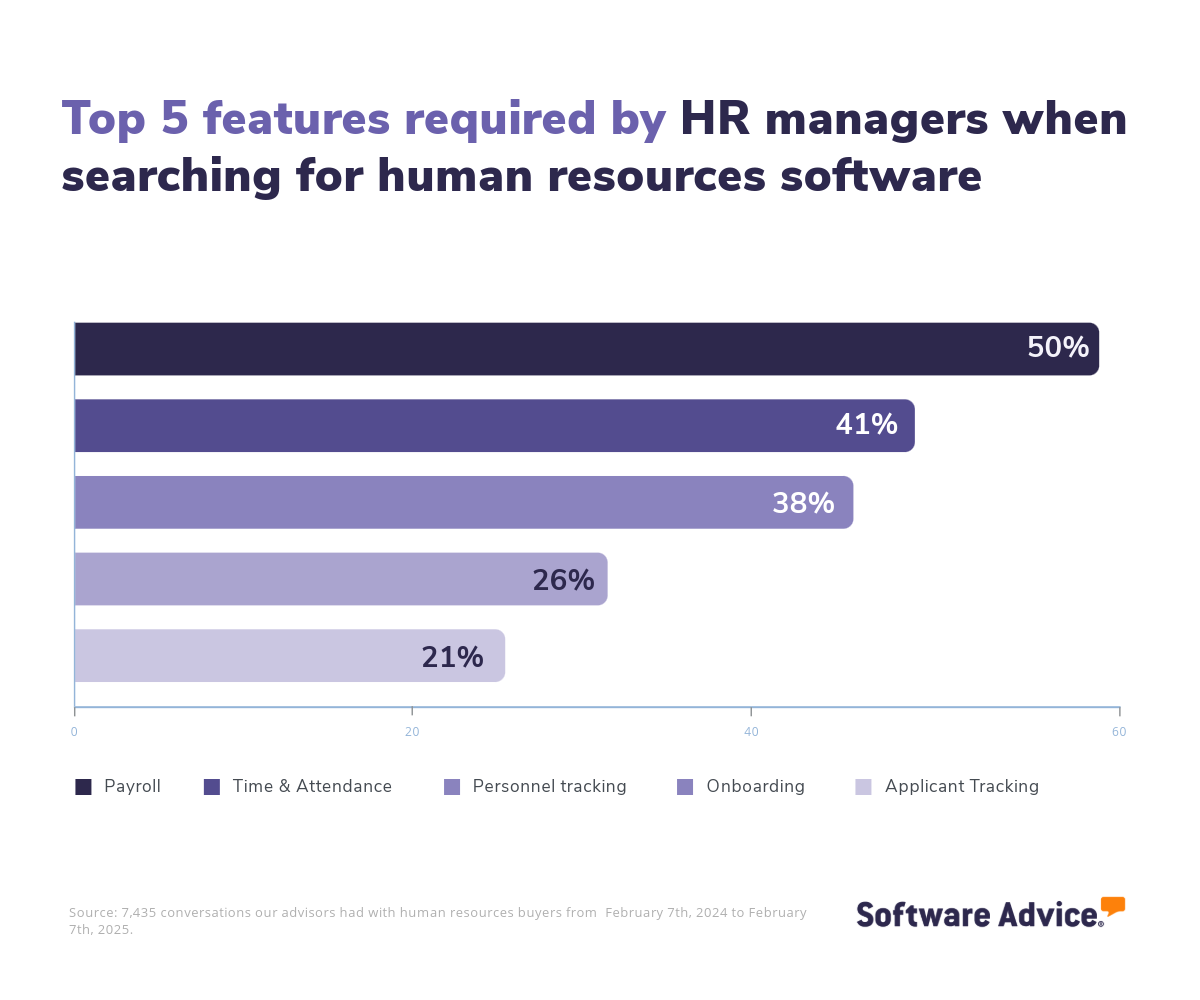
Most ATS products on the market are priced on a per-month basis, and entry-level pricing plans average $117 per month for up to nine users, while mid-tier plans can cost $1,999 per month and can include from 10 to 99 users. [4]
First-time buyers should start their evaluation by considering their budget, the number of users, the volume of job applications, and necessary integrations. Engage with key stakeholders to compile a list of crucial questions to assess systems based on your requirements, such as:
How does the software's workflow automation enhance and streamline your recruitment processes?
To what extent can you customize candidate profiles and application forms to fit your unique hiring needs?
How well does the system align with and support your overall recruiting strategy?
Can the system seamlessly integrate with the existing tools and platforms your business currently uses in its recruitment efforts?
With so many vendors available, selecting the right ATS can be a challenging task. In this guide, you’ll learn about the features and benefits of ATS software and receive step-by-step guidance on choosing the right solution for your business. You can also reach out to schedule a consultation with any of our experienced ATS advisors.
What is an applicant tracking system?
Applicant tracking software (ATS) streamlines the recruitment process by centralizing the management of job applicants. It provides HR professionals and recruiters with a platform to organize, sort, and evaluate candidates efficiently, featuring capabilities such as resume parsing, candidate tracking, and job posting.
The main objective of an ATS is to improve hiring efficiency by automating repetitive tasks and offering insights for better hiring. It allows users to customize workflows, integrate with other HR tools, and enhance collaboration among hiring teams, ensuring a seamless recruitment process.
Key features of applicant tracking systems
When comparing ATS products to select the best system for your business, it's important to know what features you can expect to see. Some features, like candidate tracking, candidate profiles, job posting, and candidate sourcing, are core features that will be available in every ATS. Other features, such as application management, resume storage, interview scheduling, and workflow management, are commonly offered but may not come as standard with every vendor. Here’s a handy comparison to keep in mind:
Core ATS features
Candidate profiles | Record candidate information such as professional qualifications, experiences, skills, and attributes. 91% of verified reviewers rate this feature as critical or highly important. |
Candidate tracking | Record candidate interactions, notes, and developments. 94% rate this feature as critical or highly important. |
Job posting | Post, track, and manage open jobs on multiple channels, such as job boards and company career sites. 88% rate this feature as critical or highly important. |
Candidate sourcing | Proactively search for potential hires to fill current and future job openings and build a talent pipeline. |
Common ATS features
Application management | Track, manage, and store the applications of potential future hires. 89% of reviewers rate this feature as critical or highly important. |
Resume storage | Upload and store resumes. 83% rate this feature as critical or highly important. |
Interviews scheduling | Plan, organize, and set up the dates, times, and locations of interviews. 78% rate this feature as critical or highly important. |
Job management | Manage and track all job information and associated tasks. 77% rate this feature as critical or highly important. |
Background screening | Research and validate a candidate’s criminal, educational, job, or financial record. |
Benefits and competitive advantages of using an ATS
Our analysis of over 6,600 user reviews highlights that recruitment management, candidate tracking, and hiring management are the top-rated benefits of applicant tracking software. These features directly address the core needs of recruitment by boosting the efficiency of the hiring process, fostering better collaboration among hiring teams, optimizing the use of time and resources, and providing a clear, organized view of candidate progress.
Streamlined recruitment management: It automates candidate tracking, communication, and workflow management. This, in turn, improves efficiency and engagement with candidates. Additionally, ATS platforms provide analytics and reporting tools, offering insights into recruitment metrics to support data-driven decision-making and optimize hiring strategies.
Efficient candidate tracking: ATS tools optimize the hiring process by providing a platform for managing and tracking applicants throughout the recruitment cycle. This feature centralizes candidate information, facilitating easy navigation and updates, and supports seamless communication.
In fact, Jenn Tardy indicates the importance of candidate tracking in ensuring that qualified applicants are not lost in the recruitment process: “One of the biggest challenges that I used to experience as a recruiter is when you do have a really strong employment brand and you get tons of resumes coming in, how do you really give job seekers a fair chance without making them seem like they're going into this black hole where they never hear anything back.” [2] That is why a candidate tracking feature is key in an ATS.
Improved hiring management: It supports the hiring process by providing customizable workflows and automation tools. This feature facilitates collaboration among hiring teams, and offers analytics for informed decision-making. By simplifying candidate management and reducing manual tasks, it helps companies deliver a smooth and effective hiring experience, which leads to higher quality hires.
How to choose the best ATS for your business
Step 1: Define your requirements
Start by identifying your specific requirements, such as the number of applications you receive and the intricacy of your recruitment processes. These needs will guide you in finding a system that matches your current hiring practices and supports your future recruitment objectives.
In addition, take into account the software's features, your budget, the extent of training needed, and any data migrations and integrations required. A frequently overlooked implementation cost is transferring data from existing systems like your HRIS or talent management suite to your preferred ATS tool.
What is the cost of an applicant tracking system?
The cost of ATS software can be challenging to generalize because it depends on factors that vary by buyer, such as the number of users, the specific features needed, and the volume of candidates processed.
On average, an entry-level subscription costs $177 and supports up to nine users. The mid-tier subscription price is around $1,999 and can include from 10 to 99 users. Pricing for high-end plans can average $2,822 for 100 or more users.
Be aware of potential drawbacks
While implementing an ATS can significantly improve your recruitment process, there are some potential challenges that can be mitigated with proper planning. Here are some key considerations:
Initial setup and cost: Implementing an ATS can involve a considerable upfront investment of time and money, which may be daunting for smaller businesses. Without careful planning, the setup process can often lead to delays and increased costs.
Complexity and user adoption: Some ATS solutions can be complex and overwhelming for new users, especially in smaller businesses without dedicated HR or IT support. Ensuring that all team members are comfortable using the system is crucial. Otherwise, the lack of an intuitive design or adequate training can lead to underutilization and inefficiencies, the exact opposite of what you hope to achieve by adopting an ATS in the first place.
Customization and integration challenges: Some ATS platforms might lack the required customization to align with specific business processes, resulting in operational shortcomings. Furthermore, integrating the ATS with existing HR or recruitment tools can be complex, potentially creating data silos and necessitating manual data entry, which again hampers the effectiveness the software is intended to deliver.
Over-reliance: Depending too heavily on an ATS can reduce a team's flexibility and adaptability. Automated processes might struggle with situations outside the system's workflows, diminishing problem-solving skills and making it hard to adapt to unexpected changes or opportunities.
While ATS platforms offer tools for candidate tracking, communication, and workflow management, it cannot independently make strategic hiring decisions or manage team dynamics. Effective recruitment still requires human oversight, judgment, and intervention to navigate complex situations.
Consider these integrations for your ATS
Applicant tracking systems are commonly integrated with HR software, recruiting software, and background check services, especially in environments where streamlined recruitment processes are crucial. For example, an ATS can connect with HR software to help businesses have a smooth transition from candidate to employee, while recruiting software integration supports candidate sourcing and management. Background check software integration allows the verification of candidate credentials. Combined, these integrations improve efficiency, minimize errors, and ensure a cohesive and effective hiring process.
Step 2: Make a shortlist of applicant tracking software
With the vast array of ATS software options available, choosing the best one for your business can be daunting; however, with the right resources and support, the process can become significantly more manageable.
Get qualified help from an advisor
At Software Advice, our advisors have extensive experience assisting HR managers in finding solutions that fit their specific needs and budgets. If you're seeking guidance, you can chat online with an advisor or arrange a phone call. Within minutes, your advisor will help you create a shortlist of options that meet your requirements.
To help you after your free consultation, check out After Your Advisor Call: 4 Tips To Keep Your Software Purchase on Track.
Explore our list of project management FrontRunners
If you’re not ready to speak to an advisor just yet, you can also start compiling your shortlist of ATS with our FrontRunners report. Only products that earn top user ratings make this list. You can also check out our full methodology description for more details on how the report is compiled.
In addition, you can download a free comparison chart via The Ultimate Software Vendor Evaluation Guide. This guide and comparison chart will help you compare software evaluation criteria for each prospective vendor by tracking functionalities, training and support offerings, costs, and deployment options.
Step 3: Pick your best option
After refining your shortlist, the next step is to participate in vendor demos. These sessions provide an opportunity to explore features and ask questions, aiding in making a well-informed investment decision. Bear in mind that thorough preparation is crucial to fully benefit from these demos.
Preparing for vendor demos
Consider asking vendors the following questions during demos:
How customizable is the ATS? Can it fit our specific recruitment workflows and processes?
Customization ensures that the ATS can be tailored to your unique recruitment needs, allowing for seamless integration into your existing processes and enhancing overall efficiency.
What integrations are available with our current HR systems, job boards, and background check services?
Understanding integration capabilities is crucial for maintaining a cohesive tech environment, reducing manual data entry, and ensuring smooth and accurate data flow between systems.
Can you provide details on the training and support available post-implementation to ensure smooth adoption by our team?
Comprehensive training and support are essential for equipping your team with the skills needed to effectively use the ATS. This helps minimize disruptions and promotes user acceptance.
What reporting and analytics capabilities does the ATS offer to help us track recruitment metrics and make data-driven decisions?
Robust reporting and analytics are vital for monitoring recruitment performance, enabling data-driven decisions that can optimize hiring strategies and improve recruitment outcomes.
Step 4: Successful implementation of the new ATS
After selecting and signing a contract for a new ATS, the next step is the implementation process. Whether you’re transitioning from another ATS or moving away from spreadsheets, here are some key considerations to keep in mind:
Establish clear change management communication: Develop a communication plan detailing the implementation process, benefits, and workflow changes. Ensure all team members are informed about important dates, training sessions, and milestones. Transparent communication minimizes resistance and prepares the team for a smoother transition.
Provide training and change support: Organize hands-on training sessions for all users, covering both basic and advanced features that enhance efficiency. Clearly explain how the tool will affect workflows and set expectations for its use. Continuous support, including Q&A sessions, can facilitate adoption and mitigate resistance.
Start with a pilot project: Begin by implementing the ATS on a small-scale project to evaluate its performance and make necessary adjustments before a full rollout. Use this phase to gather feedback, address any issues, and refine your change management strategy. Highlighting successes and demonstrating improvements will encourage wider adoption across teams.
For more details on how to ensure a smooth transition, check out our guide, 5 Critical Steps to a Successful Software Implementation Plan.
Software related to ATS
Depending on the applicant tracking system you select, you might need to supplement certain features with additional software to support tasks like advanced candidate assessment, onboarding, or for specialized recruitment needs. Some types of software that are closely related to applicant tracking systems, but may or may not be included in your ATS, include:
Human resources software: Often referred to as HR systems or human resource management systems (HRMS), these tools are designed to help organizations manage their human capital. They allow HR teams to oversee various essential functions, such as onboarding, employee benefits, attendance, payroll, and more.
Performance management system software: Streamlines the process of evaluating employee performance, establishing new goals, and creating personalized development plans.
Talent management solutions: Allows HR professionals to manage the entire employee lifecycle, from sourcing and hiring to management and development, with features for applicant tracking, performance management, and more.
Job board software: Assists companies in promoting available positions both internally and externally. It can function as a standalone application or be integrated into the company's existing website.
Recruiting software: Extends beyond applicant tracking needs to help recruiters manage job descriptions and searches, improve the candidate experience, perform background checks, conduct social recruiting, and more.
Video interviewing software: Simplifies the recruitment process by removing the necessity for numerous in-person interviews by enabling seamless video interviews. Interviewers can also record these conversations for further assessment.
Onboarding software: Helps businesses automate processes to turn new hires into full-fledged, productive employees.
Reference check software: Simplifies and automates the process of soliciting, gathering, and verifying job references.
Staffing agency software: Specializes in helping external recruiting and staffing agencies better manage clients, external career sites, and quickly fill roles with high-quality talent.
More resources for your ATS journey
A Guide to Applicant Tracking Software Pricing Models
5 Key Applicant Tracking Software Features And Top Products That Offer Them
HRIS vs. HRMS vs. HCM: What’s the difference?
About our contributors
Author
Bruno Peláez is a senior content analyst at Software Advice, covering the B2B software industry, with a current focus on the human resources and finance and accounting industries. His Software Advice research has been featured in various Spanish-speaking publications including El Economista (Mexico), Forbes México (Mexico), El Universal (Mexico), El Financiero (Mexico) and El Periódico (Spain), among others.
Bruno’s research and analysis is informed by more than 300,000 authentic user reviews on Software Advice and over 35,000 interactions between Software Advice software advisors and accounting or HR software buyers. Bruno also regularly analyzes market sentiment by conducting surveys of HR leaders and practitioners, as well as leaders in the finance and accounting space, so he can provide the most up-to-date and helpful information to small and midsize businesses purchasing software or services.
Bruno has been writing about consumer technology for almost two decades. He has a master's degree in digital arts, as well as professional experience in video production.
Editor
Mehar Luthra is a team lead at Software Advice and specializes in editing reports that cover the latest trends affecting small businesses. With nearly a decade of experience, she has edited a multitude of research articles, top-rated software reports, and thought leadership articles for diverse markets such as Brazil, Japan, Canada, France, Australia, and India. She finds it particularly rewarding to produce content that provides small-business owners with practical tips and helpful advice on topics such as the digitalisation of small businesses, eCommerce trends, and HR developments.
Armed with a double bachelor’s in law (LL.B.) and business economics from Delhi University, she won a full scholarship to study for a master’s in creative writing at the National University of Ireland, Galway. In addition, she has written blog articles spanning a variety of topics such as fiction and non-fiction books, mental health and anxiety, the latest restaurants, and more. Her articles have been featured in Ireland’s national magazine The Village, among other publications. A die-hard journaling fan, she enjoys watching psychological thrillers, reading fiction books, and drinking iced coffee (even in the winter).
Contributor
Jenn Tardy, founder and CEO of Jennifer Tardy Consulting, specializes in diversity recruiting, employee retention, and career coaching with over 14 years of experience. She has partnered with top organizations like SHRM and Harvard University. Named a 2020 LinkedIn Top Voice, Jenn is on a mission to universalize her Lived Experience Intelligence™ framework and normalize diversity recruiting practices to help organizations build more inclusive, equitable workplaces.
Sources
Software Advice advisor call notes: Findings are based on data from telephonic conversations that Software Advice’s advisor team had with small and midsize businesses seeking human resources tools. For this report, we analyzed phone interactions from January 31st, 2024, to January 31st, 2025. Read the complete methodology.
Jenn Tardy, LinkedIn.
Software Advice reviews data: Software Advice reviews are collected from verified users for individual software products. For this report, we analyzed reviews from the past year as of the production date. Read the complete methodology.
Only products with publicly available pricing information and qualified software products within the category are included in our pricing analyses. We summarize publicly available pricing sources, including vendor websites, beginning with the lowest monthly pricing (not considering annual discounts) for packages that include the core functionality for the software category. We also list pricing for more advanced packages (per user, when available) that include these core software feature(s). Individual software buyers’ specific feature needs may differ, and final pricing will vary.
Applicant Tracking FAQs
- What is the most used applicant tracking system?
Out of the most popular applicant tracking products, Lever has the highest rating on Software Advice.
- What is the applicant tracking system?
An applicant tracking system (ATS) is software designed to streamline the recruitment process by organizing, tracking, and managing job applications. It automates tasks like resume parsing, candidate tracking, and job posting, supporting efficiency and improving the candidate experience. ATS platforms can integrate with other HR tools and offer analytics for data-driven decisions.
- Are there different types of ATS?
Yes, these are some different types of ATS: 1) Standalone ATS: Focuses solely on recruitment management. 2) Integrated ATS: Part of a larger HRMS or HCM suite for comprehensive HR solutions. 3) Cloud-based ATS: Offers flexibility and accessibility via the internet. 4) On-premise ATS: Installed locally, offering more control but requiring dedicated IT resources. 5) Industry-specific ATS: Tailored for specific industries like healthcare or retail. 6) Enterprise ATS: Designed for large organizations with complex recruitment needs. 7) Small business ATS: Simplified for small and midsized businesses.
- What are the disadvantages of applicant tracking systems?
Applicant tracking systems (ATS) bring a lot of value but have some disadvantages that can impact the hiring process. They may over-filter resumes, excluding qualified candidates if their resumes lack specific keywords or formats. Further, integration with existing HR systems can be complex, and automated screening might perpetuate biases present in the input data. Additionally, ATS tools can sometimes be difficult to set up and use, requiring significant training and support.
- Can ATS read PDF?
An ATS tools can read PDFs if they are text-based, but cannot read image-based PDFs. For the PDF to be processed by the ATS, it needs simple formatting and standard fonts like Arial or Times New Roman. Complex layouts and graphics may not be interpreted correctly.
- Do all companies use applicant tracking system?
No, not all companies use an applicant tracking system (ATS). While ATS platforms are common among medium to large organizations for streamlining recruitment processes, smaller companies may rely on manual methods or simpler digital tools due to budget constraints or less complex hiring needs.