


Best Expense Report Software of 2026
Updated February 18, 2026 at 9:04 AM

Written by Amita Jain
Senior Content Writer

Edited by Mehar Luthra
Team Lead, Content

Reviewed by Bryan Dengler
Senior Advisor

Talk with us for a free 15-min consultation
Expert advisors like Jacqueline, who have helped 1,000+ companies, can find the right software for your needs.
- All Software
- Software Advice FrontRunners
- Popular Comparisons
- Buyer's Guide
- Frequently Asked Questions
Expense reporting software helps businesses track, approve, and reimburse employee expenses efficiently. Navigating 300 products, each built for different workflows, team sizes, and compliance needs, can be overwhelming. To help you narrow it down, I worked with our expense reporting software advisors to curate a list of recommended productsi and a list of the expense reporting software Frontrunners based on user reviews. For further information, read my expense reporting software buyer's guide.
Expense Report Software
Sort by
Reviews: Sorts listings by the number of user reviews we have published, greatest to least.
Average Rating: Sorts listings by overall star rating based on user reviews, highest to lowest.
Alphabetically (A-Z): Sorts listings by product name from A to Z.

Sage Intacct operates within the Sage Business Cloud portfolio as a comprehensive cloud-based financial management software, exp...Read more about Sage Intacct


Sage Intacct's Best Rated Features
See All
Sage Intacct's Worst Rated Features
See All

Emburse Expense Professional is an expense management platform designed to simplify expense reporting while addressing organizat...Read more about Emburse Expense Professional


Emburse Expense Professional's Best Rated Features
See All
Emburse Expense Professional's Worst Rated Features
See All

FreshBooks is a web-based accounting platform designed for small businesses across industries such as marketing, legal services,...Read more about FreshBooks

FreshBooks's Best Rated Features
See All
FreshBooks's Worst Rated Features
See All

Rydoo is a business expense management solution. It automates expense flows and reimbursement cycles and enables expense control...Read more about Rydoo

Rydoo's Best Rated Features
See All
Rydoo's Worst Rated Features
See All

Tradogram is a cloud-based procurement management solution. Users can choose from a list of integrated modules such as supplier ...Read more about Tradogram


Tradogram's Best Rated Features
See All
Tradogram's Worst Rated Features
See All
Software Advice FrontRunners 2026

(4595)

(8380)

(216)

(3269)

(1718)

(4504)

(2236)

(1185)

(1105)

(257)
Best for Usability

Rippling

Rippling is the highest rated for its usability out of the most popular tools, based on our analysis of Expense Report products with the most market demand.
Rippling is best suited for SMBs seeking top-tier usability in HR and payroll management. Our reviewers say its intuitive interface and centralized platform streamline onboarding, payroll, and employee management, saving time and reducing manual work.
- Reviewers Perspective
"I do like the one stop shop function of how we use Rippling for everything from payroll fuctions, to IT management, to app management and user enrollment in the various tech platforms we utilize."
JLJames Line
Director of Finance
Used for 2+ years
We analyzed 730 verified user reviews for Rippling to find out what actual users really think.
Payroll
Rippling automates payroll, HR, and benefits management in one platform. Teams review pay statements, manage time off, and access tax documents efficiently, reducing manual errors.Employee Management
Employee records, compliance, and personal information are kept in one place. Onboarding, leave management, and benefits access are streamlined for administrators and employees.Navigation
Users quickly locate paystubs, benefits, and HR tools with Rippling’s clean layout and search functionality. Efficient navigation reduces time spent searching for information. - Key FeaturesRippling's scoreCategory average
Expense Claims
5.04.59 category average
Expense Tracking
4.684.62 category average
Receipt Management
4.364.58 category average
- Screenshots


Best for Quick Implementation


In our analysis of Expense Report products with the most market demand, QuickBooks Online is the most requested by users for quick implementation out of the most popular tools.
QuickBooks Online is ideal for SMBs needing rapid implementation of accounting and invoicing solutions. Our reviewers point out that setup is straightforward, automation features save time, and real-time collaboration with accountants is seamless.
- Reviewers Perspective
"QuickBooks Online offers features that enables me to streamline processes such as invoicing, time tracking on projects and billing."
PMPatrick Muruthi
Chief Accountant
Used for 2+ years
We analyzed 787 verified user reviews for QuickBooks Online to find out what actual users really think.
Ease of Use
QuickBooks Online is easy to set up and operate. Businesses handle daily financial activities efficiently, with helpful tutorials and a design that reduces administrative workload.Customer Support
Support is available through multiple channels and helpful for basic issues. However, slow response times and inconsistent answers can make resolving complex problems challenging.Invoicing
QuickBooks Online lets users create, customize, and send invoices quickly. Automation features for recurring invoices and payment reminders help manage cash flow and integrate with other financial tasks. - Key FeaturesQuickBooks Online's scoreCategory average
Expense Claims
4.274.59 category average
Expense Tracking
4.464.62 category average
Receipt Management
4.484.58 category average
- Screenshots


Most Used By Non-Profit Organization Management

Ramp

According to our user reviews, Ramp is the most requested by users in non-profit organization management out of the most popular tools.
Ramp is most used by non-profit organization management teams looking for efficient spend and expense controls. Our reviewers say its automated receipt matching, real-time notifications, and easy card management simplify workflows and improve transparency.
- Reviewers Perspective
"Fantastic customer support, amazing solutions that accelerate accounting processes, providing invaluable insights into our expenses / payables so we can best forecast our expenses and create value in what we actually do."
HCHarrison Caplan
CEO
Used for 1-2 years
We analyzed 170 verified user reviews for Ramp to find out what actual users really think.
Expense Management
Ramp enables teams to track, organize, and analyze expenses, supporting better control over company spending and budgeting. Real-time updates and customizable settings simplify expense tracking and provide transparency.Credit Card Management
Ramp manages company credit cards, issues new cards rapidly, and sets spending limits for employees. Automatic receipt matching and real-time notifications streamline reconciliation and compliance.Receipt Upload
Users upload receipts via email, text, or mobile app. Instant notifications and automatic matching reduce administrative work, keeping records accurate and minimizing lost documentation. - Key FeaturesRamp's scoreCategory average
Expense Claims
4.864.59 category average
Expense Tracking
4.874.62 category average
Receipt Management
4.964.58 category average
- Screenshots


Highly Rated for Automation

Xero

According to our user reviews, Xero is the highest rated for automation out of the most popular tools.
Xero is highly rated for automation and is well-suited to SMBs wanting to streamline repetitive accounting tasks. Our reviewers say its automation of invoicing, bank reconciliation, and expense tracking saves significant time and improves workflow efficiency.
- Reviewers Perspective
"If fully utilised Xero is a very powerful business tool that can encapsulate everything financial - from integrated stock systems and product costing, to sales tracking and customer management."
MWMatt White
Founder and Director
Used for 1-2 years
We analyzed 768 verified user reviews for Xero to find out what actual users really think.
Accounting
Automating accounts payable, receivables, and general ledger management, Xero’s cloud-based platform streamlines financial operations for small businesses. Teams collaborate in real time, making accounting accessible from anywhere.Invoicing
Managing invoicing is simplified with Xero’s automation of recurring invoices, customizable templates, and real-time payment tracking. Businesses use the clean dashboard to monitor outstanding invoices and cash flow, sending professional invoices directly from the mobile app.Ease of Use
Daily financial tasks are made straightforward by Xero’s clear layout and simple interface. Even those without technical or accounting experience quickly adapt, minimizing complexity and enabling efficient onboarding. - Key FeaturesXero's scoreCategory average
Expense Claims
4.414.59 category average
Expense Tracking
4.414.62 category average
Receipt Management
4.564.58 category average
- Screenshots


Best for User Interface

Wave

Wave is the highest rated for its user interface out of the most popular tools.
Wave is best for SMBs prioritizing a user-friendly interface for accounting and invoicing. Our reviewers say its clean design, customizable invoices, and easy bank integration make managing finances and generating reports straightforward and accessible.
- Reviewers Perspective
"I have been using Wave for our small business bookkeeping for the past five or six years and love the ability to connect my bank accounts and credit cards and run weekly, monthly, and yearly reports."
BCBrigitte Chapman
Co-Owner
Used for 2+ years
We analyzed 720 verified user reviews for Wave to find out what actual users really think.
Accounting
Wave offers a comprehensive suite of accounting tools, automating repetitive tasks and providing real-time reporting. Small businesses and startups use free core features for expense tracking and collaboration.Small Business Use
Wave caters to small businesses, freelancers, and startups by providing essential accounting, invoicing, and expense tracking tools without a subscription fee. Businesses manage finances and generate reports affordably.Ease of Use
Wave’s design and setup process are accessible for users with minimal accounting experience. Teams quickly learn to use the platform for daily financial tasks, saving time and reducing stress. - Key FeaturesWave's scoreCategory average
Expense Tracking
4.414.62 category average
Receipt Management
4.464.58 category average
- Screenshots


Best for Mobile app
FreshBooks

FreshBooks is the most requested by users for mobile app out of the most popular tools, based on our analysis of Expense Report products with the most market demand.
FreshBooks is best for SMBs and freelancers who rely on a robust mobile app for invoicing and expense tracking. Our reviewers say the mobile app is intuitive, supports time tracking, and enables quick invoice creation and payment management on the go.
- Reviewers Perspective
"FreshBooks has been a key product in our business helping us to manage our finances from sending our invoices for collecting payments to budgeting and controlling how we spend our financial resources."
JMJaime Morgan
Outside Sales
Used for 2+ years
We analyzed 838 verified user reviews for FreshBooks to find out what actual users really think.
Invoicing
FreshBooks streamlines invoicing with customizable templates, recurring invoices, and real-time payment tracking. Businesses convert estimates to invoices, track billable hours, and accept online payments efficiently.Ease of Use
Daily business management is simplified by FreshBooks’ intuitive interface and helpful tutorials. Even beginners quickly start tracking expenses and entering time, improving workflow across devices.Accounting
FreshBooks handles expense tracking, general ledger management, and basic financial reporting. Small businesses and freelancers use automation tools to reduce errors and keep records organized. - Key FeaturesFreshBooks's scoreCategory average
Expense Claims
4.434.59 category average
Expense Tracking
4.524.62 category average
Receipt Management
4.554.58 category average
- Screenshots


Highly Rated for Quick Adoption/Easy Adoption

SAP Concur

In our analysis of Expense Report products with the most market demand, SAP Concur is the highest rated for quick adoption out of the most popular tools.
SAP Concur is highly rated for quick adoption and is ideal for organizations seeking easy, mobile-friendly expense management. Our reviewers point out that onboarding is simple, and the mobile app allows for fast receipt capture and streamlined expense reporting.
- Reviewers Perspective
"The softwares ability to sync with Credit Card providers and receipt tracking has made business travelers expense report creation and submittal much easier."
MCMichael Comer
Sr. Director Professional Services
Used for 2+ years
We analyzed 789 verified user reviews for SAP Concur to find out what actual users really think.
Expense Management
Teams organize, track, and submit expenses using SAP Concur’s automation tools. Businesses centralize receipts and expenses, streamline travel booking, and monitor approval/payment status in real time.Receipt Upload
Users capture and attach receipts via mobile, email, or desktop. Automated scanning and classification speed up reporting, though occasional glitches and file limitations require manual corrections.Ease of Use
Processing expenses is straightforward with SAP Concur’s intuitive interface. Organizations keep tasks organized and reduce paperwork, improving productivity with flexible, accessible tools. - Key FeaturesSAP Concur's scoreCategory average
Expense Claims
4.624.59 category average
Expense Tracking
4.564.62 category average
Receipt Management
4.544.58 category average
- Screenshots


Highly Rated for Integrations

Zoho Expense

Zoho Expense is the highest rated for integrations out of the most popular tools, based on our analysis of Expense Report products with the most market demand.
Zoho Expense is highly rated for integrations and suits businesses needing seamless connections with other accounting tools. Our reviewers say integrations with platforms like QuickBooks and robust receipt scanning features save time and reduce manual entry.
- Reviewers Perspective
"The platform is also highly customizable, with features like approval workflows, budget tracking, and detailed reporting to suit various business needs."
CMCátia Moura
ServiceNow Consultant
Used for 6-12 months
We analyzed 567 verified user reviews for Zoho Expense to find out what actual users really think.
Expense Management
Zoho Expense tracks, categorizes, and reports expenses with automated data capture and customizable reports. Businesses use approval workflows and real-time tracking to reduce manual work and improve accuracy.Receipt Scanning
Teams capture, upload, and organize receipts quickly using autoscan and mobile photo features. Accurate extraction reduces manual entry and supports audit and tax requirements.Ease of Use
Navigation and task completion are simple for both new and experienced users. Minimal training is needed, and help resources support efficient expense management without complexity. - Key FeaturesZoho Expense's scoreCategory average
Expense Claims
4.624.59 category average
Expense Tracking
4.724.62 category average
Receipt Management
4.694.58 category average
- Screenshots


Most Rated for SMBs

webexpenses

Of the products listed on our FrontRunners report, webexpenses is the most requested by small businesses out of the most popular tools.
webexpenses is most rated for SMBs looking for efficient expense management and streamlined claims. Our reviewers say its mobile app, automated receipt capture, and customizable approval workflows improve efficiency and reduce administrative burden.
- Reviewers Perspective
"Overall, Webexpenses delivers a user-friendly, efficient system that simplifies expense management and saves valuable time for both employees and finance teams."
CCCiska Ciska
GM People and Culture
Used for 1-2 years
We analyzed 643 verified user reviews for webexpenses to find out what actual users really think.
Expense Management
Webexpenses organizes expenses, captures receipts efficiently, and automates categorization. Businesses track reimbursements, maintain audit trails, and reduce manual errors with customizable workflows and reporting tools.Ease of Use
Expense reporting is simplified by Webexpenses’ intuitive navigation and accessible web/mobile versions. Minimal training is needed, making it easy for users of all technical backgrounds to keep records organized.Expense Claims
Submitting, tracking, and approving claims is streamlined. Real-time policy checks, customizable approval flows, and grouping claims help reduce errors and ensure compliance, with live updates for multiple projects. - Key Featureswebexpenses's scoreCategory average
Expense Claims
4.554.59 category average
Expense Tracking
4.594.62 category average
Receipt Management
4.374.58 category average
- Screenshots


Most Rated for Enterprise

Teampay

Teampay is the most requested by enterprises out of the most popular tools, based on our analysis of Expense Report products with the most market demand.
Teampay is most rated for enterprise organizations seeking streamlined spend management and approval workflows. Our reviewers say Slack integration, instant virtual card issuance, and automated approval processes make expense management efficient and user-friendly.
- Reviewers Perspective
"The Slack prompts made it simple to submit a request for a card to be issued, and I really like that Teampay also shows me account updates—like when a transaction is declined—right in Slack."
IMInga Mamut
CRM Manager
Used for 6-12 months
We analyzed 193 verified user reviews for Teampay to find out what actual users really think.
Ease of Use
Teampay’s seamless experience across desktop and mobile lets users complete tasks and access information quickly. Businesses benefit from fast onboarding and easy navigation for daily operations.Approval Process
Organizations use Teampay to request, track, and manage approvals efficiently. Automated workflows and transparent status updates streamline purchase requests and internal communication.Receipt Upload
Teams attach receipts immediately after purchases using Slack integration. Transaction visibility aids reconciliation, though unclear upload steps and frequent notifications may require attention. - Key FeaturesTeampay's scoreCategory average
Expense Claims
3.04.59 category average
Expense Tracking
4.474.62 category average
Receipt Management
4.564.58 category average
- Screenshots


Sage Intacct

- Reviewers Perspective
"We have used almost 7 years and it has served us well in all aspects of accounting, payables, cash management, General Ledger and Reporting."
SFSteve Fooskas
Accounting Manager
Used for 2+ years
We analyzed 365 verified user reviews for Sage Intacct to find out what actual users really think.
Accounting
Finance teams manage accounting records, general ledger, and daily operations across entities. Automation, audit trails, and robust controls support compliance and streamline month-end processes.Ease of Use
Teams of varying experience levels navigate Sage Intacct’s logical interface for daily tasks and reporting. Training and adoption are straightforward, supporting efficient business management.Financial Reporting
Organizations analyze transactions, budgets, and performance with real-time, customizable reports. Automated statement generation and dimensional analysis support audits and data-driven decisions. - Key FeaturesSage Intacct's scoreCategory average
Expense Claims
3.174.59 category average
Expense Tracking
4.224.62 category average
Receipt Management
4.444.58 category average
- Screenshots


Payhawk

- Reviewers Perspective
"What I liked most about Payhawk is the ease of tracking company expenses in real time, as well as the integration with other accounting tools, which greatly streamlines administrative processes."
PEPablo Esparcia
Accountant
Used for 1-2 years
We analyzed 155 verified user reviews for Payhawk to find out what actual users really think.
Expense Management
Finance teams track company expenses in real time and automate workflows. Integration with accounting tools and customizable categories provide greater visibility and control over spending.Ease of Use
Organizations onboard new users quickly with Payhawk’s clear layout and user-friendly navigation. Both desktop and mobile platforms support efficient daily tasks without unnecessary complications.Customer Support
Teams resolve queries efficiently through responsive chat and messaging channels. Comprehensive guides and resources support troubleshooting, though some report occasional delays during urgent issues. - Key FeaturesPayhawk's scoreCategory average
Expense Claims
4.574.59 category average
Expense Tracking
4.464.62 category average
Receipt Management
4.474.58 category average
- Screenshots


Procurify

- Reviewers Perspective
"We've been using Procurify for nearly 5 years now, can it has completely transformed the way our organization manages purchasing and spend control."
SBSerena Barnett
Director of Accounting
Used for 2+ years
We analyzed 143 verified user reviews for Procurify to find out what actual users really think.
Purchase Order Management
Teams automate purchase order creation and approvals with Procurify. The platform supports real-time tracking and reconciliation, helping organizations maintain compliance and control spend across procurement activities.User Interface
Staff navigate Procurify’s interface with ease. The clean dashboard and straightforward design enable quick access to features, streamlining daily procurement tasks for companies of varying sizes.Customer Support
Managers reach Procurify’s support team through multiple channels for setup, troubleshooting, and ongoing guidance. Training resources and prompt responses help organizations resolve issues and adapt the platform to their needs. - Key FeaturesProcurify's scoreCategory average
Expense Claims
4.444.59 category average
Expense Tracking
4.654.62 category average
Receipt Management
4.674.58 category average
- Screenshots


Holded

- Reviewers Perspective
"The ease of being able to issue invoices, of sharing access with our consultancy, and of reconciling payments and collections with the different digital payment gateways that we use."
LRLuis Roig
Socio Director
Used for 2+ years
We analyzed 224 verified user reviews for Holded to find out what actual users really think.
Invoicing
Organizations automate invoice creation, recurring billing, and payment reminders. Financial data is centralized for better oversight, though some processes like numbering and folder organization can be challenging.Accounting
Teams manage all financial tasks in one platform with automation and secure data handling. Integration with other modules supports efficient reporting, expense tracking, and up-to-date records.Administrative Management
Businesses centralize operations, automate routine tasks, and improve team collaboration with shared real-time information. The platform supports project and employee management, though some areas could be enhanced. - Key FeaturesHolded's scoreCategory average
Expense Tracking
4.104.62 category average
Receipt Management
4.144.58 category average
- Screenshots


Navan

- Reviewers Perspective
"helps improve the optimization of expenses for each trip scheduled for each employee, its functions make the entire process of expenses, reservations, changes easier to carry out and better scheduled with the correct and clear information of everything to keep correct accounts."
SMSteven Mullings
system technique
Used for 1-2 years
We analyzed 161 verified user reviews for Navan to find out what actual users really think.
Expense Management
Finance teams book travel and submit related expenses in one platform. Receipt scanning, automated data extraction, and approval workflows support streamlined reimbursement and oversight.TripActions
Organizations use TripActions (Navan) to organize business travel within company policies. The platform saves time and keeps details organized for both individual and team bookings.Rewards
Travelers earn rewards for cost-effective choices, including gift cards and loyalty program integration. The program motivates users to maximize both personal and corporate benefits. - Key FeaturesNavan's scoreCategory average
- Screenshots


Elorus

- Reviewers Perspective
"It has streamlined my invoicing and expense tracking process, reduced the chance of accounting errors, and made my day-to-day financial management much easier."
ATAntonis Tsaknis
Owner
Used for 2+ years
We analyzed 239 verified user reviews for Elorus to find out what actual users really think.
Invoice Management
Users manage invoices with automation, secure payment links, and tracking from any location. Customizable templates and recurring billing support streamlined financial management, though some want more design flexibility.Ease of Use
Teams handle business tasks with Elorus’s straightforward navigation and simple layout. The platform’s organized structure and accessible features help keep company files tidy and efficiently administered.Tracking Expense
Businesses track expenses, manage invoicing, and monitor project time in one interface. Automated reporting and dashboards provide a clear overview of income, expenses, and profitability. - Key FeaturesElorus's scoreCategory average
Expense Tracking
4.784.62 category average
Receipt Management
4.604.58 category average
- Screenshots


FreeAgent

- Reviewers Perspective
"It has made my yearly accounts so much easier to finish on time with the direct contact with my accountant."
MLMick Lowe
Graphic designer
Used for 1-2 years
We analyzed 128 verified user reviews for FreeAgent to find out what actual users really think.
Invoicing
Businesses manage invoices, track payments, and automate reminders within a clear interface. Recurring invoices and payment reconciliation reduce administrative work and support project-based billing.Accounting
Teams use FreeAgent’s cloud-based system for remote access, report generation, and collaboration with accountants. The platform supports accurate records and simplifies year-end accounts for small businesses.Customer Support
Users access timely, knowledgeable support from real people, not bots. Comprehensive help resources and clear communication help resolve issues and maximize software benefits. - Key FeaturesFreeAgent's scoreCategory average
Expense Claims
5.04.59 category average
Expense Tracking
4.634.62 category average
Receipt Management
4.674.58 category average
- Screenshots


TravelBank

- Reviewers Perspective
"TravelBank provides a comprehensive platform combining travel booking, budget oversight, and expense reporting."
KMKilmer Morgan
Senior Director of Advertising
Used for 2+ years
We analyzed 183 verified user reviews for TravelBank to find out what actual users really think.
Expense Management
Organizations combine travel booking, budget oversight, and expense reporting in one platform. Digital receipt uploads and categorization streamline reimbursements and reduce paperwork.Receipt Upload
Employees capture and store receipts via mobile or desktop, matching them to transactions. This reduces reliance on paper and helps users stay organized while traveling.Flight Booking
Teams search, compare, and book flights efficiently. Users manage approvals and receive notifications, though some request more airline options and bundled booking features. - Key FeaturesTravelBank's scoreCategory average
Expense Claims
4.754.59 category average
Expense Tracking
4.754.62 category average
Receipt Management
4.754.58 category average
- Screenshots


Precoro

- Reviewers Perspective
"We intergrated with Quickbooks Online this year, and it has made out purchasing and AP more streamlined."
BBBill Bucco
Budget Director
Used for 2+ years
We analyzed 198 verified user reviews for Precoro to find out what actual users really think.
Purchase Order Management
Procurement teams manage purchase orders and related activities in one platform. Customizable fields, order tracking, and budget monitoring streamline purchasing and enhance transparency.Customer Support
Users receive attentive support throughout onboarding and daily use. The team resolves questions quickly, provides guidance, and communicates updates for ongoing improvements.Ease of Use
Organizations adopt Precoro with minimal training due to its intuitive dashboard and clear navigation. The platform’s design supports fast onboarding and immediate workflow improvements. - Key FeaturesPrecoro's scoreCategory average
Expense Claims
4.04.59 category average
Expense Tracking
4.784.62 category average
Receipt Management
4.534.58 category average
- Screenshots


Coupa

- Reviewers Perspective
"Coupa is a great management tool for purchase and order requests, it has saved 100s of man hours and streamlined the payment process"
TCTriston Campbell
Maintenance
Used for 1-2 years
We analyzed 92 verified user reviews for Coupa to find out what actual users really think.
Invoicing
Finance teams automate invoice matching, approval routing, and payment processing. Electronic submission and real-time tracking reduce manual errors and support supplier relationships.Expense Management
Users submit expense reports, track expenditures, and access approval workflows via mobile or desktop. Automated processes and comprehensive reporting enhance cost visibility and control.Approval Process
Organizations route purchase orders and expense requests to appropriate approvers. Mobile notifications and customizable chains help maintain oversight and save time on pending actions. - Key FeaturesCoupa's scoreCategory average
Expense Tracking
4.534.62 category average
Receipt Management
4.294.58 category average
- Screenshots


ExpensePoint

- Reviewers Perspective
"ExpensePoint automated tracking and reporting features have helped streamline our financial processes, making audits and compliance much easier, and it’s a great tool for businesses looking to automate expense management."
JWJames Winterman
Operations Manager
Used for 6-12 months
We analyzed 292 verified user reviews for ExpensePoint to find out what actual users really think.
Expense Management
Teams automate expense tracking and reporting with ExpensePoint, reducing manual work for both employees and accounting. Custom fields and detailed reports support audits and analysis, helping organizations maintain compliance and organize expenses by project or department.Receipt Management
Employees snap photos of receipts via mobile devices and email them directly to their receipt wallet. This process minimizes paperwork, speeds up expense reporting, and ensures easy access to documentation for audits and daily operations.Ease of Use
Staff navigate ExpensePoint with minimal clicks and a clear layout. The platform’s straightforward design extends to its mobile app, enabling efficient expense management for both new and experienced users on the go. - Key FeaturesExpensePoint's scoreCategory average
Expense Claims
4.834.59 category average
Expense Tracking
4.814.62 category average
Receipt Management
4.704.58 category average
- Screenshots


- Reviewers Perspective
"Its intuitive interface, secure cloud-based platform, and clear visibility into cash flow make it a practical choice for everyday accounting tasks. While customer support and mobile performance could be improved, and customization options are somewhat limited compared to premium competitors, Sage delivers solid value for money."
ALAlain Le Breton
IT
Used for 2+ years
We analyzed 331 verified user reviews for Sage Accounting to find out what actual users really think.
Accounting
Users handle everyday accounting tasks with Sage Accounting’s intuitive interface and secure cloud-based platform. Small businesses and beginners benefit from clear cash flow visibility, well-labeled reports, and an audit trail that supports efficient bookkeeping.Invoice Management
Teams generate and send professional invoices, track payments, and manage billing efficiently across devices. Recurring invoices and real-time tracking are valued, but customization and mobile app performance have limitations compared to other platforms.Setup
New users complete Sage Accounting setup with minimal technical expertise. Clear steps and video tutorials support straightforward installation, making deployment accessible for both beginners and experienced professionals. - Screenshots


Veryfi

- Reviewers Perspective
"I liked the data extraction feature, by using this i was able to extract the data from various receipts, bank statements and invoices easily."
ADAkshay Diwate
Product Marketing Manager
Used for 6-12 months
We analyzed 158 verified user reviews for Veryfi to find out what actual users really think.
Receipt Management
Businesses scan, digitize, and categorize receipts and invoices with machine learning-driven OCR. Accurate extraction of vendor names, dates, and amounts streamlines expense tracking and reconciliation.Integrations
Teams connect Veryfi with popular accounting platforms, banking feeds, and cloud storage. Direct posting of expenses and receipts simplifies reconciliation and reporting across multiple projects.Ease of Use
Users capture and manage receipts easily on mobile or desktop. The clean design and straightforward workflows help teams stay organized and save time on daily financial tasks. - Key FeaturesVeryfi's scoreCategory average
Expense Tracking
4.794.62 category average
Receipt Management
4.784.58 category average
- Screenshots


Perk

- Reviewers Perspective
"Travelperk makes finalizing traveling plans for our employees efficient, simple, and timely."
AGAshley Geneser
Accounting
Used for 6-12 months
We analyzed 361 verified user reviews for Perk to find out what actual users really think.
Travel Management
HR and finance teams centralize all aspects of business travel, including expenses, approvals, and trip details. Group travel, spend tracking, and booking within company policies save time and streamline planning.Ease of Use
Administrators and travelers navigate Perk’s intuitive interface with little training. The clear layout and reliable design reduce manual work, making travel management straightforward for all roles.Flight and Hotel Booking
Organizations compare and book flights and hotels in one place, using filters to align with policy. Bundled bookings and a wide selection improve efficiency, though some inventory gaps exist. - Key FeaturesPerk's scoreCategory average
Expense Claims
5.04.59 category average
Expense Tracking
4.554.62 category average
Receipt Management
5.04.58 category average
- Screenshots


- Reviewers Perspective
"The ability to hold multiple currencies, automate workflows, and integrate with accounting platforms like Xero makes it highly efficient for scaling businesses."
ATAlice Taylor Shrubsole
Associate Operations Manager
Used for 2+ years
We analyzed 49 verified user reviews for Revolut Business to find out what actual users really think.
Currency Exchange
Managing international payments is streamlined with Revolut Business. SMBs can hold and transfer funds in multiple currencies, reducing bank charges and simplifying cross-border vendor payments.Customer Support
Resolving account issues relies on Revolut’s chat feature. Businesses face slow replies and generic answers during peak times, making it challenging to address complex operational concerns quickly.Card and Account Management
Organizing finances is easier with Revolut’s customizable cards and instant transfers. SMBs can manage multiple currency accounts and virtual cards, supporting secure, fast financial workflows. - Key FeaturesRevolut Business's scoreCategory average
Expense Claims
3.504.59 category average
Expense Tracking
3.784.62 category average
Receipt Management
4.04.58 category average
- Screenshots


Methodology
The research for the best expense report software list was conducted in October 2025. We evaluated data (user reviews and demand signals) from the past 24 months as of the research date. Read the complete methodology.
Popular Expense Report Comparisons


Buyer's Guide
This detailed guide will help you find and buy the right expense management software for you and your business.
Last Updated on September 30, 2025Here's what we'll cover:
Benefits and competitive advantages of using expense reporting software
How to choose the best expense reporting software for your business
What you need to know about expense reporting software
Expense reporting software (also called expense management software) helps businesses automate the tracking, management, and reimbursement of out-of-pocket expenses like meals, mileage, and other purchases made by employees for business purposes. Of the more than 6,500 accounting software buyers our advisors talked to in the past two years, 14% requested software with expense management capabilities. [1] Requests most often came from buyers in industries like non-profits (25%), consulting (9%), manufacturing (8%), and construction (8%), where project or client-related expense tracking is critical to operations.
The expense reporting software market is huge, with over 300 different expense reporting software products on our site and more than 13,000 verified user reviews published in the past two years alone. You know you need expense reporting software, but how do you figure out which platform is the right one for you?
Cost will obviously be a major factor. Although high-end systems can cost upwards of $45 per user, per month and more, entry-level systems average around only $14 per user, per month. [2] Plus, many expense reporting software vendors also offer free versions of their products.
First-time expense reporting software buyers should keep their budget, number of employees, feature needs, and necessary integrations in mind when comparing their options. You should meet with other stakeholders to figure out answers to critical questions about your purchase, such as:
Do we want to track expenses by project, department, or client?
What kind of approval workflows do we need?
Can we integrate it with our accounting system?
Do we need mobile receipt capture capabilities for field employees?
What kind of expense reports do we need to generate?
What types of user training resources are provided?
Researching different products to find the right one can feel like a long and daunting task. That’s why, with help from our experienced expense management software advisors McKenzie Anderson and Bryan Dengler, this guide offers everything you need to know about buying expense reporting software so you can make a quick decision with confidence.
What is expense reporting software?
Tracking expenses is an essential task for every company, and expense report software automates the process of managing business expenses, from recording an expense claim by an employee and routing it through appropriate managers for approval to final reimbursements. Not only does digitizing this process save time, but it reduces errors caused by manual data entry.
While the nuances in a system vary by provider, the key steps typically include:
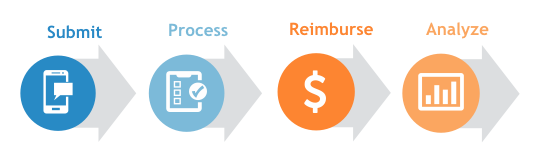
Submitting a claim. The software allows employees to input their expenses (for example, travel costs, meals, office supplies), attach copies of receipts, and send expense reports for management approval, all through a web or mobile app. It also includes the ability to automatically import expenses from personal and company credit cards, so no expenditures are overlooked.
The software then allows organizations to process expense reports. This includes customizing the approval workflows (like by setting spending limits per expense category or creating rules dictating overall spending overrides as per company expense policies) and automating the routing of filed claims through appropriate managers for approvals.
Once approved, funds are reimbursed to employees, often through direct deposit allowing for quick and easy fund transfers so compensation is available for immediate use.
The software also syncs this data automatically with accounting systems for accurate financial record-keeping and spending analysis. This brings in the ability to track spends by expense category, project, department, or vendor, providing insight into spending trends and potential areas for cost savings.
In short, expense reporting software replaces manual expense spreadsheets and paper receipts with an efficient, transparent digital process that improves oversight into where money is being spent and makes the moving of claims easier.
Essential features of expense reporting software
All expense reporting systems offer core features like receipt capture and expense categorization. Beyond this, systems can have varied features ranging from approval process control, mobile receipt upload, to time tracking.
To help, here are the expense reporting features that reviewers rate as the most important: [3]
Core expense report features
Expense tracking: Maintain a detailed log of all business expenses. 89% of reviewers say this is a critical or highly important feature.
Receipt management: Capture, store, and organize receipts electronically in a centralized portal. 87% rate this as a critical or highly important feature.
Highly rated common expense report features
Mobile receipt uploads: Scan and upload receipt pictures using a mobile device and store them to the central database. 82% of reviewers say this is a critical or highly important feature.
Spend control: Set allowances and ensure employees don't spend more than the allotted amounts. 80% say this is a critical or highly important feature.
Mobile access: Capture and submit expenses on the go via mobile devices. 79% say this is a critical or highly important feature.
Compliance management: Enforce spending rules by flagging out-of-policy expenses (e.g. over budget limits, missing required information) and send managers alerts if a submitted expense violates company policy to catch errors or frauds early. 74% say this is a critical or highly important feature.
Approval process control: Customize routing of expense reports for manager approval and automate multi-level approvals and notifications, ensuring every expense is reviewed properly. 67% rate this as a critical or highly important feature.
Our advisor McKenzie Anderson notes that you may want to check if a system allows syncing expenses from a personal credit card. “A common question I get from buyers is whether they can use their personal cards or if they’ll have to use a company card through the solution.” This is an important feature consideration, especially for small businesses that don’t issue corporate cards.
Benefits of using expense reporting software
Of the buyers who contacted us in the past two years looking for accounting software, including expense management tools, 37% were still using manual methods like pen and paper, spreadsheets, or no methods at all for their accounting needs.
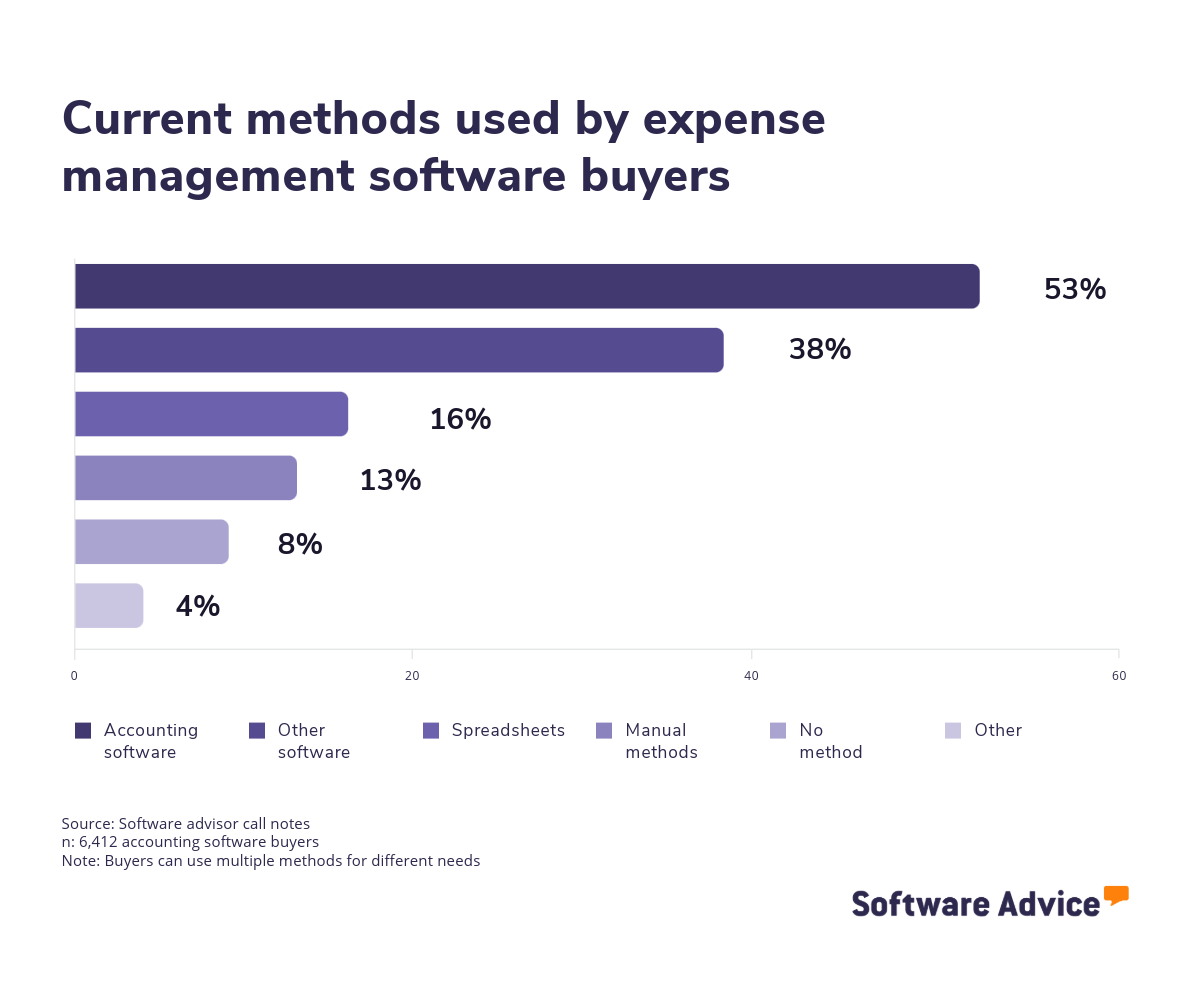
Not only does this lead to a lot of manual work and input errors, but it also ties up your skilled workforce (employees and accounts) on mundane jobs. As one of our advisors, Bryan Dengler, notes, “Many companies coming from manual processes are wanting to streamline and automate their expense management processes.” Dedicated expense management software not only saves time, but automates important tasks like submission, approval, and reimbursement of expense claims; making them much faster and accurate and with far less frustration for everyone involved.
In addition, our reviews data shows that expense reporting software offers other benefits, including:
Reduced processing time: One of the biggest wins of expense reporting software is a reduction in manual work. Automation features like optical character recognition (OCR) technology in receipt capture and automated approval workflows decrease processing time and allows teams to focus on more important tasks. So, instead of typing expenses into a spreadsheet, an employee can simply snap a photo of the receipt, and the software will auto-extract the details.
Improved policy compliance: Expense report software helps companies enforce spending rules consistently, for example, flagging any expense of over $100 or alcohol expense for review. This reduces accidental mistakes and prevents improper claims. As Anderson mentions, “Receipts can get lost,” but with a proper system, digital capture ensures they don’t, and rules can be set so that any out-of-policy expenses are caught upfront.
Better visibility into spending: Many expense tools provide real-time dashboards and automatic reports, giving finance teams and business leaders instant visibility into where the money is going. Also, because all expenses flow through one system, you can see up-to-date totals and breakdowns by category, employee, project, etc., on demand.
Enhanced employee experience: Mobile receipt capture and faster reimbursements improve employee experience. Some systems can even handle the entire planning and execution of travel plans while ensuring bookings only from approved vendors. As our advisor, Dengler, notes, “Many buyers are looking for the travel portion as well where they can book directly through the system for work expenses, whether it be hotel or airline,” adding further convenience for both employees and managers.
Ultimately, with the right expense reporting software, you can gain valuable insights into your spending habits, manage daily expenses and cash flow efficiently, and enhance the overall employee experience.
How to choose the best expense reporting software for your business
Step 1. Define your requirements
According to our 2025 Tech Trends Survey, the top change regretful software buyers would make is to better clarify their goals and desired outcomes right at the beginning [4]. Align all stakeholders in your expense management software purchase on the features you need and the specific metrics you’re trying to improve with a new system.
Keep these things in mind when defining your needs:
Create a list of must-have features and use cases
Identify what you need from an expense reporting solution. Do you need strict policy controls for compliance? Multi-level approvals? Integration with your accounting system or corporate credit card?
Also, consider the volume of expense reports you handle and the number of users (employees as well as managers) who will use the system. A small business with five employees might only need a simple tool for receipt capture and basic reports, whereas a midsize company with more employees could end up needing advanced analytics, multiple approval tiers, and support for international currencies.
Clarifying your requirements will save time and help you narrow down the hundreds of options available to you, providing a guidepost to measure the fit of a tool with your business.
Know how much expense reporting software really costs
The biggest component of expense reporting software is the subscription cost, which most often scales based on the number of users you need and the features offered. For context, over three quarters (78%) of expense management software buyers have budgeted under $50 per user, per month.
Standard entry-level plans often range around $14 per user, per month, while premium and advanced subscriptions can go up to $45 per user, per month. In addition to subscription costs, consider any other costs you may run into like paying extra for add-on features, implementation support, or personalized user training.
Keep necessary integrations top of mind
Expense report software should ideally connect with your existing accounting, enterprise resource planning (ERP), HR, and payroll systems to avoid data silos. Most providers also give access to pre-built integrations or application programming interfaces (APIs) to sync with third-party tools.
Verify that the platform you choose can import credit card transactions or export data to your ledger. Additionally, check the compatibility of the software with your employees’ most-used devices, including laptops and mobiles, and email software. Doing this will make sure you pick a system that fits in well with your business operations.
Step 2. Make your expense reporting software shortlist
With your budget and requirements in mind, it’s time to start researching different systems and create a shortlist of 2-3 products to evaluate further. Luckily, Software Advice has some useful resources, including online reviews and buyers guides, to help you pare down your options quickly.
Get qualified help from an advisor
At Software Advice, advisors like Anderson and Dengler have experience helping organizations identify expense management systems that match their needs and budgets.
If you need help, you can either schedule a phone call with an advisor or chat online with one right now. In just a few minutes, your advisor will help you craft a shortlist of expense reporting software options that best align with your requirements.
Explore our list of expense reporting FrontRunners
If you’d rather do the research yourself, a good place to start is our 2025 expense reporting FrontRunners report. Using reviews data, we map the top products in the category based on customer satisfaction and usability.
Step 3. Pressure test the best options
The next step after putting together your shortlist is to investigate your top options further by talking with vendors, taking part in demos, and getting hands-on experience through free trials. Here’s our advice for this stage.
Ask the right questions during demos
Virtually every vendor will offer a live demo. Software vendors are incentivized to show their product in the best light during a demo. To cut through the marketing clichés and see if a system will fulfil your needs, consider asking a few scenario-based questions, such as:
How would your system handle an expense that exceeds the pre-set limit?
Can it support multi-currency expenses for our overseas team?
Can you show us how to set up approval workflows for the legal department?
How often do you update your software, and what kinds of features are on your roadmap for future updates?
What kind of support do you offer during implementation?
You can also use our ultimate software vendor comparison chart to keep track of your scores and answers.
Take advantage of free trials
The free trial period is another important factor that can guide you in the final software buying decision, according to our research. During this time, have some employees and managers simulate the expense process of your company, submit test reports, approve them, generate reports, etc. This hands-on approach will quickly reveal how intuitive the interface is and if the features you need are implemented well.
Pay attention to things like: does the mobile-app make capturing receipts easy? Can managers easily review and approve or reject with appropriate reasons? Do the key integrations (like syncing of reimbursement data with accounting software) work perfectly?
Also, ensure all types of users (IT administrators, managers, and employees) try out the systems on your shortlist and give their feedback.
Step 4. Make the most of your expense reporting software
Choosing the right software is only part of the process; implementing it effectively is a crucial piece of the puzzle for success. Once you’ve selected a solution, create a detailed plan for a smooth rollout.
Establish an internal point of contact
This person will be your ‘expense champion’ (perhaps from the finance team), who can answer user questions and liaise with the vendor if any problems arise. Your employees should understand why the new system is an improvement over the old process (you can emphasize faster reimbursements and less paperwork). The important part is to aim to get buy-in from all stakeholders involved.
Work with the vendor on an implementation plan
Configure the software to your policies (e.g. set up approval flows, spending limits, integration connections) and migrate any existing expense data if needed. It’s often helpful to roll out the software in phases. You can start with a single department or a small pilot group to iron out any issues and then expand company-wide.
Ensure you provide adequate training to employees and approvers
This could include in-person workshops, video tutorials, or even just a clear one-page cheat sheet on how to submit an expense report and attach receipts. Most modern expense tools are easy to use, but training helps avoid confusion and builds confidence in the new process.
Gather user feedback
During the first few weeks, gather feedback from all involved and be ready to adjust settings and provide additional support. A thoughtful approach to implementation, strong communication, training, and gradual adoption can increase the likelihood of high user adoption and software success.
Software related to expense reporting
Maybe you’re looking for something similar to expense reporting software, yet slightly different. Or maybe you need other software to help with other finance-related needs.
To help, here are some other types of software related to expense reporting software to consider:
Accounts payable software: Accounts payable (AP) solutions streamline the entire process of receiving, processing, and paying vendor invoices. While expense reporting focuses on employee expenses, AP software handles vendor bills.
Travel management software: Helps organizations manage the entire travel process, from booking to expense reimbursement. This is ideal if your primary focus is on managing business travel rather than general expenses.
Policy management software: Enables companies to create, review, approve, and store policies according to the established workflow.
Enterprise resource planning (ERP) software: These help manage all aspects of a business, including accounting, inventory, human resources, and more. Expense reporting is often a module within an ERP system.
More resources for your expense reporting journey
How Automated Expense Management Simplifies Your Financial Workflow
Small Business Guide To Set Up an Effective Accounting Function: 5 Essentials
Double-Entry Bookkeeping 101: A Practical Guide for Small Businesses
Accounting Process Automation: How to Get Started and What to Consider
6 Accounting Reports To Analyze Your Small-Business Operations
About our contributors
Author
Amita Jain is a senior writer for Software Advice, covering finance technology with a focus on expense management and accounting solutions for small-to-midsize businesses. After completing her master’s in policy studies from King’s College London, she began her career as a journalist in New Delhi, India, where she garnered first-hand knowledge of the startup space and the education sector. She spent nearly half a decade covering high-level events hosted by the United Nations and the Government of India. Her work has been featured in Careers360, among other publications.
Amita’s research and writing for Software Advice is informed by more than 130,000 authentic user reviews and over 30,000 interactions between Software Advice software advisors and software buyers. Amita also regularly speaks to leaders in the finance and accounting space so she can provide the most up-to-date and helpful information to small and midsize businesses purchasing software or services.
When she’s not contemplating tech solutions for SMBs, Amita finds her zen in swimming, doodling, and indulging in animated sitcoms and science fiction.
Editor
Mehar Luthra is a team lead at Software Advice and specializes in editing reports that cover the latest trends affecting small businesses. With nearly a decade of experience, she has edited a multitude of research articles, top-rated software reports, and thought leadership articles for diverse markets such as Brazil, Japan, Canada, France, Australia, and India. She finds it particularly rewarding to produce content that provides small-business owners with practical tips and helpful advice on topics such as the digitalisation of small businesses, eCommerce trends, and HR developments.
Armed with a double bachelor’s in law (LL.B.) and business economics from Delhi University, she won a full scholarship to study for a master’s in creative writing at the National University of Ireland, Galway. In addition, she has written blog articles spanning a variety of topics such as fiction and non-fiction books, mental health and anxiety, the latest restaurants, and more. Her articles have been featured in Ireland’s national magazine The Village, among other publications. A die-hard journaling fan, she enjoys watching psychological thrillers, reading fiction books, and drinking iced coffee (even in the winter).
Advisors
Years in role: 3
Location: Austin, TX
As a Senior Advisor, I engage with approximately 25 small and midsize business owners weekly, enabling them to pinpoint the perfect software match. I do this by nailing down their unique requirements and streamlining the selection process from a vast array of options to the top three to five tools in a single consultation. Through personalized consultations, I specialize in understanding the software needs of businesses in my areas of expertise, which include:
Accounting
Manufacturing
Learning Management Systems (LMS)
Supply Chain Management
The software landscape can be daunting, and I often hear the hurdles business leaders encounter in our discussions. It's fulfilling to provide guidance that genuinely impacts their decisions. What I love most about assisting software buyers is reaching the end of a call and realizing I've positively influenced someone's life and work.
Sources
Software Advice advisor call notes: Findings are based on data from telephonic conversations that Software Advice’s advisor team had with small-to-midsize businesses seeking accounting software, including expense management applications. For this report, we analyzed phone interactions from the past two years as of the production date. Read the complete methodology.
Software Advice software pricing data: Only products with publicly available pricing information and qualified software products within the category, as of the production date, are included in the pricing analysis. Read the complete methodology.
Software Advice reviews data: Software Advice reviews are collected from verified users for individual software products. For this report, we analyzed reviews from the past two years as of the production date. Read the complete methodology.
Software Advice’s 2025 Tech Trends Survey was conducted online in August 2024 among 3,500 respondents in the U.S. (n=700), U.K. (n=350), Canada (n=350), Australia (n=350), France (n=350), India (n=350), Germany (n=350), Brazil (n=350), and Japan (n=350), at businesses across multiple industries and company sizes (five or more employees). The survey was designed to understand the timeline, organizational challenges, adoption & budget, vendor research behaviors, ROI expectations and satisfaction levels for software buyers. Respondents were screened to ensure their involvement in business software purchasing decisions.
Expense Report FAQs
- What is the best expense reporting software?
Based on our analysis of over 13,000 reviews from verified expense reporting software users, Zoho Invoice had the highest overall rating. Our analysis finds online invoicing, invoice processing, and customizable invoices as its top-rated features. Having said that, the best expense reporting software depends on what you’re looking for. If ease of use is your priority, you might prefer a system with a great mobile app for capturing receipts on the go. If compliance is critical to you, you may want to look for software with automated policy enforcement and multi-level approvals.
- Is there free expense reporting software?
Yes, many expense reporting tools offer free plans, but they usually come with limits, such as a cap on the number of users or reports per month. If you’re a freelancer or a startup with a small team with simple expense tracking needs, a free version could be enough. Among the over 300 expense reporting products we analyzed, Ramp was rated best for free expense reporting software.
- What is the best way to keep track of expenses for a small business?
For small businesses, the easiest way to track expenses is with a tool that integrates with your accounting system. Many small businesses start with an affordable expense tracking app that lets employees submit expense claims and automatically categorize them. If you’re still using spreadsheets, making the switch can save you hours of manual work each month and give you better oversight into your spending habits.
- How to record expenses for a small business?
The best approach is to categorize expenses as they happen. Don’t wait until tax season whether you’re using software or a spreadsheet. Make sure you log every expense (date, amount, category), keep digital copies of receipts (many expense tools let you snap a picture and store it), separate business and personal spending (keep a dedicated business account or card), and reconcile expenses with your accounting software regularly (integrate your expense system with your accounting software for automatic reconciliations). Also, make sure to set clear submission deadlines for employees and configure your software to flag out-of-policy expenses.