


Best Task Management Software of 2026
Updated January 14, 2026 at 6:10 AM

Written by Shubham Gupta
Writer

Edited by Parul Sharma
Editor

Reviewed by Hussain Bandukwala
PMO, Project management expert

Talk with us for a free 15-min consultation
Expert advisors like Jacqueline, who have helped 1,000+ companies, can find the right software for your needs.
- All Software
- Software Advice FrontRunners
- Popular Comparisons
- Buyer's Guide
- Frequently Asked Questions
Task management software helps teams and individuals organize work, assign tasks, and track progress across projects and daily operations. With more than 600 tools serving industries from marketing to construction, the market is split by varied collaboration styles and workflow needs. To help you narrow it down, I worked with our task management software advisors to curate a list of recommended productsi and a list of the Task Management software Frontrunners based on user reviews. For further information, read my Task management software buyer's guide.
Task Management Software
Sort by
Reviews: Sorts listings by the number of user reviews we have published, greatest to least.
Average Rating: Sorts listings by overall star rating based on user reviews, highest to lowest.
Alphabetically (A-Z): Sorts listings by product name from A to Z.

Kintone is a cloud-based, customizable workflow management platform suitable for businesses of all sizes. The key features of th...Read more about kintone


kintone's Best Rated Features
See All
kintone's Worst Rated Features
See All

Wrike is a cloud-based project management platform for teams of 20+ that is suitable for both large enterprises and SMBs. It sup...Read more about Wrike
Wrike's Best Rated Features
See All
Wrike's Worst Rated Features
See All

Combining powerful project management and easily streamlined operations - we’re the only platform built for managing client proj...Read more about Teamwork.com

Teamwork.com's Best Rated Features
See All
Teamwork.com's Worst Rated Features
See All

monday.com is a work and project management platform that helps teams of all sizes plan, prioritize, manage, and execute work ef...Read more about monday.com

monday.com's Best Rated Features
See All
monday.com's Worst Rated Features
See All

Nimble - Collaborative Lean/ Agile Work Management Platform. Nimble comes with a unique combination of features to manage tradit...Read more about Nimble Enterprise


Nimble Enterprise's Best Rated Features
See All
Nimble Enterprise's Worst Rated Features
See All
Software Advice FrontRunners 2026

(4858)

(13524)

(2679)

(23446)

(4538)

(5691)

(3469)

(2627)

(2872)

(14402)
Best for Mobile app

Connecteam

- Key FeaturesConnecteam's scoreCategory average
Assignment Management
4.634.63 category average
Task Editing
4.544.57 category average
Task Scheduling
4.574.58 category average
- Screenshots


Best for Collaboration

Asana

- Key FeaturesAsana's scoreCategory average
Assignment Management
4.654.63 category average
Task Editing
4.604.57 category average
Task Scheduling
4.644.58 category average
- Screenshots


Best for Customization

Notion

- Key FeaturesNotion's scoreCategory average
Task Editing
4.584.57 category average
Task Scheduling
4.444.58 category average
- Screenshots


Highly Rated for User Interface

Trello

- Key FeaturesTrello's scoreCategory average
Assignment Management
4.714.63 category average
Task Editing
4.624.57 category average
Task Scheduling
4.574.58 category average
- Screenshots


Highly Rated for Automation

ClickUp

- Key FeaturesClickUp's scoreCategory average
Assignment Management
4.734.63 category average
Task Editing
4.554.57 category average
Task Scheduling
4.554.58 category average
- Screenshots


Highly Rated for Quick Implementation
monday.com

- Key Featuresmonday.com's scoreCategory average
Assignment Management
4.574.63 category average
Task Editing
4.594.57 category average
Task Scheduling
4.584.58 category average
- Screenshots


Highly Rated for Quick Adoption/Easy Adoption

Smartsheet

- Key FeaturesSmartsheet's scoreCategory average
Assignment Management
4.404.63 category average
Task Editing
4.544.57 category average
Task Scheduling
4.524.58 category average
- Screenshots


Highly Rated for Integrations

Todoist

- Key FeaturesTodoist's scoreCategory average
Assignment Management
4.444.63 category average
Task Editing
4.614.57 category average
Task Scheduling
4.664.58 category average
- Screenshots


Highly Rated for AI powered
Wrike

- Key FeaturesWrike's scoreCategory average
Assignment Management
4.674.63 category average
Task Editing
4.514.57 category average
Task Scheduling
4.484.58 category average
- Screenshots


Highly Rated for Security and Access Control

Basecamp

- Key FeaturesBasecamp's scoreCategory average
Assignment Management
4.304.63 category average
Task Editing
4.454.57 category average
Task Scheduling
4.514.58 category average
- Screenshots


- Key FeaturesMicrosoft To Do's scoreCategory average
Task Editing
4.624.57 category average
Task Scheduling
4.624.58 category average
- Screenshots


Any.do

- Key FeaturesAny.do's scoreCategory average
Assignment Management
4.504.63 category average
Task Editing
4.604.57 category average
Task Scheduling
4.684.58 category average
- Screenshots


- Key FeaturesZoho Projects's scoreCategory average
Assignment Management
4.04.63 category average
Task Editing
4.544.57 category average
Task Scheduling
4.574.58 category average
- Screenshots


Businessmap

- Key FeaturesBusinessmap's scoreCategory average
Task Editing
4.794.57 category average
Task Scheduling
4.494.58 category average
- Screenshots


Hive

- Key FeaturesHive's scoreCategory average
Task Editing
4.504.57 category average
Task Scheduling
4.324.58 category average
- Screenshots


- Key FeaturesMicrosoft Planner's scoreCategory average
Assignment Management
4.434.63 category average
Task Editing
4.584.57 category average
Task Scheduling
4.574.58 category average
- Screenshots


Quire

- Key FeaturesQuire's scoreCategory average
Assignment Management
4.604.63 category average
Task Editing
4.724.57 category average
Task Scheduling
4.544.58 category average
- Screenshots


OpenProject

- Key FeaturesOpenProject's scoreCategory average
Assignment Management
4.834.63 category average
Task Scheduling
4.634.58 category average
- Screenshots


- Key FeaturesAdobe Workfront's scoreCategory average
Assignment Management
4.744.63 category average
Task Editing
4.494.57 category average
Task Scheduling
4.514.58 category average
- Screenshots


GanttPRO

- Key FeaturesGanttPRO's scoreCategory average
Assignment Management
5.04.63 category average
Task Editing
4.754.57 category average
Task Scheduling
4.834.58 category average
- Screenshots


Teamwork.com

- Key FeaturesTeamwork.com's scoreCategory average
Task Editing
4.514.57 category average
Task Scheduling
4.524.58 category average
- Screenshots


Paymo

- Key FeaturesPaymo's scoreCategory average
Assignment Management
4.504.63 category average
Task Editing
4.514.57 category average
Task Scheduling
4.454.58 category average
- Screenshots


Clinked

- Key FeaturesClinked's scoreCategory average
Task Editing
4.884.57 category average
Task Scheduling
4.874.58 category average
- Screenshots


Bitrix24

- Key FeaturesBitrix24's scoreCategory average
Assignment Management
4.04.63 category average
Task Editing
4.404.57 category average
Task Scheduling
4.384.58 category average
- Screenshots


Methodology
The research for the best Task Management software list was conducted in October 2025. We evaluated data (user reviews and demand signals) from the past 24 months as of the research date. Read the complete methodology.
Popular Task Management Comparisons


Buyer's Guide
This detailed guide will help you find and buy the right task management software for you and your business.
Last Updated on May 14, 2025Here’s what we’ll cover:
What you need to know about task management software
What is task management software?
Essential features of task management software
Benefits and competitive advantages of using task management software
How to choose the best task management software for your business
Software related to task management
More resources for your task management journey
What you need to know about task management software
Task management software helps businesses organize and track tasks, deadlines, and workflows, improving team coordination and productivity. These tools are ideal for businesses seeking a way to monitor progress, set priorities, and ensure that deadlines are met efficiently.
To give you an idea about the task management software market, we have 643 products on our site and gathered 11,584 verified user reviews in the past year. [1] For professionals in roles such as project managers, team leads, and operations managers, this means a wide variety of options, each offering unique features to suit specific needs, from simple task tracking to complex project collaboration.
Pricing for task management software starts at $8.95 for basic plans, $49 for mid-tier plans, and $117 for high-end plans. Higher-priced enterprise plans provide additional features, such as advanced reporting, team collaboration tools, and integrations with other business systems. [2]
When evaluating task management software, first-time buyers should consider task creation and assignment processes, priority-setting capabilities, and how it handles team communication and deadlines. To ensure the software will meet your needs, ask vendors detailed questions such as:
How does this software handle task dependencies and allow automatic updates if deadlines or priorities change?
What features are available to track individual task progress, and how can this be customized for different team members or projects?
How does the software facilitate real-time collaboration, allowing team members to comment, attach files, or share updates directly within tasks?
Does the software support recurring tasks, and can it automate reminders or notifications to ensure nothing falls through the cracks?
How does the tool handle task prioritization, and is it flexible enough to adapt to changing project demands or urgent deadlines?
With 643 task management tools available, choosing the right one on your own can be time-consuming. Our experienced software advisor, Hussain Bandukwala, draws on years of expertise from guiding task management software buyers. He’ll help you navigate your options and find the best fit for your needs. Ready to explore further? Schedule a consultation today.
What is task management software?
Task management software is a tool that helps teams and individuals organize, assign, and track their tasks from start to finish. It’s designed to keep things simple, focusing on task completion, prioritization, and meeting deadlines without the complexity of larger project management systems.
These tools typically offer task tracking, scheduling, and workflow management features. They help teams stay on top of their work by providing clear task assignments, setting deadlines, and tracking progress. This helps ensure better team coordination, easier visibility into work responsibilities, and automated reminders to keep everything on track. In short, they make managing tasks a lot easier.
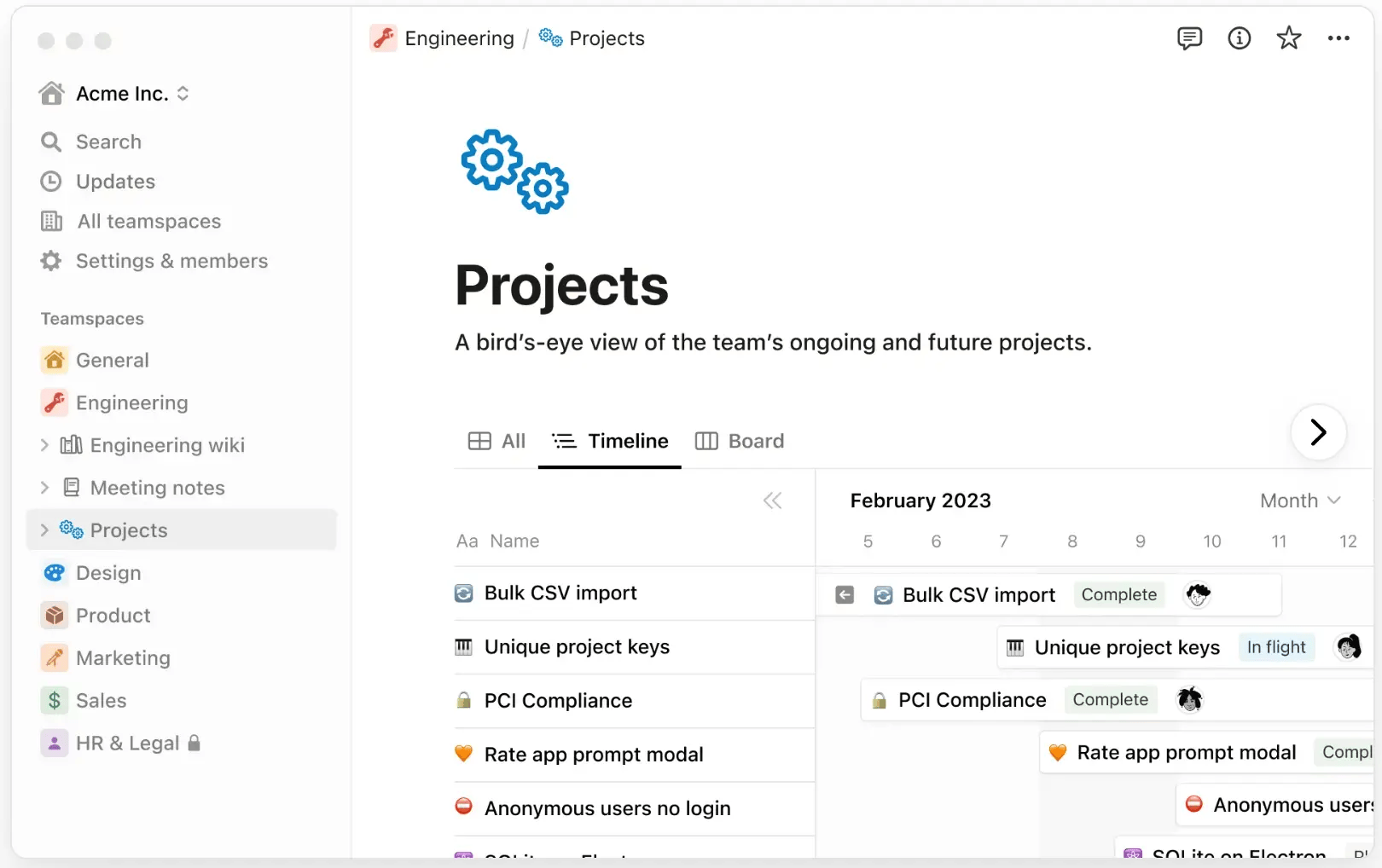
As task management tools evolve, automation is becoming a bigger part of the picture, helping to remove repetitive work. But as Bandukwala points out, it’s not just about automation: “AI can handle repetitive tasks like automation, but giving teams the right training and ensuring data quality is key to making the most out of task management tools.” This highlights how combining the right tool with proper training ensures that teams use the software to its full potential, making the most out of every task.
Essential features of task management software
Choosing the right task management software requires understanding its core and common features. Core features, such as task progress tracking and task scheduling, are essential in ensuring tasks are efficiently organized and completed on time. After analyzing reviews and engaging with task management software providers, we’ve identified several common features that enhance these core functionalities.
Core task management software features
Task scheduling | Enables users to track and manage the scheduling of tasks to ensure deadlines are met. 90% of users rate it highly critical, reflecting its importance in maintaining organized workflows. |
Task progress tracking | Tracks the status and progress of tasks, ensuring that teams stay on top of their work. 88% of users rate it highly critical, highlighting its role in keeping tasks on track. |
Common task management software features
Task editing | Users can edit task details such as deadlines or assignees to reflect changes as needed. 92% of users highly value this feature and consider it critical. |
Assignment management | Helps assign tasks based on team members' skills or availability, ensuring the right person handles each task. 89% of users consider it essential for smooth task allocation. |
Prioritization | Allows teams to prioritize tasks based on urgency or importance, helping to ensure critical work is completed first. Regarded as crucial by 88% of users. |
Commenting/Notes | Facilitates communication within tasks by allowing team members to leave comments or notes for others. 88% of users emphasize its importance for fostering collaboration. |
Users can design and manage workflows to streamline repetitive tasks. Rated highly critical by 87% of users. | |
Allows teams to track the progress of larger projects, providing a clear overview from start to finish. Considered highly important by 86% of users, ensuring that project goals are consistently met. | |
Search/filter | Enables users to quickly search and filter tasks based on keywords or criteria. 80% of users rated it as essential for efficient task management. |
Provides a space for team members to communicate and share files in real time, improving team cohesion and reducing communication gaps. 79% of users find this feature critical for seamless collaboration. | |
Recurring tasks | Allows users to set up tasks that automatically repeat, saving time and ensuring regular activities are never overlooked. 78% of users value this feature for its ability to streamline ongoing responsibilities. |
An integrated calendar helps track meetings and deadlines, keeping team members organized. 75% of users find this functionality crucial for keeping track of important dates. | |
Tracks time spent on tasks, essential for productivity insights and project cost management. | |
Sub-task management | Users can break large tasks into smaller, manageable sub-tasks, making complex projects easier to handle. |
Deadline management | Helps teams track and manage task deadlines, ensuring that projects are completed on time. |
Task management software provides a straightforward, budget-friendly solution for teams managing smaller, less complex projects. These tools focus on essential task tracking and scheduling without the complexity of larger project management systems, making them easy to adopt and scale. Bandukwala says, "With task management tools, the learning curve is much lower, and because they are cheaper, you can buy more licenses for your team, making them an ideal choice for managing day-to-day tasks without the complexity of larger project management software."
Benefits and competitive advantages of using task management software
Based on insights from our proprietary data analysis of user reviews and expert feedback, task management software is designed to optimize team efficiency, streamline workflows, and boost productivity. These tools allow teams to stay organized, automate repetitive tasks, and ensure that deadlines are met.
However, many teams combine task management software with other tools, such as project management software, to create a more comprehensive workflow. As Bandukwala points out, "I've seen clients use task management software alongside project management tools, but it's important to focus on the strengths of each. Task management software excels in managing to-do lists and checklists, often overlooked in project management tools. It's about supplementing each tool with the right processes to optimize productivity."
Here are the key benefits backed by real user feedback and expert insights:
Seamless team communication and collaboration: Task management software enables better coordination by providing a centralized platform where team members can collaborate on tasks, share updates, and communicate in real time. This leads to more efficient teamwork and fewer communication breakdowns.
Increased team productivity through automation: Task management tools help teams save time and reduce manual effort by automating repetitive tasks such as task assignments, deadline reminders, and progress updates. This allows employees to focus on higher-value tasks and achieve more.
Enhanced workflow efficiency with task prioritization: Task management software allows users to prioritize tasks based on urgency or importance. This feature ensures that critical tasks are tackled first, improving workflow efficiency and ensuring teams stay on top of their most pressing responsibilities.
Better project tracking for on-time delivery: Task management software provides robust tracking features, allowing users to monitor task completion, set milestones, and track overall project progress. This visibility ensures that all tasks are completed on time, reducing delays and improving project delivery.
Improved task organization for clear accountability: With features like task assignment, deadlines, and status updates, task management software helps organizations clearly define who is responsible for each task. This promotes accountability, ensures better task organization, and improves team performance.
How to choose the best task management software for your business
1. Define your requirements
Choosing the right task management software starts with understanding your team's needs. Are you looking to streamline task assignments, improve collaboration, or keep track of project deadlines? Knowing these core requirements will help you select the software that aligns with your team’s specific challenges and goals, setting the foundation for smooth, efficient workflows.
Assess your team’s needs and task complexities
Before selecting task management software, assessing your team’s specific needs is essential. Consider the complexity of the tasks you manage, whether you need simple to-do lists or more advanced features like task dependencies and recurring tasks. For instance, 42% of businesses using task management software have up to 50 employees, so small to mid-sized teams often require a straightforward solution that scales. [1]
Our analysis from the past year also shows that industries like IT (11%), marketing and advertising (8%), and computer software (6%) are leading users of task management software. While these percentages may seem small, they highlight the diverse industries adopting these tools to manage tasks efficiently.
Evaluate user-friendliness and adoption
Your task management software should be simple, intuitive, and easy for your team to adopt. After all, the quicker your team gets on board, the faster you'll see a boost in productivity. For example, 91% of users find to-do lists essential for staying organized, while 90% consider task editing and updates crucial for keeping everything on track.
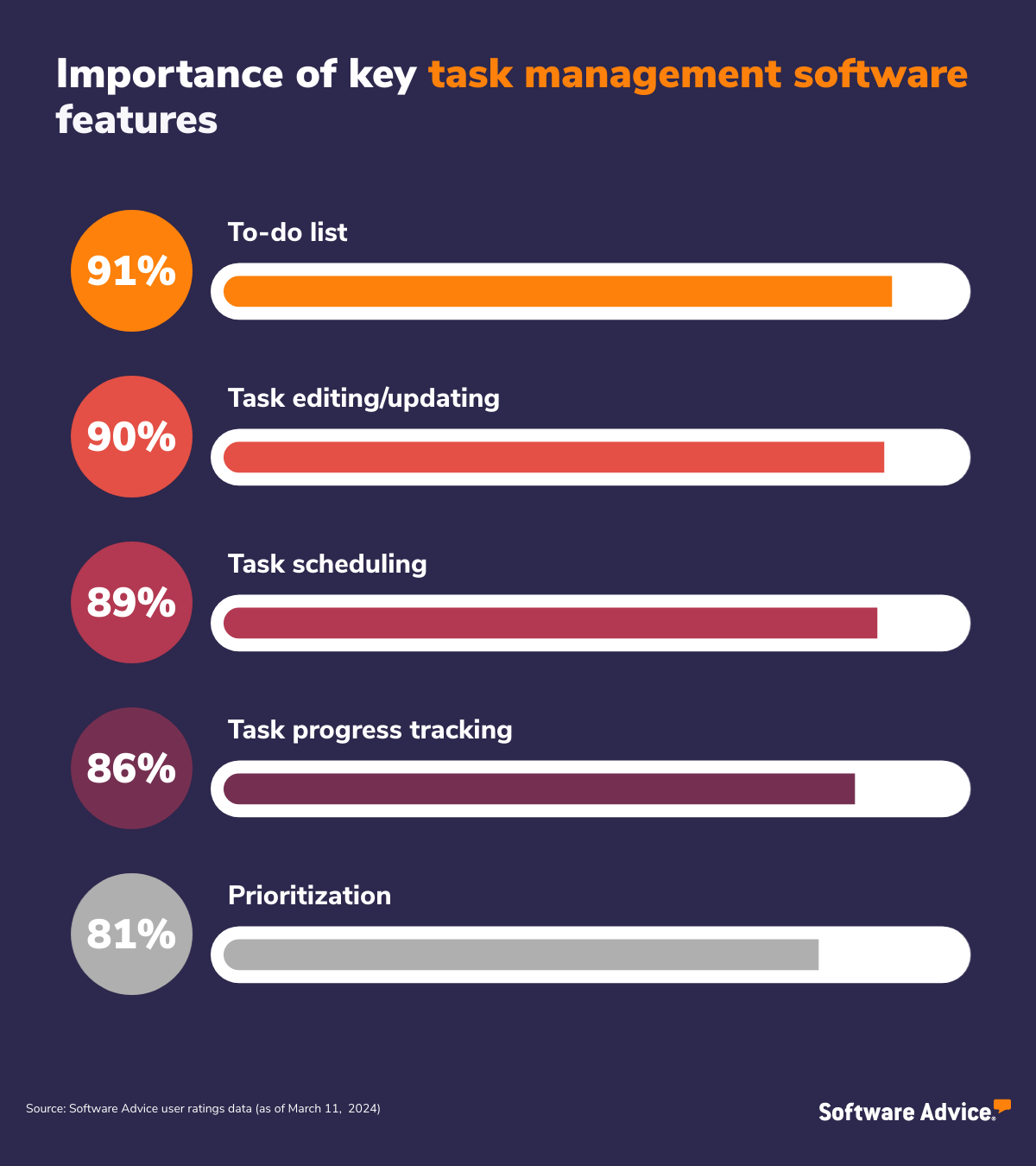
Task scheduling is another highly important feature, with 89% of reviewers prioritizing it for task management. Ensure the software has an interface that makes these key functions easy to use and will support your team’s immediate needs and long-term growth.
Determine task volume and workload management
Think about the number of tasks your team handles and how the software helps organize and distribute workloads effectively. Does it offer task prioritization to ensure the most urgent work gets done first? Can it manage team capacity and assign tasks based on individual skills or availability? You need to choose a solution that can handle your team’s workload without slowing down or becoming inefficient, especially as your team scales and the volume of tasks increases.
Calculate the total cost of ownership (TCO)
When calculating the cost of task management software, it's important to look beyond the initial price tag. Consider ongoing expenses such as support, training, and the software’s ability to scale as your team grows. Ensure the software provides a clear return on investment (ROI) through productivity gains, time savings, and reduced operational overhead.
Pricing breakdown:
Basic plans: Starting at $8.95 monthly, ideal for small teams with essential task-tracking needs.
Mid-tier plans: Starting at $49 monthly, offering additional features like task dependencies and reporting.
High-end plans: Starting at $117 per month, these plans provide advanced reporting, team collaboration tools, and integrations with other business systems for larger teams or enterprises.
Review integration capabilities
It is crucial to ensure that task management software integrates smoothly with your team's existing tools, such as email, file-sharing platforms, communication tools, and calendars.
Seamless integrations make the software fit naturally into your workflow, reducing disruptions and increasing efficiency. As Bandukwala highlights, "Integrating task management software with other systems can be challenging, especially when data is working in silos. While manual data integration may not seem like much of an overhead, the purpose of task management software is to make everything seamless."
Ensuring compatibility with your existing systems will make the software more effective and reduce the need for additional manual work.
2. Make a shortlist of task management software
With so many task management software options available, narrowing down your choices can feel overwhelming. The key to simplifying this process is creating a shortlist tailored to your team's needs and objectives. By focusing on software that addresses your unique challenges, you’ll be better equipped to find a solution that boosts productivity and streamlines workflows.
Consult with task management software advisors
Choosing the right task management software can be tricky, but our expert advisors can make the process much easier. At Software Advice, our experienced advisors like Bandukwala specialize in helping businesses like yours find the best task management solutions. By understanding your team’s unique needs, our advisors will guide you to a shortlist of tools that fit both your requirements and budget. Whether you want to chat online or prefer a more detailed phone consultation, our advisors are ready to help you explore options and identify the right fit.
Explore FrontRunners for Task Management
Before jumping into a 1:1 consultation with an advisor, it can be helpful to explore our FrontRunners report on task management software. This report highlights top-rated software based on user reviews and functionality, giving you a solid starting point. By reviewing the FrontRunners list first, you’ll have a clearer idea of your options and be better prepared with specific questions when you connect with an advisor. For a detailed explanation of our selection process, visit our methodology page.
3. Pick your best option
When selecting task management software, picking the best option goes beyond simply reviewing features and pricing. It’s about finding the tool that best aligns with your team’s processes, enhances productivity, and scales as your needs evolve. To make the right choice, it's essential to dive deeper into how the software fits into your daily operations, adapts to your team’s workflow, and supports long-term growth.
Test software with demos and free trials
Take full advantage of demos and free trials to assess how the software works in real-world scenarios. Testing the software for usability and feature relevance is essential before committing. Ensure that it supports your team’s specific task management needs—whether that’s task assignment, progress tracking, or prioritization.
Testing also allows you to evaluate how intuitive the software is and whether it can integrate smoothly with your team’s existing processes. Make sure to involve team members in the testing process to get their feedback on how easy the tool is to adopt and whether it enhances their workflow.
Consult with current users and experts
One of the best ways to understand how task management software performs is by consulting with current users who have similar needs. Look for reviews and case studies from companies in your industry to see how they’ve implemented the software and the challenges they’ve faced.
Talking to experts or users who have gone through the same selection process can help you identify potential pitfalls or hidden benefits that might not be immediately obvious. This feedback will provide real-world insights into how well the software scales, handles increased task volume, and integrates into existing systems.
Evaluate flexibility and customization options
When selecting task management software, it is crucial to assess its flexibility in adapting to your team’s needs. Can you create task templates, custom fields, and workflows that align with your processes? A highly adaptable tool will ensure your team can use it in a way that fits your needs.
However, it’s equally important to understand the software’s limitations. Bandukwala points out, "With task management software, there are limitations in how complex things can go. Understanding the limits on the number of tasks, users, and dependencies between tasks is really important." Make sure to evaluate how well the software can handle your team’s workload and whether it supports the level of complexity your projects may require as they evolve.
4. Make the most of your task management software
Once you’ve adopted task management software, the key to maximizing its value is making sure your team uses it effectively. It’s not just about having the tool—it’s about integrating it fully into your team’s workflow to improve productivity, collaboration, and overall efficiency. Here are a few strategies to ensure you're getting the most out of your software:
Conduct team training for effective use: Provide structured training sessions to ensure your team understands how to use the software fully. This will help them adopt the software faster and make the most of its features.
Regularly review and refine workflows: Track how the software is being used and adjust workflows as needed to continuously improve team efficiency and collaboration. Task management software is most effective when optimized for your team's specific work methods.
Encourage consistent task tracking and updates: To make the most out of your task management software, make task updates a habit. Ensure team members regularly update their task status, add comments, and flag issues in real time, which enhances accountability.
Use built-in reporting for insights: Leverage the software’s built-in reporting tools to track team productivity, identify bottlenecks, and make data-driven decisions to improve task allocation and performance over time.
Software related to task management
While searching for task management software, you may find other related software types that perform similar functions or can be integrated to enhance your team’s productivity. These tools can complement task management systems and streamline various business processes.
Project Management Software: Offers comprehensive tools for planning, executing, and tracking projects, providing broader management capabilities for more complex workflows.
Remote Work Software: Supports communication and collaboration for distributed teams, offering tools like video conferencing, file sharing, and messaging to keep everyone connected.
Requirements Management Software: Helps track and manage project or product requirements, ensuring alignment across teams and stakeholders from start to finish.
Time and Expense Software: Tracks employee time, expenses, and reimbursements, helping businesses manage budgets and improve financial transparency.
Workflow Management Software: Automates and optimizes workflows by defining tasks and processes, improving efficiency, and ensuring tasks are completed in the correct order.
More resources for your task management journey
5 Key Task Management Software Features and Top Products That Offer Them
Project Management 101: Terms and Techniques to Get You Started
About our contributors
Author
Shubham is a writer at Software Advice, specializing in project management. His focus is to guide project managers from planning to execution and beyond. His expertise also spans construction, manufacturing, and other related topics.
Shubham’s research and writing for Software Advice is informed by nearly 200,000 authentic user reviews and more than 10,000 interactions between Software Advice software advisors and project management software buyers. Shubham also regularly speaks to project managers and PMO leaders so he can provide the most up-to-date and helpful information to small and midsize businesses purchasing software or services.
Outside work, Shubham likes to explore the depth of Urdu poetry and enjoys his time with his dog.
Editor
Parul Sharma is a content editor at Software Advice with expertise in curating content for various niches, including SaaS, digital marketing, and search engine optimization. With over half a decade of experience in content writing and editing, Parul has the expertise to simplify complex terms into engaging, valuable content for targeted audiences. She completed her graduation and post-graduation in English literature from Delhi University and was awarded the Dr. Asha Sahni Memorial Award for being the highest scorer in her graduating class.
Parul has contributed to the news, lifestyle, education, and health verticle of DNA India, India’s premier media channel. Outside of work, she can be found curating healthy recipes, coloring in mandala books, and spending quality time with her family.
Advisor
Hussain Bandukwala is a PMO and project management expert with over 20 years of experience advising SMBs, nonprofits, public sector, and Fortune 500 companies to enhance strategic execution and operational efficiency. As founder of Parwaaz Consulting, he specializes in PMO leadership, project management, and change management coaching. A LinkedIn Learning instructor and industry speaker, Hussain is a globally recognized PMO influencer known for driving successful PMO integration and performance.
Sources
Software Advice reviews data: Software Advice reviews are collected from verified users for individual software products. For this report, we analyzed reviews from December 2023 to December 2024. Read the complete methodology.
Software Advice software pricing data: Only products with publicly available pricing information and qualified software products within the category, as of January 2025, are included in the pricing analysis. Read the complete methodology.
Task Management FAQs
- What is the meaning of task management software?
Task management software is a tool designed to organize, prioritize, and track tasks within a project or workflow. It helps individuals and teams manage deadlines, allocate resources, and collaborate efficiently, enhancing productivity and ensuring timely task completion.
- Is Excel a task management tool?
While Excel is not specifically designed as a task management tool, it can organize and track tasks through spreadsheets. However, it lacks the advanced features and automation of dedicated task management software.
- How much does talent management software cost?
According to our pricing research, entry-level talent management software systems average around $73 per month. Premium talent management software suites can average $234 per month or more, depending on how many employees you have and the level of functionality offered. Be sure to talk to vendors to understand all the costs involved with their talent management system.
- What is the best software for task management?
According to our analysis of products with high market demand and reviews, Connecteam had the highest overall rating from verified reviewers on Software Advice.
- Who uses task management software?
Individuals, teams, and organizations across various industries use task management software to streamline workflows, enhance collaboration, and improve productivity. It's beneficial for anyone needing to organize and track tasks efficiently.
- What is the best free task management app?
According to our analysis of market demand and reviews, Todoist received the highest overall rating from verified reviewers on Software Advice. It is recognized for its robust features and ease of use, making it an excellent choice for a free task management app.
- What is the best tool to track action items?
The best tool for tracking action items depends on your specific needs. Explore the best task management software category to find options that suit your requirements and offer features, such as task tracking, reminders, and collaboration.
- How do you effectively track action items?
To track action items effectively, use a task management tool to organize tasks, set priorities, assign responsibilities, and establish deadlines. Regularly update progress and review tasks to ensure accountability and timely completion.