


Best Knowledge Base software of 2026: which is right for you?

- Popular Comparisons
- FrontRunners
- Buyers Guide
- Related Software
Compare Products
Showing 1 - 25 of 283 products
Compare Products
Sort by
Reviews: Sorts listings by the number of user reviews we have published, greatest to least.
Average Rating: Sorts listings by overall star rating based on user reviews, highest to lowest.
Alphabetically (A-Z): Sorts listings by product name from A to Z.

Shape's cloud-based solution offers tools designed to manage online marketing and promotions, capture leads from online sources,...Read more about Shape


Shape's Best Rated Features
See All
Shape's Worst Rated Features
See All

SalesNOW by Interchange Solutions Inc. is a cloud-based customer relationship management (CRM) and sales force automation soluti...Read more about SalesNOW

SalesNOW's Best Rated Features
See All
SalesNOW's Worst Rated Features
See All

Sales Cloud is equipped with customer relationship management (CRM) functionality that encompasses lead management, marketing au...Read more about Salesforce Sales Cloud


Salesforce Sales Cloud's Best Rated Features
See All
Salesforce Sales Cloud's Worst Rated Features
See All

Document360 is an AI-powered knowledge base platform built for enterprises that need secure, scalable documentation. It centrali...Read more about Document360

Document360's Best Rated Features
See All
Document360's Worst Rated Features
See All

Creatio is a new era CRM to manage all customer and operational workflows with no-code and AI at its core. Creatio Sales is an ...Read more about Creatio CRM

Creatio CRM's Best Rated Features
See All
Creatio CRM's Worst Rated Features
See All

Workbooks is the 'No-BS' CRM. Workbooks designs, develops and implements its own software, which is targeted specifically at m...Read more about Workbooks

Workbooks's Best Rated Features
See All
Workbooks's Worst Rated Features
See All

SAP Customer Experience is a cloud-based customer relationship management solution that helps small and mid-size businesses mana...Read more about SAP Customer Experience
SAP Customer Experience's Best Rated Features
See All
SAP Customer Experience's Worst Rated Features
See All

Rock Solid OneView is a Microsoft Dynamics-based citizen engagement platform that helps citizens and local governments work as o...Read more about Rock Solid
No reviews yet
recommendations


An Inc. 5000 fastest growing private company, recognized by Gartner as a top viable vendor for Integrated Revenue and Customer M...Read more about Symphony

HelpCrunch is a customer communication platform combining live chat, email marketing automation and a help desk in one solution....Read more about HelpCrunch

HelpCrunch's Best Rated Features
See All
HelpCrunch's Worst Rated Features
See All

Zendesk is a cloud-based help desk management solution offering customizable tools to build customer service portal, knowledge b...Read more about Zendesk Suite

Zendesk Suite's Best Rated Features
See All
Zendesk Suite's Worst Rated Features
See All

Universal Knowledge is a knowledge management solution designed by Knowledge Powered Solutions to increase the efficiency of age...Read more about Universal Knowledge


TeamSupport is purpose-built for B2B SaaS companies to gain a 365° view of the customer. Centralize every interaction, sentiment...Read more about TeamSupport
TeamSupport's Best Rated Features
See All
TeamSupport's Worst Rated Features
See All

Flowlu is a cloud-based, all-in-one business management solution designed for teams of all sizes and industries. Whether you're ...Read more about Flowlu

Flowlu's Best Rated Features
See All
Flowlu's Worst Rated Features
See All

Veloxy is a sales enablement solution that helps businesses using Salesforce CRM track potential leads, schedule and send emails...Read more about Veloxy


LiveAgent is a cloud-based help Ddsk solution for eCommerce businesses at the small and midsize levels. The platform offers live...Read more about LiveAgent
LiveAgent's Best Rated Features
See All
LiveAgent's Worst Rated Features
See All

Yonyx is a cloud-based solution designed to help call centers and customer service businesses create and manage interactive guid...Read more about Yonyx

Yonyx's Best Rated Features
See All
Yonyx's Worst Rated Features
See All

360Learning is a collaborative LMS tool that helps businesses author and conduct interactive learning experiences so learners ca...Read more about 360Learning
360Learning's Best Rated Features
See All
360Learning's Worst Rated Features
See All

Paperflite is a cloud-based content management system that assists marketing and sales teams with collaboration and prospect eng...Read more about Paperflite
Paperflite's Best Rated Features
See All
Paperflite's Worst Rated Features
See All

The AI-Powered Helpdesk for Modern B2B Teams Supportbench is the most complete helpdesk platform built specifically for B2B sup...Read more about Supportbench
Supportbench's Best Rated Features
See All
Supportbench's Worst Rated Features
See All

Teamgate is a user-friendly, yet extremely powerful CRM for Sales and SaaS teams of all sizes. We pride ourselves on empowering...Read more about Teamgate
Teamgate's Best Rated Features
See All
Teamgate's Worst Rated Features
See All

Clari Copilot turns your revenue team into serial closers by helping them win every revenue-critical moment. With Clari Copilo...Read more about Clari Copilot
Clari Copilot's Best Rated Features
See All
Clari Copilot's Worst Rated Features
See All

Giva is a cloud-based IT help desk that offers ticketing, knowledgebase, asset management, change management, dashboards, self-s...Read more about Giva
Giva's Best Rated Features
See All
Giva's Worst Rated Features
See All

Hiver is a modern, AI help desk software designed for sleek, fast-moving teams. It rejects the false trade-off that power must m...Read more about Hiver

Hiver's Best Rated Features
See All
Hiver's Worst Rated Features
See All

Reamaze is a cloud-based help desk and customer messaging solution that helps businesses support, engage and convert customers u...Read more about Re:amaze
Popular Comparisons



Your Guide to Top Knowledge Base Software, November 2022
Software Advice uses reviews from real software users to highlight the top-rated Knowledge Base products in North America.
Learn how products are chosenExplore FrontRunners


“Usability” includes user ratings for Functionality and Ease of Use.
“Customer Satisfaction” includes user ratings for Customer Support, Likelihood to Recommend and Value for Money.
Reviews analysis period: The reviews analysis period spans two years and ends the 15th of the month prior to publication.

Buyers Guide
This detailed guide will help you find and buy the right knowledge base software for you and your business.
Last Updated on January 27, 2025Are you a customer support manager struggling with resource-crunch?
Are your agents tired of answering the same questions over and over again?
Do your customers need to wait a long time for customer support, resulting in poor customer experience?
If you answered 'yes' to any of these questions, you'll need to find ways to free up agents' time to manage increasing workloads efficiently. Otherwise, you'll need to hire more agents, adding to the costs of your customer support operations.
One way of doing that is to provide your customers with a self-service support website, where they can search for answers to their questions.
A knowledge base solution helps you do that—without requiring you to have technical expertise. It lets you create a support website where you can list frequently asked questions (FAQs), helping customers find answers to their questions all on their own.
A knowledge base solution gives you a double advantage: While your agents save time per issue fielded, your customers will not need to contact support agents for more straightforward technical issues.
To help you select the right knowledge base solution for your business, we've created this guide that covers the basic information related to knowledge base solutions.
In this guide, we'll cover:
What is knowledge base software?
Knowledge base software is a tool that helps users create and manage a support website where customers can search through issues and find answers on their own. The software also allows managers to understand the search trends, and thereby come up with more topic ideas for the support website.
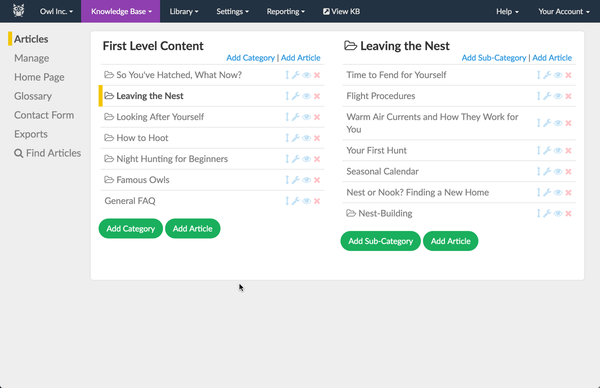
Managing content on knowledge base website in KnowledgeOwl (Source)
Common features of knowledge base software
The first step for selecting the right knowledge base software for your business is to understand the essential features of the software. This knowledge will help you select the products that can help you automate knowledge base functions based on your business needs.
According to our research, below are the common features of knowledge base software:
Website management | Helps you create and host a website where customers can search support-related materials by performing keyword search. |
CMS integration | Lets you add a customer support section to your existing website. For instance, if you host your website using WordPress, you can add a section where customers can find FAQs and access support guides. |
Reporting | Provides you with reports on customer support website parameters such as the number of searches and daily visitors. This feature also helps you identify frequent search terms, providing you with topic ideas for support guides. |
Multi-language support | Lets you create knowledge base content in different languages. You can also let users switch to different languages from the support page itself. |
What type of buyer are you?
After you've read about the features, the next step is to understand the types of knowledge base software buyers. This will help you understand the software type you need to invest in.
According to our research, the following are the types of knowledge base software buyers:
Standalone knowledge base software buyers: These buyers already have a help desk or ticketing system for managing customer support requests, and want to add a self-service knowledge base section on their support website. These buyers should look for the products listed on our knowledge base directory page.
Full customer support system buyers: If you are currently using manual methods for managing customer support requests, and need to digitize your help desk ticketing and knowledge base function, a knowledge base solution will not suffice your needs. You need to check out help desk solutions with knowledge base functionality. The caveat here is pricing—if these solutions fall outside your budget, you can look for a free help desk solution, and invest in a knowledge base solution that integrates with it.
Benefits of knowledge base software
After you've gone through the list of features, the next step is to understand the benefits of knowledge base solutions. This will help you understand how the software will be useful in different areas of your customer support operations.
Following are the key advantages of using a knowledge base solution:
Reduced agent workload. Since knowledge base software lets customers handle a lot of queries by themselves, they will not need to interact with an agent directly, thereby freeing up agents' workloads. They can focus on difficult issues while allowing customers to find answers to the easy ones on their own.
Lesser response time of the customer support team. Since knowledge base software frees up your agent's time, they will be able to pick up incoming support requests faster. This will result in a shorter wait time for customers and improved customer experience.
Lower cost of customer support operations. By freeing up agents' workloads, the software increases your support team's capacity for handling more inquiries. This reduces the need for hiring more customer agents for managing increasing workload, thereby reducing the costs involved in adding new employees.
Market trends to understand
The last step is to understand the relevant market trends. This knowledge will help you select vendors that are currently working on incorporating these technologies into their offerings, thereby providing you with an early adoption advantage.
According to our research, following are the biggest trends in knowledge base software space:
Video content is the future of knowledge base support. While customers can read text and understand instructions, they can still have trouble following through the technical steps it takes to resolve issues. With the help of video content, you can make the steps engaging, thereby simplifying even the more complex issues. For instance, the agent can create a walk-through video of the process, which customers can follow along to fix the issues. Since this will significantly improve the effectiveness of self-service support, we expect video-based knowledge base management solutions to become mainstream by 2022.
Chatbots to improve efficiency of knowledge base software. Chatbots can help you add a human touch to self-service support. For instance, an AI-based chatbot can interpret a customer's query, sift through the knowledge base resources, find the solution, and present it to the customer in a conversational way. This allows your customers to find resolutions to their issues faster and quicker, thereby improving customer experience. With vendors such as Acquire.io and Zendesk making efforts in this direction, we can expect chatbots to become core functionality by 2021.
Note: The applications selected in this article are examples to show a feature in context and are not intended as endorsements or recommendations. They have been obtained from sources believed to be reliable at the time of publication.