


Best Appointment Scheduling Software of 2026
Updated February 18, 2026 at 10:22 AM

Written by Molly Burke
Senior Specialist Analyst

Edited by Caroline Rousseau
Senior Editor

Talk with us for a free 15-min consultation
Expert advisors like Jacqueline, who have helped 1,000+ companies, can find the right software for your needs.
- All Software
- Buyer's Guide
- Software Advice FrontRunners
- Frequently Asked Questions
- Popular Comparisons
Appointment scheduling software helps book and manage external-facing meetings, with features like automatic reminders to boost attendance and built-in payment collection to support cash flow. With 500 products, some tools are tailored to industries like healthcare or beauty. To help you narrow it down, I worked with our appointment scheduling software advisors to curate a list of recommended productsi and a list of the appointment scheduling software Frontrunners based on user reviews. For further information, read my appointment scheduling software buyer's guide.
Appointment Scheduling Software
Sort by
Reviews: Sorts listings by the number of user reviews we have published, greatest to least.
Average Rating: Sorts listings by overall star rating based on user reviews, highest to lowest.
Alphabetically (A-Z): Sorts listings by product name from A to Z.

The AdvancedMD EHR Software offers a comprehensive Electronic Medical Record (EMR) service designed to streamline and optimize v...Read more about AdvancedMD EHR
AdvancedMD EHR's Best Rated Features
See All
AdvancedMD EHR's Worst Rated Features
See All

IMS (Intelligent Medical Software) by Meditab Software is an Electronic Health Records (EHR) and Practice Management solution th...Read more about Intelligent Medical Software

Boulevard provides the only client experience platform purpose-built for appointment-based, self-care businesses. The easy-to-us...Read more about Boulevard


Boulevard's Best Rated Features
See All
Boulevard's Worst Rated Features
See All

LeadSquared is a cloud-based marketing automation and customer relationship management (CRM) solution for businesses of all size...Read more about LeadSquared


LeadSquared's Best Rated Features
See All
LeadSquared's Worst Rated Features
See All

OpenPM is a cloud-based practice management solution designed to help medical organizations manage billing, accounting, patient ...Read more about OpenPM


OpenPM's Best Rated Features
See All
OpenPM's Worst Rated Features
See All
Software Advice FrontRunners 2026

(4073)

(3976)

(920)

(348)

(211)

(295)

(666)

(3475)

(488)

(364)
Best for Quick Implementation

Calendly

According to our user reviews, Calendly is the most requested by users for quick implementation out of the most popular tools.
Calendly is best for SMBs seeking quick implementation of automated scheduling, especially those looking to reduce back-and-forth communications. Our reviewers say setup is fast and integration with existing calendars is seamless, enabling users to streamline appointment booking with minimal training.
- Reviewers Perspective
"It's also very intuitive to set-up and you can create automation in your workflows by adding Zoom Meetings automatically, and integrating it with Zoom, your calendar and even your CRMS."
NWNolan Walker
Head of Sales
Used for 2+ years
We analyzed 800 verified user reviews for Calendly to find out what actual users really think.
Calendar Integration
Calendly syncs with Google, Outlook, and iCloud calendars. Real-time updates prevent double-bookings and ensure accurate appointment reflection across platforms.Ease of Use
Users set up and manage appointments with minimal training. The interface supports both tech-savvy and non-technical staff for efficient scheduling.Appointment Scheduling
Clients and colleagues book available times without manual coordination. Customization for appointment types, durations, and booking rules supports varied business needs. - Key FeaturesCalendly's scoreCategory average
Appointment Management
4.764.68 category average
Confirmations/Reminders
4.664.63 category average
- Screenshots


Best for Mobile app


According to our user reviews, Google Calendar is the most requested by users for mobile app out of the most popular tools.
Google Calendar is best for SMBs prioritizing mobile access and on-the-go schedule management. Our reviewers point out that its mobile app offers reliable real-time notifications, cross-device syncing, and easy meeting scheduling, making it simple to stay organized from anywhere.
- Reviewers Perspective
"Integration with the Google Suite, having the Google Meet video conferencing integrated into events that you schedule, and being able to see everyone's calendar in the workplace to schedule meeting is very helpful."
DHDesmond Ho
Project Manager
Used for 2+ years
We analyzed 781 verified user reviews for Google Calendar to find out what actual users really think.
Calendar
Users organize appointments, events, and tasks in one place with Google Calendar. Teams and families coordinate via multi-calendar management, real-time sync, and shared access across devices.Meeting Reminder
Teams schedule meetings, set reminders, and receive notifications to stay organized. Google Calendar links video conferencing and supports alert customization for streamlined collaboration.Ease of Use
Staff manage schedules without a steep learning curve. The user-friendly interface and simple navigation allow for fast onboarding and efficient daily use. - Key FeaturesGoogle Calendar's scoreCategory average
Appointment Management
4.804.68 category average
Confirmations/Reminders
4.714.63 category average
- Screenshots


Best for Usability

Mend

In our analysis of Appointment Scheduling products with the most market demand, Mend is the highest rated for its usability out of the most popular tools.
Mend is best for organizations that value usability in telehealth and appointment scheduling. Our reviewers say the platform is easy to navigate, with straightforward appointment management and automated reminders that simplify onboarding for both staff and patients.
- Reviewers Perspective
"Mend is extremely easy to use and I think it's an excellent tool to use for appointments!"
SWSherdana Watkins
Sr. Requirements Analyst
Used for 1-2 years
We analyzed 480 verified user reviews for Mend to find out what actual users really think.
Ease of Use
Staff with varying technical backgrounds log in, complete documentation, and navigate appointments efficiently. Mend’s design supports quick adaptation for both computer and mobile users.Appointment Scheduling
Users schedule, receive reminders, and manage appointments remotely. Text notifications and calendar syncing fit busy healthcare or legal environments, though some steps may be redundant.Customer Support
Teams resolve issues quickly with live chat and knowledgeable representatives. Mend’s support is accessible and provides guidance for onboarding and troubleshooting. - Key FeaturesMend's scoreCategory average
Appointment Management
4.834.68 category average
Confirmations/Reminders
4.804.63 category average
- Screenshots


Highly Rated for Customization

GlossGenius

In our analysis of Appointment Scheduling products with the most market demand, GlossGenius is the highest rated for customization out of the most popular tools.
GlossGenius is highly rated for customization, making it ideal for beauty and wellness professionals who want to tailor booking and client communication to their brand. Our reviewers highlight the ease of customizing websites, reminders, and client notes, streamlining both operations and client experience.
- Reviewers Perspective
"It has help me to organize my business and present a professional service from booking to appointment notes to setting financial goals"
KKKatina King
cosmology and consulting
Used for 6-12 months
We analyzed 224 verified user reviews for GlossGenius to find out what actual users really think.
Ease of Use
Users navigate daily business operations with an intuitive interface. GlossGenius reduces the learning curve and allows quick adoption for new and experienced users.Appointment Scheduling
Businesses schedule, reschedule, and manage appointments easily. Calendar syncing, reminders, and payment collection help reduce double bookings and missed appointments.Client Communication
Teams use automated text reminders, confirmation emails, and client notes to maintain professionalism and streamline interactions. Mass texting and after-service follow-ups support ongoing engagement. - Key FeaturesGlossGenius's scoreCategory average
Appointment Management
4.874.68 category average
Confirmations/Reminders
4.894.63 category average
Customer History
1.04.69 category average
- Screenshots


Highly Rated for Security and Access Control

Klara

Klara is the highest rated for security and access control out of the most popular tools, based on our analysis of Appointment Scheduling products with the most market demand.
Klara is highly rated for security and access control, making it well-suited for healthcare organizations that require HIPAA-compliant patient communication. Our reviewers say Klara streamlines secure messaging and document sharing, improving workflow while protecting patient privacy.
- Reviewers Perspective
"As a Patient Coordinator, Klara makes it easy to assist patients in scheduling or rescheduling appointments, shortening check-ins by obtaining insurance cards and IDs ahead of time, and informing patients of schedule changes by sending out broadcasts."
LLLaWanda Lewis
Patient Coordinator
Used for 6-12 months
We analyzed 169 verified user reviews for Klara to find out what actual users really think.
Ease of Use
Staff and patients handle daily tasks with minimal training. Klara’s design streamlines work and reduces administrative burden in healthcare environments.Patient Reminders
Practices send customized appointment reminders, forms, and follow-ups. Broadcasts help reduce no-shows and streamline scheduling, supporting patient engagement.Staff and Patient Interaction
Teams and patients interact via an accessible platform. Klara supports efficient administrative workflows and keeps multi-location practices connected. - Key FeaturesKlara's scoreCategory average
Appointment Management
4.734.68 category average
Confirmations/Reminders
4.744.63 category average
- Screenshots


Best for Customer Satisfaction

Mangomint

Mangomint is the highest rated for customer satisfaction out of the most popular tools, based on our analysis of Appointment Scheduling products with the most market demand.
Mangomint is best for SMBs seeking high customer satisfaction in appointment and payment management. Our reviewers say it offers an intuitive interface, smooth onboarding, and features like express booking and online forms that save time for both staff and clients.
- Reviewers Perspective
"I have used a lot of different booking software for massage, this one is by far my favorite, from the simple layout and ease of booking different appointment types, to the analytics, it has everything you need."
ATAnastasia Tsiagkouris
Massage
Used for 6-12 months
We analyzed 222 verified user reviews for Mangomint to find out what actual users really think.
Ease of Use
Staff and clients quickly learn and navigate Mangomint’s clean interface. The system reduces paperwork and streamlines daily operations in wellness and salon settings.Online Booking
Clients book appointments directly from business websites. The booking flow supports multiple services and guests, improving appointment rates and saving staff time.Appointment Scheduling
Teams view schedules, attach forms, and send reminders. Organizing appointments by practitioner helps prevent errors and supports smooth workflows. - Key FeaturesMangomint's scoreCategory average
Appointment Management
4.934.68 category average
Confirmations/Reminders
4.894.63 category average
Customer History
4.884.69 category average
- Screenshots


Highly Rated for Quick Adoption/Easy Adoption

Weave

According to our user reviews, Weave is the highest rated for quick adoption out of the most popular tools.
Weave is highly rated for quick adoption, making it a strong fit for practices needing rapid onboarding and efficient patient communication. Our reviewers say the platform is easy to learn, integrates with practice management software, and streamlines workflows with automated reminders and texting.
- Reviewers Perspective
"I have been using Weave for over three years now and it truly helps our office with every aspect of communication - chatting with team members within the office, being able to text patients, and sending digital forms."
ALAbby Luker
Administrative Coordinator
Used for 2+ years
We analyzed 412 verified user reviews for Weave to find out what actual users really think.
Ease of Use
Staff access patient information and manage appointments with a straightforward interface. The design supports quick setup and daily use across desktop and mobile.Appointment Reminders
Front office teams automate appointment reminders and confirmations. Two-way texting and customizable messaging help reduce no-shows and improve patient engagement.Office Management
Offices coordinate communication, paperwork, and daily operations across locations. Integration with practice management software and real-time messaging aids staff collaboration. - Key FeaturesWeave's scoreCategory average
Appointment Management
4.364.68 category average
Confirmations/Reminders
4.444.63 category average
Customer History
4.04.69 category average
- Screenshots


Highly Rated for Automation

Vagaro

According to our user reviews, Vagaro is the highest rated for automation out of the most popular tools.
Vagaro is highly rated for automation, making it ideal for small businesses in beauty and wellness that want to streamline appointment scheduling and client management. Our reviewers highlight automated reminders, easy online booking, and efficient workflow features that reduce manual tasks.
- Reviewers Perspective
"I enjoy the functionality and convenience of being able to schedule my appointments via an app on my phone."
AGAllison Griggs
Appeals Specialist
Used for 1-2 years
We analyzed 839 verified user reviews for Vagaro to find out what actual users really think.
Appointment Scheduling
Staff and clients book, modify, and cancel appointments from any device. Automated reminders and real-time updates support busy beauty and wellness businesses.Ease of Use
Teams manage daily tasks with an intuitive interface. Quick learning and clear navigation help minimize administrative overhead.Client Management
Businesses track appointments, histories, and preferences in one system. Automated confirmations and organized profiles support personalized service and retention. - Key FeaturesVagaro's scoreCategory average
Appointment Management
4.654.68 category average
Confirmations/Reminders
4.744.63 category average
Customer History
4.594.69 category average
- Screenshots


Most Rated for SMBs

Jane

Of the products listed on our FrontRunners report, Jane is the most requested by small businesses out of the most popular tools.
Jane is most rated for SMBs, particularly healthcare practices seeking an all-in-one, user-friendly platform for scheduling, billing, and patient management. Our reviewers say Jane offers intuitive onboarding, flexible customization, and strong support resources that ease daily operations.
- Reviewers Perspective
"Ease of use for clinician and client, availability to create surveys for clients to fill out, or for clinicians to use valuable measures online, helpful team members who are qualified to answer any questions."
TWTricia Wilson
Clinical Traumatologist
Used for 2+ years
We analyzed 327 verified user reviews for Jane to find out what actual users really think.
Clinic Management
Clinics manage scheduling, documentation, and staff coordination in one platform. Jane adapts to different specialties and supports workflow consolidation.Patient Management
Practices manage patient records, scheduling, and documentation efficiently. Customizable features and secure telemedicine options support quality care.Billing and Payment
Teams consolidate billing, payments, and insurance claims. Jane streamlines financial management, though some users report challenges with insurance billing and customization. - Key FeaturesJane's scoreCategory average
Appointment Management
4.824.68 category average
Confirmations/Reminders
4.784.63 category average
- Screenshots


Highly Rated for User Interface
Boulevard

In our analysis of Appointment Scheduling products with the most market demand, Boulevard is the highest rated for user interface out of the most popular tools.
Boulevard is highly rated for its user interface, making it well-suited for salons and spas seeking an intuitive, modern booking and management experience. Our reviewers note the platform’s clear layout, ease of navigation, and features that simplify appointment scheduling for both staff and clients.
- Reviewers Perspective
"It is user friendly, the features it offers are exceptional compared to many other platforms, the appointment scheduling & management has been so easy, payment processing is easy, and the customer services has been exceptional at communicating with us when needed!"
MAMandy Anderson
Business Administrator
Used for 1-2 years
We analyzed 260 verified user reviews for Boulevard to find out what actual users really think.
Customer Support
Support teams address questions and resolve issues quickly. Training resources and feedback-driven improvements help with onboarding and ongoing satisfaction.Online Booking
Clients book appointments via business websites without redirection. Features like client profiles and seamless payment processing streamline operations and enhance experience.Appointment Scheduling
Staff manage appointments, send reminders, and reschedule from any device. Custom schedules fit business needs, though some mobile and alert features may need refinement. - Key FeaturesBoulevard's scoreCategory average
Appointment Management
4.774.68 category average
Confirmations/Reminders
4.614.63 category average
Customer History
4.754.69 category average
- Screenshots


ClinicSense

- Reviewers Perspective
"It is a very good software that allows me to schedule clients or the clients to schedule themselves online, to send out intake forms and appointment reminders."
SMSharon Martin
Massage Therapist
Used for 1-2 years
We analyzed 466 verified user reviews for ClinicSense to find out what actual users really think.
Appointment Scheduling
Users find ClinicSense highly effective for managing appointment scheduling, noting that both practitioners and clients benefit from its intuitive online booking and automated reminders. They appreciate the time-saving features, such as the ability for clients to self-schedule, receive reminders, and access availability at any hour, which reduces administrative workload and missed appointments. While users value the streamlined process, some wish for more customization options, such as flexible scheduling for specific days, drag-and-drop rescheduling, and enhanced control over recurring appointments and availability.Customer Support
Users consistently praise ClinicSense for its responsive and knowledgeable customer support, highlighting the team's prompt replies and personalized assistance through video tutorials and direct communication. They value the approachable and helpful staff, who address questions and resolve technical issues quickly, making users feel supported and confident in using the software. Many reviewers mention that the support team listens to feedback, implements updates, and provides clear guidance, which enhances their overall experience with ClinicSense.Online Booking
Users appreciate ClinicSense for its seamless online booking capabilities, which allow clients to schedule appointments easily and independently at any time. They find the interface user-friendly for both practitioners and clients, noting that features like availability emails, customizable booking links, and integrated charting help streamline business operations. While the online booking system is generally reliable and efficient, some users express a desire for additional options, such as blocking certain clients, adding service add-ons, and customizing booking rules for different therapists. - Key FeaturesClinicSense's scoreCategory average
Appointment Management
4.894.68 category average
Confirmations/Reminders
4.904.63 category average
Customer History
4.834.69 category average
- Screenshots


Carepatron

- Reviewers Perspective
"I also love the Template format, how you can set up the services and how the services are color coded."
CDCoty Duby Peplinski
Owner, LPCC
Used for 6-12 months
We analyzed 303 verified user reviews for Carepatron to find out what actual users really think.
Customer Support
Users consistently highlight Carepatron’s customer support as responsive, attentive, and available through multiple channels, including chat, email, and direct calls. They appreciate that the support team addresses questions quickly, values feedback, and provides personalized assistance, which helps resolve issues efficiently. Many reviewers also note that Carepatron’s ongoing improvements and willingness to listen to user suggestions contribute to a positive and supportive experience.Ease of Use
Users find Carepatron easy to navigate, with an intuitive interface that allows them to manage tasks and organize information without unnecessary complexity. They appreciate that the platform is straightforward for both beginners and experienced users, making it simple to set up, access resources, and adapt to their workflow. Many reviewers mention that Carepatron’s design and layout help them stay productive and reduce the time needed to learn new features.Patient Practice Management
Users report that Carepatron streamlines patient practice management by offering tools for secure record keeping, appointment scheduling, and compliance with healthcare regulations. They value the platform’s flexibility, cost-effectiveness, and ability to support both solo practitioners and larger teams, making it easier to manage patient care and administrative tasks. Reviewers also highlight features such as customizable care plans, patient portals, and efficient documentation, which help them deliver individualized care and maintain organized records. - Key FeaturesCarepatron's scoreCategory average
Appointment Management
4.614.68 category average
Confirmations/Reminders
4.524.63 category average
- Screenshots


Noterro

- Reviewers Perspective
"I cannot stress enough how impressed I am with Noterro’s customer Service. Whenever I’ve had something I didn’t understand and subsequently reached out for assistance, they were on it with a quick respond and follow up."
DBDenise Buslach
Owner, sole proprietor
Used for 2+ years
We analyzed 443 verified user reviews for Noterro to find out what actual users really think.
Customer Support
Users consistently describe Noterro’s customer support as responsive, knowledgeable, and attentive to their needs, with staff providing clear explanations and helpful guidance. They value the promptness of replies, whether through chat, email, or phone, and appreciate that support personnel are willing to address questions, resolve issues, and accept suggestions for improvements. Users also highlight the ongoing communication, personalized onboarding, and the team’s willingness to walk them through processes, which helps them feel confident and supported when using Noterro.Ease of Use
Users find Noterro easy to set up and navigate, even for those with limited technical skills or experience with practice management software. They appreciate the intuitive interface, clear instructions, and the ability to access the platform from various devices, which streamlines administrative tasks and daily operations. Users also mention that the system’s straightforward design, helpful resources, and responsive support make it simple to learn, allowing them to focus more on their business and less on technology.Features
Users appreciate the broad range of features in Noterro, noting that the software is regularly updated with new tools and enhancements based on practitioner feedback. They find the platform well-suited for massage therapists, bodyworkers, and other health professionals, with customizable options for charting, scheduling, and practice management. While users value the feature set and ongoing improvements, some mention a desire for additional specialty-specific features and more customization to better fit their unique practice needs. - Key FeaturesNoterro's scoreCategory average
Appointment Management
4.804.68 category average
Confirmations/Reminders
4.734.63 category average
Customer History
4.774.69 category average
- Screenshots


- Reviewers Perspective
"It helped streamline scheduling for test drives and customer meetings, reduced missed appointments, and kept everything organized in one place with the rest of Microsoft 365."
DMDylan Mountain
Sales Rep
Used for 6-12 months
We analyzed 124 verified user reviews for Microsoft Bookings to find out what actual users really think.
Calendar Scheduling
Users appreciate that Microsoft Bookings allows them to set available meeting hours and automatically merges appointments with their calendars, preventing scheduling conflicts. They highlight the seamless integration with Outlook and Teams, which helps manage team calendars and streamlines the scheduling process for both individuals and groups. Reviewers find that Microsoft Bookings offers flexibility, effective calendar management, and a reduction in time spent coordinating meetings, making it a valuable scheduling tool.Integrations
Users benefit from Microsoft Bookings' seamless integration with Outlook, Teams, and other Microsoft 365 tools, which keeps their workflow organized and efficient. They find it easy to embed booking forms on websites, sync calendars, and manage appointments without needing separate software or additional subscriptions. Reviewers appreciate the straightforward setup and the way Microsoft Bookings fits naturally into their existing Microsoft environment, though some wish for broader integration options beyond the Microsoft ecosystem.Calendar Sync
Users highlight that Microsoft Bookings syncs effortlessly with their Outlook and Google calendars, allowing them to manage availability and avoid double bookings. They appreciate receiving real-time updates and confirmations, which help them stay organized and informed about their appointments. Reviewers find that the calendar synchronization feature streamlines scheduling, supports recurring appointments, and ensures that both staff and clients can easily view and book available time slots. - Key FeaturesMicrosoft Bookings's scoreCategory average
Appointment Management
4.654.68 category average
Confirmations/Reminders
4.664.63 category average
- Screenshots


Goldie

- Reviewers Perspective
"It has helped me keep track of my payment records and has made appointments scheduling easier for my clients"
RSReneasha Sims
Hairstylist
Used for 6-12 months
We analyzed 630 verified user reviews for Goldie to find out what actual users really think.
Appointment Management
Users rely on Goldie to efficiently organize appointments, track client histories, and keep their schedules up to date. They value the ability to book, adjust, and confirm appointments with ease, as well as features like automated reminders and customizable booking options. Although some wish for improvements in multi-staff management and appointment notifications, they find Goldie’s appointment management reliable and helpful for reducing missed appointments.Ease of Use
Users find Goldie remarkably straightforward, with most features easy to learn and set up, even for those new to business software. They appreciate how the platform streamlines daily tasks, making it simple to manage schedules, bookings, and business operations from anywhere. While some mention a slight learning curve for advanced tools, they note that Goldie quickly becomes intuitive and helps reduce stress and save time.Customer Support
Users consistently praise Goldie’s customer support team for their prompt, friendly, and effective assistance when issues arise. They highlight the ease of reaching out for help, quick resolution of technical problems, and ongoing updates that reflect user feedback. Many reviewers note that Goldie’s support enhances their overall experience, making setup and customization of services and client management smoother. - Key FeaturesGoldie's scoreCategory average
Appointment Management
4.814.68 category average
Confirmations/Reminders
4.744.63 category average
Customer History
4.584.69 category average
- Screenshots


GoReminders

- Reviewers Perspective
"We send different reminders for different types of appointments (service, installation, sales, etc) and GoReminders makes it easy to customize those appointment reminders for our clients."
SMSara Moseley
President
Used for 1-2 years
We analyzed 218 verified user reviews for GoReminders to find out what actual users really think.
Appointment Management
Users find GoReminders highly effective for organizing and tracking appointments, with features that allow them to easily schedule, edit, and cancel bookings. They appreciate the ability to send automated confirmations and reminders to clients, which has led to a noticeable reduction in missed appointments and improved communication. Additionally, users value the customization options for different appointment types and the seamless calendar pairing, which streamlines their workflow and saves significant time.Reminders
Users rely on GoReminders to automate reminder messages, which helps them reduce no-shows and maintain clear communication with clients. They appreciate the flexibility to customize reminder templates, choose delivery methods, and set multiple reminders for each appointment. The user-friendly interface and reliable delivery of SMS and email reminders make it easy for users to stay organized and ensure that both staff and customers are consistently informed.Customer Support
Users consistently praise GoReminders for its responsive and helpful customer support, noting that questions and issues are addressed quickly and thoroughly. They find it easy to reach support through various channels, and appreciate the willingness of the team to implement suggestions and provide follow-up. The positive experiences with setup assistance and ongoing service contribute to users feeling confident and satisfied with their use of GoReminders. - Key FeaturesGoReminders's scoreCategory average
Appointment Management
4.904.68 category average
Confirmations/Reminders
4.884.63 category average
- Screenshots


- Reviewers Perspective
"Built-In (paid) Marketing Tools & Loyalty - email and text campaigns, unique discounts, track customer engagement, get people back to your business, help clients feel special on special days like birthdays, anniversaries, etc."
JPJess Poynter
Founder, CEO, Trichologist, Cosmetologist
Used for 2+ years
We analyzed 192 verified user reviews for Square Appointments to find out what actual users really think.
Appointment Scheduling
Users find Square Appointments highly effective for booking and managing appointments, appreciating its user-friendly interface and the ability to customize schedules and reminders. They value features such as online booking, automated notifications, and the convenience of tracking appointments, payments, and client information in one place. Many reviewers highlight how Square Appointments streamlines their workflow, saves time, and allows clients to easily schedule or modify appointments without direct contact, improving overall business efficiency.Ease of Use
Users consistently praise Square Appointments for its intuitive design and straightforward navigation, making it accessible for both beginners and experienced professionals. They mention that setup is simple, modifications are easy to implement, and the platform adapts well to different business needs without unnecessary complexity. Reviewers appreciate how Square Appointments simplifies daily operations, allowing them to manage bookings and client information quickly and efficiently.Customer Support
Users note that Square Appointments offers helpful resources such as a feature request forum and a responsive support team, which can resolve issues and improve the product. However, many reviewers report challenges with customer service, including slow response times, difficulty reaching support, and unresolved problems that sometimes lead them to seek alternative solutions. They also mention that some service features are harder to customize and that support is less invested compared to other platforms. - Key FeaturesSquare Appointments's scoreCategory average
Appointment Management
4.504.68 category average
Confirmations/Reminders
4.494.63 category average
Customer History
4.774.69 category average
- Screenshots


Meevo

- Reviewers Perspective
"Meevo has the best customer service I have ever experienced and the level of customization that you can do is exceptional."
AHAMELIA Hayes
Owner
Used for 2+ years
We analyzed 225 verified user reviews for Meevo to find out what actual users really think.
Customer Support
Users consistently highlight Meevo's customer support as attentive, knowledgeable, and genuinely invested in their success. They appreciate being able to reach support through multiple channels, including phone, chat, and online resources, and note that responses are prompt and solutions are often provided quickly. Reviewers value the friendly attitude of the support team, the proactive follow-up, and the willingness to listen to feedback and implement changes that benefit their businesses.Training and Learning Curve
Users find Meevo's training resources, such as videos, webinars, and walkthroughs, highly effective for onboarding new staff and learning the system. They mention that the platform is intuitive and user-friendly, which makes it easier to train employees and reduces the time needed to become proficient. Reviewers also appreciate the ongoing educational opportunities and support, which help them continue discovering new features and optimizing their use of Meevo.Ease of Use
Users describe Meevo as a user-friendly and intuitive system that streamlines daily operations and navigation. They enjoy the clean interface, customizable menus, and the ability to easily switch between tasks without unnecessary steps or confusion. Reviewers note that Meevo’s design allows them to work efficiently, with features like tabs, big buttons, and helpful walkthroughs making the software accessible for staff at all skill levels. - Key FeaturesMeevo's scoreCategory average
Appointment Management
4.794.68 category average
Confirmations/Reminders
4.534.63 category average
Customer History
4.04.69 category average
- Screenshots


Phreesia

- Reviewers Perspective
"The customization, service, and ease of access it has created for our patients to complete forms/registration prior to visit to then allow us more time with the patient."
KBKaitlyn Burrier
Operations and Data Analyst
Used for 2+ years
We analyzed 131 verified user reviews for Phreesia to find out what actual users really think.
Patient Check-In
Users find Phreesia streamlines the patient check-in process, allowing patients to complete forms and registration before their visit, which frees up staff to focus more on patient care. They appreciate the flexibility to customize workflows, send targeted reminders, and communicate quickly with patients through text and email, making the process efficient for both in-person and telehealth appointments. Reviewers note that Phreesia improves operational efficiency, reduces wait times, and enhances patient satisfaction, although some mention that older patients may need additional assistance with digital check-in.Customer Support
Users consistently describe Phreesia’s customer support as knowledgeable, responsive, and proactive in addressing questions and issues throughout implementation and daily use. They value the ongoing communication with dedicated representatives, who provide guidance, training, and real-time assistance, making transitions and updates smooth for their practices. Reviewers highlight that Phreesia’s support team is attentive to feedback and quick to resolve concerns, contributing to a positive overall experience.Appointment Management
Users appreciate that Phreesia automates appointment reminders, enables pre-registration, and allows patients to complete forms ahead of their scheduled time, which helps reduce no-shows and saves staff time. They value features like the appointment hub and the ability to manage different appointment types, but some wish for improvements in confirmation processes and more customization for reminders and interviews. Reviewers mention that while the platform streamlines many tasks, certain limitations—such as manual scheduling for new appointments and issues with saving patient information—can create additional work. - Key FeaturesPhreesia's scoreCategory average
Appointment Management
4.274.68 category average
Confirmations/Reminders
4.564.63 category average
- Screenshots


- Reviewers Perspective
"SimplyBook.me is a strong, reliable booking platform ideal for service-based businesses that value automation, client convenience, and scalability. While power users may face a learning curve and increasing costs as they grow, the platform delivers solid functionality and professionalism when properly set up."
PGPeter Gittens
owner
Used for 1-2 years
We analyzed 621 verified user reviews for SimplyBook.me to find out what actual users really think.
Booking
Users find SimplyBook.me to be a robust booking platform that streamlines appointment management for service-based businesses and offers extensive customization for booking pages. They appreciate the ability to automate notifications, manage group bookings, and allow clients to book independently, which saves time and improves efficiency. Reviewers highlight the platform’s flexibility, mobile app access, and scalable pricing, noting that it meets the needs of both small startups and larger organizations seeking professional online booking solutions.Customer Support
Users consistently praise SimplyBook.me for its responsive and helpful customer support, which provides prompt assistance through live chat, video tutorials, and thorough documentation. They value the support team’s proactive approach and ability to resolve setup challenges, making the onboarding process smoother for businesses of all sizes. Reviewers also appreciate the platform’s flexibility in managing multiple service providers and locations, noting that customer support enhances their overall experience and confidence in using the software.Integrations
Users appreciate how SimplyBook.me can be embedded into their websites and social media pages, making it easy for clients to book directly from various online platforms. They highlight the seamless connection with tools like Google Calendar, WordPress, Facebook, and payment gateways, which simplifies daily operations and expands reach. Reviewers also mention the intuitive widget setup, customizable templates, and the ability to tailor the booking interface to match their brand, enhancing both functionality and appearance. - Key FeaturesSimplyBook.me's scoreCategory average
Appointment Management
4.684.68 category average
Confirmations/Reminders
4.554.63 category average
Customer History
4.04.69 category average
- Screenshots


- Reviewers Perspective
"They have communities where you can make suggestions for improvement of the software and they make updates based on customer suggestions."
LCLaShundra Clark
Licensed Professional Counselor Supervisor Clinical Director
Used for 2+ years
We analyzed 820 verified user reviews for SimplePractice to find out what actual users really think.
Customer Support
Users frequently mention that SimplePractice provides responsive customer support, with quick replies to questions and helpful troubleshooting resources. They appreciate the availability of tutorials, webinars, and community forums, which make learning the system and resolving issues easier. Reviewers also highlight the company’s openness to feedback and willingness to implement user suggestions, though some wish for more immediate live support options.Ease of Use
Users describe SimplePractice as intuitive and easy to learn, with a clean interface and well-organized features that minimize the learning curve. They appreciate the comprehensive tutorials, help guides, and visual layout, which make navigation straightforward even for those less tech-savvy. Reviewers note that the platform’s design allows them to quickly access essential tools, manage documentation, and stay organized without feeling overwhelmed.Practice Management
Users rely on SimplePractice to centralize practice management tasks, including scheduling, documentation, and client communications, which helps streamline their workflow. They appreciate the platform’s suitability for solo practitioners and small practices, noting that it saves time, reduces administrative burdens, and supports HIPAA compliance. Reviewers mention the customizable forms, reminders, and reporting features as valuable for keeping their practices organized and efficient, though some wish for more flexibility as their practices grow. - Key FeaturesSimplePractice's scoreCategory average
Appointment Management
4.394.68 category average
Confirmations/Reminders
4.394.63 category average
- Screenshots


WaitWell

- Reviewers Perspective
"From an operational standpoint, the platform has significantly improved the experience for both our passengers, who now receive timely notifications, and our employees, who are better equipped to manage guest expectations."
JDJorge Da Silva
Head of Lounges, North America
Used for 2+ years
We analyzed 65 verified user reviews for WaitWell to find out what actual users really think.
Customer Support
Users find WaitWell’s customer support team responsive, helpful, and quick to address questions or issues, making operational changes seamless. They appreciate the platform’s ability to automate scheduling, save time, and deliver timely notifications to both staff and clients, which enhances service delivery. Reviewers highlight that WaitWell’s support staff are receptive to feedback, available around the clock, and consistently provide solutions that improve customer experience and workflow organization.Appointment Booking
Users rely on WaitWell for managing appointments and walk-ins, noting that booking and rescheduling is simple and accessible from mobile devices. They value the robust reminder and confirmation features, which help minimize missed appointments and streamline scheduling for both staff and clients. Reviewers mention that WaitWell allows for efficient appointment management, though some wish for stricter group size limits and additional calendar integrations to further enhance the process.Ease of Use
Users find WaitWell straightforward and convenient, with an intuitive interface that makes booking and queue management accessible for both staff and customers. They note that while the initial learning curve can be slow, the software quickly becomes easy to use and meets organizational needs without significant challenges. Reviewers appreciate that WaitWell is user-friendly on both front and back ends, and they rarely encounter issues or limitations during daily operations. - Key FeaturesWaitWell's scoreCategory average
Appointment Management
4.874.68 category average
Confirmations/Reminders
4.694.63 category average
- Screenshots


DaySchedule

- Reviewers Perspective
"It’s handy for keeping all client info in one place—easy to access, update, and track history. Makes follow-ups and repeat bookings smoother."
BGBrennan Gutierrez
System Administrator I
Used for 1-2 years
We analyzed 35 verified user reviews for DaySchedule to find out what actual users really think.
- Key FeaturesDaySchedule's scoreCategory average
Appointment Management
4.744.68 category average
Confirmations/Reminders
4.754.63 category average
- Screenshots


Mindbody

- Reviewers Perspective
"It simplifies everything—from class scheduling and membership management to retail and reporting—so we can focus more on building community and delivering a great experience."
MSMelissa Schkliar
Director of Marketing and Communications
Used for 2+ years
We analyzed 874 verified user reviews for Mindbody to find out what actual users really think.
Scheduling
Users value Mindbody for its intuitive scheduling features, which allow them to manage classes, appointments, and staff calendars efficiently from anywhere. They appreciate the ability to view and modify schedules, set reminders, and sync with personal calendars, making it easy for clients to book and for businesses to stay organized. The platform’s streamlined interface and mobile access help users keep track of availability and upcoming appointments, supporting both individual and group scheduling needs.Class Management
Users rely on Mindbody to manage class schedules, track attendance, and handle payments for memberships and packages all in one place. They highlight the convenience of booking, canceling, and viewing class options, as well as the ability to customize offerings and monitor client engagement. The software’s features for managing instructors, updating class details, and organizing events help users streamline studio operations and provide a seamless experience for both staff and clients.Gym and Fitness Classes
Users appreciate Mindbody for its comprehensive tools that support booking, managing, and tracking fitness classes and gym appointments across multiple locations. They find it easy to compare schedules, access introductory offers, and keep all their workout information in one app, which enhances organization and accountability. The platform’s widespread adoption by gyms and studios allows users to book classes, manage memberships, and track progress efficiently, whether at home or while traveling. - Key FeaturesMindbody's scoreCategory average
Appointment Management
4.224.68 category average
Confirmations/Reminders
4.334.63 category average
- Screenshots


Fresha

- Reviewers Perspective
"My experience has been totally positive, I would like to improve some things but that depends on me and my clients (like the use of cards to charge when they don't show up for the appointment), but this is a complete app with everything you need."
MGMilagros Guzman
Beauty Salon
Used for 6-12 months
We analyzed 663 verified user reviews for Fresha to find out what actual users really think.
Customer Support
Users consistently find Fresha's customer support to be responsive, attentive, and genuinely invested in their success, with team members quickly addressing questions and implementing feedback. They value the proactive communication, personalized assistance, and the ongoing improvements that reflect user suggestions, which help businesses stay organized and efficient. Many reviewers highlight that the support team is approachable, knowledgeable, and always willing to help, making the overall experience with Fresha both smooth and reassuring.Ease of Use
Users describe Fresha as exceptionally easy to use, with an intuitive interface that requires little to no training to navigate. They appreciate how the platform streamlines daily tasks, making it simple to manage appointments, records, and business operations without feeling overwhelmed by complexity. Many reviewers note that both staff and clients adapt quickly to Fresha, which helps businesses operate more efficiently and reduces the time spent on administrative work.Appointment Scheduling
Users rely on Fresha for managing appointments, highlighting its flexible calendar, automated reminders, and the ability to customize bookings for different staff and services. They appreciate how clients can book and reschedule appointments online at any time, which reduces missed appointments and saves time for both clients and staff. Reviewers also mention that Fresha’s appointment scheduling tools help them track client history, manage multiple bookings, and streamline their business workflow. - Key FeaturesFresha's scoreCategory average
Appointment Management
4.554.68 category average
Confirmations/Reminders
4.424.63 category average
Customer History
4.504.69 category average
- Screenshots


Methodology
The research for the best Appointment Scheduling software list was conducted in October 2025. We evaluated data (user reviews and demand signals) from the past 24 months as of the research date. Read the complete methodology.
Popular Appointment Scheduling Comparisons


Buyer's Guide
This detailed guide will help you find and buy the right appointment scheduling software for you and your business.
Last Updated on May 21, 2025Here's what we'll cover:
What you need to know about appointment scheduling software
What is appointment scheduling software?
Essential features of appointment scheduling software
Benefits and competitive advantages of using appointment scheduling software
How to choose the best appointment scheduling software for your business
Software related to appointment scheduling
More resources for your appointment scheduling journey
What you need to know about appointment scheduling software
Appointment scheduling software allows users to manage calendar availability, book appointments, pay for booked services, and receive automated booking confirmations and reminders to improve meeting attendance rates.
Appointment scheduling software supports a wide range of industries and has a growing number of use cases. It is predominantly used to book meetings with external users, such as customers, clients, and job applicants. On the cutting edge, some appointment scheduling vendors are expanding this category’s internal use cases for things like improving employee experiences, such as nudging hybrid employees toward impromptu online interactions with colleagues, based on real-time availability determined by AI. [1]
We have 541 appointment scheduling products listed on our site, and we’ve published over 9,000 verified user reviews for this software in the past year alone. [2] Within this category, there are general tools that can support most businesses, plus specialized tools designed to support medical practices, salons, gyms, cleaning services, financial institutions, and freelance service providers.
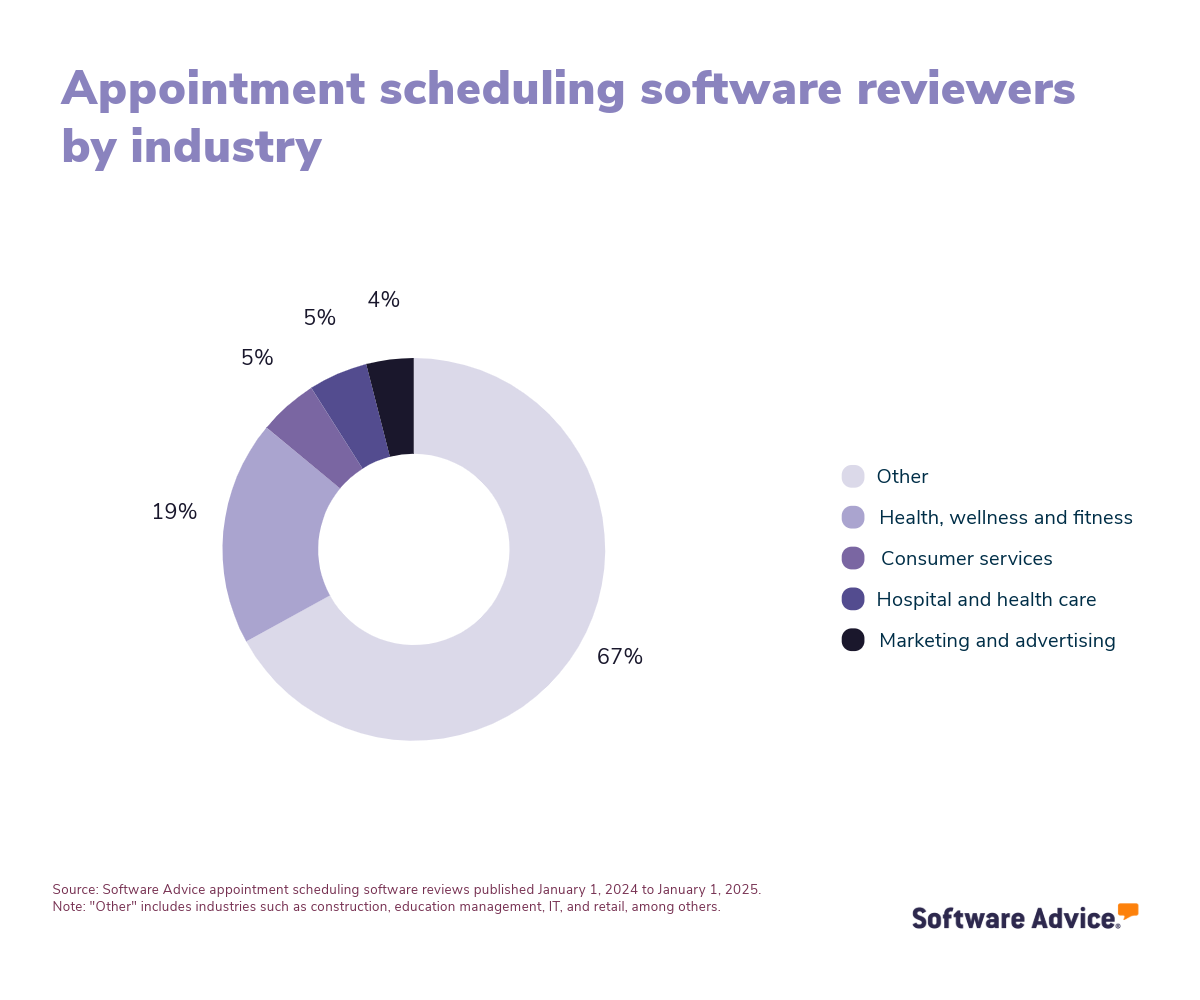
The kind of appointments your businesses books, the number of locations your business operates, and the level of customization you need for your tool will determine your final purchase decision.
So will your budget. Appointment scheduling software is typically priced on a per user, per month basis, with entry-level plans starting at $4.59 per user per month for basic functionality. For higher-end tools with advanced features, you can expect to pay anywhere from $6.89 per user per month to a flat rate of $137 per month. [3]
First-time buyers should consider the following questions before deciding on an appointment scheduling tool:
How many user seats and/or bookable calendars do we need this tool to support?
What integrations will we need? For example: video conferencing, online calendar, or website builder.
How customizable is the user interface? For instance, how much branding can we apply to the scheduling tool?
What are our security needs?
Do we need an appointment scheduling tool that is specifically tailored to support our industry? For example, do we need a HIPAA-compliant medical appointment scheduling tool, a field service scheduling tool, or a beauty service scheduling tool?
What is appointment scheduling software?
Appointment scheduling software is a tool that helps businesses and professionals manage bookings and appointments. Instead of using traditional methods, such as phone calls or paper calendars, this system allows clients or customers to book appointments online at any time and from anywhere. The software can also send automated appointment reminders to reduce no-shows.
With these features, appointment scheduling software saves valuable administrative time while enhancing the client/customer experience and providing them with the convenience of selecting their preferred time slots. It also provides an organized view of all scheduled meetings to simplify managing multiple bookings.
The tool can also integrate with billing tools if pre-payments are required during bookings.
Essential features of appointment scheduling software
Every appointment scheduling software solution comes with core features for booking appointments online and receiving booking confirmation and reminder notifications. Other features and functionality, such as calendar management, mobile access, and online payments, come with most, but not all, tools in this category. It’s important to select a tool that has the features your business needs. We analyzed thousands of reviews to determine which features were most critical for real users.
Core appointment scheduling software features
Confirmations/reminders | Automated reminders and confirmations for booked appointments and events via text or email. 89% of reviewers say this feature is critical or highly important. |
Online booking | Book meetings and appointments through a website or digital platform. 69% of reviewers say this feature is critical or highly important. |
Common appointment scheduling software features
Appointment management | Manage various aspects of appointments, including booking, rescheduling, and canceling. 94% of reviewers say this feature is critical or highly important. |
Calendar management | Track and manage schedules and meetings via an integrated calendar. 88% of users rate this feature as critical or highly important. |
Availability management | Monitor and analyze the availability of resources to help plan and streamline the service delivery to clients. 84% of users rate this feature as critical or highly important. |
Mobile access | Access software remotely via mobile devices. 84% of reviewers say this feature is critical or highly important. |
Automated scheduling | Automatically create schedules based on business needs or employee availability and qualifications. 78% of reviewers say this feature is critical or highly important. |
Online payments | Accept and process online payment transactions. 78% of reviewers say this feature is critical or highly important. |
Website integration | Seamlessly integrates with 3rd party websites. 76% of reviewers say this feature is critical or highly important. |
Customizable forms | Customize contracts and forms to collect specific information. 75% of reviewers say this feature is critical or highly important. |
Recurring appointments | Schedule repeating appointments based on a duration of time. 69% of reviewers say this feature is critical or highly important. |
Client database | Electronic storage of stakeholder contact information. 65% of reviewers say this feature is critical or highly important. |
Benefits and competitive advantages of using appointment scheduling software
Appointment scheduling software makes it easier for customers to book appointments with businesses, which leads to a few obvious benefits: more income, more services rendered, and more opportunities to gather positive reviews.
In addition, our reviews data shows that appointment scheduling software offers these other perks:
Reduces last-minute cancellations and no-shows: By sending booking confirmation notifications and reminders as the appointment date draws closer, appointment scheduling tools help ensure customers remember their appointments.
Simplifies and speeds up payment: Businesses can use these tools to collect payment when the customer books a service, so they get paid sooner with less run-around.
Gives customers autonomy: With availability management and integrated calendar features, customers can see when service providers are available in real time and make booking decisions at their convenience, without the need to call, message, or email the business to coordinate their appointment time. This saves administrative staff the hassle of manually determining service provider availability.
These are benefits of general appointment scheduling software tools, but industry-specific tools offer specialized benefits. For example, appointment scheduling software tools specifically designed for medical practices tend to offer HIPAA compliance and stronger security features.
How to choose the best appointment scheduling software for your business
Step 1: Define your requirements
Before you start searching for appointment scheduling software, make sure you know how you’ll use the tool, whether you need a specialized solution, and how much you’re willing to invest.
Identify specific use cases and data requirements
Not all appointment scheduling tools are built the same—some are more general and have basic features, while others offer more bells and whistles. Knowing how exactly you’ll use your appointment scheduling solution is the first step to finding the right fit. To identify use cases, answer the following questions:
Will we use this software to book external appointments, internal meetings, employee shifts, job applicant interviews, or some combination of the above?
How many bookable calendars and locations does this tool need to support? Many tools are priced per user/bookable calendar per month, and free or entry-level subscription plans may only support one physical location.
Do we want to accept payments at the time of booking through this tool?
How many different kinds of bookable appointment types do we want to offer through this tool? Some tools limit the number of customized templates offered in different pricing tiers.
How much branding do we want to apply to our tool’s user interface? This may be more or less important to your business depending on whether the tool is customer-facing or for internal use.
Do we have special data or security requirements for our appointment types, such as HIPAA compliance?
Answering these questions can help you narrow down your options from a more general list of basic appointment scheduling tools to industry-specific tools for medical practices, restaurants, salons, or employee scheduling software, among other specialities.
Set a budget
Decide how much your business can afford for your new appointment scheduling tool. Small teams with only a few appointment types and bookable calendars may be satisfied with free or entry-level paid plans. If your business is larger, with multiple locations, many bookable calendars, or a diversity of appointment types and customization needs, you can expect to pay more.
Step 2: Make a shortlist
After identifying your business’s requirements, it helps to put together a list of options that you can edit as you do product research. You’ll want to end up with a focused shortlist of two to three solid options that offer the features you need at the price you’re willing to pay.
Check out the leading appointment scheduling tools
To get started creating your shortlist, explore our list of Appointment Scheduling FrontRunners. This report includes a list of products that have earned top user ratings and meet the following criteria:
Have at least 20 unique user reviews from the last 24 months
Be a stand-alone scheduling product
Offer these core features: calendar management, availability management
Check out our full methodology for a more detailed understanding of how we compiled the FrontRunners list.
Step 3: Pick your best option
Once you’ve created your shortlist, it’s time to reach out to those vendors to determine your best fit.
Schedule vendor demos
Vendor demo sessions give you an up-close look at how software works. You’ll get a chance to ask a vendor rep about pricing, features, tech support, and training resources. It’s a good idea to bring your end users to demos so they can test the software themselves and share feedback on how it could impact their day-to-day work.
During demos, ask vendors the following questions:
What kind of technical support do you offer?
How frequently do you update your software?
How customizable is the interface in the subscription plan I’m interested in?
How does your company secure data within the tool?
You should book demo sessions with all of the vendors on your shortlist, so you get an accurate picture of your options.
Take advantage of free trials
A free trial is the best way to test whether a new tool will work for your business. You’ll learn whether the tool lives up to its marketing, which can save you from disaster. Again, you should involve end users and your IT team in free trials to determine if it’s truly helpful to end users and compatible with your existing tech stack.
Make your final decision
Our research shows that satisfying software purchases take place within three months of starting product research. [4] Don’t drag out your purchase decision—make your choice as soon as you identify an option that works for you.
Step 4: Make the most of your appointment scheduling software
Here are some tips for a smooth onboarding phase, so you can get results from your new appointment scheduling solution.
Train your team
To improve use rates and minimize technical issues, make sure your team knows how to use the software correctly. Use the training resources or hands-on sessions provided by your vendor.
Ask for customer feedback
Make sure the tool actually helps customers book appointments by asking for feedback on their booking experience. You may find you need to troubleshoot issues you otherwise wouldn’t learn about.
Measure success
Your new software should help boost KPIs like new customer acquisition, meeting attendance rates, and on-time payment rates. Be sure to track metrics like this to determine whether your new software is a good fit.
For more help with the implementation stage, check out our five-step guide to a successful software implementation.
Software related to appointment scheduling
More resources for your appointment scheduling journey
About our contributors
Author
Molly Burke is a senior analyst and writer for Software Advice. She covers customer experience and marketing in the retail and restaurant industries, with a focus on how emerging technology is transforming the way everyday people shop. Her research helps business owners make software investment decisions that will help them navigate the ever-shifting retail landscape.
Molly’s research and analysis is informed by more than 120,000 authentic user reviews on Software Advice and nearly 8,000 interactions between Software Advice software advisors and retail software buyers. Molly also regularly analyzes market sentiment by conducting surveys of retail and restaurant leaders, as well as consumers, so she can provide the most up-to-date and helpful information to small and midsize businesses purchasing software or services.
Her insights on generative AI, social media, and other tech trends have been featured in The New York Times, Vogue, BBC, CNBC, Forbes, and the Financial Times, among other publications.
Editor
Caroline Rousseau is a senior content editor at Software Advice.
A former content analyst, Caroline has, for the past five years, built, written, and edited research reports about technological trends, opportunities, and challenges with an SMB audience in mind. Her content has been featured in French Tier 1 media including Le Monde, L’Express, and Le Figaro, among other publications.
Her previous experience as a graphic designer, translator, and LQA specialist in various industries converged into a skill set that allows her to create compelling content about today’s business matters. Caroline’s personal interests include literature and art and she has a passion for Albert Camus, graphic novels, and drawing.
Sources
Cool Vendors in Digital Workplace Applications, Gartner (accessible to Gartner clients)
Software Advice reviews data: Software Advice reviews are collected from verified users for individual software products. For this report, we analyzed reviews from the past two years as of the production date. Read the complete methodology.
Software Advice software pricing data: Only products with publicly available pricing information and qualified software products within the category, as of the production date, are included in the pricing analysis. Read the complete methodology.
Software Advice’s 2025 Tech Trends Survey was conducted online in August 2024 among 3,500 respondents in the U.S. (n=700), U.K. (n=350), Canada (n=350), Australia (n=350), France (n=350), India (n=350), Germany (n=350), Brazil (n=350), and Japan (n=350), at businesses across multiple industries and company sizes (five or more employees). The survey was designed to understand the timeline, organizational challenges, adoption & budget, vendor research behaviors, ROI expectations and satisfaction levels for software buyers. Respondents were screened to ensure their involvement in business software purchasing decisions.
Appointment Scheduling FAQs
- What is the best appointment scheduling system?
According to our verified user reviews, Calendly is the overall best-rated appointment scheduling tool.
- Is there a free scheduling software?
There are forever-free versions of appointment scheduling software, as well as free trials of paid plans, in our catalog.
- What is scheduling software used for?
Businesses use scheduling software to provide an easier self-service booking option for customers, clients, and employees. This software displays a business’s real-time availability, saving users the work of figuring out mutual availability. It also sends automatic booking confirmation and reminder notifications, cutting down on cancellations and no-shows.
- What is the most used scheduling software?
Calendly is the overall best-rated tool among our most popular appointment scheduling solutions.
- Do I need scheduling software?
It’s a good idea to adopt appointment scheduling software if your business relies on customer appointments to run smoothly. This kind of software can help you collect payments in a timely manner, book more appointments, and improve customer satisfaction.